[论文笔记] Pi-0: 面向通用机器人控制的VLA Flow 模型

Pi-0:迈向机器人基础模型的新进展

作者 | 林天威 编辑 | 自动驾驶之心

原文链接:https://zhuanlan.zhihu.com/p/4711051331

点击下方卡片,关注“自动驾驶之心”公众号

戳我-> 领取自动驾驶近15个方向学习路线

>>点击进入→自动驾驶之心具身智能技术交流群

本文只做学术分享,如有侵权,联系删文

Pi-0 是Physical Intelligence 成立后的第一个论文工作(全公司都署名了,豪华阵容)。这篇论文主要关注如何实现robot foundation model,并聚焦在两个方面:Pre/Post-Training 策略;基于Flow-Matching 的action expert。从结果看,pi-0可以实现比较强的泛化能力,并能实现非常实时的推理。比起之前的OpenVLA 等工作,pi-0 在端到端VLA这条路线上向robot foundation model 迈进了很多。
e54c7d00edc5c2c586d7088fd1396e27.png

Motivation

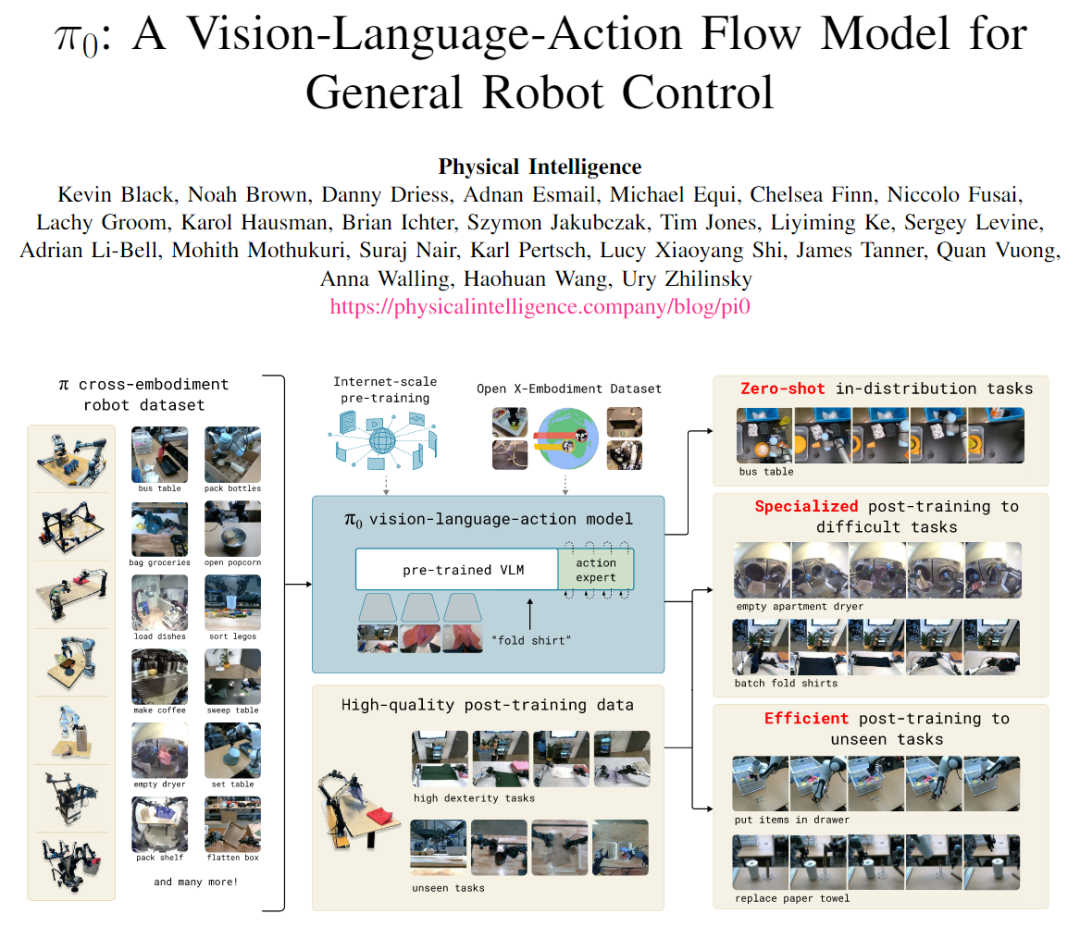
Pi-0 的核心motivation 是将LLM 和VLM 领域中已经经过考验的Pre/Post-Training 训练范式迁移到机器人具身模型的训练过程中来,即:

  • Pre-training:在大规模且非常多样性的互联网语料库上对模型做预训练;

  • Post-training:在更精心设计的数据集上fine-tune (or "align") 模型,使模型输出更符合预期;

如何将这个范式迁移到机器人领域呢?Pi-0 的训练,实质上是三步:

  • Internet-scale Pre-Training: Pi-0 是基于一个训练好的开源VLM 模型继续训练的,因此这个开源VLM 模型的训练实质上相当于是Pi-0 模型训练的第一个阶段,提供了模型的多模理解能力;

  • Pre-Training:基于团队构造的一个10000 小时机器人操作数据集,进行了大规模训练。实质上,Pre-Training 后,Pi-0 模型就已经可以处理见过的任务,并zero-shot泛化到一些不那么难的任务上

  • Post-Training:对于一些新的很困难的任务,需要5-100 小时数据进行fine-tune.

作者认为,要获得一个具备良好泛化能力的robot foundation model,主要有三方面挑战:

  • 数据的规模要足够大(数据量、本体丰富度、任务丰富度等);

  • 模型的架构要合理(支持高频控制,连续action space控制);

  • Training recipe 要合理(训练策略,数据配比等);

围绕这几个问题,Pi-0 的核心设计如下节介绍。

The Pi-0 Model

模型结构
d4b8e334512d9f4b9be9027adb7dbeb6.png

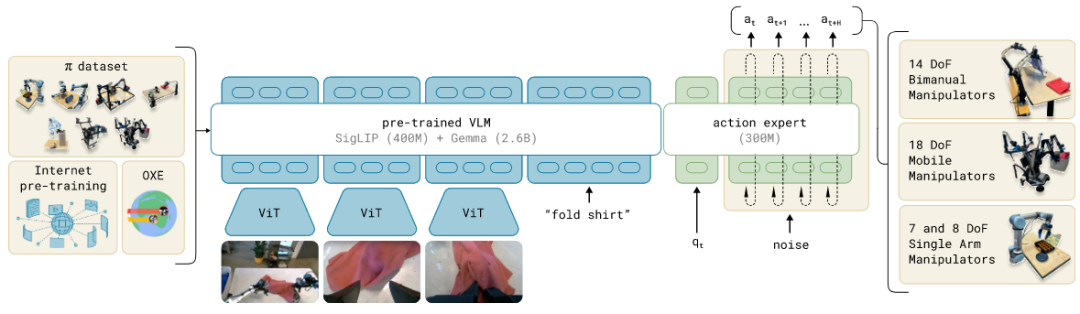
模型结构如上图所示:

  • 模型基于一个Pre-Trained VLM (PaliGemma) 构建,其包含视觉Encoder 部分(SigLIP,400M)和Transformer 部分(Gemma,2.6B);

  • 在预训练模型的基础上,Pi-0 通过MoE 混合专家模型的方式引入了一个action expert 来处理动作的输入和输出。这里是指,只有一个Transformer 模型,在处理文本和图像token 时,用的是原模型的参数;在处理action token 时,则用新初始化的action expert 的参数;

  • 输入:模型的输入包括3帧最近的图像,文本指令,以及机器人本体信号(即各joint 当前angle)

  • 输出:输出是称作action chunk 的形式,即未来一段时间的action 序列,这里的序列长度H 设定为50,对于50HZ 控制的情况,即相当于预测未来一秒钟的动作。这里action 的维度,设定为各个本体中最长的那个(18DoF),不够的本体则pad。(注意,这里action space 都设定在joint space,这有利于模型输出结果直接控制机械臂,避免了IK 解算环节)

Flow Matching as Action Expert

Flow matching 可以看作是diffusion 的一种变体,之前有听说但没仔细学习过,正好这次学习了下(知乎上也有很多不错的介绍文章,比如 笑书神侠:深入解析Flow Matching技术 )。Flow-Matching 主要是学习如何从一个噪声分布数据流形到目标分布数据流形之间的flow。Flow matching 的主要优势主要在于训练/推理方式比较简单、生成路径比较容易控制、稳定性更高等。Flow Matching +简单线性高斯概率路径的方案在生成任务上也获得了比较好的效果。

具体到Pi-0中:在action 预测任务中,在时间t我们要预测一个action chunk, 则优化目标为:

fa058d88010a1878f6f4d03c144211af.png
  • 是 [0,1] 之间的数值,代表flow-matching 的timestep,0对应噪声分布,1对应目标分布;

  • 即所对应的噪声流形到目标流形的中间流形。基于flow matching 的定义,我们可以将后验概率(即已知,来获得)表示为:

61775a7d5eb78ae88a7fb46f2cb1bdc4.png
  • 具体地,基于线性高斯路径策略,可以表示为(和扩散加噪过程很相似):

852c41ef659aa7c4ad420820b1646387.png
  • 而在前面的训练损失函数中,我们实质监督的是,在这个时间点流形的 flow 或者说是速度方向(也因此这种训练方法叫做flow matching)。(,)指网络预测结果,其优化目标为:

ce0ea6147b1f7f90ce284a4895c70913.png
  • 因此,diffusion 和flow matching 的训练都是一个去噪过程,但表示形式不同,前者预测的是添加的噪声,后者预测的是噪声到分布的方向。flow matching 可以通过控制优化路径来实现更灵活的生成控制。

  • 在训练阶段,从一个beta 分布中采样(为了强调前段/噪声更多阶段的训练)。而在inferece 阶段,Pi-0 使用了10步均等步长(=0.1)的形式来实现flow matching 过程:

Pre-Training and Post-Training
8815352714540e6f02d18882cb5610bf.png

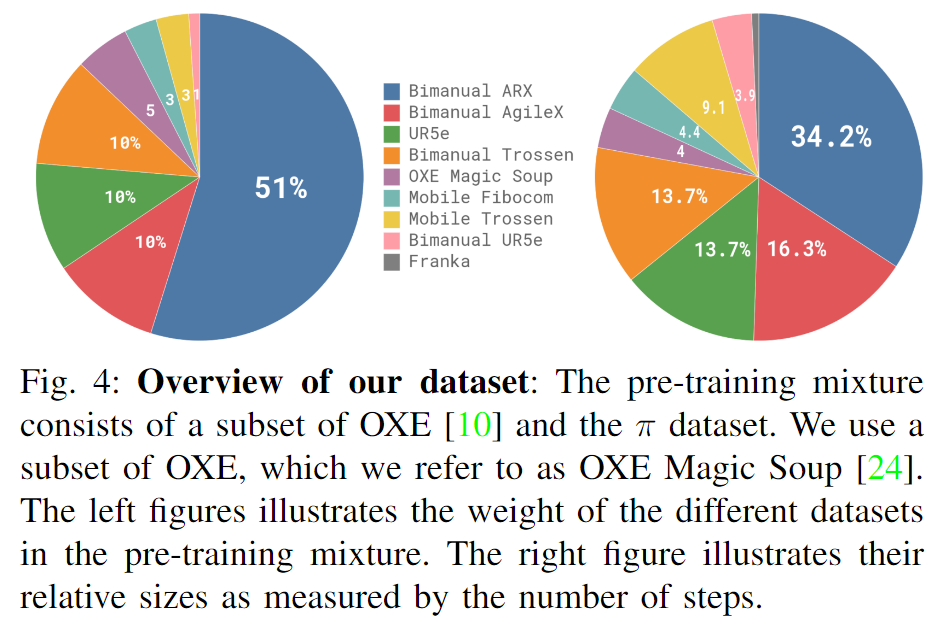
作者认为预训练阶段最重要的就是diversity,用了一个10000小时规模的数据集训练:

  • 数据集大部分是自采的(采集方式下一节介绍),仅9.1% 是开源的(Open-emb-x, droid 等)。数据集的自采集部分,包含了903 million timestep。

  • 数据集中使用了多种本体,大部分都是双臂数据,基本都是aloha 数据

  • 自采任务包含68个任务,但普遍都是比较复杂的符合任务,所以实质上包含的任务更多;

作者认为后训练阶段数据的要点是动作质量高,即动作要完成地一致且高效

  • Post-training 阶段的任务选择地和预训练有明显差异;

  • 简单的任务,需要5小时数据,最复杂的任务需要100小时甚至更多;

Robot System
328a157d1dc89f6dd6ec00666d46db3d.png

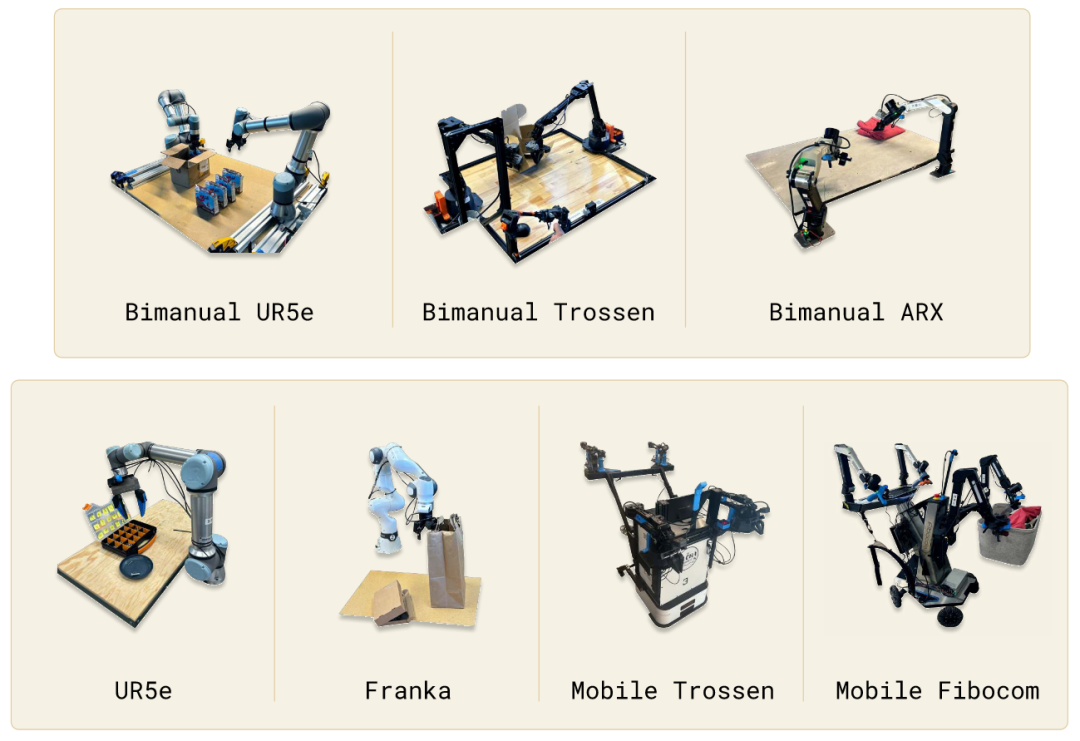
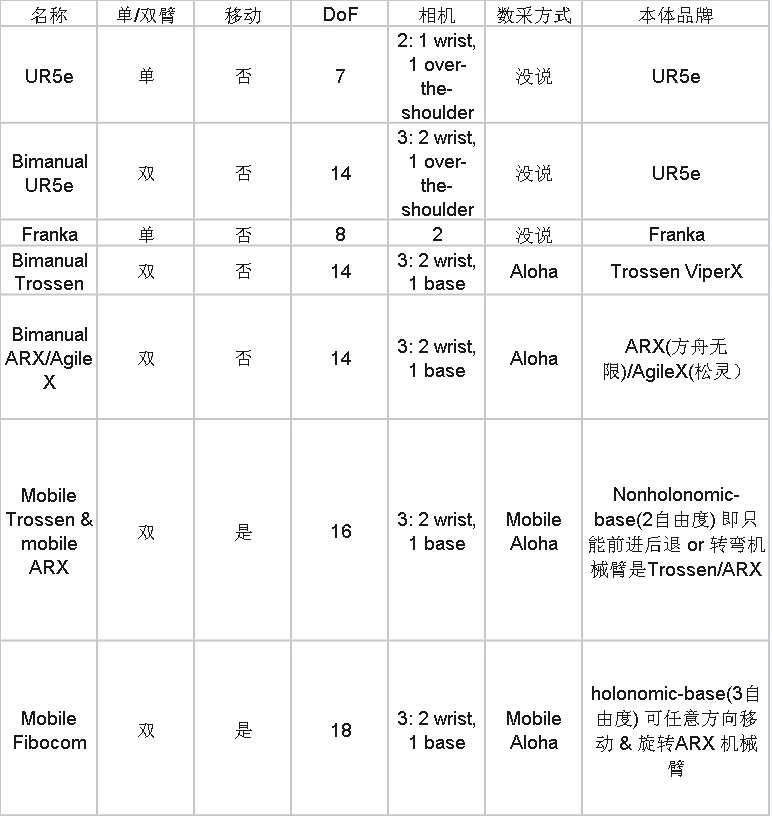
Pi-0 构造了一个还算比较丰富的多本体平台,如上图所示。具体信息整理如下:
5208b1e720f4c59a30de533cab2ef663.png
  • 轻型机械臂用的都是Aloha 方案,主要是Trossen,ARX(方舟无限,国产)和AgileX(松灵,国产)

  • 非轻型机械臂(UR5e 和Franka)用的不是Aloha 方案,没说啥采集方案。猜测应该是6D 鼠标等遥操设备。

  • 这里面的所有任务都是夹爪,没做灵巧手;

Experiment

实验内容比较多,这里主要贴一下两个主要实验

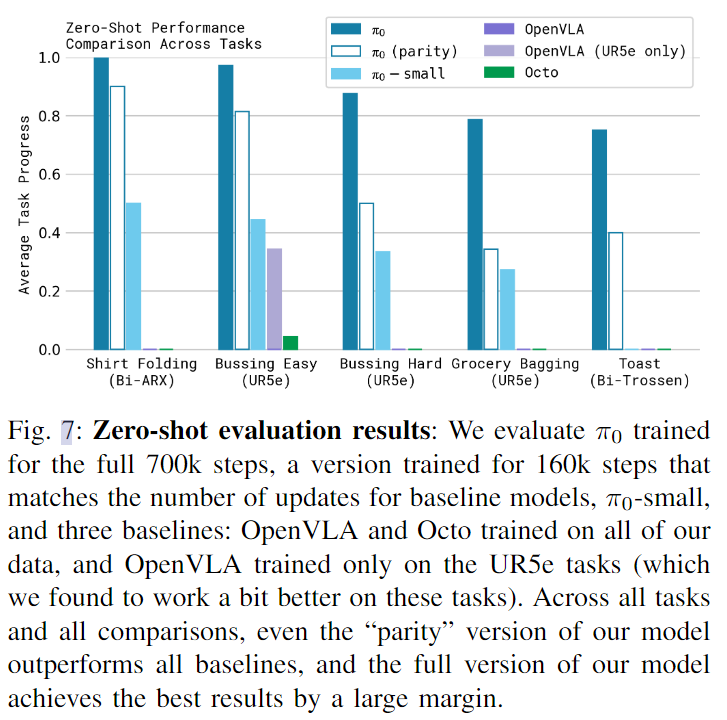
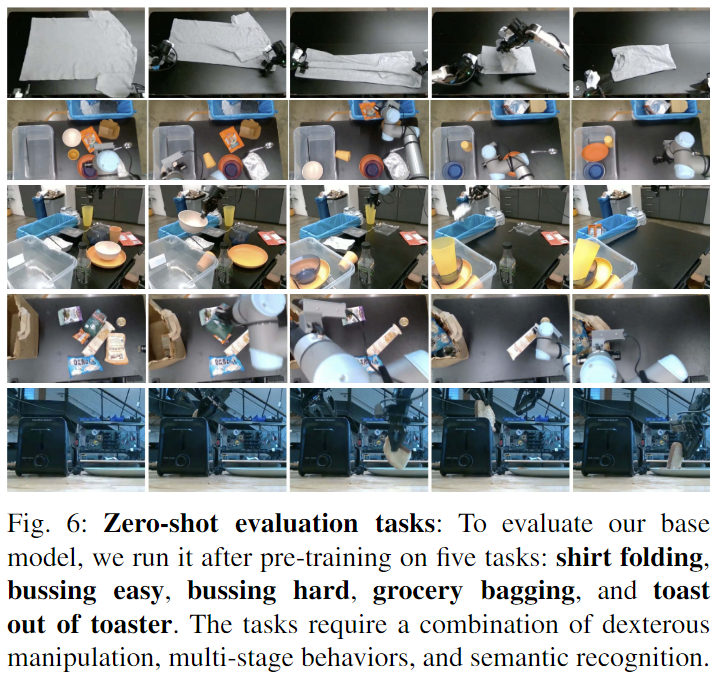
Zero-shot evaluation

这个任务主要是想看Pre-Training 完的模型直接拿来用的效果,和OpenVLA,Octo 等方法比;
a803d7445decaf43c30408f0e5c300f8.png 4f9b71529095a175974e738df0a58c2b.png
  • Pi-0 比OpenVLA 等方法效果好很多;

  • Pi-0-Parity 是训练步数比较少的模型 160k/700k,表明训练充分对模型效果影响很大

  • Pi-0-Small 是没有用Pretrain VLM 的模型,可以看出来效果也差了很多。

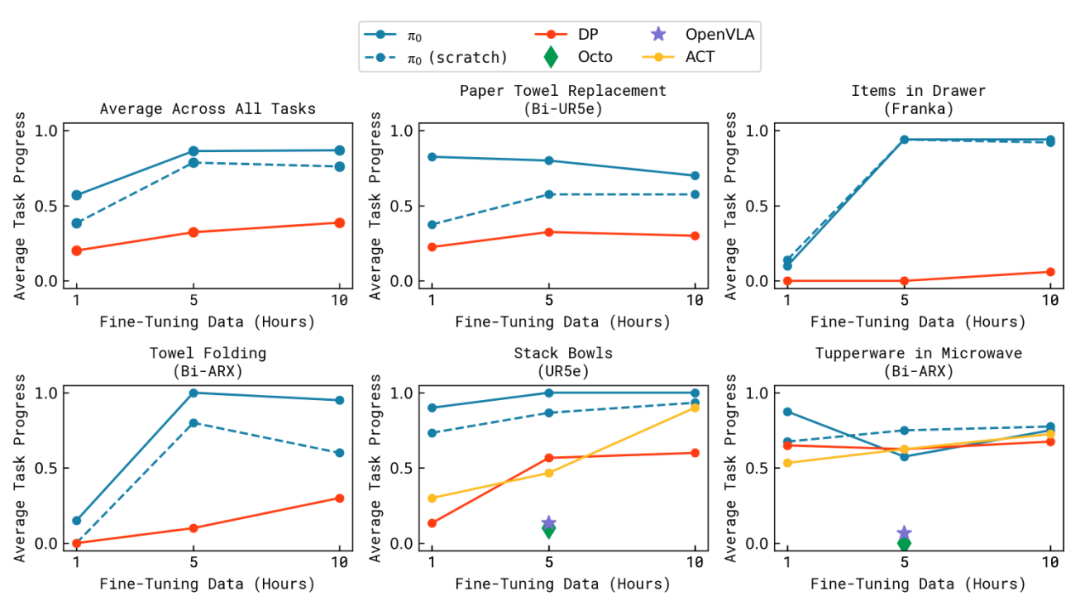
Post-Training Evaluation

在新的困难的灵巧任务上进行训练和测试:
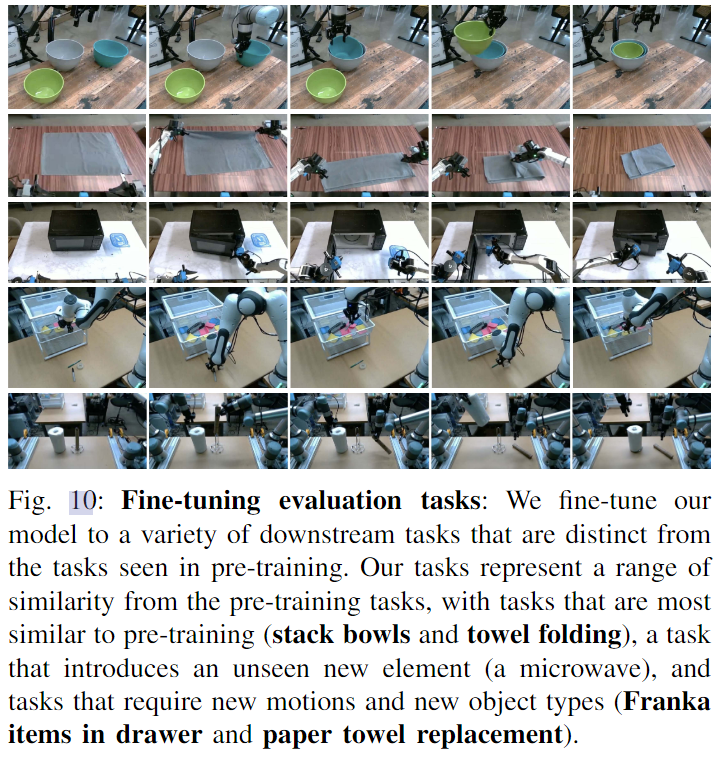
568deb0c12f5117b2823247cd943199b.png e83ba4dd72fb32e11a3e46870719b764.png

部署 & 效率测评

这里补充一下附录里面提到的部署时的推理策略和推理效率。推理策略:

  • 模型每次生成H timestep 的action chunk,H一般是50;

  • 对于20Hz 控制的机械臂,需要2.5s 执行完;对于50HZ 控制的机械臂,需要1s 的执行完;

  • 实质上,并不会等所有action 执行完再进入下一轮执行。对于20Hz 平台,在执行完16步(0.8s)后就会进入下一轮;对于50Hz平台,执行完25步(0.5s)后就会进入下一轮

这个执行策略,其实是每0.5s 做一次重新规划。这是因为Pi-0 并没有把历史决策作为输入,即这个模型并没有维护history 信息。所以这个方案实质上还是应该看作是一个开环方案。
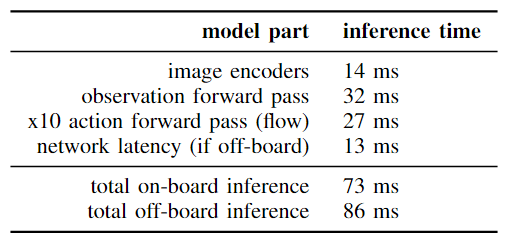
bdca506730e2a6aac23219bf31d26577.png
  • 速度是在4090 上测试的,可以看出这个3.4B模型的推理还是很快的,应该用上了当前主流的推理加速

  • Off-board 指显卡不在设备上,通过wifi 通信,可以看出他们这个通信延迟做的也还行。

  • 整体延迟控制在了100ms 内,这意味着他们其实最高可以以10FPS 频率来做重规划。

讨论 & 总结

Pi-0 方案可以看作是OpenVLA 这类VLA 方案的一次系统升级,主要是更好的训练数据 + 更好的Policy Head。而且Policy Head 和VLM 模型连接的方式,可能是一种很好的大小脑系统连接的路径。整个方案系统性很强,值得细读学习,整体读下来感觉也很好。

除了优点,还是有不少槽点和疑惑点的:

  • 从预训练的层面,这篇工作似乎并没有带来太多新东西。当前大家对于“具身预训练”这个话题,可能更多还是希望能够减少需要大量人力投入的遥操数据采集环节。所以,这篇文章里面的Pre-Training,可能实质上对应的是我们认为的Post-Training,而Post-Training 对应的则是我们认为的few-shot adaption。

  • 文章中提到一个观点:“高质量数据不能教会模型如何从错误中恢复”,那言下之意应该是低质量数据中一下错误后重新尝试的数据对这方面有帮助。这个观点很认同,但文中其实并没有分析训练数据中是否真的有这类数据,也没有做相关的佐证实验。

  • Pi-0 的框架没有加入history 我感觉还是比较可惜的,或许是他们的下一步吧;

  • 模型部分,不同本体似乎没有加一个区分指示的token,只靠action space 维度区分不太靠谱;同时Pi-0 也没有展示本体层面的泛化能力。

① 2025中国国际新能源技术展会

自动驾驶之心联合主办中国国际新能源汽车技术、零部件及服务展会。展会将于2025年2月21日至24日在北京新国展二期举行,展览面积达到2万平方米,预计吸引来自世界各地的400多家参展商和2万名专业观众。作为新能源汽车领域的专业展,它将全面展示新能源汽车行业的最新成果和发展趋势,同期围绕个各关键板块举办论坛,欢迎报名参加。

e27d60beb9d18220f6d990326196d62a.jpeg

② 国内首个自动驾驶学习社区

『自动驾驶之心知识星球』近4000人的交流社区,已得到大多数自动驾驶公司的认可!涉及30+自动驾驶技术栈学习路线,从0到一带你入门自动驾驶感知端到端自动驾驶世界模型仿真闭环2D/3D检测、语义分割、车道线、BEV感知、Occupancy、多传感器融合、多传感器标定、目标跟踪)、自动驾驶定位建图SLAM、高精地图、局部在线地图)、自动驾驶规划控制/轨迹预测等领域技术方案大模型,更有行业动态和岗位发布!欢迎扫描加入

d7923db93ebcd74605dfe97c50fd1b79.png

 ③全网独家视频课程

端到端自动驾驶、仿真测试、自动驾驶C++、BEV感知、BEV模型部署、BEV目标跟踪、毫米波雷达视觉融合多传感器标定多传感器融合多模态3D目标检测车道线检测轨迹预测在线高精地图世界模型点云3D目标检测目标跟踪Occupancy、CUDA与TensorRT模型部署大模型与自动驾驶NeRF语义分割自动驾驶仿真、传感器部署、决策规划、轨迹预测等多个方向学习视频(扫码即可学习

5d1cba733f67a355451324422a4161a0.png

网页端官网:www.zdjszx.com

④【自动驾驶之心】全平台矩阵

736e29a8278ed4f6e757c8ac7ffb8285.png

SAP Process Orchestration The Comprehensive Guide, 2nd Edition SAP流程编制综合指南 1 Introduction to SAP Process Orchestration 1.1 Historical Overview and Evolution 1.1.1 SAP Process Integration 1.1.2 SAP Composition Environment 1.1.3 SAP Process Orchestration 1.1.4 SAP Process Orchestration 7.5 Highlights 1.2 SAP Process Orchestration Components 1.2.1 SAP Process Integration 1.2.2 Business Process Management 1.2.3 Business Rules Management 1.3 Architectural Overview and Positioning 1.3.1 SAP Process Orchestration Positioning 1.3.2 SAP NetWeaver Application Server for Java: System Architecture 1.3.3 SAP NetWeaver AS Java System Logical Layers 1.4 Installation Options 1.4.1 Case 1: SAP Process Integration Dual Stack 1.4.2 Case 2: SAP PI Dual Stack and SAP Composition Environment in Separate Installations 1.4.3 Case 3: SAP PI Single Stack and SAP Composition Environment in Separate Installations 1.4.4 Case 4: SAP PO—SAP PI and SAP Composition Environment in a Single Installation 1.5 Summary 2 Administration and Development Tools 2.1 SAP Process Orchestration Tools 2.1.1 Enterprise Services Repository 2.1.2 Integration Directory 2.1.3 System Landscape Directory 2.1.4 Configuration and Monitoring 2.2 SAP NetWeaver Administrator 2.2.1 Availability and Performance 2.2.2 Operations 2.2.3 Configuration 2.2.4 Troubleshooting 2.2.5 SOA 2.3 SAP NetWeaver Developer Studio 2.3.1 Use and Download 2.3.2 SAP Process Orchestration and SAP NetWeaver Developer Studio 2.4 Summary Part II Advanced Adapter Engine Extended (AEX) 3 Configuring the System Landscape Directory 3.1 System Landscape Directory Components and Features 3.1.1 Landscape 3.1.2 Software Catalog 3.1.3 Development 3.2 Registering Systems to the System Landscape Directory 3.2.1 Connecting to ABAP-Based Systems 3.2.2 Connecting to Java-Based Systems 3.2.3 Connecting to Other Systems 3.3 Administration of the System Landscape Directory 3.3.1 Server 3.3.2 Data and Content 3.4 System Landscape Directory Strategies 3.4.1 Manual Export and Import of Data 3.4.2 Automatic Bridge Forwarding 3.4.3 Full Automatic Synchronization 3.5 Tips and Tricks 3.5.1 Naming Convention 3.5.2 Keeping Your System Landscape Directory Catalogs Up to Date 3.5.3 Self-Registration of a Java-Based System with the SLD 3.5.4 Configuring Data Suppliers from One SLD to Another 3.5.5 Manual Export and Import of Data 3.5.6 Connecting the SLD to CTS+ to Facilitate the Export and Import of SLD Data 3.6 Exercise: Configuring the System Landscape Directory 3.6.1 Exercise Description 3.6.2 Exercise Solution Approach 3.6.3 Exercise Step-by-Step Solution 3.7 Summary 4 Working with the Enterprise Services Repository and Registry 4.1 Basic ES Repository Technical Concepts 4.1.1 Functional Blocks 4.1.2 First Steps in the Enterprise Services Repository 4.1.3 Service Interface 4.1.4 Integration Patterns: Stateful and Stateless Communication 4.1.5 Asynchronous versus Synchronous 4.1.6 Quality of Service 4.2 Design Objects 4.2.1 Software Component Versions 4.2.2 Folders 4.2.3 Namespaces 4.2.4 Mappings 4.2.5 Process Integration Scenario 4.2.6 Actions 4.3 Data Types and Message Types 4.3.1 Data Types 4.3.2 External Definitions 4.3.3 Message Type 4.3.4 Additional Design Objects 4.4 Exercise: Working with the ES Repository and Registry 4.4.1 Exercise Description 4.4.2 Exercise Solution Approach 4.4.3 Exercise Step-by-Step Solution 4.5 Summary 5 Working with the Integration Directory 5.1 Integration Directory Overview 5.2 Collaboration Profiles 5.2.1 Party 5.2.2 Communication Component 5.2.3 Communication Channel 5.2.4 Communication Component without a Party 5.3 Adapter Types 5.3.1 Technical Adapters to Enable Communication with SAP or Third-Party Systems 5.3.2 Application Adapters to Enable Communication with an SAP System 5.3.3 SAP Industry Adapters 5.3.4 Third-Party-Developed Adapters 5.4 Integrated Configuration 5.4.1 Inbound Processing 5.4.2 Receiver 5.4.3 Receiver Interfaces 5.4.4 Outbound Processing 5.5 The XI Message Protocol 5.6 Configuration Scenario 5.6.1 Creating a Configuration Scenario from Scratch (Manually) 5.6.2 Creating a Configuration Scenario from a Model 5.7 Value Mapping 5.7.1 If/Else Logic 5.7.2 Fixed Values 5.7.3 Value Mapping 5.8 Business-to-Business Integration 5.8.1 Business-to-Business On Premise 5.8.2 Business-to-Business Managed Services 5.8.3 Trading Partner Management 5.9 Axis Framework 5.10 Representational State Transfer Adapter 5.11 Message Alerting 5.11.1 Alert Rule Overview 5.11.2 Creating an Alert Rule 5.11.3 Editing or Deleting a Rule 5.12 Publish the Service in the Services Registry 5.13 Integration Directory Programming Interface (Directory API) 5.14 Exercise: Working with the Integration Directory 5.14.1 Exercise Description 5.14.2 Exercise Solution Approach 5.14.3 Exercise Step-by-Step Solution 5.15 Summary 6 Building an Integration Flow 6.1 SAP NetWeaver Developer Studio 6.1.1 Installing SAP NetWeaver Developer Studio 6.1.2 Setting Up SAP NetWeaver Developer Studio 6.1.3 Enterprise Integration Patterns and User-Defined Templates 6.2 Basics of Creating and Configuring an Integration Flow 6.2.1 Creating an iFlow 6.2.2 Configuring an iFlow 6.3 iFlow Example 6.3.1 Creating Products, Software Components, Business Systems, and Technical Systems in the SLD 6.3.2 Importing SLD Objects into the ES Repository in SAP NetWeaver Developer Studio 6.3.3 Create Enterprise Service Repository Objects 6.3.4 Create Directory Objects: Import Business Systems and Create iFlows 6.3.5 Testing the iFlow Scenario 6.3.6 Monitoring the Scenario 6.4 New Features of the Process Integration Designer 6.4.1 Export Objects from the Integration Designer 6.4.2 Automatically Deploy after Import 6.4.3 Version History and Deployment Status 6.5 Supporting Multiple Senders for Your iFlow 6.6 Exercise: Building an Integration Flow 6.6.1 Exercise Description 6.6.2 Exercise Solution Approach 6.6.3 Exercise Step-by-Step Solution 6.7 Summary 7 Administration and Monitoring in AEX 7.1 Administration 7.1.1 Central Administration Tool 7.1.2 SAP NetWeaver Administrator 7.1.3 SAP NetWeaver Application Server Java 7.1.4 SAP Process Integration Monitoring (pimon) 7.1.5 SAP Management Console 7.1.6 Config Tool 7.1.7 Administration Using Telnet 7.2 Monitoring 7.2.1 SAP NetWeaver Administrator 7.2.2 SAP Process Integration Local Monitoring 7.2.3 SAP PI Central Monitoring with SAP Solution Manager 7.2.4 Message Retention 7.2.5 User-Defined Message Search 7.3 Troubleshooting 7.3.1 Configuring Log and Traces 7.3.2 Using the Log Viewer 7.4 Summary 8 Migrating Interfaces from SAP PI Dual Stack to SAP PO 8.1 Migration Strategies 8.2 Migrating System Landscape Directory Content 8.2.1 Products 8.2.2 Software Components 8.2.3 Technical System 8.2.4 Business System 8.3 Migrating Enterprise Services Repository Content 8.3.1 Exporting Objects 8.3.2 Importing Objects 8.4 Migrating Integration Directory Content 8.4.1 Manually 8.4.2 Using the Migration Tool 8.5 Summary Part III Business Process Management and Composition 9 Introduction to SAP BPM and BPMN 2.0 9.1 Managing Business Processes 9.2 SAP Business Process Management 9.2.1 SAP BPM versus SAP Business Workflow 9.2.2 BPM before SAP BPM 9.2.3 SAP BPM Main Components 9.3 Business Process Model and Notation 2.0 9.3.1 Swimlanes 9.3.2 Artifacts 9.3.3 Flow Objects 9.3.4 Connections 9.4 Summary 10 Creating Your First SAP BPM Process 10.1 SAP BPM Positioning and Development Environment 10.1.1 Positioning 10.1.2 Setting Up Your Development Environment 10.2 Creating and Modeling an SAP BPM Process 10.2.1 Demonstration Scenario 10.2.2 Building an SAP BPM Process: Overview 10.2.3 SAP NetWeaver Developer Studio Perspective Concept 10.2.4 Create a Project in SAP NetWeaver Developer Studio 10.2.5 Creating a Process for Your BPMN 10.2.6 Creating a BPMN Model 10.3 Configuring the BPMN Model 10.3.1 Data Objects 10.3.2 Creating Data Structures 10.3.3 Importing XSD and WSDL 10.3.4 Process Pool Properties 10.3.5 BPMN Flow Objects 10.4 Flow Objects 10.4.1 Events 10.4.2 Tasks 10.4.3 Activities 10.4.4 Gateways 10.4.5 Artifacts 10.5 Build and Deploy Your Process 10.5.1 Steps for Building a Process 10.5.2 Steps for Deploying a Process 10.6 Advanced Mapping 10.6.1 Mappings 10.6.2 Options in Mapping Assignment 10.6.3 Automatic Mapping 10.6.4 Custom Functions 10.7 Implementing Error Handling 10.8 Combining SAP BPM and the AEX 10.8.1 Message from SAP BPM to the AEX 10.8.2 Message from the AEX to SAP BPM 10.8.3 Leverage an ES Repository Mapping in SAP BPM 10.9 Exercise: Creating an SAP Business Process Management Process 10.9.1 Exercise Description 10.9.2 Exercise Solution Approach 10.9.3 Exercise Step-by-Step Solution 10.10 Summary 11 Applying Advanced SAP BPM Concepts and Extensions 11.1 Service-Oriented Architecture Configuration 11.1.1 Configuration for an Automated Activity 11.1.2 Configuration for a Start Event or Intermediary Event 11.2 Testing and Running an SAP BPM Process 11.2.1 Process Repository Overview 11.2.2 Process Testing 11.3 Custom Enterprise Java Bean Functions 11.3.1 Create EJB and EAR Development Components 11.3.2 Create the Enterprise Java Bean 11.3.3 Build and Deploy 11.3.4 Create a New Enterprise Java Bean Function 11.4 Using the Claim Check Pattern 11.4.1 Create Interfaces 11.4.2 Create Mappings 11.4.3 Configure the Channel 11.4.4 Retrieve the Large Message from SAP BPM 11.4.5 Update the Status of the Large Message from SAP BPM 11.5 SAP BPM Application Programming Interface 11.5.1 Prerequisite to Using the SAP BPM API 11.5.2 Implementation Aspects and Examples 11.6 SAP Business Process Management OData 11.6.1 OData Services for Tasks and Task Data 11.6.2 Error Handling 11.7 Using the Push API to Access SAP BPM Lifecycle Events 11.7.1 Accessing Events through a Message Driven Bean 11.7.2 Accessing Events through a Java Message Service API 11.8 Debugging and Troubleshooting SAP BPM Processes 11.8.1 Place Breakpoints in the Process 11.8.2 Add a Debug Configuration 11.9 Tuning SAP BPM-Related Performance Parameters 11.10 Best Practices for Your SAP BPM Application 11.10.1 BPMN, Mapping, and Parallelism 11.10.2 Task Related 11.10.3 Gateways 11.10.4 Looping 11.10.5 Data Object 11.10.6 Correlation 11.10.7 Error Handling 11.10.8 Housekeeping 11.11 Exercise: Applying Advanced SAP BPM Concepts and Extensions 11.11.1 Exercise Solution Approach 11.11.2 Exercise Step-by-Step Solution 11.12 Summary 12 Combining SAP BPM and UI Technologies 12.1 Web Dynpro Java User Interface Technology 12.1.1 Generating a Web Dynpro User Interface 12.1.2 Post-Configuration Steps 12.2 Integrating SAPUI5 into an SAP BPM Process 12.2.1 SAPUI5 Technology Platform 12.2.2 Model-View-Controller Concept 12.2.3 SAPUI5 Components 12.2.4 Other SAPUI5 Concepts 12.2.5 Integration Steps 12.3 Other User Interface Technologies 12.3.1 Visual Composer 12.3.2 Adobe Offline Forms 12.3.3 Support for Custom User Interface Technologies 12.4 Summary 13 SAP Business Rules Management 13.1 How Business Rules Work 13.2 SAP Business Rules Management 13.2.1 Rules Composer 13.2.2 Rules Manager 13.2.3 Rules Engine 13.3 Modeling Business Rules with Rules Composer 13.3.1 Create the Rules Composer Development Component 13.3.2 Adding Context to the Rules 13.3.3 Creating a Ruleset 13.3.4 Flow Ruleset 13.4 Testing Business Rules 13.5 Best Practices for Modeling Business Rules 13.5.1 Separate Decision Logic from Other Types of Logic 13.5.2 Reuse and Extend before Building 13.6 Exercise: SAP Business Rules Management 13.6.1 Exercise Solution Approach 13.6.2 Exercise Step-by-Step Solution 13.7 Summary 14 Implementing Java Proxies 14.1 Java Proxy Concept and Considerations 14.2 Implementation Approaches 14.2.1 Outside-In Approach 14.2.2 Inside-Out Approach 14.3 Technical Implementation 14.3.1 Development Environment 14.3.2 Developing a Server Java Proxy 14.3.3 Developing a Client Java Proxy 14.4 Building an Orchestration 14.5 Exercise: Implementing Java Proxies 14.5.1 Exercise Solution Approach 14.5.2 Exercise Step-by-Step Solution 14.6 Summary 15 Administration and Monitoring Message Processing in SAP BPM 15.1 Monitoring 15.1.1 SAP Business Process Management System Overview 15.1.2 Process Repository 15.1.3 Process Management 15.1.4 Task Management 15.1.5 SAP BPM Inbox 15.1.6 Business Logs 15.1.7 SAP BPM Action Monitor 15.1.8 Process Troubleshooting 15.1.9 Rules Business Logs 15.1.10 SAP BPM Analytics Dashboard 15.2 Administration 15.2.1 Process Data Archiving 15.2.2 Log Viewer 15.3 Summary 16 Migrating ccBPM from SAP PI to SAP PO 16.1 Motivation for Migration 16.2 Migration Approach 16.2.1 Analyze the As-Is Integration Processes 16.2.2 Translate and Redesign 16.2.3 Export and Reuse Enterprise Services Repository Objects 16.2.4 Migrate and Adapt Configuration Scenarios 16.3 Recommendations 16.4 Summary Part IV Advanced Concepts 17 SAP Cloud Platform Integration for SAP PO 17.1 Enable Cloud Integration Content in SAP PO 17.2 Reusing Cloud Integration Content 17.2.1 Download Cloud Integration Content 17.2.2 Deploy the Cloud Integration Content 17.3 Monitoring 17.3.1 Monitoring the Integration Gateway Component 17.3.2 Monitoring Messages Related to the Deployment of Cloud Integration Content 17.4 Summary 18 Additional Components for SAP Process Orchestration 18.1 Component Model 18.1.1 Product 18.1.2 Software Components 18.1.3 Development Component 18.1.4 Dependencies among Development Components 18.1.5 Public Parts 18.2 SAP NetWeaver Development Infrastructure 18.2.1 Change Management Services 18.2.2 Design Time Repository 18.2.3 Component Build Service 18.3 SAP Composite Application Framework 18.3.1 Design Time Aspects 18.3.2 Runtime Aspects 18.4 Service Registry 18.5 Enhanced Change and Transport System 18.5.1 SAP PI-Related Transports 18.5.2 Transports for Non-SAP PI Java Objects 18.6 Exercise: Create an SWCV 18.6.1 Exercise Solution Approach 18.6.2 Exercise Step-by-Step Solution 18.7 Summary 19 Landscape Setup Considerations 19.1 Java System Configuration 19.1.1 Java Sizing and Setup Considerations 19.1.2 Java System Architecture 19.1.3 Java Central Services 19.1.4 Java Parameter Tuning 19.2 Handling Certificates 19.2.1 Certificate Key Storage 19.2.2 Encryption of Message Content on Database Level 19.3 Housekeeping 19.3.1 Archiving 19.3.2 Deletion 19.3.3 Restarting 19.3.4 Recovery 19.4 Monitoring 19.4.1 Runtime Workbench 19.4.2 Wily Enterprise Manager 19.4.3 SAP Management Console 19.4.4 SAP Solution Manager Monitoring 19.4.5 Tracing 19.4.6 JVMMON 19.5 Summary A Orchestration Outlook A.1 SAP API Management A.2 SAP Cloud Platform Integration A.2.1 Features and Facts Overview of SAP Cloud Platform Integration A.2.2 Development Guide: Getting Started A.2.3 Monitoring A.3 The Integration Advisor A.3.1 Interface Specifications: Advice from the Advisor A.3.2 Mapping Guideline A.3.3 Runtime A.3.4 Testing A.4 SAP Cloud Platform Workflow as a Service A.4.1 Workflow Service A.4.2 Workflow Modeling A.4.3 SAP Cloud Platform Business Rules A.4.4 Workflow Tasks Management A.4.5 Integration 官方出品,英文原版,可编辑带导航非影印版(总计1866页)
### 智元 VLA 架构与 PI 的关系及迭代版本介绍 智元 VLA(Vision-Language-Action)架构是一种专注于多模态任务的模型框架,其设计目标是将视觉、语言和动作等不同模态的信息统一到一个序列建模框架中。这种设计使得 VLA 模型能够处理复杂的机器人任务、自然语言理解和计算机视觉问题。以下是关于智元 VLA 架构与 PI 的关系及其迭代版本的详细介绍。 #### 1. 智元 VLA 架构的核心特点 智元 VLA 架构的主要特点是通过统一的序列建模框架来适配多种数据类型[^2]。具体来说: - **多模态融合**:VLA 能够同时处理视觉、语言和动作数据,从而实现跨模态任务的无缝衔接。 - **Transformer 基础**:大多数 VLA 模型以 Transformer 为基础架构,利用自注意力机制来捕捉长距离依赖关系。 - **扩散模型增强**:部分迭代版本引入了扩散模型,用于生成高质量的图像或动作序列[^1]。 #### 2. PI 模型与智元 VLA 的关系 PI 模型(如 π₀)是智元 VLA 架构中的一个重要分支,专注于复杂多阶段控制任务。π₀ 使用 Flow Matching 架构,并在大规模预训练数据上进行训练,从而具备强大的多阶段任务执行能力[^1]。以下是两者的关系: - **继承与发展**:PI 模型可以看作是智元 VLA 架构的一个特定方向的发展,主要聚焦于动作控制和复杂任务规划。 - **参数规模对比**:PI 模型(如 π₀)通常具有较大的参数规模(例如 3.3B 参数),而某些 VLA 模型可能更注重轻量化设计[^1]。 - **应用场景差异**:VLA 架构的应用范围更广,包括但不限于视觉理解、语言生成和动作控制;而 PI 模型则更专注于机器人动作规划和复杂任务执行。 #### 3. 智元 VLA 的迭代版本 智元 VLA 架构经历了多个版本的迭代,每个版本都有不同的改进方向和技术特点。以下是一些关键迭代版本的介绍: - **RT-1 和 RT-2**: - RT-1 是早期版本,基于 Transformer 架构并通过离散化动作 token 实现高效推理。 - RT-2 在此基础上进一步发展,直接将机器人的动作用语言 token 表示,并结合互联网视觉语言模型进行联合训练[^1]。 - **Octo**: - Octo 是一个专注于多相机和多类型任务的版本,结合了 Transformer 和扩散模型,适用于复杂场景下的多模态任务。 - **RDT-1B 和 OpenVLA**: - RDT-1B 使用大规模扩散网络,专注于双臂操纵任务,适合需要高精度控制的场景[^1]。 - OpenVLA 则采用混合架构(如 Llama2 等 VLM),具备较少的参数量但仍然能够达到优异性能,适合资源受限的环境部署[^1]。 - **π₀**: - π₀ 是 PI 系列的一个重要版本,使用 Flow Matching 架构,在大规模多任务数据上进行预训练,具备复杂多阶段控制能力[^1]。 #### 4. 技术优势与局限性 - **技术优势**: - 统一的序列建模框架使得 VLA 架构能够灵活适配多种任务。 - 部分版本(如 OpenVLA)在保持高性能的同时实现了轻量化设计,适合边缘设备部署。 - **局限性**: - 大规模模型(如 RT-2 和 π₀)的计算成本较高,可能导致推理延迟增加。 - 不同数据源的异质性仍然是多模态任务中的主要挑战[^2]。 ```python # 示例代码:简单的 Transformer 模型结构 import torch import torch.nn as nn class SimpleTransformer(nn.Module): def __init__(self, d_model, nhead, num_layers): super(SimpleTransformer, self).__init__() self.transformer = nn.Transformer(d_model=d_model, nhead=nhead, num_encoder_layers=num_layers, num_decoder_layers=num_layers) def forward(self, src, tgt): return self.transformer(src, tgt) model = SimpleTransformer(d_model=512, nhead=8, num_layers=6) src = torch.rand((10, 32, 512)) # 输入序列 tgt = torch.rand((20, 32, 512)) # 目标序列 output = model(src, tgt) print(output.shape) # 输出形状 ```
评论 1
添加红包

请填写红包祝福语或标题

红包个数最小为10个

红包金额最低5元

当前余额3.43前往充值 >
需支付:10.00
成就一亿技术人!
领取后你会自动成为博主和红包主的粉丝 规则
hope_wisdom
发出的红包
实付
使用余额支付
点击重新获取
扫码支付
钱包余额 0

抵扣说明:

1.余额是钱包充值的虚拟货币,按照1:1的比例进行支付金额的抵扣。
2.余额无法直接购买下载,可以购买VIP、付费专栏及课程。

余额充值