



 本文介绍了一个使用SpringBoot创建的阅读列表应用,演示了如何利用SpringDataJPA进行数据库操作,Thymeleaf模板引擎展示数据,以及Maven构建过程。
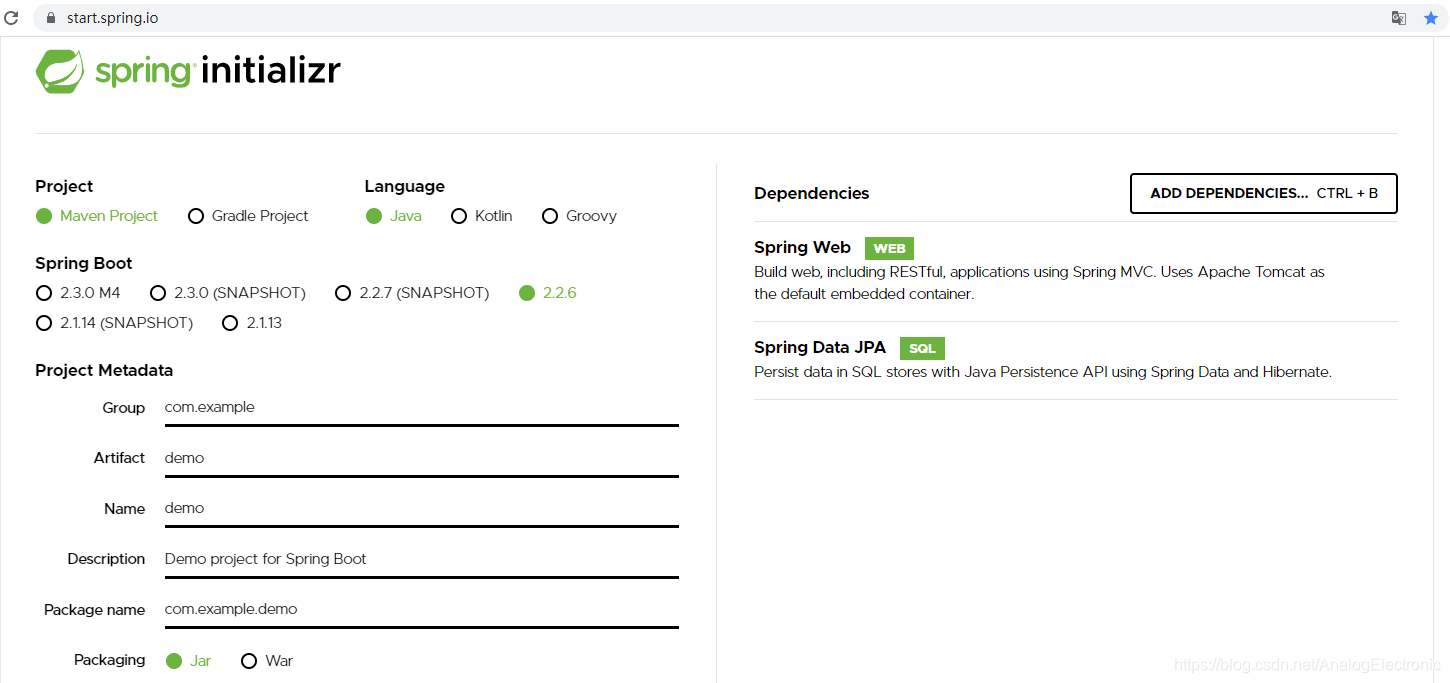
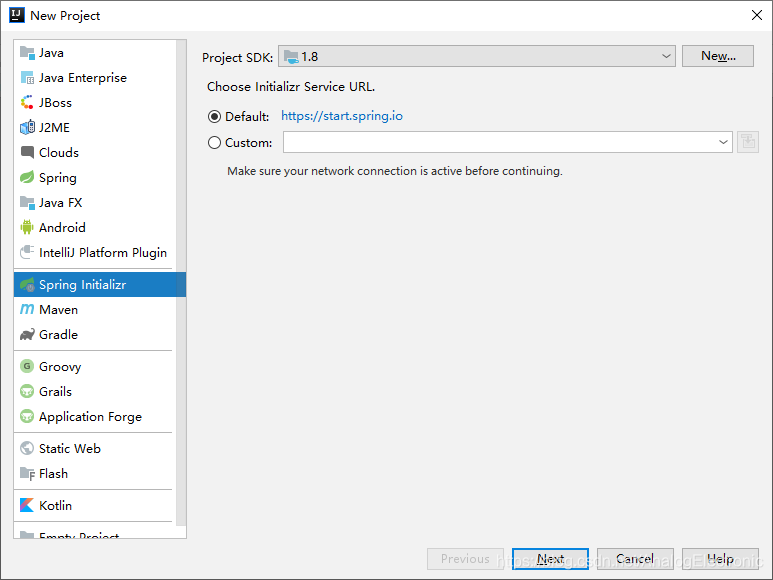
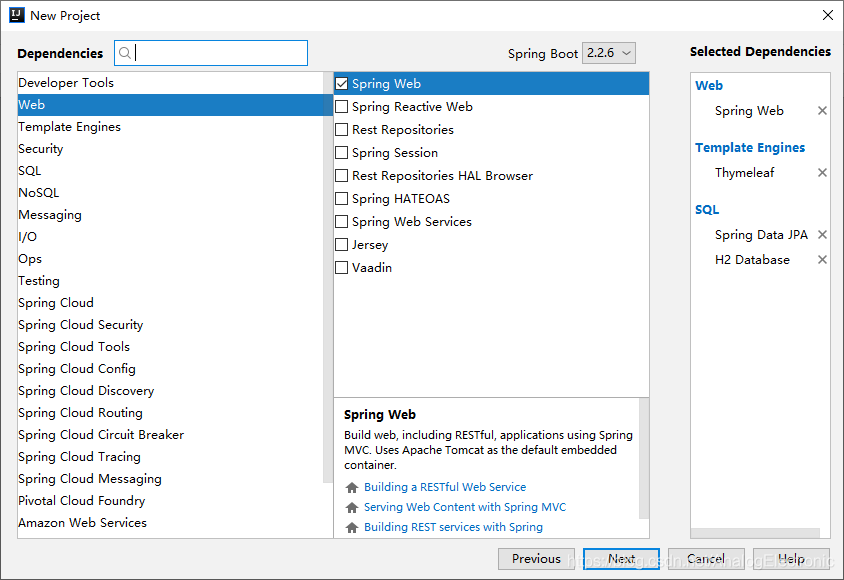
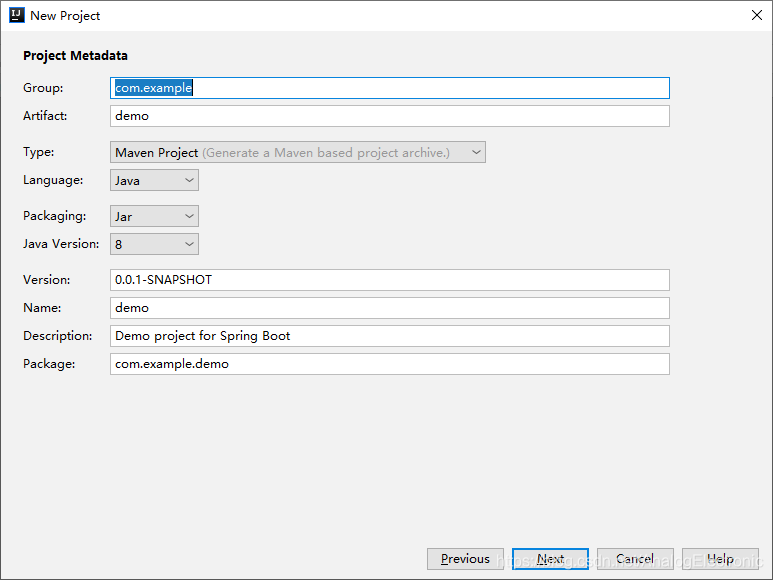
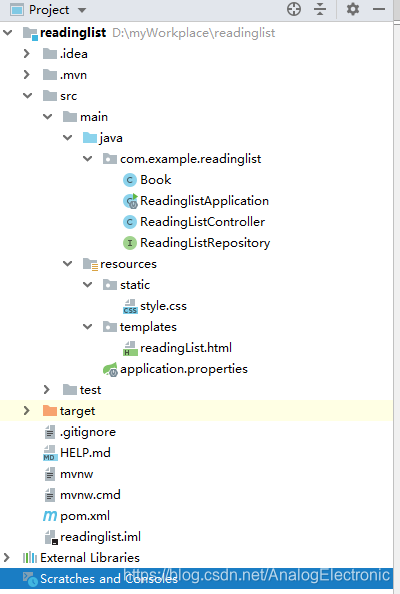
<?xml version="1.0" encoding="UTF-8"?>
<project xmlns="http://maven.apache.org/POM/4.0.0" xmlns:xsi="http://www.w3.org/2001/XMLSchema-instance"
         xsi:schemaLocation="http://maven.apache.org/POM/4.0.0 https://maven.apache.org/xsd/maven-4.0.0.xsd">
    <modelVersion>4.0.0</modelVersion>
    <parent>
        <groupId>org.springframework.boot</groupId>
        <artifactId>spring-boot-starter-parent</artifactId>
        <version>2.2.6.RELEASE</version>
        <relativePath/> <!-- lookup parent from repository -->
    </parent>
    <groupId>com.example</groupId>
    <artifactId>readinglist</artifactId>
    <version>0.0.1-SNAPSHOT</version>
    <name>readinglist</name>
    <description>Demo project for Spring Boot</description>

    <properties>
        <java.version>1.8</java.version>
    </properties>

    <dependencies>
        <dependency>
            <groupId>org.springframework.boot</groupId>
            <artifactId>spring-boot-starter-data-jpa</artifactId>
        </dependency>
        <dependency>
            <groupId>org.springframework.boot</groupId>
            <artifactId>spring-boot-starter-thymeleaf</artifactId>
        </dependency>
        <dependency>
            <groupId>org.springframework.boot</groupId>
            <artifactId>spring-boot-starter-web</artifactId>
        </dependency>

        <dependency>
            <groupId>com.h2database</groupId>
            <artifactId>h2</artifactId>
            <scope>runtime</scope>
        </dependency>
        <dependency>
            <groupId>org.springframework.boot</groupId>
            <artifactId>spring-boot-starter-test</artifactId>
            <scope>test</scope>
            <exclusions>
                <exclusion>
                    <groupId>org.junit.vintage</groupId>
                    <artifactId>junit-vintage-engine</artifactId>
                </exclusion>
            </exclusions>
        </dependency>
    </dependencies>

    <build>
        <plugins>
            <plugin>
                <groupId>org.springframework.boot</groupId>
                <artifactId>spring-boot-maven-plugin</artifactId>
            </plugin>
        </plugins>
    </build>

</project>
package com.example.readinglist;

import org.springframework.boot.SpringApplication;
import org.springframework.boot.autoconfigure.SpringBootApplication;

@SpringBootApplication
public class ReadinglistApplication {

    public static void main(String[] args) {
        SpringApplication.run(ReadinglistApplication.class, args);
    }

}
package com.example.readinglist;

import javax.persistence.Entity;
import javax.persistence.GeneratedValue;
import javax.persistence.GenerationType;
import javax.persistence.Id;

//@Entity注解表明它是一个JPA实体
@Entity
public class Book {
    //id属性加了@Id和@GeneratedValue注解,说明这个字段 是实体的唯一标识,并且这个字段的值是自动生成的。
    @Id
    @GeneratedValue(strategy = GenerationType.AUTO)
    private Long id;
    private String reader;
    private String isbn;
    private String title;
    private String author;
    private String description;
    public Long getId() {
        return id;
    }

    public void setId(Long id) {
        this.id = id;
    }

    public String getReader() {
        return reader;
    }

    public void setReader(String reader) {
        this.reader = reader;
    }

    public String getIsbn() {
        return isbn;
    }

    public void setIsbn(String isbn) {
        this.isbn = isbn;
    }

    public String getTitle() {
        return title;
    }

    public void setTitle(String title) {
        this.title = title;
    }

    public String getAuthor() {
        return author;
    }

    public void setAuthor(String author) {
        this.author = author;
    }

    public String getDescription() {
        return description;
    }

    public void setDescription(String description) {
        this.description = description;
    }

}
package com.example.readinglist;

import org.springframework.data.jpa.repository.JpaRepository;
import  java.util.List;

/**
 * 接下来,我们就要定义用于把Book对象持久化到数据库的仓库了。
 * ①因为用了Spring Data JPA, 所以我们要做的就是简单地定义一个接口,
 * 扩展一下Spring Data JPA的JpaRepository接口:
 */

/**
 * 通过扩展JpaRepository,ReadingListRepository直接继承了18个执行常用持久化操作 的方法。
 * JpaRepository是个泛型接口,有两个参数:仓库操作的领域对象类型,及其ID属性的 类型
 */
public interface ReadingListRepository extends JpaRepository<Book,Long> {
    /**
     * 可以根据读者的用户名来查找阅读列表。
     * @param reader
     * @return List
     */
    List<Book> findByReader(String reader);
}
package com.example.readinglist;

import org.springframework.stereotype.Controller;
import org.springframework.ui.Model;
import org.springframework.web.bind.annotation.PathVariable;
import org.springframework.web.bind.annotation.RequestMapping;
import org.springframework.web.bind.annotation.RequestMethod;

import java.util.List;

//这样组件扫描会自动将ReadingListController注册为 Spring应用程序上下文里的一个Bean
@Controller
//将其中所有的处理器 方法都映射到了“/”这个URL路径上。
@RequestMapping("/")
public class ReadingListController {
    private ReadingListRepository readingListRepository;

    public ReadingListController(ReadingListRepository readingListRepository){
        this.readingListRepository = readingListRepository;
    }

    /**
     * 处理/{reader}上的HTTP GET请求,根据路径里指定的读者,从(通 过控制器的构造器注入的)仓库获取Book列表。
     * 随后将这个列表塞入模型,用的键是 books,后返回readingList作为呈现模型的视图逻辑名称。
     * @param reader
     * @param model
     * @return String
     */
    @RequestMapping(value="/{reader}",method = RequestMethod.GET)
    public String readersBooks(
            @PathVariable("reader") String reader, Model model){
        List<Book> readingList = readingListRepository.findByReader(reader);
        if(readingList != null){
            model.addAttribute("books",readingList);
        }
        return "readingList";
    }

    /**
     *  addToReadingList():处理/{reader}上的HTTP POST请求,将请求正文里的数据绑定 到一个Book对象上。
     *  该方法把Book对象的reader属性设置为读者的姓名,
     *  随后通过仓 库的save()方法保存修改后的Book对象,
     *  后重定向到/{reader}(控制器中的另一个方 法会处理该请求)。
     * @param reader
     * @param book
     * @return
     */
    @RequestMapping(value = "/{reader}",method = RequestMethod.POST)
    public String addToReadingList(
            @PathVariable("reader") String reader,Book book){
        book.setReader(reader);
        readingListRepository.save(book);
        return "redirect:/{reader}";
    }
}
<!DOCTYPE html>
<html lang="en" xmlns:th="http://www.springframework.org/schema/data/jaxb">
<head>
    <meta charset="UTF-8">
    <title>Reading List</title>
    <link rel="stylesheet" th:href="@{/style.css}"/>
</head>
<body>
    <h2>Your ReadingList</h2>
    <h2>Your Reading List</h2>
    <div th:unless="${#lists.isEmpty(books)}">
        <dl th:each="book : ${books}">
            <dt class="bookHeadline">
                <span th:text="${book.title}">Title</span> by
                <span th:text="${book.author}">Author</span>
                (ISBN: <span th:text="${book.isbn}">ISBN</span>)
            </dt>
            <dd class="bookDescription">
            <span th:if="${book.description}" th:text="${book.description}">Description</span>
            <span th:if="${book.description eq null}">No description available</span>
            </dd>
        </dl>
    </div>
    <div th:if="${#lists.isEmpty(books)}">
        <p>You have no books in your book list</p>
    </div>

    <hr/>

    <h3>Add a book</h3>
    <form method="POST">
        <label for="title">Title:</label>
        <input type="text" name="title" size="50"></input><br/>
        <label for="author">Author:</label>
        <input type="text" name="author" size="50"></input><br/>
        <label for="isbn">ISBN:</label>
        <input type="text" name="isbn" size="15"></input><br/>
        <label for="description">Description:</label><br/>
        <textarea name="description" cols="80" rows="5">
        </textarea><br/>       <input type="submit"></input>
    </form>
</body>
</html>
body {
    background-color: #cccccc;
    font-family: arial,helvetica,sans-serif;
}
.bookHeadline
{     font-size: 12pt;
    font-weight: bold;
}

.bookDescription {
    font-size: 10pt;
}

label {     font-weight: bold; }
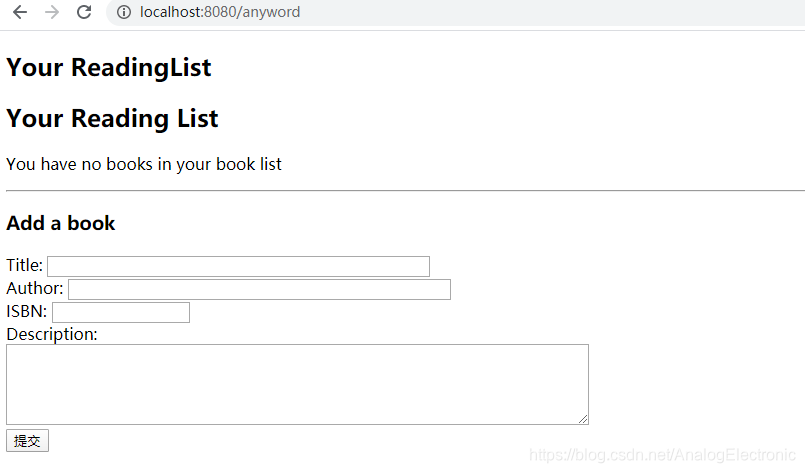
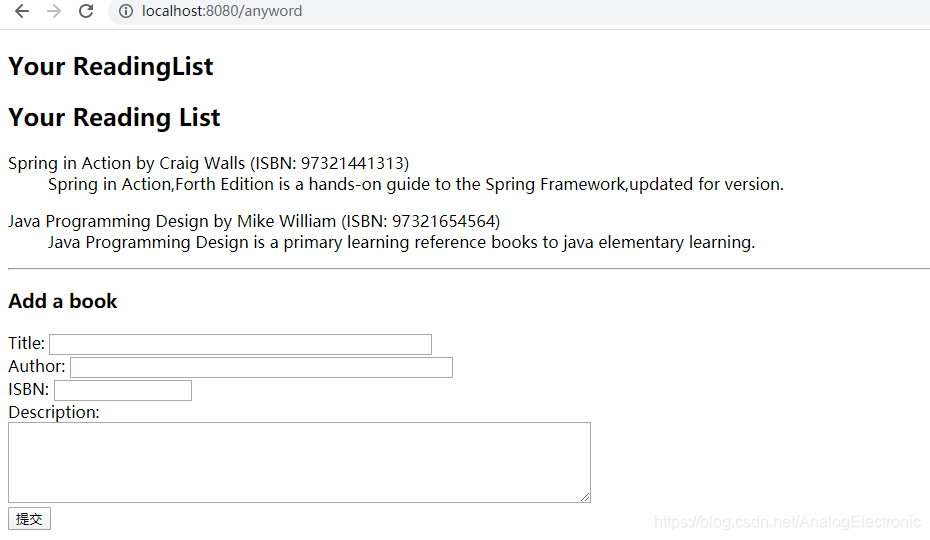
这里面似乎有个问题,就是css没有起作用、、、





 扫一扫
扫一扫


 1128
1128

 被折叠的 条评论
为什么被折叠?
被折叠的 条评论
为什么被折叠?
 到【灌水乐园】发言





