
父组件传值时,子组件报错Uncaught (in promise) ReferenceError: studyData is not defined

文章讲述了在Vue3的<templatesetup>中,如何正确从父组件通过props向子组件传递数据,以及遇到Uncaught(inpromise)ReferenceError:studyDataisnotdefined错误的原因和解决方案。

当我在父组件中使用如下代码传值时

但是在子组件中使用如下代码打印传值studyData时
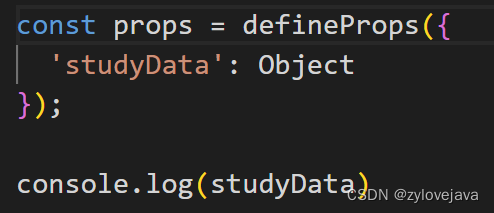
浏览器报Uncaught (in promise) ReferenceError: studyData is not defined这个错误
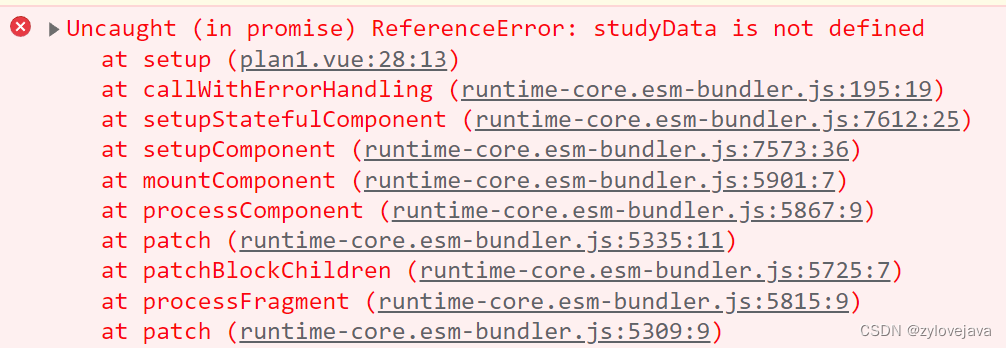
这是因为我直接访问 studyData 变量,但在代码中并没有显式定义 studyData 变量。

在Vue 3的 <script setup> 中,defineProps 函数会将接收到的属性作为参数传递给返回的对象,而不是直接声明变量,所以我们应该通过上述代码的 props.studyData 来访问数据

下面修改为正确的代码:
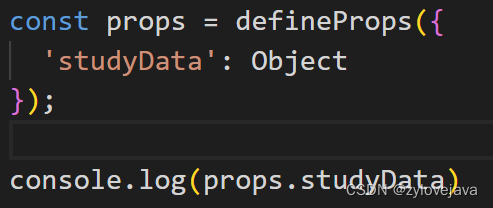
保存打开浏览器发现数据正常打印

你遇到的错误: ``` Uncaught (in promise) ReferenceError: deviceModelOptions is not defined ``` ### 🔍 错误原因: > 你在 `onChangeEvent` 或 `.then(...)` 回调中使用了 `deviceModelOptions`,但 **没有在文件顶部正确声明或导入它**。 --- ## ✅ 正确解决方案:定义响应式变量 你需要确保在当前 `.ts` 文件(或组合式函数)中显式地使用 `ref` 创建 `deviceModelOptions`。 ### ✅ 修改步骤如下: ### 1. 在文件顶部引入 `ref` 并定义响应式变量 ```ts import { ref } from 'vue'; // ✅ 定义响应式的 deviceModelOptions export const deviceModelOptions = ref<Array<{ label: string; value: string }>>([]); ``` > ⚠️ 注意: > - 必须用 `ref([])` 包裹,因为 Vue 模板只能监听响应式数据的变化。 > - 如果你不加 `ref`,直接写 `let deviceModelOptions = []`,视图不会更新! --- ### 2. 确保 `onChangeEvent` 能访问到这个变量 ```ts function onChangeEvent(value: string | string[], component: any) { switch (component.value) { case "deviceType": if (!value || (Array.isArray(value) && value.length === 0)) return; const thingTypeId = Array.isArray(value) ? value[value.length - 1] : value; // 清空旧选项 deviceModelOptions.value = []; // ✅ 这里必须通过 .value 赋 getDeviceTypeThingIconStoreModel({ thingTypeId }) .then(res => { if (res?.data?.length > 0) { // 去重并映射为 { label, value } const uniqueModels = Array.from( new Map( res.data .sort((a: any, b: any) => a.sort - b.sort) .map((item: any) => [ item.model, { label: item.model, value: item.model } ]) ).values() ); // ✅ 更新响应式数据 deviceModelOptions.value = uniqueModels; } }) .catch(err => { console.error('Failed to load device models:', err); }); break; } } ``` --- ### 3. 在表单配置中正确引用该变量 ```ts { name: "label.thing-icon-store-deviceModel", type: "select", value: "deviceModel", required: true, attribute: (component: any) => { return { disabled: deviceModelOptions.value.length === 0, // 可选:无数据禁用 props: { multiple: true, options: deviceModelOptions.value, // ✅ 绑定响应式数组 placeholder: deviceModelOptions.value.length === 0 ? '请先选择设备类型' : '请选择设备型号' }, onChange: (val: any) => { console.log('Selected device models:', val); } }; }, } ``` --- ## ❌ 常见错误排查清单 | 错误 | 如何修复 | |------|---------| | `deviceModelOptions is not defined` | 没有声明变量 → 添加 `const deviceModelOptions = ref([])` | | `Cannot assign to 'value' because it is a read-only property` | 使用了非响应式方式导出 → 不要用 `readonly` 或 `const deviceModelOptions = []` | | 视图不更新 | 没有用 `ref` → 必须用 `ref` + `.value` | | 多个组件共用? | 若需全局共享,请将 `deviceModelOptions` 提取到一个独立的 Composable 文件中 | --- ### ✅ 推荐结构组织(建议拆分逻辑) 新建一个文件 `useDeviceModelOptions.ts`: ```ts // @/composables/useDeviceModelOptions.ts import { ref } from 'vue'; import { getDeviceTypeThingIconStoreModel } from '@/api/device'; // 假设你的接口在这里 export function useDeviceModelOptions() { const deviceModelOptions = ref<Array<{ label: string; value: string }>>([]); const loading = ref(false); const loadByThingTypeId = async (thingTypeId: string) => { if (!thingTypeId) { deviceModelOptions.value = []; return; } loading.value = true; try { const res = await getDeviceTypeThingIconStoreModel({ thingTypeId }); if (res?.data?.length > 0) { const uniqueModels = Array.from( new Map( res.data .sort((a: any, b: any) => a.sort - b.sort) .map((item: any) => [ item.model, { label: item.model, value: item.model } ]) ).values() ); deviceModelOptions.value = uniqueModels; } else { deviceModelOptions.value = []; } } catch (err) { console.error('Failed to load device models:', err); deviceModelOptions.value = []; } finally { loading.value = false; } }; return { deviceModelOptions, loading, loadByThingTypeId }; } ``` #### 在主组件中使用: ```ts import { useDeviceModelOptions } from '@/composables/useDeviceModelOptions'; const { deviceModelOptions, loadByThingTypeId } = useDeviceModelOptions(); function onChangeEvent(value: string | string[], component: any) { if (component.value === "deviceType") { const thingTypeId = Array.isArray(value) ? value.at(-1)! : value; loadByThingTypeId(thingTypeId); // ✅ 调用封装好的加载函数 } } ``` --- ## ✅ 最终效果 - ✅ 不再报错:`deviceModelOptions is not defined` - ✅ 数据响应式更新,下拉框自动刷新 - ✅ 代码更清晰、可复用、易测试 ---
评论 2
添加红包

请填写红包祝福语或标题

红包个数最小为10个

红包金额最低5元

当前余额3.43前往充值 >
需支付:10.00
成就一亿技术人!
领取后你会自动成为博主和红包主的粉丝 规则
hope_wisdom
发出的红包
实付
使用余额支付
点击重新获取
扫码支付
钱包余额 0

抵扣说明:

1.余额是钱包充值的虚拟货币,按照1:1的比例进行支付金额的抵扣。
2.余额无法直接购买下载,可以购买VIP、付费专栏及课程。

余额充值


