


 本文详细介绍了.NET编程中的特性,包括其用途、格式,如预定义特性(如Obsolete和Conditional用于标记过时和条件编译)和自定义特性(如DebugInfo示例)。还涵盖了如何在类、方法和属性中使用特性以及控制台应用程序中的应用实例。
特性:Attribute
什么是特性?
1.一般放置在类前、属性前、方法前等使用这个特性。对类,属性,方法附带一些解释的信息。
2.特性的格式:[ 特姓名(参数列表) ]
例如:
1.不带参数的特性:[Serializable] 定义类前,表示这个类可以被序列化
2.带参数的特性:[Browsable(true)] 允许属性可以显示窗体属性面板上
3.带多个参数特性:[ 特性("参数一" , "参数二")]
使用特性的时候,也可以使用多个特性
例如:
        [Browsable(true)]
        [Description("这是整型变量")]
        [Category("外观"),DefaultValue(19)]
        public int A;
多个特性也可以通过一个【】进行连接起来
例如:
        [Browsable(true), Description("这是整型变量"), Category("外观"), DefaultValue(19)]
        public int A;
特性的分类:预定义特性和自定义特性
预定义特性:.NET提供内置的特性
1.Obsolete:定义某个属性或者方法是过时,然后会再提示请使用其他方法进行替代
[Obsolete(参数一,参数二)]
参数一是一个提示信息,字符串格式
参数二是一个bool指,是不是一个错误,如果是true直接报红色错误
2.Conditional:条件编译,根据这个特性设置的条件执行对应方法
语法:[Conditional(参数一)]参数一是一个条件,在form1.cs演示
例如:
        static void Main(string[] args)
        {
            //UseOldMoney();
            //UseNewMoney1();
             UseNewMoney2();
            //using System.Windows.Forms;
            Application.EnableVisualStyles();
            Application.SetCompatibleTextRenderingDefault(false);
            Application.Run(new Form1());

        }
        [Obsolete("Dont use UseOldMoney,please use UseNewMoney2 function instead")]
        public static void UseOldMoney()
        {
            Console.WriteLine("使用2毛的钱");
        }

        [Obsolete("Dont use UseNewMoney1,please use UseNewMoney2 function instead", true)]
        public static void UseNewMoney1()
        {
            Console.WriteLine("使用五毛的钱");

        }
        public static void UseNewMoney2()
        {
            Console.WriteLine("使用1元的钱");
        }
自定义特性
创建到使用自定义特性步骤:AttributeUsage
1.声明自定义特性(创建一个自定义特性类)
2.构建自定义特性(添加自定义特性类属性和方法)
3.在目标程序上应用自定义特性(使用自定义特性)
4.提供反射访问特性(提供自定义特性访问类型属性和方法)
添加特性使用的地方,例如特性在类前面、方法前、字段前等地方进行使用
class 允许特性写在类前面
Constructor 允许特性写在构造函数前面
Method 允许特性写在函数前面
Property 允许特性写在属性前面
AllowMultiple 是否允许多用
就比如:
[AttributeUsage(AttributeTargets.Class | AttributeTargets.Constructor |
            AttributeTargets.Method|AttributeTargets.Property,AllowMultiple =true)]
如何创建一个自定义特性类?
Attribute属于特性的基类,任何特性都是继承于Attribute
        public class DebugInfo : Attribute
        {
            //构建特性功能:根据特性知道当前这个代码开发人员 修改的最后日期,bug的编号等信息
            //2 添加属性和方法
            private int BugNo; // bug编号
            private string DevName;// 开发者名称
            private string LastTime;// 修改时间
            public string Message;// 使用特性的提示信息

            //每个特性都需要实现至少一个构造函数
            //私有的属性可以通过构造函数进行赋值
            // public 可以使用特性进行公开赋值
            public DebugInfo(int b,string d,string l)
            {
                BugNo = b;
                DevName = d;
                LastTime = l;

            }
        }
验证特性
        [DebugInfo(101,"李大帅","2024-1-10",Message="this is a Rect de class")]
        class Rect
        {
            public int Width;
            [DebugInfo(102, "李小帅", "刚刚")]
            // 作者是李小帅 2024-1-10
            public int Length { get; set; }

            [DebugInfo(103,"玉子","gg")]
            public int MianJi()
            {
                return Width * Length;
            }
        }
        [STAThread]
        static void Main()
        {
            Application.EnableVisualStyles();
            Application.SetCompatibleTextRenderingDefault(false);
            Application.Run(new Form1());
        }
关于特性例举一些例子:
//#define URL // 定义URL
#define Debug


using System;
using System.Collections.Generic;
using System.ComponentModel;
using System.Data;
using System.Diagnostics;
using System.Drawing;
using System.Linq;
using System.Text;
using System.Threading.Tasks;
using System.Windows.Forms;

namespace _1_特性
{
    [Serializable]
    public partial class Form1 : Form
    {
        [Browsable(true)]
        [Description("这是一个颜色关于文字字体的颜色")] //描述属性
        [Category("外观"), DefaultValue("System.Drawing.Color.Red")]// 属性分类 属性默认值
        public Color MyColor { get; set; } = Color.Red;

        public Form1()
        {
            InitializeComponent();

 // 条件编译 根据一个条件执行不同的代码  一般在脚本最上面的进行定义条件,#define进行定义
#if URL  // 如果URL定义

           Console.WriteLine("有请求的url=192.168.113.");

#else   // 如果URL没有定义
            Console.WriteLine("无请求的url=127.0.0.1");
#endif

            //conditional:讲一写函数隔离出来,相比来说特性隔离策略要比#if#endif不容易出错。

            f1();
            f2();

        }
        [Conditional("URL")] // 当定义了URL执行f1方法 #define进行定义
        public void f1()
        {
            Console.WriteLine("有定义URL时候执行");
        }
        //俩个条件是或者关系
        [Conditional("Debug"),Conditional("URL")] // 当定义Debug执行f2方法 #define进行定义
       public void f2()
        {
            Console.WriteLine("没有定义URL时候执行");
        }

    }
}
控制台显示效果如下图所示:
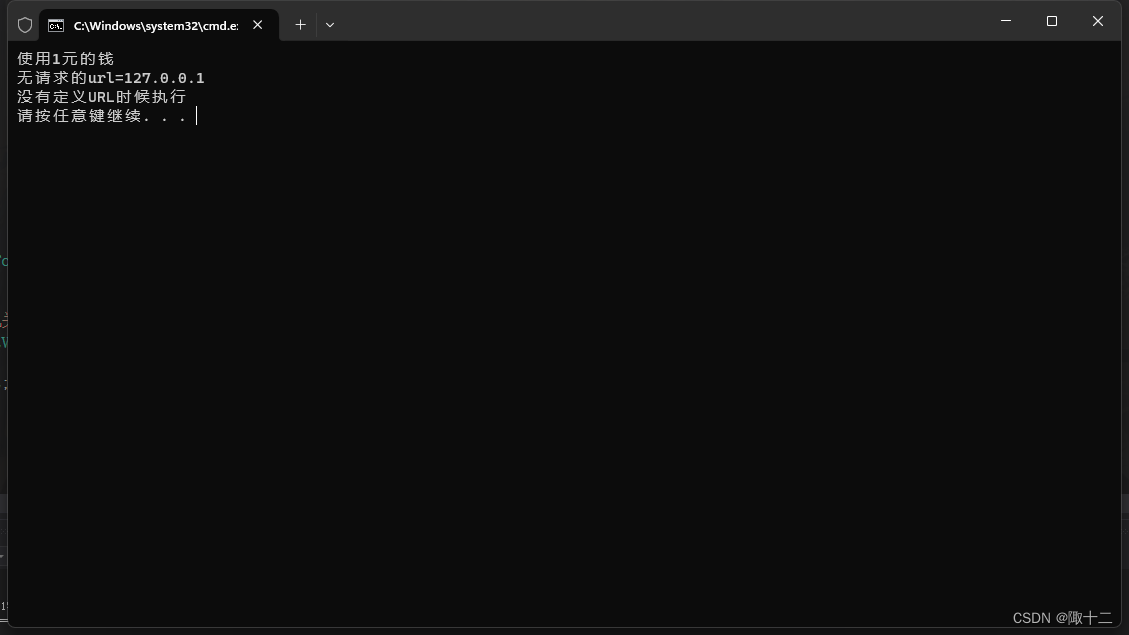
OK,关于特性的一些基本知识点都总结在这篇文章里了,如果又不懂的,可以私信评论哦
(●'◡'●)





 扫一扫
扫一扫


 1178
1178

 被折叠的 条评论
为什么被折叠?
被折叠的 条评论
为什么被折叠?
 到【灌水乐园】发言





