 Linux SPI通用字符设备介绍与实例分析



Linux SPI设备分析5(基于Linux6.6)---SPI 通用字符设备介绍
一、spi通用字符设备概述
SPI 通用字符设备(SPI generic character device)是指通过字符设备模型将 SPI 外设暴露给用户空间,使得用户能够通过标准的字符设备接口(如 open, read, write, ioctl 等)访问和控制 SPI 外设。这样做的优势是用户可以使用常见的文件操作接口来与 SPI 外设进行交互,而无需了解具体的硬件细节或驱动细节。
在 Linux 中,SPI 通常是通过 spi_device 结构体与硬件通信的,而 SPI 驱动程序则负责将外设绑定到 SPI 总线,创建和管理 spi_device 设备。为了让 SPI 设备通过字符设备接口与用户空间进行交互,驱动程序可以实现 SPI 通用字符设备。
1.1、为Spi 通用字符设备创建而注册的spi driver
spi模块为通用字符设备创建的spi driver如下,该驱动实现的功能如下:
- 该驱动可匹配的spi设备有两种:
- spi_device->modalias的值为“spidev”
- 针对支持设备树的内核,设备节点的compatible为“rohm,dh2228fv”的spi设备
- 在spidev_probe接口中,根据传递的spi device参数,完成对应spi通用字符设备的注册,字符设备名称为“"spidevX.Y"”(其中X为spi总线号,Y为spi设备对应的片选序号)
- 在spidev_remove接口中,完成字符设备的注销操作。
drivers/spi/spidev.c
static struct spi_driver spidev_spi_driver = {
	.driver = {
		.name =		"spidev",
		.of_match_table = spidev_dt_ids,
		.acpi_match_table = spidev_acpi_ids,
	},
	.probe =	spidev_probe,
	.remove =	spidev_remove,
	.id_table =	spidev_spi_ids,

	/* NOTE:  suspend/resume methods are not necessary here.
	 * We don't do anything except pass the requests to/from
	 * the underlying controller.  The refrigerator handles
	 * most issues; the controller driver handles the rest.
	 */
};
1.2、spi通用字符设备驱动创建流程
SPI 模块提供的通用字符设备是与具体的spi设备向关联的,必须创建一个设备名称或者设备节点名称固定的spi device(spi 设备名称为“spidev”或设备节点名称为“rohm,dh2228fv”),然后与spi驱动模块注册的spi 驱动匹配,方才触发spi 通用字符设备的创建。
其实spi通用字符设备与spi驱动中实现字符设备的流程基本上是一致的,区别是会在spi驱动的probe接口进行一些spi设备的初始化操作,而spi通用字符设备创建所对应的spi驱动的probe仅用来创建字符设备。如下图所示,创建spi 字符设备的创建流程,将这个流程图中的红色虚线框中的内容去除,即为spi通用字符设备驱动的创建流程。
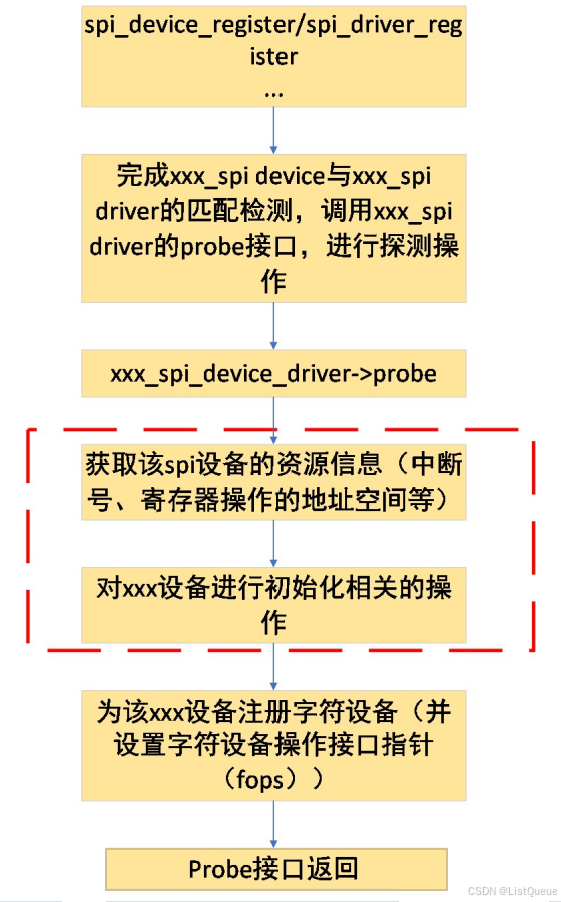
二、spi通用字符设备的操作接口
在接口spidev_init中,完成了主设备号为SPIDEV_MAJOR,次设备号为0的spi字符设备的创建,该字符设备文件对应的处理接口为spidev_fops,其定义如下:
drivers/spi/spidev.c
static const struct file_operations spidev_fops = {
	.owner =	THIS_MODULE,
	/* REVISIT switch to aio primitives, so that userspace
	 * gets more complete API coverage.  It'll simplify things
	 * too, except for the locking.
	 */
	.write =	spidev_write,
	.read =		spidev_read,
	.unlocked_ioctl = spidev_ioctl,
	.compat_ioctl = spidev_compat_ioctl,
	.open =		spidev_open,
	.release =	spidev_release,
	.llseek =	no_llseek,
};
2.1、spidev_open
spidev_open接口主要用于判断所要打开的spi通用字符设备文件,并根据字符设备文件的设备号在device_list链表上查找对应的spidev_data类型的变量,并将其绑定至文件描述的私有变量指针上。(当进行通用字符设备文件节点的创建前,通过注册spidevice并与spidev_spi_driver绑定时,通过调用spidev_probe时,将该spidevice对应的spidev_data类型的变量添加到device_list链表上,同时通过调用device_create接口完成device类型变量的创建,同时向应用层发送uevent,由应用层的udev或mdev完成字符设备节点的创建(通过mknod系统调用))。
如下是struct spidev_data类型的变量,该变量实现了spi通用字符设备节点对应的文件描述符与spi模块的关联:
- 通过spi_device类型的变量,完成了与spi device的关联,从而也完成了与对应spi master的绑定;
- dev_t类型的变量说明了该spi通用字符设备节点的设备号;
- buffer为进行spi通信的buffer。
drivers/spi/spidev.c
struct spidev_data {
	dev_t			devt;
	struct mutex		spi_lock;
	struct spi_device	*spi;
	struct list_head	device_entry;

	/* TX/RX buffers are NULL unless this device is open (users > 0) */
	struct mutex		buf_lock;
	unsigned		users;
	u8			*tx_buffer;
	u8			*rx_buffer;
	u32			speed_hz;
};
2.2、spidev_read、spidev_write
这两个接口主要通过调用spi通信接口spi_async,完成与具体的spidevice的通信(同步通信)。当spidev_read、spidev_write接口调用spi_async时,借助完成量接口,完成了同步通信(调用wait_for_completion使本进程进入sleep状态,待spi-core完成通信后,则通过执行spidev_complete将该进程唤醒,从而完成了同步通信操作)。
drivers/spi/spidev.c
/* Read-only message with current device setup */
static ssize_t
spidev_read(struct file *filp, char __user *buf, size_t count, loff_t *f_pos)
{
	struct spidev_data	*spidev;
	ssize_t			status;

	/* chipselect only toggles at start or end of operation */
	if (count > bufsiz)
		return -EMSGSIZE;

	spidev = filp->private_data;

	mutex_lock(&spidev->buf_lock);
	status = spidev_sync_read(spidev, count);
	if (status > 0) {
		unsigned long	missing;

		missing = copy_to_user(buf, spidev->rx_buffer, status);
		if (missing == status)
			status = -EFAULT;
		else
			status = status - missing;
	}
	mutex_unlock(&spidev->buf_lock);

	return status;
}

/* Write-only message with current device setup */
static ssize_t
spidev_write(struct file *filp, const char __user *buf,
		size_t count, loff_t *f_pos)
{
	struct spidev_data	*spidev;
	ssize_t			status;
	unsigned long		missing;

	/* chipselect only toggles at start or end of operation */
	if (count > bufsiz)
		return -EMSGSIZE;

	spidev = filp->private_data;

	mutex_lock(&spidev->buf_lock);
	missing = copy_from_user(spidev->tx_buffer, buf, count);
	if (missing == 0)
		status = spidev_sync_write(spidev, count);
	else
		status = -EFAULT;
	mutex_unlock(&spidev->buf_lock);

	return status;
}
2.3、spidev_ioctl、spidev_compat_ioctl
这两个接口主要进行通信速率、通信模式等设置操作,包括SPI_IOC_WR_MODE、SPI_IOC_WR_LSB_FIRST、SPI_IOC_WR_BITS_PER_WORD、SPI_IOC_WR_MAX_SPEED_HZ等接口,也支持与spi device的读写通信等。
drivers/spi/spidev.c
static long
spidev_ioctl(struct file *filp, unsigned int cmd, unsigned long arg)
{
	int			retval = 0;
	struct spidev_data	*spidev;
	struct spi_device	*spi;
	u32			tmp;
	unsigned		n_ioc;
	struct spi_ioc_transfer	*ioc;

	/* Check type and command number */
	if (_IOC_TYPE(cmd) != SPI_IOC_MAGIC)
		return -ENOTTY;

	/* guard against device removal before, or while,
	 * we issue this ioctl.
	 */
	spidev = filp->private_data;
	mutex_lock(&spidev->spi_lock);
	spi = spi_dev_get(spidev->spi);
	if (spi == NULL) {
		mutex_unlock(&spidev->spi_lock);
		return -ESHUTDOWN;
	}

	/* use the buffer lock here for triple duty:
	 *  - prevent I/O (from us) so calling spi_setup() is safe;
	 *  - prevent concurrent SPI_IOC_WR_* from morphing
	 *    data fields while SPI_IOC_RD_* reads them;
	 *  - SPI_IOC_MESSAGE needs the buffer locked "normally".
	 */
	mutex_lock(&spidev->buf_lock);

	switch (cmd) {
	/* read requests */
	case SPI_IOC_RD_MODE:
	case SPI_IOC_RD_MODE32:
		tmp = spi->mode;

		{
			struct spi_controller *ctlr = spi->controller;

			if (ctlr->use_gpio_descriptors && ctlr->cs_gpiods &&
			    ctlr->cs_gpiods[spi_get_chipselect(spi, 0)])
				tmp &= ~SPI_CS_HIGH;
		}

		if (cmd == SPI_IOC_RD_MODE)
			retval = put_user(tmp & SPI_MODE_MASK,
					  (__u8 __user *)arg);
		else
			retval = put_user(tmp & SPI_MODE_MASK,
					  (__u32 __user *)arg);
		break;
	case SPI_IOC_RD_LSB_FIRST:
		retval = put_user((spi->mode & SPI_LSB_FIRST) ?  1 : 0,
					(__u8 __user *)arg);
		break;
	case SPI_IOC_RD_BITS_PER_WORD:
		retval = put_user(spi->bits_per_word, (__u8 __user *)arg);
		break;
	case SPI_IOC_RD_MAX_SPEED_HZ:
		retval = put_user(spidev->speed_hz, (__u32 __user *)arg);
		break;

	/* write requests */
	case SPI_IOC_WR_MODE:
	case SPI_IOC_WR_MODE32:
		if (cmd == SPI_IOC_WR_MODE)
			retval = get_user(tmp, (u8 __user *)arg);
		else
			retval = get_user(tmp, (u32 __user *)arg);
		if (retval == 0) {
			struct spi_controller *ctlr = spi->controller;
			u32	save = spi->mode;

			if (tmp & ~SPI_MODE_MASK) {
				retval = -EINVAL;
				break;
			}

			if (ctlr->use_gpio_descriptors && ctlr->cs_gpiods &&
			    ctlr->cs_gpiods[spi_get_chipselect(spi, 0)])
				tmp |= SPI_CS_HIGH;

			tmp |= spi->mode & ~SPI_MODE_MASK;
			spi->mode = tmp & SPI_MODE_USER_MASK;
			retval = spi_setup(spi);
			if (retval < 0)
				spi->mode = save;
			else
				dev_dbg(&spi->dev, "spi mode %x\n", tmp);
		}
		break;
	case SPI_IOC_WR_LSB_FIRST:
		retval = get_user(tmp, (__u8 __user *)arg);
		if (retval == 0) {
			u32	save = spi->mode;

			if (tmp)
				spi->mode |= SPI_LSB_FIRST;
			else
				spi->mode &= ~SPI_LSB_FIRST;
			retval = spi_setup(spi);
			if (retval < 0)
				spi->mode = save;
			else
				dev_dbg(&spi->dev, "%csb first\n",
						tmp ? 'l' : 'm');
		}
		break;
	case SPI_IOC_WR_BITS_PER_WORD:
		retval = get_user(tmp, (__u8 __user *)arg);
		if (retval == 0) {
			u8	save = spi->bits_per_word;

			spi->bits_per_word = tmp;
			retval = spi_setup(spi);
			if (retval < 0)
				spi->bits_per_word = save;
			else
				dev_dbg(&spi->dev, "%d bits per word\n", tmp);
		}
		break;
	case SPI_IOC_WR_MAX_SPEED_HZ: {
		u32 save;

		retval = get_user(tmp, (__u32 __user *)arg);
		if (retval)
			break;
		if (tmp == 0) {
			retval = -EINVAL;
			break;
		}

		save = spi->max_speed_hz;

		spi->max_speed_hz = tmp;
		retval = spi_setup(spi);
		if (retval == 0) {
			spidev->speed_hz = tmp;
			dev_dbg(&spi->dev, "%d Hz (max)\n", spidev->speed_hz);
		}

		spi->max_speed_hz = save;
		break;
	}
	default:
		/* segmented and/or full-duplex I/O request */
		/* Check message and copy into scratch area */
		ioc = spidev_get_ioc_message(cmd,
				(struct spi_ioc_transfer __user *)arg, &n_ioc);
		if (IS_ERR(ioc)) {
			retval = PTR_ERR(ioc);
			break;
		}
		if (!ioc)
			break;	/* n_ioc is also 0 */

		/* translate to spi_message, execute */
		retval = spidev_message(spidev, ioc, n_ioc);
		kfree(ioc);
		break;
	}

	mutex_unlock(&spidev->buf_lock);
	spi_dev_put(spi);
	mutex_unlock(&spidev->spi_lock);
	return retval;
}


static long
spidev_compat_ioctl(struct file *filp, unsigned int cmd, unsigned long arg)
{
	if (_IOC_TYPE(cmd) == SPI_IOC_MAGIC
			&& _IOC_NR(cmd) == _IOC_NR(SPI_IOC_MESSAGE(0))
			&& _IOC_DIR(cmd) == _IOC_WRITE)
		return spidev_compat_ioc_message(filp, cmd, arg);

	return spidev_ioctl(filp, cmd, (unsigned long)compat_ptr(arg));
}
三、实例分析
1. SPI 通用字符设备实例概述
SPI 通用字符设备驱动通过字符设备接口将 SPI 设备暴露给用户空间应用。用户可以通过 open, read, write, ioctl 等标准文件操作与 SPI 外设进行交互。下面通过一个 SPI 通用字符设备驱动的实例来详细分析其工作原理。
2. 驱动代码分析
以下是一个简化的 SPI 通用字符设备驱动实例:
#include <linux/module.h>
#include <linux/kernel.h>
#include <linux/init.h>
#include <linux/fs.h>
#include <linux/spi/spi.h>
#include <linux/cdev.h>
#include <linux/uaccess.h>

#define DEVICE_NAME "spi_device"
#define SPI_BUS 0   // SPI 总线编号
#define SPI_CS 0    // SPI 设备片选

static dev_t dev_num;
static struct cdev spi_cdev;
static struct class *spi_class;
static struct spi_device *spi_dev;

// SPI 设备的缓冲区
static char spi_buffer[128];

// 设备文件操作结构
static struct file_operations spi_fops = {
    .owner = THIS_MODULE,
    .open = spi_open,
    .read = spi_read,
    .write = spi_write,
    .unlocked_ioctl = spi_ioctl,
};

// 打开 SPI 设备
static int spi_open(struct inode *inode, struct file *file)
{
    pr_info("SPI device opened\n");
    return 0;
}

// 读取数据
static ssize_t spi_read(struct file *file, char __user *buf, size_t count, loff_t *offset)
{
    int ret;
    struct spi_transfer t = {
        .tx_buf = NULL,
        .rx_buf = spi_buffer,
        .len = count,
    };
    struct spi_message msg;

    spi_message_init(&msg);
    spi_message_add_tail(&t, &msg);

    ret = spi_sync(spi_dev, &msg);
    if (ret < 0) {
        pr_err("SPI read failed\n");
        return ret;
    }

    // 将读取的数据从内核缓冲区复制到用户空间
    if (copy_to_user(buf, spi_buffer, count)) {
        return -EFAULT;
    }

    return count;
}

// 写入数据
static ssize_t spi_write(struct file *file, const char __user *buf, size_t count, loff_t *offset)
{
    int ret;
    struct spi_transfer t = {
        .tx_buf = spi_buffer,
        .rx_buf = NULL,
        .len = count,
    };
    struct spi_message msg;

    if (copy_from_user(spi_buffer, buf, count)) {
        return -EFAULT;
    }

    spi_message_init(&msg);
    spi_message_add_tail(&t, &msg);

    ret = spi_sync(spi_dev, &msg);
    if (ret < 0) {
        pr_err("SPI write failed\n");
        return ret;
    }

    return count;
}

// 控制命令(用于扩展SPI设备的特性)
static long spi_ioctl(struct file *file, unsigned int cmd, unsigned long arg)
{
    // 这里可以处理 IOCTL 操作,根据需要定义控制命令
    return 0;
}

// 初始化 SPI 设备
static int spi_probe(struct spi_device *spi)
{
    int ret;

    spi_dev = spi;  // 记录 SPI 设备

    // 注册字符设备
    ret = alloc_chrdev_region(&dev_num, 0, 1, DEVICE_NAME);
    if (ret < 0) {
        pr_err("Failed to allocate character device region\n");
        return ret;
    }

    // 创建字符设备
    spi_class = class_create(THIS_MODULE, DEVICE_NAME);
    if (IS_ERR(spi_class)) {
        unregister_chrdev_region(dev_num, 1);
        pr_err("Failed to create class\n");
        return PTR_ERR(spi_class);
    }

    device_create(spi_class, NULL, dev_num, NULL, DEVICE_NAME);

    cdev_init(&spi_cdev, &spi_fops);
    ret = cdev_add(&spi_cdev, dev_num, 1);
    if (ret < 0) {
        class_destroy(spi_class);
        unregister_chrdev_region(dev_num, 1);
        pr_err("Failed to add cdev\n");
        return ret;
    }

    pr_info("SPI device registered\n");
    return 0;
}

// SPI 设备移除
static int spi_remove(struct spi_device *spi)
{
    device_destroy(spi_class, dev_num);
    class_destroy(spi_class);
    cdev_del(&spi_cdev);
    unregister_chrdev_region(dev_num, 1);
    pr_info("SPI device removed\n");
    return 0;
}

// SPI 驱动结构体
static struct spi_driver spi_drv = {
    .driver = {
        .name = "spi_generic",
        .owner = THIS_MODULE,
    },
    .probe = spi_probe,
    .remove = spi_remove,
};

module_spi_driver(spi_drv);

MODULE_LICENSE("GPL");
MODULE_AUTHOR("Your Name");
MODULE_DESCRIPTION("SPI Generic Character Device Driver");
3. 关键部分分析
a. 字符设备创建与注册
ret = alloc_chrdev_region(&dev_num, 0, 1, DEVICE_NAME);
alloc_chrdev_region:分配一个字符设备编号(dev_num),DEVICE_NAME是设备的名称,0是从哪个编号开始分配,1表示仅分配一个设备号。
spi_class = class_create(THIS_MODULE, DEVICE_NAME);
device_create(spi_class, NULL, dev_num, NULL, DEVICE_NAME);
class_create:创建一个设备类,用于管理和显示设备。device_create:根据设备类和设备编号创建一个设备文件,这样用户就可以通过/dev/spi_device与 SPI 设备交互。
cdev_init(&spi_cdev, &spi_fops);
ret = cdev_add(&spi_cdev, dev_num, 1);
cdev_init:初始化cdev结构体,这个结构体描述了一个字符设备的文件操作方法。cdev_add:将字符设备添加到系统中,使得系统可以识别并处理与之相关的文件操作。
b. SPI 数据传输
struct spi_transfer t = {
    .tx_buf = NULL,  // 读取操作时,没有数据需要发送
    .rx_buf = spi_buffer,  // 数据读取到这个缓冲区
    .len = count,  // 读取的字节数
};
struct spi_message msg;
spi_message_init(&msg);
spi_message_add_tail(&t, &msg);
spi_transfer:描述一次 SPI 数据传输,包括发送和接收缓冲区、传输长度等。spi_message:多个spi_transfer组成一个传输消息,spi_message_init初始化消息结构,spi_message_add_tail将传输添加到消息队列。
ret = spi_sync(spi_dev, &msg);
spi_sync:执行同步 SPI 传输,阻塞直到数据传输完成。
c. 设备文件操作
spi_open:每次用户打开设备文件时会调用此函数。在此实现中,仅进行日志打印。spi_read:读取数据时,通过spi_sync函数从 SPI 外设读取数据并将其传输到用户空间。spi_write:写入数据时,将数据从用户空间复制到内核缓冲区,并通过spi_sync函数将数据发送到 SPI 外设。spi_ioctl:提供一个接口,用于实现控制命令和特性扩展,通常可以用于设置 SPI 参数或控制特定操作。
d. SPI 设备的初始化与移除
static int spi_probe(struct spi_device *spi)
spi_probe:当 SPI 设备绑定到 SPI 总线时,会调用此函数来初始化设备,并注册字符设备。spi_remove:当 SPI 设备从系统中移除时,销毁字符设备、设备文件和相关资源。





 扫一扫
扫一扫


 2866
2866

 被折叠的 条评论
为什么被折叠?
被折叠的 条评论
为什么被折叠?
 到【灌水乐园】发言





