


 本文详细介绍了在Spring框架中如何处理BeanDefinition,包括创建BeanDefinition类以存储Bean信息,以及如何根据@Scope注解判断单例或原型模式。还涉及到了ApplicationContext中对扫描的Bean进行Scope注解检查的过程。
目录
前言
第一天我们实现了@ComponentScan的自动扫描bean并加载的功能,但实际上在加载到单例池之前,还有几部分重要的事情,其中一件就是将需与被加载为Bean的封装在BeanDefinitionMap当中,接下来我们要实现下图中将Bean封装在beanDefinitionMap中
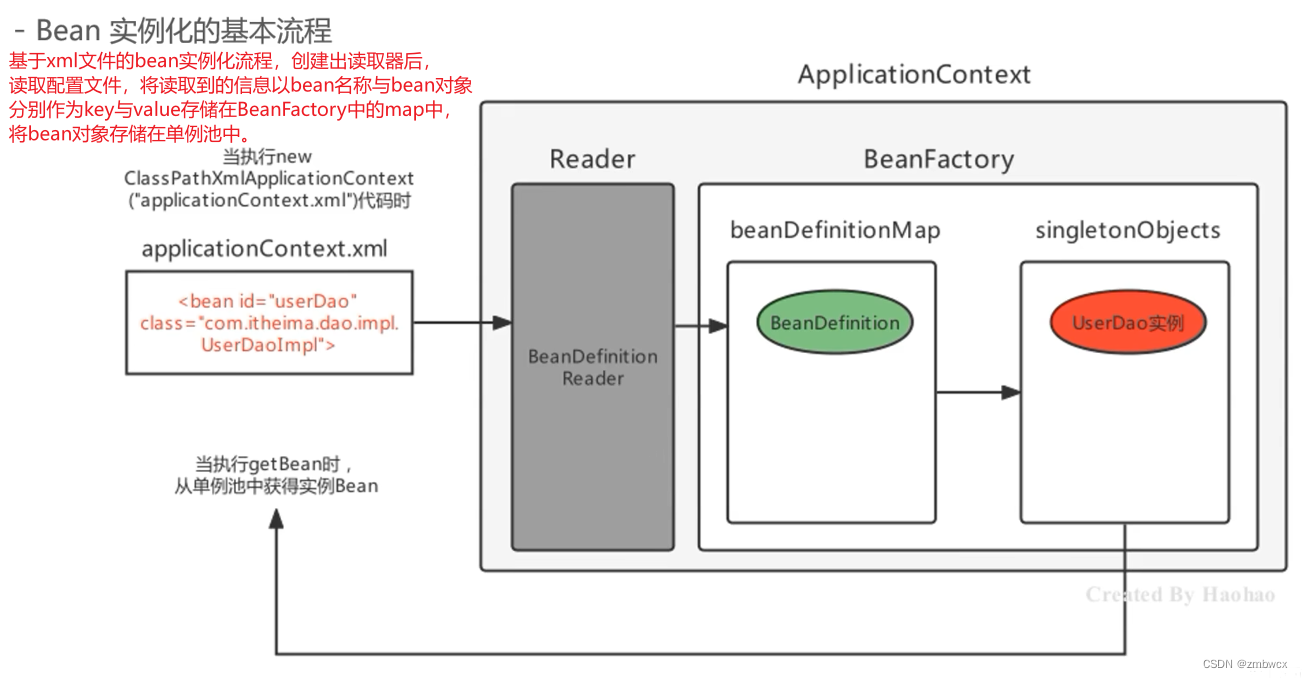
BeanDefinition中主要存放了Bean的信息,如bean对象,bean的是否懒加载信息,又或是是否是单例的信息等。而这些BeanDefinition代表一个Bean对象,需要创建一个BeanDefinitionMap来存储多个BeanDefinition的信息。
添加注解Scope
@Scope的作用是指定bean是否是单例,默认为单例
@Target(ElementType.TYPE)
@Retention(RetentionPolicy.RUNTIME)
public @interface MyScope {
    String value() default "Singleton";
}
创建BeanDefinition类
public class BeanDefinition {
    //用来存放类
    private Class<?> clazz;

    //用来存放创建模式是否为单例
    private String modeType;

    public BeanDefinition(Class<?> clazz, String modeType) {
        this.clazz = clazz;
        this.modeType = modeType;
    }

    public Class<?> getClazz() {
        return clazz;
    }
}
原生的BeanDefinition是一个接口,并且封装了很多信息,比如说元数据,类上的注解信息等,但是我们暂时只封装类信息与是否单例信息并且是一个类而并非一个接口。
修改ApplicationContext类
第一天实现了Bean扫描,接下来要实现被扫描的bean中是否添加了@Scope注解,将是否单例属性与类信息封装到BeanDefinition中。仅需要在构造好beanName时添加如下代码即可。
//判断是否添加了@MyScope注解,通知判断该注解的值
BeanDefinition beanDefinition = new BeanDefinition();
if (aClass.isAnnotationPresent(MyScope.class)) {
    String value = aClass.getAnnotation(MyScope.class).value();
    if (!"Singleton".equals(value) && "Prototype".equals(value)) {
        //说明是不是非单例的对象
        beanDefinition.setType("Prototype");
    }
}
beanDefinition.setType("Singleton");
beanDefinition.setClazz(aClass);
beanDefinitionMap.put(beanName, beanDefinition);
同时我们需要修改加入单例池部分的代码,因为单例池中的对象都来自于BeanDefinition中,因此后续我们会编写如何从BeanDefinitionMap中获取信息并加入单例池,在此之前我们先暂时删除加入单例池部分的代码。
添加测试代码
    public void printBeanDefinitionMap(){
        this.beanDefinitionMap.forEach((k,v)->{
            System.out.println(k+":"+v);
        });
    }
运行测试是否能正常输出
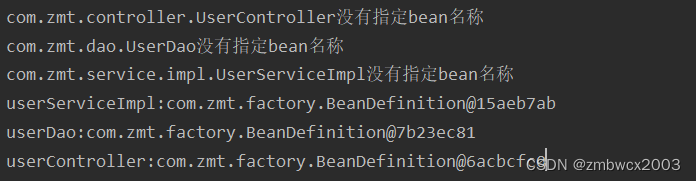
至此实现了封装BeanDefinition
完整ApplicationContext类代码
public class SpringApplication2 {
    //配置类属性
    private Class<?> configClass;
    //单例池
    private ConcurrentHashMap<String, Object> singletonObjects;
    //BeanDefinitionMap
    private Map<String, BeanDefinition> beanDefinitionMap;

    //每创建一个容器都会有各自的单例池
    {
        singletonObjects = new ConcurrentHashMap<>(256);
        beanDefinitionMap = new ConcurrentHashMap<>(256);
    }

    public SpringApplication2(Class<?> configClass) throws Exception {
        this.configClass = configClass;
        this.init();
    }

    private void init() throws Exception {
        //判断该类是否是配置类
        MyConfiguration configuration = configClass.getAnnotation(MyConfiguration.class);
        if (configuration == null) {
            //说明不是配置类
            throw new RuntimeException("该类不是配置类,目前只支持传入配置类");
        }
        //如果是配置类,那么获取需要扫描的类路径
        MyComponentScan scan = configClass.getAnnotation(MyComponentScan.class);
        if (scan == null) {
            throw new RuntimeException("不存在扫描注解");
        }
        String[] paths = scan.value();
        //遍历需要扫描的路径
        for (String path : paths) {
            path = URLDecoder.decode(path, "UTF-8");
            //path这里还有作用,因此不建议将path接收replace的结果
            // com/zmt
            String newPath = path.replace(".", "/");
            //获取根路径,并去除最前面的/
            String classPath = configClass.getResource("/").getPath().substring(1);
            classPath = URLDecoder.decode(classPath, "UTF-8");
            System.out.println("classPath:" + classPath);

            //获取被扫描包的绝对路径
            String absolutePath = configClass.getResource("/" + newPath).getPath();
            absolutePath = URLDecoder.decode(absolutePath, "UTF-8");
            System.out.println(absolutePath);

            //遍历绝对路径的子包,寻找.class结尾的文件
            File rootFile = new File(absolutePath);
            if (rootFile.isFile()) {
                throw new RuntimeException("不支持扫描具体类");
            }
            //说明指定路径是一个文件夹
            //获取所有的类名称
            List<String> listClass = dirFile(rootFile);
            for (String absoluteClassPath : listClass) {
                //完整类名,通过Class.forName()创建出该类
                String fullClassName = absoluteClassPath.replace(classPath, "").replace("/", ".");
                //加载出该类
                ClassLoader classLoader = configClass.getClassLoader();
                Class<?> aClass = classLoader.loadClass(fullClassName);
                MyComponent myComponent = aClass.getAnnotation(MyComponent.class);
                if (myComponent == null) {
                    //该类不应该被加载
                    continue;
                }

                //获取Bean名称
                String beanName = getBeanName(fullClassName, aClass, myComponent);

                //判断是否添加了@MyScope注解,通知判断该注解的值
                BeanDefinition beanDefinition = new BeanDefinition();
                if (aClass.isAnnotationPresent(MyScope.class)) {
                    String value = aClass.getAnnotation(MyScope.class).value();
                    if (!"Singleton".equals(value) && "Prototype".equals(value)) {
                        //说明是不是非单例的对象
                        beanDefinition.setType("Prototype");
                    }
                }
                beanDefinition.setType("Singleton");
                beanDefinition.setClazz(aClass);
                beanDefinitionMap.put(beanName, beanDefinition);

            }
        }
    }

    public void printBeanDefinition(){
        this.beanDefinitionMap.forEach((k,v)->{
            System.out.println(k+":"+v);
        });
    }

    private String getBeanName(String fullClassName, Class<?> aClass, MyComponent myComponent) {
        //如果注解中没有没有给定值,那么采用类名首字母小写的方式
        String beanName = myComponent.value();
        if ("".equals(beanName)) {
            System.out.println(aClass.getName() + "没有指定bean名称");
            String className = fullClassName.substring(fullClassName.lastIndexOf(".") + 1);
            beanName = className.substring(0, 1).toLowerCase() + className.substring(1);
        }
        return beanName;
    }

    /**
     * 遍历文件夹,获取所有类绝对路径集合
     *
     * @param rootFile
     * @return
     */
    private List<String> dirFile(File rootFile) {
        List<String> fileList = new ArrayList<>();
        if (rootFile.isDirectory()) {
            File[] files = rootFile.listFiles();
            for (File file : files) {
                fileList.addAll(dirFile(file));
            }
        } else {
            //走到这说明已经不是文件夹了
            String filePath = rootFile.getPath();
            if (filePath.endsWith(".class")) {
                //类的绝对路径
                String classPath = filePath.replace("\\", "/").replace(".class", "");
                System.out.println(classPath);
                fileList.add(classPath);
            }
        }
        return fileList;
    }
}





 扫一扫
扫一扫


 1万+
1万+

 被折叠的 条评论
为什么被折叠?
被折叠的 条评论
为什么被折叠?
 到【灌水乐园】发言





