



 ConsecutiveScrollerLayout 是一款 Android 下的支持多个滑动布局和普通控件持续连贯滑动的容器,能实现流畅的滑动体验,并支持布局吸顶等功能。本文介绍其基本用法及高级特性。
ConsecutiveScroller
项目地址:donkingliang/ConsecutiveScroller 
简介: ConsecutiveScrollerLayout 是 Android 下支持多个滑动布局(RecyclerView、WebView、ScrollView 等)和普通控件(TextView、ImageView、LinearLayou、自定义 View 等)持续连贯滑动的容器,它使所有的子 View 像一个整体一样连续顺畅滑动。并且支持布局吸顶功能。
标签:
ConsecutiveScrollerLayout 是 Android 下支持多个滑动布局(RecyclerView、WebView、ScrollView 等)和 lView 等)和普通控件(TextView、ImageView、LinearLayou、自定义 View 等)持续连贯滑动的容器,它使所有的子 View 像一个整体一样连续顺畅滑动。并且支持布局吸顶功能。
效果图
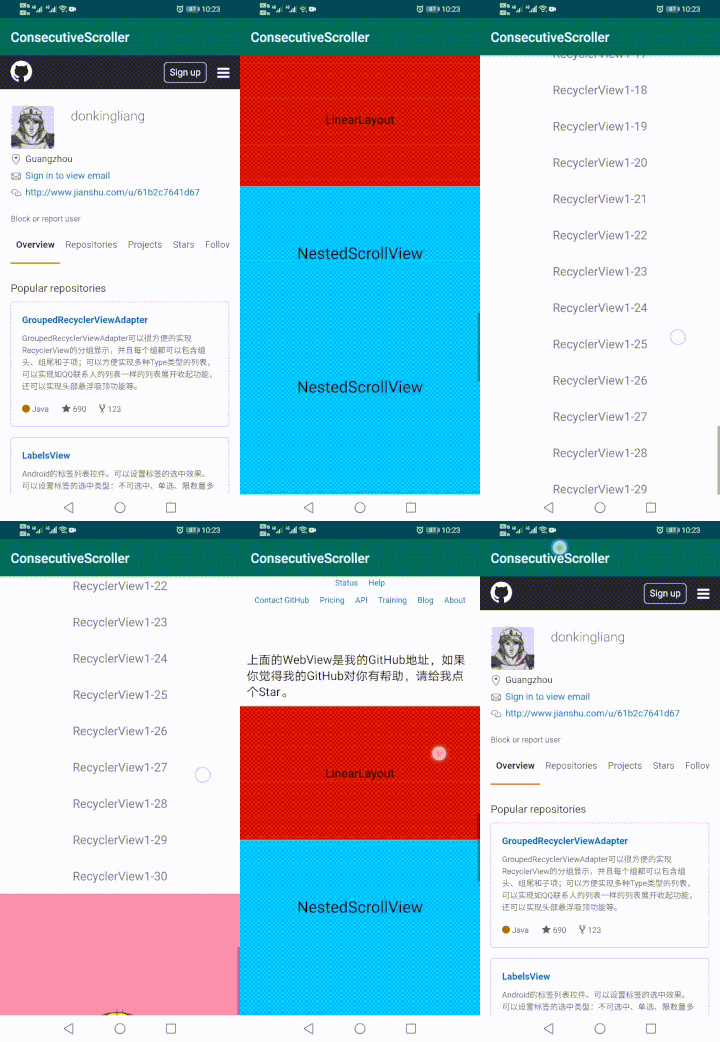
引入依赖
在 Project 的 build.gradle 在添加以下代码
allprojects {
        repositories {
            ...
            maven { url 'https://jitpack.io' }
        }
    }
在 Module 的 build.gradle 在添加以下代码
// 使用了 Androidx
implementation 'com.github.donkingliang:ConsecutiveScroller:2.3.0'

// 或者

// 使用 Android support 包
implementation 'com.github.donkingliang:ConsecutiveScroller:1.3.0'
由于 Androidx 和 Android support 包不兼容,所以 ConsecutiveScroller 使用两个版本分别支持使用 Androidx 和使用 Android support 包的项目。 大版本号 1 使用 Android support 包,大版本号 2 使用 Androidx。
基本使用
ConsecutiveScrollerLayout 的使用非常简单,把需要滑动的布局作为 ConsecutiveScrollerLayout 的直接子 View 即可。
<?xml version="1.0" encoding="utf-8"?>
<com.donkingliang.consecutivescroller.ConsecutiveScrollerLayout xmlns:android="http://schemas.android.com/apk/res/android"
    android:id="@+id/scrollerLayout"
    android:layout_width="match_parent"
    android:layout_height="match_parent"
    android:scrollbars="vertical">

    <WebView
        android:id="@+id/webView"
        android:layout_width="match_parent"
        android:layout_height="match_parent" />

    <LinearLayout
        android:layout_width="match_parent"
        android:layout_height="200dp"
        android:background="@android:color/holo_red_dark"
        android:gravity="center"
        android:orientation="vertical">

    </LinearLayout>

    <androidx.core.widget.NestedScrollView
        android:layout_width="match_parent"
        android:layout_height="match_parent">

    </androidx.core.widget.NestedScrollView>

    <androidx.recyclerview.widget.RecyclerView
        android:id="@+id/recyclerView1"
        android:layout_width="match_parent"
        android:layout_height="wrap_content" />

    <ImageView
        android:layout_width="match_parent"
        android:layout_height="wrap_content"
        android:scaleType="fitXY"
        android:src="@drawable/temp" />

    <ScrollView
        android:layout_width="match_parent"
        android:layout_height="match_parent">

    </ScrollView>

    <androidx.recyclerview.widget.RecyclerView
        android:id="@+id/recyclerView2"
        android:layout_width="match_parent"
        android:layout_height="wrap_content" />

</com.donkingliang.consecutivescroller.ConsecutiveScrollerLayout>
布局吸顶
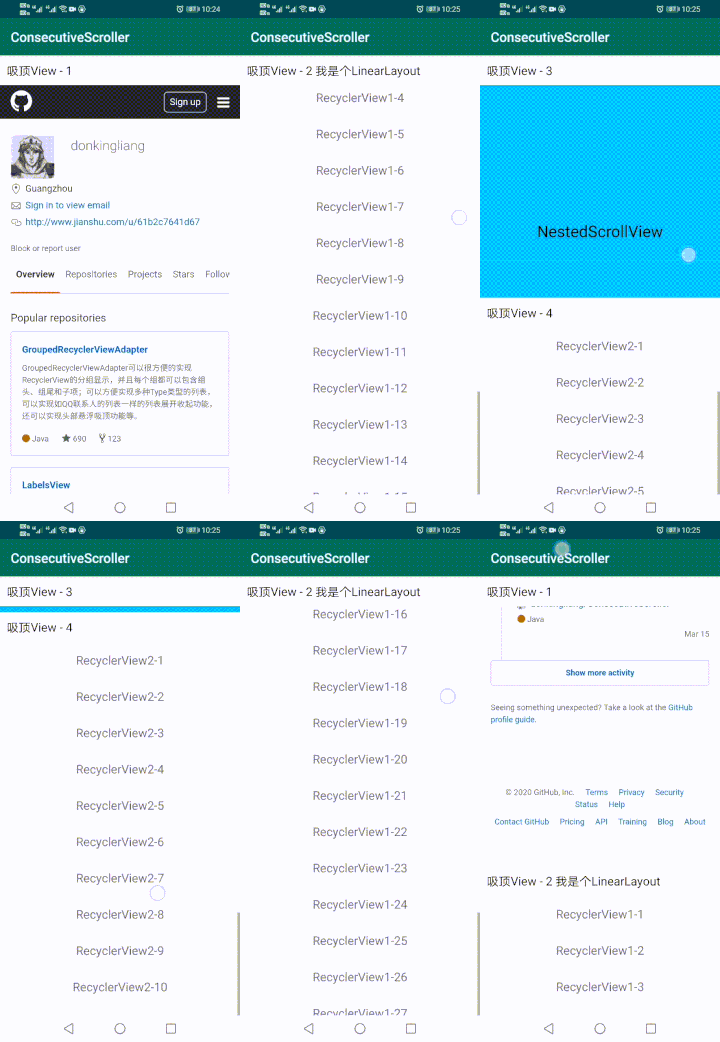
要实现布局的吸顶效果,在以前,我们可能会写两个一摸一样的布局,一个隐藏在顶部,一个嵌套在 ScrollView 下,通过监听 ScrollView 的滑动来显示和隐藏顶部的布局。这种方式实现起来既麻烦也不优雅。ConsecutiveScrollerLayout 内部实现了子 View 吸附顶部的功能,只要设置一个属性,就可以实现吸顶功能。而且支持设置多个子 View 吸顶,后面的 View 要吸顶时会把前面的吸顶 View 推出屏幕。
<?xml version="1.0" encoding="utf-8"?>
<com.donkingliang.consecutivescroller.ConsecutiveScrollerLayout xmlns:android="http://schemas.android.com/apk/res/android"
    xmlns:app="http://schemas.android.com/apk/res-auto"
    android:id="@+id/scrollerLayout"
    android:layout_width="match_parent"
    android:layout_height="match_parent"
    android:scrollbars="vertical">

  <!-- 设置 app:layout_isSticky="true"就可以使 View 吸顶 -->
    <TextView
        android:layout_width="match_parent"
        android:layout_height="wrap_content"
        android:background="@android:color/white"
        android:padding="10dp"
        android:text="吸顶 View - 1"
        android:textColor="@android:color/black"
        android:textSize="18sp"
        app:layout_isSticky="true" />

    <WebView
        android:id="@+id/webView"
        android:layout_width="match_parent"
        android:layout_height="match_parent" />

    <LinearLayout
        android:layout_width="match_parent"
        android:layout_height="wrap_content"
        android:background="@android:color/white"
        android:orientation="vertical"
        app:layout_isSticky="true">

        <TextView
            android:layout_width="match_parent"
            android:layout_height="wrap_content"
            android:padding="10dp"
            android:text="吸顶 View - 2 我是个 LinearLayout"
            android:textColor="@android:color/black"
            android:textSize="18sp" />

    </LinearLayout>

    <androidx.recyclerview.widget.RecyclerView
        android:id="@+id/recyclerView1"
        android:layout_width="match_parent"
        android:layout_height="wrap_content" />

    <TextView
        android:layout_width="match_parent"
        android:layout_height="wrap_content"
        android:background="@android:color/white"
        android:padding="10dp"
        android:text="吸顶 View - 3"
        android:textColor="@android:color/black"
        android:textSize="18sp"
        app:layout_isSticky="true" />

    <androidx.core.widget.NestedScrollView
        android:layout_width="match_parent"
        android:layout_height="match_parent">

    </androidx.core.widget.NestedScrollView>

    <TextView
        android:layout_width="match_parent"
        android:layout_height="wrap_content"
        android:background="@android:color/white"
        android:padding="10dp"
        android:text="吸顶 View - 4"
        android:textColor="@android:color/black"
        android:textSize="18sp"
        app:layout_isSticky="true" />

    <androidx.recyclerview.widget.RecyclerView
        android:id="@+id/recyclerView2"
        android:layout_width="match_parent"
        android:layout_height="wrap_content" />

</com.donkingliang.consecutivescroller.ConsecutiveScrollerLayout>
注意:
1、吸顶功能使用了 Android 5.0 之后才有的 API:setTranslationZ(),所有吸顶功能不支持 5.0 以前的手机。
2、由于吸顶功能需要通过设置 View 的 z 来时吸顶 View 显示在所有 View 的上面,所以使用者不要给 View 设置 z 或者 elevation。
3、对于一些 View,如果它显示在吸顶 View 的前面,把吸顶 View 重叠覆盖了,是因为它的 z 比吸顶 View 的 z 大,你可以把它的 elevation 设置为 0,或者给吸顶的 View 设置一个大点的 elevation 值。
局部滑动
ConsecutiveScrollerLayout 将所有的子 View 视作一个整体,由它统一处理页面的滑动事件,所以它默认会拦截可滑动的子 View 的滑动事件,由自己来分发处理。并且会追踪用户的手指滑动事件,计算调整 ConsecutiveScrollerLayout 滑动偏移。如果你希望某个子 View 自己处理自己的滑动事件,可以通过设置 layout_isConsecutive 属性来告诉父 View 不要拦截它的滑动事件,这样就可以实现在这个 View 自己的高度内滑动自己的内容,而不会作为 ConsecutiveScrollerLayout 的一部分来处理。
<?xml version="1.0" encoding="utf-8"?>
<com.donkingliang.consecutivescroller.ConsecutiveScrollerLayout xmlns:android="http://schemas.android.com/apk/res/android"
    xmlns:app="http://schemas.android.com/apk/res-auto"
    android:id="@+id/scrollerLayout"
    android:layout_width="match_parent"
    android:layout_height="match_parent"
    android:scrollbars="vertical">

<!--设置 app:layout_isConsecutive="false"使父布局不拦截滑动事件-->
    <LinearLayout
        android:layout_width="match_parent"
        android:layout_height="wrap_content"
        android:orientation="vertical"
        app:layout_isConsecutive="false">

        <TextView
            android:layout_width="match_parent"
            android:layout_height="wrap_content"
            android:padding="10dp"
            android:text="下面的红色区域是个 RecyclerView,它在自己的范围内单独滑动。"
            android:textColor="@android:color/black"
            android:textSize="18sp"
            app:layout_isSticky="true" />

        <androidx.recyclerview.widget.RecyclerView
            android:id="@+id/recyclerView1"
            android:layout_width="match_parent"
            android:layout_height="300dp"
            android:layout_marginLeft="50dp"
            android:layout_marginRight="50dp"
            android:layout_marginBottom="30dp"
            android:background="@android:color/holo_red_dark"/>

    </LinearLayout>

    <TextView
        android:layout_width="match_parent"
        android:layout_height="wrap_content"
        android:padding="10dp"
        android:text="下面的是个 NestedScrollView,它在自己的范围内单独滑动。"
        android:textColor="@android:color/black"
        android:textSize="18sp" />

    <androidx.core.widget.NestedScrollView
        android:layout_width="match_parent"
        android:layout_height="250dp"
        app:layout_isConsecutive="false">

    </androidx.core.widget.NestedScrollView>

</com.donkingliang.consecutivescroller.ConsecutiveScrollerLayout>
在这个例子中 NestedScrollView 希望在自己的高度里滑动自己的内容,而不是跟随 ConsecutiveScrollerLayout 滑动,只要给它设置 layout_isConsecutive="false"就可以了。而 LinearLayout 虽然不是滑动布局,但是在下面嵌套了个滑动布局 RecyclerView,所以它也需要设置 layout_isConsecutive="false"。
ConsecutiveScrollerLayout 支持 NestedScrolling 机制,如果你的局部滑动的 view 实现了 NestedScrollingChild 接口(如:RecyclerView、NestedScrollView 等),它滑动完成后会把滑动事件交给父布局。如果你不想你的子 view 或它的下级 view 与父布局嵌套滑动,可以给子 view 设置 app:layout_isNestedScroll="false"。它可以禁止子 view 与 ConsecutiveScrollerLayout 的嵌套滑动
使用腾讯 x5 的 WebView
由于腾讯 x5 的 VebView 是一个 FrameLayout 嵌套 WebView 的布局,而不是一个 WebView 的子类,所以要在 ConsecutiveScrollerLayout 里使用它,需要把它的滑动交给它里面的 WebView。自定义 MyWebView 继承腾讯的 WebView,重写它的 scrollBy()方法即可。
public class MyWebView extends com.tencent.smtt.sdk.WebView {

    public MyWebView(Context context, boolean b) {
        super(context, b);
    }

    public MyWebView(Context context) {
        super(context);
    }

    public MyWebView(Context context, AttributeSet attributeSet) {
        super(context, attributeSet);
    }

    public MyWebView(Context context, AttributeSet attributeSet, int i) {
        super(context, attributeSet, i);
    }

    public MyWebView(Context context, AttributeSet attributeSet, int i, boolean b) {
        super(context, attributeSet, i, b);
    }

    public MyWebView(Context context, AttributeSet attributeSet, int i, Map<String, Object> map, boolean b) {
        super(context, attributeSet, i, map, b);
    }


    @Override
    public void scrollBy(int x, int y) {
        // 把滑动交给它的子 view
        getView().scrollBy(x, y);
    }
}
另外需要隐藏它的子 view 的滚动条
View view = webView.getView();
view.setVerticalScrollBarEnabled(false);
view.setHorizontalScrollBarEnabled(false);
view.setOverScrollMode(OVER_SCROLL_NEVER);
其他注意事项
1、WebView 在加载的过程中如果滑动的布局,可能会导致 WebView 与其他 View 在显示上断层,使用下面的方法一定程度上可以避免这个问题。
webView.setWebChromeClient(new WebChromeClient() {
            @Override
            public void onProgressChanged(WebView view, int newProgress) {
                super.onProgressChanged(view, newProgress);
                scrollerLayout.checkLayoutChange();
            }
        });
2、继承 AbsListView 的布局(ListView、GridView 等),在滑动上可能会与用户的手指滑动不同步,推荐使用 RecyclerView 代替。
3、ConsecutiveScrollerLayout 的子 View 不支持 margin,子 View 间的间距可以通过 Space 设置。
4、使用 ConsecutiveScrollerLayout 提供的 setOnVerticalScrollChangeListener()方法监听布局的滑动事件。View 所提供的 setOnScrollChangeListener()方法已无效。
5、通过 getOwnScrollY()方法获取 ConsecutiveScrollerLayout 的垂直滑动距离,View 的 getScrollY()方法获取的不是 ConsecutiveScrollerLayout 的整体滑动距离。





 扫一扫
扫一扫


 686
686

 被折叠的 条评论
为什么被折叠?
被折叠的 条评论
为什么被折叠?
 到【灌水乐园】发言





