


一、前言
1.1 文章起因
这篇文章的起因来源于一个 BUG,这个 BUG 和上篇文章《Java SynchronizedSet 线程不安全之坑》 有点关系。简单来说,就是在线程池中执行任务,任务本身未做异常处理,导致出现异常后任务停止。
出错的原因来自对 Collections.synchronizedSet(new HashSet<>()) 的线程不安全访问,抛出了 ConcurrentModificationException。
问题的关键是在事后查询线上日志时并没有发现相关异常记录,导致问题的排查变得困难。所幸最后找到了问题,同时也发现了默认情况下线程中的异常是不会被记录到日志中的,也算是踩了个坑吧,这就是这篇文章的由来。
1.2 问题复现
写个简单的 Case 复现一下,首先日志框架这里使用 log4j2:
<dependency>
    <groupId>org.apache.logging.log4j</groupId>
    <artifactId>log4j-core</artifactId>
    <version>2.12.1</version>
</dependency>
在 resources 目录下创建 log4j2.xml 配置文件,将日志信息输出到文件中:
<?xml version="1.0" encoding="UTF-8"?>
<configuration status="ON">
    <appenders>
        <Console name="Console" target="SYSTEM_OUT">
            <PatternLayout pattern="%d{HH:mm:ss.SSS} [%t] %-5level %logger{36} - %msg%n"/>
        </Console>
        <RollingFile name="RollingFile" fileName="target/logs/app.log"
                     filePattern="target/logs/$${date:yyyy-MM}/app-%d{MM-dd-yyyy}-%i.log.gz">
            <PatternLayout pattern="%d{yyyy.MM.dd 'at' HH:mm:ss z} %-5level %class{36} %L %M - %msg%xEx%n"/>
            <SizeBasedTriggeringPolicy size="10 MB" />
        </RollingFile>
    </appenders>
    <loggers>
        <root level="DEBUG">
            <appender-ref ref="Console"/>
            <appender-ref ref="RollingFile"/>
        </root>
    </loggers>
</configuration>
编写示例程序,创建一个线程池执行任务,业务逻辑为除零操作:
import org.apache.logging.log4j.LogManager;
import org.apache.logging.log4j.Logger;

import java.util.concurrent.LinkedBlockingQueue;
import java.util.concurrent.ThreadPoolExecutor;
import java.util.concurrent.TimeUnit;

public class ThreadPoolLogTest {
    private static final long KEEP_ALIVE_TIME = 60L;
    private static Logger log = LogManager.getLogger(ThreadPoolLogTest.class);

    public static void main(String[] args) {
        ThreadPoolExecutor executor = poolExecutor(1, 1);
        log.info("开始提交任务");
        executor.execute(ThreadPoolLogTest::doSomeThing);
        log.info("提交任务完成");
    }

    private static void doSomeThing() {
        int value = 10 / 0;
    }

    public static ThreadPoolExecutor poolExecutor(int core, int max) {
        return new ThreadPoolExecutor(core, max, KEEP_ALIVE_TIME, TimeUnit.SECONDS,
                new LinkedBlockingQueue<>(), new ThreadPoolExecutor.AbortPolicy());
    }
}
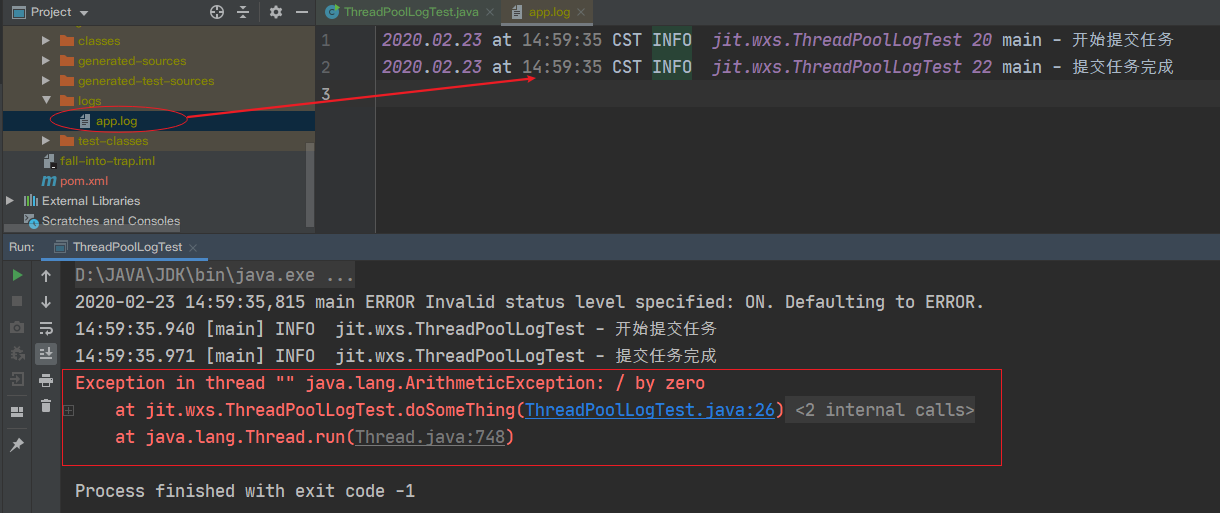
运行程序,查看控制台输出及日志输出。我们发现,在控制台中正确输出了异常栈,但是在日志中却没有记录下异常栈。
二、原生处理机制
我们知道,对线程池提交任务有两种方式,一种是 execute 方式,另一种是 submit 方式,这两种方式我都会分别介绍它们的处理方式。
由于咱们上面的例子使用的是 execute 方式,就先说说这种方式吧。
2.1 execute 方式
如下图所示,ThreadPoolExecutor 通过 getThreadFactory().newThread(this) 方式创建了一个任务,其底层执行的为 Thread 类。
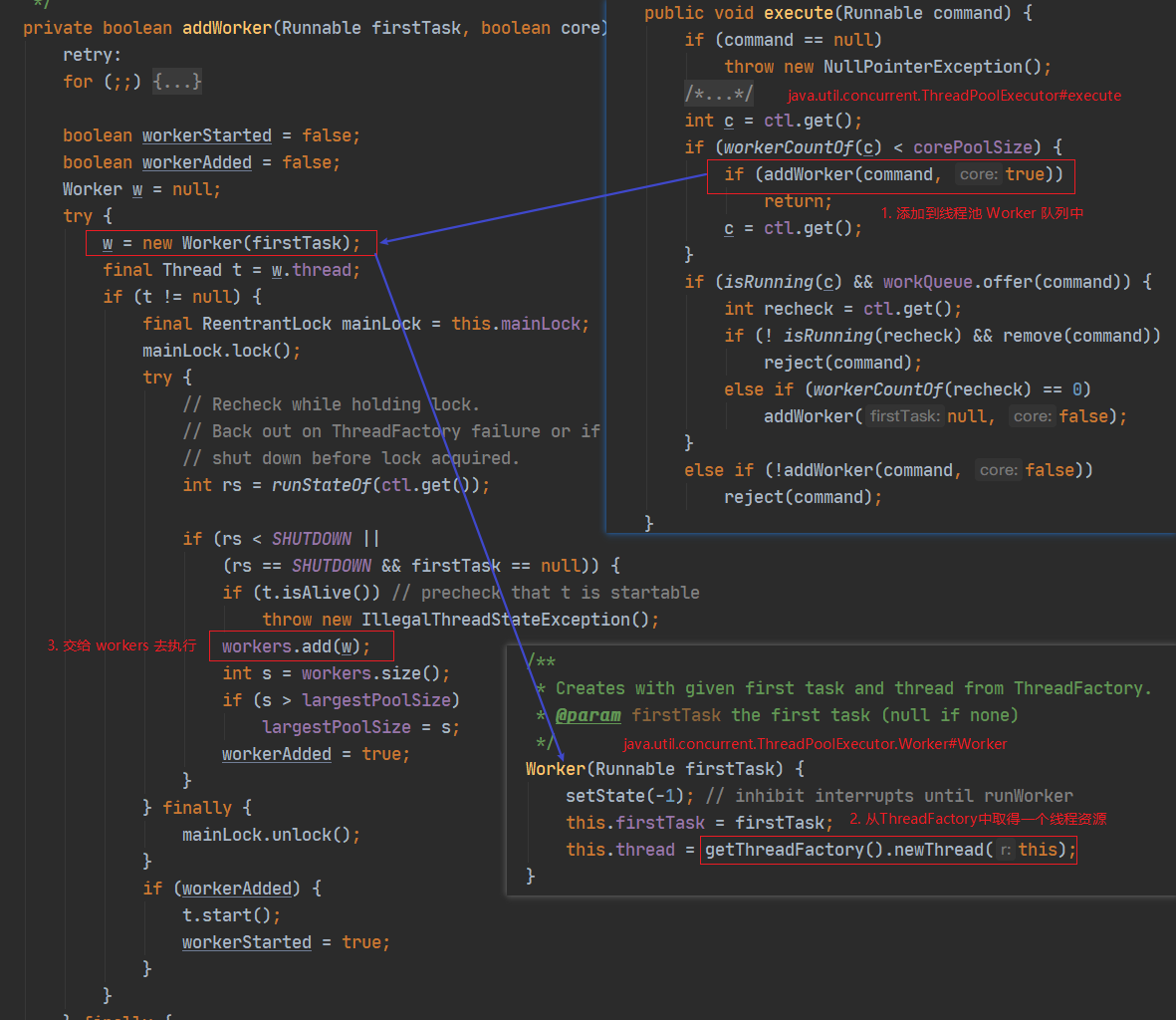
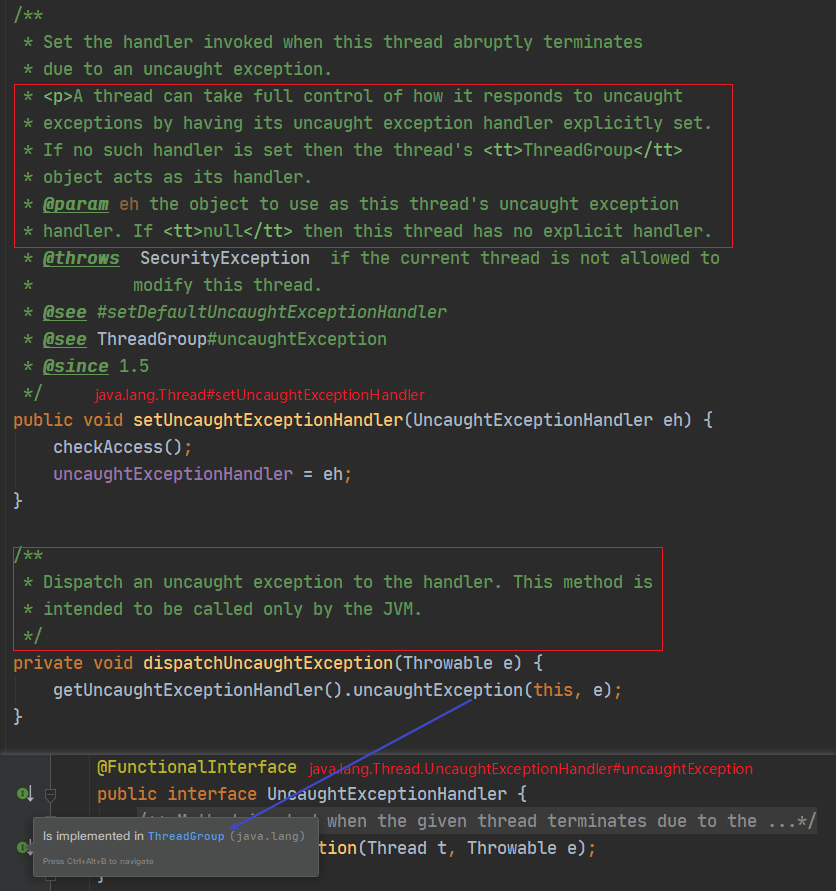
查看 Thread 类的源码,发现了两个十分特别的方法,结合上面的 JavaDoc 注释:
-
setUncaughtExceptionHandler():一个线程可以通过该方法来设置有未捕获的异常时程序的处理机制。如果没有设置,则ThreadGroup会作为默认的处理机制。 -
dispatchUncaughtException(): 当出现未捕获异常时调用该方法,该方法仅被 JVM 所调用。
接着我们看下 dispatchUncaughtException() 中的 uncaughtException() 方法,发现其属于 UncaughtExceptionHandler 接口,查看该接口实现类。目前只有一个实现类,就是 ThreadGroup。
现在有点思路了,梳理下:
- Case 中的除零异常未做异常处理,因此当执行到该处时,JVM 会调用
dispatchUncaughtException()方法。 - 默认情况下,
ThreadGroup会作为默认的处理机制,即会调用ThreadGroup#uncaughtException()方法。
让我们看看 ThreadGroup 的 uncaughtException() 方法是如何处理的。
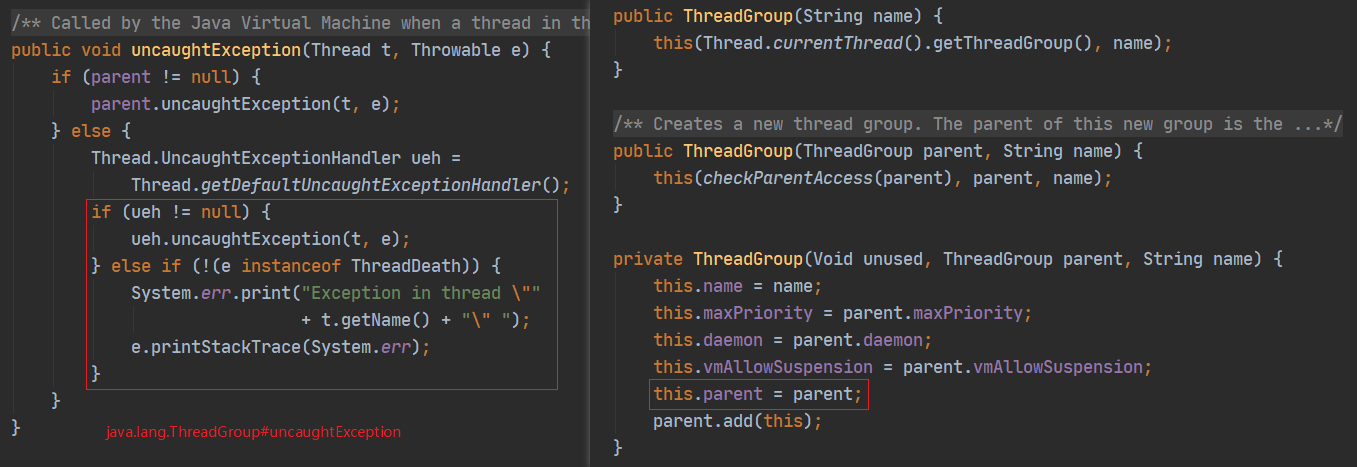
方法比较简单:
- 首先判断是否存在
parent,parent 在构造时会被传入,默认是当前线程的 ThreadGroup。如果存在话调用 parent 的 uncaughtException() 方法。 - 判断当前线程是否有设置
defaultUncaughtExceptionHandler,如果有,调用它的 uncaughtException() 方法。 - 最后,只要异常不是
ThreadDeath子类,直接使用System.err输出。
OK 了,问题找到了。如果这里直接走了最后的逻辑,那么 System.err 是只会输出在控制台和 tomcat 的 catalina.out 中,不会输出在日志中的。打上断点验证下。
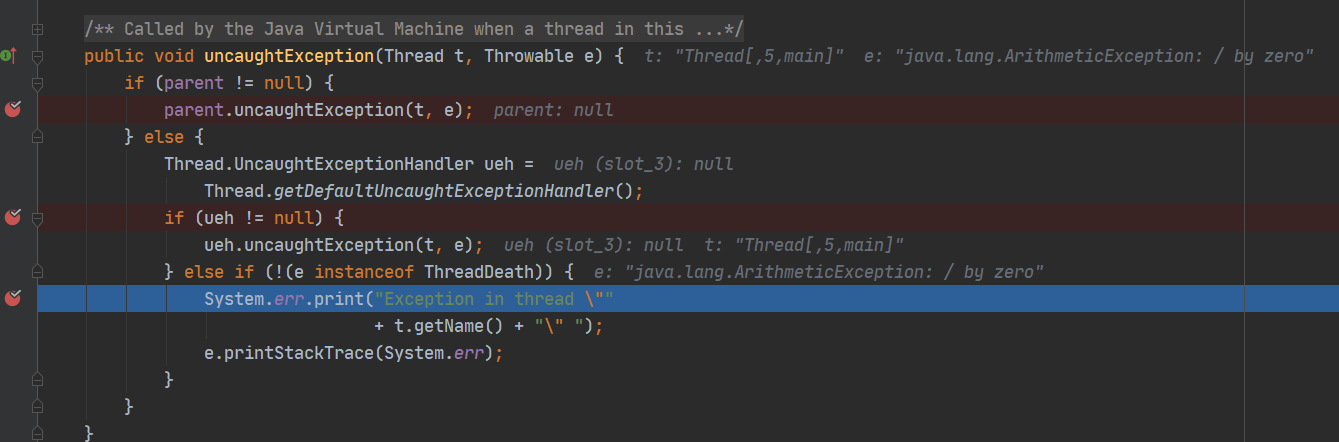
Thread.getDefaultUncaughtExceptionHandler() 为 null,除零异常不属于 ThreadDeath,因此执行 System.err 的逻辑,大功告成。
2.2 submit 方式
以上这些都是针对线程池的 execute() 而言,如果咱使用的是 submit() 呢,修改 Case 如下:
public class ThreadPoolLogTest {
    private static final long KEEP_ALIVE_TIME = 60L;
    private static Logger log = LogManager.getLogger(ThreadPoolLogTest.class);

    public static void main(String[] args) throws ExecutionException, InterruptedException {
        ThreadPoolExecutor executor = poolExecutor(1, 1);
        log.info("开始提交任务");
        Future<Result> task = executor.submit(ThreadPoolLogTest::doSomeThing);
        log.info("提交任务完成");

        // 临时注释
//        while (!task.isDone()) {
//            TimeUnit.MILLISECONDS.sleep(100);
//        }
//        log.info("任务执行结果:{}", task.get().ok);
    }

    private static Result doSomeThing() {
        int value = 10 / 0;
        return new Result(true);
    }

    public static ThreadPoolExecutor poolExecutor(int core, int max) {
        return new ThreadPoolExecutor(core, max, KEEP_ALIVE_TIME, TimeUnit.SECONDS,
                new LinkedBlockingQueue<>(), new ThreadPoolExecutor.AbortPolicy());
    }

    static class Result {
        boolean ok;

        Result(boolean ok) { this.ok = ok; }

        @Override
        public String toString() { return "Result{" + "ok=" + ok + '}'; }
    }
}
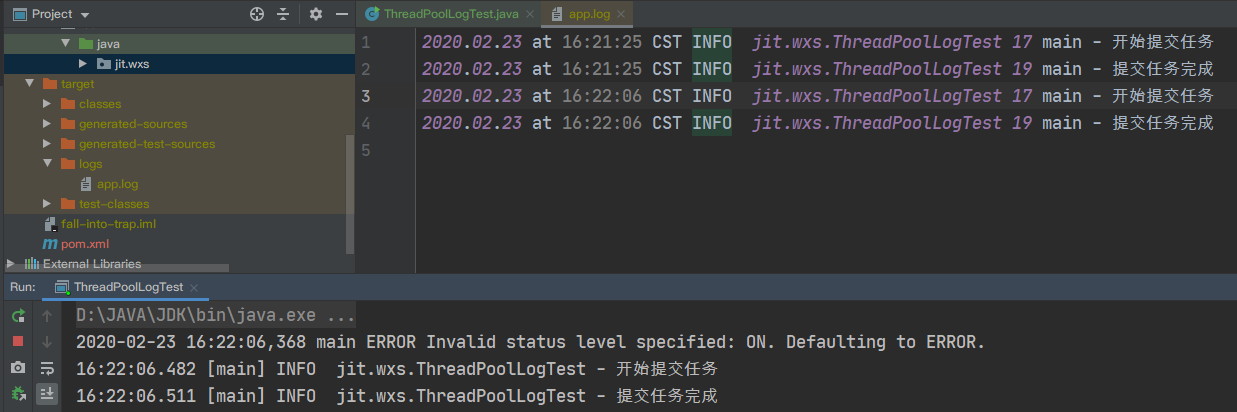
运行程序,发现这次不仅日志没有异常栈,连控制台也没了,继续开始看源码。
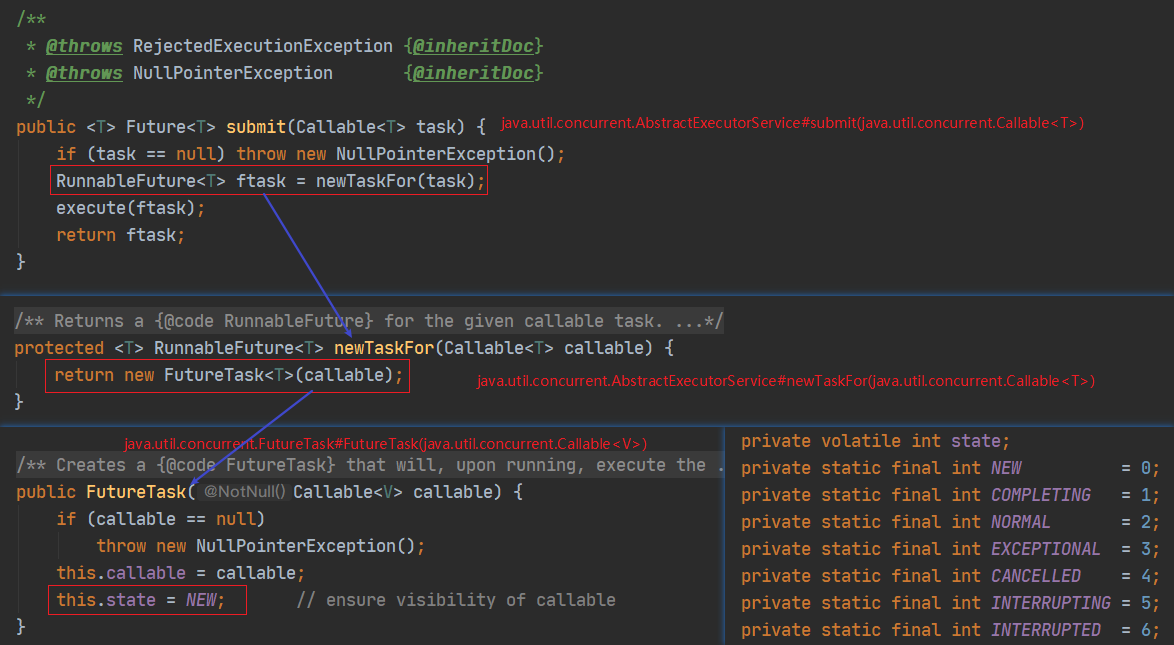
我们发现 submit 方法最后底层真正干活的是 FutureTask,同时任务的 state 被置为 1(NEW)。接着看 FutureTask 类的 run() 方法是如何处理的。
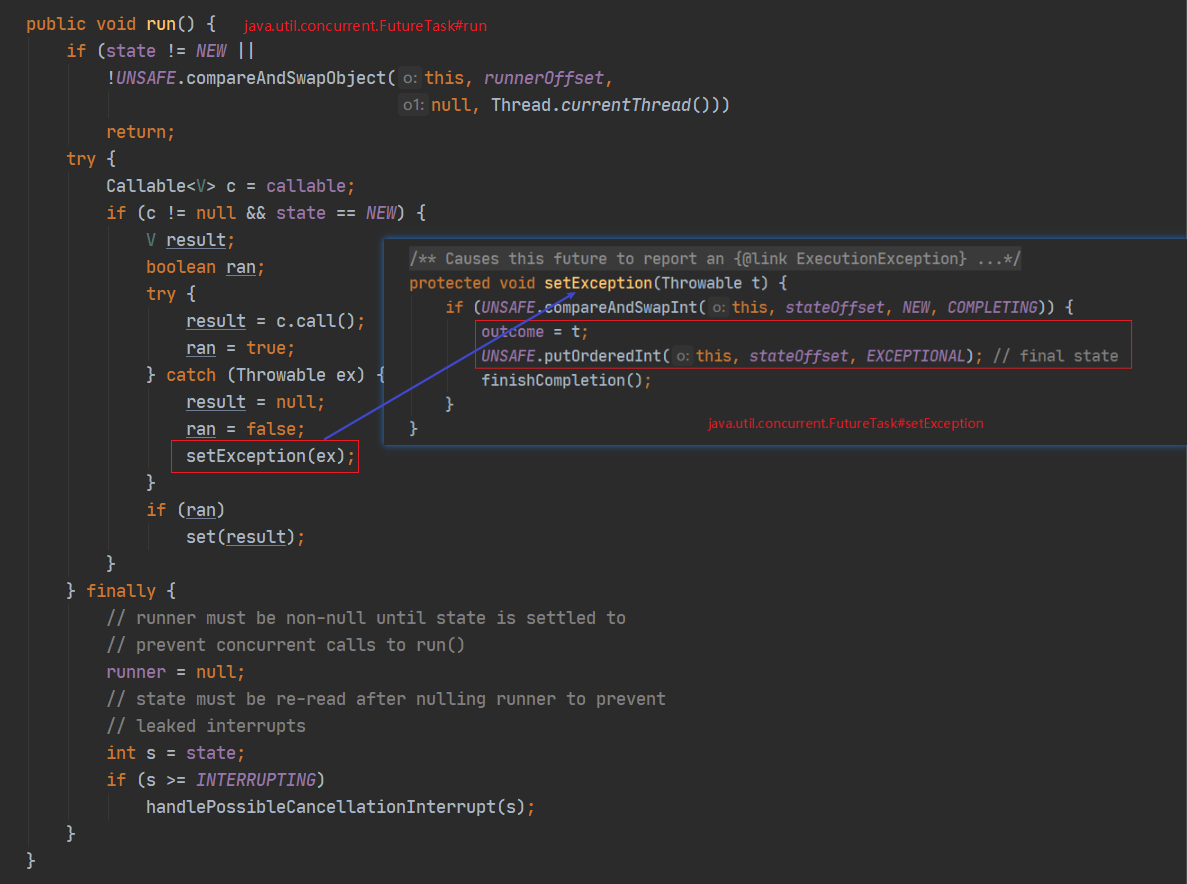
run() 方法中关于异常处理的部分:
- 将 FutureTask 包装的返回置为了 null
- 将 ran 置为了 false
- 调用
setException()方法
在 setException() 方法中:
- 将异常保存给了
outcome - state 被置为了 3(EXCEPTIONAL)
至此就结束了,说明 submit() 方式的异常信息并不是在 run() 方法中抛出的,因此只能去看获取执行结果的 get() 方法。
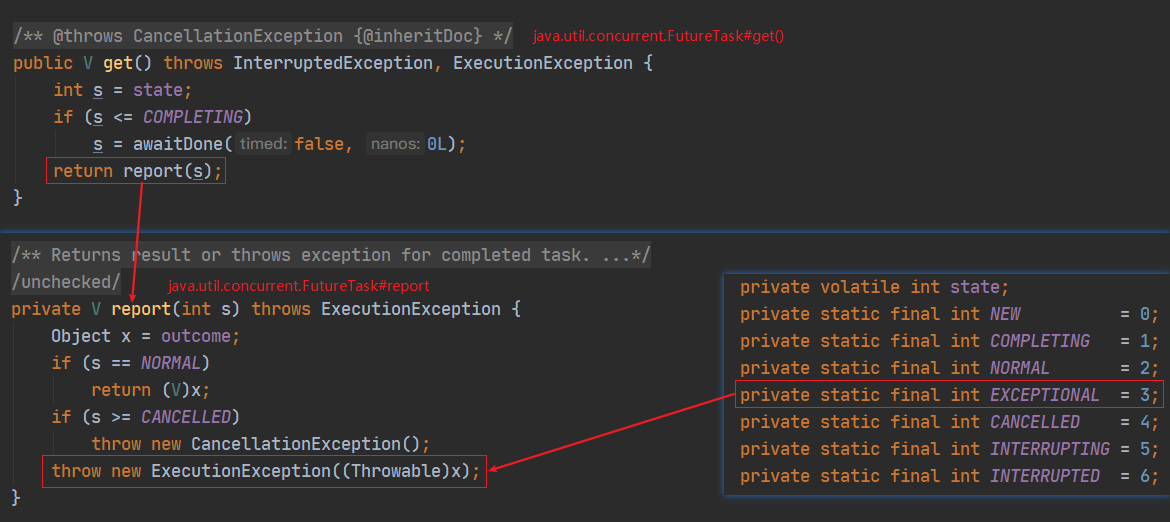
由于之前 state 被设置为了 3(EXCEPTIONAL),因此 get() 方法中直接走 report() 方法,report() 方法中首先将 ountcome 取出赋给局部变量 x,对于 s == 3 的处理是直接将异常 x 包装成 ExecutionException 抛出。
至此,完成源码查看,梳理下思路:
- 线程池调用 submit() 方法底层是由 FutureTask 来执行的。
- FutureTask 的 run() 方法在抛出异常时,调用 setException() 方法将异常保存下来。
- 主线程通过调用 FutureTask 的 get() 方法,当执行出现异常时,被抛出。
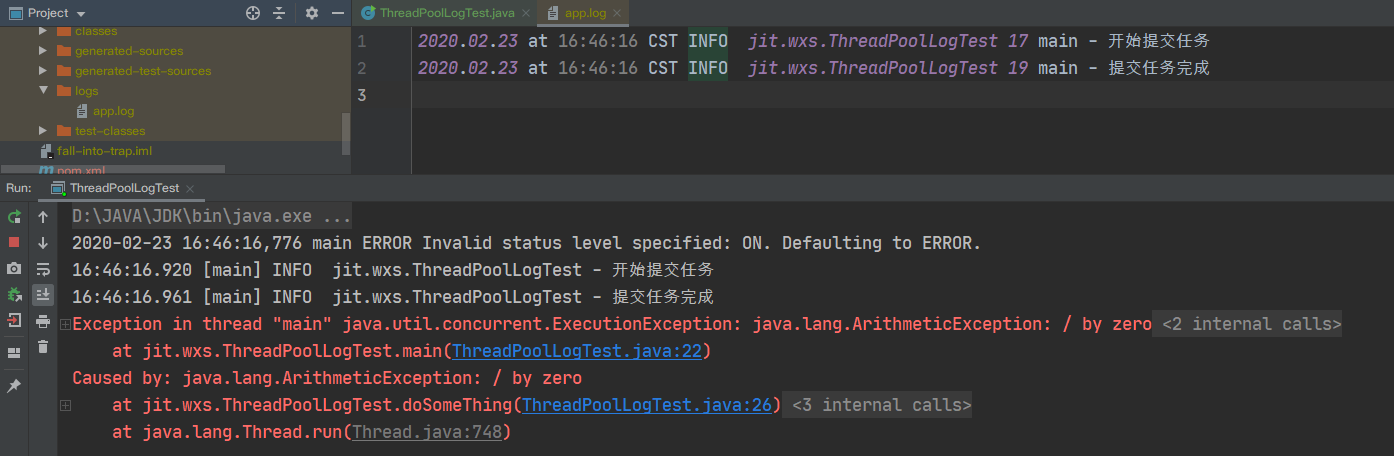
最后恢复本节 Case main() 方法最后一行的注释,重新运行程序,得到和 execute() 方式一样的结果。
三、自定义处理机制
本章将开始介绍如何解决异常栈不输出到日志文件中的问题,提出以下四种解决方式:
- 手动 catch:适用 execute() 方式、submit() 方式
- 自定义 ThreadPoolExecutor:适用 execute() 方式
- 自定义 ThreadGroup:适用 execute() 方式
- 设置 UncaughtExceptionHandler:适用 execute() 方式
之所以后面三种不适用于 submit() 方式,是因为 sumbit() 方式只有在主线程 get() 时候才会抛出异常,因此直接在主线程手动 catch get() 方法即可,不需要自定义 ThreadPoolExecutor。而自定义 ThreadGroup 和设置 UncaughtExceptionHandler这两种,是跟 Thread 类强绑定的,与 submit() 无关。
3.1 手动 Catch
手动 Catch 是最简单的方法,直接在会抛出异常的地方手动 catch 即可。唯一麻烦的地方就是要在每个任务的地方都写一遍。
(1)对于 sumbit() 方式,修改 doSimeThing() :
private static Result doSomeThing() {
    try {
        int value = 10 / 0;
    } catch (Exception e) {
        log.error("doSomeThing execute Exception: ", e);
        return new Result(false);
    }
    return new Result(true);
}
运行结果如下:
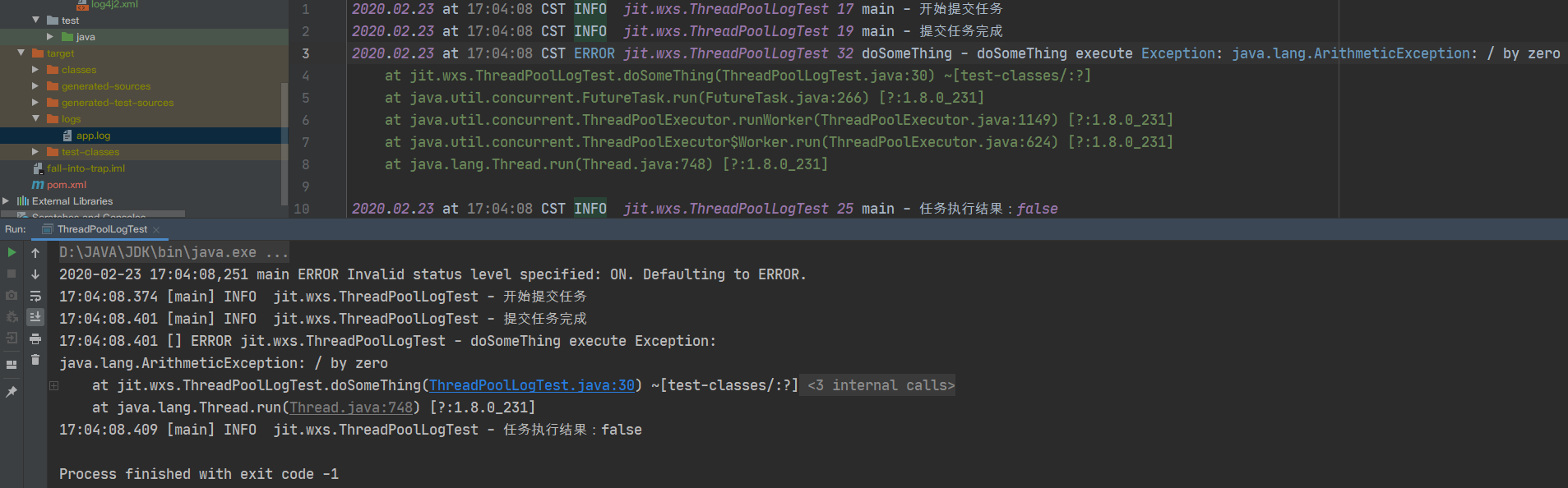
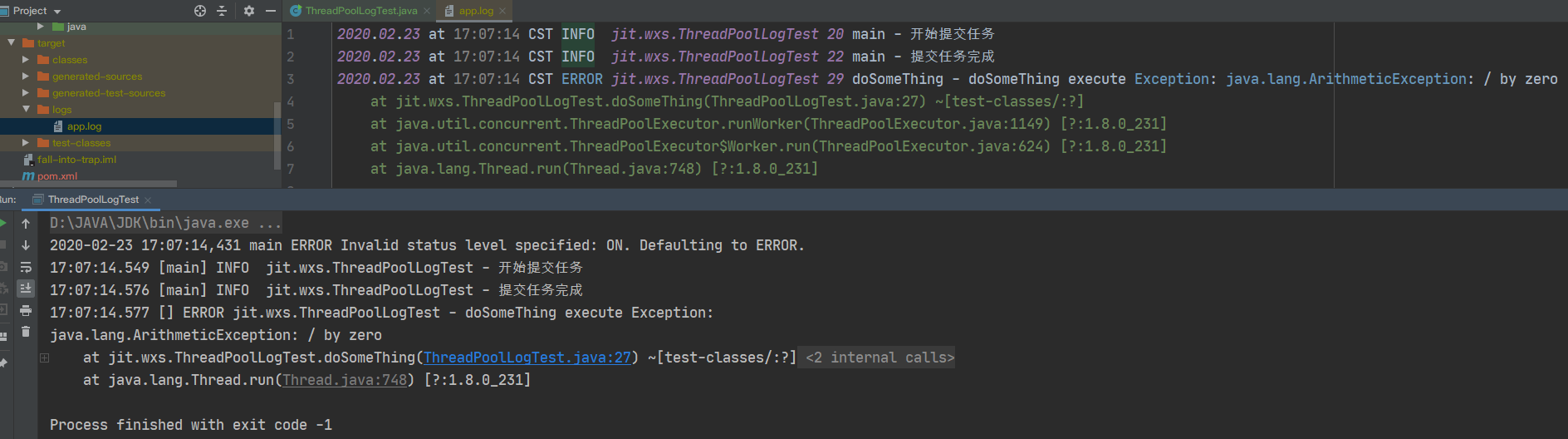
(2)对于 execute() 方式,修改 doSimeThing() :
private static void doSomeThing() {
    try {
        int value = 10 / 0;
    } catch (Exception e) {
        log.error("doSomeThing execute Exception: ", e);
    }
}
运行结果如下:
3.2 自定义 ThreadPoolExecutor
首先咱们先抽取一个 utils 方法,用于打印异常栈,后面都会用到:
public class ThreadUtils {
    public static String stackTrace(StackTraceElement[] stackTrace) {
        if (stackTrace != null && stackTrace.length > 0) {
            StringBuilder logs = new StringBuilder(512);
            for (StackTraceElement e : stackTrace) {
                logs.append(java.text.MessageFormat.format("{0}: {1}(): {2}" , e.getClassName(), e.getMethodName(),
                        e.getLineNumber())).append("\n");
            }
            return logs.toString();
        }
        return "";
    }
}
自定义 ThreadPoolExecutor,并重写 afterExecute() 方法,该方法在任务执行完毕后会被调用,我们可以在其中处理我们的异常。
import org.apache.logging.log4j.LogManager;
import org.apache.logging.log4j.Logger;

import java.util.concurrent.*;

public class CustomThreadPoolExecutor extends ThreadPoolExecutor {
    private static Logger log = LogManager.getLogger(CustomThreadPoolExecutor.class);

    public CustomThreadPoolExecutor(int corePoolSize, int maximumPoolSize, long keepAliveTime, TimeUnit unit,
                                    BlockingQueue<Runnable> workQueue, RejectedExecutionHandler handler) {
        super(corePoolSize, maximumPoolSize, keepAliveTime, unit, workQueue, handler);
    }

    @Override
    protected void afterExecute(Runnable r, Throwable e) {
        super.afterExecute(r, e);
        log.error("CustomThreadPoolExecutor execute Exception: {}",
                ThreadUtils.stackTrace(e.getStackTrace()));
    }
}
重新调整下我们的 Case,把线程池的创建替换成我们自定义的线程池:
public class ThreadPoolLogTest {
    private static final long KEEP_ALIVE_TIME = 60L;
    private static Logger log = LogManager.getLogger(ThreadPoolLogTest.class);

    public static void main(String[] args) {
        ThreadPoolExecutor executor = poolExecutor(1, 1);
        log.info("开始提交任务");
        executor.execute(ThreadPoolLogTest::doSomeThing);
        log.info("提交任务完成");
    }

    private static void doSomeThing() {
        int value = 10 / 0;
    }

    public static CustomThreadPoolExecutor poolExecutor(int core, int max) {
        return new CustomThreadPoolExecutor(core, max, KEEP_ALIVE_TIME, TimeUnit.SECONDS,
                new LinkedBlockingQueue<>(), new ThreadPoolExecutor.AbortPolicy());
    }
}
运行程序:
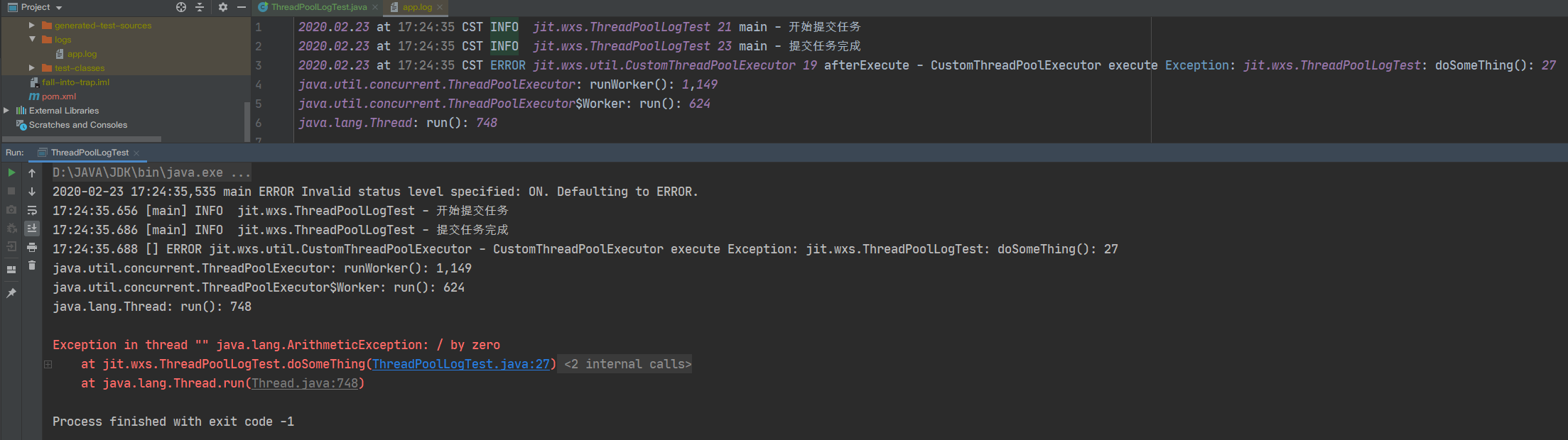
之所以控制台会输出两遍异常栈,是因为第一遍是我们自定义线程池输出的,且它会被记录到日志中。第二遍是 super.afterExecute(r, e) 导致的,这一遍只会输出在控制台。
3.3 自定义 ThreadGroup
除了可以自定义线程池,也可以自定义 ThreadGroup,这样就不会调用默认的 ThreadGroup,走 System.err 的逻辑了。
import org.apache.logging.log4j.LogManager;
import org.apache.logging.log4j.Logger;

public class CustomThreadGroup extends ThreadGroup {
    private static Logger log = LogManager.getLogger(CustomThreadGroup.class);

    public CustomThreadGroup(String name) {
        super(name);
    }

    @Override
    public void uncaughtException(Thread t, Throwable e) {
        super.uncaughtException(t, e);
        log.error("CustomThreadPoolExecutor execute Exception: {}",
                ThreadUtils.stackTrace(e.getStackTrace()));
    }
}
重新调整下我们的 Case,线程池的创建时传入我们自定义的 ThreadGroup:
public class ThreadPoolLogTest {
    private static final long KEEP_ALIVE_TIME = 60L;
    private static Logger log = LogManager.getLogger(ThreadPoolLogTest.class);

    public static void main(String[] args) {
        ThreadPoolExecutor executor = poolExecutor(1, 1);
        log.info("开始提交任务");
        executor.execute(ThreadPoolLogTest::doSomeThing);
        log.info("提交任务完成");
    }

    private static void doSomeThing() {
        int value = 10 / 0;
    }

    public static ThreadPoolExecutor poolExecutor(int core, int max) {
        return new ThreadPoolExecutor(core, max, KEEP_ALIVE_TIME, TimeUnit.SECONDS,
                new LinkedBlockingQueue<>(), r -> new Thread(new CustomThreadGroup("CustomThreadGroup"), r),
                new ThreadPoolExecutor.AbortPolicy());
    }
}
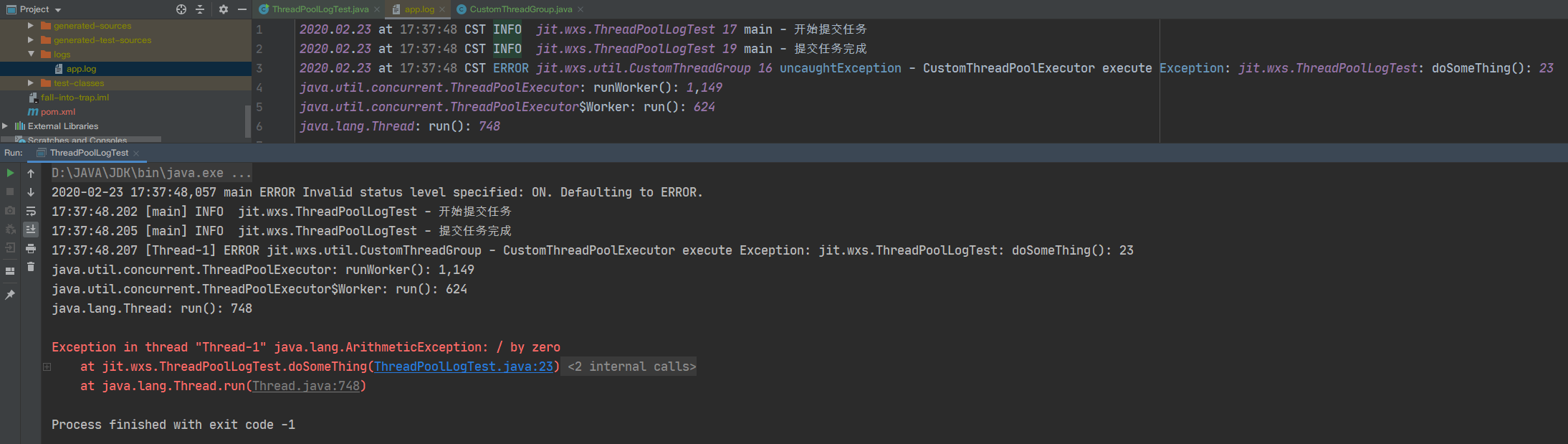
运行程序:
3.4 设置 UncaughtExceptionHandler
最后一种,手动设置 UncaughtExceptionHandler。重新调整下我们的 Case,线程池的创建时传入我们自定义的 UncaughtExceptionHandler:
public class ThreadPoolLogTest {
    private static final long KEEP_ALIVE_TIME = 60L;
    private static Logger log = LogManager.getLogger(ThreadPoolLogTest.class);

    public static void main(String[] args) {
        ThreadPoolExecutor executor = poolExecutor(1, 1);
        log.info("开始提交任务");
        executor.execute(ThreadPoolLogTest::doSomeThing);
        log.info("提交任务完成");
    }

    private static void doSomeThing() {
        int value = 10 / 0;
    }

    public static ThreadPoolExecutor poolExecutor(int core, int max) {
        return new ThreadPoolExecutor(core, max, KEEP_ALIVE_TIME, TimeUnit.SECONDS,
                new LinkedBlockingQueue<>(), r -> {
                    Thread thread = new Thread(r);
                    thread.setUncaughtExceptionHandler((t, e) ->
                            log.error("CustomThreadPoolExecutor execute Exception: {}",
                                    ThreadUtils.stackTrace(e.getStackTrace())));
                    return thread;
                }, new ThreadPoolExecutor.AbortPolicy());
    }
}
运行程序:
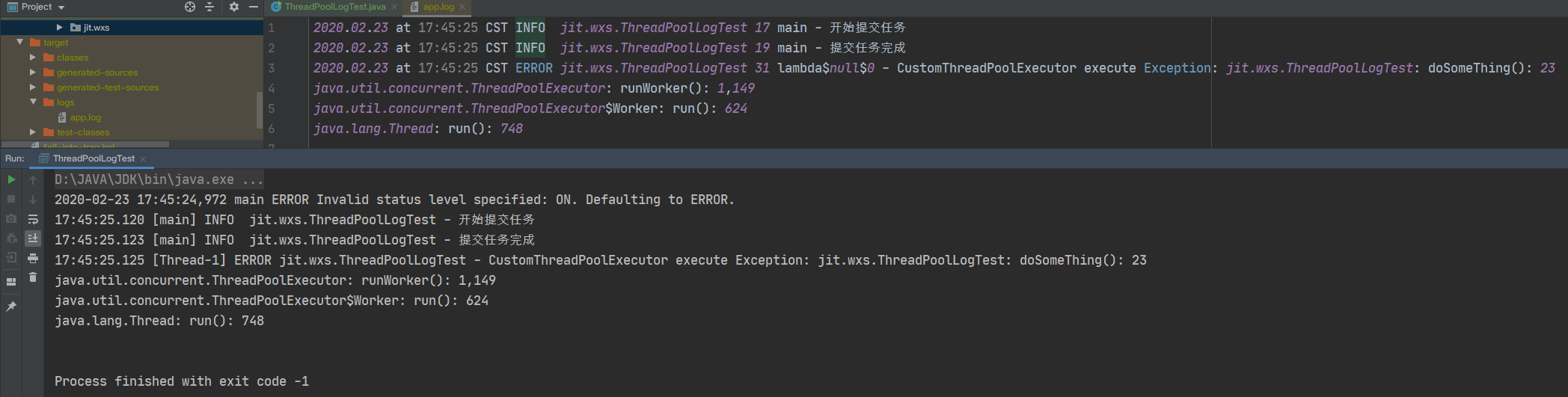
与自定义 ThreadPoolExecutor、自定义 ThreadGroup 不同的是,这种方式不会打印两遍错误栈。
四、ScheduledThreadPoolExecutor
ScheduledThreadPoolExecutor 是另一种常用的线程池,常用了执行延迟任务或定时任务。常用的方法为 scheduleXXX 系列。那在这个线程池中异常是如何处理的呢?
ScheduledThreadPoolExecutor 底层使用 ScheduledFutureTask 来执行任务,而 ScheduledFutureTask 是 FutureTask 的子类。
在使用 schedule() 方法时,我们可以通过这两个方法返回的 Future 来获得执行结果,这和 ThreadPoolExecutor 的 submit() 的处理方式是一致的。但是对于 scheduleWithFixedDelay() 和 scheduleAtFixedRate() 这两个方法,执行的是定时任务,返回的 Future 只会用来取消任务,而不是得到结果。因此对于这两个方法来说,需要采用 ThreadPoolExecutor 的 execute() 的处理方式。
五、总结
5.1 ThreadPoolExecutor
-
sumbit()方式底层使用 FutureTask 执行任务,如果业务抛出异常,只有在调用 Future#get() 时才会被抛出。 -
execute()方法底层使用 Thread 执行任务,如果业务抛出异常,默认采用 Sysstem.err 进行输出,只会打印在控制台和 tomcat 的 catalina.out 文件,不会输出到日志中。 -
sumbit()方法处理异常,既可以在业务中进行手动 catch,也可以在调用 Future#get() 时手动 catch。 -
execute()方法处理异常:-
业务中手动 catch,每个业务地方都要写,最稳妥。
-
自定义 ThreadPoolExecutor 或者自定义 ThreadGroup,控制台会打印两遍日志。
-
设置 UncaughtExceptionHandler,控制台只打印一遍日志。
-
5.2 ScheduledThreadPoolExecutor
schedule()方法采用和 ThreadPoolExecutor 的sumbit()方法一样处理异常。scheduleWithFixedDelay()和scheduleAtFixedRate()方法采用和 ThreadPoolExecutor 的execute()方法一样处理异常。
5.3 程序的健壮性
最后在想谈谈健壮性这个问题,不论是自定义 ThreadPoolExecutor,或是自定义 ThreadGroup,或是设置 UncaughtExceptionHandler。到了这个地步说明线程执行已经出现了错误,此时整个任务已经挂掉了。
举个例子,例如你使用线程池进行一批数据计算,其中有一项数据出了问题。如果忽略出错的那一项数据是可接受的话,那么让整个任务都挂掉是不合适的。因此你应该在业务中手动 catch,来避免整个任务挂掉。
再举个例子,如果某个任务对正确性要求十分的高,如果出错整个系统都没有运行的必要了,那么就可以使用其他的几种处理方式。
可能例子举得不是十分恰当,但我想说明的是,技术最终要服务于业务,具体该使用哪种方式应该与你的业务场景有关。






 扫一扫
扫一扫


 1465
1465


 到【灌水乐园】发言



