


前面介绍了一种裁剪框的实现方案详见Qt实现截图之二 ,本节再介绍一种实现方案。
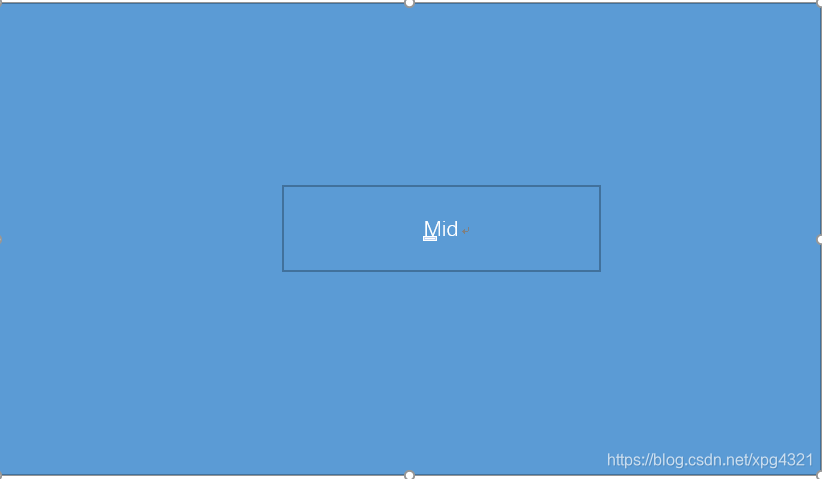
分层依旧两层,改变的是裁剪层,差别在于只需要一个裁剪窗口也就是去掉前面的top,right, left,bottom,只留下mid窗体用于高亮显示裁剪区域。
布局如下:
void MaskFrameBase::setup()
{
    this->setMouseTracking(true);

   // this->setObjectName("shtcenterframe");
    this->setSizePolicy(QSizePolicy::Expanding,QSizePolicy::Expanding);

    this->captureArea = new QFrame(this);
    this->captureArea->installEventFilter(this);
    this->captureArea->setObjectName("captureareaframe");
    this->captureArea->setSizePolicy(QSizePolicy::Expanding,QSizePolicy::Expanding);
    this->captureArea->setMouseTracking(true);
    createBtnFrame();

    bSetupView = true;

    adjustCaptureArea();
    this->captureArea->resize(0, 0);
    this->captureArea->setVisible(false);
}
1.绘制裁剪框
首先计算一下边框绘制的区域
void MaskFrameBase::calRect()
{
    leftTopRect = QRect(edgeMargin, edgeMargin, _rect_border_size.width(), _rect_border_size.height());
    topRect = QRect((this->captureArea->width() - _rect_border_size.width()) * 0.5, edgeMargin, _rect_border_size.width(), _rect_border_size.height());
    rigtTopRect = QRect(this->captureArea->width() - _rect_border_size.width() - edgeMargin, edgeMargin, _rect_border_size.width(), _rect_border_size.height());
    rightRect = QRect(this->captureArea->width() - _rect_border_size.width() - edgeMargin, (this->captureArea->height() - _rect_border_size.height()) * 0.5, _rect_border_size.width(), _rect_border_size.height());
    rightBottomRect = QRect(this->captureArea->width() - _rect_border_size.width() - edgeMargin, this->captureArea->height() - _rect_border_size.height() - edgeMargin, _rect_border_size.width(), _rect_border_size.height());
    bottomRect = QRect((this->captureArea->width() - _rect_border_size.width()) * 0.5, this->captureArea->height() - _rect_border_size.height() - edgeMargin, _rect_border_size.width(), _rect_border_size.height());
    leftBottomRect = QRect(edgeMargin, this->captureArea->height() - _rect_border_size.height() - edgeMargin, _rect_border_size.width(), _rect_border_size.height());
    leftRect = QRect(edgeMargin, (this->captureArea->height() - _rect_border_size.height()) * 0.5, _rect_border_size.width(), _rect_border_size.height());
    centerRect = QRect(_rect_border_size.width() * 0.5 + edgeMargin, _rect_border_size.height() * 0.5 + edgeMargin, this->captureArea->width() - _rect_border_size.width() - edgeMargin * 2, this->captureArea->height() - _rect_border_size.height()- edgeMargin*2);
}
绘制跟之前一样
bool MaskFrameBase::eventFilter(QObject *obj, QEvent *event)
{
    if(obj == this->captureArea)
    {
        if(event->type() == QEvent::Paint)
        {
            QPainter painter(captureArea);

            painter.setRenderHint(QPainter::Antialiasing, true);
            painter.setPen(QPen(QColor(0xFC, 0xC9, 0x01), lineWidth,  Qt::SolidLine, Qt::RoundCap, Qt::RoundJoin));    //设置画笔形式
            //画矩形
            calRect();

            QPainterPath path;
            path.addEllipse(leftRect.left(), leftRect.top(), leftRect.width(), leftRect.width());
            path.addEllipse(topRect.left(), topRect.top(), topRect.width(), topRect.width());
            path.addEllipse(rigtTopRect.left(), rigtTopRect.top(), rigtTopRect.width(), rigtTopRect.width());
            path.addEllipse(rightRect.left(), rightRect.top(), rightRect.width(), rightRect.width());
            path.addEllipse(rightBottomRect.left(), rightBottomRect.top(), rightBottomRect.width(), rightBottomRect.width());
            path.addEllipse(bottomRect.left(), bottomRect.top(), bottomRect.width(), bottomRect.width());
            path.addEllipse(leftBottomRect.left(), leftBottomRect.top(), leftBottomRect.width(), leftBottomRect.width());
            path.addEllipse(leftTopRect.left(), leftTopRect.top(), leftTopRect.width(), leftTopRect.width());
            painter.setBrush(Qt::white);
            painter.drawPath(path);

            //划线
            painter.drawLine(QLine(QPoint(_rect_border_size.width() + edgeMargin, _rect_border_size.height() * 0.5 + edgeMargin), QPoint((this->captureArea->width() - _rect_border_size.width()) * 0.5 - 1, _rect_border_size.height() * 0.5 + edgeMargin)));
            painter.drawLine(QLine(QPoint((this->captureArea->width() - _rect_border_size.width()) * 0.5 + _rect_border_size.width(), _rect_border_size.height() * 0.5 + edgeMargin), QPoint(this->captureArea->width() - _rect_border_size.width() - edgeMargin - 1, _rect_border_size.height() * 0.5 + edgeMargin)));

            painter.drawLine(QLine(QPoint(this->captureArea->width() - _rect_border_size.width() * 0.5 - edgeMargin, _rect_border_size.height() + edgeMargin), QPoint(this->captureArea->width() - _rect_border_size.width() * 0.5 - edgeMargin, (this->captureArea->height() - _rect_border_size.height()) * 0.5 - 1)));
            painter.drawLine(QLine(QPoint(this->captureArea->width() - _rect_border_size.width() * 0.5 - edgeMargin, (this->captureArea->height() - _rect_border_size.height()) * 0.5 + _rect_border_size.height()), QPoint(this->captureArea->width() - _rect_border_size.width() * 0.5 - edgeMargin, this->captureArea->height() - _rect_border_size.height() - edgeMargin - 1)));

            painter.drawLine(QLine(QPoint((this->captureArea->width() - _rect_border_size.width()) * 0.5 + _rect_border_size.width(), this->captureArea->height() - _rect_border_size.height() * 0.5 - edgeMargin), QPoint(this->captureArea->width() - _rect_border_size.width() - edgeMargin - 1, this->captureArea->height() - _rect_border_size.height() * 0.5 - edgeMargin)));
            painter.drawLine(QLine(QPoint(_rect_border_size.width() + edgeMargin, this->captureArea->height() - _rect_border_size.height() * 0.5 - edgeMargin), QPoint((this->captureArea->width() - _rect_border_size.width()) * 0.5 - 1, this->captureArea->height() - _rect_border_size.height() * 0.5 - edgeMargin)));

            painter.drawLine(QLine(QPoint(_rect_border_size.width() * 0.5 + edgeMargin, _rect_border_size.height() + edgeMargin), QPoint(_rect_border_size.width() * 0.5 + edgeMargin, (this->captureArea->height() - _rect_border_size.height()) * 0.5 - 1)));
            painter.drawLine(QLine(QPoint(_rect_border_size.width() * 0.5 + edgeMargin, (this->captureArea->height() - _rect_border_size.height()) * 0.5 + _rect_border_size.height()), QPoint(_rect_border_size.width() * 0.5 + edgeMargin, this->captureArea->height() - _rect_border_size.height() - edgeMargin - 1)));
        }
    }
    return QFrame::eventFilter(obj, event);
}
2.重载父窗口paintEvent
重载这个事件是为了绘制非裁减区域,绘制层半透明,首先要判断一下裁剪区域是否显示且有效,无效则全屏绘制成半透明,代码如下:
void MaskFrameBase::paintEvent(QPaintEvent *)
{
    QPainter painter(this);

    if(this->captureArea->isVisible() && captureAreaValide())
    {
        //左边区域
        painter.fillRect(QRect(0, this->captureArea->pos().y()+_rect_border_size.height() * 0.5+edgeMargin,
                               this->captureArea->pos().x()+_rect_border_size.width() * 0.5+edgeMargin ,
                               this->captureArea->height()-_rect_border_size.height()-edgeMargin*2),
                         QBrush(QColor(0, 0, 0,128)));
        //上边区域
        painter.fillRect(QRect(0, 0, width(), this->captureArea->pos().y()+_rect_border_size.height() * 0.5+edgeMargin),
                         QBrush(QColor(0, 0, 0,128)));
        //右边区域
        painter.fillRect(QRect(this->captureArea->geometry().right()-edgeMargin-_rect_border_size.width() * 0.5,
                               this->captureArea->pos().y()+_rect_border_size.height() * 0.5+edgeMargin,
                               width()-this->captureArea->geometry().right()+_rect_border_size.width() * 0.5+edgeMargin,
                               this->captureArea->height()-_rect_border_size.height()-edgeMargin*2),
                                QBrush(QColor(0, 0, 0,128)));
        //下边区域
         painter.fillRect(QRect(0,
                                this->captureArea->geometry().top()+this->captureArea->height()-_rect_border_size.height() * 0.5-edgeMargin,
                                width(),
                                height()-this->captureArea->geometry().bottom()+_rect_border_size.height()*0.5+edgeMargin),
                                QBrush(QColor(0, 0, 0,128)));

        //透明区域
        QRect rect;
        rect.setX(this->captureArea->pos().x()+_rect_border_size.width()*0.5+edgeMargin);
        rect.setY(this->captureArea->pos().y()+_rect_border_size.height()*0.5 +edgeMargin);
        rect.setWidth(this->captureArea->width()-_rect_border_size.width()-edgeMargin*2);
        rect.setHeight(this->captureArea->height()-_rect_border_size.height()-edgeMargin*2);
    #ifdef Q_OS_WIN
            painter.fillRect(rect, QBrush(QColor(0, 0, 0, 1)));
    #else
            painter.fillRect(rect, QBrush(QColor(0, 0, 0, 20)));
    #endif
    }
    else
    {
        painter.fillRect(rect(), QBrush(QColor(0, 0, 0, 128)));
    }

}
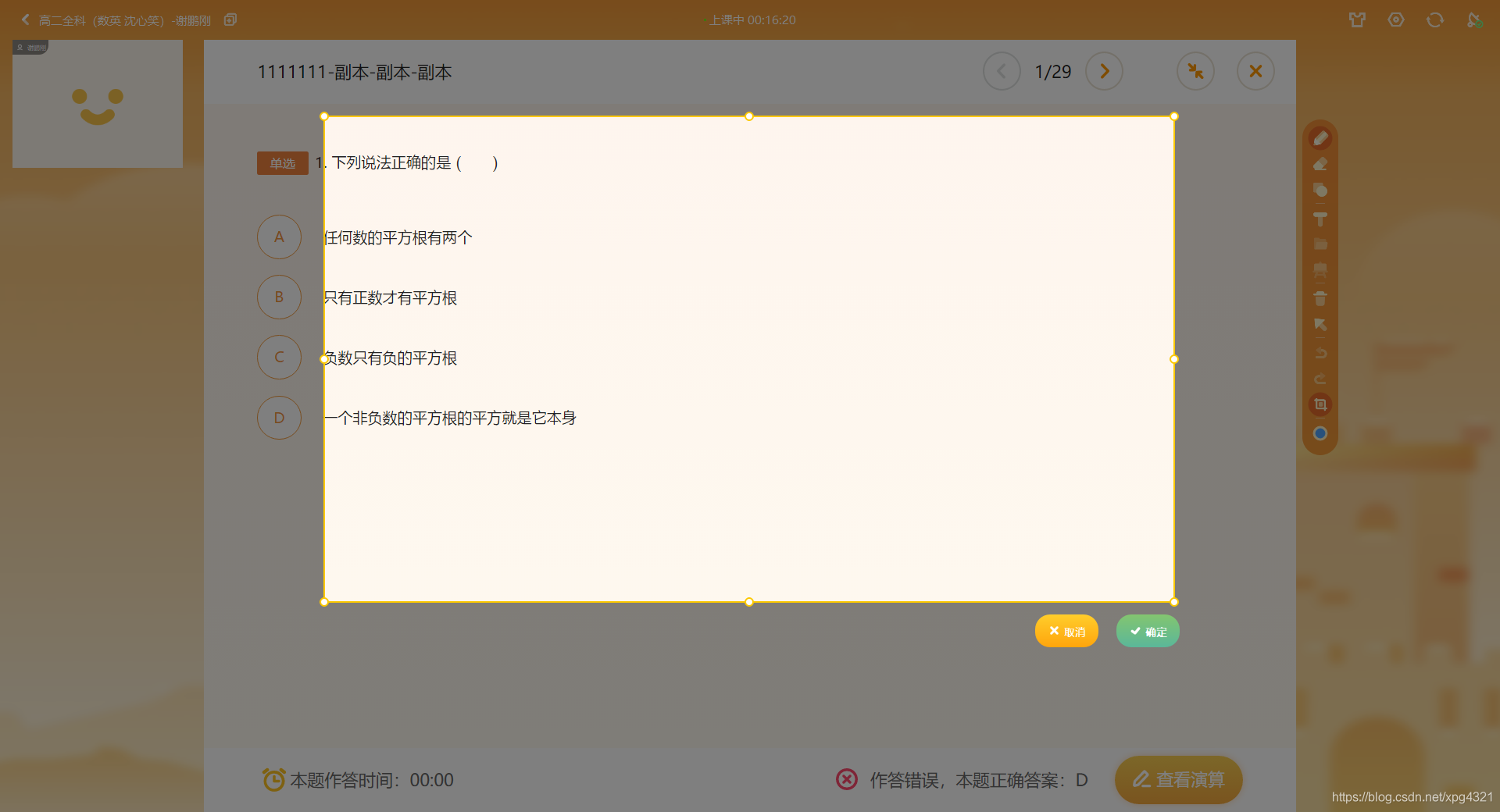
3.效果
效果跟方案一是一样的:
完整代码:
#include "maskframebase.h"
#include "remixhelp.h"
#include <QFrame>
#include <QLabel>
#include <QMouseEvent>
#include <QToolButton>
#include <QHBoxLayout>
#include <QApplication>
#include <QDesktopWidget>
#include <QDebug>
#include <QPainter>
#include <QPushButton>

#define SNAP_BTN_SAVE "snapsavebtn"
#define SNAP_BTN_CANCEL "snapcancelbtn"
#define SNAP_BTN_SEND "snapsendbtn"

MaskFrameBase::MaskFrameBase(QWidget* parent):QFrame(parent),captureArea(NULL),
    btnFrame(NULL),bSetupView(false),pressPoint(0,0),curmousePoint(0,0),
    startPointCapture(0,0),endPointCapture(0,0),operateMode(SelectArea),
    borderSide(LeftBorder),cornerSide(LeftTop),bLeftPressed(false),
    _rect_border_size(dpiSize(12, 12)),edgeMargin(dpiWidth(4)), lineWidth(dpiWidth(3))
{
    setFixedParas();
}

MaskFrameBase::~MaskFrameBase()
{
}

void MaskFrameBase::setFixedParas()
{
    this->mScale = 1;
    this->btnHeigh = 34*mScale;
    this->btnFrameHeigh = dpiHeight(70);
    this->btnFrameWidth = dpiWidth(220);
    this->sizeTipFrameWidth = 80*mScale;
    this->sizeTipFrameHeigh = 40*mScale;
    this->captureBorderWidth = _rect_border_size.width()*0.5+edgeMargin+lineWidth;
    this->borderEdgeWidth = 0;
    this->maskColor = "rgba(0, 0, 0 , 178)";//70%透明度
}

void MaskFrameBase::setup()
{
    this->setMouseTracking(true);

   // this->setObjectName("shtcenterframe");
    this->setSizePolicy(QSizePolicy::Expanding,QSizePolicy::Expanding);

    this->captureArea = new QFrame(this);
    this->captureArea->installEventFilter(this);
    this->captureArea->setObjectName("captureareaframe");
    this->captureArea->setSizePolicy(QSizePolicy::Expanding,QSizePolicy::Expanding);
    this->captureArea->setMouseTracking(true);
    createBtnFrame();

    bSetupView = true;

    adjustCaptureArea();
    this->captureArea->resize(0, 0);
    this->captureArea->setVisible(false);
}

void MaskFrameBase::showMask()
{
    this->show();
    this->setCursor(Qt::CrossCursor);
    this->raise();
}

void MaskFrameBase::reset()
{
    this->pressPoint = QPoint(0,0);
    this->curmousePoint = QPoint(0,0);
    this->startPointCapture = QPoint(0,0);
    this->endPointCapture = QPoint(0,0);
    this->startPointCaptureMark = QPoint(0,0);//按下鼠标瞬间的截屏区域
    this->endPointCaptureMark = QPoint(0,0);
    this->operateMode = SelectArea;
    this->borderSide = LeftBorder;
    this->cornerSide = LeftTop;
    this->setCursor(Qt::CrossCursor);

    this->bLeftPressed = false;
    this->btnFrame->hide();
    adjustCaptureArea();
    this->hide();
}

void MaskFrameBase::resizeEvent(QResizeEvent* event)
{
    QFrame::resizeEvent(event);
    adjustCaptureArea();
}

void MaskFrameBase::mousePressEvent(QMouseEvent* event)
{
    QFrame::mousePressEvent(event);

    if(event->button() == Qt::RightButton)
    {
        if(event->type() == QEvent::MouseButtonPress)
        {
            //reset();
            //cancelSelect();
            //emit selectedSnap(QPoint(0,0),QPoint(0,0));
        }
    }
    else if(event->button() == Qt::LeftButton)
    {
        this->pressPoint = event->pos();
        this->bLeftPressed = true;

        this->startPointCaptureMark = this->startPointCapture;//按下鼠标瞬间的截屏区域
        this->endPointCaptureMark = this->endPointCapture;

        //qDebug()<<"mousePressEvent:bLeftPressed"<<endl;
    }
}

void MaskFrameBase::mouseMoveEvent(QMouseEvent *event)
{
    QFrame::mouseMoveEvent(event);
    this->curmousePoint = event->pos();

//    static int index = 0;
//    qDebug()<<"MaskFrameBase::mouseMoveEvent:"<<index<<endl;
//    ++index;
    restrictMouseMove(this->curmousePoint);

    if(this->bLeftPressed)
    {
        this->btnFrame->hide();

        if(updateCaptureRect())
        {
            adjustCaptureArea();
        }
    }

    if(!this->bLeftPressed){
        judgeOperateState(this->curmousePoint);
    }
}

void MaskFrameBase::restrictMouseMove(QPoint& pt)
{
    //qDebug()<<"MaskFrameBase::restrictMouseMove:x:"<<pt.x()<<",y:"<<pt.y()<<endl;

    bool outbounds = false;
    if(pt.x() <= 0){
        pt.setX(0);
        outbounds = true;
        //qDebug()<<"MaskFrameBase::restrictMouseMove:left"<<endl;
    }

    if(pt.x() >= this->width()){
        pt.setX(this->width());
        outbounds = true;
        //qDebug()<<"MaskFrameBase::restrictMouseMove:right"<<endl;
    }

    if(pt.y() <= 0){
        pt.setY(0);
        outbounds = true;
        //qDebug()<<"MaskFrameBase::restrictMouseMove:top"<<endl;
    }

    if(pt.y() >= this->height()){
        pt.setY(this->height());
        outbounds = true;
        //qDebug()<<"MaskFrameBase::restrictMouseMove:bottom"<<endl;
    }

    if(outbounds){
        //固定一下鼠标
        QApplication::desktop()->cursor().setPos(this->mapToGlobal(pt));
    }
}

void MaskFrameBase::mouseReleaseEvent(QMouseEvent *event)
{
    QFrame::mouseReleaseEvent(event);

    //qDebug()<<"MaskFrameBase::mouseReleaseEvent"<<endl;

    if(event->button() == Qt::LeftButton)
    {
        //qDebug()<<"MaskFrameBase::mouseReleaseEvent LeftButton"<<endl;

        this->bLeftPressed = false;

        this->curmousePoint = event->pos();

        //只点击一下的情况
        if(qAbs(this->curmousePoint.x()-this->pressPoint.x())<=this->captureBorderWidth &&
                qAbs(this->curmousePoint.y()-pressPoint.y())<=this->captureBorderWidth &&
                (this->operateMode==SelectArea || this->operateMode==Normal)){
            showBtnFrame();
            return;
        }

        adjustCaptureArea();
        showBtnFrame();
    }
}

void MaskFrameBase::enterEvent(QEvent *e)
{
    QFrame::enterEvent(e);
}

void MaskFrameBase::leaveEvent(QEvent *e)
{
    QFrame::leaveEvent(e);
 }


void MaskFrameBase::calRect()
{
    leftTopRect = QRect(edgeMargin, edgeMargin, _rect_border_size.width(), _rect_border_size.height());
    topRect = QRect((this->captureArea->width() - _rect_border_size.width()) * 0.5, edgeMargin, _rect_border_size.width(), _rect_border_size.height());
    rigtTopRect = QRect(this->captureArea->width() - _rect_border_size.width() - edgeMargin, edgeMargin, _rect_border_size.width(), _rect_border_size.height());
    rightRect = QRect(this->captureArea->width() - _rect_border_size.width() - edgeMargin, (this->captureArea->height() - _rect_border_size.height()) * 0.5, _rect_border_size.width(), _rect_border_size.height());
    rightBottomRect = QRect(this->captureArea->width() - _rect_border_size.width() - edgeMargin, this->captureArea->height() - _rect_border_size.height() - edgeMargin, _rect_border_size.width(), _rect_border_size.height());
    bottomRect = QRect((this->captureArea->width() - _rect_border_size.width()) * 0.5, this->captureArea->height() - _rect_border_size.height() - edgeMargin, _rect_border_size.width(), _rect_border_size.height());
    leftBottomRect = QRect(edgeMargin, this->captureArea->height() - _rect_border_size.height() - edgeMargin, _rect_border_size.width(), _rect_border_size.height());
    leftRect = QRect(edgeMargin, (this->captureArea->height() - _rect_border_size.height()) * 0.5, _rect_border_size.width(), _rect_border_size.height());
    centerRect = QRect(_rect_border_size.width() * 0.5 + edgeMargin, _rect_border_size.height() * 0.5 + edgeMargin, this->captureArea->width() - _rect_border_size.width() - edgeMargin * 2, this->captureArea->height() - _rect_border_size.height()- edgeMargin*2);
}

bool MaskFrameBase::eventFilter(QObject *obj, QEvent *event)
{
    if(obj == this->captureArea)
    {
        if(event->type() == QEvent::Paint)
        {
            QPainter painter(captureArea);

            painter.setRenderHint(QPainter::Antialiasing, true);
            painter.setPen(QPen(QColor(0xFC, 0xC9, 0x01), lineWidth,  Qt::SolidLine, Qt::RoundCap, Qt::RoundJoin));    //设置画笔形式
            //画矩形
            calRect();

            QPainterPath path;
            path.addEllipse(leftRect.left(), leftRect.top(), leftRect.width(), leftRect.width());
            path.addEllipse(topRect.left(), topRect.top(), topRect.width(), topRect.width());
            path.addEllipse(rigtTopRect.left(), rigtTopRect.top(), rigtTopRect.width(), rigtTopRect.width());
            path.addEllipse(rightRect.left(), rightRect.top(), rightRect.width(), rightRect.width());
            path.addEllipse(rightBottomRect.left(), rightBottomRect.top(), rightBottomRect.width(), rightBottomRect.width());
            path.addEllipse(bottomRect.left(), bottomRect.top(), bottomRect.width(), bottomRect.width());
            path.addEllipse(leftBottomRect.left(), leftBottomRect.top(), leftBottomRect.width(), leftBottomRect.width());
            path.addEllipse(leftTopRect.left(), leftTopRect.top(), leftTopRect.width(), leftTopRect.width());
            painter.setBrush(Qt::white);
            painter.drawPath(path);

            //划线
            painter.drawLine(QLine(QPoint(_rect_border_size.width() + edgeMargin, _rect_border_size.height() * 0.5 + edgeMargin), QPoint((this->captureArea->width() - _rect_border_size.width()) * 0.5 - 1, _rect_border_size.height() * 0.5 + edgeMargin)));
            painter.drawLine(QLine(QPoint((this->captureArea->width() - _rect_border_size.width()) * 0.5 + _rect_border_size.width(), _rect_border_size.height() * 0.5 + edgeMargin), QPoint(this->captureArea->width() - _rect_border_size.width() - edgeMargin - 1, _rect_border_size.height() * 0.5 + edgeMargin)));

            painter.drawLine(QLine(QPoint(this->captureArea->width() - _rect_border_size.width() * 0.5 - edgeMargin, _rect_border_size.height() + edgeMargin), QPoint(this->captureArea->width() - _rect_border_size.width() * 0.5 - edgeMargin, (this->captureArea->height() - _rect_border_size.height()) * 0.5 - 1)));
            painter.drawLine(QLine(QPoint(this->captureArea->width() - _rect_border_size.width() * 0.5 - edgeMargin, (this->captureArea->height() - _rect_border_size.height()) * 0.5 + _rect_border_size.height()), QPoint(this->captureArea->width() - _rect_border_size.width() * 0.5 - edgeMargin, this->captureArea->height() - _rect_border_size.height() - edgeMargin - 1)));

            painter.drawLine(QLine(QPoint((this->captureArea->width() - _rect_border_size.width()) * 0.5 + _rect_border_size.width(), this->captureArea->height() - _rect_border_size.height() * 0.5 - edgeMargin), QPoint(this->captureArea->width() - _rect_border_size.width() - edgeMargin - 1, this->captureArea->height() - _rect_border_size.height() * 0.5 - edgeMargin)));
            painter.drawLine(QLine(QPoint(_rect_border_size.width() + edgeMargin, this->captureArea->height() - _rect_border_size.height() * 0.5 - edgeMargin), QPoint((this->captureArea->width() - _rect_border_size.width()) * 0.5 - 1, this->captureArea->height() - _rect_border_size.height() * 0.5 - edgeMargin)));

            painter.drawLine(QLine(QPoint(_rect_border_size.width() * 0.5 + edgeMargin, _rect_border_size.height() + edgeMargin), QPoint(_rect_border_size.width() * 0.5 + edgeMargin, (this->captureArea->height() - _rect_border_size.height()) * 0.5 - 1)));
            painter.drawLine(QLine(QPoint(_rect_border_size.width() * 0.5 + edgeMargin, (this->captureArea->height() - _rect_border_size.height()) * 0.5 + _rect_border_size.height()), QPoint(_rect_border_size.width() * 0.5 + edgeMargin, this->captureArea->height() - _rect_border_size.height() - edgeMargin - 1)));
        }
        if(event->type() == QEvent::Resize || event->type() == QEvent::Move )
        {
            repaint();
        }
    }
    return QFrame::eventFilter(obj, event);
}

void MaskFrameBase::paintEvent(QPaintEvent *)
{
    QPainter painter(this);

    if(this->captureArea->isVisible() && captureAreaValide())
    {
        //左边区域
        painter.fillRect(QRect(0, this->captureArea->pos().y()+_rect_border_size.height() * 0.5+edgeMargin,
                               this->captureArea->pos().x()+_rect_border_size.width() * 0.5+edgeMargin ,
                               this->captureArea->height()-_rect_border_size.height()-edgeMargin*2),
                         QBrush(QColor(0, 0, 0,128)));
        //上边区域
        painter.fillRect(QRect(0, 0, width(), this->captureArea->pos().y()+_rect_border_size.height() * 0.5+edgeMargin),
                         QBrush(QColor(0, 0, 0,128)));
        //右边区域
        painter.fillRect(QRect(this->captureArea->geometry().right()-edgeMargin-_rect_border_size.width() * 0.5,
                               this->captureArea->pos().y()+_rect_border_size.height() * 0.5+edgeMargin,
                               width()-this->captureArea->geometry().right()+_rect_border_size.width() * 0.5+edgeMargin,
                               this->captureArea->height()-_rect_border_size.height()-edgeMargin*2),
                                QBrush(QColor(0, 0, 0,128)));
        //下边区域
         painter.fillRect(QRect(0,
                                this->captureArea->geometry().top()+this->captureArea->height()-_rect_border_size.height() * 0.5-edgeMargin,
                                width(),
                                height()-this->captureArea->geometry().bottom()+_rect_border_size.height()*0.5+edgeMargin),
                                QBrush(QColor(0, 0, 0,128)));

        //透明区域
        QRect rect;
        rect.setX(this->captureArea->pos().x()+_rect_border_size.width()*0.5+edgeMargin);
        rect.setY(this->captureArea->pos().y()+_rect_border_size.height()*0.5 +edgeMargin);
        rect.setWidth(this->captureArea->width()-_rect_border_size.width()-edgeMargin*2);
        rect.setHeight(this->captureArea->height()-_rect_border_size.height()-edgeMargin*2);
    #ifdef Q_OS_WIN
            painter.fillRect(rect, QBrush(QColor(0, 0, 0, 1)));
    #else
            painter.fillRect(rect, QBrush(QColor(0, 0, 0, 20)));
    #endif
    }
    else
    {
        painter.fillRect(rect(), QBrush(QColor(0, 0, 0, 128)));
    }

}

void MaskFrameBase::createBtnFrame()//按钮
{
}

void MaskFrameBase::cancelSelect()
{
}

void MaskFrameBase::adjustCaptureArea()
{
    if(this->width()==0 || this->height()==0){
        return;
    }
    int startx = this->startPointCapture.x();
    int starty = this->startPointCapture.y();
    int endx = this->endPointCapture.x();
    int endy = this->endPointCapture.y();

   int captureHeight = endy-starty;
    //mid-capture
    int captureWidth = endx-startx;
    this->captureArea->setGeometry(startx,starty,captureWidth,captureHeight);
    if(!this->captureArea->isVisible()){
        this->captureArea->show();
    }
}

//只处理公共的移动事件,在移动时,调整抓取的区域坐标
bool MaskFrameBase::updateCaptureRect()
{
    if(this->operateMode == MoveArea)
    {
        if(captureAreaValide()){
            updateCaptureRectMove();
            return true;
        }
    }

    return false;
}

//移动时,改变抓屏区坐标
void MaskFrameBase::updateCaptureRectMove()
{
    int movex = this->curmousePoint.x()-this->pressPoint.x();
    int movey = this->curmousePoint.y()-this->pressPoint.y();

    //qDebug()<<"updateCaptureRectMove:"<<movex<<" "<<movey<<endl;

    bool outbounds = false;
    if(movex > 0){
        //移动到右边界时,停止移动
        if(this->endPointCaptureMark.x()+movex > this->width()){
            //qDebug()<<"updateCaptureRectMove over right"<<endl;
            movex = this->width()-this->endPointCaptureMark.x();
            outbounds = true;
        }
    }
    else{
        //移动到左边界
        if(this->startPointCaptureMark.x()+movex < 0){
            //qDebug()<<"updateCaptureRectMove over left"<<endl;
            movex = -this->startPointCaptureMark.x();
            outbounds = true;
        }
    }

    if(movey > 0){
        //移动到下边界
        if(this->endPointCaptureMark.y()+movey > this->height()){
            //qDebug()<<"updateCaptureRectMove over bottom"<<endl;
            movey = this->height()-this->endPointCaptureMark.y();
            outbounds = true;
        }
    }
    else{
        //移动到上边界
        if(this->startPointCaptureMark.y()+movey < 0){
            //qDebug()<<"updateCaptureRectMove over top"<<endl;
            movey = -this->startPointCaptureMark.y();
            outbounds = true;
        }
    }

    if(outbounds){
        //固定一下鼠标
        QPoint curcurpos(this->pressPoint.x()+movex,this->pressPoint.y()+movey);
        QApplication::desktop()->cursor().setPos(this->mapToGlobal(curcurpos));
    }

    //调整截屏区域坐标
    this->startPointCapture.setX(this->startPointCaptureMark.x()+movex);
    this->startPointCapture.setY(this->startPointCaptureMark.y()+movey);
    this->endPointCapture.setX(this->endPointCaptureMark.x()+movex);
    this->endPointCapture.setY(this->endPointCaptureMark.y()+movey);
}

void MaskFrameBase::alignPoint(QPoint& startpt,QPoint& endpt)
{
    int startx = startpt.x();
    int starty = startpt.y();
    int endx = endpt.x();
    int endy = endpt.y();
    startpt.setX(qMin(startx,endx));
    startpt.setY(qMin(starty,endy));
    endpt.setX(qMax(startx,endx));
    endpt.setY(qMax(starty,endy));
}

void MaskFrameBase::generateResultPos(QPoint startpt,QPoint endpt)
{
    this->startPointCapture.setX(qMin(startpt.x(),endpt.x()));
    this->startPointCapture.setY(qMin(startpt.y(),endpt.y()));
    this->endPointCapture.setX(qMax(startpt.x(),endpt.x()));
    this->endPointCapture.setY(qMax(startpt.y(),endpt.y()));
}

void MaskFrameBase::showBtnFrame()
{
    if(this->btnFrame==NULL || !captureAreaValide()){
        return;
    }

    //右下角显示的
    int posX = this->endPointCapture.x()-this->btnFrameWidth;
    int posY = this->endPointCapture.y();

    if(posX <= 0){
        posX = this->startPointCapture.x();
    }

    if(posY+this->btnFrameHeigh >= this->height()){
        if(this->startPointCapture.y()-1-this->btnFrameHeigh > 0){
            posY = this->startPointCapture.y()-this->btnFrameHeigh;
        }
        else{
            posY = this->endPointCapture.y()-1-this->btnFrameHeigh;
        }
    }

//    //右上角显示的
//    int posX = this->endPointCapture.x()-this->btnFrameWidth;
//    int posY = this->startPointCapture.y()-this->btnFrameHeigh;

//    //截屏区宽度小于工具栏宽度,且截屏区很靠左侧
//    if(posX <= 0){
//        posX = this->startPointCapture.x();
//    }

//    if(posY <= 1){
//        if(this->endPointCapture.y()+this->btnFrameHeigh+1 < this->height()){
//            posY = this->endPointCapture.y();
//        }
//        else{
//            posY = this->startPointCapture.y()+1;
//        }
//    }

    this->btnFrame->setGeometry(posX,posY,this->btnFrameWidth,this->btnFrameHeigh);
    this->btnFrame->show();
    this->btnFrame->raise();
}

QPushButton* MaskFrameBase::createActionButton(const QString &name, const QString& toolTipKey, const QString &icon){
    QPushButton* actionButton = new QPushButton(this->btnFrame);
    actionButton->setIconSize(dpiSize(20, 20));
    actionButton->setIcon(QIcon(icon));
    actionButton->setText(name);
    actionButton->setSizePolicy(QSizePolicy::Fixed, QSizePolicy::Fixed);
    actionButton->setFixedSize(dpiSize(96, 50));

    return actionButton;
}

//鼠标未按下左键,移动过程中使用,会改变鼠标指针样式
bool MaskFrameBase::judgeOperateState(QPoint curpos)
{
    if(this->bLeftPressed){
        return false;
    }

    int tmpptx = this->startPointCapture.x()+this->captureBorderWidth+this->borderEdgeWidth;
    int tmppty = this->startPointCapture.y()+this->captureBorderWidth+this->borderEdgeWidth;
    QPoint startTmp(tmpptx,tmppty);
    tmpptx = this->endPointCapture.x()-this->captureBorderWidth-this->borderEdgeWidth;
    tmppty = this->endPointCapture.y()-this->captureBorderWidth-this->borderEdgeWidth;
    QPoint endTmp(tmpptx,tmppty);
    QRect captureRect(startTmp,endTmp);

    //无选定区域时,显示选中图
    if(captureRect.width()<captureBorderWidth*2 || captureRect.height()<captureBorderWidth*2){
          if(!judgeUponCorner(curpos))
          {
              if(captureRect.contains(curpos)){
                  this->operateMode = MoveArea;
                  this->setCursor(Qt::SizeAllCursor);
                  //qDebug()<<"judgeOperateState MoveArea"<<endl;

              }
              else
              {
                  this->operateMode = SelectArea;
                  this->setCursor(Qt::CrossCursor);
              }
          }

        return true;
    }

    //是否在弹出按钮上
    if(judgeUponBtnFrame(curpos)){
        //qDebug()<<"judgeOperateState onBotton"<<endl;
        return true;
    }

    //在截取区,可拖动选取区域
    if(captureRect.contains(curpos)){
        this->operateMode = MoveArea;
        this->setCursor(Qt::SizeAllCursor);
        //qDebug()<<"judgeOperateState MoveArea"<<endl;
        return true;
    }

    //判断是否在边框上
    if(judgeUponBorder(curpos)){
        //qDebug()<<"judgeOperateState:border match"<<endl;
        return true;
    }

    return false;

    //在四个边角的判断不是每个子类都需要

    //qDebug()<<"judgeOperateState last SelectArea"<<endl;
}

//鼠标是否移动到四个边角
bool MaskFrameBase::judgeUponCorner(QPoint curpos)
{
    if(this->bLeftPressed){
        return false;
    }

    //左上角
    int tmpptx = this->startPointCapture.x()-this->borderEdgeWidth;
    int tmppty = this->startPointCapture.y()-this->borderEdgeWidth;
    QPoint startTmp(tmpptx,tmppty);
    tmpptx = this->startPointCapture.x()+this->captureBorderWidth+this->borderEdgeWidth;
    tmppty = this->startPointCapture.y()+this->captureBorderWidth+this->borderEdgeWidth;
    QPoint endTmp(tmpptx,tmppty);
    QRect leftTopRect(startTmp,endTmp);
    if(leftTopRect.width()>1 && leftTopRect.height()>1 &&
            leftTopRect.contains(curpos)){
        this->operateMode = CornerScale;
        this->cornerSide = LeftTop;
        this->setCursor(Qt::SizeFDiagCursor);

        //qDebug()<<"judgeUponCorner LeftTop"<<endl;

        return true;
    }

    //右上角
    tmpptx = this->endPointCapture.x()-this->captureBorderWidth-this->borderEdgeWidth;
    tmppty = this->startPointCapture.y()-this->borderEdgeWidth;
    startTmp.setX(tmpptx);
    startTmp.setY(tmppty);
    tmpptx = this->endPointCapture.x()+this->borderEdgeWidth;
    tmppty = this->startPointCapture.y()+this->captureBorderWidth+this->borderEdgeWidth;
    endTmp.setX(tmpptx);
    endTmp.setY(tmppty);
    QRect rightTopRect(startTmp,endTmp);
    if(rightTopRect.width()>1 && rightTopRect.height()>1 &&
            rightTopRect.contains(curpos)){
        this->operateMode = CornerScale;
        this->cornerSide = RightTop;
        this->setCursor(Qt::SizeBDiagCursor);

        //qDebug()<<"judgeUponCorner RightTop"<<endl;
        return true;
    }

    //左下角
    tmpptx = this->startPointCapture.x()-this->borderEdgeWidth;
    tmppty = this->endPointCapture.y()-this->captureBorderWidth-this->borderEdgeWidth;
    startTmp.setX(tmpptx);
    startTmp.setY(tmppty);
    tmpptx = this->startPointCapture.x()+this->captureBorderWidth+this->borderEdgeWidth;
    tmppty = this->endPointCapture.y()+this->borderEdgeWidth;
    endTmp.setX(tmpptx);
    endTmp.setY(tmppty);
    QRect leftBottomRect(startTmp,endTmp);
    if(leftBottomRect.width()>1 && leftBottomRect.height()>1 &&
            leftBottomRect.contains(curpos)){
        this->operateMode = CornerScale;
        this->cornerSide = LeftBottom;
        this->setCursor(Qt::SizeBDiagCursor);
        //qDebug()<<"judgeUponCorner LeftBottom"<<endl;
        return true;
    }

    //右下角
    tmpptx = this->endPointCapture.x()-this->captureBorderWidth-this->borderEdgeWidth;
    tmppty = this->endPointCapture.y()-this->captureBorderWidth-this->borderEdgeWidth;
    startTmp.setX(tmpptx);
    startTmp.setY(tmppty);
    tmpptx = this->endPointCapture.x()+this->borderEdgeWidth;
    tmppty = this->endPointCapture.y()+this->borderEdgeWidth;
    endTmp.setX(tmpptx);
    endTmp.setY(tmppty);
    QRect rightBottomRect(startTmp,endTmp);
    if(rightBottomRect.width()>1 && rightBottomRect.height()>1 &&
            rightBottomRect.contains(curpos)){
        this->operateMode = CornerScale;
        this->cornerSide = RightBottom;
        this->setCursor(Qt::SizeFDiagCursor);
        //qDebug()<<"judgeUponCorner RightBottom"<<endl;
        return true;
    }

    return false;
}

//鼠标是否移动到边框
bool MaskFrameBase::judgeUponBorder(QPoint curpos)
{
    if(this->bLeftPressed){
        return false;
    }
    int border = dpiWidth(2);
    int starx = this->startPointCapture.x()+captureBorderWidth;
    int stary = this->startPointCapture.y()+captureBorderWidth;
    int endx = this->endPointCapture.x()-captureBorderWidth;
    int endy = this->endPointCapture.y()-captureBorderWidth;
    int width = qAbs(this->endPointCapture.x()-this->startPointCapture.x())-_rect_border_size.width()*2+lineWidth;
    int height = qAbs(this->endPointCapture.y()-this->startPointCapture.y())-_rect_border_size.height()*2+lineWidth;

    //左侧边框
    int tmpptx = starx-_rect_border_size.width()*0.5;
    int tmppty = stary;
    QPoint startTmp(tmpptx,tmppty);
    tmpptx = tmpptx + _rect_border_size.width();
    tmppty = tmppty +height-lineWidth;
    QPoint endTmp(tmpptx,tmppty);
    QRect leftborder(startTmp,endTmp);
    if(leftborder.width()>border && leftborder.height()>border &&
            leftborder.contains(curpos)){
        this->operateMode = BorderScale;
        this->borderSide = LeftBorder;
        this->setCursor(Qt::SizeHorCursor);
        qDebug()<<"judgeUponBorder:LeftBorder"<<endl;
        return true;
    }

    //右侧边框
    tmpptx = endx-_rect_border_size.width()*0.5;
    tmppty = stary;
    startTmp.setX(tmpptx);
    startTmp.setY(tmppty);
    tmpptx = tmpptx+_rect_border_size.width();
    tmppty = tmppty + height-lineWidth;
    endTmp.setX(tmpptx);
    endTmp.setY(tmppty);
    QRect rightborder(startTmp,endTmp);
    if(rightborder.width()>border && rightborder.height()>border &&
            rightborder.contains(curpos)){
        this->operateMode = BorderScale;
        this->borderSide = RightBorder;
        this->setCursor(Qt::SizeHorCursor);
        qDebug()<<"judgeUponBorder:RightBorder"<<endl;
        return true;
    }

    //上边框
    tmpptx = starx;
    tmppty = stary-_rect_border_size.width();
    startTmp.setX(tmpptx);
    startTmp.setY(tmppty);
    tmpptx = tmpptx+width-lineWidth;
    tmppty = tmppty+_rect_border_size.height();
    endTmp.setX(tmpptx);
    endTmp.setY(tmppty);
    QRect topborder(startTmp,endTmp);
    if(topborder.width()>1 && topborder.height()>1 &&
            topborder.contains(curpos)){
        this->operateMode = BorderScale;
        this->borderSide = TopBorder;
        this->setCursor(Qt::SizeVerCursor);
        qDebug()<<"judgeUponBorder:TopBorder"<<endl;
        return true;
    }

    //下边框
    tmpptx = starx;
    tmppty = endy-_rect_border_size.width()*0.5;
    startTmp.setX(tmpptx);
    startTmp.setY(tmppty);
    tmpptx = tmpptx+width-lineWidth;
    tmppty = tmppty+_rect_border_size.height();
    endTmp.setX(tmpptx);
    endTmp.setY(tmppty);
    QRect bottomborder(startTmp,endTmp);
    if(bottomborder.width()>border && bottomborder.height()>border &&
            bottomborder.contains(curpos)){
        this->operateMode = BorderScale;
        this->borderSide = BottomBorder;
        this->setCursor(Qt::SizeVerCursor);
        qDebug()<<"judgeUponBorder:BottomBorder"<<endl;
        return true;
    }

    return false;
}

//鼠标是否移动到弹出的工具条
bool MaskFrameBase::judgeUponBtnFrame(QPoint curpos)
{
    if(this->bLeftPressed){
        return false;
    }

    if(!this->btnFrame->isVisible()){
        //qDebug()<<"judgeUponBtnFrame not visible"<<endl;
        return false;
    }

    QPoint startpos = this->btnFrame->pos();
    QPoint endpos(startpos.x()+this->btnFrameWidth,startpos.y()+this->btnFrameHeigh);
    QRect btnRect(startpos,endpos);
    if(btnRect.width()>1 && btnRect.height()>1 &&
            btnRect.contains(curpos)){
        //qDebug()<<"judgeUponBtnFrame Normal"<<endl;
        this->operateMode = Normal;
        this->setCursor(Qt::ArrowCursor);
        return true;
    }

    return false;
}

//截屏区域是否有效(有效是指有有效面积)
bool MaskFrameBase::captureAreaValide()
{
    int width = this->endPointCapture.x()-this->startPointCapture.x();
    int heigh = this->endPointCapture.y()-this->startPointCapture.y();

    if(width < this->captureBorderWidth*2 ||
            heigh < this->captureBorderWidth*2){
        return false;
    }

    return true;
}

//判断点是否已在全屏的边界
bool MaskFrameBase::isPointToBorder(const QPoint& pt)
{
    if(pt.x()<=0 || pt.x()>=this->width() ||
            pt.y()<=0 || pt.y()>=this->height()){
        return true;
    }
    return false;
}
#ifndef MASK_FRAME_BASE_H
#define MASK_FRAME_BASE_H

#include <QPoint>
#include <QObject>
#include <QFrame>
#include "snappopupview.h"

class QLabel;
class QToolButton;

/**
 * @brief The MaskFrameBase class 抓屏/屏幕分享过程中的遮罩层-基类
 */
class MaskFrameBase : public QFrame {
    Q_OBJECT

protected:
    enum eOperateMode{
        Normal,//鼠标变成普通的指针形状
        SelectArea,//选取/重新选取区域
        MoveArea,//移动选定的区域
        BorderScale,//拖动边框进行缩放
        CornerScale//拖动边角进行缩放
    };

    enum eBorderSide{
        LeftBorder,
        TopBorder,
        RightBorder,
        BottomBorder
    };

    enum eCornerSide{
        LeftTop,
        LeftBottom,
        RightTop,
        RightBottom
    };

public:
    explicit MaskFrameBase(QWidget* parent = 0);
    virtual ~MaskFrameBase();

    void setup();
    void showMask();
    void reset();

protected:
    virtual void resizeEvent(QResizeEvent* event) override;
    virtual void mousePressEvent(QMouseEvent* event) override;
    virtual void mouseMoveEvent(QMouseEvent *event) override;
    virtual void mouseReleaseEvent(QMouseEvent *event) override;
    virtual void enterEvent(QEvent*) override;
    virtual void leaveEvent(QEvent*) override;
    virtual bool eventFilter(QObject *obj, QEvent *event) override;
    virtual void paintEvent(QPaintEvent *) override;

protected:
    virtual void createBtnFrame();
    virtual void showBtnFrame();

    virtual bool judgeOperateState(QPoint curpos);//鼠标未按下左键,移动过程中使用,会改变鼠标指针样式
    virtual bool updateCaptureRect();//更新截屏区域的坐标,更新了返回true
    virtual void adjustCaptureArea();//调整绘制区

    virtual void cancelSelect();
    void calRect();

protected:
    void setFixedParas();

    QPushButton* createActionButton(const QString &name, const QString& toolTipKey, const QString &icon);

    void alignPoint(QPoint& startpt,QPoint& endpt);//将一对点,整理一下,startpt返回左上
    void generateResultPos(QPoint startpt,QPoint endpt);
    bool captureAreaValide();//截屏区域是否有效(有效是指有有效面积)
    bool isPointToBorder(const QPoint& pt);//判断点是否已在全屏的边界

    bool judgeUponCorner(QPoint curpos);//鼠标是否移动到四个边角
    bool judgeUponBorder(QPoint curpos);//鼠标是否移动到边框
    bool judgeUponBtnFrame(QPoint curpos);//鼠标是否移动到弹出的工具条

    void updateCaptureRectMove();//移动时,改变抓屏区坐标

    void restrictMouseMove(QPoint& pt);

protected:
    QFrame* captureArea;//透明区域,选取图像
    QFrame* btnFrame;//操作按钮

    bool bSetupView;

    bool bLeftPressed;
    QPoint pressPoint;//鼠标点坐标
    QPoint curmousePoint;

    QPoint startPointCapture;//截屏区域
    QPoint endPointCapture;

    QPoint startPointCaptureMark;//按下鼠标瞬间的截屏区域
    QPoint endPointCaptureMark;

    eOperateMode operateMode;//鼠标移动时,操作的类型
    eBorderSide borderSide;//BorderScale模式下选定的是哪个边
    eCornerSide cornerSide;//CornerScale模式下选定的是哪个角

    int mScale;
    int btnHeigh;
    int btnFrameWidth;
    int btnFrameHeigh;
    int sizeTipFrameWidth;
    int sizeTipFrameHeigh;
    QString maskColor;
    QString capturBorderStyle;
    int captureBorderWidth;//边框
    int borderEdgeWidth;//判断鼠标移动到边框上时,边框区域=边框本身的宽度+borderEdgeWidth
    SnapPopupView * snapPopupView;

    //矩形
    QRect leftTopRect;
    QRect topRect;
    QRect rigtTopRect;
    QRect rightRect;
    QRect rightBottomRect;
    QRect bottomRect;
    QRect leftBottomRect;
    QRect leftRect;
    QRect centerRect;
    int  edgeMargin;     //鼠标检测的边缘距离
    QSize _rect_border_size;
    int lineWidth;
};

#endif // MASK_FRAME_BASE_H

 1076


 扫一扫


 被折叠的 条评论
为什么被折叠?
 到【灌水乐园】发言


