



 本文介绍了Android系统开机启动的优化,重点关注Bootchart工具的使用。通过Logcat记录关键时间点,配合Bootchart分析CPU、磁盘性能,以优化启动时间。文章详细讲解了如何启用Bootchart,生成分析结果,并解析了生成的图表。
Logcat
使用adb wait-for-device logcat -b all获取开机完成log,并获取Android Performance之开机优化(1)-开机启动流程中开机log关键字,实例如下:
01-06 08:57:23.540 877 877 I boot_progress_start: 15656
01-06 08:57:28.984 877 877 I boot_progress_preload_start: 21100
01-06 08:57:32.070 877 877 I boot_progress_preload_end: 24186
01-06 08:57:33.613 2024 2024 I boot_progress_system_run: 25729
01-06 08:57:34.450 2024 2024 I boot_progress_pms_start: 26566
01-06 08:57:34.493 2024 2024 I boot_progress_pms_system_scan_start: 26608
01-06 08:57:41.973 2024 2024 I boot_progress_pms_data_scan_start: 34089
01-06 08:57:42.518 2024 2024 I boot_progress_pms_scan_end: 34633
01-06 08:57:43.011 2024 2024 I boot_progress_pms_ready: 35127
11-30 22:43:43.825 2024 2024 I boot_progress_ams_ready: 130106
11-30 22:43:50.266 2024 2236 I boot_progress_enable_screen: 136547
Bootchart
bootchart 是一个用于 linux 启动过程性能分析的开源工具软件,在系统启动过程中自动收集 CPU 占用率、磁盘吞吐率、进程等信息,并以图形方式显示分析结果,可用作指导优化系统启动过程。
bootchart 让用户可以很直观的查看系统启动的过程和各个过程耗费的时间,以便让用户能够分析启动过程,从而进行优化以提高启动时间。
它由 bootchartd 服务和 bootchart-render 两部分组成,后者主要负责生成启动流程的分析结果图。
android P中已经内置了bootchart工具(data/bootchart目录存在),在存在enabled文件的情况下,在init.rc启动时开始,boot complete时结束
一、启用Bootchart
adb shell touch /data/bootchart/enabled
adb shell reboot
二、生成物
/data/bootchart目录
header proc_diskstats.log proc_ps.log proc_stat.log
三、工具解析
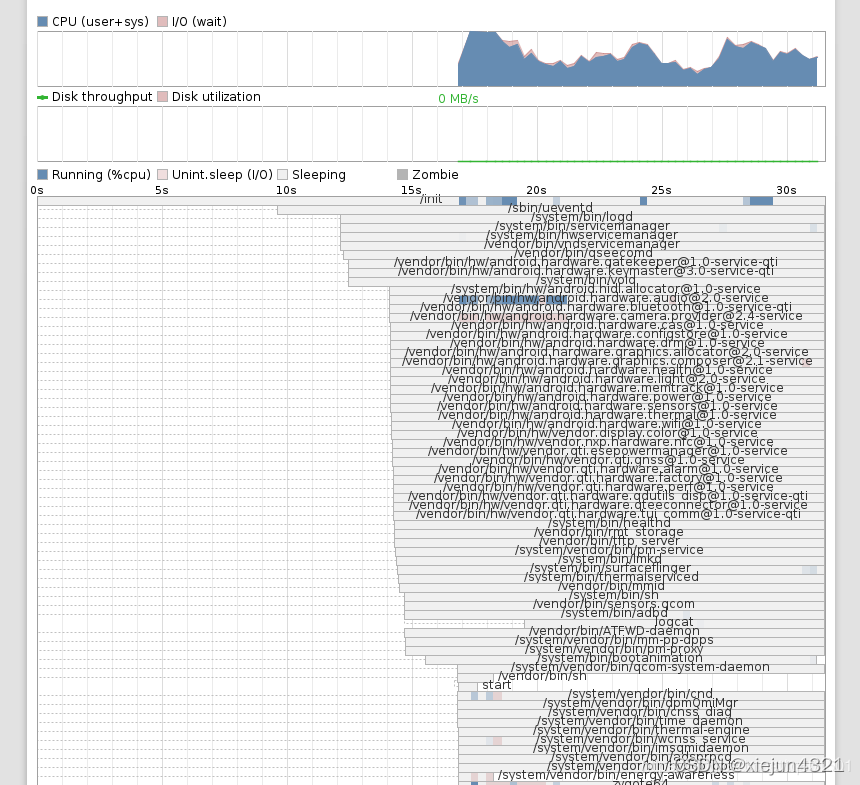
拷贝/data/bootchart目录到任意位置
拷贝/system/core/init/grab-bootchart.sh到相同位置
$chmod 777 grab-bootchart.sh
$./grab-bootchart.sh
三、bootchart.png





 扫一扫
扫一扫


 1368
1368


 到【灌水乐园】发言




