



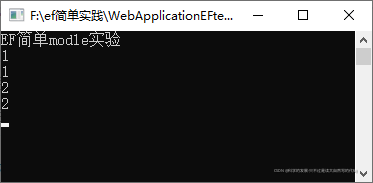
 该博客展示了如何在.NET Console应用中利用Entity Framework(EF)执行SQL命令(如插入数据)和查询(如选择数据)。示例代码使用了MySql数据库,并详细给出了配置文件的设置。运行结果显示了数据的插入和查询操作。
1.概要
使用ef有些时候,使用简单的语句更容易实现,而使用ef更复杂,这时候可以使用ef的两个方法
1.db.Database.ExecuteSqlCommand("insert into tb1(v1) values(2)");
2.var c = db.Database.SqlQuery<int>("select v1 from tb1");
2.代码
2.1 代码
using MySql.Data.EntityFramework;
using System;
using System.Collections.Generic;
using System.ComponentModel.DataAnnotations.Schema;
using System.Data.Entity;
using System.Linq;
using System.Text;
using System.Threading.Tasks;

namespace ConsoleApp1
{
    class Program
    {
        static void Main(string[] args)
        {
            Console.WriteLine("EF简单modle实验");
            using (DBContentMy db = new DBContentMy())
            {
                db.Database.ExecuteSqlCommand("insert into tb1(v1) values(2)");
            }
            using (DBContentMy db = new DBContentMy())
            {
                var c = db.Database.SqlQuery<int>("select v1 from tb1");
                foreach (int a in c)
                {
                    Console.WriteLine(a);
                }
            }
            Console.ReadKey();
        }
        [Table("Tb1")]
        class Tb1
        {
            public int id { set; get; }
            public int v1 { set; get; }
        }
        [DbConfigurationType(typeof(MySqlEFConfiguration))]
        class DBContentMy : DbContext
        {
            public DBContentMy() : base("DbConnStr")
            {
                Database.SetInitializer<DBContentMy>(null);
            }
            protected override void OnModelCreating(DbModelBuilder modelBuilder)
            {
                base.OnModelCreating(modelBuilder);
            }


            public DbSet<Tb1> Tb1s { set; get; }
        }
    }
}
2.2配置文件
<?xml version="1.0" encoding="utf-8"?>
<configuration>
  <configSections>
    <!-- For more information on Entity Framework configuration, visit http://go.microsoft.com/fwlink/?LinkID=237468 -->
    <section name="entityFramework" type="System.Data.Entity.Internal.ConfigFile.EntityFrameworkSection, EntityFramework, Version=6.0.0.0, Culture=neutral, PublicKeyToken=b77a5c561934e089" requirePermission="false" />
  </configSections>
  <startup>
    <supportedRuntime version="v4.0" sku=".NETFramework,Version=v4.7.1" />
  </startup>
	<connectionStrings>
		<add name="DbConnStr" connectionString="Data Source=localhost;port=3306;Initial Catalog=db;user id=root;password=123456;" providerName="MySql.Data.MySqlClient" />
	</connectionStrings>
	<entityFramework>
    <providers>
      <provider invariantName="System.Data.SqlClient" type="System.Data.Entity.SqlServer.SqlProviderServices, EntityFramework.SqlServer" />
    <provider invariantName="MySql.Data.MySqlClient" type="MySql.Data.MySqlClient.MySqlProviderServices, MySql.Data.EntityFramework, Version=8.0.26.0, Culture=neutral, PublicKeyToken=c5687fc88969c44d">
      </provider></providers>
  </entityFramework>
  <runtime>
    <assemblyBinding xmlns="urn:schemas-microsoft-com:asm.v1">
      <dependentAssembly>
        <assemblyIdentity name="System.Buffers" publicKeyToken="cc7b13ffcd2ddd51" culture="neutral" />
        <bindingRedirect oldVersion="0.0.0.0-4.0.3.0" newVersion="4.0.3.0" />
      </dependentAssembly>
    </assemblyBinding>
  </runtime>
</configuration>
3.运行结果
4.其他
4.1 创建数据脚本
CREATE TABLE `tb1` (
  `id` int(11) NOT NULL AUTO_INCREMENT,
  `v1` int(11) DEFAULT NULL,
  PRIMARY KEY (`id`)
)
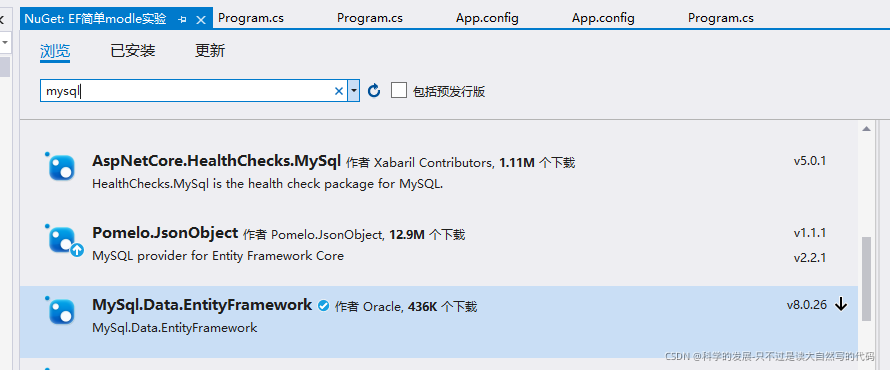
4.2 nuget (需要安装的东西很多,单是只下载这一个其他关联的都会自动下载)





 扫一扫
扫一扫


 1739
1739

 被折叠的 条评论
为什么被折叠?
被折叠的 条评论
为什么被折叠?
 到【灌水乐园】发言





