私有部署supabase完整手册-3 边函数(Edge Functions)开发/部署/测试

该文章已生成可运行项目,

搭建本地supabase cli 开发环境

环境准备

提前准备好windos11/ node / docker 桌面环境.

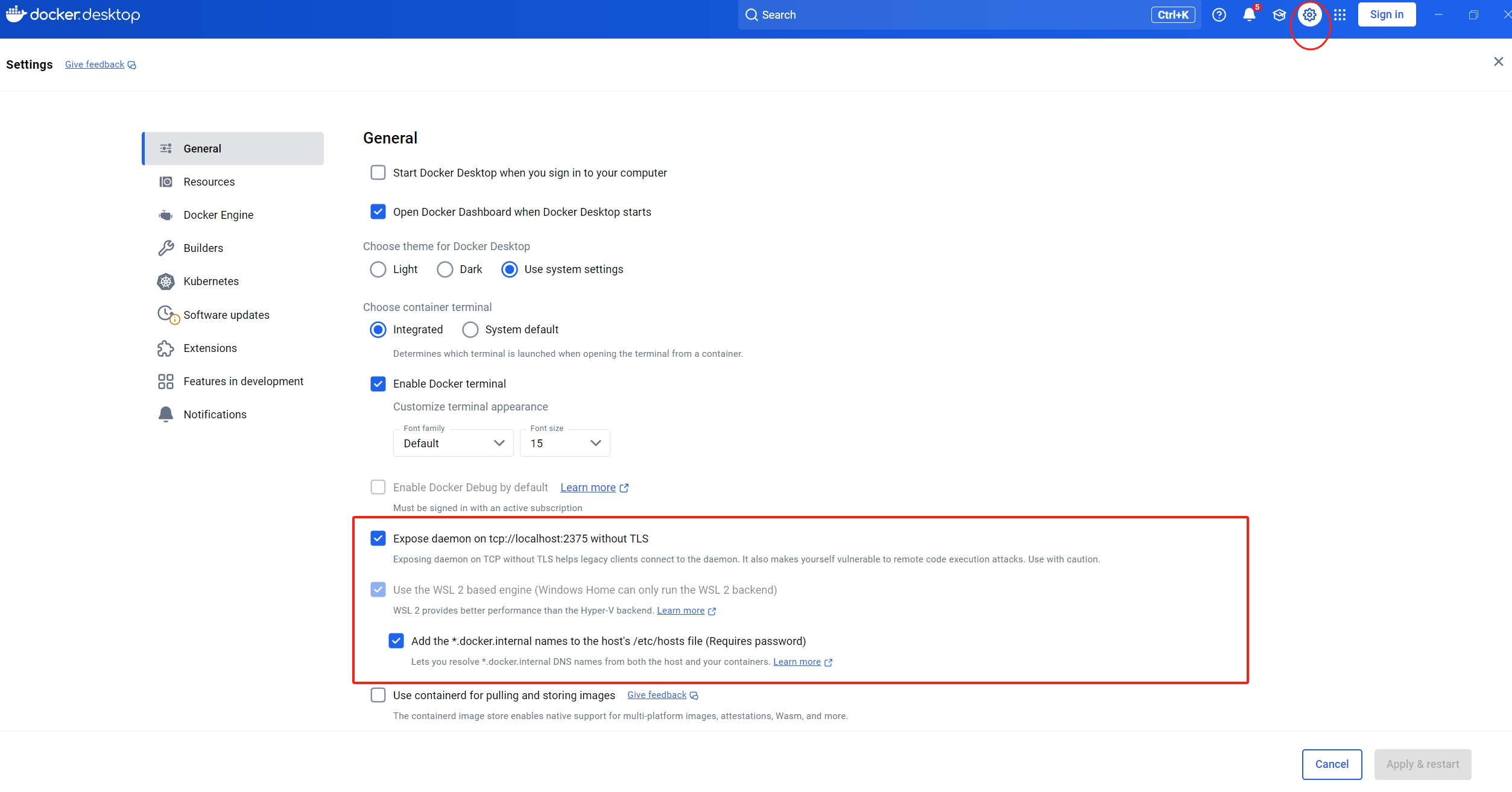
docker安装之后,需要进行配置.否则后面supabase镜像无法启动.按照如下图所示进行配置
在这里插入图片描述
如有问题可以进一步参考官方指导.
https://supabase.com/docs/guides/local-development?queryGroups=package-manager&package-manager=npm

安装Supabase CLI

npm install supabase --save-dev

初始化项目

在您的存储库中,初始化 Supabase 项目:

npx supabase init

启动 Supabase 堆栈

npx supabase start

查看本地 Supabase 实例http://localhost:54323

查看状态 npx supabase status

PS D:\AndroidProject\BDCamera\doc\server\supabase_cli> npx supabase status
Stopped services: [supabase_imgproxy_supabase_cli supabase_pooler_supabase_cli]
supabase local development setup is running.

         API URL: http://127.0.0.1:54321
     GraphQL URL: http://127.0.0.1:54321/graphql/v1
  S3 Storage URL: http://127.0.0.1:54321/storage/v1/s3
          DB URL: postgresql://postgres:postgres@127.0.0.1:54322/postgres
      Studio URL: http://127.0.0.1:54323
    Inbucket URL: http://127.0.0.1:54324
      JWT secret: super-secret-jwt-token-with-at-least-32-characters-long
        anon key: eyJhbGciOiJIUzI1NiIsInR5c,,,,,,,,,,,,,,,,,,,,,,blYTn_I0
service_role key: eyJhbGciOiJIUzI1NiIsInR5cCI........................p7fsn3W0YpN81IU
   S3 Access Key: 625729a08b95.......a663f3a23c
   S3 Secret Key: 850181e4652dd023b7a9............d487ee0cc3254aed6eda37307425907
       S3 Region: local

本地环境准备完毕.
避坑指南 启动服务之前,需要打开docker 设置中的 Expose daemon on tcp://localhost:2375 without TLS, 否则
supabase_vector_supabase_cli镜像会频繁重启,导致失败.

在本地开发 Edge Functions

创建 Edge 函数

npx supabase functions new hello-function

这将在您的文件夹中创建一个函数存根:supabase
└── supabase
├── functions
│ └── hello-world
│ │ └── index.ts ## Your function code
└── config.toml

使用vscode等编辑器打开 index.ts文件查看,默认生成代码如下:

// Follow this setup guide to integrate the Deno language server with your editor:
// https://deno.land/manual/getting_started/setup_your_environment
// This enables autocomplete, go to definition, etc.

// Setup type definitions for built-in Supabase Runtime APIs
import "jsr:@supabase/functions-js/edge-runtime.d.ts"

console.log("Hello from Functions!")

Deno.serve(async (req) => {
  const { name } = await req.json()
  const data = {
    message: `Hello 你好! ${name}!`,
  }

  return new Response(
    JSON.stringify(data),
    { headers: { "Content-Type": "application/json" } },
  )
})

/* To invoke locally:

  1. Run `supabase start` (see: https://supabase.com/docs/reference/cli/supabase-start)
  2. Make an HTTP request:

  curl -i --location --request POST 'http://127.0.0.1:54321/functions/v1/hello-function' \
    --header 'Authorization: Bearer eyJhbGciOiJIUzI1NiIsInxxxxcccccccccccccccccccccccccccccccccccccccccYTn_I0' \
    --header 'Content-Type: application/json' \
    --data '{"name":"Functions"}'

*/

在本地运行 Edge Functions

测试之前需要重启以下本地 supabase

npx supabase stop
npx supabase start

使用postman 或 curl访问, 最好用 Git bash 终端执行

curl -i --location --request POST 'http://127.0.0.1:54321/functions/v1/hello-function' \
    --header 'Authorization: Bearer eyJhbGciOiJIUzI1xxxxxxxx5cCI6IkpXVCJ9.eyJpc3MiOiJzd................YTn_I0' \
    --header 'Content-Type: application/json' \
    --data '{"name":"Functions"}'

输出如下,表示已经成功返回:

% Total    % Received % Xferd  Average Speed   Time    Time     Time  Current
                                 Dload  Upload   Total   Spent    Left  Speed
100    68  100    48  100    20     37     15  0:00:01  0:00:01 --:--:--    53HTTP/1.1 200 OK
Server: nginx
Date: Mon, 05 May 2025 08:42:00 GMT
Content-Type: application/json
Content-Length: 48
Connection: keep-alive
vary: Accept-Encoding
Access-Control-Allow-Origin: *
X-Kong-Upstream-Latency: 1254
X-Kong-Proxy-Latency: 1
Via: kong/2.8.1
Strict-Transport-Security: max-age=31536000

{"message":"Hello 你好,太棒了! Functions!"}

可以使用vscode编辑 index.ts 保存后,是实时生效的.

将本地开发好的边函数 Edge Functions 部署到自托管的supabase

如果你不清楚如何私有化, 请查看私有部署supabase完整手册-1,详细介绍了如何私有化部署supabase.

手动部署

找到本地开发好的 函数目录
~\supabase\functions\hello-function
将整个目录复制到服务端supabase目录下
/www/supabase-project/volumes/functions

将函数放入后,默认情况下就可以直接访问了.并且不需要jwt验证.

访问测试:

$ curl -i --location --request POST 'https://ctaias.com/functions/v1/hello-function'  --header 'Content-Type: application/json'     --data '{"name":"Functions"}'
  % Total    % Received % Xferd  Average Speed   Time    Time     Time  Current
                                 Dload  Upload   Total   Spent    Left  Speed
100    68  100    48  100    20    721    300 --:--:-- --:--:-- --:--:--  1062HTTP/1.1 200 OK
Server: nginx
Date: Mon, 05 May 2025 08:38:32 GMT
Content-Type: application/json
Content-Length: 48
Connection: keep-alive
vary: Accept-Encoding
Access-Control-Allow-Origin: *
X-Kong-Upstream-Latency: 35
X-Kong-Proxy-Latency: 2
Via: kong/2.8.1
Strict-Transport-Security: max-age=31536000

{"message":"Hello 你好,太棒了! Functions!"}

打开服务端jwt验证

安全起见,最好是打开边函数的jwt验证,但是目前它不支持 对不同的函数分别设置,也就是如果打开jwt,所有的函数调用都会要求提供jwt.

找到服务端supabase目录,编辑 .env 文件.

############
#Functions - Configuration for Functions
############
#NOTE: VERIFY_JWT applies to all functions. Per-function VERIFY_JWT is not supported yet.
FUNCTIONS_VERIFY_JWT=true

编辑后重启服务.

安卓客户端调用测试

目前我已经将hello-function 的边函数部署到了自托管的服务器上,并且已经通过curl进行了测试.这一步使用安卓客户端进行调用.

dependencies {
    implementation("io.github.jan-tennert.supabase:functions-kt:VERSION")
}

在您的 SupabaseClient 中安装插件

val client = createSupabaseClient(
    supabaseUrl = "https://id.supabase.co",
    supabaseKey = "apikey"
) {
    
    //...
    
    install(Functions) {
        // settings
    }
    
}

函数调用

override suspend fun removeUser(): AuthErrorCode? {
        return try {
            val ret = functions.invoke(function = "hello-function", body=mapOf("name" to "王鹏"))
            val data = ret.body<String>()
            Log.d("AuthenticationRepositoryImpl", "removeUser, data:  $data")
            null
        } catch (e: AuthRestException) {
            if(BuildConfig.DEBUG)
                Log.e("AuthenticationRepositoryImpl", "removeUser", e)
            e.errorCode
        }
    }

有关边函数开发的更多信息, 参考官方的开发手册:
https://supabase.com/docs/guides/functions

本文章已经生成可运行项目
/** ****************************************************************************** * @file stm32f4xx_hal_gpio.h * @author MCD Application Team * @brief Header file of GPIO HAL module. ****************************************************************************** * @attention * * Copyright (c) 2017 STMicroelectronics. * All rights reserved. * * This software is licensed under terms that can be found in the LICENSE file * in the root directory of this software component. * If no LICENSE file comes with this software, it is provided AS-IS. * ****************************************************************************** */ /* Define to prevent recursive inclusion -------------------------------------*/ #ifndef __STM32F4xx_HAL_GPIO_H #define __STM32F4xx_HAL_GPIO_H #ifdef __cplusplus extern "C" { #endif /* Includes ------------------------------------------------------------------*/ #include "stm32f4xx_hal_def.h" /** @addtogroup STM32F4xx_HAL_Driver * @{ */ /** @addtogroup GPIO * @{ */ /* Exported types ------------------------------------------------------------*/ /** @defgroup GPIO_Exported_Types GPIO Exported Types * @{ */ /** * @brief GPIO Init structure definition */ typedef struct { uint32_t Pin; /*!< Specifies the GPIO pins to be configured. This parameter can be any value of @ref GPIO_pins_define */ uint32_t Mode; /*!< Specifies the operating mode for the selected pins. This parameter can be a value of @ref GPIO_mode_define */ uint32_t Pull; /*!< Specifies the Pull-up or Pull-Down activation for the selected pins. This parameter can be a value of @ref GPIO_pull_define */ uint32_t Speed; /*!< Specifies the speed for the selected pins. This parameter can be a value of @ref GPIO_speed_define */ uint32_t Alternate; /*!< Peripheral to be connected to the selected pins. This parameter can be a value of @ref GPIO_Alternate_function_selection */ }GPIO_InitTypeDef; /** * @brief GPIO Bit SET and Bit RESET enumeration */ typedef enum { GPIO_PIN_RESET = 0, GPIO_PIN_SET }GPIO_PinState; /** * @} */ /* Exported constants --------------------------------------------------------*/ /** @defgroup GPIO_Exported_Constants GPIO Exported Constants * @{ */ /** @defgroup GPIO_pins_define GPIO pins define * @{ */ #define GPIO_PIN_0 ((uint16_t)0x0001) /* Pin 0 selected */ #define GPIO_PIN_1 ((uint16_t)0x0002) /* Pin 1 selected */ #define GPIO_PIN_2 ((uint16_t)0x0004) /* Pin 2 selected */ #define GPIO_PIN_3 ((uint16_t)0x0008) /* Pin 3 selected */ #define GPIO_PIN_4 ((uint16_t)0x0010) /* Pin 4 selected */ #define GPIO_PIN_5 ((uint16_t)0x0020) /* Pin 5 selected */ #define GPIO_PIN_6 ((uint16_t)0x0040) /* Pin 6 selected */ #define GPIO_PIN_7 ((uint16_t)0x0080) /* Pin 7 selected */ #define GPIO_PIN_8 ((uint16_t)0x0100) /* Pin 8 selected */ #define GPIO_PIN_9 ((uint16_t)0x0200) /* Pin 9 selected */ #define GPIO_PIN_10 ((uint16_t)0x0400) /* Pin 10 selected */ #define GPIO_PIN_11 ((uint16_t)0x0800) /* Pin 11 selected */ #define GPIO_PIN_12 ((uint16_t)0x1000) /* Pin 12 selected */ #define GPIO_PIN_13 ((uint16_t)0x2000) /* Pin 13 selected */ #define GPIO_PIN_14 ((uint16_t)0x4000) /* Pin 14 selected */ #define GPIO_PIN_15 ((uint16_t)0x8000) /* Pin 15 selected */ #define GPIO_PIN_All ((uint16_t)0xFFFF) /* All pins selected */ #define GPIO_PIN_MASK 0x0000FFFFU /* PIN mask for assert test */ /** * @} */ /** @defgroup GPIO_mode_define GPIO mode define * @brief GPIO Configuration Mode * Elements values convention: 0x00WX00YZ * - W : EXTI trigger detection on 3 bits * - X : EXTI mode (IT or Event) on 2 bits * - Y : Output type (Push Pull or Open Drain) on 1 bit * - Z : GPIO mode (Input, Output, Alternate or Analog) on 2 bits * @{ */ #define GPIO_MODE_INPUT MODE_INPUT /*!< Input Floating Mode */ #define GPIO_MODE_OUTPUT_PP (MODE_OUTPUT | OUTPUT_PP) /*!< Output Push Pull Mode */ #define GPIO_MODE_OUTPUT_OD (MODE_OUTPUT | OUTPUT_OD) /*!< Output Open Drain Mode */ #define GPIO_MODE_AF_PP (MODE_AF | OUTPUT_PP) /*!< Alternate Function Push Pull Mode */ #define GPIO_MODE_AF_OD (MODE_AF | OUTPUT_OD) /*!< Alternate Function Open Drain Mode */ #define GPIO_MODE_ANALOG MODE_ANALOG /*!< Analog Mode */ #define GPIO_MODE_IT_RISING (MODE_INPUT | EXTI_IT | TRIGGER_RISING) /*!< External Interrupt Mode with Rising edge trigger detection */ #define GPIO_MODE_IT_FALLING (MODE_INPUT | EXTI_IT | TRIGGER_FALLING) /*!< External Interrupt Mode with Falling edge trigger detection */ #define GPIO_MODE_IT_RISING_FALLING (MODE_INPUT | EXTI_IT | TRIGGER_RISING | TRIGGER_FALLING) /*!< External Interrupt Mode with Rising/Falling edge trigger detection */ #define GPIO_MODE_EVT_RISING (MODE_INPUT | EXTI_EVT | TRIGGER_RISING) /*!< External Event Mode with Rising edge trigger detection */ #define GPIO_MODE_EVT_FALLING (MODE_INPUT | EXTI_EVT | TRIGGER_FALLING) /*!< External Event Mode with Falling edge trigger detection */ #define GPIO_MODE_EVT_RISING_FALLING (MODE_INPUT | EXTI_EVT | TRIGGER_RISING | TRIGGER_FALLING) /*!< External Event Mode with Rising/Falling edge trigger detection */ /** * @} */ /** @defgroup GPIO_speed_define GPIO speed define * @brief GPIO Output Maximum frequency * @{ */ #define GPIO_SPEED_FREQ_LOW 0x00000000U /*!< IO works at 2 MHz, please refer to the product datasheet */ #define GPIO_SPEED_FREQ_MEDIUM 0x00000001U /*!< range 12,5 MHz to 50 MHz, please refer to the product datasheet */ #define GPIO_SPEED_FREQ_HIGH 0x00000002U /*!< range 25 MHz to 100 MHz, please refer to the product datasheet */ #define GPIO_SPEED_FREQ_VERY_HIGH 0x00000003U /*!< range 50 MHz to 200 MHz, please refer to the product datasheet */ /** * @} */ /** @defgroup GPIO_pull_define GPIO pull define * @brief GPIO Pull-Up or Pull-Down Activation * @{ */ #define GPIO_NOPULL 0x00000000U /*!< No Pull-up or Pull-down activation */ #define GPIO_PULLUP 0x00000001U /*!< Pull-up activation */ #define GPIO_PULLDOWN 0x00000002U /*!< Pull-down activation */ /** * @} */ /** * @} */ /* Exported macro ------------------------------------------------------------*/ /** @defgroup GPIO_Exported_Macros GPIO Exported Macros * @{ */ /** * @brief Checks whether the specified EXTI line flag is set or not. * @param __EXTI_LINE__ specifies the EXTI line flag to check. * This parameter can be GPIO_PIN_x where x can be(0..15) * @retval The new state of __EXTI_LINE__ (SET or RESET). */ #define __HAL_GPIO_EXTI_GET_FLAG(__EXTI_LINE__) (EXTI->PR & (__EXTI_LINE__)) /** * @brief Clears the EXTI&#39;s line pending flags. * @param __EXTI_LINE__ specifies the EXTI lines flags to clear. * This parameter can be any combination of GPIO_PIN_x where x can be (0..15) * @retval None */ #define __HAL_GPIO_EXTI_CLEAR_FLAG(__EXTI_LINE__) (EXTI->PR = (__EXTI_LINE__)) /** * @brief Checks whether the specified EXTI line is asserted or not. * @param __EXTI_LINE__ specifies the EXTI line to check. * This parameter can be GPIO_PIN_x where x can be(0..15) * @retval The new state of __EXTI_LINE__ (SET or RESET). */ #define __HAL_GPIO_EXTI_GET_IT(__EXTI_LINE__) (EXTI->PR & (__EXTI_LINE__)) /** * @brief Clears the EXTI&#39;s line pending bits. * @param __EXTI_LINE__ specifies the EXTI lines to clear. * This parameter can be any combination of GPIO_PIN_x where x can be (0..15) * @retval None */ #define __HAL_GPIO_EXTI_CLEAR_IT(__EXTI_LINE__) (EXTI->PR = (__EXTI_LINE__)) /** * @brief Generates a Software interrupt on selected EXTI line. * @param __EXTI_LINE__ specifies the EXTI line to check. * This parameter can be GPIO_PIN_x where x can be(0..15) * @retval None */ #define __HAL_GPIO_EXTI_GENERATE_SWIT(__EXTI_LINE__) (EXTI->SWIER |= (__EXTI_LINE__)) /** * @} */ /* Include GPIO HAL Extension module */ #include "stm32f4xx_hal_gpio_ex.h" /* Exported functions --------------------------------------------------------*/ /** @addtogroup GPIO_Exported_Functions * @{ */ /** @addtogroup GPIO_Exported_Functions_Group1 * @{ */ /* Initialization and de-initialization functions *****************************/ void HAL_GPIO_Init(GPIO_TypeDef *GPIOx, GPIO_InitTypeDef *GPIO_Init); void HAL_GPIO_DeInit(GPIO_TypeDef *GPIOx, uint32_t GPIO_Pin); /** * @} */ /** @addtogroup GPIO_Exported_Functions_Group2 * @{ */ /* IO operation functions *****************************************************/ GPIO_PinState HAL_GPIO_ReadPin(GPIO_TypeDef* GPIOx, uint16_t GPIO_Pin); void HAL_GPIO_WritePin(GPIO_TypeDef* GPIOx, uint16_t GPIO_Pin, GPIO_PinState PinState); void HAL_GPIO_TogglePin(GPIO_TypeDef* GPIOx, uint16_t GPIO_Pin); HAL_StatusTypeDef HAL_GPIO_LockPin(GPIO_TypeDef* GPIOx, uint16_t GPIO_Pin); void HAL_GPIO_EXTI_IRQHandler(uint16_t GPIO_Pin); void HAL_GPIO_EXTI_Callback(uint16_t GPIO_Pin); /** * @} */ /** * @} */ /* Private types -------------------------------------------------------------*/ /* Private variables ---------------------------------------------------------*/ /* Private constants ---------------------------------------------------------*/ /** @defgroup GPIO_Private_Constants GPIO Private Constants * @{ */ #define GPIO_MODE_Pos 0U #define GPIO_MODE (0x3UL << GPIO_MODE_Pos) #define MODE_INPUT (0x0UL << GPIO_MODE_Pos) #define MODE_OUTPUT (0x1UL << GPIO_MODE_Pos) #define MODE_AF (0x2UL << GPIO_MODE_Pos) #define MODE_ANALOG (0x3UL << GPIO_MODE_Pos) #define OUTPUT_TYPE_Pos 4U #define OUTPUT_TYPE (0x1UL << OUTPUT_TYPE_Pos) #define OUTPUT_PP (0x0UL << OUTPUT_TYPE_Pos) #define OUTPUT_OD (0x1UL << OUTPUT_TYPE_Pos) #define EXTI_MODE_Pos 16U #define EXTI_MODE (0x3UL << EXTI_MODE_Pos) #define EXTI_IT (0x1UL << EXTI_MODE_Pos) #define EXTI_EVT (0x2UL << EXTI_MODE_Pos) #define TRIGGER_MODE_Pos 20U #define TRIGGER_MODE (0x7UL << TRIGGER_MODE_Pos) #define TRIGGER_RISING (0x1UL << TRIGGER_MODE_Pos) #define TRIGGER_FALLING (0x2UL << TRIGGER_MODE_Pos) /** * @} */ /* Private macros ------------------------------------------------------------*/ /** @defgroup GPIO_Private_Macros GPIO Private Macros * @{ */ #define IS_GPIO_PIN_ACTION(ACTION) (((ACTION) == GPIO_PIN_RESET) || ((ACTION) == GPIO_PIN_SET)) #define IS_GPIO_PIN(PIN) (((((uint32_t)PIN) & GPIO_PIN_MASK ) != 0x00U) && ((((uint32_t)PIN) & ~GPIO_PIN_MASK) == 0x00U)) #define IS_GPIO_MODE(MODE) (((MODE) == GPIO_MODE_INPUT) ||\ ((MODE) == GPIO_MODE_OUTPUT_PP) ||\ ((MODE) == GPIO_MODE_OUTPUT_OD) ||\ ((MODE) == GPIO_MODE_AF_PP) ||\ ((MODE) == GPIO_MODE_AF_OD) ||\ ((MODE) == GPIO_MODE_IT_RISING) ||\ ((MODE) == GPIO_MODE_IT_FALLING) ||\ ((MODE) == GPIO_MODE_IT_RISING_FALLING) ||\ ((MODE) == GPIO_MODE_EVT_RISING) ||\ ((MODE) == GPIO_MODE_EVT_FALLING) ||\ ((MODE) == GPIO_MODE_EVT_RISING_FALLING) ||\ ((MODE) == GPIO_MODE_ANALOG)) #define IS_GPIO_SPEED(SPEED) (((SPEED) == GPIO_SPEED_FREQ_LOW) || ((SPEED) == GPIO_SPEED_FREQ_MEDIUM) || \ ((SPEED) == GPIO_SPEED_FREQ_HIGH) || ((SPEED) == GPIO_SPEED_FREQ_VERY_HIGH)) #define IS_GPIO_PULL(PULL) (((PULL) == GPIO_NOPULL) || ((PULL) == GPIO_PULLUP) || \ ((PULL) == GPIO_PULLDOWN)) /** * @} */ /* Private functions ---------------------------------------------------------*/ /** @defgroup GPIO_Private_Functions GPIO Private Functions * @{ */ /** * @} */ /** * @} */ /** * @} */ #ifdef __cplusplus } #endif #endif /* __STM32F4xx_HAL_GPIO_H */
07-02
评论
成就一亿技术人!
拼手气红包6.0元
还能输入1000个字符
 
红包 添加红包
表情包 插入表情
 条评论被折叠 查看
添加红包

请填写红包祝福语或标题

红包个数最小为10个

红包金额最低5元

当前余额3.43前往充值 >
需支付:10.00
成就一亿技术人!
领取后你会自动成为博主和红包主的粉丝 规则
hope_wisdom
发出的红包
实付
使用余额支付
点击重新获取
扫码支付
钱包余额 0

抵扣说明:

1.余额是钱包充值的虚拟货币,按照1:1的比例进行支付金额的抵扣。
2.余额无法直接购买下载,可以购买VIP、付费专栏及课程。

余额充值


