


2025–6 目前最佳方式是在csdn下载jar包,直接本地破解了;两个哦,我上传了两个
版本要小于2022 4.2
注册地址填写激活网址 + 生成的GUID(不支持最新4.2版本) 激活版本 < jrebel版本 2022.4.2
下载手动安装zip包
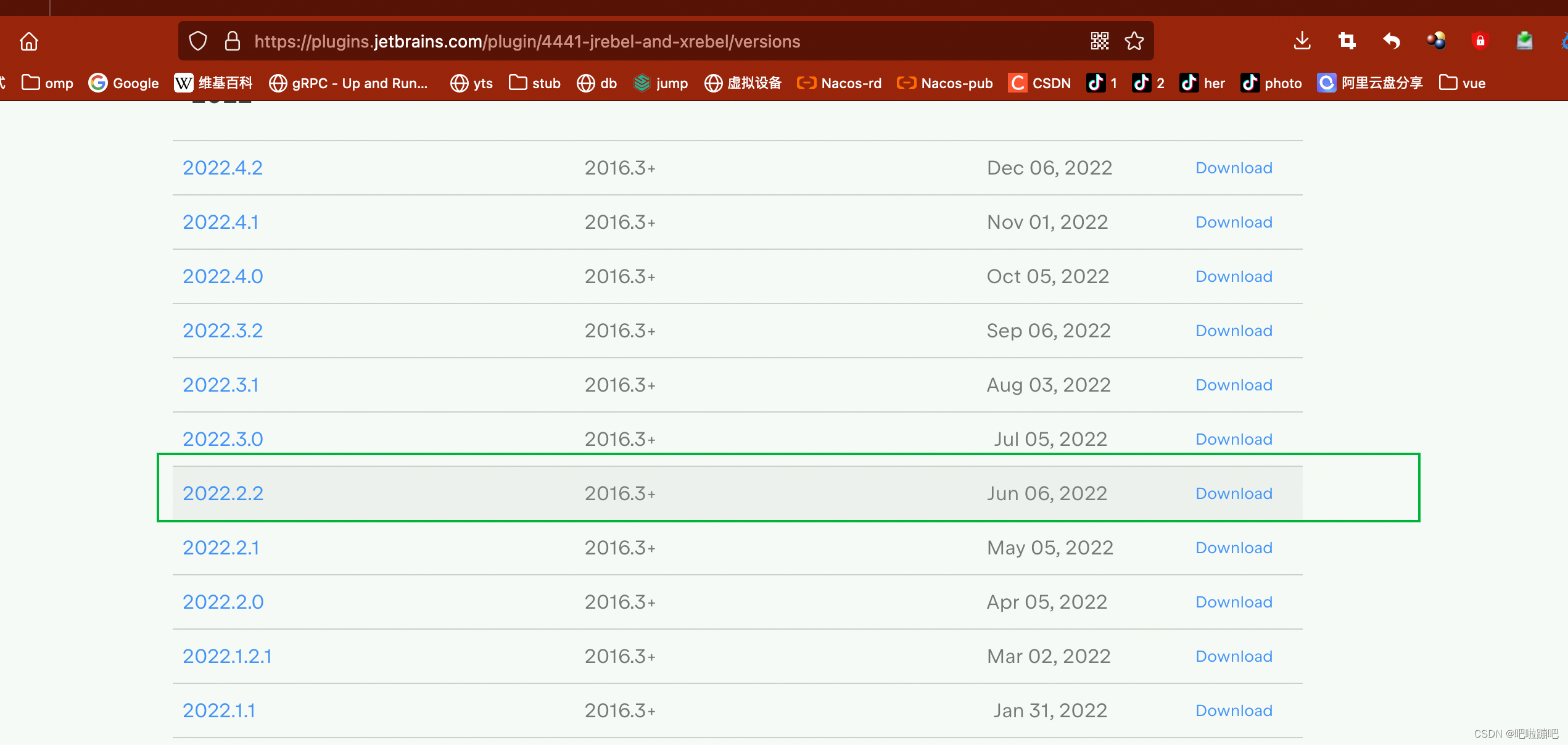
插件已经上传csdn
在Spring Boot中,可以通过以下几种方式实现404错误时返回自定义静态页面:
方法1:使用ErrorController(推荐)
@Component
public class CustomErrorController implements ErrorController {
@Autowired
private ResourceLoader resourceLoader;

@RequestMapping("/error")
public ResponseEntity<?> handleError(HttpServletRequest request) throws IOException {
    Integer statusCode = (Integer) request.getAttribute("javax.servlet.error.status_code");

    if (HttpStatus.NOT_FOUND.value() == statusCode) {
        Resource resource = resourceLoader.getResource("classpath:static/404.html");

        if (resource.exists()) {
            String content = new String(Files.readAllBytes(Paths.get(resource.getURI())));
            return ResponseEntity
                .status(HttpStatus.NOT_FOUND)
                .contentType(MediaType.TEXT_HTML)
                .body(content);
        }
    }

    // 其他错误处理
    return ResponseEntity.status(statusCode != null ? statusCode : 500)
        .body("Error occurred");
}
}
方法2:在拦截器中处理404
@Component
public class NotFoundInterceptor extends HandlerInterceptorAdapter {
@Override
public void afterCompletion(HttpServletRequest request, HttpServletResponse response,
                            Object handler, Exception ex) throws Exception {

    if (response.getStatus() == HttpStatus.NOT_FOUND.value()) {
        // 检查是否是API请求(根据Content-Type或URL模式)
        if (!isApiRequest(request)) {
            serveStatic404Page(request, response);
        }
    }
}

private boolean isApiRequest(HttpServletRequest request) {
    String accept = request.getHeader("Accept");
    String uri = request.getRequestURI();

    // 判断是否为API请求
    return (accept != null && accept.contains("application/json")) ||
           uri.startsWith("/api/");
}

private void serveStatic404Page(HttpServletRequest request,
                               HttpServletResponse response) throws IOException {
    try {
        Resource resource = new ClassPathResource("static/404.html");

        if (resource.exists()) {
            response.setContentType("text/html;charset=UTF-8");
            Files.copy(resource.getInputStream(), response.getOutputStream());
        } else {
            // 如果404页面不存在,返回默认消息
            response.getWriter().write("Page not found");
        }
    } catch (Exception e) {
        response.getWriter().write("Error serving 404 page");
    }
}
}
方法3:使用过滤器(Filter)
@Component
public class NotFoundFilter implements Filter {
@Autowired
private ResourceLoader resourceLoader;

@Override
public void doFilter(ServletRequest request, ServletResponse response,
                    FilterChain chain) throws IOException, ServletException {

    HttpServletRequest httpRequest = (HttpServletRequest) request;
    HttpServletResponse httpResponse = (HttpServletResponse) response;

    // 使用自定义ResponseWrapper
    NotFoundResponseWrapper wrapper = new NotFoundResponseWrapper(httpResponse);
    chain.doFilter(request, wrapper);

    // 检查状态码
    if (wrapper.getStatus() == HttpStatus.NOT_FOUND.value()) {
        if (!isApiRequest(httpRequest)) {
            serve404Page(httpRequest, wrapper);
        }
    }
}

private void serve404Page(HttpServletRequest request,
                        HttpServletResponse response) throws IOException {
    Resource resource = resourceLoader.getResource("classpath:static/404.html");

    if (resource.exists()) {
        response.setContentType("text/html;charset=UTF-8");
        response.getWriter().write(new String(resource.getInputStream().readAllBytes()));
    }
}

// ResponseWrapper用于捕获状态码
private static class NotFoundResponseWrapper extends HttpServletResponseWrapper {
    private int status = 200;

    public NotFoundResponseWrapper(HttpServletResponse response) {
        super(response);
    }

    @Override
    public void setStatus(int sc) {
        super.setStatus(sc);
        this.status = sc;
    }

    @Override
    public void sendError(int sc) throws IOException {
        this.status = sc;
        super.sendError(sc);
    }

    @Override
    public void sendError(int sc, String msg) throws IOException {
        this.status = sc;
        super.sendError(sc, msg);
    }

    public int getStatus() {
        return status;
    }
}
}
方法4:Spring Boot配置(最简单)
在application.yml或application.properties中配置:
spring:
mvc:
throw-exception-if-no-handler-found: true
web:
resources:
add-mappings: false
创建错误页面目录结构:
src/main/resources/
└── static/
└── error/
├── 404.html
└── 5xx.html
或者创建Controller:
@Controller
public class ErrorController implements org.springframework.boot.web.servlet.error.ErrorController {
@RequestMapping("/error")
public String handleError(HttpServletRequest request) {
    Integer statusCode = (Integer) request.getAttribute("javax.servlet.error.status_code");

    if (statusCode == 404) {
        return "forward:/static/404.html";
    }

    return "error";
}
}
方法5:WebMvcConfigurer配置
@Configuration
public class WebConfig implements WebMvcConfigurer {
@Override
public void addInterceptors(InterceptorRegistry registry) {
    registry.addInterceptor(new NotFoundInterceptor());
}

@Override
public void addResourceHandlers(ResourceHandlerRegistry registry) {
    // 确保静态资源能够访问
    registry.addResourceHandler("/static/**")
            .addResourceLocations("classpath:/static/");
}
}
创建404页面
在src/main/resources/static/目录下创建404.html:
推荐方案
对于实际项目,推荐使用以下组合:
-
使用Spring Boot默认的错误处理机制,在resources/static/error/目录下放置404.html
-
配合自定义ErrorController处理特殊逻辑
-
通过拦截器处理API请求,返回JSON格式的404响应
这样既能处理普通页面的404,也能正确处理API请求的404响应。





 扫一扫
扫一扫


 1292
1292

 被折叠的 条评论
为什么被折叠?
被折叠的 条评论
为什么被折叠?
 到【灌水乐园】发言





