



 本文详细介绍了如何在C语言项目上使用gtest和gmock进行单元测试。首先,通过安装mingw并下载gtest和gmock源码来搭建环境。接着,编译gmock并运行测试确保其正确安装。最后,阐述了如何在C语言项目中适配gmock,包括定义mock类、描述方法、实例化和包装mock函数进行单元测试。文章还提供了具体的文件结构和Makefile修改示例。
gtest和gmock是针对c/c++的单元测试框架。
嵌入式中大多采用C语言进行开发,为了使用gmock对C语言项目进行单元测试,存在一些而外的工作需要做。
一、环境搭建
1.安装mingw
https://osdn.net/projects/mingw/releases/
添加E:\MinGW\mingw64\bin 到系统环境变量中
2.下载gtest gmock源码
https://github.com/google/googletest
二、编译gmock
1.拷贝E:\MinGW\mingw64\bin\mingw32-make.exe 到 E:\googletest-master\googlemock\make\mingw32-make.exe
2.执行E:\googletest-master\googlemock\make\mingw32-make.exe 
运行结果将生成gmock_test.exe

运行gmock_test.exe

至此,gmock编译完成
三、适配到C语言项目中使用
1、在C语言项目中使用gtest
2、在C语言项目中使用gmock
定义mock 类
描述mock类中的方法
实例化mock类得到实例
使用函数包装mock类中的方法
使用mock函数进行单元测试
在googletest目录下新建一个test_c_code目录
新建两个C语言文件和一个C++测试文件:

code_in_c.h
#ifndef __CODE_IN_C_H__
#define __CODE_IN_C_H__

typedef struct c_struct_t{
    char *p_c_pointer;
    int(*p_c_func)(struct c_struct_t*);
}c_struct_t;

int c_func_caller(c_struct_t* p_c_struct);

#endif
code_in_c.c
#include "code_in_c.h"
#include <stdio.h>

int c_func(c_struct_t *p_c_struct)
{
    printf("%s", p_c_struct->p_c_pointer);
    return 0;
}

int c_func_caller(c_struct_t* p_c_struct)
{
    char words[40] = "hello, gmock test c code";
    char *p_words = words;
    int ret;
    p_c_struct->p_c_pointer = p_words;
    ret = p_c_struct->p_c_func(p_c_struct);
    return ret;
}

/*
void main(void)
{
    c_struct_t c_struct;
    c_struct.p_c_func = c_func;
    c_func_caller(&c_struct);
}
*/
gmock_test_c_code.cc
#include <gtest/gtest.h>
#include <gmock/gmock.h>

//引用被测函数的头文件
extern "C"
{
#include "code_in_c.h"
}

using namespace testing;
/*构造mock*/
//定义mock类
class Mock_FOO {
public:
    //定义mock方法
    MOCK_METHOD1(set, int(int num));
    //定义mock方法
    MOCK_METHOD0(get, int());
    //定义mock方法
    MOCK_METHOD1(mock_c_func, int(c_struct_t *p_c_struct));
};
//实例化mock对象
Mock_FOO mocker;
//创建mock对象方法的函数的C包装
int mock_c_func(c_struct_t *p_c_struct) {
    return mocker.mock_c_func(p_c_struct);
}

//测试被测函数
TEST(Atest, test_c_func_000)
{
    EXPECT_CALL(mocker, mock_c_func(IsNull())).WillRepeatedly(Return(654));

    c_struct_t c_struct_foo;
    c_struct_foo.p_c_func = mock_c_func;
    int ret = c_func_caller(&c_struct_foo);
    EXPECT_EQ(456, ret);
}
//测试被测函数
TEST(Atest, test_c_func_001)
{
    EXPECT_CALL(mocker, mock_c_func(An<c_struct_t *>())).WillRepeatedly(Return(654));

    c_struct_t c_struct_foo;
    c_struct_foo.p_c_func = mock_c_func;
    int l = c_func_caller(&c_struct_foo);
    EXPECT_EQ(654, l);
}

/*
int main(int argc, char *argv[]) {
    ::testing::InitGoogleTest(&argc, argv);
    return RUN_ALL_TESTS();
}
*/
修改E:\googletest-master\googlemock\make\Makefile,使得编译系统能够编译我们刚才添加的三个文件。
Makefile
# A sample Makefile for building both Google Mock and Google Test and
# using them in user tests.  This file is self-contained, so you don't
# need to use the Makefile in Google Test's source tree.  Please tweak
# it to suit your environment and project.  You may want to move it to
# your project's root directory.
#
# SYNOPSIS:
#
#   make [all]  - makes everything.
#   make TARGET - makes the given target.
#   make clean  - removes all files generated by make.

# Please tweak the following variable definitions as needed by your
# project, except GMOCK_HEADERS and GTEST_HEADERS, which you can use
# in your own targets but shouldn't modify.

# Points to the root of Google Test, relative to where this file is.
# Remember to tweak this if you move this file, or if you want to use
# a copy of Google Test at a different location.
GTEST_DIR = ../../googletest

# Points to the location of the Google Test libraries
GTEST_LIB_DIR = .

# Points to the root of Google Mock, relative to where this file is.
# Remember to tweak this if you move this file.
GMOCK_DIR = ..

# Where to find user code.
# USER_DIR = ../test
USER_DIR = ../test_c_code

# Flags passed to the preprocessor.
# Set Google Test and Google Mock's header directories as system
# directories, such that the compiler doesn't generate warnings in
# these headers.
CPPFLAGS += -isystem $(GTEST_DIR)/include -isystem $(GMOCK_DIR)/include

# Flags passed to the C++ compiler.
CXXFLAGS += -g -Wall -Wextra -pthread -std=c++11

# Google Test libraries
GTEST_LIBS = libgtest.a libgtest_main.a libgmock.a libgmock_main.a

# All tests produced by this Makefile.  Remember to add new tests you
# created to the list.
# TESTS = gmock_test
TESTS = gmock_test_c_code

# All Google Test headers.  Usually you shouldn't change this
# definition.
GTEST_HEADERS = $(GTEST_DIR)/include/gtest/*.h \
                $(GTEST_DIR)/include/gtest/internal/*.h

# All Google Mock headers. Note that all Google Test headers are
# included here too, as they are #included by Google Mock headers.
# Usually you shouldn't change this definition.
GMOCK_HEADERS = $(GMOCK_DIR)/include/gmock/*.h \
                $(GMOCK_DIR)/include/gmock/internal/*.h \
                $(GTEST_HEADERS)

# House-keeping build targets.

all : $(GTEST_LIBS) $(TESTS)

clean :
	rm -f $(GTEST_LIBS) $(TESTS) *.o

# Builds gmock.a and gmock_main.a.  These libraries contain both
# Google Mock and Google Test.  A test should link with either gmock.a
# or gmock_main.a, depending on whether it defines its own main()
# function.  It's fine if your test only uses features from Google
# Test (and not Google Mock).

# Usually you shouldn't tweak such internal variables, indicated by a
# trailing _.
GTEST_SRCS_ = $(GTEST_DIR)/src/*.cc $(GTEST_DIR)/src/*.h $(GTEST_HEADERS)
GMOCK_SRCS_ = $(GMOCK_DIR)/src/*.cc $(GMOCK_HEADERS)

# For simplicity and to avoid depending on implementation details of
# Google Mock and Google Test, the dependencies specified below are
# conservative and not optimized.  This is fine as Google Mock and
# Google Test compile fast and for ordinary users their source rarely
# changes.
gtest-all.o : $(GTEST_SRCS_)
	$(CXX) $(CPPFLAGS) -I$(GTEST_DIR) -I$(GMOCK_DIR) $(CXXFLAGS) \
            -c $(GTEST_DIR)/src/gtest-all.cc

gtest_main.o : $(GTEST_SRCS_)
	$(CXX) $(CPPFLAGS) -I$(GTEST_DIR) -I$(GMOCK_DIR) $(CXXFLAGS) \
            -c $(GTEST_DIR)/src/gtest_main.cc

gmock-all.o : $(GMOCK_SRCS_)
	$(CXX) $(CPPFLAGS) -I$(GTEST_DIR) -I$(GMOCK_DIR) $(CXXFLAGS) \
            -c $(GMOCK_DIR)/src/gmock-all.cc

gmock_main.o : $(GMOCK_SRCS_)
	$(CXX) $(CPPFLAGS) -I$(GTEST_DIR) -I$(GMOCK_DIR) $(CXXFLAGS) \
            -c $(GMOCK_DIR)/src/gmock_main.cc

libgtest.a : gtest-all.o
	$(AR) $(ARFLAGS) $@ $^

libgtest_main.a : gtest_main.o
	$(AR) $(ARFLAGS) $@ $^

libgmock.a : gmock-all.o
	$(AR) $(ARFLAGS) $@ $^

libgmock_main.a : gmock_main.o
	$(AR) $(ARFLAGS) $@ $^

# Builds a sample test.

gmock_test.o : $(USER_DIR)/gmock_test.cc $(GMOCK_HEADERS)
	$(CXX) $(CPPFLAGS) $(CXXFLAGS) -c $(USER_DIR)/gmock_test.cc

gmock_test : gmock_test.o $(GTEST_LIBS)
	$(CXX) $(CPPFLAGS) $(CXXFLAGS) -L$(GTEST_LIB_DIR) -lgmock -lpthread $^ -o $@

# Builds a sample test for c code.

code_in_c.o : $(USER_DIR)/code_in_c.c $(GMOCK_HEADERS)
	gcc $(CPPFLAGS) -c $(USER_DIR)/code_in_c.c

gmock_test_c_code.o : $(USER_DIR)/gmock_test_c_code.cc $(GMOCK_HEADERS)
	$(CXX) $(CPPFLAGS) $(CXXFLAGS) -c $(USER_DIR)/gmock_test_c_code.cc

gmock_test_c_code : code_in_c.o gmock_test_c_code.o $(GTEST_LIBS)
	$(CXX) $(CPPFLAGS) $(CXXFLAGS) -L$(GTEST_LIB_DIR) -lgmock -lpthread $^ -o $@
最终,生成的我们的可执行测试文件: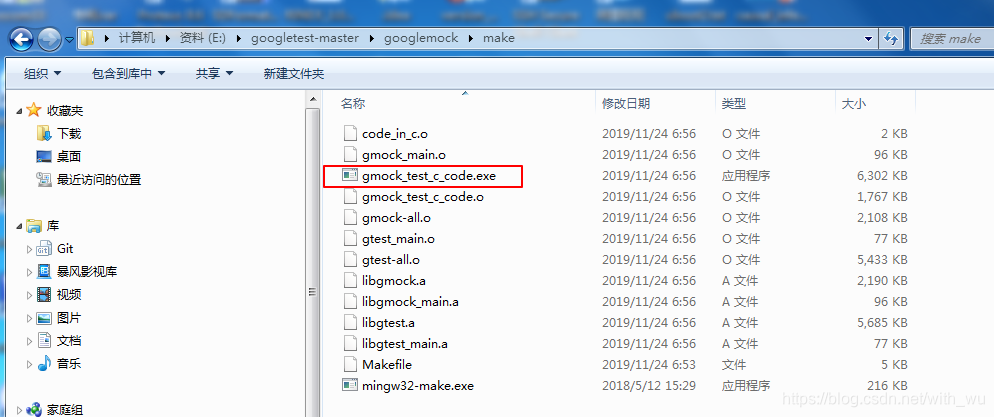
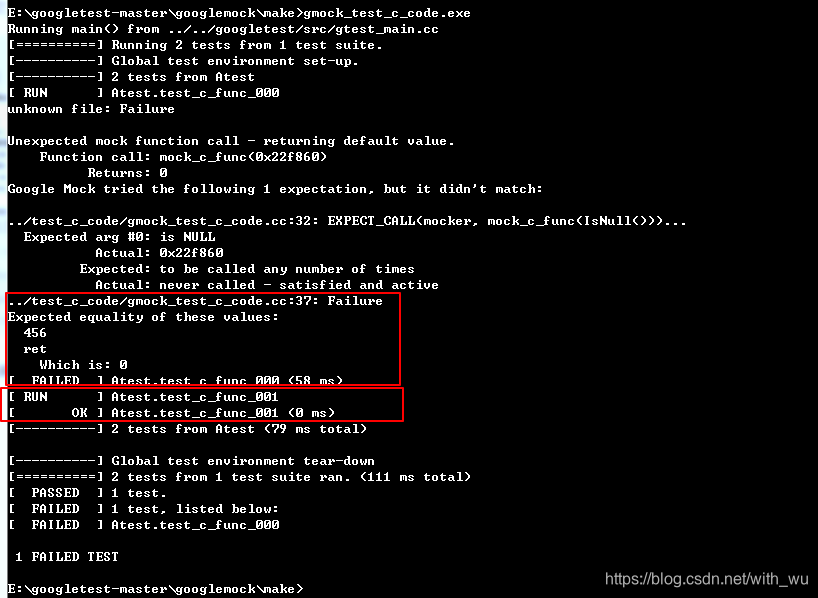
执行该测试文件:





 扫一扫
扫一扫


 4837
4837

 被折叠的 条评论
为什么被折叠?
被折叠的 条评论
为什么被折叠?
 到【灌水乐园】发言





