



 本文详细介绍了如何在Eclipse中创建一个Java项目,利用Hadoop的API编写WordCount程序,进行词频统计。从创建本地文件、设置项目、添加依赖JAR包,到编写Mapper和Reducer类,再到编译打包程序和运行Hadoop任务,每个步骤都有清晰的说明和截图辅助理解。最后展示了程序运行结果,成功实现了词频统计。
需要的jar包评论区发邮箱
1.创建本地文件
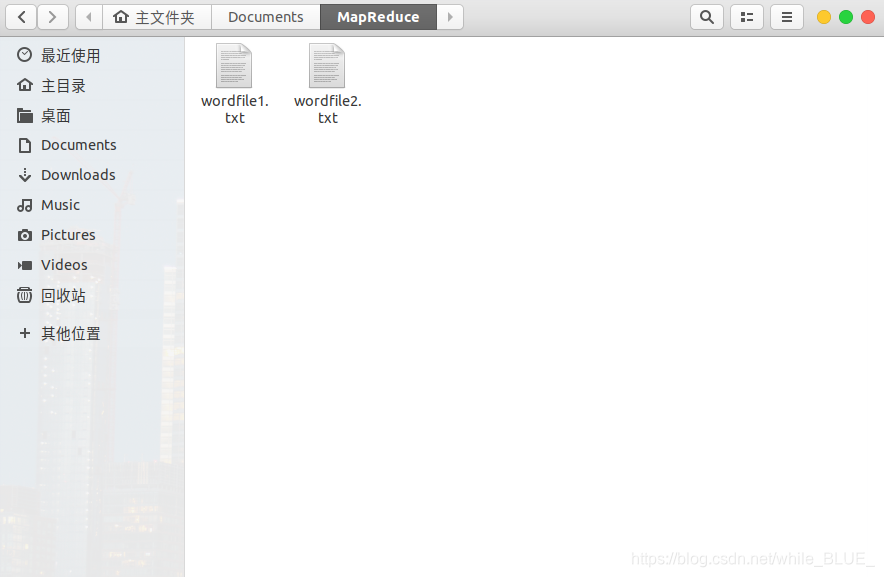
系统本地创建txt文件,wordfile1.txt。
2. 在Eclipse中创建项目
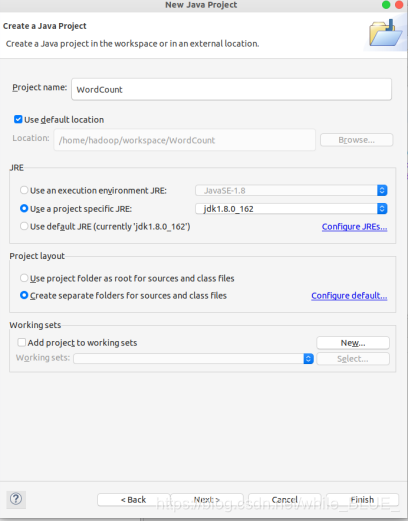
选择“File–>New–>Java Project”菜单,开始创建一个Java工程,命名为名称“WordCount”,并选中“Use default location”,如下图所示界面。
3. 为项目添加需要用到的JAR包
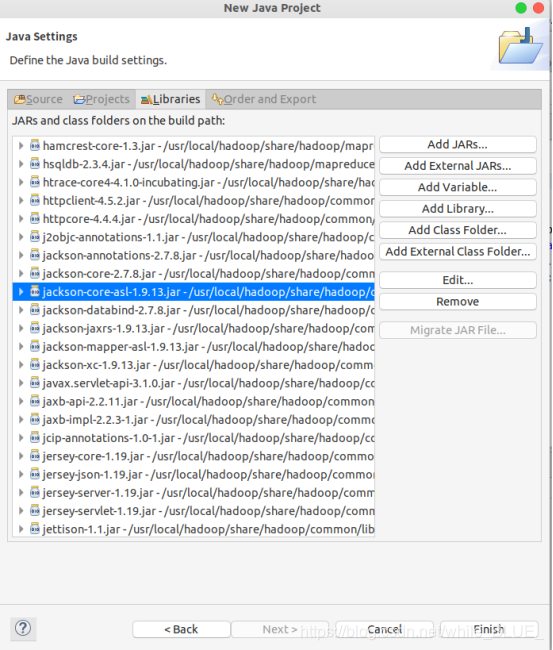
进入下一步的设置以后,会弹出如下图所示界面。
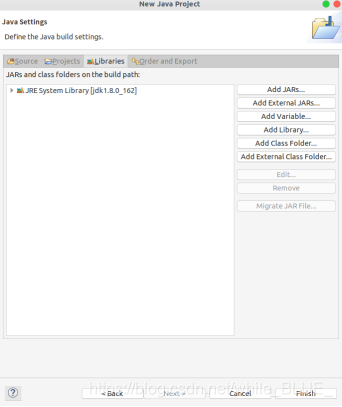
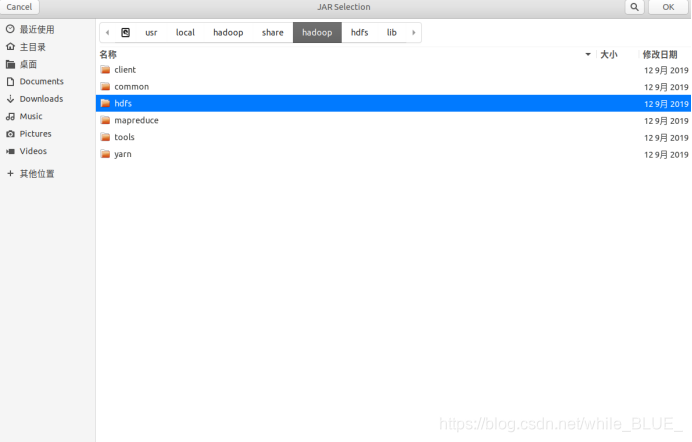
点击界面中的“Libraries”选项卡,然后,点击界面右侧的“Add External JARs…”按钮,弹出如下图所示界面。
需要向Java工程中添加以下JAR包:
(1)“/usr/local/hadoop/share/hadoop/common”目录下的hadoop-common-3.1.3.jar和haoop-nfs-3.1.3.jar;
(2)“/usr/local/hadoop/share/hadoop/common/lib”目录下的所有JAR包;
(3)“/usr/local/hadoop/share/hadoop/mapreduce”目录下的所有JAR包,但是,不包括jdiff、lib、lib-examples和sources目录。
(4)“/usr/local/hadoop/share/hadoop/mapreduce/lib”目录下的所有JAR包。
4. 编写Java应用程序
选择“New–>Class”菜单以后,新建WordCount类。
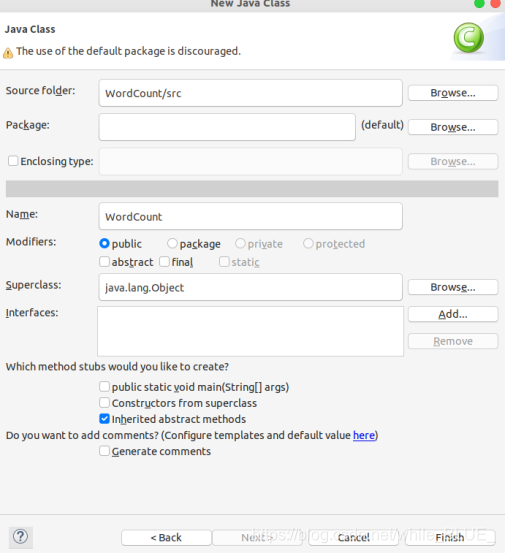
Eclipse自动创建了一个名为“WordCount.java”的源代码文件,并且包含了代码“public class WordCount{}”,请清空该文件里面的代码,然后在该文件中输入完整的词频统计程序代码,具体如下:
import java.io.IOException;
import java.util.Iterator;
import java.util.StringTokenizer;
import org.apache.hadoop.conf.Configuration;
import org.apache.hadoop.fs.Path;
import org.apache.hadoop.io.IntWritable;
import org.apache.hadoop.io.Text;
import org.apache.hadoop.mapreduce.Job;
import org.apache.hadoop.mapreduce.Mapper;
import org.apache.hadoop.mapreduce.Reducer;
import org.apache.hadoop.mapreduce.lib.input.FileInputFormat;
import org.apache.hadoop.mapreduce.lib.output.FileOutputFormat;
import org.apache.hadoop.util.GenericOptionsParser;
public class WordCount {
    public WordCount() {
    }
     public static void main(String[] args) throws Exception {
        Configuration conf = new Configuration();
        String[] otherArgs = (new GenericOptionsParser(conf, args)).getRemainingArgs();
        if(otherArgs.length < 2) {
            System.err.println("Usage: wordcount <in> [<in>...] <out>");
            System.exit(2);
        }
        Job job = Job.getInstance(conf, "word count");
        job.setJarByClass(WordCount.class);
        job.setMapperClass(WordCount.TokenizerMapper.class);
        job.setCombinerClass(WordCount.IntSumReducer.class);
        job.setReducerClass(WordCount.IntSumReducer.class);
        job.setOutputKeyClass(Text.class);
        job.setOutputValueClass(IntWritable.class);
        for(int i = 0; i < otherArgs.length - 1; ++i) {
            FileInputFormat.addInputPath(job, new Path(otherArgs[i]));
        }
        FileOutputFormat.setOutputPath(job, new Path(otherArgs[otherArgs.length - 1]));
        System.exit(job.waitForCompletion(true)?0:1);
    }
    public static class TokenizerMapper extends Mapper<Object, Text, Text, IntWritable> {
        private static final IntWritable one = new IntWritable(1);
        private Text word = new Text();
        public TokenizerMapper() {
        }
        public void map(Object key, Text value, Mapper<Object, Text, Text, IntWritable>.Context context) throws IOException, InterruptedException {
            StringTokenizer itr = new StringTokenizer(value.toString());
            while(itr.hasMoreTokens()) {
                this.word.set(itr.nextToken());
                context.write(this.word, one);
            }
        }
    }
public static class IntSumReducer extends Reducer<Text, IntWritable, Text, IntWritable> {
        private IntWritable result = new IntWritable();
        public IntSumReducer() {
        }
        public void reduce(Text key, Iterable<IntWritable> values, Reducer<Text, IntWritable, Text, IntWritable>.Context context) throws IOException, InterruptedException {
            int sum = 0;
            IntWritable val;
            for(Iterator i$ = values.iterator(); i$.hasNext(); sum += val.get()) {
                val = (IntWritable)i$.next();
            }
            this.result.set(sum);
            context.write(key, this.result);
        }
    }
}
5. 编译打包程序
现在就可以编译上面编写的代码。可以直接点击Eclipse工作界面上部的运行程序的快捷按钮,结果如下图所示。
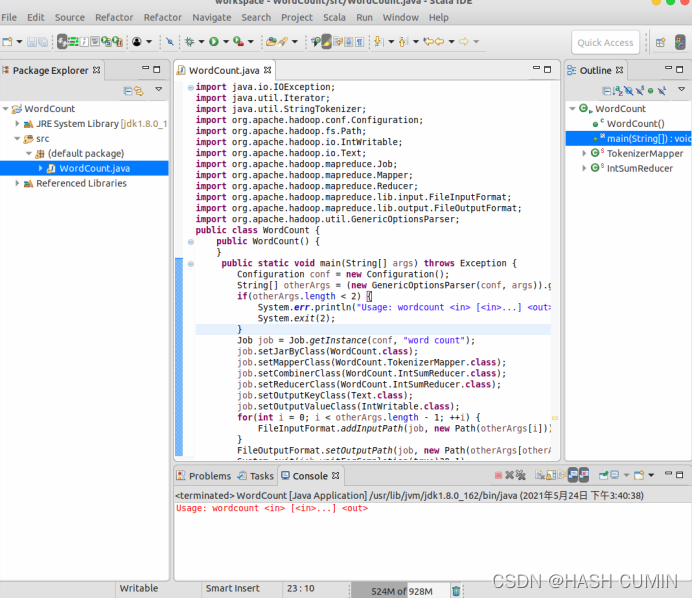
下面就可以把Java应用程序打包生成JAR包,部署到Hadoop平台上运行。现在可以把词频统计程序放在“/usr/local/hadoop/myapp”目录下。如果该目录不存在,可以使用如下命令创建:
cd /usr/local/hadoop
mkdir myapp
将工程右击Export导出jar包:
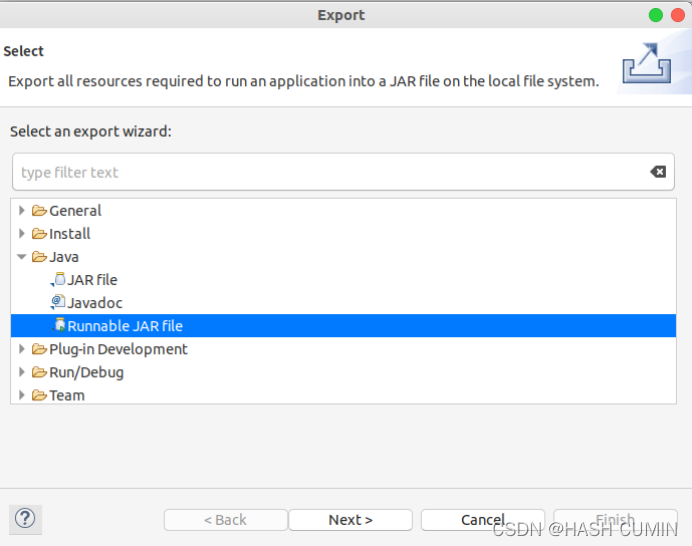
在该界面中,选择“Runnable JAR file”,然后,点击“Next>”按钮,弹出如下图所示界面。
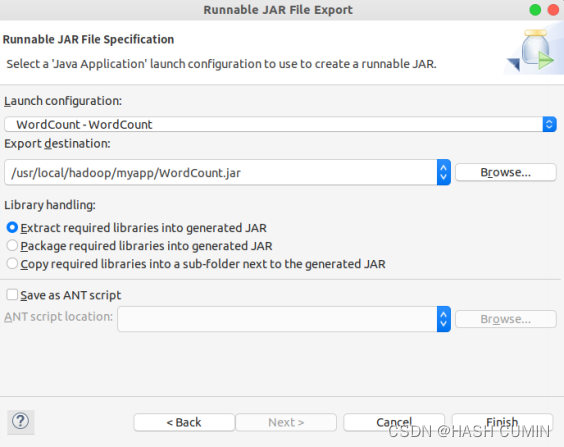
在该界面中,“Launch configuration”用于设置生成的JAR包被部署启动时运行的主类,需要在下拉列表中选择刚才配置的类“WordCount-WordCount”。在“Export destination”中需要设置JAR包要输出保存到哪个目录,比如,这里设置为“/usr/local/hadoop/myapp/WordCount.jar”。在“Library handling”下面选择“Extract required libraries into generated JAR”。然后,点击“Finish”按钮,会出现如下图所示界面。
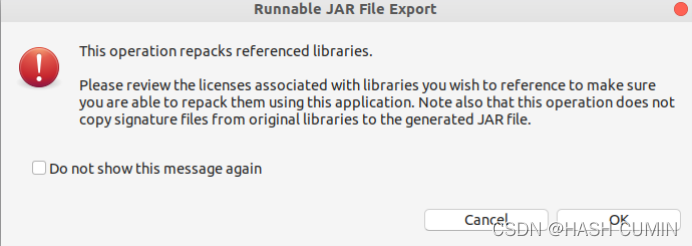
直接点击界面右下角的“OK”按钮。至此,已经顺利把WordCount工程打包生成了WordCount.jar。
5. 运行程序
在运行程序之前,需要启动Hadoop,命令如下:
cd /usr/local/hadoop
./sbin/start-dfs.sh
在启动Hadoop之后,需要首先删除HDFS中与当前Linux用户hadoop对应的input和output目录(即HDFS中的“/user/hadoop/input”和“/user/hadoop/output”目录),这样确保后面程序运行不会出现问题,具体命令如下:
./bin/hdfs dfs -rm -r input
./bin/hdfs dfs -rm -r output
然后,再在HDFS中新建与当前Linux用户hadoop对应的input目录,即“/user/hadoop/input”目录,具体命令如下:
./bin/hdfs dfs -mkdir input
然后,把Linux本地文件系统中新建的两个文件wordfile1.txt,上传到HDFS中“/user/hadoop/input”目录下,命令如下:
./bin/hdfs dfs -put ./wordfile1.txt input
现在,就可以在Linux系统中,使用hadoop jar命令运行程序,命令如下:
./bin/hadoop jar ./myapp/WordCount.jar input output
上面命令执行以后,当运行顺利结束时,屏幕上会显示类似如下的信息:
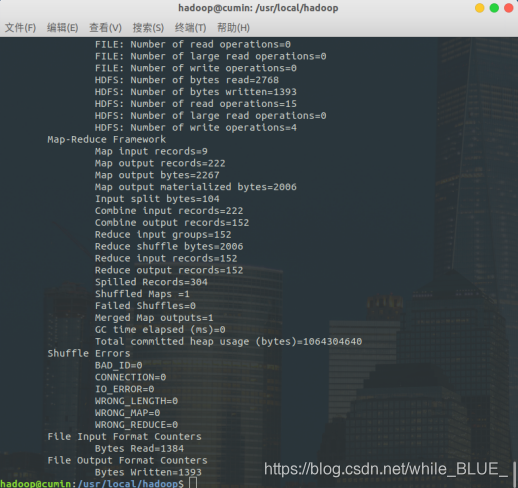
词频统计结果已经被写入了HDFS的“/user/hadoop/output”目录中,可以执行如下命令查看词频统计结果:
./bin/hdfs dfs -cat output/*
上面命令执行后,会在屏幕上显示如下词频统计结果:
hadoop@cumin:/usr/local/hadoop$ ./bin/hdfs dfs -cat output/*
2021-05-24 21:17:42,733 INFO sasl.SaslDataTransferClient: SASL encryption trust check: localHostTrusted = false, remoteHostTrusted = false
000	1
5	1
Chinese	2
Commercials	1
In	1
Language	1
On	1
Secondly,	1
TVs,	1
The	1
Therefore,	1
This	1
To	1
Undoubtedly,	1
What's	1
Words	1
Yet	1
a	6
accumulate	1
accurate	1
age	1
an	1
and	5
appearing	1
arbitrary	1
argue	1
arouse	1
arouses	1
as	4
attention.	1
audience's	1
awareness	1
ban	1
be	3
been	1
begin	1
boasting	1
boy,	1
brands.	1
by	4
can	1
cartoon	2
characters	1
children	1
commercial	2
commercial,	1
commercials	2
commercials,	1
concern	1
culture	1
culture,	1
deep	1
depicts	1
dictionary.	1
dignity	1
disrespect	1
dissimilar	1
distinguish	1
down	1
easy	1
first	1
for	3
fosters	1
from	1
general	1
grab	1
have	1
history	1
homophones	1
identifies	1
idiom	1
idiom,	1
image	1
importance	1
in	3
incorrect	1
innovative	1
integrity	2
intended	1
is	6
issue	1
it	2
its	1
itself	1
just	1
kept	1
kind	1
labels	1
language	3
last	1
magazines.	1
maintain	1
majority	1
makers	1
may	1
media	1
misled	1
misspelling	2
misspellings	1
nation's	1
nationality	1
newspapers	1
not	1
of	9
on	2
only	1
or	2
other	2
our	1
over	1
people	1
pin	1
presented	1
problem.	1
propaganda.	1
put	1
puzzled	1
quite	1
replaced	1
safeguarded.	1
scene	1
school	1
should	1
so	1
solve	1
spelling	1
spellings.	1
step	1
such	1
symbolizes	1
television	1
that	2
the	17
their	1
these	1
this	2
thought-provoking	1
to	5
trying	1
two	3
uncommon	1
unity.	1
versions	1
vocabulary	1
way	1
well	1
when	1
which	1
who	1
worse,	1
years.	1
yet	1






 扫一扫
扫一扫


 1028
1028


 到【灌水乐园】发言



