



1、RabbitMQ简单模式概念
RabbitMQ共有六种工作模式:简单模式(Simple)、工作队列模式(Work Queue)、发布订阅模式(Publish/Subscribe)、路由模式(Routing)、通配符模式(Topics)、远程调用模式(RPC,不常用)
1、简单模式
特点:
-
一个生产者对应一个消费者,通过队列进行消息传递。
-
该模式使用direct交换机,direct交换机是RabbitMQ默认交换机。
2、RabbitMQ简单模式项目搭建
接下来我们使用JAVA代码操作RabbitMQ,让其按照简单模式进行工作。
-
JMS
-
由于MQ产品很多,操作方式各有不同,于是JAVA提供了一套规则
——JMS,用于操作消息中间件。JMS即Java消息服务
(JavaMessage Service)应用程序接口,是一个Java平台中关于面
向消息中间件的API。JMS是JavaEE规范中的一种,类比JDBC。很多
MQ产品都实现了JMS规范,例如ActiveMQ。RabbitMQ
-
-
创建项目
-
启动RabbitMQ
# 开启管控台插件 rabbitmq-plugins enable rabbitmq_management # 启动rabbitmq rabbitmq-server -detached -
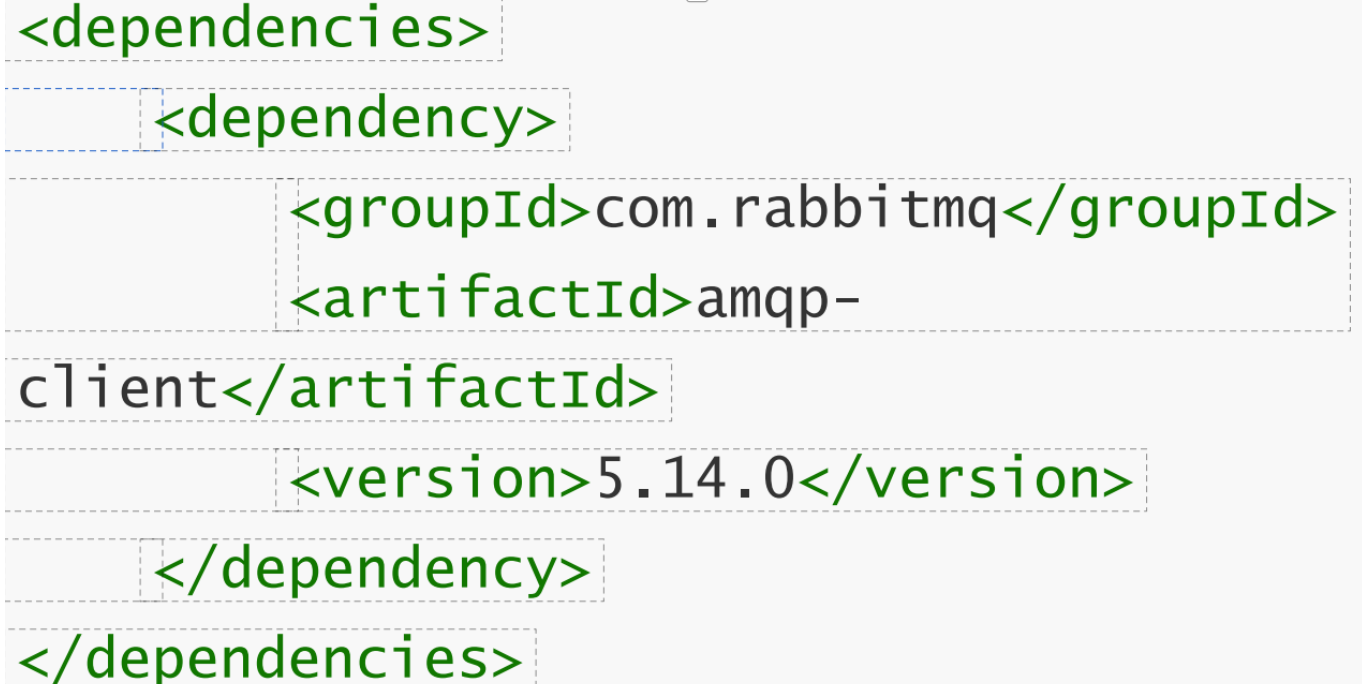
创建普通maven项目,添加RabbitMQ依赖:
-
3、RabbitMQ简单模式编写生产者
接下来我们编写生产者代码创建消息:
// 生产者
public class Producer {
  public static void main(String[] args) throws IOException, TimeoutException {
    // 1.创建连接工厂
    ConnectionFactory connectionFactory = new ConnectionFactory();
    connectionFactory.setHost("192.168.0.162");
    connectionFactory.setPort(5672);
    connectionFactory.setUsername("guest");
    connectionFactory.setPassword("guest");
    connectionFactory.setVirtualHost("/");
    // 2.创建连接
    Connection connection = connectionFactory.newConnection();
    // 3.建立信道
    Channel channel = connection.createChannel();
    // 4.创建队列,如果队列已存在,则使用该队列
    /**
     * 参数1:队列名
     * 参数2:是否持久化,true表示MQ重启后队列还在。
     * 参数3:是否私有化,false表示所有消费者都可以访问,true表示只有第一次拥有它的消费者才能访问
     * 参数4:是否自动删除,true表示不再使用队列时自动删除队列
     * 参数5:其他额外参数
     */
    channel.queueDeclare("simple_queue",false,false,false,null);
    // 5.发送消息
    String message = "hello!rabbitmq!";
    /**
     * 参数1:交换机名,""表示默认交换机
     * 参数2:路由键,简单模式就是队列名
     * 参数3:其他额外参数
     * 参数4:要传递的消息字节数组
     */
    channel.basicPublish("","simple_queue",null,message.getBytes());
    // 6.关闭信道和连接
    channel.close();
    connection.close();
    System.out.println("===发送成功===");
   }
}
运行生产者后,我们可以看到在RabbitMQ中创建了队列,队列中已经有了消息。

4、RabbitMQ简单模式编写消费者
// 消费者
public class Consumer {
  public static void main(String[] args) throws IOException, TimeoutException {
    // 1.创建连接工厂
    ConnectionFactory connectionFactory = new ConnectionFactory();
    connectionFactory.setHost("192.168.0.162");
    connectionFactory.setPort(5672);
    connectionFactory.setUsername("studydemo");
    connectionFactory.setPassword("studydemo");
    connectionFactory.setVirtualHost("/");
    // 2.创建连接
    Connection connection = connectionFactory.newConnection();
    // 3.建立信道
    Channel channel = connection.createChannel();
    // 4.监听队列
    /**
     * 参数1:监听的队列名
     * 参数2:是否自动签收,如果设置为false,则需要手动确认消息已收到,否则MQ会一直发送消息
     * 参数3:Consumer的实现类,重写该类方法表示接受到消息后如何消费
     */
    channel.basicConsume("simple_queue",true,new DefaultConsumer(channel){
      @Override
      public void handleDelivery(String consumerTag, Envelope envelope, AMQP.BasicProperties properties, byte[] body) throws IOException {
        String message = new String(body, "UTF-8");
        System.out.println("接受消息,消息为:"+message);
       }
     });
   }
}
运行消费者后,我们可以看到在RabbitMQ中的消息已经被消费

2、RabbitMQ工作队列模式概念
与简单模式相比,工作队列模式(Work Queue)多了一些消费者,该模式也使用direct交换机,应用于处理消息较多的情况。特点如下:
一个队列对应多个消费者。
一条消息只会被一个消费者消费。
消息队列默认采用轮询的方式将消息平均发送给消费者。
1、RabbitMQ工作队列模式编写生产者
public class Producer {
  public static void main(String[] args) throws IOException, TimeoutException {
    // 1.创建连接工厂
    ConnectionFactory connectionFactory = new ConnectionFactory();
    connectionFactory.setHost("192.168.0.162");
    connectionFactory.setPort(5672);
    connectionFactory.setUsername("itbaizhan");
    connectionFactory.setPassword("itbaizhan");
    connectionFactory.setVirtualHost("/");
    // 2.创建连接
    Connection connection = connectionFactory.newConnection();
    // 3.建立信道
    Channel channel = connection.createChannel();
    // 4.创建队列,持久化队列
    channel.queueDeclare("work_queue",true,false,false,null);
    // 5.发送大量消息,参数3表示该消息为持久化消息,即除了保存到内存还会保存到磁盘中
    for (int i = 1; i <= 100; i++) {
      channel.basicPublish("","work_queue", MessageProperties.PERSISTENT_TEXT_PLAIN,
           ("你好,这是今天的第"+i+"条消息").getBytes());
     }
    // 6.关闭资源
    channel.close();
    connection.close();
   }
}
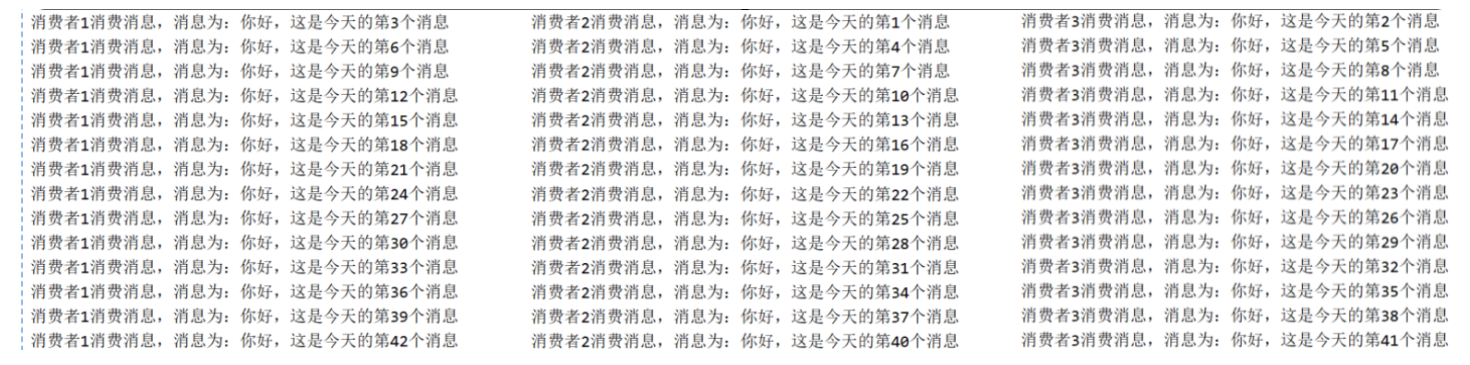
效果如下:
、
2、编写消费者
队列采用轮询的方式平均发送给消费者
// 消费者1
public class Consumer1 {
  public static void main(String[] args) throws IOException, TimeoutException {
    // 1.创建连接工厂
    ConnectionFactory connectionFactory = new ConnectionFactory();
    connectionFactory.setHost("192.168.0.162");
    connectionFactory.setPort(5672);
    connectionFactory.setUsername("itbaizhan");
    connectionFactory.setPassword("itbaizhan");
    connectionFactory.setVirtualHost("/");
    // 2.创建连接
    Connection connection = connectionFactory.newConnection();
    // 3.建立信道
    Channel channel = connection.createChannel();
    // 4.监听队列,处理消息
    channel.basicConsume("work_queue",true,new DefaultConsumer(channel){
      @Override
      public void handleDelivery(String consumerTag, Envelope envelope, AMQP.BasicProperties properties, byte[] body) throws IOException {
        String message = new String(body, "UTF-8");
        System.out.println("消费者1消费消息,消息为:"+message);
       }
     });
   }
}


// 消费者2
public class Consumer2 {
  public static void main(String[] args) throws IOException, TimeoutException {
    // 1.创建连接工厂
    ConnectionFactory connectionFactory = new ConnectionFactory();
    connectionFactory.setHost("192.168.0.162");
    connectionFactory.setPort(5672);
    connectionFactory.setUsername("itbaizhan");
    connectionFactory.setPassword("itbaizhan");
    connectionFactory.setVirtualHost("/");
    // 2.创建连接
    Connection connection = connectionFactory.newConnection();
    // 3.建立信道
    Channel channel = connection.createChannel();
    // 4.监听队列,处理消息
    channel.basicConsume("work_queue",true,new DefaultConsumer(channel){
      @Override
      public void handleDelivery(String consumerTag, Envelope envelope, AMQP.BasicProperties properties, byte[] body) throws IOException {
        String message = new String(body, "UTF-8");
        System.out.println("消费者2消费消息,消息为:"+message);
       }
     });
   }
}


// 消费者3
public class Consumer3 {
  public static void main(String[] args) throws IOException, TimeoutException {
    // 1.创建连接工厂
    ConnectionFactory connectionFactory = new ConnectionFactory();
    connectionFactory.setHost("192.168.0.162");
    connectionFactory.setPort(5672);
    connectionFactory.setUsername("itbaizhan");
    connectionFactory.setPassword("itbaizhan");
    connectionFactory.setVirtualHost("/");
    // 2.创建连接
    Connection connection = connectionFactory.newConnection();
    // 3.建立信道
    Channel channel = connection.createChannel();
    // 4.监听队列,处理消息
    channel.basicConsume("work_queue",true,new DefaultConsumer(channel){
      @Override
      public void handleDelivery(String consumerTag, Envelope envelope, AMQP.BasicProperties properties, byte[] body) throws IOException {
        String message = new String(body, "UTF-8");
        System.out.println("消费者3消费消息,消息为:"+message);
       }
     });
   }
}
3、RabbitMQ发布订阅模式概念
在开发过程中,有一些消息需要不同消费者进行不同的处理,如电商网站的同一条促销信息需要短信发送、邮件发送、站内信发送等。此时可以使用发布订阅模式(Publish/Subscribe)
特点:
-
生产者将消息发送给交换机,交换机将消息转发到绑定此交换机的每个队列中。
-
工作队列模式的交换机只能将消息发送给一个队列,发布订阅模式的交换机能将消息发送给多个队列。发布订阅模式使用fanout交换机。
1、编写生产
// 生产者
public class Producer {
  public static void main(String[] args) throws IOException, TimeoutException {
    // 1.创建连接工厂
    ConnectionFactory connectionFactory = new ConnectionFactory();
    connectionFactory.setHost("192.168.0.162");
    connectionFactory.setPort(5672);
    connectionFactory.setUsername("itbaizhan");
    connectionFactory.setPassword("itbaizhan");
    connectionFactory.setVirtualHost("/");
    // 2.创建连接
    Connection connection = connectionFactory.newConnection();
    // 3.建立信道
    Channel channel = connection.createChannel();
    // 4.创建交换机
    /**
     * 参数1:交换机名
     * 参数2:交换机类型
     * 参数3:交换机持久化
     */
    channel.exchangeDeclare("exchange_fanout", BuiltinExchangeType.FANOUT,true);
    // 5.创建队列
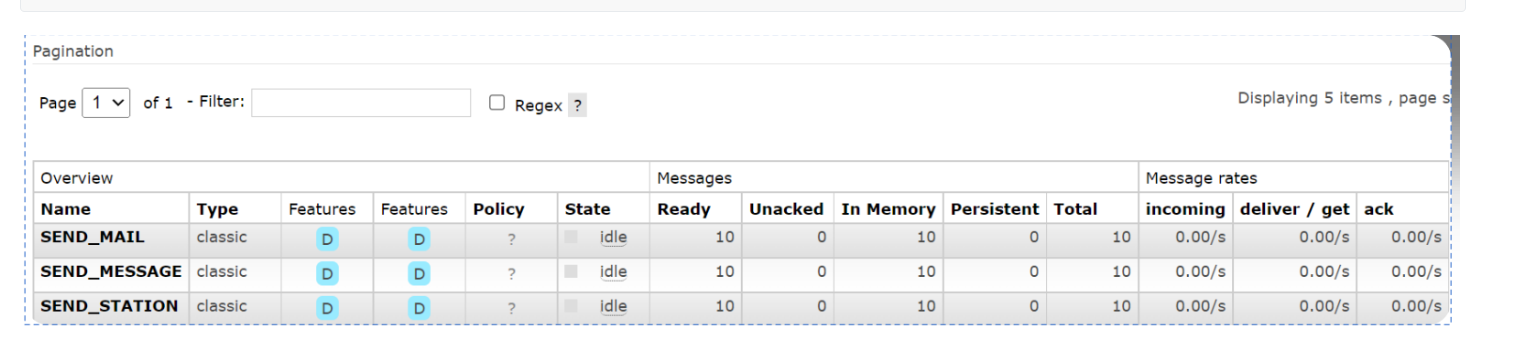
    channel.queueDeclare("SEND_MAIL",true,false,false,null);
    channel.queueDeclare("SEND_MESSAGE",true,false,false,null);
    channel.queueDeclare("SEND_STATION",true,false,false,null);
    // 6.交换机绑定队列
    /**
     * 参数1:队列名
     * 参数2:交换机名
     * 参数3:路由关键字,发布订阅模式写""即可
     */
    channel.queueBind("SEND_MAIL","exchange_fanout","");
    channel.queueBind("SEND_MESSAGE","exchange_fanout","");
    channel.queueBind("SEND_STATION","exchange_fanout","");
    // 7.发送消息
    for (int i = 1; i <= 10 ; i++) {
      channel.basicPublish("exchange_fanout","",null,
           ("你好,尊敬的用户,秒杀商品开抢了!"+i).getBytes(StandardCharsets.UTF_8));
     }
    // 8.关闭资源
    channel.close();
    connection.close();
   }
}
2、编写消费者
接下来编写三个消费者,分别监听各自的队列。
// 站内信消费者
public class CustomerStation {
  public static void main(String[] args) throws IOException, TimeoutException {
    // 1.创建连接工厂
    ConnectionFactory connectionFactory = new ConnectionFactory();
    connectionFactory.setHost("192.168.0.162");
    connectionFactory.setPort(5672);
    connectionFactory.setUsername("itbaizhan");
    connectionFactory.setPassword("itbaizhan");
    connectionFactory.setVirtualHost("/");// 默认虚拟机
    //2.创建连接
    Connection conn = connectionFactory.newConnection();
    //3.建立信道
    Channel channel = conn.createChannel();
    // 4.监听队列
    channel.basicConsume("SEND_STATION", true, new DefaultConsumer(channel) {
      @Override
      public void handleDelivery(String consumerTag, Envelope envelope, AMQP.BasicProperties properties, byte[] body) throws IOException {
        String message = new String(body, "utf-8");
        System.out.println("发送站内信:"+message);
       }
     });
   }
}


// 邮件消费者
public class Customer_Mail {
  public static void main(String[] args) throws IOException, TimeoutException {
    // 1.创建连接工厂
    ConnectionFactory connectionFactory = new ConnectionFactory();
    connectionFactory.setHost("192.168.0.162");
    connectionFactory.setPort(5672);
    connectionFactory.setUsername("itbaizhan");
    connectionFactory.setPassword("itbaizhan");
    connectionFactory.setVirtualHost("/");// 默认虚拟机
    //2.创建连接
    Connection conn = connectionFactory.newConnection();
    //3.建立信道
    Channel channel = conn.createChannel();
    // 4.监听队列
    channel.basicConsume("SEND_MAIL", true, new DefaultConsumer(channel) {
      @Override
      public void handleDelivery(String consumerTag, Envelope envelope, AMQP.BasicProperties properties, byte[] body) throws IOException {
        String message = new String(body, "utf-8");
        System.out.println("发送邮件:"+message);
       }
     });
   }
}


// 短信消费者
public class Customer_Message {
  public static void main(String[] args) throws IOException, TimeoutException {
    // 1.创建连接工厂
    ConnectionFactory connectionFactory = new ConnectionFactory();
    connectionFactory.setHost("192.168.0.162");
    connectionFactory.setPort(5672);
    connectionFactory.setUsername("itbaizhan");
    connectionFactory.setPassword("itbaizhan");
    connectionFactory.setVirtualHost("/");// 默认虚拟机
    //2.创建连接
    Connection conn = connectionFactory.newConnection();
    //3.建立信道
    Channel channel = conn.createChannel();
    // 4.监听队列
    channel.basicConsume("SEND_MESSAGE", true, new DefaultConsumer(channel) {
      @Override
      public void handleDelivery(String consumerTag, Envelope envelope, AMQP.BasicProperties properties, byte[] body) throws IOException {
        String message = new String(body, "utf-8");
        System.out.println("发送短信:"+message);
       }
     });
   }
}
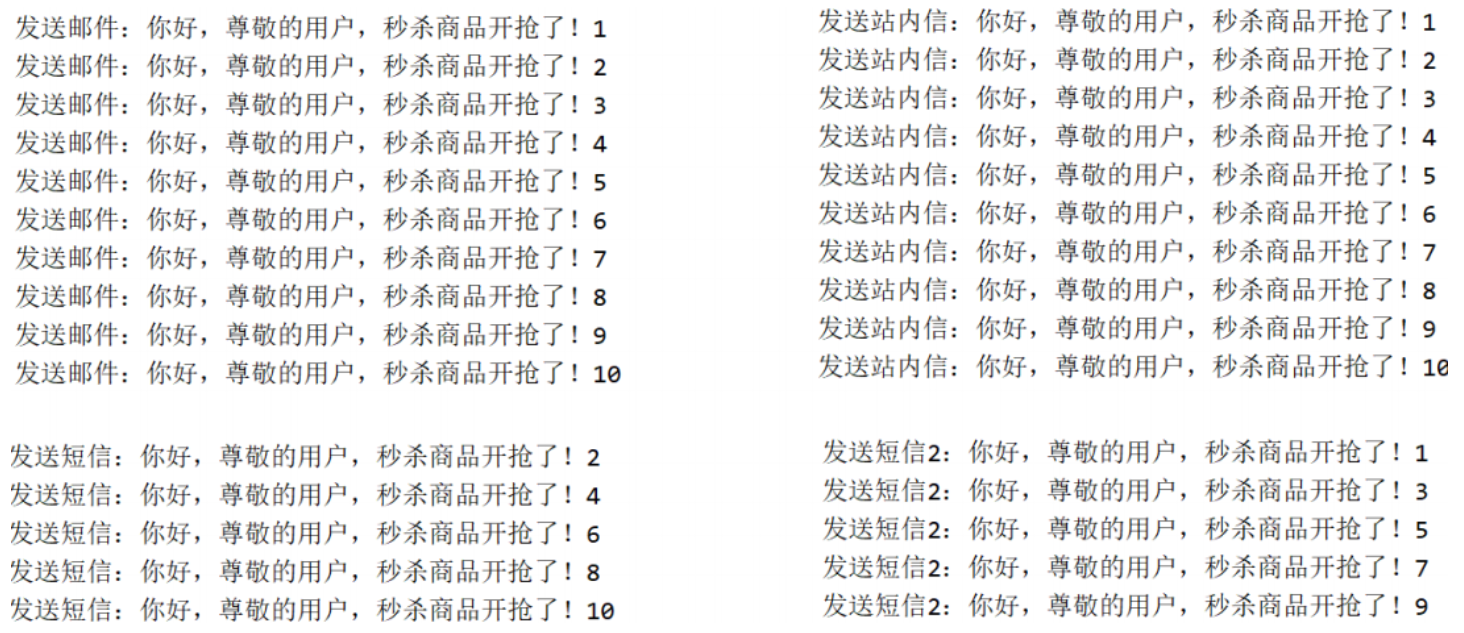
也可以使用工作队列+发布订阅模式同时使用,两个消费者同时监听
一个队列:
// 短信消费者2
public class Customer_Message2 {
  public static void main(String[] args) throws IOException, TimeoutException {
    // 1.创建连接工厂
    ConnectionFactory connectionFactory = new ConnectionFactory();
    connectionFactory.setHost("192.168.0.162");
    connectionFactory.setPort(5672);
    connectionFactory.setUsername("itbaizhan");
    connectionFactory.setPassword("itbaizhan");
    connectionFactory.setVirtualHost("/");// 默认虚拟机
    //2.创建连接
    Connection conn = connectionFactory.newConnection();
    //3.建立信道
    Channel channel = conn.createChannel();
    // 4.监听队列
    channel.basicConsume("SEND_MESSAGE", true, new DefaultConsumer(channel) {
      @Override
      public void handleDelivery(String consumerTag, Envelope envelope, AMQP.BasicProperties properties, byte[] body) throws IOException {
        String message = new String(body, "utf-8");
        System.out.println("发送短信2:"+message);
       }
     });
   }
}
4、RabbitMQ路由模式概念
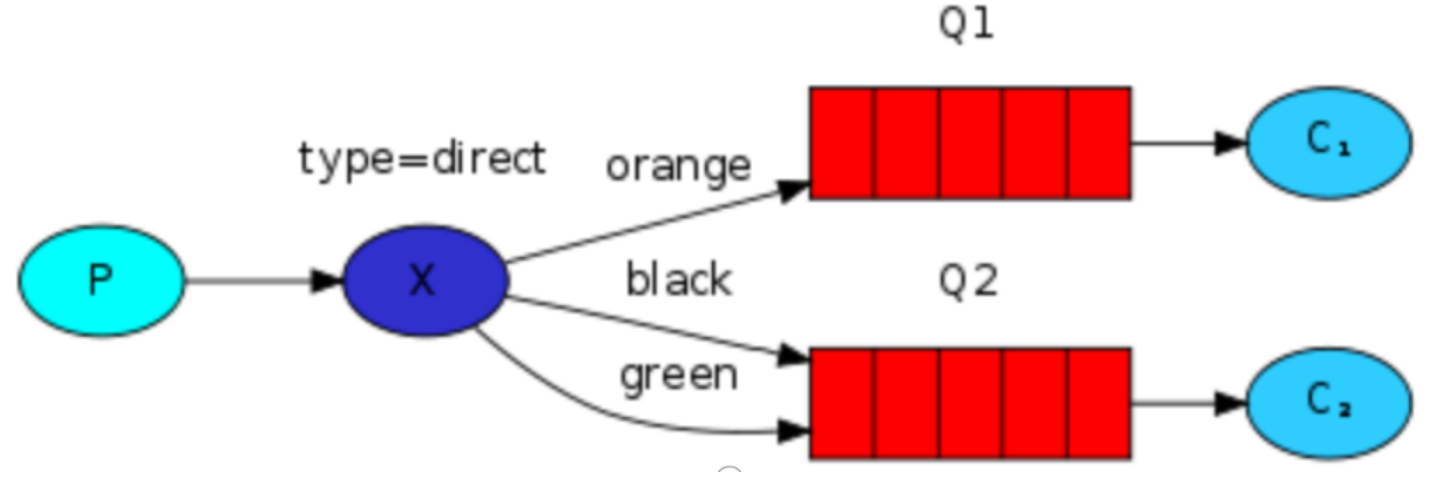
使用发布订阅模式时,所有消息都会发送到绑定的队列中,但很多时候,不是所有消息都无差别的发布到所有队列中。比如电商网站的促销活动,双十一大促可能会发布到所有队列;而一些小的促销活动为了节约成本,只发布到站内信队列。此时需要使用路由模式(Routing)完成这一需求。
特点:
- 每个队列绑定路由关键字RoutingKey
- 生产者将带有RoutingKey的消息发送给交换机,交换机根据RoutingKey转发到指定队列。路由模式使用direct交换机。
1、编写生产者
路由模式使用direct交换机
// 生产者
public class Producer {
  public static void main(String[] args) throws IOException, TimeoutException {
    // 1.创建连接工厂
    ConnectionFactory connectionFactory = new ConnectionFactory();
    connectionFactory.setHost("192.168.0.162");
    connectionFactory.setPort(5672);
    connectionFactory.setUsername("studydemo");
    connectionFactory.setPassword("studydemo");
    connectionFactory.setVirtualHost("/");
    // 2.创建连接
    Connection connection = connectionFactory.newConnection();
    // 3.建立信道
    Channel channel = connection.createChannel();
    // 4.创建交换机
    channel.exchangeDeclare("exchange_routing", BuiltinExchangeType.DIRECT,true);
    // 5.创建队列
    channel.queueDeclare("SEND_MAIL2",true,false,false,null);
    channel.queueDeclare("SEND_MESSAGE2",true,false,false,null);
    channel.queueDeclare("SEND_STATION2",true,false,false,null);
    // 6.交换机绑定队列
    channel.queueBind("SEND_MAIL2","exchange_routing","import");
    channel.queueBind("SEND_MESSAGE2","exchange_routing","import");
    channel.queueBind("SEND_STATION2","exchange_routing","import");
    channel.queueBind("SEND_STATION2","exchange_routing","normal");
    // 7.发送消息
    channel.basicPublish("exchange_routing","import",null,
        "双十一大促活动".getBytes());
    channel.basicPublish("exchange_routing","normal",null,
        "小心促销活动".getBytes());
    // 8.关闭资源
    channel.close();
    connection.close();
   }
}
2、编写消费者
// 站内信消费者
public class Customer_Station {
  public static void main(String[] args) throws IOException, TimeoutException {
    // 1.创建连接工厂
    ConnectionFactory connectionFactory = new ConnectionFactory();
    connectionFactory.setHost("192.168.0.162");
    connectionFactory.setPort(5672);
    connectionFactory.setUsername("studydemo");
    connectionFactory.setPassword("studydemo");
    connectionFactory.setVirtualHost("/");// 默认虚拟机
    //2.创建连接
    Connection conn = connectionFactory.newConnection();
    //3.建立信道
    Channel channel = conn.createChannel();
    // 4.监听队列
    channel.basicConsume("SEND_STATION2", true, new DefaultConsumer(channel) {
      @Override
      public void handleDelivery(String consumerTag, Envelope envelope, AMQP.BasicProperties properties, byte[] body) throws IOException {
        String message = new String(body, "utf-8");
        System.out.println("发送站内信:"+message);
       }
     });
   }
}


// 邮件消费者
public class Customer_Mail {
  public static void main(String[] args) throws IOException, TimeoutException {
    // 1.创建连接工厂
    ConnectionFactory connectionFactory = new ConnectionFactory();
    connectionFactory.setHost("192.168.0.162");
    connectionFactory.setPort(5672);
    connectionFactory.setUsername("studydemo");
    connectionFactory.setPassword("studydemo");
    connectionFactory.setVirtualHost("/");
    //2.创建连接
    Connection conn = connectionFactory.newConnection();
    //3.建立信道
    Channel channel = conn.createChannel();
    // 4.监听队列
    channel.basicConsume("SEND_MAIL2", true, new DefaultConsumer(channel) {
      @Override
      public void handleDelivery(String consumerTag, Envelope envelope, AMQP.BasicProperties properties, byte[] body) throws IOException {
        String message = new String(body, "utf-8");
        System.out.println("发送邮件:"+message);
       }
     });
   }
}


// 短信消费者
public class Customer_Message {
  public static void main(String[] args) throws IOException, TimeoutException {
    // 1.创建连接工厂
    ConnectionFactory connectionFactory = new ConnectionFactory();
    connectionFactory.setHost("192.168.0.162");
    connectionFactory.setPort(5672);
    connectionFactory.setUsername("studydemo");
    connectionFactory.setPassword("studydemo");
    connectionFactory.setVirtualHost("/");// 默认虚拟机
    //2.创建连接
    Connection conn = connectionFactory.newConnection();
    //3.建立信道
    Channel channel = conn.createChannel();
    // 4.监听队列
    channel.basicConsume("SEND_MESSAGE2", true, new DefaultConsumer(channel) {
      @Override
      public void handleDelivery(String consumerTag, Envelope envelope, AMQP.BasicProperties properties, byte[] body) throws IOException {
        String message = new String(body, "utf-8");
        System.out.println("发送短信:"+message);
       }
     });
   }
}

5、RabbitMQ通配符模式概念
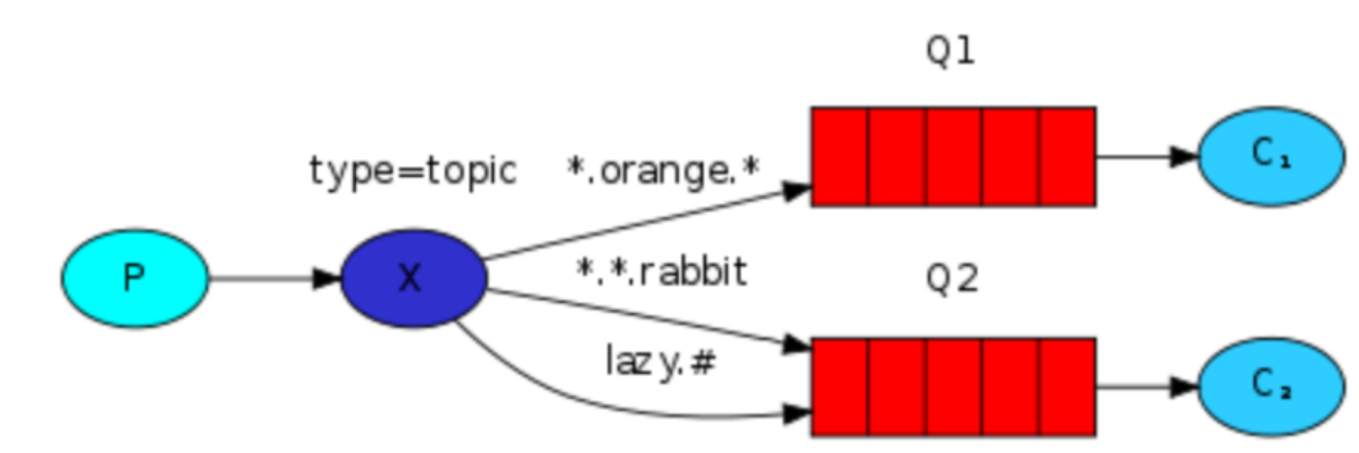
通配符模式(Topic)是在路由模式的基础上,给队列绑定带通配符的路由关键字,只要消息的RoutingKey能实现通配符匹配,就会将消息转发到该队列。通配符模式比路由模式更灵活,使用topic交换机。
通配符规则:
- 消息设置RoutingKey时,RoutingKey由多个单词构成,中间以.分割
- 队列设置RoutingKey时,#可以匹配任意多个单词,*可以匹配任意一个单词。
1、编写生产者
通配符模式使用topic交换器。
生产者:
// 生产者
public class Producer {
  public static void main(String[] args) throws IOException, TimeoutException {
    // 1.创建连接工厂
    ConnectionFactory connectionFactory = new ConnectionFactory();
    connectionFactory.setHost("192.168.0.162");
    connectionFactory.setPort(5672);
    connectionFactory.setUsername("studydemo");
    connectionFactory.setPassword("studydemo");
    connectionFactory.setVirtualHost("/");
    // 2.创建连接
    Connection connection = connectionFactory.newConnection();
    // 3.建立信道
    Channel channel = connection.createChannel();
    // 4.创建交换机
    channel.exchangeDeclare("exchange_topic", BuiltinExchangeType.TOPIC,true);
    // 5.创建队列
    channel.queueDeclare("SEND_MAIL3",true,false,false,null);
    channel.queueDeclare("SEND_MESSAGE3",true,false,false,null);
    channel.queueDeclare("SEND_STATION3",true,false,false,null);
    // 6.交换机绑定队列
    channel.queueBind("SEND_MAIL3","exchange_topic","#.mail.#");
    channel.queueBind("SEND_MESSAGE3","exchange_topic","#.message.#");
    channel.queueBind("SEND_STATION3","exchange_topic","#.station.#");
    // 7.发送消息
    channel.basicPublish("exchange_topic","mail.message.station",null,
        "双十一大促活动".getBytes());
    channel.basicPublish("exchange_topic","station",null,
        "小型促销活动".getBytes());
    // 8.关闭资源
    channel.close();
    connection.close();
   }
}
2、消费者
// 站内信消费者
public class Customer_Station {
  public static void main(String[] args) throws IOException, TimeoutException {
    // 1.创建连接工厂
    ConnectionFactory connectionFactory = new ConnectionFactory();
    connectionFactory.setHost("192.168.0.162");
    connectionFactory.setPort(5672);
    connectionFactory.setUsername("studydemo");
    connectionFactory.setPassword("studydemo");
    connectionFactory.setVirtualHost("/");// 默认虚拟机


    //2.创建连接
    Connection conn = connectionFactory.newConnection();

    //3.建立信道
    Channel channel = conn.createChannel();

    // 4.监听队列
    channel.basicConsume("SEND_STATION3", true, new DefaultConsumer(channel) {
      @Override
      public void handleDelivery(String consumerTag, Envelope envelope, AMQP.BasicProperties properties, byte[] body) throws IOException {
        String message = new String(body, "utf-8");
        System.out.println("发送站内信:"+message);
       }
     });
   }
}


// 邮件消费者
public class Customer_Mail {
  public static void main(String[] args) throws IOException, TimeoutException {
    // 1.创建连接工厂
    ConnectionFactory connectionFactory = new ConnectionFactory();
    connectionFactory.setHost("192.168.0.162");
    connectionFactory.setPort(5672);
    connectionFactory.setUsername("studydemo");
    connectionFactory.setPassword("studydemo");
    connectionFactory.setVirtualHost("/");// 默认虚拟机


    //2.创建连接
    Connection conn = connectionFactory.newConnection();

    //3.建立信道
    Channel channel = conn.createChannel();

    // 4.监听队列
    channel.basicConsume("SEND_MAIL3", true, new DefaultConsumer(channel) {
      @Override
      public void handleDelivery(String consumerTag, Envelope envelope, AMQP.BasicProperties properties, byte[] body) throws IOException {
        String message = new String(body, "utf-8");
        System.out.println("发送邮件:"+message);
       }
     });
   }


}


// 短信消费者
public class Customer_Message {
  public static void main(String[] args) throws IOException, TimeoutException {
    // 1.创建连接工厂
    ConnectionFactory connectionFactory = new ConnectionFactory();
    connectionFactory.setHost("192.168.0.162");
    connectionFactory.setPort(5672);
    connectionFactory.setUsername("studydemo");
    connectionFactory.setPassword("studydemo");
    connectionFactory.setVirtualHost("/");// 默认虚拟机


    //2.创建连接
    Connection conn = connectionFactory.newConnection();

    //3.建立信道
    Channel channel = conn.createChannel();

    // 4.监听队列
    channel.basicConsume("SEND_MESSAGE3", true, new DefaultConsumer(channel) {
      @Override
      public void handleDelivery(String consumerTag, Envelope envelope, AMQP.BasicProperties properties, byte[] body) throws IOException {
        String message = new String(body, "utf-8");
        System.out.println("发送短信:"+message);
       }
     });
   }
}






 扫一扫
扫一扫


 797
797

 被折叠的 条评论
为什么被折叠?
被折叠的 条评论
为什么被折叠?
 到【灌水乐园】发言





