


 文章描述了解决Ubuntu20.04环境下在编译OpenCV时遇到的动态链接库版本不一致导致的编译错误,涉及libwayland-client.so.0和libgdal.so.26,通过查找依赖库、确认Anaconda路径和重定向链接库解决。
参考
根据该博主的文章,推广至所有类似的问题都是可以解决的,再次感谢博主!
【已解决】Ubuntu 20.04 编译OpenCV 动态链接库指向版本不一致导致出错_usr/bin/ld: /home/mengshi/miniconda3/lib/libfmt.so-优快云博客
错误
可以看到有两类文件都出错了,因为原博客已经详细解决了libwayland-client.so.0的问题,这里类比原博客中的方法,解决libgdal.so.26的问题
/usr/bin/ld: /lib/x86_64-linux-gnu/libwayland-client.so.0: undefined reference to `ffi_type_uint32@LIBFFI_BASE_7.0'
/usr/bin/ld: /lib/libgdal.so.26: undefined reference to `TIFFReadRGBAStripExt@LIBTIFF_4.0'
/usr/bin/ld: /lib/x86_64-linux-gnu/libwayland-client.so.0: undefined reference to `ffi_type_sint32@LIBFFI_BASE_7.0'
/usr/bin/ld: /lib/x86_64-linux-gnu/libp11-kit.so.0: undefined reference to `ffi_closure_alloc@LIBFFI_CLOSURE_7.0'
/usr/bin/ld: /lib/x86_64-linux-gnu/libwayland-client.so.0: undefined reference to `ffi_call@LIBFFI_BASE_7.0'
/usr/bin/ld: /lib/x86_64-linux-gnu/libp11-kit.so.0: undefined reference to `ffi_type_uint8@LIBFFI_BASE_7.0'
/usr/bin/ld: /lib/x86_64-linux-gnu/libp11-kit.so.0: undefined reference to `ffi_prep_closure_loc@LIBFFI_CLOSURE_7.0'
/usr/bin/ld: /lib/x86_64-linux-gnu/libp11-kit.so.0: undefined reference to `ffi_type_uint64@LIBFFI_BASE_7.0'
/usr/bin/ld: /lib/x86_64-linux-gnu/libwayland-client.so.0: undefined reference to `ffi_type_pointer@LIBFFI_BASE_7.0'
/usr/bin/ld: /lib/libgdal.so.26: undefined reference to `TIFFReadRGBATileExt@LIBTIFF_4.0'
/usr/bin/ld: /lib/x86_64-linux-gnu/libwayland-client.so.0: undefined reference to `ffi_type_void@LIBFFI_BASE_7.0'
/usr/bin/ld: /lib/x86_64-linux-gnu/libwayland-client.so.0: undefined reference to `ffi_prep_cif@LIBFFI_BASE_7.0'
collect2: error: ld returned 1 exit status
make[2]: *** [CMakeFiles/SampleProject.dir/build.make:136: SampleProject] Error 1
make[1]: *** [CMakeFiles/Makefile2:103: CMakeFiles/SampleProject.dir/all] Error 2
make: *** [Makefile:84: all] Error 2
解决方法
安装工具
sudo apt install locate用内置命令ldd查看出现问题的libgdal.so.26当中,所依赖的tiff这个库的叫什么。
ldd /lib/libgdal.so.26 | grep libtiff输出
libtiff.so.5 => /lib/x86_64-linux-gnu/libtiff.so.5 (0x00007f00a7eb3000)查看anaconda版本指向错误的地方了
ll ~/anaconda3/lib/ | grep libtiff输出可以看到“libtiff.so.5 -> ./libtiff.so.6*”指向错误
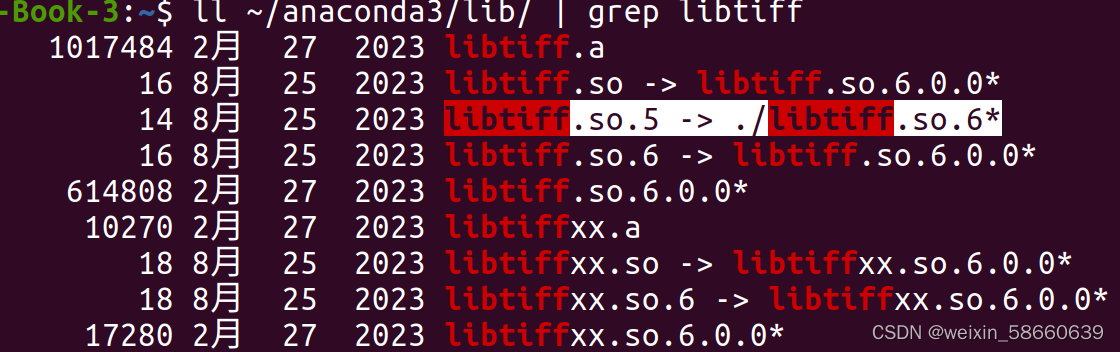
更改指向
cd ~/anaconda3/lib
sudo rm libtiff.so.5
sudo ln -s /lib/x86_64-linux-gnu/libtiff.so.5.5.0 libtiff.so.5
再次查看,即发现指向正确







 扫一扫
扫一扫


 2838
2838

 被折叠的 条评论
为什么被折叠?
被折叠的 条评论
为什么被折叠?
 到【灌水乐园】发言





