


 本博客介绍了一个使用Unity实现的智能巡逻兵小游戏项目。游戏包含地图、巡逻兵和玩家角色,巡逻兵能根据玩家的位置变化自动调整行动路线。采用订阅与发布模式、工厂模式等软件设计模式,以及AnimatorController进行动画控制。
Unity实现智能巡逻兵小游戏
游戏设计要求
- 创建一个地图和若干巡逻兵(使用动画);
- 每个巡逻兵走一个3~5条边的凸多边形,位置数据是相对地址。即每次确定下一个目标位置,用自己当前位置为原点计算;
- 巡逻兵碰撞到障碍物,则会自动选下一个点为目标;
- 巡逻兵在设定范围内感知到玩家,会自动追击玩家;
- 失去玩家目标后,继续巡逻;
- 计分:玩家每次甩掉一个巡逻兵计一分,与巡逻兵发生碰撞则游戏结束;
程序设计要求
-
必须使用订阅与发布模式传消息
subject:OnLostCoal
Publisher:?
Subscriber:? -
工厂模式生产巡逻兵
项目实现
设计游戏规则
- 玩家通过操控键盘方向键来进行转向和移动,左右箭头表示站在原地向左转或向右转,上下箭头表示沿当前方向前进或后退;
- 每轮游戏会在游戏场景中随机出现10个宝箱,玩家收集完所有宝箱就获胜;
- 玩家每次成功甩掉一个巡逻兵计一分,若被巡逻兵抓住(与巡逻兵发生碰撞)则游戏结束。
代码实现
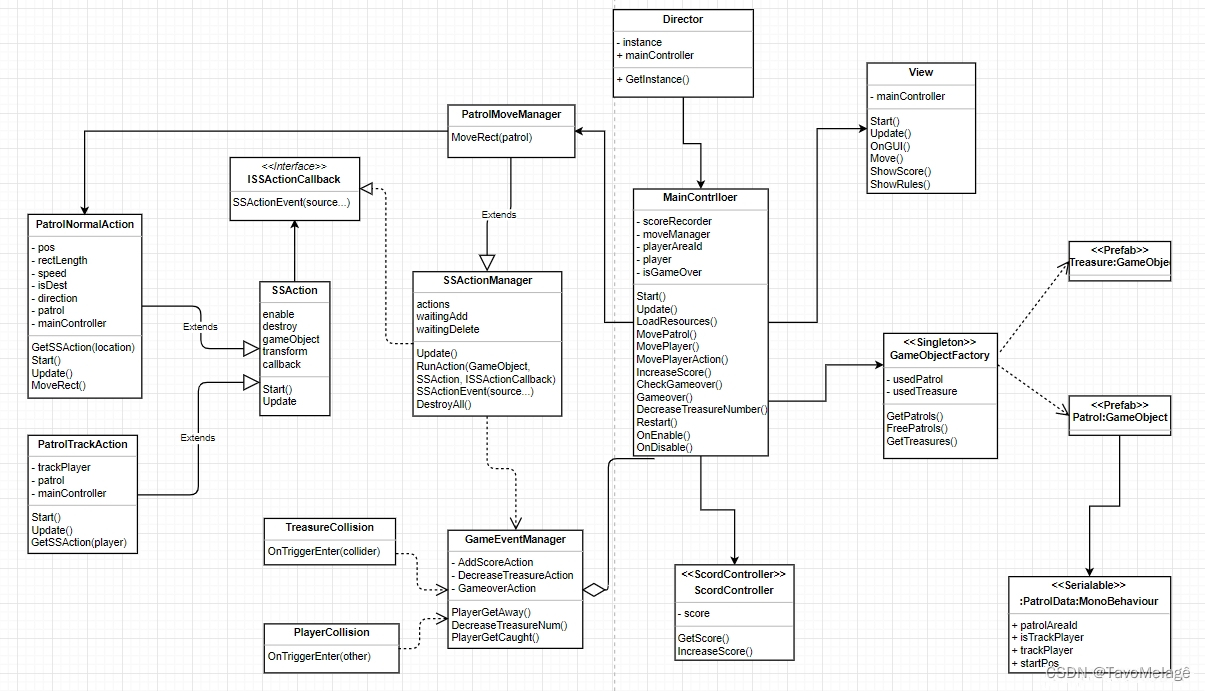
该项目基于如下的UML:
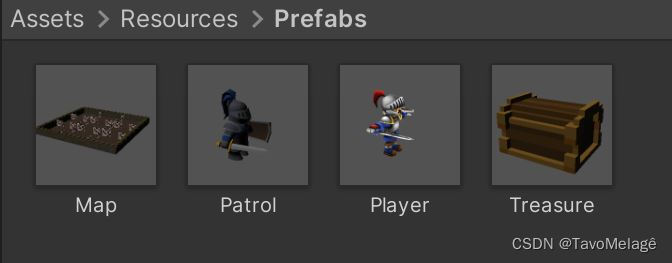
首先从Unity3D的Assets Store中导入游戏需要用到的对象预制。地图(砖墙)、巡逻兵、玩家和宝箱的预制导入Assets > Resources > Prefabs后如图所示:
然后为巡逻兵对象Patrol和玩家对象Player创建AnimatorController。巡逻兵对象Patrol的AnimatorController如图:
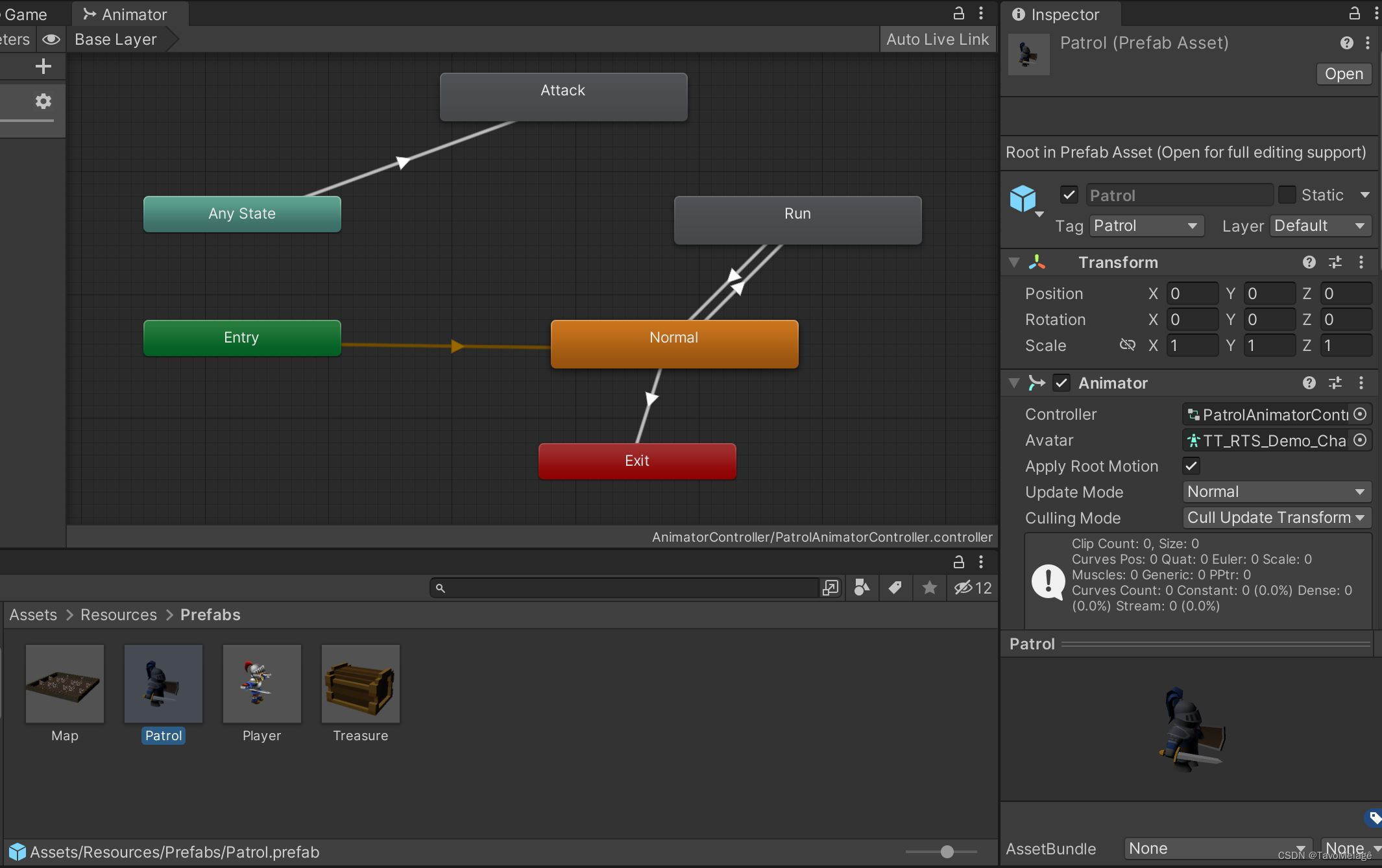
将巡逻兵的普通状态放到Normal状态中,进入跑步状态时动作状态由Normal转至Run,攻击状态为Attack:
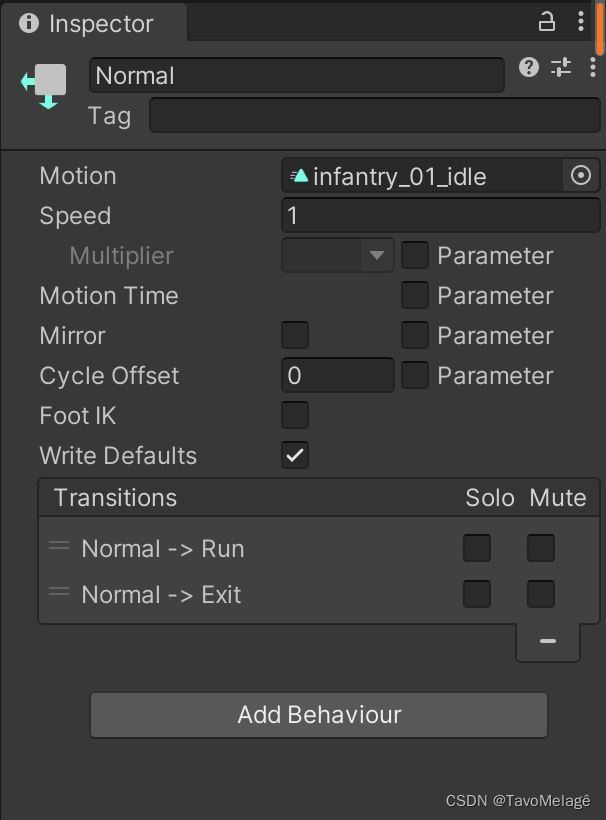
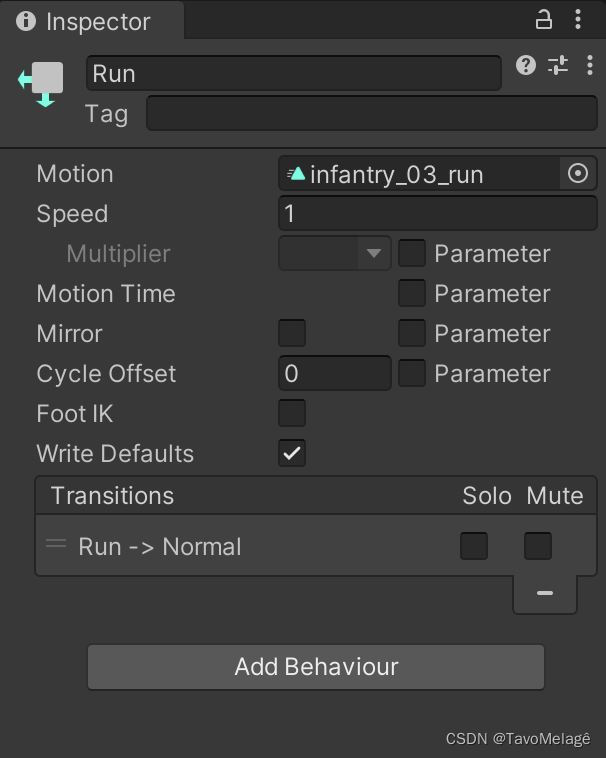
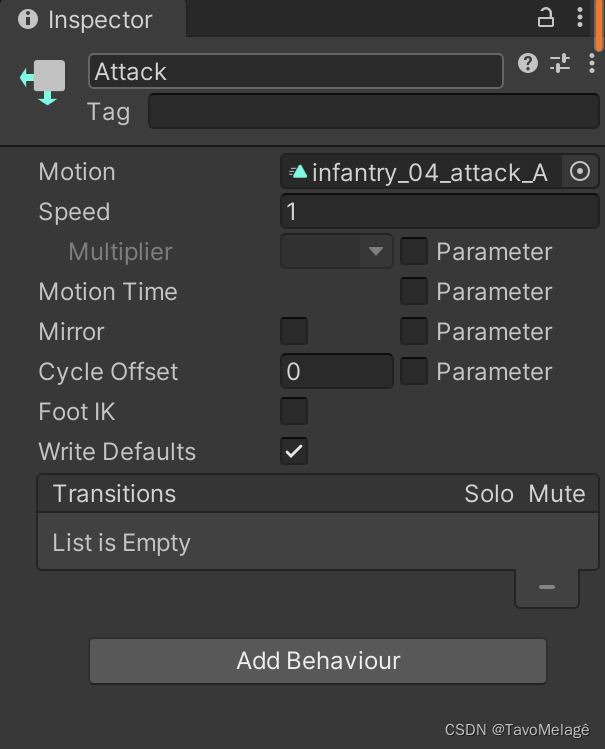
设置bool类型参数run控制Normal状态和Run状态的转换,当run==true时Patrol从Normal状态转到Run状态,反之当run==false时Patrol从Run状态转到Normal状态:
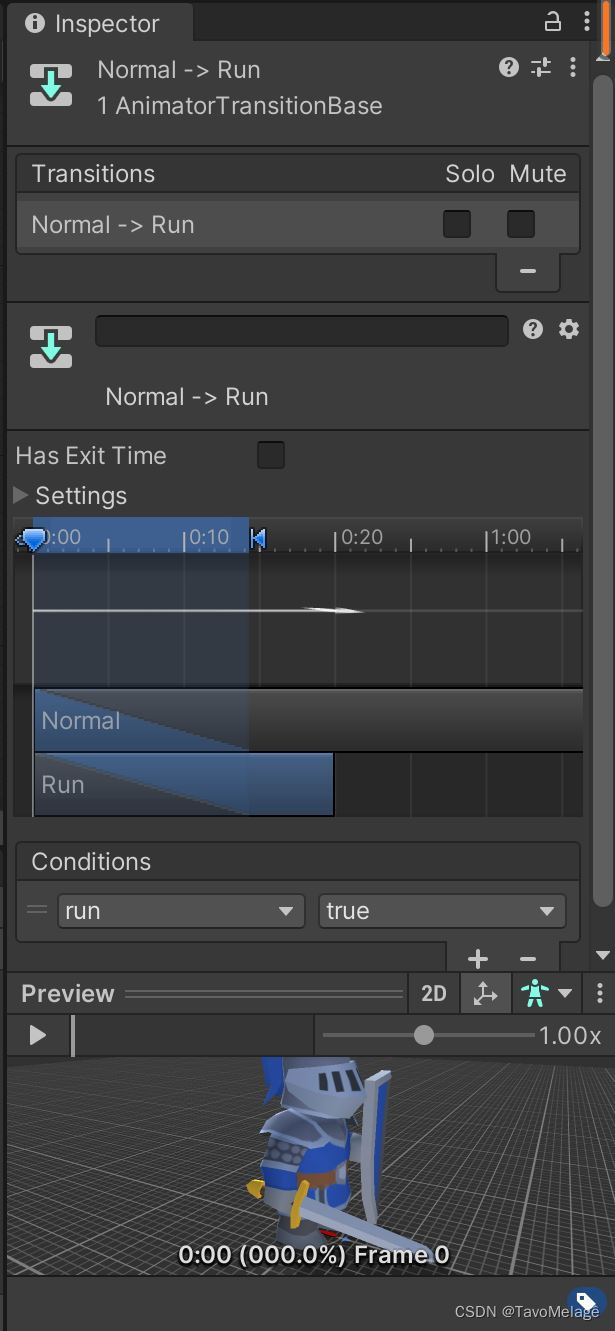
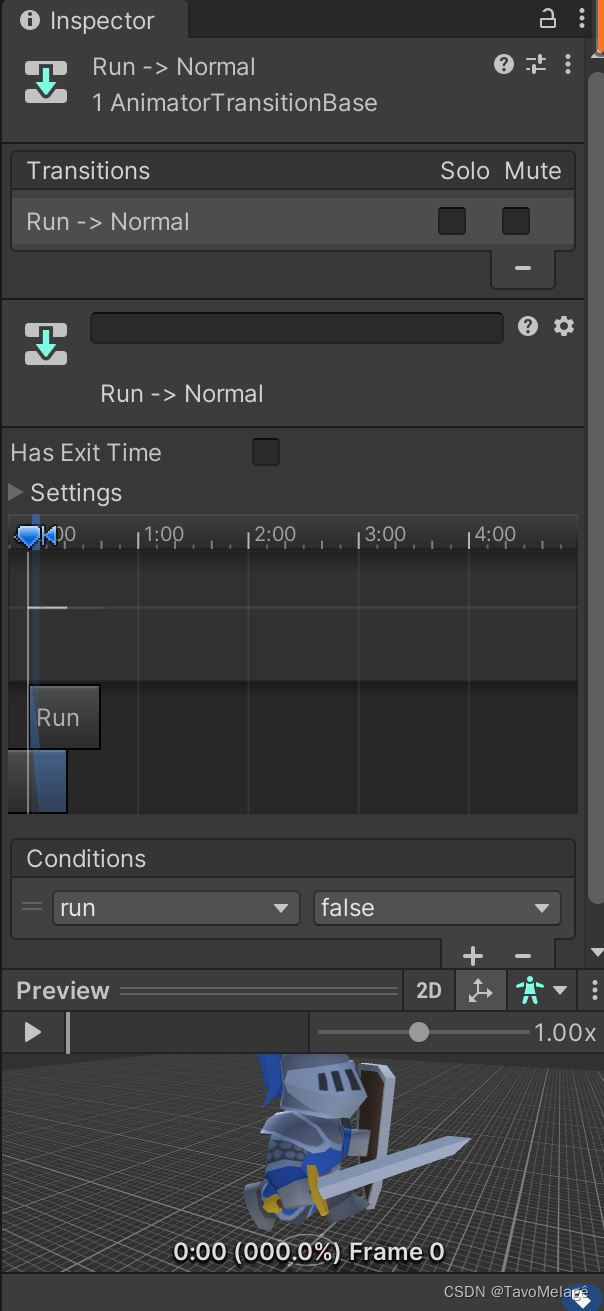
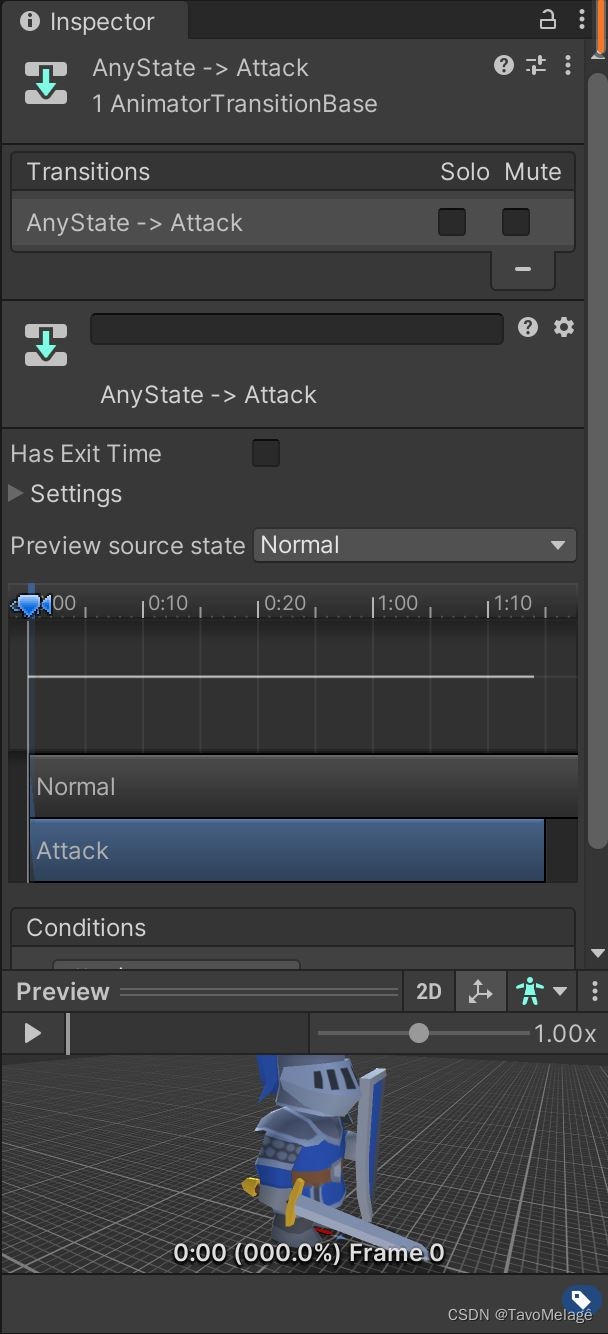
trigger类型参数attack控制巡逻兵任何状态到攻击状态的转换,当巡逻兵遇到玩家时attack被触发,此时Patrol不管处于什么状态都转换为Attack状态:
玩家对象Player的AnimatorController如图:
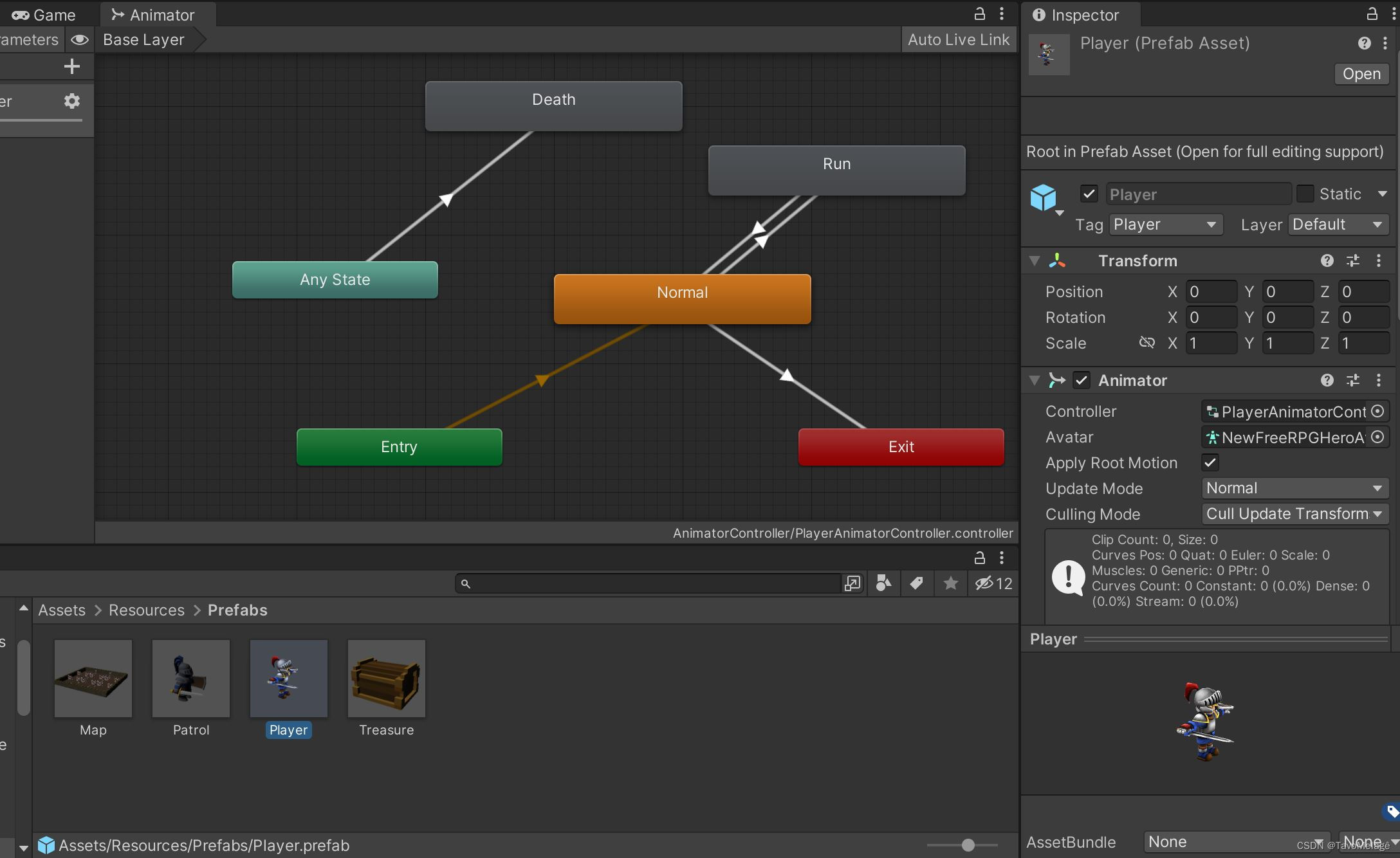
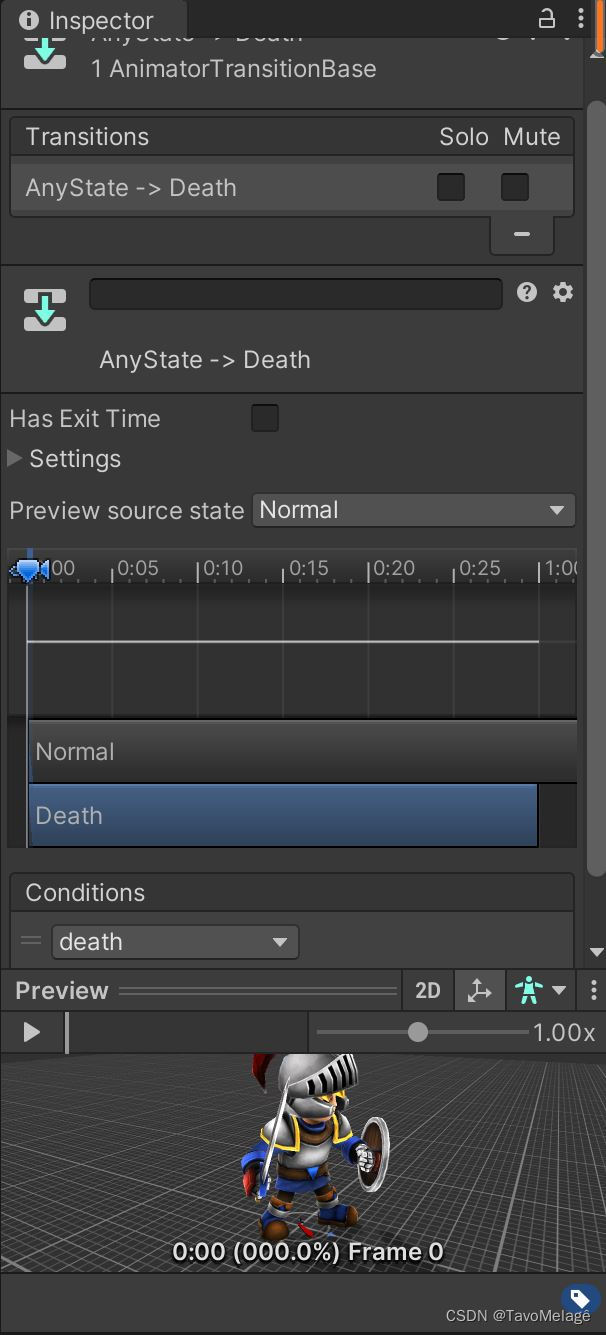
玩家的普通状态、跑步状态、死亡状态分别为Normal、Run、Death,普通状态可以和跑步状态互相转换,任何状态都可以转换为死亡状态:
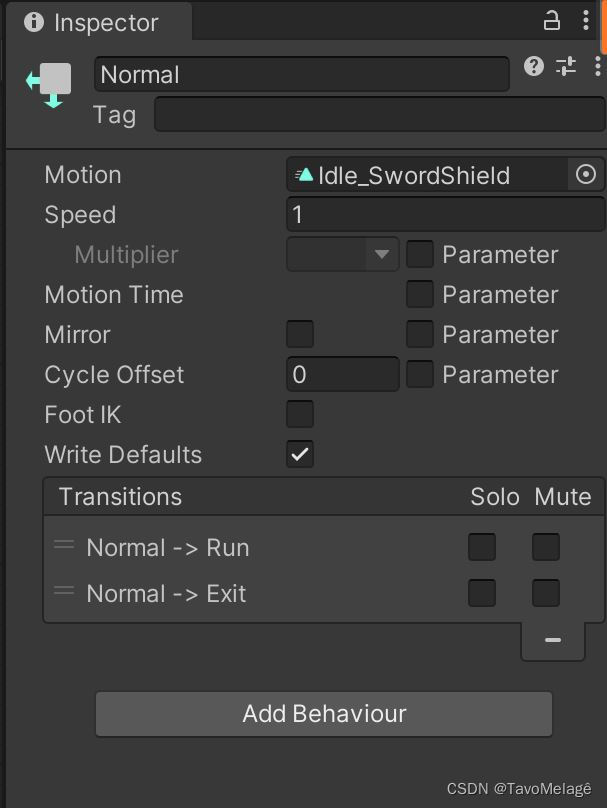
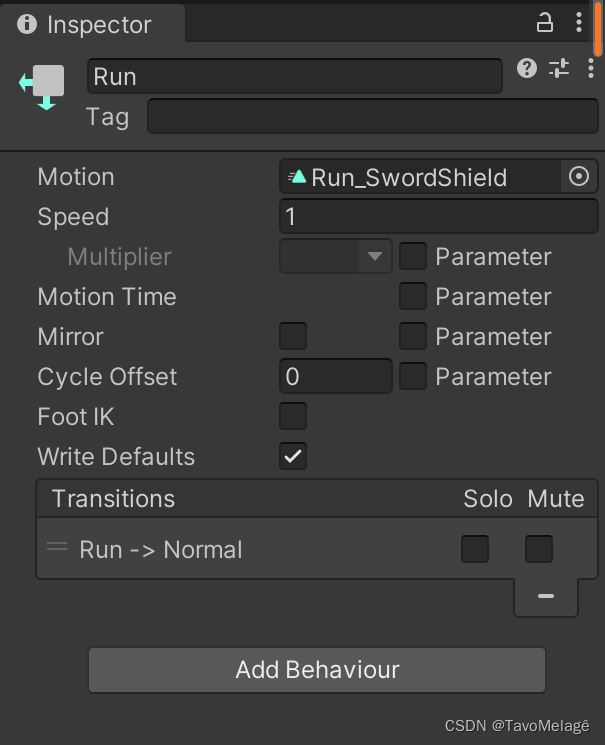
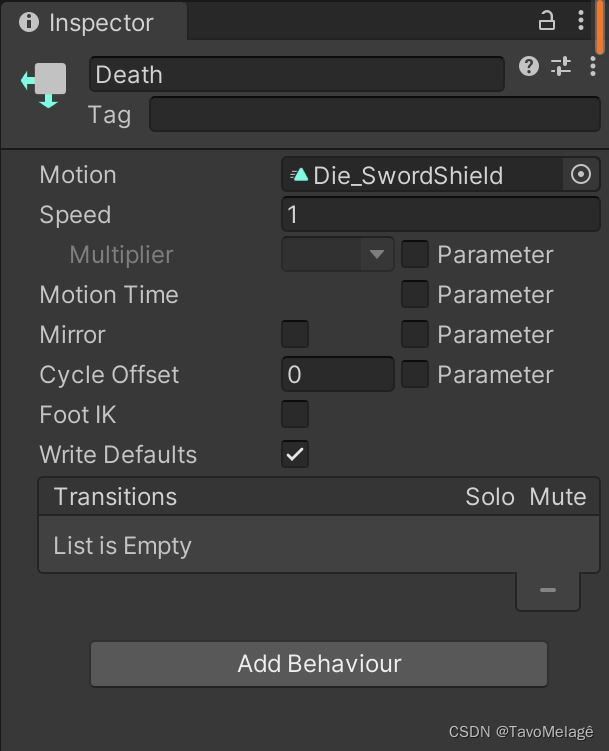
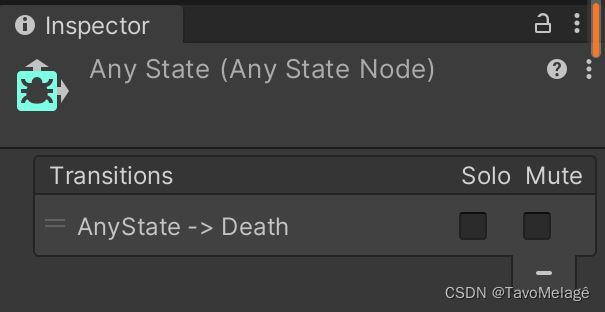
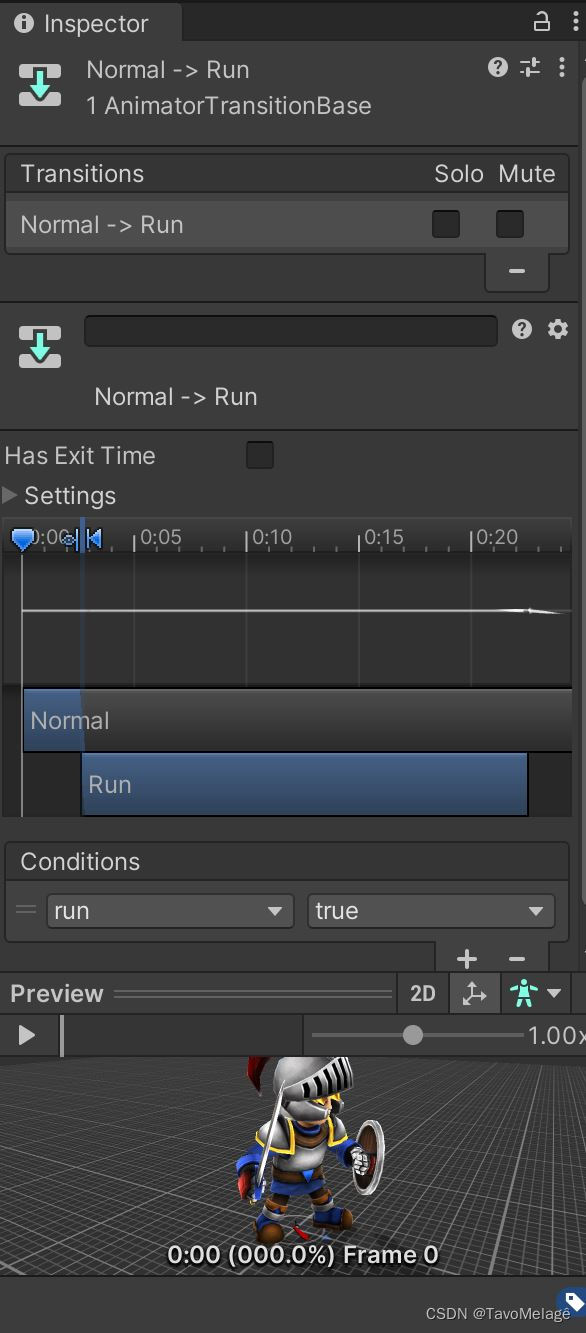
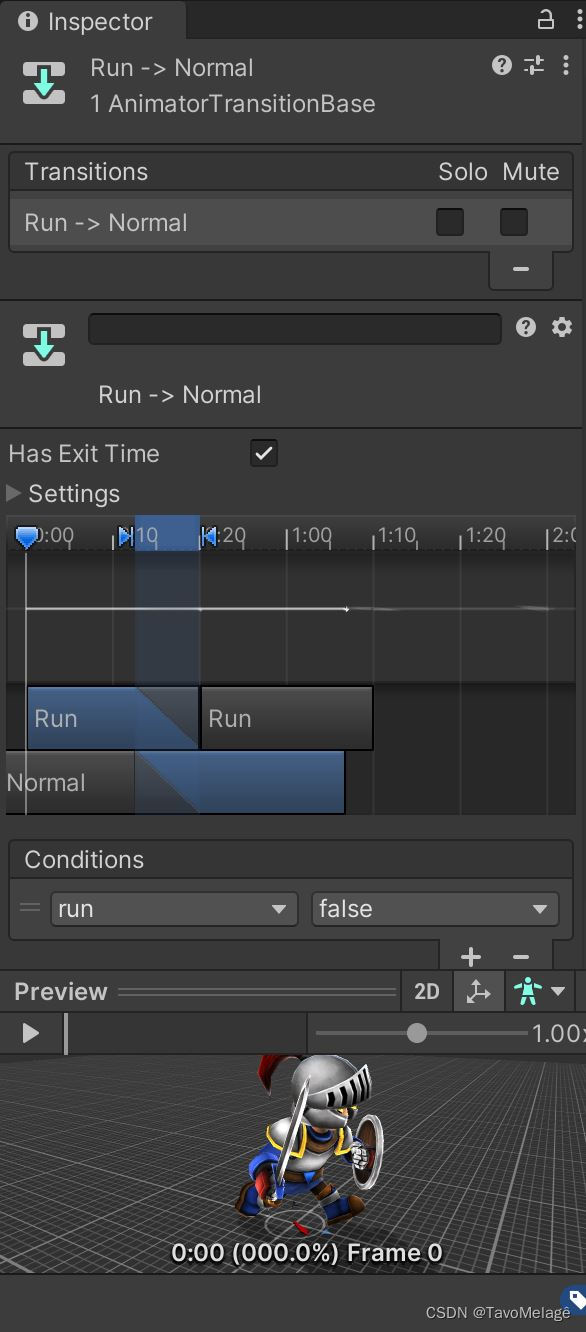
bool类型参数run控制Normal状态和Run状态的转换,run==true时Player从Normal状态转到Run状态,run==false时Player从Run状态转到Normal状态:
trigger类型参数Death控制玩家任何状态到死亡状态的转换,当death被触发时Player进入Death状态:
完成玩家和巡逻兵的动画控制器设计后设计游戏的各个单实例类。
导演类Director
using System.Collections;
using System.Collections.Generic;
using UnityEngine;

public class Director : System.Object {
    private static Director instance;
    public MainController mainController { get; set; }
    public static Director GetInstance() {
        if (instance == null) {
            instance = new Director();
        }
        return instance;
    }
}
对象工厂类GameObjectFactory
负责使用了工厂模式和对象池技术生产巡逻兵和宝箱。由于游戏中巡逻兵不会消失,数量保持不变,宝箱也只减少而不新生成,因此所有巡逻兵和宝箱对象均不需要回收,GameObjectFactory类中的回收方法FreePatrols()只需要实现使巡逻兵在失去玩家目标后停止移动(将run参数设为false):
using System.Collections;
using System.Collections.Generic;
using UnityEngine;

public class GameObjectFactory : MonoBehaviour {
    private List<GameObject> usedPatrol = new List<GameObject>();  // 正在被使用的巡逻兵对象
    private List<GameObject> usedTreasure = new List<GameObject>();  // 正在被使用的宝箱对象

    // 巡逻兵获取方法
    public List<GameObject> GetPatrols() {
        // 巡逻兵游戏对象
        GameObject patrolPrefab = GameObject.Instantiate(Resources.Load<GameObject>("Prefabs/Patrol"), Vector3.zero, Quaternion.identity);
        patrolPrefab.SetActive(false);
        float[] posX = { -5.5f, 4.5f, 12.5f };
        float[] posZ = { -4.5f, 5.5f, -12.5f };
        // 生成巡逻兵的初始位置
        for (int i = 0; i < 3; ++i) {
            for (int j = 0; j < 3; ++j) {
                Vector3 startPos = new Vector3(posX[i], 0, posZ[j]);
                GameObject patrol = GameObject.Instantiate(patrolPrefab, startPos, Quaternion.identity);
                patrol.SetActive(true);
                patrol.GetComponent<PatrolData>().patrolAreaId = i * 3 + j + 1;
                patrol.GetComponent<PatrolData>().startPos = startPos;
                usedPatrol.Add(patrol);
            }
        }
        return usedPatrol;
    }

    // 巡逻兵回收方法
    public void FreePatrols() {
        // 巡逻兵停止
        for (int i = 0; i < usedPatrol.Count; ++i) {
            usedPatrol[i].gameObject.GetComponent<Animator>().SetBool("run", false);
        }
    }

    // 宝箱获取方法
    public List<GameObject> GetTreasures() {
        // 宝箱游戏对象
        GameObject treasurePrefab = GameObject.Instantiate(Resources.Load<GameObject>("Prefabs/Treasure"), Vector3.zero, Quaternion.identity);
        treasurePrefab.SetActive(false);
        for (int i = 0; i < Director.GetInstance().mainController.GetTreasureNumber(); ++i) {
            int xIndex = Random.Range(0, 24) - 12;
            int zIndex = Random.Range(0, 24) - 12;
            GameObject treasure = GameObject.Instantiate(treasurePrefab, new Vector3(xIndex, 0, zIndex), Quaternion.identity);
            treasure.SetActive(true);
            usedTreasure.Add(treasure);
        }
        return usedTreasure;
    }
}
场记类ScoreRecorder
负责计分:
using System.Collections;
using System.Collections.Generic;
using UnityEngine;

public class ScoreController : MonoBehaviour {
    private int score = 0;  // 分数

    public int GetScore() {
        return score;
    }

    public void IncreaseScore() {
        score++;
    }
}
动作基类SSAction
using System.Collections;
using System.Collections.Generic;
using UnityEngine;

public class SSAction : ScriptableObject {
    public bool enable = true;  // 动作可进行
    public bool destroy = false;  // 动作已完成可被销毁
    public GameObject gameobject { get; set; }  // 附着游戏对象
    public Transform transform { get; set; }  // 游戏对象的的运动
    public ISSActionCallback callback { get; set; }  // 回调函数

    public virtual void Start() {}  // Start()重写方法
    public virtual void Update() {}  // Update()重写方法
}
动作管理者基类SSActionManager
维护两个队列——等待加入动作队列waitingAdd、等待删除动作队列waitingDelete,分别用于载入动作和清空动作。除了载入动作和清空动作外SSActionManager还负责游戏对象每次行为结束后的动作回调。
using System.Collections;
using System.Collections.Generic;
using UnityEngine;

public class SSActionManager : MonoBehaviour, ISSActionCallback {
    // 动作集
    private Dictionary<int, SSAction> actions = new Dictionary<int, SSAction>();
    // 即将开始的动作的等待加入队列
    private List<SSAction> waitingAdd = new List<SSAction>();
    // 已完成的的动作的等待删除队列
    private List<int> waitingDelete = new List<int>();

    protected void Update() {
        // 载入即将开始的动作
        foreach (SSAction ac in waitingAdd) {
            actions[ac.GetInstanceID()] = ac;
        }
        // 清空等待加入队列
        waitingAdd.Clear();

        // 运行载入动作
        foreach (KeyValuePair<int, SSAction> kv in actions) {
            SSAction ac = kv.Value;
            if (ac.destroy) {
                waitingDelete.Add(ac.GetInstanceID());
            }
            else if (ac.enable) {
                ac.Update();
            }
        }

        // 清空已完成的动作
        foreach (int key in waitingDelete) {
            SSAction ac = actions[key];
            actions.Remove(key);
            Object.Destroy(ac);
        }
        // 清空等待删除队列
        waitingDelete.Clear();
    }

    // 初始化动作并加入到等待加入队列
    public void RunAction(GameObject gameobject, SSAction action, ISSActionCallback manager)
    {
        action.gameobject = gameobject;
        action.transform = gameobject.transform;
        action.callback = manager;
        waitingAdd.Add(action);
        action.Start();
    }

    // 巡逻兵正常巡逻或追踪玩家行为结束后的回调方法
    public void SSActionEvent(SSAction source,
        SSActionEventType events = SSActionEventType.Competed,
        int intParam = 0,
        string strParam = null,
        GameObject objectParam = null)
    {
        // 如果消息的回调参数为1,追踪行为结束,开始正常巡逻
        if(intParam == 1) {
            // 继续巡逻
            PatrolNormalAction move = PatrolNormalAction.GetSSAction(objectParam.gameObject.GetComponent<PatrolData>().startPos);
            this.RunAction(objectParam, move, this);
            // 玩家逃脱消息
            Singleton<GameEventManager>.Instance.PlayerGetAway();
        }
        // 如果消息的回调参数为0,正常巡逻结束,开始追踪玩家
        else {
            // 追踪玩家
            PatrolTrackAction trackAction = PatrolTrackAction.GetSSAction(objectParam.gameObject.GetComponent<PatrolData>().trackPlayer);
            this.RunAction(objectParam, trackAction, this);
        }
    }

    // 清除所有动作
    public void DestroyAll() {
        foreach (KeyValuePair<int, SSAction> kv in actions) {
            SSAction ac = kv.Value;
            ac.destroy = true;
        }
    }
}
巡逻兵正常巡逻动作类PatrolNormalAction
在发现玩家目标前巡逻兵按照一个矩形进行移动,如果玩家进入了巡逻兵的感知范围,那么PatrolNormalAction类就会发送正常巡逻行为结束的消息
using System.Collections;
using System.Collections.Generic;
using UnityEngine;

public class PatrolNormalAction : SSAction {
    private Vector3 pos;  // 巡逻兵位置
    private float rectLength;  // 矩形长度
    public float speed = 1f;  // 移动速度
    private bool isDest;  // 是否每个方向的终点
    private int direction;  // 巡逻兵的移动方向
    private PatrolData patrol;  // 巡逻兵数据
    private MainController mainController;

    private const int EAST = 0;
    private const int NORTH = 1;
    private const int WEST = 2;
    private const int SOUTH = 3;

    // 获取动作
    public static PatrolNormalAction GetSSAction(Vector3 location) {
        PatrolNormalAction action = CreateInstance<PatrolNormalAction>();
        action.pos = new Vector3(location.x, 0, location.z);
        // 设定矩形边长
        action.rectLength = Random.Range(4, 8);
        return action;
    }

    public override void Start() {
        this.gameobject.GetComponent<Animator>().SetBool("run", true);
        patrol = this.gameobject.GetComponent<PatrolData>();
        mainController = Director.GetInstance().mainController;
        isDest = true;
        direction = EAST;
    }

    public override void Update() {
        // 巡逻兵按矩形移动
        MoveRect();
        // 如果巡逻兵和玩家在同一区域并在巡逻兵感知范围内,那么开始追踪
        if (mainController.GetPlayerAreaId() == patrol.patrolAreaId && patrol.isTrackPlayer) {
            this.destroy = true;
            this.callback.SSActionEvent(this, SSActionEventType.Competed, 0, null, this.gameobject);
        }
    }

    void MoveRect() {
        float newPosX = pos.x;
        float newPosZ = pos.z;
        if (isDest) {
            // 设定每个方向的新的移动终点
            switch (direction) {
                case EAST:
                    newPosX -= rectLength;
                    break;
                case SOUTH:
                    newPosZ -= rectLength;
                    break;
                case WEST:
                    newPosX += rectLength;
                    break;
                case NORTH:
                    newPosZ += rectLength;
                    break;
            }
            isDest = false;
        }
        Vector3 newPos = new Vector3(newPosX, 0, newPosZ);
        this.transform.LookAt(newPos);
        float distance = Vector3.Distance(transform.position, newPos);
        // 沿着方向直走
        if (distance > 1) {
            transform.position = Vector3.MoveTowards(this.transform.position, newPos, speed * Time.deltaTime);
        }
        // 在转弯处改变方向
        else {
            direction = (direction + 1) % 4;
            isDest = true;
        }
        // 设定新的位置
        pos.x = newPosX;
        pos.z = newPosZ;
    }
}
巡逻兵追踪动作类PatrolTrackAction
当玩家进入巡逻兵的感知范围内时,巡逻兵就会转换到跑步追踪状态;当玩家离开巡逻兵感知范围时,PatrolTrackAction就发送追踪行为结束消息:
using System.Collections;
using System.Collections.Generic;
using UnityEngine;

public class PatrolTrackAction : SSAction {
    private GameObject trackPlayer;  // 追踪的玩家
    private PatrolData patrol;  // 巡逻兵
    private MainController mainController;

    public override void Start() {
        patrol = this.gameobject.GetComponent<PatrolData>();
        mainController = Director.GetInstance().mainController;
    }

    public override void Update() {
        // 朝玩家方向走
        transform.position = Vector3.MoveTowards(this.transform.position, trackPlayer.transform.position, 2 * Time.deltaTime);
        this.transform.LookAt(trackPlayer.transform.position);

        // 如果玩家和巡逻兵不在同一个区域,或巡逻兵没有感知到玩家
        if (mainController.GetPlayerAreaId() != patrol.patrolAreaId || !patrol.isTrackPlayer) {
            // 发送追踪行为结束消息
            this.destroy = true;
            this.callback.SSActionEvent(this, SSActionEventType.Competed, 1, null, this.gameobject);
        }
    }

    // 获取动作
    public static PatrolTrackAction GetSSAction(GameObject player) {
        PatrolTrackAction action = CreateInstance<PatrolTrackAction>();
        action.trackPlayer = player;
        return action;
    }
}
巡逻兵移动方法管理器类PatrolMoveManager
using System.Collections;
using System.Collections.Generic;
using UnityEngine;

public class PatrolMoveManager : SSActionManager {
    // 按照矩形移动
    public void MoveRect(GameObject patrol) {
        PatrolNormalAction moveRect = PatrolNormalAction.GetSSAction(patrol.transform.position);
        this.RunAction(patrol, moveRect, this);
    }
}
回调接口类ISSActionCallback
当巡逻兵发现玩家并由正常巡逻状态转为跑步状态追踪玩家,或者巡逻兵失去玩家目标由跑步追踪状态转换为正常巡逻状态,就会调用ISSActionCallback接口里的SSActionEvent方法,并开始新的行为和消息操作:
using System.Collections;
using System.Collections.Generic;
using UnityEngine;

public enum SSActionEventType : int { Started, Competed }
public interface ISSActionCallback {
    // 回调函数
    void SSActionEvent(SSAction source,
        SSActionEventType events = SSActionEventType.Competed,
        int intParam = 0,
        string strParam = null,
        GameObject objectParam = null);
}
以上SSAction、SSActionManager、PatrolNormalAction、PatrolTrackAction、PatrolMoveManager、ISSActionCallback六个类,利用回调方法实现了以订阅-发布模式传递。
游戏事件代理模型类GameEventManager
负责代理玩家分数的增减、宝箱的减少,以及结束游戏
using System.Collections;
using System.Collections.Generic;
using UnityEngine;

public class GameEventManager : MonoBehaviour {
    // 增加分数
    public delegate void AddScoreEvent();
    public static event AddScoreEvent AddScoreAction;
    // 减少宝箱
    public delegate void DecreaseTreasureEvent();
    public static event DecreaseTreasureEvent DecreaseTreasureAction;
    // 游戏结束
    public delegate void GameoverEvent();
    public static event GameoverEvent GameoverAction;

    // 玩家逃脱
    public void PlayerGetAway() {
        if (AddScoreAction != null) {
            AddScoreAction();
        }
    }

    // 减少宝箱数量
    public void DecreaseTreasureNum() {
        if (DecreaseTreasureAction != null) {
            DecreaseTreasureAction();
        }
    }

    // 玩家被抓到了
    public void PlayerGetCaught() {
        if (GameoverAction != null) {
            GameoverAction();
        }
    }
}
地图区域触发脚本AreaTrigger
地图被分割成3×3=9个区域,每个区域有1名巡逻兵,当玩家进入某区域时,区域就感知玩家,并记录玩家进入区域的序号:
using System.Collections;
using System.Collections.Generic;
using UnityEngine;

public class AreaTrigger : MonoBehaviour {
    public int areaId;  // 区域序号
    MainController mainController;
    private void Start() {
        mainController = Director.GetInstance().mainController as MainController;
    }

    void OnTriggerEnter(Collider collider) {
        // 记录玩家进入区域的序号
        if (collider.gameObject.tag == "Player") {
            mainController.SetPlayerAreaId(areaId);
        }
    }
}
巡逻兵与玩家的碰撞脚本PlayerCollision
当巡逻兵感知到与其发生碰撞的对象时玩家对象,那么转换玩家状态,触发玩家被抓事件;如果发生碰撞的是墙体对象,那么由于其刚体性质,改变巡逻兵的移动方向:
using System;
using System.Collections;
using System.Collections.Generic;
using System.Threading;
using UnityEngine;

public class PlayerCollision : MonoBehaviour {
    void OnCollisionEnter(Collision collider) {
        // 当和巡逻兵相撞的是玩家,那么调整玩家状态,触发玩家被抓事件,如果碰撞是墙,那么改换方向移动
        if (collider.gameObject.tag == "Player") {
            collider.gameObject.GetComponent<Animator>().SetTrigger("death");
            this.GetComponent<Animator>().SetTrigger("attack");
            Singleton<GameEventManager>.Instance.PlayerGetCaught();
        }
    }
}
宝箱碰撞脚本TreasureCollision
如果玩家与宝箱对象发生碰撞,那么宝箱消失(TreasureCollision发送减少宝箱数量的消息)。
using System.Collections;
using System.Collections.Generic;
using UnityEngine;

public class TreasureCollision : MonoBehaviour {
    void OnTriggerEnter(Collider collider) {
        // 如果是玩家碰到还在显示中的宝箱
        if (collider.gameObject.tag == "Player" && this.gameObject.activeSelf) {
            this.gameObject.SetActive(false);
            // 减少宝箱数量
            Singleton<GameEventManager>.Instance.DecreaseTreasureNum();
        }
    }
}
巡逻兵触发脚本PatrolTrigger
当玩家对象进入巡逻兵的感知范围时,将巡逻兵的状态转换为追踪状态并设置巡逻兵追踪玩家对象;当玩家对象退出巡逻兵感知范围时,将巡逻兵的状态转换为正常巡逻状态并设置当前巡逻兵追踪的玩家对象为空。
using System.Collections;
using System.Collections.Generic;
using UnityEngine;

public class PatrolTrigger : MonoBehaviour {
    void OnTriggerEnter(Collider collider) {
        // 如果玩家进入巡逻兵感知范围
        if (collider.gameObject.tag == "Player") {
            // 设置巡逻兵正在追踪玩家,设置追踪的玩家对象
            this.gameObject.transform.parent.GetComponent<PatrolData>().isTrackPlayer = true;
            this.gameObject.transform.parent.GetComponent<PatrolData>().trackPlayer = collider.gameObject;
        }
    }

    void OnTriggerExit(Collider collider) {
        // 如果玩家退出巡逻兵感知范围
        if (collider.gameObject.tag == "Player") {
            // 设置巡逻兵不在追踪玩家,设置追踪的玩家对象为空
            this.gameObject.transform.parent.GetComponent<PatrolData>().isTrackPlayer = false;
            this.gameObject.transform.parent.GetComponent<PatrolData>().trackPlayer = null;
        }
    }
}
以上的GameEventManager、AreaTrigger、PlayerCollision、TreasureCollision、PatrolTrigger使用了上述实现的订阅-发布模式传递消息。
主控制类MainController
using System.Collections;
using System.Collections.Generic;
using UnityEngine;
using UnityEngine.SceneManagement;

public class MainController : MonoBehaviour {
    private ScoreController scoreRecorder;  // 记分器
    private PatrolMoveManager moveManager;  // 移动管理器
    private int playerAreaId;  // 玩家所处区域序号
    private GameObject player;  // 玩家对象
    public Camera mainCamera;  // 主相机
    public int treasureNumber = 10;  // 宝箱数量
    public float moveSpeed = 5;  // 移动速度
    public float rotateSpeed = 135f;  // 旋转速度
    private bool isGameOver;  // 游戏是否结束

    void Start() {
        Director director = Director.GetInstance();
        director.mainController = this;
        scoreRecorder = gameObject.AddComponent<ScoreController>() as ScoreController;
        moveManager = gameObject.AddComponent<PatrolMoveManager>() as PatrolMoveManager;
        LoadResources();
        mainCamera.GetComponent<CameraFollow>().follow = player;
        isGameOver = false;
    }

    void Update() {
        CheckGameOver();
    }

    // 加载资源
    public void LoadResources() {
        // 生成地图
        Instantiate(Resources.Load<GameObject>("Prefabs/Map"));
        // 生成玩家
        player = Instantiate(Resources.Load("Prefabs/Player"), new Vector3(0, 9, 0), Quaternion.identity) as GameObject;
        // 生成宝箱
        Singleton<GameObjectFactory>.Instance.GetTreasures();
        // 生成巡逻兵并让其移动
        MovePatrol();
    }

    public void MovePatrol() {
        // 让所有巡逻兵都移动
        List<GameObject> patrols = Singleton<GameObjectFactory>.Instance.GetPatrols();
        for (int i = 0; i < patrols.Count; i++) {
            moveManager.MoveRect(patrols[i]);
        }
    }

    // 玩家移动
    public void MovePlayer(float translationX, float translationZ) {
        if(!isGameOver) {
            MovePlayerAction(translationX, translationZ);
            if (player.transform.position.y != 0) {
                player.transform.position = new Vector3(player.transform.position.x, 0, player.transform.position.z);
            }
        }
    }

    // 设置玩家移动时的跑步动作
    public void MovePlayerAction(float translationX, float translationZ) {
        if (translationX != 0 || translationZ != 0) {
            player.GetComponent<Animator>().SetBool("run", true);
        }
        else {
            player.GetComponent<Animator>().SetBool("run", false);
        }
        // 移动和旋转动作
        player.transform.Translate(0, 0, translationZ * moveSpeed * Time.deltaTime);
        player.transform.Rotate(0, translationX * rotateSpeed * Time.deltaTime, 0);
    }

    public void IncreaseScore() {
        scoreRecorder.IncreaseScore();
    }

    public void CheckGameOver() {
        // 所有宝箱都被收集,游戏结束
        if(treasureNumber == 0) {
            Gameover();
        }
    }

    // 游戏结束,释放所有的巡逻兵
    public void Gameover() {
        isGameOver = true;
        Singleton<GameObjectFactory>.Instance.FreePatrols();
        moveManager.DestroyAll();
    }

    public void DecreaseTreasureNumber() {
        treasureNumber--;
    }

    public int GetScore() {
        return scoreRecorder.GetScore();
    }

    public void SetPlayerAreaId(int areaId) {
        playerAreaId = areaId;
    }

    public int GetPlayerAreaId() {
        return playerAreaId;
    }

    public int GetTreasureNumber() {
        return treasureNumber;
    }

    public bool GetGameover() {
        return isGameOver;
    }

    public void Restart() {
        SceneManager.LoadScene("Scenes/SampleScene");
    }

    void OnEnable() {
        GameEventManager.AddScoreAction += IncreaseScore;
        GameEventManager.GameoverAction += Gameover;
        GameEventManager.DecreaseTreasureAction += DecreaseTreasureNumber;
    }

    void OnDisable() {
        GameEventManager.AddScoreAction -= IncreaseScore;
        GameEventManager.GameoverAction -= Gameover;
        GameEventManager.DecreaseTreasureAction -= DecreaseTreasureNumber;
    }
}
摄像机跟随玩家脚本CameraFollow
using System.Collections;
using System.Collections.Generic;
using UnityEngine;

public class CameraFollow : MonoBehaviour {
    public GameObject follow;  // 跟随的物体
    public float speed = 5f;  // 相机跟随物体的的速度
    Vector3 offsetPos;  // 相机和物体的相对偏移位置

    void Start() {
        offsetPos = transform.position - follow.transform.position;
    }

    void FixedUpdate() {
        Vector3 targetPos = follow.transform.position + offsetPos;
        // 摄像机平滑过渡到目标位置
        transform.position = Vector3.Lerp(transform.position, targetPos, speed * Time.deltaTime);
    }
}
视图类View
using System.Collections;
using System.Collections.Generic;
using UnityEngine;

public class View : MonoBehaviour {
    private MainController mainController;

    void Start() {
        mainController = Director.GetInstance().mainController as MainController;
    }

    void Update() {
        Move();
    }

    void OnGUI() {
        ShowScore();
        ShowRules();
        GUIStyle textStyle = new GUIStyle();
        textStyle.fontSize = 30;
        if(mainController.GetGameover() && mainController.GetTreasureNumber() != 0) {
            GUI.Label(new Rect(Screen.width / 2 - 55, Screen.width / 2 - 250, 100, 100), "游戏结束", textStyle);
            if (GUI.Button(new Rect(Screen.width / 2 - 45, Screen.width / 2 - 170, 100, 50), "重新开始")) {
                mainController.Restart();
            }
        }
        else if(mainController.GetTreasureNumber() == 0) {
            GUI.Label(new Rect(Screen.width / 2 - 55, Screen.width / 2 - 250, 100, 100), "恭喜胜利!", textStyle);
            if (GUI.Button(new Rect(Screen.width / 2 - 45, Screen.width / 2 - 170, 100, 50), "重新开始")) {
                mainController.Restart();
            }
        }
    }

    public void Move() {
        float translationX = Input.GetAxis("Horizontal");
        float translationZ = Input.GetAxis("Vertical");
        mainController.MovePlayer(translationX, translationZ);
    }

    public void ShowScore() {
        GUIStyle scoreStyle = new GUIStyle();
        GUIStyle textStyle = new GUIStyle();
        scoreStyle.normal.textColor = Color.yellow;
        scoreStyle.fontSize = 20;
        textStyle.fontSize = 20;
        GUI.Label(new Rect(Screen.width - 100, 5, 200, 50), "分数:", textStyle);
        GUI.Label(new Rect(Screen.width - 50, 5, 200, 50), mainController.GetScore().ToString(), scoreStyle);
        GUI.Label(new Rect(10, 5, 50, 50), "剩余宝箱数:", textStyle);
        GUI.Label(new Rect(125, 5, 50, 50), mainController.GetTreasureNumber().ToString(), scoreStyle);
    }

    // 展示规则
    public void ShowRules() {
        GUIStyle ruleStyle = new GUIStyle();
        ruleStyle.fontSize = 17;
        GUI.Label(new Rect(Screen.width / 2 - 80, 10, 100, 100), "按方向键进行移动", ruleStyle);
        GUI.Label(new Rect(Screen.width / 2 - 190, 30, 100, 100), "每次甩掉一个巡逻兵计一分,与巡逻兵碰撞游戏结束", ruleStyle);
        GUI.Label(new Rect(Screen.width / 2 - 130, 50, 100, 100), "收集完所有的宝箱那么游戏获胜", ruleStyle);
    }
}





 扫一扫
扫一扫


 378
378

 被折叠的 条评论
为什么被折叠?
被折叠的 条评论
为什么被折叠?
 到【灌水乐园】发言





