制作一个简易的博文案例,EF的查询、下拉框查询、根据id查询与添加功能
建立数据库
article表 文章表
| 列名 | 数据类型 | 说明 |
|---|
| id | int | 主键,自增 |
| title | nvarchar(50) | 非空 |
| author | nvarchar(50) | 非空 |
| content | text | 非空 |
| time | date | 非空 |
| catelogid | int | 非空 |
catelong表 文章类型表
| 列名 | 数据类型 | 说明 |
|---|
| id | int | 主键,自增 |
| name | varchar(50) | 非空 |
建立数据外键关联
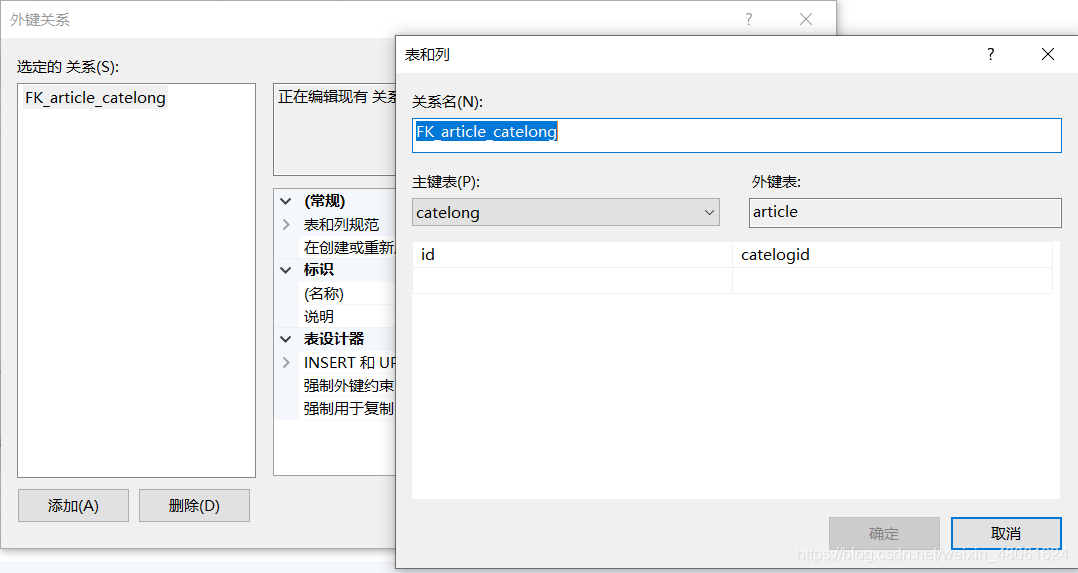
创建EF实体数据模型导入数据
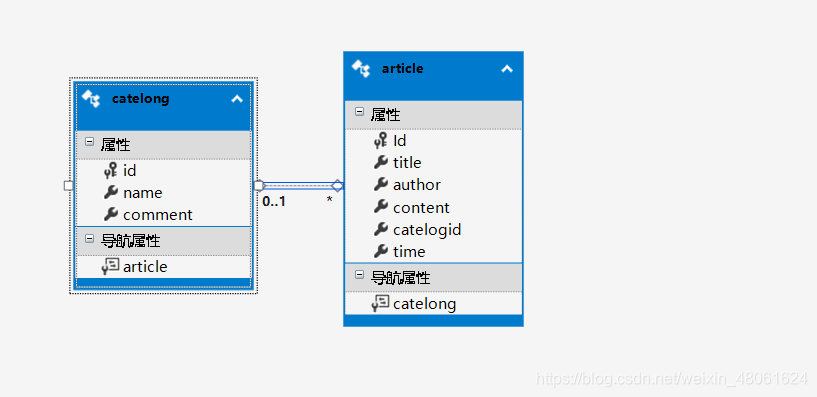
前端静态页面实现
主页静态页面
<%@ Page Language="C#" AutoEventWireup="true" CodeBehind="index.aspx.cs" Inherits="_5月27号.index" %>

<!DOCTYPE html>

<html xmlns="http://www.w3.org/1999/xhtml">
<head runat="server">
    <meta http-equiv="Content-Type" content="text/html; charset=utf-8" />
    <title></title>
    <style>
        .div1 {
            width: 400px;
            height: 200px;
            margin:0px auto;
            text-align:center;
            float:left;
            cursor: pointer;
        }
        p {
            margin:0px auto;
            text-align:center;
        }
        .span2{
            float:right;
        }
        #wz{
            width:800px;
            height:500px
        }
    </style>
</head>
<body>
    <form id="form1" runat="server">
        <div id="wz">

            <p><span class="span1">请选择类型:<asp:DropDownList ID="DropDownList1" AutoPostBack="true" runat="server" CssClass="dro" OnSelectedIndexChanged="DropDownList1_SelectedIndexChanged" OnTextChanged="DropDownList1_TextChanged"></asp:DropDownList></span>
            <span class="span2"><asp:LinkButton style="text-decoration:none;color:black;" ID="LinkButton2" runat="server">添加</asp:LinkButton></span></p>
            <asp:Repeater ID="Repeater1" runat="server" OnItemCommand="Repeater1_ItemCommand">
                <ItemTemplate>
                    <asp:LinkButton ID="LinkButton1" Style="text-decoration:none;color:black;" runat="server" CommandName="xx" CommandArgument='<%# Eval("id")%>'>
                    <div class="div1">
                        <p class="div2">标    题:<%# Eval("title")%></p>
                        <p>作    者:<%# Eval("author")%></p>
                        <p>类    型:<%# Eval("catelong.name")%></p>
                        <p>内    容:<%# Eval("content")%></p>
                        <p>发布时间:<%# Convert.ToDateTime(Eval("time")).ToString("yyyy年MM月dd日")%></p>
                        <hr />
                    </div>
                        </asp:LinkButton>
                </ItemTemplate>
            </asp:Repeater>
        </div>
    </form>
</body>
</html>
查看详情页面代码
<%@ Page Language="C#" AutoEventWireup="true" CodeBehind="WebForm1.aspx.cs" Inherits="_5月27号.WebForm1" %>
<!DOCTYPE html>
<html xmlns="http://www.w3.org/1999/xhtml">
<head runat="server">
<meta http-equiv="Content-Type" content="text/html; charset=utf-8"/>
<title></title>
</head>
<body>
<form id="form1" runat="server">
<div>
<p>标题:<h1><%= Title%></h1></p>
<p>作者:<%= author%></p>
<p>类型:<%= cname%></p>
<p>内容:<%= content%></p>
<p>发布时间:<%= time%></p>
<asp:Button ID="Button1" runat="server" Text="返回" OnClick="Button1_Click" />
</div>
</form>
</body>
</html>
发布文章页面
<%@ Page Language="C#" AutoEventWireup="true" CodeBehind="WebForm2.aspx.cs" Inherits="_5月27号.WebForm2" %>

<!DOCTYPE html>

<html xmlns="http://www.w3.org/1999/xhtml">
<head runat="server">
<meta http-equiv="Content-Type" content="text/html; charset=utf-8"/>
    <title></title>
</head>
<body>
    <form id="form1" runat="server">
        <div>
            <p>标题:<asp:TextBox ID="TextBox1" runat="server"></asp:TextBox></p>
            <p>作者:<asp:TextBox ID="TextBox2" runat="server"></asp:TextBox></p>
            <p>类型:<asp:DropDownList ID="DropDownList1" runat="server"></asp:DropDownList></p>
            <p>类容:<asp:TextBox ID="TextBox3" runat="server"></asp:TextBox></p>
            <asp:Button ID="Button1" runat="server" Text="发布文章" OnClick="Button1_Click" />
        </div>
    </form>
</body>
</html>
功能页面代码
主页面功能代码
public partial class index : System.Web.UI.Page
{
MyDBEntities db = new MyDBEntities();
protected void Page_Load(object sender, EventArgs e)
{
if (!IsPostBack)
{
string fag= Request.QueryString["fag"];
if (fag=="cg")
{
Response.Write("<script>alert('添加成功')</script>");
}else if(fag=="sb"){
Response.Write("<script>alert('添加失败')</script>");
}
Repeater1.DataSource = db.article.ToList();
Repeater1.DataBind();
DropDownList1.DataSource = db.catelong.ToList();
DropDownList1.DataTextField = "name";
DropDownList1.DataValueField = "id";
DropDownList1.DataBind();
ListItem list = new ListItem();
list.Text = "全部";
list.Value = "0";
DropDownList1.Items.Insert(0,list);
}
}
protected void Repeater1_ItemCommand(object source, RepeaterCommandEventArgs e)
{
if (e.CommandName=="xx")
{
int id = int.Parse(e.CommandArgument.ToString());
Response.Redirect($"WebForm1.aspx?id={id}");
}
}
protected void DropDownList1_SelectedIndexChanged(object sender, EventArgs e)
{
if (DropDownList1.SelectedValue == "0")
{
Repeater1.DataSource = db.article.ToList();
Repeater1.DataBind();
}
else
{
int shu = int.Parse(DropDownList1.SelectedValue);
Repeater1.DataSource = db.article.Where(a => a.catelogid == shu).ToList();
Repeater1.DataBind();
}
}
protected void LinkButton2_Click(object sender, EventArgs e)
{
Response.Redirect("WebForm2.aspx");
}
}
查看详情页面功能代码
MyDBEntities db = new MyDBEntities();
public string title = "";
public string author = "";
public string cname = "";
public string content = "";
public string time = "";
protected void Page_Load(object sender, EventArgs e)
{
int id = int.Parse(Request.QueryString["id"]);
article b = db.article.Where(a => a.Id == id).Single();
title = b.title;
author = b.author;
cname = b.catelogid.ToString();
content = b.content;
time = Convert.ToDateTime(b.time).ToString("yyyy年MM月dd日");
}
protected void Button1_Click(object sender, EventArgs e)
{
Response.Redirect("index.aspx");
}
发布文章功能代码
MyDBEntities db = new MyDBEntities();
protected void Page_Load(object sender, EventArgs e)
{
if (!IsPostBack)
{
DropDownList1.DataSource = db.catelong.ToList();
DropDownList1.DataTextField = "name";
DropDownList1.DataValueField = "id";
DropDownList1.DataBind();
}
}
protected void Button1_Click(object sender, EventArgs e)
{
if(TextBox1.Text!=""&&TextBox2.Text!=""&&TextBox3.Text!=""){
article article = new article();
article.title = TextBox1.Text;
article.author = TextBox2.Text;
article.catelogid = int.Parse(DropDownList1.SelectedValue);
article.content = TextBox3.Text;
article.time = DateTime.Now;
db.article.Add(article);
if (db.SaveChanges()>0)
{
string fag = "cg";
Response.Redirect($"index.aspx?fag={fag}");
}else{
string fag = "sb";
Response.Redirect($"index.aspx?fag={fag}");
}
}
}


 本文详细介绍了如何使用Entity Framework在C#中进行数据库article表与catelog表的操作,包括创建表结构、数据关联、CRUD操作以及前端页面的下拉框查询、详情查看和发布功能实现。





 扫一扫
扫一扫


 881
881

 被折叠的 条评论
为什么被折叠?
被折叠的 条评论
为什么被折叠?
 到【灌水乐园】发言





