GROMACS Tutorial GROMACS 教程Protein-Ligand Complex 蛋白质-配体复合物

GROMACS Tutorial  GROMACS 教程

Protein-Ligand Complex  蛋白质-配体复合物

Justin A. Lemkul, Ph.D.  贾斯汀·A·勒姆库尔,博士
Virginia Tech Department of Biochemistry
弗吉尼亚理工大学生物化学系
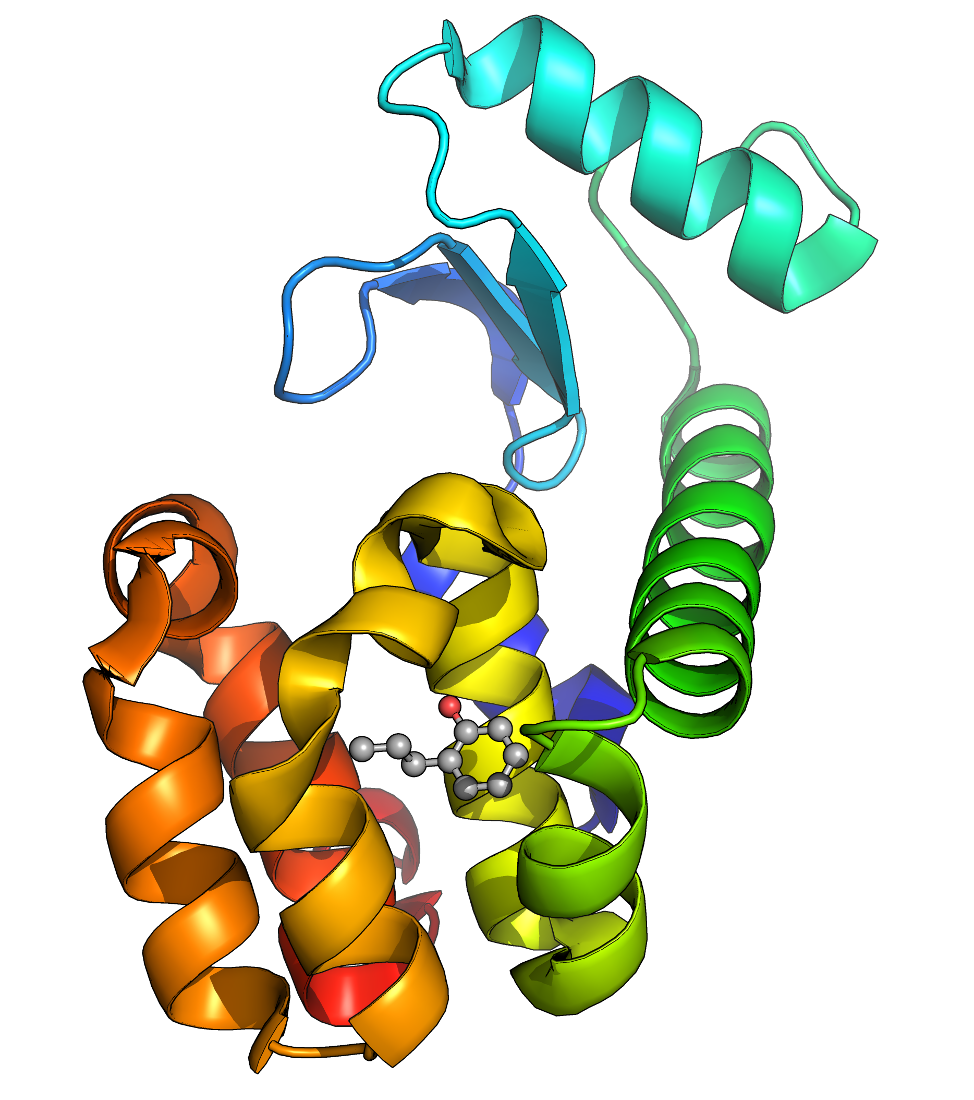
This example will guide a new user through the process of setting up a simulation system containing a protein (T4 lysozyme L99A/M102Q) in complex with a ligand. This tutorial focuses specifically on issues related to dealing with the ligand, assuming that the user is familiar with basic GROMACS operations and the contents of a topology. If this is not the case, please refer to a more basic tutorial before attempting this one.
这个示例将指导新用户完成设置一个包含蛋白质(T4 溶菌酶 L99A/M102Q)与配体结合的模拟系统的过程。本教程特别关注与处理配体相关的问题,假设用户已熟悉基本的 GROMACS 操作和拓扑文件内容。如果不是这样,请在尝试本教程前参考更基础的教程。

This tutorial requires a GROMACS version in the 2018.x series.
本教程需要使用 2018.x 系列的 GROMACS 版本。

Step One: Prepare the Protein Topology
第一步:准备蛋白质拓扑结构

We must download the protein structure file we will be working with. For this tutorial, we will utilize T4 lysozyme L99A/M102Q (PDB code 3HTB). Go to the RCSB website and download the PDB text for the crystal structure.
我们必须下载将要处理的蛋白质结构文件。在这个教程中,我们将使用 T4 溶菌酶 L99A/M102Q(PDB 代码 3HTB)。前往 RCSB 网站下载晶体结构的 PDB 文本。

Once you have downloaded the structure, you can visualize it using a viewing program such as VMD, Chimera, PyMOL, etc. Once you've had a look at the molecule, you are going to want to strip out the crystal waters, PO4, and BME. Note that such a procedure is not universally appropriate (i.e., the case of a bound active site water molecule). For our intentions here, we do not need crystal water or other species, which are just crystallization co-solvents. We will instead focus on the ligand called "JZ4," which is 2-propylphenol.
下载结构后,您可以使用 VMD、Chimera、PyMOL 等查看程序来可视化它。在查看分子后,您需要去除晶体水、PO4 和 BME。请注意,这种操作并非普遍适用(例如,结合的活性位点水分子的情况)。对于我们在此的目的而言,我们不需要晶体水或其他物质,这些只是结晶共溶剂。我们将重点关注名为"JZ4"的配体,它是 2 丙基酚。

If you want a clean version of the .pdb file to check your work, you can download it here. The problem we now face is that the JZ4 ligand is not a recognized entity in any of the force fields provided with GROMACS, so pdb2gmx will give a fatal error if you were try to pass this file through it. Topologies can only be assembled automatically if an entry for a building block is present in the .rtp (residue topology) file for the force field. Since this is not the case, we will prepare our system topology in two steps:
如果你需要一个干净的.pdb 文件来检查你的工作,你可以从这里下载。我们现在面临的问题是 JZ4 配体在任何 GROMACS 提供的力场中都不是一个被识别的实体,因此如果你尝试通过 pdb2gmx 处理这个文件,它将给出致命错误。拓扑结构只能在使用力场的.rtp(残基拓扑)文件中包含构建模块条目时自动组装。由于情况并非如此,我们将分两步准备我们的系统拓扑:

  1. Prepare the protein topology with pdb2gmx
    使用 pdb2gmx 准备蛋白质拓扑
  2. Prepare the ligand topology using external tools
    使用外部工具准备配体拓扑

Since we will be preparing these two topologies separately, we must save the protein and JZ4 ligand into separate coordinate files. Save the JZ4 coordinates like so:
由于我们将分别准备这两个拓扑结构,我们必须将蛋白质和 JZ4 配体保存到不同的坐标文件中。将 JZ4 坐标保存如下:

grep JZ4 3HTB_clean.pdb > jz4.pdb

Then simply delete the JZ4 lines from 3HTB_clean.pdb. At this point, preparing the protein topology is trivial. The force field we will be using in this tutorial is CHARMM36, obtained from the MacKerell lab website. While there, download the latest CHARMM36 force field tarball and the "cgenff_charmm2gmx.py" conversion script, which we will use later. Download the version of the conversion script that corresponds to your installed Python version (Python 2.x or 3.x).
然后只需从 3HTB_clean.pdb 中删除 JZ4 行。此时,准备蛋白质拓扑结构非常简单。本教程中我们将使用的力场是 CHARMM36,可以从 MacKerell 实验室网站获取。在那里,下载最新的 CHARMM36 力场 tarball 以及"cgenff_charmm2gmx.py"转换脚本,我们稍后会使用。下载与您安装的 Python 版本(Python 2.x 或 3.x)对应的转换脚本版本。

Unarchive the force field tarball in your working directory:
在您的工作目录中解压缩力场 tarball:

tar -zxvf charmm36-jul2022.ff.tgz

There should now be a "charmm36-jul2022.ff" subdirectory in your working directory. Write the topology for the T4 lysozyme with pdb2gmx:
现在您的工作目录中应该有一个"charmm36-jul2022.ff"子目录。使用 pdb2gmx 编写 T4 溶菌酶的拓扑结构:

gmx pdb2gmx -f 3HTB_clean.pdb -o 3HTB_processed.gro -ter

You will be prompted to make 3 selections.
您将被提示进行 3 次选择。

  1. Force field  力场
  2. Water model  水模型
  3. Terminus type  末端类型
Select the Force Field:
From current directory:
 1: CHARMM36 all-atom force field (July 2022)
From '/usr/local/gromacs/share/gromacs/top':
 2: AMBER03 protein, nucleic AMBER94 (Duan et al., J. Comp. Chem. 24, 1999-2012, 2003)
 3: AMBER94 force field (Cornell et al., JACS 117, 5179-5197, 1995)
 4: AMBER96 protein, nucleic AMBER94 (Kollman et al., Acc. Chem. Res. 29, 461-469, 1996)
 5: AMBER99 protein, nucleic AMBER94 (Wang et al., J. Comp. Chem. 21, 1049-1074, 2000)
 6: AMBER99SB protein, nucleic AMBER94 (Hornak et al., Proteins 65, 712-725, 2006)
 7: AMBER99SB-ILDN protein, nucleic AMBER94 (Lindorff-Larsen et al., Proteins 78, 1950-58, 2010)
 8: AMBERGS force field (Garcia & Sanbonmatsu, PNAS 99, 2782-2787, 2002)
 9: CHARMM27 all-atom force field (CHARM22 plus CMAP for proteins)
10: GROMOS96 43a1 force field
11: GROMOS96 43a2 force field (improved alkane dihedrals)
12: GROMOS96 45a3 force field (Schuler JCC 2001 22 1205)
13: GROMOS96 53a5 force field (JCC 2004 vol 25 pag 1656)
14: GROMOS96 53a6 force field (JCC 2004 vol 25 pag 1656)
15: GROMOS96 54a7 force field (Eur. Biophys. J. (2011), 40,, 843-856, DOI: 10.1007/s00249-011-0700-9)
16: OPLS-AA/L all-atom force field (2001 aminoacid dihedrals)

For this tutorial, choose the CHARMM36 force field (option 1), listed first under "From current directory" in the list.
对于本教程,请选择 CHARMM36 力场(选项 1),它在列表中位于"从当前目录"下的第一个位置。

Choose the default water model (CHARMM-modified TIP3P) and then choose "NH3+" and "COO-" for the termini. This interactive selection is necessary due to the N-terminal residue being methionine (MET), which causes pdb2gmx to choose an incompatible terminus type that is intended for carbohydrates. You must select the protein-specific termini, otherwise you will get a fatal error about non-matching atom names.
选择默认的水模型(CHARMM 修改的 TIP3P),然后为末端选择"NH3+"和"COO-"。这种交互式选择是必要的,因为 N 端残基是蛋氨酸(MET),这会导致 pdb2gmx 选择一种不兼容的末端类型,该类型是为碳水化合物设计的。你必须选择蛋白质特定的末端,否则你会得到一个关于原子名称不匹配的致命错误。

Step Two: Prepare the Ligand Topology
第二步:准备配体拓扑

We must now deal with the ligand. But how does one come up with parameters for some species that the force field does not automatically recognize? Proper treatment of ligands is one of the most challenging tasks in molecular simulation. Force field authors spend years of their lives deriving self-consistent force fields, and it is no small task to introduce a new species into this framework. Force field parameters for any new species must be derived and validated in a manner that is consistent with the original force field.
现在我们需要处理配体。但如何为那些力场无法自动识别的物种提供参数呢?正确处理配体是分子模拟中最具挑战性的任务之一。力场作者花费数年时间推导自洽的力场,将新物种引入这一框架绝非易事。任何新物种的力场参数都必须以与原始力场一致的方式推导和验证。

For the OPLS, AMBER, and CHARMM force fields, this derivation often takes the form of various quantum mechanical calculations. The primary literature for these force fields describes the required procedure. For GROMOS force fields, parameterization methodology is less clear, relying on empirical fitting of condensed-phase behavior. That is, some initial charges and Lennard-Jones parameters are calculated for each atom type, evaluated for their accuracy, and refined. While the end result is very satisfactory, i.e. fluids resemble their real-world counterparts, the derivation process can be laborious and frustrating.
对于 OPLS、AMBER 和 CHARMM 力场,这种推导通常以各种量子力学计算的形式进行。这些力场的主要文献描述了所需的程序。对于 GROMOS 力场,参数化方法不太明确,依赖于凝聚相行为的经验拟合。也就是说,为每种原子类型计算一些初始电荷和 Lennard-Jones 参数,评估其准确性,并进行优化。虽然最终结果非常令人满意,即流体类似于现实世界的对应物,但推导过程可能既费力又令人沮丧。

For this reason, automated tools are greatly preferred. For each force field, there are methodologies or software programs that purport to give parameters compatible with various force fields. Not all of them are equally accurate. For a few examples, refer to the following table:
因此,自动化工具更受青睐。对于每种力场,都有声称能提供与各种力场兼容参数的方法或软件程序。它们并非都同样准确。以下表格列举了几个例子:


AMBERAntechamberParametrizes molecules using GAFF
使用 GAFF 参数化分子
acpypeA Python interface to Antechamber, writes GROMACS topologies
一个用于 Antechamber 的 Python 接口,用于生成 GROMACS 拓扑文件

CHARMMCGenFFThe official CHARMM General Force Field server
官方的 CHARMM 通用力场服务器

GROMOS87/GROMOS96PRODRG 2.5An automated server for topology generation
一个用于拓扑生成的自动化服务器
ATBA newer server for topology generation, uses GROMOS96 54A7
一个更新的用于拓扑生成的服务器,使用 GROMOS96 54A7

OPLS-AALigParGenA server from the Jorgensen group to produce OPLS topologies
Jorgensen 小组的服务器用于生成 OPLS 拓扑

Add Hydrogen Atoms to JZ4
为 JZ4 添加氢原子

In this tutorial, we will be generating the JZ4 topology with the CGenFF server. Click the link in the table above to visit the site. Register for a (free) account and activate it. CGenFF requires a Sybyl .mol2 file as its input, to collect rudimentary atom type information and bonded connectivity. CHARMM is also an all-atom force field, meaning all H atoms are explicitly represented. Crystal structures do not typically assign H coordinates, so they have to be built in. To produce a .mol2 file and add H atoms, use the Avogadro program. Open jz4.pdb in Avogadro, and from the "Build" menu, choose "Add Hydrogens." Avogadro will build all of the H atoms onto the JZ4 ligand. Save a .mol2 file (File -> Save As... and choose Sybyl Mol2 from the drop-down menu) named "jz4.mol2."
在本教程中,我们将使用 CGenFF 服务器生成 JZ4 拓扑。点击上表中的链接访问该网站。注册一个(免费)账户并激活它。CGenFF 需要 Sybyl .mol2 文件作为输入,以收集基本的原子类型信息和键合连接信息。CHARMM 也是一个全原子力场,这意味着所有 H 原子都明确表示。晶体结构通常不分配 H 坐标,因此必须构建它们。要生成.mol2 文件并添加 H 原子,请使用 Avogadro 程序。在 Avogadro 中打开 jz4.pdb,从“构建”菜单中选择“添加氢原子”。Avogadro 将构建 JZ4 配体上的所有 H 原子。保存一个名为“jz4.mol2”的.mol2 文件(文件 -> 另存为...并从下拉菜单中选择 Sybyl Mol2)。

Several corrections must be made to jz4.mol2 before it can be used. Open jz4.mol2 in your favorite plain-text editor and you will find:
在使用 jz4.mol2 之前,必须对其进行几项修正。在您最喜欢的纯文本编辑器中打开 jz4.mol2,您会发现:

@<TRIPOS>MOLECULE
*****
 22 22 0 0 0
SMALL
GASTEIGER

@<TRIPOS>ATOM
      1 C4         24.2940  -24.1240   -0.0710 C.3   167  JZ4167     -0.0650
      2 C7         21.5530  -27.2140   -4.1120 C.ar  167  JZ4167     -0.0613
      3 C8         22.0680  -26.7470   -5.3310 C.ar  167  JZ4167     -0.0583
      4 C9         22.6710  -25.5120   -5.4480 C.ar  167  JZ4167     -0.0199
      5 C10        22.7690  -24.7300   -4.2950 C.ar  167  JZ4167      0.1200
      6 C11        21.6930  -26.4590   -2.9540 C.ar  167  JZ4167     -0.0551
      7 C12        22.2940  -25.1870   -3.0750 C.ar  167  JZ4167     -0.0060
      8 C13        22.4630  -24.4140   -1.8080 C.3   167  JZ4167     -0.0245
      9 C14        23.9250  -24.7040   -1.3940 C.3   167  JZ4167     -0.0518
     10 OAB        23.4120  -23.5360   -4.3420 O.3   167  JZ4167     -0.5065
     11 H          25.3133  -24.3619    0.1509 H       1  UNL1        0.0230
     12 H          23.6591  -24.5327    0.6872 H       1  UNL1        0.0230
     13 H          24.1744  -23.0611   -0.1016 H       1  UNL1        0.0230
     14 H          21.0673  -28.1238   -4.0754 H       1  UNL1        0.0618
     15 H          21.9931  -27.3472   -6.1672 H       1  UNL1        0.0619
     16 H          23.0361  -25.1783   -6.3537 H       1  UNL1        0.0654
     17 H          21.3701  -26.8143   -2.0405 H       1  UNL1        0.0621
     18 H          21.7794  -24.7551   -1.0588 H       1  UNL1        0.0314
     19 H          22.2659  -23.3694   -1.9301 H       1  UNL1        0.0314
     20 H          24.5755  -24.2929   -2.1375 H       1  UNL1        0.0266
     21 H          24.0241  -25.7662   -1.3110 H       1  UNL1        0.0266
     22 H          23.7394  -23.2120   -5.1580 H       1  UNL1        0.2921
@<TRIPOS>BOND
     1     4     3   ar
     2     4     5   ar
     3     3     2   ar
     4    10     5    1
     5     5     7   ar
     6     2     6   ar
     7     7     6   ar
     8     7     8    1
     9     8     9    1
    10     9     1    1
    11     1    11    1
    12     1    12    1
    13     1    13    1
    14     2    14    1
    15     3    15    1
    16     4    16    1
    17     6    17    1
    18     8    18    1
    19     8    19    1
    20     9    20    1
    21     9    21    1
    22    10    22    1

The first change that needs to be made is in the MOLECULE heading. Replace "*****" with "JZ4," e.g.:
需要做的第一个更改是在 MOLECULE 标题中。将"*****"替换为"JZ4",例如:

@<TRIPOS>MOLECULE
JZ4

Next, fix the residue names and numbers such that they are all the same. This .mol2 file only contains one molecule, therefore there should only be one residue name and number specified. After editing, the corrected ATOM section of jz4.mol2 should read:
接下来,修正残基名称和编号,确保它们全部相同。这个.mol2 文件只包含一个分子,因此应该只有一个残基名称和编号。编辑后,jz4.mol2 的修正后的 ATOM 部分应该读取:

@<TRIPOS>ATOM
      1 C4         24.2940  -24.1240   -0.0710 C.3     1  JZ4        -0.0650
      2 C7         21.5530  -27.2140   -4.1120 C.ar    1  JZ4        -0.0613
      3 C8         22.0680  -26.7470   -5.3310 C.ar    1  JZ4        -0.0583
      4 C9         22.6710  -25.5120   -5.4480 C.ar    1  JZ4        -0.0199
      5 C10        22.7690  -24.7300   -4.2950 C.ar    1  JZ4         0.1200
      6 C11        21.6930  -26.4590   -2.9540 C.ar    1  JZ4        -0.0551
      7 C12        22.2940  -25.1870   -3.0750 C.ar    1  JZ4        -0.0060
      8 C13        22.4630  -24.4140   -1.8080 C.3     1  JZ4        -0.0245
      9 C14        23.9250  -24.7040   -1.3940 C.3     1  JZ4        -0.0518
     10 OAB        23.4120  -23.5360   -4.3420 O.3     1  JZ4        -0.5065
     11 H          25.3133  -24.3619    0.1509 H       1  JZ4         0.0230
     12 H          23.6591  -24.5327    0.6872 H       1  JZ4         0.0230
     13 H          24.1744  -23.0611   -0.1016 H       1  JZ4         0.0230
     14 H          21.0673  -28.1238   -4.0754 H       1  JZ4         0.0618
     15 H          21.9931  -27.3472   -6.1672 H       1  JZ4         0.0619
     16 H          23.0361  -25.1783   -6.3537 H       1  JZ4         0.0654
     17 H          21.3701  -26.8143   -2.0405 H       1  JZ4         0.0621
     18 H          21.7794  -24.7551   -1.0588 H       1  JZ4         0.0314
     19 H          22.2659  -23.3694   -1.9301 H       1  JZ4         0.0314
     20 H          24.5755  -24.2929   -2.1375 H       1  JZ4         0.0266
     21 H          24.0241  -25.7662   -1.3110 H       1  JZ4         0.0266
     22 H          23.7394  -23.2120   -5.1580 H       1  JZ4         0.2921

Last, notice the strange bond order in the @<TRIPOS>BOND section. All programs seem to have their own method for generating this list, but not all are created equal. There will be issues in constructing a correct topology with matching coordinates if the bonds are not listed in ascending order. To fix this problem, download the sort_mol2_bonds.pl script I have written and execute it:
最后,注意 @<TRIPOS>BOND 部分中的奇怪键序。所有程序似乎都有自己生成这个列表的方法,但并非所有方法都一样。如果键不是按升序列出,则在构建匹配坐标的正确拓扑结构时会出现问题。要解决这个问题,请下载我编写的 sort_mol2_bonds.pl 脚本并执行它:

perl sort_mol2_bonds.pl jz4.mol2 jz4_fix.mol2

Use "jz4_fix.mol2" in the next step.
下一步使用"jz4_fix.mol2"。

Generate the JZ4 Topology with CGenFF
使用 CGenFF 生成 JZ4 拓扑

The jz4_fix.mol2 file is now ready for use to produce a topology. Visit the CGenFF server, log into your account, and and click "Upload molecule" at the top of the page. Upload jz4_fix.mol2 and the CGenFF server will quickly return a topology in the form of a CHARMM "stream" file (extension .str). Save its contents from your web browser into a file called "jz4.str." You can also download a copy of this file here.
jz4_fix.mol2 文件现在已准备好用于生成拓扑。访问 CGenFF 服务器,登录您的账户,然后点击页面顶部的"上传分子"。上传 jz4_fix.mol2 文件,CGenFF 服务器将快速返回一个以 CHARMM"流"文件形式(扩展名.str)的拓扑。从您的网络浏览器中保存其内容到一个名为"jz4.str"的文件中。您也可以在此处下载该文件的副本。

The CHARMM stream file contains all of the topology information - atom types, charges, and bonded connectivity. It also has sections for additional bonded parameters that were generated by analogy for any internal interactions not covered by the force field. CGenFF also provides penalty scores for each parameter, that is, an assessment of how reliable the assigned parameter is. Anything below 10 is considered acceptable for immediate use. Values from 10 - 50 imply that some validation of the topology is warranted, and any penalties larger than 50 generally require manual reparametrization. This penalty scoring is one of the most important features of the CGenFF server. Many other servers generate topologies and are "black boxes," which users are simply left to trust implicitly. Staking your entire research project on an automatic program without verification is very dangerous. A poor ligand topology can lead to significant wasted time and unreliable results. Always validate the topologies of newly parametrized species! At minimum, check the magnitudes of charges and the atom types assigned to the ligand against existing moieties in the force field.
CHARMM 流文件包含所有拓扑信息——原子类型、电荷和键合连接性。它还包含用于生成任何未被力场覆盖的内部相互作用的额外键合参数的部分。CGenFF 还为每个参数提供惩罚分数,即对分配参数可靠性的评估。低于 10 的任何值都被认为可以立即使用。10 到 50 之间的值意味着需要对拓扑进行一些验证,而任何大于 50 的惩罚通常需要手动重新参数化。这种惩罚评分是 CGenFF 服务器最重要的功能之一。许多其他服务器生成拓扑,并且是“黑箱”,用户只能默认信任。完全依赖未经验证的自动程序来开展整个研究项目非常危险。一个差的配体拓扑会导致大量时间浪费和不可靠的结果。始终验证新参数化的物种的拓扑!至少,检查电荷的幅度和分配给配体的原子类型是否与力场中现有的基团一致。

Examine the contents of jz4.str and look at the penalties for the charges and the new dihedral parameters. All of them are very low, suggesting that this topology is of very good quality and can be used directly for our simulation.
检查 jz4.str 的内容,并查看电荷的惩罚和新的二面角参数。所有这些都非常低,表明这个拓扑结构质量非常好,可以直接用于我们的模拟。

The JZ4 topology in CHARMM format is all well and good, but it's not useful if we are trying to run our simulation in GROMACS. Download a suitable version of the cgenff_charmm2gmx.py script from this GitHub site. The script name will include the version, _py2 or _py3, but here for simplicity this information is omitted but you will need to use the actual name of the script that you downloaded for your Python version. Perform the conversion with:
CHARMM 格式的 JZ4 拓扑结构虽然不错,但如果我们要在 GROMACS 中运行模拟,它就没什么用了。从这个 GitHub 站点下载一个合适的 cgenff_charmm2gmx.py 脚本。脚本名称会包含版本信息,_py2 或_py3,但为了简化,这里省略了这些信息,不过你需要使用与你 Python 版本对应的实际脚本名称。执行转换操作:

python cgenff_charmm2gmx.py JZ4 jz4_fix.mol2 jz4.str charmm36-jul2022.ff

PLEASE NOTE: This script requires NetworkX package, and there are very specific versions that have been tested. Please see the above-linked GitHub site for version recommendations and the combinations of Python and NetworkX that have been tested. Deviations from these versions may lead to syntax issues that may cause the scripts to fail.
请注意:这个脚本需要 NetworkX 包,并且有经过测试的特定版本。请参考上述链接的 GitHub 站点获取版本推荐以及经过测试的 Python 和 NetworkX 组合。偏离这些版本可能会导致语法问题,从而使脚本运行失败。

NOTE the following screen output at the end of the successful conversion:
注意在成功转换的末尾查看以下屏幕输出:

============ DONE ============
Conversion complete.
The molecule topology has been written to jz4.itp
Additional parameters needed by the molecule are written to jz4.prm, which needs to be included in the system .top
============ DONE ============

This ligand introduces new bonded parameters that are not part of the existing force field, and these parameters are written to a file called "jz4.prm," which is in the format of a GROMACS .itp file. We will deal with this file shortly, but it is important to note its existence. The ligand topology is now written to "jz4.itp," which contains the ligand [ moleculetype ] definition.
这个配体引入了现有力场中不包含的新键合参数,这些参数被写入名为"jz4.prm"的文件中,该文件采用 GROMACS .itp 格式。我们稍后会处理这个文件,但重要的是要记住它的存在。配体拓扑结构现在被写入"jz4.itp"文件,其中包含配体 [ moleculetype ] 的定义。

Build the Complex  构建复合物

From pdb2gmx, we have a file called "3HTB_processed.gro" that contains the processed, force field-compliant structure of our protein. We also have "jz4_ini.pdb" from cgenff_charmm2gmx.py that has all of the necessary H atoms and matches the atom names in the JZ4 topology. Convert this .pdb file to .gro format with editconf:
从 pdb2gmx,我们有一个名为"3HTB_processed.gro"的文件,其中包含我们蛋白质的经过处理、符合力场规范的构象。我们还有 cgenff_charmm2gmx.py 生成的"jz4_ini.pdb"文件,其中包含所有必要的氢原子,并与 JZ4 拓扑中的原子名称匹配。使用 editconf 将这个.pdb 文件转换为.gro 格式:

gmx editconf -f jz4_ini.pdb -o jz4.gro

Copy 3HTB_processed.gro to a new file to be manipulated, for instance, call it "complex.gro," as the addition of JZ4 to the protein will generate our protein-ligand complex. Next, simply copy the coordinate section of jz4.gro and paste it into complex.gro, below the last line of the protein atoms, and before the box vectors, like so:
将 3HTB_processed.gro 复制到一个新的待处理文件中,例如命名为"complex.gro",因为添加 JZ4 到蛋白质中将生成我们的蛋白质-配体复合物。接下来,只需将 jz4.gro 的坐标部分复制并粘贴到 complex.gro 中,放在蛋白质原子最后一行的下方,以及盒子向量之前,如下所示:

  163ASN      C 1691   0.621  -0.740  -0.126
  163ASN     O1 1692   0.624  -0.616  -0.140
  163ASN     O2 1693   0.683  -0.703  -0.011
   5.99500   5.19182   9.66100   0.00000   0.00000  -2.99750   0.00000   0.00000   0.00000

becomes (added text in bold green)...
变成(加粗的绿色文本)...

  163ASN      C 1691   0.621  -0.740  -0.126
  163ASN     O1 1692   0.624  -0.616  -0.140
  163ASN     O2 1693   0.683  -0.703  -0.011

    1JZ4     C4    1   2.429  -2.412  -0.007
    1JZ4     C7    2   2.155  -2.721  -0.411
    1JZ4     C8    3   2.207  -2.675  -0.533
    1JZ4     C9    4   2.267  -2.551  -0.545
    1JZ4    C10    5   2.277  -2.473  -0.430
    1JZ4    C11    6   2.169  -2.646  -0.295
    1JZ4    C12    7   2.229  -2.519  -0.308
    1JZ4    C13    8   2.246  -2.441  -0.181
    1JZ4    C14    9   2.392  -2.470  -0.139
    1JZ4    OAB   10   2.341  -2.354  -0.434
    1JZ4     H1   11   2.531  -2.436   0.015
    1JZ4     H2   12   2.366  -2.453   0.069
    1JZ4     H3   13   2.417  -2.306  -0.010
    1JZ4     H4   14   2.107  -2.812  -0.407
    1JZ4     H5   15   2.199  -2.735  -0.617
    1JZ4     H6   16   2.304  -2.518  -0.635
    1JZ4     H7   17   2.137  -2.681  -0.204
    1JZ4     H8   18   2.178  -2.476  -0.106
    1JZ4     H9   19   2.227  -2.337  -0.193
    1JZ4    H10   20   2.458  -2.429  -0.214
    1JZ4    H11   21   2.402  -2.577  -0.131
    1JZ4    H12   22   2.374  -2.321  -0.516

   5.99500   5.19182   9.66100   0.00000   0.00000  -2.99750   0.00000   0.00000   0.00000

Since we have added 22 more atoms into the .gro file, increment the second line of complex.gro to reflect this change. There should be 2636 atoms in the coordinate file now.
由于我们在.gro 文件中添加了 22 个原子,请将 complex.gro 文件的第二行增加以反映这一变化。现在坐标文件中应该有 2636 个原子。

Build the Topology  构建拓扑结构

Including the parameters for the JZ4 ligand in the system topology is very easy. Just insert a line that says #include "jz4.itp" into topol.top after the position restraint file is included. The inclusion of position restraints indicates the end of the "Protein" moleculetype section.
在系统拓扑中包含 JZ4 配体的参数非常简单。在包含位置约束文件后,只需在 topol.top 文件中插入一行内容为 #include "jz4.itp" 的语句。位置约束的包含表示"Protein"分子类型部分的结束。

; Include Position restraint file
#ifdef POSRES
#include "posre.itp"
#endif

; Include water topology
#include "./charmm36-jul2022.ff/tip3p.itp"

becomes...  变成...

; Include Position restraint file
#ifdef POSRES
#include "posre.itp"
#endif

; Include ligand topology
#include "jz4.itp"

; Include water topology
#include "./charmm36-jul2022.ff/tip3p.itp"

The ligand introduces new dihedral parameters, which were written to "jz4.prm" by the cgenff_charmm2gmx.py script. At the TOP of topol.top, insert an #include statement to add these parameters:
配体引入了新的二面角参数,这些参数由 cgenff_charmm2gmx.py 脚本写入到"jz4.prm"文件中。在 topol.top 文件的 TOP 部分,插入一个 #include 语句来添加这些参数:

; Include forcefield parameters
#include "./charmm36-jul2022.ff/forcefield.itp"

; Include ligand parameters
#include "jz4.prm"

[ moleculetype ]
; Name            nrexcl
Protein_chain_A     3

The placement of this #include statement is critical - it must appear before any [ moleculetype ] entry because all parameters have to be defined before any molecules can be constructed. It must also appear AFTER the #include statement for the parent force field, because all atom types have to be known before bonded parameters can be introduced that make use of them.
这个 #include 语句的位置至关重要——它必须出现在任何 [ moleculetype ] 条目之前,因为所有参数都必须在构建任何分子之前定义。它还必须在父力场 #include 语句之后出现,因为所有原子类型都必须在引入使用它们的键合参数之前已知。

The last adjustment to be made is in the [ molecules ] directive. To account for the fact that there is a new molecule in complex.gro, we have to add it here, like so:
最后需要进行的调整是在 [ molecules ] 指令中。为了考虑 complex.gro 中有一个新分子,我们必须在这里添加它,如下所示:

[ molecules ]
; Compound        #mols
Protein_chain_A     1
JZ4                 1

The topology and coordinate file are now in agreement with respect to the contents of the system.
拓扑结构和坐标文件现在在系统内容方面已保持一致。

Step Three: Defining the Unit Cell & Adding Solvent
第三步:定义晶胞并添加溶剂

At this point, the workflow is just like any other MD simulation. We will define the unit cell and fill it with water.
此时,工作流程与其他 MD 模拟类似。我们将定义晶胞并用水填充它。

gmx editconf -f complex.gro -o newbox.gro -bt dodecahedron -d 1.0

gmx solvate -cp newbox.gro -cs spc216.gro -p topol.top -o solv.gro

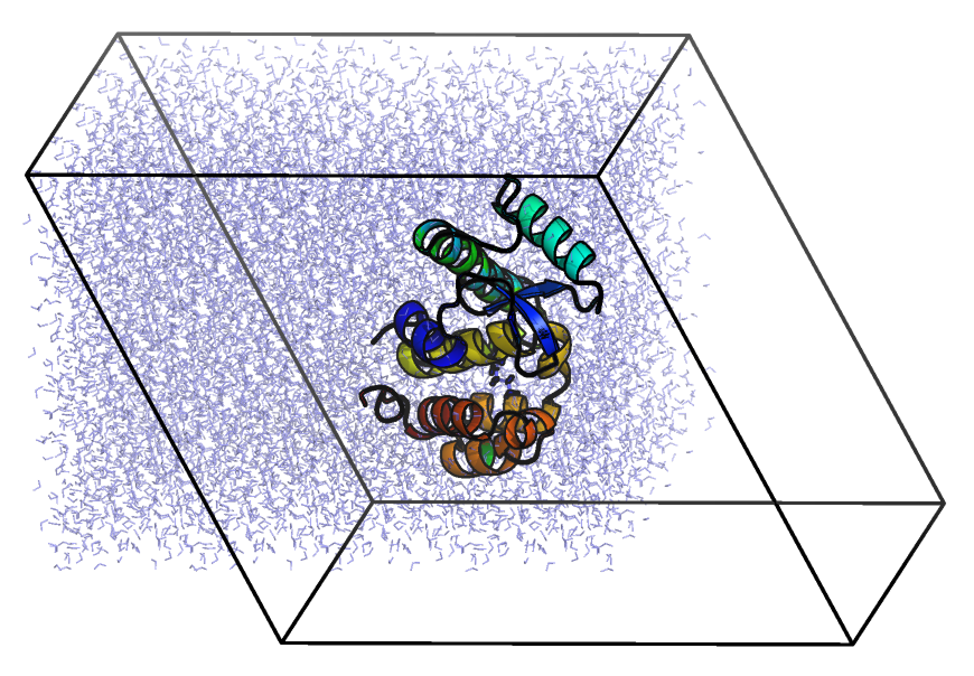
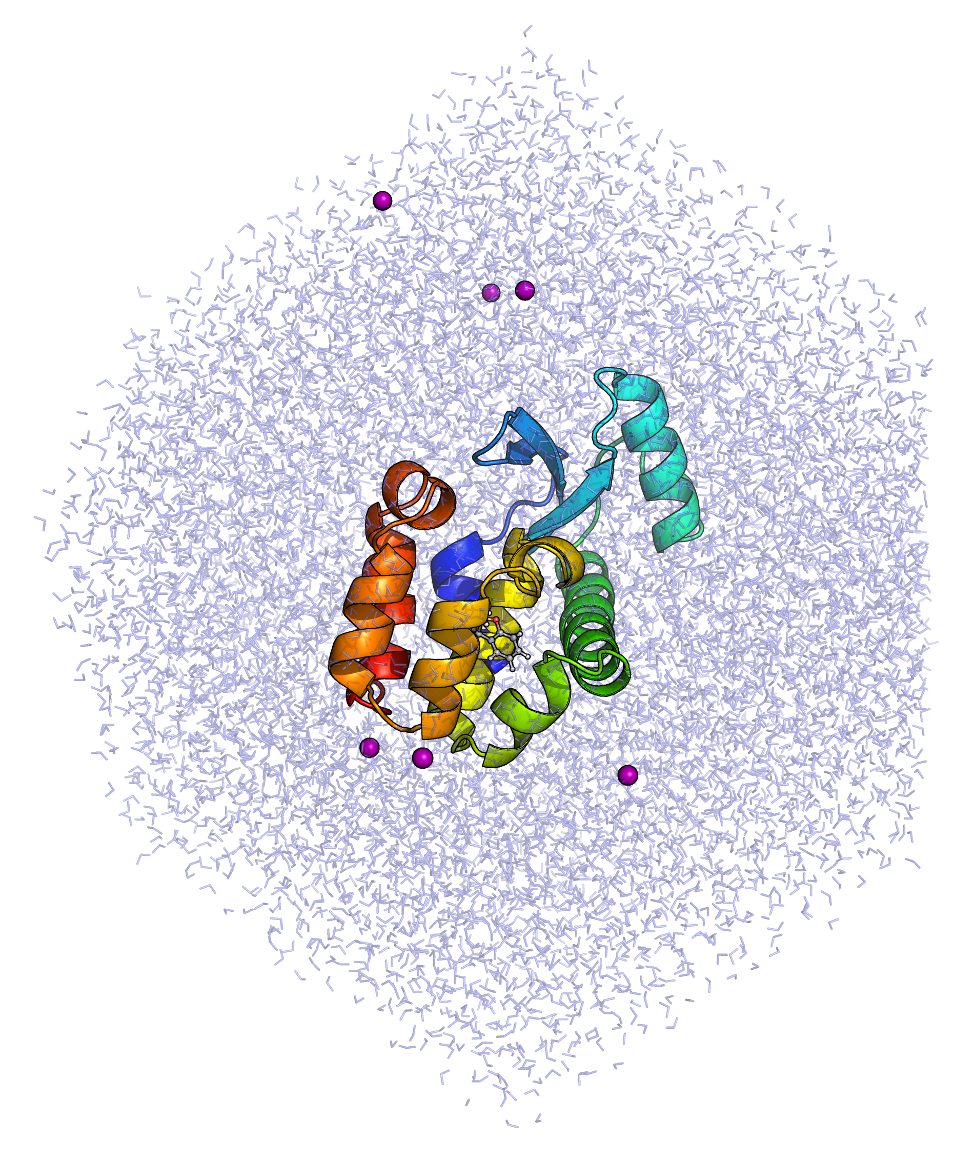
Upon visualizing solv.gro, you may wonder why editconf did not produce the requested dodecahedral unit cell shape, as the system will look something like this:
在可视化 solv.gro 时,您可能会疑惑为什么 editconf 没有生成所需的十二面体晶胞形状,因为系统看起来会像这样:

GROMACS programs always use the most numerically efficient representation of the coordinates, one that has everything re-wrapped into a triclinic unit cell. The physical calculations that mdrun performs can be carried out equivalently with different coordinate wrapping, so the most efficient is preferred. The desired unit cell shape can be recovered later, following the generation of a .tpr file.
GROMACS 程序始终使用坐标的最优数值表示,即将所有内容重新包装到三斜晶胞中。mdrun 执行的实际计算可以用不同的坐标包装等价完成,因此优先选择最优的。所需的晶胞形状可以在生成.tpr 文件后恢复。

Step Four: Adding Ions  第四步:添加离子

We now have a solvated system that contains a charged protein. The output of pdb2gmx told us that the protein has a net charge of +6e (based on its amino acid composition). If you missed this information in the pdb2gmx output, look at the last line of your [ atoms ] directive in topol.top; it should read (in part) "qtot 6." Since life does not exist at a net charge, we must add ions to our system.
我们现在有一个包含带电蛋白质的溶剂化系统。pdb2gmx 的输出告诉我们该蛋白质的总电荷为+6e(基于其氨基酸组成)。如果你在 pdb2gmx 的输出中错过了这些信息,请查看 topol.top 文件中 [ atoms ] 指令的最后一行,它应该部分显示为"qtot 6."。由于生命体不会存在于净电荷状态,我们必须向系统中添加离子。

Use grompp to assemble a .tpr file, using any .mdp file. I use an .mdp file for running energy minimization, since they require the fewest parameters and are thus the easiest to maintain. For example, this one.
使用 grompp 组装一个.tpr 文件,可以使用任何.mdp 文件。我使用.mdp 文件进行能量最小化,因为它们需要的参数最少,因此最容易维护。例如,这个文件。

gmx grompp -f ions.mdp -c solv.gro -p topol.top -o ions.tpr

We now pass our .tpr file to genion:
现在我们将我们的.tpr 文件传递给 genion:

gmx genion -s ions.tpr -o solv_ions.gro -p topol.top -pname NA -nname CL -neutral

The names of the ions specified with -pname and -nname were force field-specific in previous versions of GROMACS, but were standardized in version 4.5. The specified atom names are always the elemental symbol in all capital letters, along with the [ moleculetype ]. Residue names may or may not append the sign of the charge (+/-). Refer to ions.itp for proper nomenclature if you encounter difficulties.
以前版本中,使用-pname 和-nname 指定的离子名称在 GROMACS 中是力场特定的,但在 4.5 版本中已标准化。指定的原子名称始终是大写的元素符号,后跟 [ moleculetype ] 。残基名称可能或可能不附加电荷符号(+/-)。如果你遇到困难,请参考 ions.itp 以获取正确的命名规则。

Your [ molecules ] directive should now look like:
您现在的 [ molecules ] 指令应该如下所示:

[ molecules ]
; Compound        #mols
Protein_chain_A     1
JZ4                 1
SOL             10228
CL                  6

Step Five: Energy Minimization
第五步:能量最小化

Now that the system is assembled, create the binary input using grompp using this input parameter file:
现在系统已经组装完毕,使用 grompp 创建二进制输入,使用这个输入参数文件:

gmx grompp -f em.mdp -c solv_ions.gro -p topol.top -o em.tpr

Make sure you have been updating your topol.top file when running genbox and genion, or else you will get lots of nasty error messages ("number of coordinates in coordinate file does not match topology," etc).
运行 genbox 和 genion 时,确保你更新了 topol.top 文件,否则你会收到很多烦人的错误消息("坐标文件中的坐标数量与拓扑不匹配"等)。

We are now ready to invoke mdrun to carry out the EM:
我们现在可以调用 mdrun 来执行 EM:

gmx mdrun -v -deffnm em

For me, the system converged relatively quickly:
对我来说,系统相对较快收敛:

Steepest Descents converged to Fmax < 1000 in 143 steps
Potential Energy  = -4.9014547e+05
Maximum force     =  8.7411469e+02 on atom 27
Norm of force     =  5.6676244e+01

As in the lysozyme tutorial, it is possible to monitor various components of the potential energy using the energy module. I will not illustrate these principles here. Have fun.
如同在溶菌酶教程中一样,可以使用能量模块来监测势能的各个组成部分。我不会在这里演示这些原理。祝您玩得开心。

Now that our system is at an energy minimum, we can begin real dynamics.
现在我们的系统达到了能量最小值,我们可以开始真正的动力学模拟。

Step Six: Equilibration  第六步:平衡

Equilibrating our protein-ligand complex will be much like equilibrating any other system containing a protein in water. There are a few special considerations, in this case:
平衡我们的蛋白质-配体复合物将类似于在任何含有蛋白质的水系统中进行平衡。在这种情况下,有几个特殊的注意事项:

  1. Applying restraints to the ligand
    对配体施加约束
  2. Treatment of temperature coupling groups
    温度耦合组的处理

Restraining the Ligand  约束配体

To restrain the ligand, we will need to generate a position restraint topology for it. First, create an index group for JZ4 that contains only its non-hydrogen atoms:
为了约束配体,我们需要为其生成一个位置约束拓扑。首先,为 JZ4 创建一个仅包含其非氢原子的索引组:

gmx make_ndx -f jz4.gro -o index_jz4.ndx
...
 > 0 & ! a H*
 > q

Then, execute the genrestr module and select this newly created index group (which will be group 3 in the index_jz4.ndx file):
然后,执行 genrestr 模块并选择这个新创建的索引组(该组将是 index_jz4.ndx 文件中的第 3 组):

gmx genrestr -f jz4.gro -n index_jz4.ndx -o posre_jz4.itp -fc 1000 1000 1000

Now, we need to include this information in our topology. We can do this in several ways, depending upon the conditions we wish to use. If we simply want to restrain the ligand whenever the protein is also restrained, add the following lines to your topology in the location indicated:
现在,我们需要将此信息包含在我们的拓扑中。我们可以根据所需条件以多种方式完成此操作。如果我们只想在蛋白质也被约束时约束配体,请将以下行添加到拓扑中指定的位置:

; Include Position restraint file
#ifdef POSRES
#include "posre.itp"
#endif

; Include ligand topology
#include "jz4.itp"

; Ligand position restraints
#ifdef POSRES
#include "posre_jz4.itp"
#endif

; Include water topology
#include "./charmm36-jul2022.ff/tip3p.itp"

Location matters! You must put the call for posre_jz4.itp in the topology as indicated. The parameters within jz4.itp define a [ moleculetype ] directive for our ligand. The moleculetype ends with the inclusion of the water topology (tip3p.itp). Placing the call to posre_jz4.itp anywhere else will attempt to apply the position restraint parameters to the wrong moleculetype.
位置很重要!你必须按照指示在拓扑中放置 posre_jz4.itp 的调用。jz4.itp 中的参数为我们的配体定义了一个 [ moleculetype ] 指令。分子类型以包含水拓扑(tip3p.itp)而结束。将 posre_jz4.itp 的调用放在任何其他位置都会尝试将位置约束参数应用于错误的分子类型。

If you want a bit more control during equilibration, i.e. restraining the protein and ligand independently, you could instead control the inclusion of the ligand position restraint file in a different #ifdef block, like so:
如果你在平衡过程中需要更多控制,即独立地约束蛋白质和配体,你可以选择在另一个 #ifdef 块中控制配体位置约束文件的包含,如下所示:

; Include Position restraint file
#ifdef POSRES
#include "posre.itp"
#endif

; Include ligand topology
#include "jz4.itp"

; Ligand position restraints
#ifdef POSRES_LIG
#include "posre_jz4.itp"
#endif

; Include water topology
#include "./charmm36-jul2022.ff/tip3p.itp"

In the latter case, to restrain both the protein and the ligand, we would need to specify define = -DPOSRES -DPOSRES_LIG in the .mdp file. How you want to treat your system is up to you. These examples are meant only to illustrate the flexibility GROMACS provides. For a standard equilibration procedure, restraining the protein and ligand simultaneously is probably sufficient. Your own needs may vary.
在后一种情况下,要约束蛋白质和配体,我们需要在 .mdp 文件中指定 define = -DPOSRES -DPOSRES_LIG 。如何处理你的系统取决于你。这些示例仅旨在说明 GROMACS 提供的灵活性。对于标准的平衡过程,同时约束蛋白质和配体可能就足够了。你的具体需求可能会有所不同。

Thermostats  恒温器

Proper control of temperature coupling is a sensitive issue. Coupling every moleculetype to its own thermostatting group is a bad idea. For instance, if you do the following:
温度耦合的适当控制是一个敏感问题。将每种分子类型与其自身的恒温器组耦合是一个坏主意。例如,如果你这样做:

tc-grps = Protein JZ4 SOL CL

Your system will probably blow up, since the temperature coupling algorithms are not stable enough to control the fluctuations in kinetic energy that groups with a few atoms (i.e., JZ4 and CL) will produce. Do not couple every single species in your system separately.
您的系统可能会崩溃,因为温度耦合算法不够稳定,无法控制由少数原子组成的组(即 JZ4 和 CL)产生的动能波动。不要单独耦合系统中的每一种物质。

The typical approach is to set tc-grps = Protein Non-Protein and carry on. Unfortunately, the "Non-Protein" group also encompasses JZ4. Since JZ4 and the protein are physically linked very tightly, it is best to consider them as a single entity. That is, JZ4 is grouped with the protein for the purposes of temperature coupling. In the same way, the few Cl- ions we inserted are considered part of the solvent. To do this, we need a special index group that merges the protein and JZ4. We accomplish this with the make_ndx module, supplying any coordinate file of the complete system. Here, I am using em.gro, the output (minimized) structure of our system:
典型的方法是设置 tc-grps = Protein Non-Protein 然后继续。不幸的是,“非蛋白质”组也包括 JZ4。由于 JZ4 和蛋白质物理连接非常紧密,最好将它们视为一个整体。也就是说,在温度耦合的目的上,JZ4 是与蛋白质分组在一起的。同样,我们插入的少量 Cl - 离子被认为是溶剂的一部分。为此,我们需要一个特殊的索引组,将蛋白质和 JZ4 合并。我们通过 make_ndx 模块实现这一点,提供完整系统的任何坐标文件。在这里,我使用 em.gro,这是我们系统输出的(最小化)结构:

gmx make_ndx -f em.gro -o index.ndx
...
  0 System              : 33506 atoms
  1 Protein             :  2614 atoms
  2 Protein-H           :  1301 atoms
  3 C-alpha             :   163 atoms
  4 Backbone            :   489 atoms
  5 MainChain           :   651 atoms
  6 MainChain+Cb        :   803 atoms
  7 MainChain+H         :   813 atoms
  8 SideChain           :  1801 atoms
  9 SideChain-H         :   650 atoms
 10 Prot-Masses         :  2614 atoms
 11 non-Protein         : 30892 atoms
 12 Other               :    22 atoms
 13 JZ4                 :    22 atoms
 14 CL                  :     6 atoms
 15 Water               : 30864 atoms
 16 SOL                 : 30864 atoms
 17 non-Water           :  2642 atoms
 18 Ion                 :     6 atoms
 19 JZ4                 :    22 atoms
 20 CL                  :     6 atoms
 21 Water_and_ions      : 30870 atoms

Merge the "Protein" and "JZ4" groups with the following, where ">" indicates the make_ndx prompt:
使用以下命令合并“蛋白质”和“JZ4”组,其中“>”表示 make_ndx 提示符:

> 1 | 13
> q

We can now set tc-grps = Protein_JZ4 Water_and_ions to achieve our desired "Protein Non-Protein" effect.
现在我们可以设置 tc-grps = Protein_JZ4 Water_and_ions 来实现我们想要的“蛋白质 非蛋白质”效果。

Proceed with NVT equilibration using this .mdp file.
使用此.mdp 文件进行 NVT 平衡。

gmx grompp -f nvt.mdp -c em.gro -r em.gro -p topol.top -n index.ndx -o nvt.tpr

gmx mdrun -deffnm nvt

Step Seven: Equilibration, Part 2
第七步:平衡,第二部分

Once the NVT simulation is complete, proceed to NPT with this .mdp file:
一旦 NVT 模拟完成,使用此.mdp 文件继续进行 NPT:

gmx grompp -f npt.mdp -c nvt.gro -t nvt.cpt -r nvt.gro -p topol.top -n index.ndx -o npt.tpr

gmx mdrun -deffnm npt

Step Eight: Production MD
步骤八:生产 MD

Upon completion of the two equilibration phases, the system is now well-equilibrated at the desired temperature and pressure. We are now ready to release the position restraints and run production MD for data collection. The process is just like we have seen before, as we will make use of the checkpoint file (which in this case now contains preserve pressure coupling information) to grompp. We will run a 10-ns MD simulation, the script for which can be found here.
完成两个平衡阶段后,系统现在已在目标温度和压力下达到良好平衡。我们现在可以释放位置约束并运行生产 MD 以收集数据。这个过程就像我们之前看到的一样,我们将使用检查点文件(在这种情况下现在包含保持压力耦合信息)来运行 grompp。我们将运行一个 10 纳秒的 MD 模拟,该脚本的路径在此处提供。

gmx grompp -f md.mdp -c npt.gro -t npt.cpt -p topol.top -n index.ndx -o md_0_10.tpr

gmx mdrun -deffnm md_0_10

Step Nine: Analysis  步骤九:分析

Recentering and Rewrapping Coordinates
重新中心化并重新包装坐标

As in any simulation conducted with periodic boundary conditions, molecules may appear "broken" or may "jump" back and forth across the box. To recenter the protein and rewrap the molecules within the unit cell to recover the desired rhombic dodecahedral shape, invoke trjconv:
与任何使用周期性边界条件的模拟一样,分子可能会出现"断裂"或"跳跃"穿过盒子。要重新中心化蛋白质并将分子在晶胞内重新包装以恢复所需的菱形十二面体形状,调用 trjconv:

gmx trjconv -s md_0_10.tpr -f md_0_10.xtc -o md_0_10_center.xtc -center -pbc mol -ur compact

Choose "Protein" for centering and "System" for output. Note that centering complexes (protein-ligand, protein-protein) may be difficult for longer simulations involving many jumps across periodic boundaries. In those instances (particularly in protein-protein complexes), it may be necessary to create a custom index group to use for centering, corresponding to the active site of one protein or the interfacial residues of one monomer in a complex.
选择"蛋白质"进行中心化,选择"系统"作为输出。注意,对于涉及许多跨周期边界跳跃的较长模拟,中心化复合物(蛋白质-配体、蛋白质-蛋白质)可能很困难。在这些情况下(特别是在蛋白质-蛋白质复合物中),可能需要创建一个自定义索引组用于中心化,对应于一个蛋白质的活性位点或复合物中一个单体的界面残基。

To extract the first frame (t = 0 ns) of the trajectory, use trjconv -dump with the recentered trajectory:
要提取轨迹的第一帧(t = 0 ns),使用带有重新中心化轨迹的 trjconv -dump:

gmx trjconv -s md_0_10.tpr -f md_0_10_center.xtc -o start.pdb -dump 0

For even smoother visualization, it may be beneficial to perform rotational and translational fitting. Execute trjconv as follows:
为了更平滑地可视化,执行旋转和平移拟合可能是有益的。按照以下方式执行 trjconv:

gmx trjconv -s md_0_10.tpr -f md_0_10_center.xtc -o md_0_10_fit.xtc -fit rot+trans

Choose "Backbone" to perform least-squares fitting to the protein backbone, and "System" for output. Note that simultaneous PBC rewrapping and fitting of the coordinates is mathematically incompatible. Should you wish to perform fitting (which is useful for visualization, but not necessary for most analysis routines), carry out these coordinate manipulations separately, as indicated here.
选择"Backbone"对蛋白质骨架进行最小二乘拟合,选择"System"进行输出。请注意,同时进行 PBC 重绕和坐标拟合在数学上是不兼容的。如果您希望进行拟合(这对于可视化很有用,但对于大多数分析程序不是必需的),请按照这里指示单独执行这些坐标操作。

Analyzing Protein-Ligand Interactions and Ligand Dynamics
分析蛋白质-配体相互作用和配体动力学

This tutorial cannot possible cover all analysis methods that you may wish to perform. A few basic operations will be illustrated here.
本教程不可能涵盖您可能希望执行的所有分析方法。这里将说明一些基本操作。

The 2-propylphenol ligand can engage in a hydrogen bond with the Gln102 side chain. The GROMACS hbond module can easily be employed to calculate the number of hydrogen bonds between any groups of atoms, but in our case, the only values will be 1 or 0. For a more detailed look at how the ligand is interacting with Gln102, we will compute the distance between the hydroxyl group of JZ4 and the carbonyl O atom of Gln102. For a hydrogen bond to be formed, the typical criterion is that the donor and acceptor atoms will be separated by a distance ≤ 3.5 Å (0.35 nm). Use the distance module to calculate the distance over the course of the trajectory, using command-line selection syntax (see gmx help selections for examples and more syntax).
2-丙基苯酚配体可以与 Gln102 侧链形成氢键。GROMACS hbond 模块可以轻松用于计算任意原子组之间的氢键数量,但在我们的情况下,结果值只能是 1 或 0。为了更详细地了解配体与 Gln102 的相互作用,我们将计算 JZ4 羟基与 Gln102 羰基 O 原子之间的距离。形成氢键的典型标准是供体原子和受体原子之间的距离≤3.5 Å(0.35 nm)。使用距离模块在整个轨迹过程中计算距离,使用命令行选择语法(参见 gmx help selections 获取示例和更多语法)。

gmx distance -s md_0_10.tpr -f md_0_10_center.xtc -select 'resname "JZ4" and name OAB plus resid 102 and name OE1' -oall

The average distance is 0.31 ± 0.05 nm, consistent with the formation of a hydrogen bond.
平均距离为 0.31 ± 0.05 nm,与氢键的形成一致。

The second criterion usually applied in determining the presence of a hydrogen bond is the angle formed among the donor, hydrogen, and acceptor atoms. There are different conventions for calculating the angle. In the GROMACS hbond module, the angle is defined as hydrogen-donor-acceptor, and this angle should be ≤ 30°. To perform this analysis, first create index groups for the donor atoms (which must include both the donor heavy atom and the bonded hydrogen) and the acceptor atom:
确定氢键存在时通常应用的第二个标准是供体、氢原子和受体原子之间形成的角度。计算角度有不同的约定。在 GROMACS hbond 模块中,角度定义为氢-供体-受体,该角度应≤30°。要执行此分析,首先为供体原子(必须包括供体重原子和键合氢原子)和受体原子创建索引组:

gmx make_ndx -f em.gro -o index.ndx
...
 > 13 & a OAB | a H12
 (creates group 23)
 > 1 & r 102 & a OE1
 (creates group 24)
 > 23 | 24
 > q

Analyze the angle formed by these three atoms using the angle module:
使用角度模块分析这三个原子形成的角度:

gmx angle -f md_0_10_center.xtc -n index.ndx -ov angle.xvg

Note that angle takes no -s argument, unlike most other GROMACS analysis modules. Angle calculations do not require mass or periodicity information, atom names, etc. so the trajectory is processed without a .tpr or coordinate file. The value returned by the command should be roughly 23 ± 9°. This outcome may be somewhat unexpected, as the index group we constructed was in the order of OAB, H12, OE1, which would correspond to the donor-hydrogen-acceptor distance, which we expect to be close to linear (~180°). Inspect the contents of the index file and you will find:
请注意,角度不需要-s 参数,这与大多数其他 GROMACS 分析模块不同。角度计算不需要质量或周期性信息、原子名称等,因此处理轨迹时不需要.tpr 或坐标文件。命令返回的值应约为 23±9°。这个结果可能有些出乎意料,因为我们构建的索引组是 OAB、H12、OE1 的顺序,这对应于供体-氢-受体距离,我们预期它接近线性(~180°)。检查索引文件的内容,你会发现:

[ JZ4_&_OAB_H12_Protein_&_r_102_&_OE1 ]
1616 2624 2636

make_ndx has sorted the atom numbers automatically from low to high, thus the outcome of the calculation is the acceptor-donor-hydrogen angle, the same angle that the hbond module would have calculated. So the result is consistent with formation of a hydrogen bond, since it is ≤ 30°. To get the desired angle of donor-hydrogen-acceptor, we would have to manually edit the index group in a text file to reorder the atom numbers (2624 2636 1616). Re-running the angle calculation with this index group yields an average value of 147 ± 11°.
make_ndx 已自动将原子序号从低到高排序,因此计算结果为供体-受体-氢角,即 hbond 模块会计算的相同角度。因此结果与氢键形成一致,因为其值≤30°。要获得所需的供体-氢-受体角度,我们需要手动编辑文本文件中的索引组以重新排序原子序号(2624 2636 1616)。使用此索引组重新运行角度计算,得到平均值为 147 ± 11°。

Finally, we may be interested in quantifying how much the ligand binding pose has changed over the course of the simulation. To compute a heavy-atom RMSD of just JZ4, create a new index group for it:
最后,我们可能对模拟过程中配体结合构象的变化程度感兴趣。要计算仅 JZ4 的重原子 RMSD,为其创建一个新的索引组:

gmx make_ndx -f em.gro -n index.ndx
...
 > 13 & ! a H*
 > name 26 JZ4_Heavy
 > q

Execute the rms module, choosing "Backbone" for least-squares fitting and "JZ4_Heavy" for the RMSD calculation. By doing so, the overall rotation and translation of the protein is removed via fitting and the RMSD reported is how much the JZ4 position has varied relative to the protein, which is a good indicator of how well the binding pose was preserved during the simulation.
执行 rms 模块,选择"Backbone"进行最小二乘拟合,选择"JZ4_Heavy"进行 RMSD 计算。通过这种方式,蛋白质的整体旋转和平移通过拟合被去除,所报告的 RMSD 是 JZ4 位置相对于蛋白质的变化量,这是衡量模拟过程中结合构象是否得到良好保留的良好指标。

gmx rms -s em.tpr -f md_0_10_center.xtc -n index.ndx -tu ns -o rmsd_jz4.xvg

The calculated RMSD should be about 0.1 nm (1 Å), indicating only a very small change in the ligand's position.
计算得到的 RMSD 值应约为 0.1 纳米(1 埃),表明配体的位置仅发生了微小变化。

Protein-Ligand Interaction Energy
蛋白质-配体相互作用能

To quantify the strength of the interaction between JZ4 and T4 lysozyme, it may be useful to compute the nonbonded interaction energy between these two species. GROMACS has the ability to decompose the short-range nonbonded energies between any number of defined groups. It is important to note that this quantity is NOT a free energy or a binding energy. In fact, most force fields are not parametrized in such a way that this quantity is actually physically meaningful. CHARMM is parametrized to specifically target quantum mechanical interaction energies with water, so it is intrinsically balanced against meaningful quantities, and as such the interaction energy can be useful.
为了量化 JZ4 与 T4 溶菌酶之间的相互作用强度,计算这两种物质之间的非键相互作用能可能是有用的。GROMACS 具有分解任意定义组之间短程非键相互作用能的能力。需要注意的是,这个量不是自由能或结合能。实际上,大多数力场并不是以这种方式参数化,使得这个量在物理上是有意义的。CHARMM 被参数化以专门针对与水的量子力学相互作用能,因此它在本质上与有意义的量相平衡,因此相互作用能是有用的。

Calculation of an interaction energy is carried out via the energygrps keyword in the .mdp file. Despite being an .mdp keyword, interaction energy calculations should not be considered part of a normal simulation. Decomposition of the short-range energies is incompatible with running on a GPU and also slows the calculation down unnecessarily. The mdrun module does not need to do this extra work to perform a valid simulation. As such, only compute interaction energies as a part of your analysis, not your dynamics. Create a new .tpr file from an .mdp file that has energygrps = Protein JZ4 defined, like this one:
计算相互作用能是通过.mdp 文件中的 energygrps 关键字进行的。尽管 energygrps 是.mdp 关键字,但相互作用能的计算不应被视为常规模拟的一部分。短程能的分解与在 GPU 上运行不兼容,并且还会不必要地减慢计算速度。mdrun 模块无需做这些额外工作即可进行有效模拟。因此,仅将相互作用能作为分析的一部分进行计算,而不是动力学模拟。从已定义 energygrps = Protein JZ4 的.mdp 文件创建一个新的.tpr 文件,如下所示:

gmx grompp -f ie.mdp -c npt.gro -t npt.cpt -p topol.top -n index.ndx -o ie.tpr

Next, invoke mdrun with the -rerun option to recalculate energies from the existing simulation trajectory:
接下来,使用-rerun 选项调用 mdrun 以从现有模拟轨迹中重新计算能量:

gmx mdrun -deffnm ie -rerun md_0_10.xtc -nb cpu

Note the use of -deffnm to read ie.tpr and write all output files to ie.* as their file names. The -rerun option takes the name of the trajectory for which you want to recompute energies, and -nb cpu tells mdrun to only attempt to run on CPU hardware and ignore any GPU that might be available. As stated above, this type of calculation cannot be performed on a GPU. The rerun should be very fast, completing in just a few minutes.
注意使用-deffnm 读取 ie.tpr 并将所有输出文件写入 ie.*作为文件名。 -rerun 选项接受您想要重新计算能量的轨迹的名称,-nb cpu 告诉 mdrun 仅尝试在 CPU 硬件上运行并忽略可能可用的任何 GPU。如上所述,此类计算无法在 GPU 上执行。重新计算应该非常快,只需几分钟即可完成。

Extract the energy terms of interest via the energy module. The terms we are interested in are Coul-SR:Protein-JZ4 and LJ-SR:Protein-JZ4.
通过能量模块提取感兴趣的能项。我们感兴趣的项是 Coul-SR:Protein-JZ4 和 LJ-SR:Protein-JZ4。

gmx energy -f ie.edr -o interaction_energy.xvg

The average short-range Coulombic interaction energy is -20.5 ± 7.4 kJ mol-1 and the short-range Lennard-Jones energy is -99.1 ± 7.2 kJ mol-1. It may be tempting to draw conclusions from the relative magnitudes of these quantities, but even though CHARMM was parametrized against explicit water interaction energies, decomposition of interaction energies further into these components is not necessarily real. There is no way to experimentally verify these quantities, so it is impossible to know whether they are meaningful. The total interaction energy, however, is useful in this case. That value (after propagating the error according to the standard formula for addition of two quantities) is -119.6 ± 10.3 kJ mol-1.
平均短程库仑相互作用能为-20.5 ± 7.4 kJ mol -1 ,短程 Lennard-Jones 能为-99.1 ± 7.2 kJ mol -1 。从这些量的相对大小得出结论可能很有诱惑力,但即使 CHARMM 针对显式水分子的相互作用能进行了参数化,将相互作用能进一步分解为这些分量也未必是真实的。没有办法通过实验验证这些量,因此无法确定它们是否有意义。然而,总相互作用能在这种情况下是有用的。该值(根据两个量相加的标准公式传播误差)为-119.6 ± 10.3 kJ mol -1 。

Summary  摘要

You have now conducted a molecular dynamics simulation of a protein-ligand complex with GROMACS. This tutorial should not be viewed as comprehensive. There are many more types of simulations that one can conduct with GROMACS (free energy calculations, non-equilibrium MD, and normal modes analysis, just to name a few). You should also review the literature and the GROMACS manual for adjustments to the .mdp files provided here for efficiency and accuracy purposes.
您现在已使用 GROMACS 对一个蛋白质-配体复合物进行了分子动力学模拟。本教程不应被视为全面的。使用 GROMACS 可以进行更多类型的模拟(自由能计算、非平衡 MD 和正常模式分析,仅举几例)。您还应该查阅文献和 GROMACS 手册,以对提供的.mdp 文件进行调整,以提高效率和准确性。

If you have suggestions for improving this tutorial, if you notice a mistake, or if anything is otherwise unclear, please feel free to email me. Please note: this is not an invitation to email me for GROMACS problems. I do not advertise myself as a private tutor or personal help service. That's what the GROMACS User Forum is for. I may help you there, but only in the context of providing service to the community as a whole, not just the end user.
如果您对本教程有任何改进建议,如果您发现错误,或者如果任何内容仍不清晰,请随时通过电子邮件与我联系。请注意:这不是邀请我通过电子邮件解决 GROMACS 问题。我不将自己宣传为私人导师或个人帮助服务。GROMACS 用户论坛才是为此目的。我可能会在那里提供帮助,但仅限于为整个社区提供服务,而不仅仅是最终用户。

Happy simulating!  模拟愉快!

评论
添加红包

请填写红包祝福语或标题

红包个数最小为10个

红包金额最低5元

当前余额3.43前往充值 >
需支付:10.00
成就一亿技术人!
领取后你会自动成为博主和红包主的粉丝 规则
hope_wisdom
发出的红包

打赏作者

皮肤小白生

你的鼓励将是我创作的最大动力

¥1 ¥2 ¥4 ¥6 ¥10 ¥20
扫码支付:¥1
获取中
扫码支付

您的余额不足,请更换扫码支付或充值

打赏作者

实付
使用余额支付
点击重新获取
扫码支付
钱包余额 0

抵扣说明:

1.余额是钱包充值的虚拟货币,按照1:1的比例进行支付金额的抵扣。
2.余额无法直接购买下载,可以购买VIP、付费专栏及课程。

余额充值