


 本文介绍如何在Vue.js的el-table组件中嵌入el-switch开关,并在开关内显示文字,通过实例展示具体实现过程。
先来样式截图
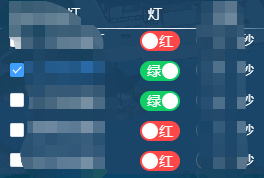
// 模板
<el-table :data="tableList" >

	<el-table-column label="灯" width="50" align="center">
	  <template slot-scope="scope">
	    <el-switch class="switchStyle" v-model="scope.row.isGreen" active-text="绿" inactive-text="红"
	               active-color="#13ce66" inactive-color="#ff4949"></el-switch>
	  </template>
	</el-table-column>

</el-table>


// data 数据
tableList: [
  {

    isGreen: false,

  }
]

// 样式
/deep/.el-switch__core{
   width: 55px!important;
}
/deep/.switchStyle > .el-switch__label {
  position: absolute;
  display: none;
  color: #fff;
}
/deep/.switchStyle > .el-switch__label--left {
  z-index: 9;
  right: -3px;
}
/deep/.switchStyle > .el-switch__label--right {
  z-index: 9;
  left: -3px;
}
/deep/.switchStyle > .el-switch__label.is-active {
  display: block;
}





 扫一扫
扫一扫


 1902
1902

 被折叠的 条评论
为什么被折叠?
被折叠的 条评论
为什么被折叠?
 到【灌水乐园】发言





