



 本文详细介绍了Python中的字符串,包括字符串的创建、下标和切片操作,以及查找、替换和判断等常用方法。字符串在Python中是不可变类型,不支持原地修改,但可以通过特定方式实现类似修改的效果。
1、认识字符串
字符串是 Python 中最常⽤的数据类型。⼀般使⽤引号来创建字符串。创建字符串很简单,只要为变量分配⼀个值即可。
a = 'hello world'
b = "abcdefg"
print(type(a))
print(type(b))

注意:控制台显示结果为 <class 'str'> , 即数据类型为str(字符串)。
1.1 字符串特征
- ⼀对引号字符串
name1 = 'Tom'
name2 = "Rose"
- 三引号字符串
name3 = ''' Tom '''
name4 = """ Rose """
a = ''' i am Tom,
        nice to meet you! '''
b = """ i am Rose,
        nice to meet you! """
print(name3)
print(name4)
print(a)
print(b)

注意:三引号形式的字符串⽀持换⾏。
思考:如果创建⼀个字符串 I'm Tom ?
c = "I'm Tom"
d = 'I\'m Tom'    【也可以使用转义字符】
1.2 字符串输出
print('hello world')
name = 'Tom'
print('我的名字是%s' % name)
print(f'我的名字是{name}')

1.3 字符串输⼊
在Python中,使⽤ input() 接收⽤户输⼊。
示例代码:
name = input('请输⼊您的名字:')
print(f'您输⼊的名字是{name}')
print(type(name))
password = input('请输⼊您的密码:')
print(f'您输⼊的密码是{password}')
print(type(password))
运行结果:

2、下标
“下标” ⼜叫 “索引” ,就是编号。下标的作⽤即是通过下标快速找到对应的数据。
name = "abcdef"
print(name[1])
print(name[0])
print(name[2])

注意:下标从0开始。

3、切⽚
切⽚是指对操作的对象截取其中⼀部分的操作。字符串、列表、元组都⽀持切⽚操作。
- 1. 不包含结束位置下标对应的数据, 正负整数均可;
- 2. 步⻓是选取间隔,正负整数均可,默认步⻓为1。
示例代码1:
name = "abcdefg"
print(name[2:5:1])  # cde
print(name[2:5])  # cde
print(name[:5])  # abcde
print(name[1:])  # bcdefg
print(name[:])  # abcdefg
print(name[::2])  # aceg
print(name[:-1])  # abcdef, 负1表示倒数第⼀个数据
print(name[-4:-1])  # def
print(name[::-1])  # gfedcba
运行结果:

示例代码2:
data = 'abcdefghijklmn'
data_list = []
step = 5
for i in range(0, len(data), step):
    data_list.append(data[i: i + step])

print(data)
print(data[1:100])
print(data_list)
运行结果:

4、常⽤操作⽅法
字符串的常⽤操作⽅法有查找、修改和判断三⼤类。
4.1 查找
所谓字符串查找⽅法即是查找⼦串在字符串中的位置或出现的次数。
find():检测某个⼦串是否包含在这个字符串中,如果在返回这个⼦串开始的位置下标,否则则返回-1。
字符串序列.find(⼦串, 开始位置下标, 结束位置下标)
注意:开始和结束位置下标可以省略,表示在整个字符串序列中查找。
示例代码:
mystr = "hello world and itcast and itheima and Python"
print(mystr.find('and'))  # 12
print(mystr.find('and', 15, 30))  # 23
print(mystr.find('ands'))  # -1

index():检测某个⼦串是否包含在这个字符串中,如果在返回这个⼦串开始的位置下标,否则则报异常。
字符串序列.index(⼦串, 开始位置下标, 结束位置下标)
注意:开始和结束位置下标可以省略,表示在整个字符串序列中查找。
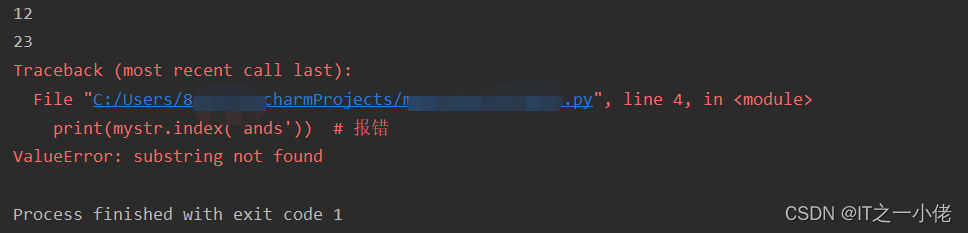
示例代码:
mystr = "hello world and itcast and itheima and Python"
print(mystr.index('and'))  # 12
print(mystr.index('and', 15, 30))  # 23
print(mystr.index('ands'))  # 报错
mystr = "hello world and itcast and itheima and Python"
print(mystr.find('and'))  # 12
print(mystr.rfind('and'))  # 35

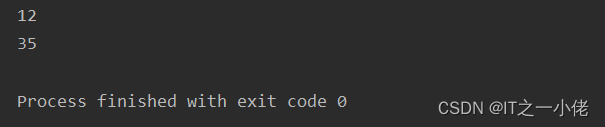
mystr = "hello world and itcast and itheima and Python"
print(mystr.index('and'))  # 12
print(mystr.rindex('and'))  # 35
字符串序列.count(⼦串, 开始位置下标, 结束位置下标)
注意:开始和结束位置下标可以省略,表示在整个字符串序列中查找。
mystr = "hello world and itcast and itheima and Python"
print(mystr.count('and'))  # 3
print(mystr.count('ands'))  # 0
print(mystr.count('and', 0, 20))  # 1

4.2 修改
字符串序列.replace(旧⼦串, 新⼦串, 替换次数)
注意:替换次数如果查出⼦串出现次数,则替换次数为该⼦串出现次数。
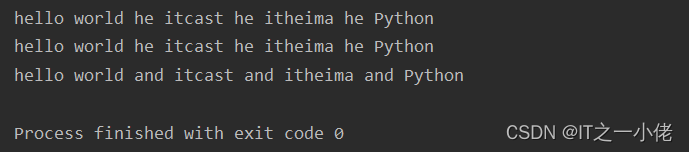
示例代码:
mystr = "hello world and itcast and itheima and Python"
# 结果:hello world he itcast he itheima he Python
print(mystr.replace('and', 'he'))
# 结果:hello world he itcast he itheima he Python
print(mystr.replace('and', 'he', 10))
# 结果:hello world and itcast and itheima and Python
print(mystr)
运行结果:
注意:数据按照是否能直接修改分为可变类型和不可变类型两种。字符串类型的数据修改的时候不能改变原有字符串,属于不能直接修改数据的类型即是不可变类型。
split():按照指定字符分割字符串,如果参数 num 有指定值,则分隔 num+1 个子字符串。
字符串序列.split(分割字符, num) 【返回的是列表】
- str -- 分隔符,默认为所有的空字符,包括空格、换行(\n)、制表符(\t)等。
- num -- 分割次数。默认为 -1, 即分隔所有。
注意:num表示的是分割字符出现的次数,即将来返回数据个数为num+1个。
示例代码:
mystr = "hello world and itcast and itheima and Python"
# 结果:['hello world ', ' itcast ', ' itheima ', ' Python']
print(mystr.split('and'))
# 结果:['hello world ', ' itcast ', ' itheima and Python']
print(mystr.split('and', 2))
# 结果:['hello', 'world', 'and', 'itcast', 'and', 'itheima', 'and', 'Python']
print(mystr.split(' '))
# 结果:['hello', 'world', 'and itcast and itheima and Python']
print(mystr.split(' ', 2))
运行结果:
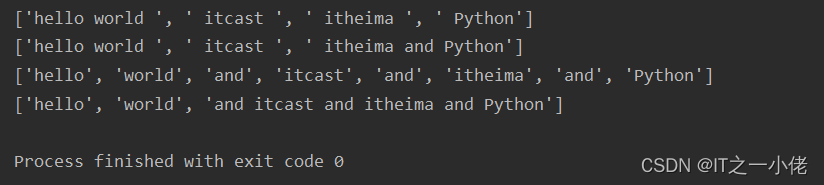
注意:如果分割字符是原有字符串中的⼦串,分割后则丢失该⼦串。
rsplit(): 按照指定字符从右面开始分割字符串,如果参数 num 有指定值,则分隔 num+1 个子字符串。用法同split()
示例代码:
mystr = "hello world and itcast and itheima and Python"

print(mystr.rsplit("and", 2))
运行结果:

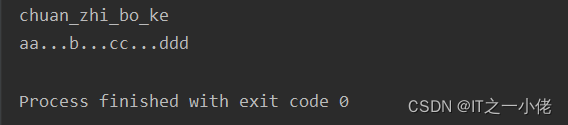
字符或⼦串.join(多字符串组成的序列)
list1 = ['chuan', 'zhi', 'bo', 'ke']
t1 = ('aa', 'b', 'cc', 'ddd')
# 结果:chuan_zhi_bo_ke
print('_'.join(list1))
# 结果:aa...b...cc...ddd
print('...'.join(t1))
mystr = "hello world and itcast and itheima and Python"
print(mystr.capitalize())

mystr = "hello world and itcast and itheima and Python"
print(mystr.title())

mystr = "hello world and itcast and itheima and Python"
print(mystr.lower())

mystr = "hello world and itcast and itheima and Python"
print(mystr.upper())

swapcase():产生新的字符串,所有字母大小写转换。
# 源码:
    def lstrip(self, *args, **kwargs): # real signature unknown
        """
        Return a copy of the string with leading whitespace removed.

        If chars is given and not None, remove characters in chars instead.
        """
        pass
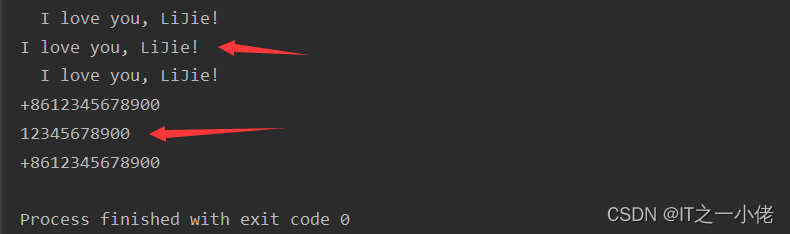
示例代码:
s1 = "  I love you, LiJie! "
print(s1)
print(s1.lstrip())
print(s1)

s2 = "+8612345678900"
print(s2)
print(s2.lstrip('+86'))
print(s2)
运行结果:
# 源码:
    def rstrip(self, *args, **kwargs): # real signature unknown
        """
        Return a copy of the string with trailing whitespace removed.

        If chars is given and not None, remove characters in chars instead.
        """
        pass
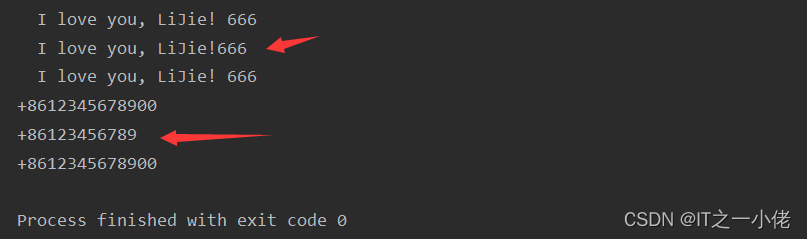
示例代码:
s1 = "  I love you, LiJie! "
print(s1 + '666')  # 为了容易看出字符串右边空格,打印时拼接了字符串
print(s1.rstrip() + '666')
print(s1 + '666')

s2 = "+8612345678900"
print(s2)
print(s2.rstrip('00'))
print(s2)
运行结果:
strip():默认删除字符串两侧空⽩字符,可以传递参数。
# 源码:
    def strip(self, *args, **kwargs): # real signature unknown
        """
        Return a copy of the string with leading and trailing whitespace removed.

        If chars is given and not None, remove characters in chars instead.
        """
        pass
在Python中,字符串的strip()方法用于去除字符串两端的指定字符(默认为空格字符)。
strip()方法的参数是可选的,可以指定需要去除的字符,其默认值是空格字符。
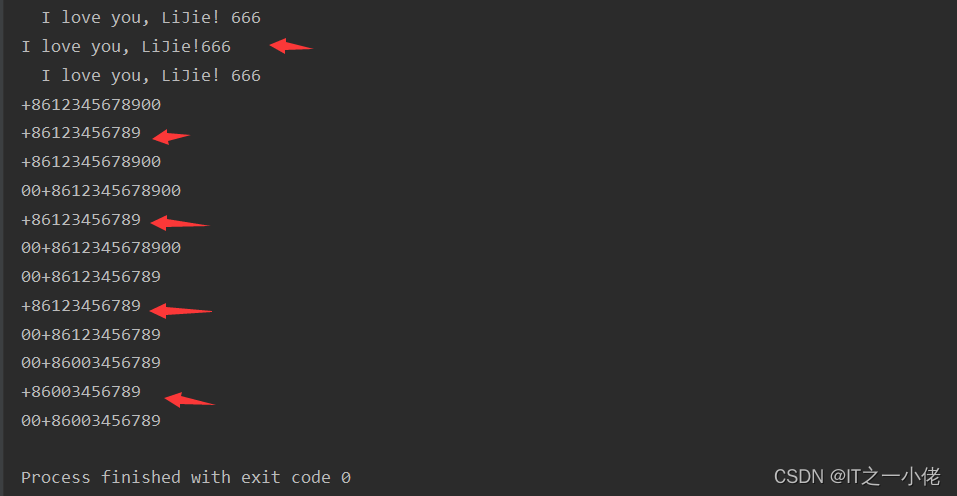
示例代码:
s1 = "  I love you, LiJie! "
print(s1 + '666')  # 为了容易看出字符串右边空格,打印时拼接了字符串
print(s1.strip() + '666')
print(s1 + '666')

s2 = "+8612345678900"
print(s2)
print(s2.strip('00'))
print(s2)

s3 = "00+8612345678900"
print(s3)
print(s3.strip('00'))
print(s3)

s4 = "00+86123456789"
print(s4)
print(s4.strip('00'))
print(s4)

s5 = "00+86003456789"
print(s5)
print(s5.strip('00'))
print(s5)
运行结果:
示例代码2:
string = "   hello world   "
print(string.strip())  # 输出:"hello world"

string = "-----hello world-----"
print(string.strip("-"))  # 输出:"hello world"
注意:strip()方法只会去除字符串两端的字符,不会对字符串内部的字符进行处理。如果需要去除字符串内部的字符,可以使用其他方法,例如replace()方法。
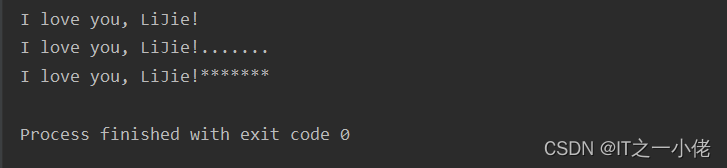
ljust():返回⼀个原字符串左对⻬,并使⽤指定字符(默认空格)填充⾄对应⻓度 的新字符串。
字符串序列.ljust(⻓度, 填充字符)
# 源码:
    def ljust(self, *args, **kwargs): # real signature unknown
        """
        Return a left-justified string of length width.

        Padding is done using the specified fill character (default is a space).
        """
        pass
示例代码:
s = "I love you, LiJie!"

print(s.ljust(25))
print(s.ljust(25, '.'))
print(s.ljust(25, '*'))
运行结果:
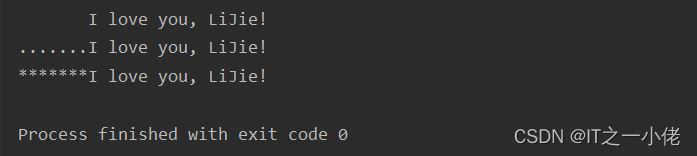
rjust():返回⼀个原字符串右对⻬,并使⽤指定字符(默认空格)填充⾄对应⻓度 的新字符串,语法和ljust()相同。
# 源码:
    def rjust(self, *args, **kwargs): # real signature unknown
        """
        Return a right-justified string of length width.

        Padding is done using the specified fill character (default is a space).
        """
        pass
示例代码:
s = "I love you, LiJie!"

print(s.rjust(25))
print(s.rjust(25, '.'))
print(s.rjust(25, '*'))
运行结果:
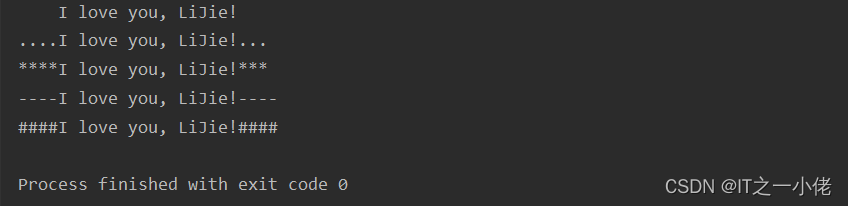
center():返回⼀个原字符串居中对⻬,并使⽤指定字符(默认空格)填充⾄对应⻓度 的新字符串,语法和ljust()相同。
# 源码:
    def center(self, *args, **kwargs): # real signature unknown
        """
        Return a centered string of length width.

        Padding is done using the specified fill character (default is a space).
        """
        pass
示例代码:
s = "I love you, LiJie!"

print(s.center(25))
print(s.center(25, '.'))
print(s.center(25, '*'))
print(s.center(26, '-'))
print(s.center(26, '#'))
运行结果:
4.3 判断
所谓判断即是判断真假,返回的结果是布尔型数据类型:True 或 False。
startswith():检查字符串是否是以指定⼦串开头,是则返回 True,否则返回 False。如果设置开始和结束位置下标,则在指定范围内检查。
字符串序列.startswith(⼦串, 开始位置下标, 结束位置下标)
mystr = "hello world and itcast and itheima and Python "
# 结果:True
print(mystr.startswith('hello'))
# 结果False
print(mystr.startswith('hello', 5, 20))
字符串序列.endswith(⼦串, 开始位置下标, 结束位置下标)
mystr = "hello world and itcast and itheima and Python"
# 结果:True
print(mystr.endswith('Python'))
# 结果:False
print(mystr.endswith('python'))
# 结果:False
print(mystr.endswith('Python', 2, 20))
示例代码:
str1 = 'hello'
str2 = 'hello12345'
# 结果:True
print(str1.isalpha())
# 结果:False
print(str2.isalpha())
运行结果:

isdigit():如果字符串只包含数字则返回 True 否则返回 False。
示例代码:
str1 = 'aaa12345'
str2 = '12345'
# 结果: False
print(str1.isdigit())
# 结果:True
print(str2.isdigit())
运行结果:

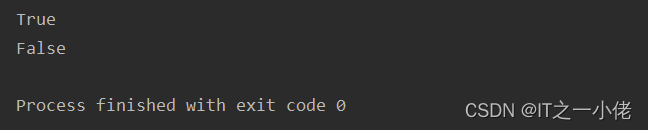
isalnum():如果字符串⾄少有⼀个字符并且所有字符都是字⺟或数字则返 回 True,否则返回 False。
示例代码:
str1 = 'aaa12345'
str2 = '12345-'
# 结果:True
print(str1.isalnum())
# 结果:False
print(str2.isalnum())
运行结果:
isspace():如果字符串中只包含空⽩,则返回 True,否则返回 False。
示例代码:
str1 = '1 2 3 4 5'
str2 = ' '
# 结果:False
print(str1.isspace())
# 结果:True
print(str2.isspace())
运行结果:

in:判断一个字符串是否在另一个字符串中。
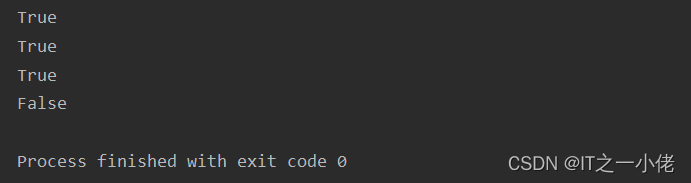
示例代码:
str1 = 'hello'
str2 = 'hello12345'
str3 = '123hello12345'
str4 = '123hello'
# 结果:True
print(str1 in str2)
print(str1 in str3)
print(str1 in str4)

# 结果:False
print(str1 not in str2)
运行结果:
isupper():是否为大写字母
islower():是否为小写字符
5、可变字符串
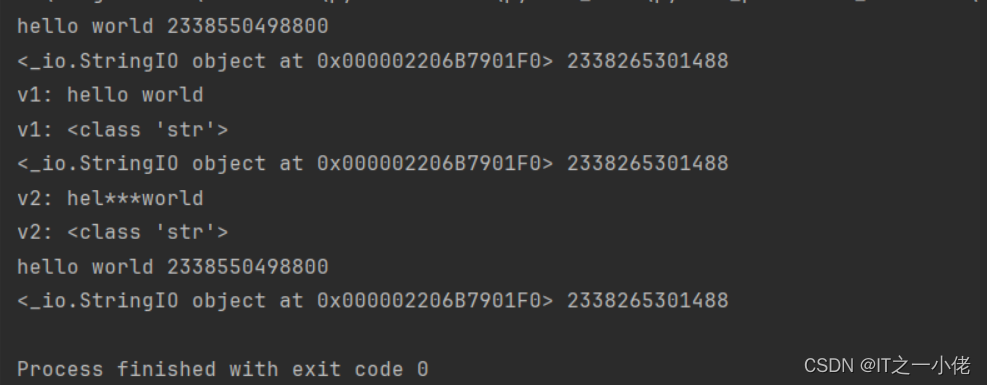
Python中,字符串属于不可变对象,不支持原地修改,如果需要修改其中的值,只能创建新的字符串对象。
确实需要原地修改字符串,可以使用io.StringIO对象或array模块
示例代码:
import io

s = "hello world"
print(s, id(s))

sio = io.StringIO(s)  # 可变字符串
print(sio, id(sio))

v1 = sio.getvalue()
print("v1:", v1)
print("v1:", type(v1))

char3 = sio.seek(3)  # 指针指到索引3这个位置
sio.write('***')
print(sio, id(sio))

v2 = sio.getvalue()
print("v2:", v2)
print("v2:", type(v2))

print(s, id(s))
print(sio, id(sio))
运行结果:





 扫一扫
扫一扫


 1万+
1万+


 到【灌水乐园】发言



