

Spring5 源码阅读笔记(5)基于注解的方法替换 spring-dispatcher.xml

本文深入解析了Spring MVC的配置过程,包括使用@EnableWebMvc注解激活MVC功能,配置视图解析器,设置默认Servlet处理及拦截器注册等关键步骤。通过示例代码展示了如何自定义拦截器并应用到特定路径。

示例

@Configuration
@EnableWebMvc
public class AppConfig implements WebMvcConfigurer {

    @Autowired
    private UserInterceptor userInterceptor;

    @Override
    public void configureViewResolvers(ViewResolverRegistry registry) {
        registry.jsp("/WEB-INF/views/", ".jsp");
    }

    @Override
    public void configureDefaultServletHandling(DefaultServletHandlerConfigurer configurer) {
        configurer.enable();
    }

    @Override
    public void addInterceptors(InterceptorRegistry registry) {
        registry.addInterceptor(userInterceptor).addPathPatterns("/user/**").excludePathPatterns("/user/query/**");
        registry.addInterceptor(new UserInterceptor1()).addPathPatterns("/user/**").excludePathPatterns("");
        addInterceptors(registry);
    }
}

@EnableWebMvc 干了什么?

@Retention(RetentionPolicy.RUNTIME)
@Target(ElementType.TYPE)
@Documented
@Import(DelegatingWebMvcConfiguration.class)
public @interface EnableWebMvc {
}

跟 DelegatingWebMvcConfiguration:

在这里插入图片描述
跟 WebMvcConfigurationSupport:
注入了一些 HandlerMapping,这里面还设置了拦截器
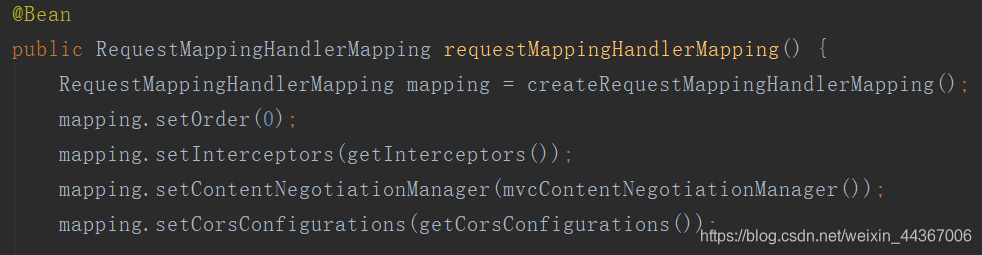
在这里插入图片描述

跟 getInterceptors:

protected final Object[] getInterceptors() {
	if (this.interceptors == null) {
		InterceptorRegistry registry = new InterceptorRegistry();
		//模板方法,见示例
		addInterceptors(registry);
		registry.addInterceptor(new ConversionServiceExposingInterceptor(mvcConversionService()));
		registry.addInterceptor(new ResourceUrlProviderExposingInterceptor(mvcResourceUrlProvider()));
		this.interceptors = registry.getInterceptors();
	}
	return this.interceptors.toArray();
}


在这里插入图片描述
在这里插入图片描述
跟 addInterceptors:
类 WebMvcConfigurerComposite 实现了示例中实现的 WebMvcConfigurer
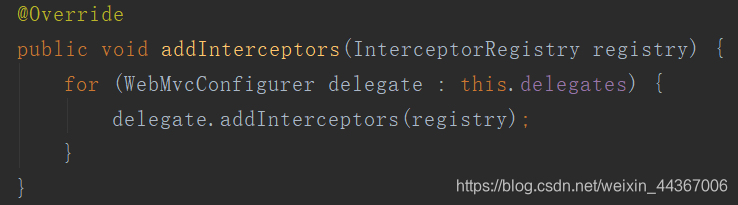
在这里插入图片描述
跟 addInterceptors:
类 WebMvcConfigurer

在这里插入图片描述

要排除以`/api/`开头的请求,您可以使用Ant路径匹配模式来配置`spring.session.redis.filter-dispatcher-types`属性。具体来说,您可以配置`spring.session.redis.filter-dispatcher-types`属性,使其不拦截`/api/**`路径下的请求。 例如,以下配置将排除以`/api/`开头的所有请求: ``` spring.session.redis.filter-dispatcher-types=REQUEST,ASYNC spring.session.redis.servlet.filter.enabled=false spring.session.store-type=redis spring.session.redis.flush-mode=on_save spring.session.redis.namespace=spring:session spring.session.redis.cleanup-cron=0 * * * * * spring.session.redis.save-mode=on_set_attribute spring.session.redis.redis-url=redis://localhost:6379 spring.session.redis.redis-password=password spring.session.redis.redis-sentinel-master-id=mymaster spring.session.redis.redis-sentinel-nodes=sentinel://localhost:26379,sentinel://localhost:26380,sentinel://localhost:26381 spring.session.redis.redis-sentinel-password=password spring.session.redis.redis-cluster-nodes=localhost:6379,localhost:6380,localhost:6381 spring.session.redis.redis-cluster-max-redirects=3 spring.session.redis.redis-properties.ssl=true spring.session.redis.redis-properties.ssl-truststore=classpath:redis.truststore spring.session.redis.redis-properties.ssl-truststore-password=redispassword spring.session.redis.redis-properties.ssl-keystore=classpath:redis.keystore spring.session.redis.redis-properties.ssl-keystore-password=redispassword spring.session.redis.redis-properties.useSsl=true spring.session.redis.redis-properties.sslProtocols=TLSv1.2,TLSv1.3 spring.session.redis.redis-properties.sslCipherSuites=TLS_ECDHE_RSA_WITH_AES_256_GCM_SHA384,TLS_ECDHE_RSA_WITH_AES_128_GCM_SHA256 spring.session.redis.redis-properties.sslProvider=JDK spring.session.redis.redis-properties.sslEnableEndpointIdentification=true spring.autoconfigure.exclude=org.springframework.boot.autoconfigure.session.SessionAutoConfiguration ``` 在以上配置中,我们使用了Ant路径匹配模式配置`spring.session.redis.filter-dispatcher-types`属性,使其不拦截`/api/**`路径下的请求。注意,我们也排除了Spring Boot自动配置的会话管理,因为我们已经使用了Spring Session Redis进行会话管理。 请注意,这只是一个示例配置,您需要根据您的具体需求进行修改。
评论
成就一亿技术人!
拼手气红包6.0元
还能输入1000个字符
 
红包 添加红包
表情包 插入表情
 条评论被折叠 查看
添加红包

请填写红包祝福语或标题

红包个数最小为10个

红包金额最低5元

当前余额3.43前往充值 >
需支付:10.00
成就一亿技术人!
领取后你会自动成为博主和红包主的粉丝 规则
hope_wisdom
发出的红包
实付
使用余额支付
点击重新获取
扫码支付
钱包余额 0

抵扣说明:

1.余额是钱包充值的虚拟货币,按照1:1的比例进行支付金额的抵扣。
2.余额无法直接购买下载,可以购买VIP、付费专栏及课程。

余额充值


