


统信uos-ssh密钥登录
1.关闭密码登录PasswordAuthentication yes 修改为
vim /etc/ssh/sshd_config

2.重启SSH
再用用户名密码登录报错
Client: keyboard-interactive auth failed
All configured authentication methods failed
3.当前管理员下密钥生成,保存路径,y ,使用密码,显示生成图
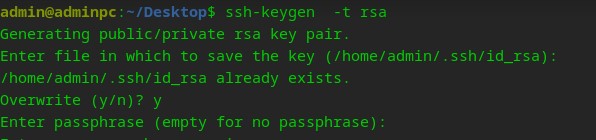
4.查看ls /home/admin/.ssh 下有两个文件 id_rsa.pub
将id_rsa复制到远程主机上,把id_rsa.pub修改名字为:authorized_keys
$:cat /home/admin/.ssh/id_rsa.pub>> /home/admin/.ssh/authorized_keys
$:rm /home/admin/.ssh/id_rsa.pub
$sudo chmod 400 /home/admin/.ssh/authorized_keys
查看ls /home/admin/.ssh
5.登录测试
Last login: Mon Aug 5 11:28:44 2024 from X.X.X.3
admin@adminpc:~$
注:如果统信中未启用,未安装先进行安装,启用
$dpkg –l |grep openssh
可以看到:openssh-clent openssh-server openssh-sftp-server 说明已安装
安装sudo apt install -y openssh-client openssh-server openssh-sftp-server
重启服务:systemctl restart ssh
查看状态:systemctl status ssh
测试:ssh –p 22 user@host





 扫一扫
扫一扫


 1302
1302

 被折叠的 条评论
为什么被折叠?
被折叠的 条评论
为什么被折叠?
 到【灌水乐园】发言





