


概述:
Android中的WatchDog机制,字面意思为“看门狗”,简而言之就是Android系统中,用来监控各个重要系统服务,例如AMS是否死锁,执行超时的机制,当出现以上情况是,会执行手机系统的重启。
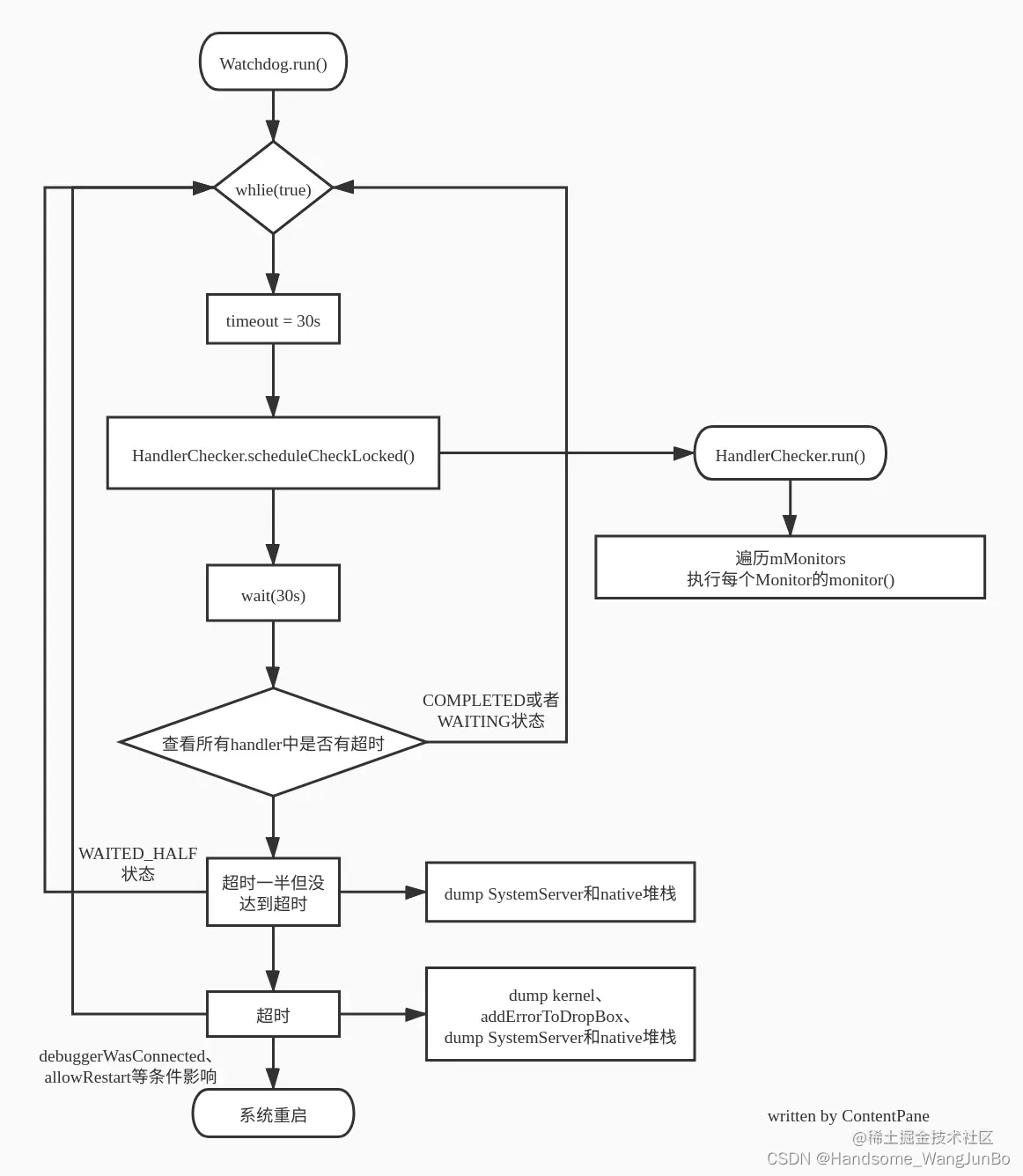
原理:WatchDog是一个线程,会不断循环执行,循环过程中会检测每个HandlerChecker里的所有mMonitors,当所有的mMonitors在指定时间(60S)执行完毕顺利返回,才被判定为完成,否则判定超时,打印一些应用的堆栈,写入log到“/data/anr/”,写入dropbox,并且会系统重启。monitor即为对应系统服务的检测是否死锁或者判定异常的接口,在各个系统服务里面实现。
启动:
watch作为系统的重要检测机制,在system_server最早的启动系统服务的“startBootstrapServices”中,由于wachdog打印日志需要依赖context,在AMS初始化以后,通过init函数将context传给watchdog单例。
/frameworks/base/services/java/com/android/server/SystemServer.java

    private void startBootstrapServices(@NonNull TimingsTraceAndSlog t) {
        ...
        final Watchdog watchdog = Watchdog.getInstance();
        watchdog.start();
        t.traceEnd();

        ...

        ActivityTaskManagerService atm = mSystemServiceManager.startService(
            ActivityTaskManagerService.Lifecycle.class).getService();
        mActivityManagerService = ActivityManagerService.Lifecycle.startService(
            mSystemServiceManager, atm);
        mActivityManagerService.setSystemServiceManager(mSystemServiceManager);
        mActivityManagerService.setInstaller(installer);
        mWindowManagerGlobalLock = atm.getGlobalLock();

        ...


        t.traceBegin("InitWatchdog");
        watchdog.init(mSystemContext, mActivityManagerService);
        t.traceEnd();
        ...
构造函数:
frameworks\base\services\core\java\com\android\server\Watchdog.java
private Watchdog() {
        super("watchdog");
        // Initialize handler checkers for each common thread we want to check.  Note
        // that we are not currently checking the background thread, since it can
        // potentially hold longer running operations with no guarantees about the timeliness
        // of operations there.

        // The shared foreground thread is the main checker.  It is where we
        // will also dispatch monitor checks and do other work.
        mMonitorChecker = new HandlerChecker(FgThread.getHandler(),
                "foreground thread", DEFAULT_TIMEOUT);
        mHandlerCheckers.add(mMonitorChecker);
        // Add checker for main thread.  We only do a quick check since there
        // can be UI running on the thread.
        mHandlerCheckers.add(new HandlerChecker(new Handler(Looper.getMainLooper()),
                "main thread", DEFAULT_TIMEOUT));
        // Add checker for shared UI thread.
        mHandlerCheckers.add(new HandlerChecker(UiThread.getHandler(),
                "ui thread", DEFAULT_TIMEOUT));
        // And also check IO thread.
        mHandlerCheckers.add(new HandlerChecker(IoThread.getHandler(),
                "i/o thread", DEFAULT_TIMEOUT));
        // And the display thread.
        mHandlerCheckers.add(new HandlerChecker(DisplayThread.getHandler(),
                "display thread", DEFAULT_TIMEOUT));
        // And the animation thread.
        mHandlerCheckers.add(new HandlerChecker(AnimationThread.getHandler(),
                "animation thread", DEFAULT_TIMEOUT));
        // And the surface animation thread.
        mHandlerCheckers.add(new HandlerChecker(SurfaceAnimationThread.getHandler(),
                "surface animation thread", DEFAULT_TIMEOUT));

        // Initialize monitor for Binder threads.
        addMonitor(new BinderThreadMonitor());

        mOpenFdMonitor = OpenFdMonitor.create();

        mInterestingJavaPids.add(Process.myPid());

        // See the notes on DEFAULT_TIMEOUT.
        assert DB ||
                DEFAULT_TIMEOUT > ZygoteConnectionConstants.WRAPPED_PID_TIMEOUT_MILLIS;
    }
这里即在systemserver.java里通过单例模式初始化watchdog对象以后,默认监测这一些重要的线程,值得注意的是Fgthread单独拿出来了,这个是用来addMonitor对应的HandlerChecker,后面会讲到。
同样还有一个重要的即监控Binder,binder数量最大为16,不允许超过,此处也是一个monitor检测的实例。另外还有AMS也会在monitor里获取同步锁,当获取不到的时候,判定为死锁,下面也会讲到。
frameworks\base\services\core\java\com\android\server\Watchdog.java
private static final class BinderThreadMonitor implements Watchdog.Monitor {
        @Override
        public void monitor() {
            Binder.blockUntilThreadAvailable();
        }


//blockUntilThreadAvailable最终调用到native代码,检测binder数量是否超过16个,超过会陷入等待,即monitor超时
frameworks/native/libs/binder/IPCThreadState.cpp
void IPCThreadState::blockUntilThreadAvailable()
{
    pthread_mutex_lock(&mProcess->mThreadCountLock);
    while (mProcess->mExecutingThreadsCount >= mProcess->mMaxThreads) {
        ALOGW("Waiting for thread to be free. mExecutingThreadsCount=%lu mMaxThreads=%lu\n",
                static_cast<unsigned long>(mProcess->mExecutingThreadsCount),
                static_cast<unsigned long>(mProcess->mMaxThreads));
        pthread_cond_wait(&mProcess->mThreadCountDecrement, &mProcess->mThreadCountLock);
    }
    pthread_mutex_unlock(&mProcess->mThreadCountLock);
}
monitor检测是否处理超时,即在monitor()方法里做自己想要的检测。
AMS monitor检测是否死锁实例:
frameworks\base\services\core\java\com\android\server\am\ActivityManagerService.java
/** In this method we try to acquire our lock to make sure that we have not deadlocked */
    public void monitor() {
        synchronized (this) { }
    }
WMS monitor:
frameworks\base\services\core\java\com\android\server\wm\WindowManagerService.java
// Called by the heartbeat to ensure locks are not held indefnitely (for deadlock detection).
    @Override
    public void monitor() {
        synchronized (mGlobalLock) { }
    }
Input monitor实例:
frameworks\base\services\core\java\com\android\server\input\InputManagerService.java
 // Called by the heartbeat to ensure locks are not held indefinitely (for deadlock detection).
    @Override
    public void monitor() {
        synchronized (mInputFilterLock) { }
        synchronized (mAssociationsLock) { /* Test if blocked by associations lock. */}
        nativeMonitor(mPtr);
    }
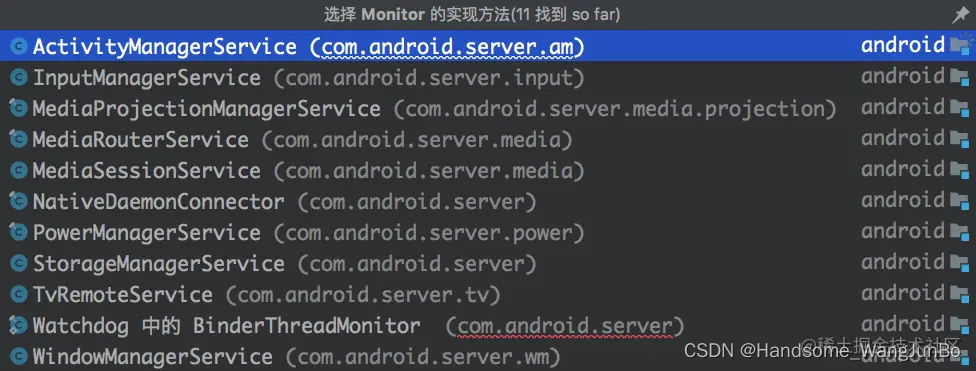
以下是实现了monitor接口的类:
AMS启动新应用的WatchDog:
AMS 中每次启动一个进程时,都会调用 handleProcessStartedLocked() 最终调用 WatchDog.processStarted() 添加到 WatchDog 中,而process 也是有限定的,如下:
    private static boolean isInterestingJavaProcess(String processName) {
        return processName.equals(StorageManagerService.sMediaStoreAuthorityProcessName)
                || processName.equals("com.android.phone");
    }


    public void processStarted(String processName, int pid) {
        if (isInterestingJavaProcess(processName)) {
            Slog.i(TAG, "Interesting Java process " + processName + " started. Pid " + pid);
            synchronized (this) {
                mInterestingJavaPids.add(pid);
            }
        }
    }
可以看到此处是为StorageManagerService.sMediaStoreAuthorityProcessName 或者是“com.android.phone”程序,才会别列入到感兴趣的列表里,在发生超时的时候,会把这些应用的堆栈给打出来:
frameworks\base\services\core\java\com\android\server\Watchdog.java
ArrayList<Integer> pids = new ArrayList<>mInterestingJavaPids);
initialStack = ActivityManagerService.dumpStackTraces(pids,null, null,
    getInterestingNativePids(), null);

ArrayList<Integer> pids = new ArrayList<>(mInterestingJavaPids);
            final File finalStack = ActivityManagerService.dumpStackTraces(
                    pids, processCpuTracker, new SparseArray<>(), getInterestingNativePids(),
                    tracesFileException);
注:如果你是app开发者,可以加上代码块,来抓取trace文件,利用traceview打开即可:
import android.os.Debug;
Debug.startMethodTracing("/sdcard/awesometrace.trace");

// 执行你希望跟踪的操作
BigInteger fN = Fibonacci.computeRecursivelyWithCache(100000);

Debug.stopMethodTracing();

// 在sdcard下面生成一个awesometrace.trace文件,通过Eclipse DDMS获取它
重启广播注册:
    final class RebootRequestReceiver extends BroadcastReceiver {
        @Override
        public void onReceive(Context c, Intent intent) {
            if (intent.getIntExtra("nowait", 0) != 0) {
                rebootSystem("Received ACTION_REBOOT broadcast");
                return;
            }
            Slog.w(TAG, "Unsupported ACTION_REBOOT broadcast: " + intent);
        }
    }
WatchDog.java内部会注册一个BroadcastReceiver,当接收到重启广播的时候,会立即重启系统
实际
addMonitor() 和addThread():
WatchDog.java:
    public interface Monitor {
        void monitor();
    }

    public void addMonitor(Monitor monitor) {
        synchronized (this) {
            mMonitorChecker.addMonitorLocked(monitor);
        }
    }

    public void addThread(Handler thread) {
        addThread(thread, DEFAULT_TIMEOUT);
    }

    public void addThread(Handler thread, long timeoutMillis) {
        synchronized (this) {
            final String name = thread.getLooper().getThread().getName();
            mHandlerCheckers.add(new HandlerChecker(thread, name, timeoutMillis));
        }
    }


AMS:

    Watchdog.getInstance().addMonitor(this);
    Watchdog.getInstance().addThread(mHandler);

    public void monitor() {
        synchronized (this) { }
    }
monitor本质上是一个接口,addmonitor函数会在Fgthread里添加一个monitor,在最终检测是否超时的时候就会回调到对应服务里的monitor方法。例如此处就是AMS检测同步锁是否死锁。
addThread会在watchdog里添加一个HandlerCheck去检测。
当以上所有的HandlerCheck 和 Monitor都添加完毕后,WatchDog就会遍历所有的HandlerCheck和Monitor,检测是否超时。
@Override
    public void run() {
        boolean waitedHalf = false;
        File initialStack = null;
        while (true) {
            final List<HandlerChecker> blockedCheckers;
            final String subject;
            final boolean allowRestart;
            int debuggerWasConnected = 0;
            synchronized (this) {
                long timeout = CHECK_INTERVAL;
                // Make sure we (re)spin the checkers that have become idle within
                // this wait-and-check interval
                for (int i=0; i<mHandlerCheckers.size(); i++) {
                    HandlerChecker hc = mHandlerCheckers.get(i);
                    hc.scheduleCheckLocked();
                }
            ...
            }
        }
    }
在run()函数里,会有一个while循环,即WatchDog会一直死循环检测系统服务是否超时。
此处最重要的检测函数为scheduleCheckLocked和HandlerCheck本身的run()函数,这两个就是真正检测monitor和handler是否处理超时的地方
        public void scheduleCheckLocked() {
            if (mCompleted) {
                // Safe to update monitors in queue, Handler is not in the middle of work
                mMonitors.addAll(mMonitorQueue);
                mMonitorQueue.clear();
            }
            if ((mMonitors.size() == 0 && mHandler.getLooper().getQueue().isPolling())
                    || (mPauseCount > 0)) {
                // Don't schedule until after resume OR
                // If the target looper has recently been polling, then
                // there is no reason to enqueue our checker on it since that
                // is as good as it not being deadlocked.  This avoid having
                // to do a context switch to check the thread. Note that we
                // only do this if we have no monitors since those would need to
                // be executed at this point.
                mCompleted = true;
                return;
            }
            if (!mCompleted) {
                // we already have a check in flight, so no need
                return;
            }

            mCompleted = false;
            mCurrentMonitor = null;
            mStartTime = SystemClock.uptimeMillis();
            mHandler.postAtFrontOfQueue(this);
        }

        @Override
        public void run() {
            // Once we get here, we ensure that mMonitors does not change even if we call
            // #addMonitorLocked because we first add the new monitors to mMonitorQueue and
            // move them to mMonitors on the next schedule when mCompleted is true, at which
            // point we have completed execution of this method.
            final int size = mMonitors.size();
            for (int i = 0 ; i < size ; i++) {
                synchronized (Watchdog.this) {
                    mCurrentMonitor = mMonitors.get(i);
                }
                mCurrentMonitor.monitor();
            }

            synchronized (Watchdog.this) {
                mCompleted = true;
                mCurrentMonitor = null;
            }
        }
回到WatchDog的run()方法,需要注意的是,WatchDog超时时间为60S,会分为两次,每次30S。block 30s会有线程堆栈log打印,并触发/data/anr/trace.txt文件生成。然后判定最终状态,判断最终状态代码:
                if (!fdLimitTriggered) {
                    final int waitState = evaluateCheckerCompletionLocked();
                    if (waitState == COMPLETED) {
                        // The monitors have returned; reset
                        waitedHalf = false;
                        continue;
                    } else if (waitState == WAITING) {
                        // still waiting but within their configured intervals; back off and recheck
                        continue;
                    } else if (waitState == WAITED_HALF) {
                        if (!waitedHalf) {
                            Slog.i(TAG, "WAITED_HALF");
                            // We've waited half the deadlock-detection interval.  Pull a stack
                            // trace and wait another half.
                            ArrayList<Integer> pids = new ArrayList<>(mInterestingJavaPids);
                            initialStack = ActivityManagerService.dumpStackTraces(pids,
                                    null, null, getInterestingNativePids(), null);
                            waitedHalf = true;
                        }
                        continue;
                    }

                    // something is overdue!
                    blockedCheckers = getBlockedCheckersLocked();
                    subject = describeCheckersLocked(blockedCheckers);
                } else {
                    blockedCheckers = Collections.emptyList();
                    subject = "Open FD high water mark reached";
                }
当超时进入overdue状态,打印出log,并且重启系统,log系统中watchdog即为此处打印
    private ArrayList<HandlerChecker> getBlockedCheckersLocked() {
        ArrayList<HandlerChecker> checkers = new ArrayList<HandlerChecker>();
        for (int i=0; i<mHandlerCheckers.size(); i++) {
            HandlerChecker hc = mHandlerCheckers.get(i);
            if (hc.isOverdueLocked()) {
                checkers.add(hc);
            }
        }
        return checkers;
    }

    private String describeCheckersLocked(List<HandlerChecker> checkers) {
        StringBuilder builder = new StringBuilder(128);
        for (int i=0; i<checkers.size(); i++) {
            if (builder.length() > 0) {
                builder.append(", ");
            }
            builder.append(checkers.get(i).describeBlockedStateLocked());
        }
        return builder.toString();
    }
随后往下的代码块就是打印log,堆栈信息
frameworks\base\services\core\java\com\android\server\Watchdog.java
@Override
public void run() {
    // 是否在等待的前半段时间 true则为等待的后半段时间
    boolean waitedHalf = false;
    // 死循环
    while (true) {
        final List<HandlerChecker> blockedCheckers;
        // 超时原因 用于日志打印
        final String subject;
        // 是否允许system_server重启 默认为true
        // 可以通过watchdog.setAllowRestart()重新设置值
        final boolean allowRestart;
        // 调试进程连接数 有的话会赋值为2
        int debuggerWasConnected = 0;
        synchronized (this) {

        //判断超时代码
        ...

        // 如果我们到这里,这意味着系统很可能挂起。
        // 首先从系统进程的所有线程收集堆栈跟踪。然后杀死这个进程,
        // 这样系统才会重新启动。
        EventLog.writeEvent(EventLogTags.WATCHDOG, subject);

        //打印ANR log
        File watchdogTraces;
        String newTracesPath = "traces_SystemServer_WDT"
                    + mTraceDateFormat.format(new Date()) + "_pid"
                    + String.valueOf(Process.myPid());
        File tracesDir = new File(ActivityManagerService.ANR_TRACE_DIR);
        watchdogTraces = new File(tracesDir, newTracesPath);
        try {
                if (watchdogTraces.createNewFile()) {
                    FileUtils.setPermissions(watchdogTraces.getAbsolutePath(),
                            0600, -1, -1); // -rw------- permissions
                    if (initialStack != null) {
                        final long age = System.currentTimeMillis()
                                - initialStack.lastModified();
                        final long FIVE_MINUTES_IN_MILLIS = 1000 * 60 * 5;
                        if (age < FIVE_MINUTES_IN_MILLIS) {
                            appendFile(watchdogTraces, initialStack);
                        }
                    }
                    if (finalStack != null) {
                        appendFile(watchdogTraces, finalStack);
                    }
                }
        } catch (Exception e) {
            // catch any exception that happens here;
            // why kill the system when it is going to die anyways?
            Slog.e(TAG, "Exception creating Watchdog dump file:", e);
        }

        ArrayList<Integer> pids = new ArrayList<>();
        pids.add(Process.myPid());
        if (mPhonePid > 0) pids.add(mPhonePid);

        // 打印java线程和native线程堆栈
        final File stack = ActivityManagerService.dumpStackTraces(
                pids, null, null, getInterestingNativePids());

        // 挂起5s确保堆栈能写入到文件中
        SystemClock.sleep(5000);

        // 让kernel dump全部的blocked线程 和 cpu信息
        doSysRq('w');
        doSysRq('l');

        // 尝试把error加到dropbox下,但假设ActivityManager自己会死锁
        // 当这种情况发生时, 导致以下语句死锁,watchdog作为一个整体将会失效
        Thread dropboxThread = new Thread("watchdogWriteToDropbox") {
                public void run() {
                    // 如果其中一条被观察的线程在Watchdog init()方法执行前被挂起
                    // 我们则没有一个有效的AMS,所以不能把log打印存储到dropbox路径下
                    if (mActivity != null) {
                        mActivity.addErrorToDropBox(
                                "watchdog", null, "system_server", null, null, null,
                                subject, null, stack, null);
                    }
                    StatsLog.write(StatsLog.SYSTEM_SERVER_WATCHDOG_OCCURRED, subject);
                }
            };
        dropboxThread.start();
        try {
            // 等待2s 让dropboxThread返回
            dropboxThread.join(2000);
        } catch (InterruptedException ignored) {}

        IActivityController controller;
        synchronized (this) {
            controller = mController;
        }
        // 如果ActivityController不为null
        if (controller != null) {
            Slog.i(TAG, "Reporting stuck state to activity controller");
            try {
                // 由于挂起system process而禁用dump 防止controller在报告错误的时候被挂起
                Binder.setDumpDisabled("Service dumps disabled due to hung system process.");
                // 1 = keep waiting, -1 = kill system
                int res = controller.systemNotResponding(subject);
                if (res >= 0) {
                    Slog.i(TAG, "Activity controller requested to coninue to wait");
                    waitedHalf = false;
                    continue;
                }
            } catch (RemoteException e) {
            }
        }

        // 只有在没有debugger连接的情况下才会杀死进程。
        if (Debug.isDebuggerConnected()) {
            debuggerWasConnected = 2;
        }
        if (debuggerWasConnected >= 2) {
            Slog.w(TAG, "Debugger connected: Watchdog is *not* killing the system process");
        } else if (debuggerWasConnected > 0) {
            Slog.w(TAG, "Debugger was connected: Watchdog is *not* killing the system process");
        } else if (!allowRestart) {
            Slog.w(TAG, "Restart not allowed: Watchdog is *not* killing the system process");
        } else {
            Slog.w(TAG, "*** WATCHDOG KILLING SYSTEM PROCESS: " + subject);
            WatchdogDiagnostics.diagnoseCheckers(blockedCheckers);
            Slog.w(TAG, "*** GOODBYE!");
            // 结束进程 watchdog存在于system_server进程之下
            // 因为watchdog就是在system_server初始化的
            Process.killProcess(Process.myPid());
            System.exit(10);
        }

        waitedHalf = false;
    }
}
最后Process.killProcess(Process.mypid()) 和System.exit(10)就是重启系统
参考文章:





 扫一扫
扫一扫


 441
441

 被折叠的 条评论
为什么被折叠?
被折叠的 条评论
为什么被折叠?
 到【灌水乐园】发言





