


 本文介绍了一个简单的Toast消息显示示例,通过创建Toast对象并调用show()方法来展示用户输入的文字,实现向模拟的圣诞老人发送愿望的功能。
4.3给圣诞老人的信息—Toast对象的使用
目录
package edu.cquptzx.UseToast;
import android.app.Activity;
import android.os.Bundle;
import android.text.Editable;
import android.view.View;
import android.view.View.OnClickListener;
import android.widget.Button;
import android.widget.EditText;
import android.widget.Toast;
publicclass UseToastActivity extends Activity {
private Button btn;
private EditText et;
/** Called when the activity is first created. */
publicvoid onCreate(Bundle savedInstanceState) {
super.onCreate(savedInstanceState);
setContentView(R.layout.main);
// Find the objects by IDs
btn = (Button) findViewById(R.id.button);
et = (EditText) findViewById(R.id.editText);
// add an listener to tha SEND BUTTON.
btn.setOnClickListener(new OnClickListener()
{
publicvoid onClick(View v)
{
//Get the text which the user have input .
/* 方案二:使用Editable
* 特点,文字获取后可以很方便的进行截取,插入,等操作. */
//Editable str;
//str = et.getText();
/* 方案一:使用String
* 特点,文字固定,编辑不方便. */
String str = null;
str = et.getText().toString();
Toast.makeText(getBaseContext(),
"Your wish: \n \" " + str.toString() + " \" \n has been send to Santa Claus.",
Toast.LENGTH_LONG)
.show();
}
});
}
}
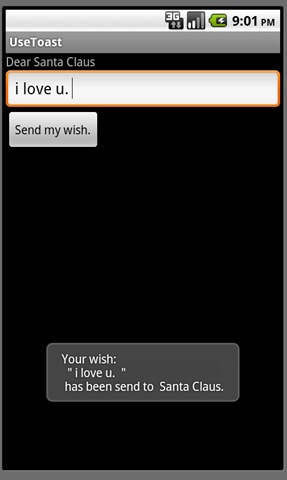
http://www.cnblogs.com/xilifeng/archive/2012/08/12/2634178.html
For more questions , contacts me by :
cquptzx@qq.com or cquptzx@outlook.com






 扫一扫
扫一扫


 5735
5735

 被折叠的 条评论
为什么被折叠?
被折叠的 条评论
为什么被折叠?
 到【灌水乐园】发言





