


C# Maui暂时还没有TextBox,因为这个可以通过xaml样式实现,但是为了长期使用,自己写一个TextBox。
定义一个TextEventArgs
|
1
2
3
4
5
6
7
8
|
public
class
TextEventArgs : EventArgs
{
public
string
Text{
get
;
set
; }
public
TextEventArgs(
string
text)
{
Text = text;
}
}
|
PropertyManager和之前的例子一样,这里就不重复了。除非更新了新功能。
我的MauiProgram.cs中添加了自定义字体,这个在第一个MAUI 配置中说了,以后也不再重复了。自己去https://www.iconfont.cn/注册账号,添加自己喜欢的字体icon,然后下载下来覆盖项目中的IconFont.ttf
|
1
|
fonts.AddFont(
"IconFont.ttf"
,
"IconFont"
);
|
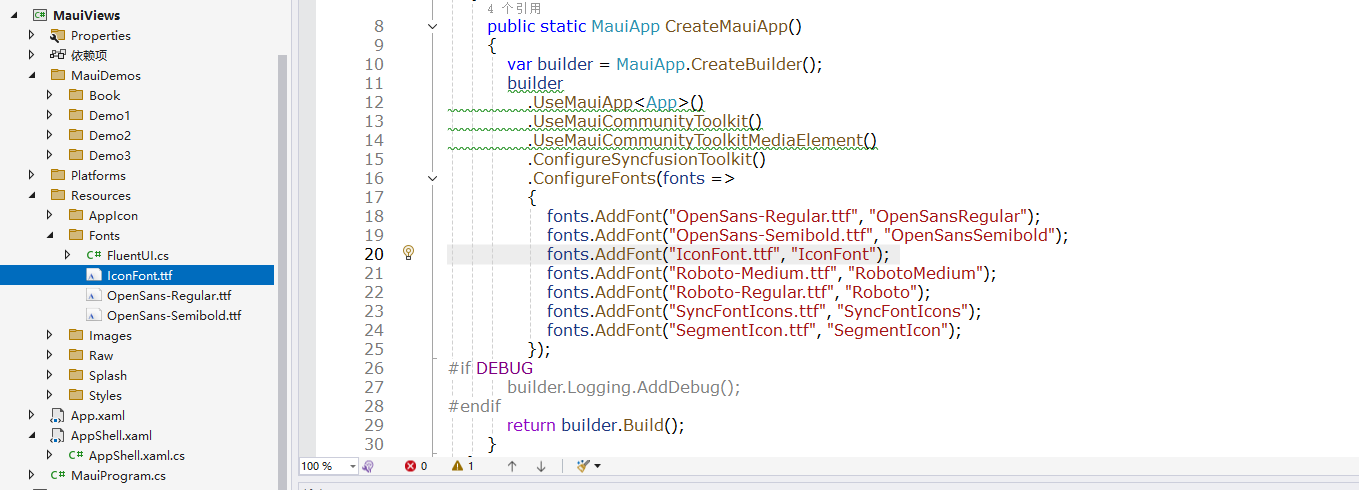
TextBox继承Border,以后所有自定义控件都继承于Border,不要用Frame了,因为这个在将来的未来会被淘汰。现在Border可以实现所有功能。
|
1
2
3
4
5
6
7
8
9
10
11
12
13
14
15
16
17
18
19
20
21
22
23
24
25
26
27
28
29
30
31
32
33
34
35
36
37
38
39
40
41
42
43
44
45
46
47
48
49
50
51
52
53
54
55
56
57
58
59
60
61
62
63
64
65
66
67
68
69
70
71
72
73
74
75
76
77
78
79
80
81
82
83
84
85
86
87
88
89
90
91
92
93
94
95
96
97
98
99
100
101
102
103
104
105
106
107
108
109
110
111
112
113
114
115
116
117
118
119
120
121
122
123
124
125
126
127
128
129
130
131
132
133
134
135
136
137
138
139
140
141
142
143
144
145
146
147
148
149
150
151
152
153
154
155
156
157
158
159
160
161
162
163
164
165
166
167
168
169
170
171
172
173
174
175
176
177
178
179
180
181
182
183
184
185
186
187
188
189
190
191
192
193
194
195
196
197
198
199
200
201
202
203
204
205
206
207
208
209
210
211
212
213
214
215
216
217
218
219
|
public
class
TextBox : Border
{
public
static
readonly
BindableProperty TextProperty = BindableProperty.Create(
nameof(Text),
typeof
(
string
),
typeof
(TextBox),
null
,
BindingMode.TwoWay, propertyChanged: OnTextChanged);
public
static
readonly
BindableProperty IsPasswordProperty = BindableProperty.Create(
nameof(IsPassword),
typeof
(
bool
),
typeof
(TextBox),
false
);
public
static
readonly
BindableProperty IsMultilineProperty = BindableProperty.Create(
nameof(IsMultiline),
typeof
(
bool
),
typeof
(TextBox),
false
);
public
static
readonly
BindableProperty PlaceholderProperty = BindableProperty.Create(
nameof(Placeholder),
typeof
(
string
),
typeof
(TextBox),
null
);
public
static
readonly
BindableProperty TextColorProperty = BindableProperty.Create(
nameof(TextColor),
typeof
(Color),
typeof
(TextBox), Colors.Black);
public
static
readonly
BindableProperty TextSizeProperty = BindableProperty.Create(
nameof(TextSize),
typeof
(
double
),
typeof
(TextBox), 15d);
public
static
readonly
BindableProperty IsReadOnlyProperty = BindableProperty.Create(
nameof(IsReadOnly),
typeof
(
bool
),
typeof
(TextBox),
false
,
propertyChanged: OnIsReadOnlyChanged);
public
static
readonly
BindableProperty CharacterSpacingProperty = BindableProperty.Create(
nameof(CharacterSpacing),
typeof
(
double
),
typeof
(TextBox), 0d);
public
static
readonly
BindableProperty CornerRadiusProperty =
BindableProperty.Create(nameof(CornerRadius),
typeof
(
double
),
typeof
(TextBox), 0d,
propertyChanged: PropertyManager.CornerRadiusProperty);
public
static
readonly
BindableProperty IconTextProperty =
BindableProperty.Create(nameof(IconText),
typeof
(
string
),
typeof
(TextBox),
null
);
public
static
readonly
BindableProperty IconTextColorProperty =
BindableProperty.Create(nameof(IconTextColor),
typeof
(Color),
typeof
(TextBox), Colors.Gray);
public
static
readonly
BindableProperty IconTextFontSizeProperty =
BindableProperty.Create(nameof(IconTextFontSize),
typeof
(
double
),
typeof
(TextBox), 22d);
public
static
readonly
BindableProperty IconFontFamilyProperty =
BindableProperty.Create(nameof(IconFontFamily),
typeof
(
string
),
typeof
(TextBox),
"IconFont"
);
public
event
EventHandler<TextEventArgs>? ReturnPressed, EditingFinished;
public
string
Text
{
get
=> (
string
)GetValue(TextProperty);
set
=> SetValue(TextProperty, value);
}
public
bool
IsPassword
{
get
=> (
bool
)GetValue(IsPasswordProperty);
set
=> SetValue(IsPasswordProperty, value);
}
public
bool
IsMultiline
{
get
=> (
bool
)GetValue(IsMultilineProperty);
set
=> SetValue(IsMultilineProperty, value);
}
public
string
Placeholder
{
get
=> (
string
)GetValue(PlaceholderProperty);
set
=> SetValue(PlaceholderProperty, value);
}
public
Color TextColor
{
get
=> (Color)GetValue(TextColorProperty);
set
=> SetValue(TextColorProperty, value);
}
public
double
TextSize
{
get
=> (
double
)GetValue(TextSizeProperty);
set
=> SetValue(TextSizeProperty, value);
}
public
bool
IsReadOnly
{
get
=> (
bool
)GetValue(IsReadOnlyProperty);
set
=> SetValue(IsReadOnlyProperty, value);
}
public
double
CharacterSpacing
{
get
=> (
double
)GetValue(CharacterSpacingProperty);
set
=> SetValue(CharacterSpacingProperty, value);
}
public
double
CornerRadius
{
get
=> (
double
)GetValue(CornerRadiusProperty);
set
=> SetValue(CornerRadiusProperty, value);
}
public
string
IconText
{
get
=> (
string
)GetValue(IconTextProperty);
set
=> SetValue(IconTextProperty, value);
}
public
Color IconTextColor
{
get
=> (Color)GetValue(IconTextColorProperty);
set
=> SetValue(IconTextColorProperty, value);
}
public
double
IconTextFontSize
{
get
=> (
double
)GetValue(IconTextFontSizeProperty);
set
=> SetValue(IconTextFontSizeProperty, value);
}
public
string
IconFontFamily
{
get
=> (
string
)GetValue(IconFontFamilyProperty);
set
=> SetValue(IconFontFamilyProperty, value);
}
private
static
void
OnTextChanged(BindableObject bindable,
object
oldValue,
object
newValue)
{
var
tb = (TextBox)bindable;
var
newText = newValue
as
string
??
string
.Empty;
var
oldText = oldValue
as
string
??
string
.Empty;
if
(newText.Length > oldText.Length && tb.IsMultiline)
{
var
addText = newText.Substring(oldText.Length);
if
(addText.Contains(
'\r'
) || addText.Contains(
'\n'
))
{
//如果是回车换行,则触发ReturnPressed事件,安全派发到UI线程
tb.Dispatcher.Dispatch(() => tb.ReturnPressed?.Invoke(tb,
new
TextEventArgs(newText)));
}
}
}
//动态更新IsReadOnly属性
private
static
void
OnIsReadOnlyChanged(BindableObject bindable,
object
oldValue,
object
newValue)
{
var
tb = (TextBox)bindable;
if
(tb.grid.Children.Count == 0)
return
;
if
(tb.grid.Children[0]
is
InputView view)
{
view.IsReadOnly = (
bool
)newValue;
view.Background = (
bool
)newValue ? Colors.WhiteSmoke : Colors.Transparent;
}
}
private
Grid grid;
public
TextBox()
{
grid =
new
Grid()
{
ColumnDefinitions =
new
ColumnDefinitionCollection
{
new
ColumnDefinition { Width = GridLength.Star },
new
ColumnDefinition { Width = GridLength.Auto }
},
};
// 设置布局
this
.Content = grid;
this
.StrokeThickness = 1;
this
.Stroke = Colors.LightGray;
this
.StrokeShape =
new
RoundRectangle() { CornerRadius = CornerRadius };
this
.Padding =
new
Thickness(0);
//重载OnHandlerChanged中也可以初始化,构造函数会先于属性设置执行
//Dispatcher.Dispatch(Init)也可以初始化
this
.Loaded += Init;
}
private
void
Init(
object
? sender, EventArgs e)
{
//凡是设置了propertyChanged的属性,都需要在这里手动初始化,因为Dispatcher.Dispatch/Loaded会在propertyChanged之后执行
InputView edit = IsMultiline ?
new
Editor()
{
Margin =
new
Thickness(0),
AutoSize = EditorAutoSizeOption.TextChanges,
VerticalTextAlignment = TextAlignment.Start,
} :
new
Entry()
{
Margin =
new
Thickness(0),
VerticalTextAlignment = TextAlignment.Start,
};
edit.IsReadOnly = IsReadOnly;
edit.Background = IsReadOnly ? Colors.WhiteSmoke : Colors.Transparent;
grid.Children.Add(edit);
edit.SetBinding(InputView.TextProperty,
new
Binding(nameof(Text), mode: BindingMode.TwoWay, source:
this
));
edit.SetBinding(InputView.PlaceholderProperty,
new
Binding(nameof(Placeholder), mode: BindingMode.TwoWay, source:
this
));
edit.SetBinding(InputView.TextColorProperty,
new
Binding(nameof(TextColor), mode: BindingMode.TwoWay, source:
this
));
edit.SetBinding(InputView.FontSizeProperty,
new
Binding(nameof(TextSize), mode: BindingMode.TwoWay, source:
this
));
edit.SetBinding(InputView.CharacterSpacingProperty,
new
Binding(nameof(CharacterSpacing), mode: BindingMode.TwoWay, source:
this
));
if
(edit
is
Entry entry)
{
edit.SetBinding(Entry.IsPasswordProperty,
new
Binding(nameof(IsPassword), mode: BindingMode.TwoWay, source:
this
));
entry.Completed += (s, e) =>
{
ReturnPressed?.Invoke(
this
,
new
TextEventArgs(edit.Text));
edit.Unfocus();
};
}
edit.Unfocused += (s, e) =>
{
EditingFinished?.Invoke(
this
,
new
TextEventArgs(edit.Text));
};
if
(IsPassword)
{
Label icon =
new
Label()
{
Text = IconText,
FontFamily = IconFontFamily,
FontSize = IconTextFontSize,
TextColor = IconTextColor,
VerticalTextAlignment = TextAlignment.Center,
Margin =
new
Thickness(10, 0),
};
grid.Children.Add(icon);
Grid.SetColumn(icon, 1);
icon.SetBinding(Label.TextProperty,
new
Binding(nameof(IconText), mode: BindingMode.TwoWay, source:
this
));
icon.SetBinding(Label.TextColorProperty,
new
Binding(nameof(IconTextColor), mode: BindingMode.TwoWay, source:
this
));
icon.SetBinding(Label.FontSizeProperty,
new
Binding(nameof(IconTextFontSize), mode: BindingMode.TwoWay, source:
this
));
icon.SetBinding(Label.FontFamilyProperty,
new
Binding(nameof(IconFontFamily), mode: BindingMode.TwoWay, source:
this
));
TapGestureRecognizer tapGesture =
new
TapGestureRecognizer();
tapGesture.Tapped += OnTapped;
icon.GestureRecognizers.Add(tapGesture);
}
}
private
void
OnTapped(
object
? sender, TappedEventArgs e)
{
Grid? grid = (sender
as
Label)?.Parent
as
Grid;
if
(grid ==
null
)
return
;
if
(grid.Children[0]
is
Entry entry)
{
entry.IsPassword = !entry.IsPassword;
}
}
}
|
TextBox.xaml (前面的例子已经说明了如何把自定义控件,加到默认命名空间,以后也不再重复了)

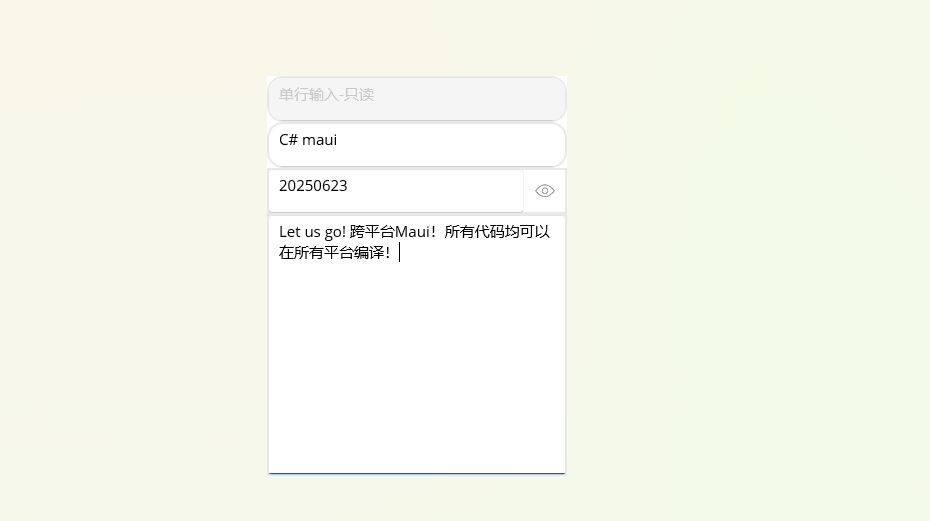
<?xml version="1.0" encoding="utf-8" ?> <ContentPage xmlns="http://schemas.microsoft.com/dotnet/2021/maui" xmlns:x="http://schemas.microsoft.com/winfx/2009/xaml" x:Class="MauiViews.MauiDemos.Book._03.TextBox" Title="TextBox" HeightRequest="400" WidthRequest="300"> <Grid RowDefinitions="auto,auto,auto, *"> <TextBox Placeholder="单行输入-只读" CornerRadius="15" IsReadOnly="True"/> <TextBox Grid.Row="1" Placeholder="单行输入" ReturnPressed="TextBox_ReturnPressed" CornerRadius="15"/> <TextBox Grid.Row="2" Placeholder="密码输入" IsPassword="True" ReturnPressed="TextBox_ReturnPressed" IconText=""/> <TextBox Grid.Row="3" Placeholder="多行输入" IsMultiline="True" ReturnPressed="TextBox_ReturnPressed"/> </Grid> </ContentPage>

对应的cs代码
|
1
2
3
4
5
6
7
8
9
10
11
12
13
14
15
16
17
|
using
Shares.Utility;
using
System.Diagnostics;
namespace
MauiViews.MauiDemos.Book._03;
public
partial
class
TextBox : ContentPage
{
public
TextBox()
{
InitializeComponent();
}
private
void
TextBox_ReturnPressed(
object
? sender, TextEventArgs e)
{
Trace.WriteLine($
"TextBox_ReturnPressed: {e.Text}"
);
}
}
|
运行效果
原创作者: dalgleish 转载于: https://www.cnblogs.com/dalgleish/p/18946148





 扫一扫
扫一扫


 1192
1192

 被折叠的 条评论
为什么被折叠?
被折叠的 条评论
为什么被折叠?
 到【灌水乐园】发言





