【开源社区openEuler实践】 G. Natlan Exploring

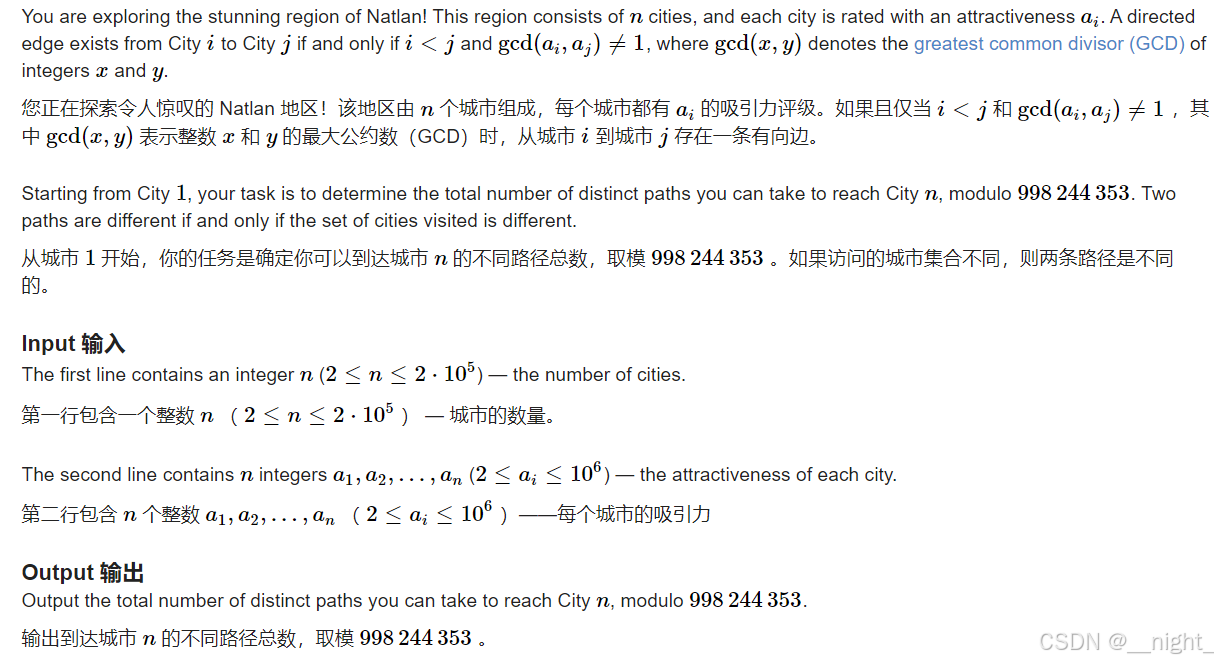
题目

f91feae22e034aa991ed76433e1bc71d.png

#include <bits/stdc++.h>
using namespace std;
#define int long long
#define pb push_back
#define fi first
#define se second
#define lson p << 1
#define rson p << 1 | 1
#define ll long long
#define pii pair<int, int>
#define ld long double
const int maxn = 1e6 + 5, inf = 1e9, maxm = 4e4 + 5, base = 337;
const int N = 1e6;
// const int mod = 1e9 + 7;
const int mod = 998244353;
// const __int128 mod = 212370440130137957LL;
int n, m;
int a[maxn], b[maxn];

void solve(){
    ll res = 0;
    int k, q;
    cin >> n;
    vector<int> a(n + 1);
    for(int i = 1; i <= n; i++){
        cin >> a[i];
    }
    vector<int> c(N + 1, 1);
    c[1] = 0;
    vector<vector<i

### Open3D Visualization Utils Python Code Examples and Documentation For working with `open3d_vis_utils.py`, this file typically contains utility functions that facilitate the visualization of point clouds or other geometric data structures within the context of Open3D. While specific details about `open3d_vis_utils.py` are not directly provided in the given references, insights into how one might approach finding relevant code examples and documentation can be derived from related information. To find useful resources regarding `open3d_vis_utils.py`, consider exploring official repositories where such scripts may reside as part of larger projects utilizing Open3D for machine learning tasks[^2]. Additionally, since similar utilities often come well-documented especially when associated with popular libraries like those mentioned, visiting the main Open3D GitHub repository could prove fruitful. The repository usually includes comprehensive guides alongside example codes demonstrating various functionalities including but not limited to visualizations[^4]. Moreover, community-driven platforms such as Stack Overflow or specialized forums dedicated to computer vision and robotics frequently host discussions around common challenges faced while implementing these tools, potentially offering practical tips on leveraging `open3d_vis_utils.py`. For direct access to usage patterns, examining contributed notebooks available through Jupyter Notebooks hosted online provides interactive demonstrations which serve both educational purposes and real-world application scenarios. ```python import open3d as o3d # Example function call assuming it exists in a hypothetical open3d_vis_utils module def visualize_point_cloud(pcd_data): pcd = o3d.geometry.PointCloud() pcd.points = o3d.utility.Vector3dVector(pcd_data) # Assuming there is an external util script providing additional features import open3d_vis_utils # Utilize custom visualization settings defined externally open3d_vis_utils.custom_visualization_settings(pcd) visualize_point_cloud([[0, 0, 0], [1, 1, 1]]) ```
评论
添加红包

请填写红包祝福语或标题

红包个数最小为10个

红包金额最低5元

当前余额3.43前往充值 >
需支付:10.00
成就一亿技术人!
领取后你会自动成为博主和红包主的粉丝 规则
hope_wisdom
发出的红包

打赏作者

__night_

你的鼓励将是我创作的最大动力

¥1 ¥2 ¥4 ¥6 ¥10 ¥20
扫码支付:¥1
获取中
扫码支付

您的余额不足,请更换扫码支付或充值

打赏作者

实付
使用余额支付
点击重新获取
扫码支付
钱包余额 0

抵扣说明:

1.余额是钱包充值的虚拟货币,按照1:1的比例进行支付金额的抵扣。
2.余额无法直接购买下载,可以购买VIP、付费专栏及课程。

余额充值