



 本文介绍了如何通过创建一个名为Ipynb_importer.py的Python文件,实现调用Jupyter Notebook (.ipynb) 文件中的模块。这个方法涉及到创建一个NotebookFinder类和NotebookLoader类,用于查找和加载.ipynb文件。一旦Ipynb_importer.py在工作目录下,就可以像普通Python文件一样导入和使用Jupyter Notebook中的函数和模块。
python开发环境Jupyter notebook良好的交互式和模块化收到很多Python开发人员青睐,但是jupyter notebook是以json格式保存文件内容的,而不是Python文件那样的普通格式,所以不能直接被python解析器解析,如何调用.ipynb种的module也成为一个问题。本文介绍一种方法,使得只要在我们的工作目录下放置一个python文件,就可以正常调用jupyter notebook文件。
Jupyter Notebook官网介绍了一种简单的方法:http://jupyter-notebook.readthedocs.io/en/latest/examples/Notebook/Importing Notebooks.html
添加jupyter notebook解析文件
首先,创建一个Python文件,例如Ipynb_importer.py,代码如下:
import io, os,sys,types
from IPython import get_ipython
from nbformat import read
from IPython.core.interactiveshell import InteractiveShell

class NotebookFinder(object):
    """Module finder that locates Jupyter Notebooks"""
    def __init__(self):
        self.loaders = {}

    def find_module(self, fullname, path=None):
        nb_path = find_notebook(fullname, path)
        if not nb_path:
            return

        key = path
        if path:
            # lists aren't hashable
            key = os.path.sep.join(path)

        if key not in self.loaders:
            self.loaders[key] = NotebookLoader(path)
        return self.loaders[key]

def find_notebook(fullname, path=None):
    """find a notebook, given its fully qualified name and an optional path

    This turns "foo.bar" into "foo/bar.ipynb"
    and tries turning "Foo_Bar" into "Foo Bar" if Foo_Bar
    does not exist.
    """
    name = fullname.rsplit('.', 1)[-1]
    if not path:
        path = ['']
    for d in path:
        nb_path = os.path.join(d, name + ".ipynb")
        if os.path.isfile(nb_path):
            return nb_path
        # let import Notebook_Name find "Notebook Name.ipynb"
        nb_path = nb_path.replace("_", " ")
        if os.path.isfile(nb_path):
            return nb_path

class NotebookLoader(object):
    """Module Loader for Jupyter Notebooks"""
    def __init__(self, path=None):
        self.shell = InteractiveShell.instance()
        self.path = path

    def load_module(self, fullname):
        """import a notebook as a module"""
        path = find_notebook(fullname, self.path)

        print ("importing Jupyter notebook from %s" % path)

        # load the notebook object
        with io.open(path, 'r', encoding='utf-8') as f:
            nb = read(f, 4)


        # create the module and add it to sys.modules
        # if name in sys.modules:
        #    return sys.modules[name]
        mod = types.ModuleType(fullname)
        mod.__file__ = path
        mod.__loader__ = self
        mod.__dict__['get_ipython'] = get_ipython
        sys.modules[fullname] = mod

        # extra work to ensure that magics that would affect the user_ns
        # actually affect the notebook module's ns
        save_user_ns = self.shell.user_ns
        self.shell.user_ns = mod.__dict__

        try:
          for cell in nb.cells:
            if cell.cell_type == 'code':
                # transform the input to executable Python
                code = self.shell.input_transformer_manager.transform_cell(cell.source)
                # run the code in themodule
                exec(code, mod.__dict__)
        finally:
            self.shell.user_ns = save_user_ns
        return mod
sys.meta_path.append(NotebookFinder())
调用jupyter notebook module
在我们的jupyter notebook文件里调用Ipynb_importer.py,接下来我们就可以像调用普通Python文件一样调用其他.pynb文件里的modules了,例如有一个IpynbModule.ipynb文件,里面定义了一个foo函数: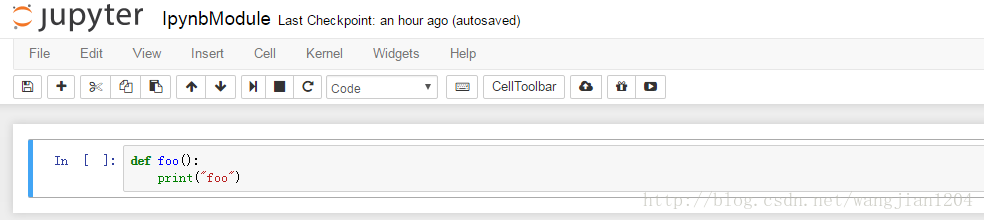
调用例子如下:
只要在我们的工作目录下放置Ipynb_importer.py文件,就可以正常调用所有的jupyter notebook文件。这种方法的本质就是使用一个jupyter notebook解析器先对.ipynb文件进行解析,把文件内的各个模块加载到内存里供其他python文件调用。






 扫一扫
扫一扫


 1073
1073

 被折叠的 条评论
为什么被折叠?
被折叠的 条评论
为什么被折叠?
 到【灌水乐园】发言





