



 文章讲述了在使用TorchANI时遇到的编译错误,由于cudatoolkit11.4对gcc版本有要求,必须低于11。作者提出降级gcc到10版本,或在编译参数中添加`-allow-unsupported-compiler`来解决。
报错信息
g++ -pthread -B /opt/conda/compiler_compat -shared -Wl,-rpath,/opt/conda/lib -Wl,-rpath-link,/opt/conda/lib -L/opt/conda/lib -Wl,-rpath,/opt/conda/lib -Wl,-rpath-link,/opt/conda/lib -L/opt/conda/lib /ee/torchani/build/temp.linux-x86_64-3.10/torchani/cuaev/aev.o /ee/torchani/build/temp.linux-x86_64-3.10/torchani/cuaev/cuaev.o -L/opt/conda/lib/python3.10/site-packages/torch/lib -L/usr/local/cuda/lib64 -lc10 -ltorch -ltorch_cpu -ltorch_python -lcudart -lc10_cuda -ltorch_cuda -o build/lib.linux-x86_64-3.10/torchani/cuaev.cpython-310-x86_64-linux-gnu.so
/opt/conda/compiler_compat/ld: cannot find /ee/torchani/build/temp.linux-x86_64-3.10/torchani/cuaev/aev.o: No such file or directory
/opt/conda/compiler_compat/ld: cannot find /ee/torchani/build/temp.linux-x86_64-3.10/torchani/cuaev/cuaev.o: No such file or directory
collect2: error: ld returned 1 exit status
error: command ‘/usr/bin/g++’ failed with exit code 1
核心在于.o文件没有正确生成。
问题定位
通过手动调用build.ninja文件得到详细报错。
In file included from /usr/local/cuda/include/cuda_runtime.h:83,
from :
/usr/local/cuda/include/crt/host_config.h:139:2: error: #error – unsupported GNU version! gcc versions later than 11 are not supported! The nvcc flag ‘-allow-unsupported-compiler’ can be used to override this version check; however, using an unsupported host compiler may cause compilation failure or incorrect run time execution. Use at your own risk.
139 | #error – unsupported GNU version! gcc versions later than 11 are not supported! The nvcc flag ‘-allow-unsupported-compiler’ can be used to override this version check; however, using an unsupported host compiler may cause compilation failure or incorrect run time execution. Use at your own risk.
| ^~~~~
ninja: build stopped: subcommand failed.
看到核心问题在于,cudatoolkit==11.4自带一个编译时的GNU版本检查。
gcc版本大于11就不能接受。
看了下环境里的gcc/g++都是11版本。
也就是说得回退10版本。
可以看官方的gcc版本推荐。
https://docs.nvidia.com/cuda/archive/11.4.4/cuda-installation-guide-linux/index.html
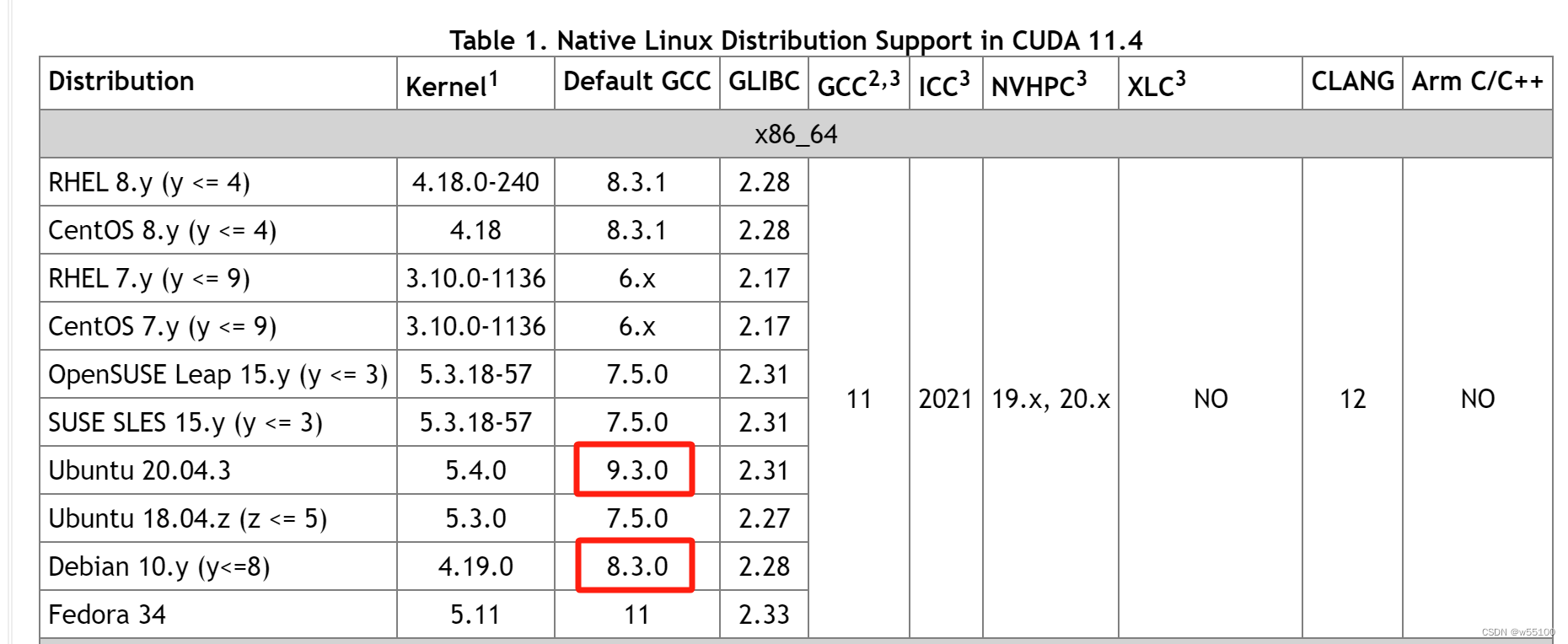
看来还是搞个9版本吧。
问题是9版本太过古老,一般镜像站是找不到包的。
得切回debian官方源。
或者按照提示,
在extra_compile_args里面
nvcc_args = "-allow-unsupported-compiler"
return CUDAExtension(
       ...,
        extra_compile_args={'cxx': cxx_args, 'nvcc': nvcc_args})







 扫一扫
扫一扫


 4852
4852

 被折叠的 条评论
为什么被折叠?
被折叠的 条评论
为什么被折叠?
 到【灌水乐园】发言





