



 本文深入探讨了Linux环境下配置文件locale的作用及意义,详细解释了环境变量LANG和LC_ALL的功能,并通过实例展示了如何设置不同语言环境。同时,文章还介绍了UTF-8编码在Linux中的应用,以及它与其他编码格式的区别。最后,提供了关于Windows编码页面与Unicode的对比,帮助读者全面了解字符编码与国际化设置。
The locale issue, also known as internationalization.
Detailed reference, see Cygwin manual.
-
locale name
-
ll_CC.encoding
ll - for language
CC - for country
Command locale shows current locale. In my environment, that gives:
[~]$ locale
LANG=C.UTF-8
LC_CTYPE=”C.UTF-8”
LC_NUMERIC=”C.UTF-8”
LC_TIME=”C.UTF-8”
LC_COLLATE=”C.UTF-8”
LC_MONETARY=”C.UTF-8”
LC_MESSAGES=”C.UTF-8”
LC_ALL=
LANG is the normal environment variable for specifying a locale. As a user, you normally set this variable
LC_ALL is an environment variable that overrides all of these. It is typically used in scripts that run particular programs.
The process of a program get arguments from command line and output to terminal is shown below:
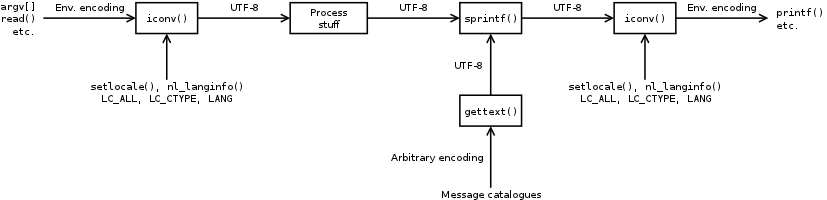
Note that, UTF-8 is the typical internal character encoding.
- gettext - 2.3 Setting the Locale through Environment Variables
- UTF-8 and Unicode FAQ for Unix/Linux
- Character encoding and locales
Windows
- MultiByteToWideChar maps character string to UTF-16 (wide string)
- OEM code page
- used by Win32 console applications
- Code page 936 (CP936) is Microsoft’s character encoding for simplified Chinese.
- The concept “CP936”, “GBK” and “GB2312” are sometimes confused in various software products. Code page 936 is not identical to GBK because a code page encodes characters while the GBK only defines code points.
- Code Pages
- New Windows applications should use Unicode to avoid the inconsistencies of varied code pages and for ease of localization.
- Windows code pages, commonly called “ANSI code pages”, are code pages for which non-ASCII values (values greater than 127) represent international characters.
- Originally, Windows code page 1252, the code page commonly used for English and other Western European languages, was based on an American National Standards Institute (ANSI) draft. That draft eventually became ISO 8859-1, but Windows code page 1252 was implemented before the standard became final, and is not exactly the same as ISO 8859-1.
- Many Windows API functions have “A” (ANSI) and “W” (wide, Unicode) versions. The “A” version handles text based on Windows code pages, while the “W” version handles Unicode text.
- A Windows operating system always has one currently active Windows code page. All ANSI versions of API functions use the currently active code page.
- Original equipment manufacturer (OEM) code pages are code pages for which non-ASCII values represent line drawing and punctuation characters.
- For both Windows code pages and OEM code pages, the code values 0x00 through 0x7F correspond to the 7-bit ASCII character set. Code values 0x00 through 0x19 and 0x7F always represent standardized control characters and 0x20 through 0x7E represent standardized displayable characters. Characters represented by the remaining codes, 0x80 through 0xff, vary among character sets.
- Code pages can be either single-byte character set (SBCS) pages or double-byte character set (DBCS) pages. In SBCS pages, each byte directly encodes a single character, so that it is possible to represent exactly 256 distinct characters (including control characters, letters, digits, punctuation, symbols, and the like). DBCS code pages are used for languages such as Japanese and Chinese.
- An application can use the MultiByteToWideChar and WideCharToMultiByte functions to convert between strings based on Windows code pages and Unicode strings. Although their names refer to “MultiByte”, these functions work equally well with SBCS, DBCS, and multibyte character set code pages.





 扫一扫
扫一扫


 42
42

 被折叠的 条评论
为什么被折叠?
被折叠的 条评论
为什么被折叠?
 到【灌水乐园】发言





