


 本文介绍Unity中使用协程实现定时功能的方法,并演示了一个简易的消息分发机制,包括注册、发送与注销消息。
第十一个示例
代码如下
     using

     System
     ;


     using

     System
     .
     Collections
     ;


     using

     UnityEngine
     ;


     namespace

     QFramework


     {


     public

     partial

     class

     MonoBehaviourSimplify


     {


     public

     void

     Delay
     (
     float
      seconds
     ,

     Action
      onFinished
     )


     {


     StartCoroutine
     (
     DelayCoroutine
     (
     seconds
     ,
      onFinished
     )
     )
     ;


     }


     private

     static

     IEnumerator

     DelayCoroutine
     (
     float
      seconds
     ,

     Action
      onFinished
     )


     {


     yield

     return

     new

     WaitForSeconds
     (
     seconds
     )
     ;


     onFinished
     (
     )
     ;


     }


     }


     public

     class

     DelayWithCoroutine

     :

     MonoBehaviourSimplify


     {


     private

     void

     Start
     (
     )


     {


     Delay
     (
     5.0f
     ,

     (
     )

     =>


     {

                UnityEditor
     .
     EditorApplication
     .
     isPlaying
     =

     false
     ;


     }
     )
     ;


     }


     #
     if
      UNITY_EDITOR


     [
     UnityEditor
     .
     MenuItem
     (
     "QFramework/11.定时功能"
     ,

     false
     ,

     11
     )
     ]


     private

     static

     void

     MenuClickd
     (
     )


     {

            UnityEditor
     .
     EditorApplication
     .
     isPlaying
     =

     true
     ;


     new

     GameObject
     (
     "DelayWithCoroutine"
     )


     .
     AddComponent
     <
     DelayWithCoroutine
     >
     (
     )
     ;


     }


     #
     endif


     protected

     override

     void

     OnBeforeDestroy
     (
     )


     {


     }


     }


     }
又一个 MonoBehaviourSimplify,我们可以考虑和之前的示例进行合并。而我们的 DelayWithCoroutine 这个示例要放在 Example 里。
整理后的代码如下: Assets/QFramework/Framework/MonoBehaviourSimplify.cs
     using

     System
     ;


     using

     System
     .
     Collections
     ;


     using

     UnityEngine
     ;


     namespace

     QFramework


     {


     public

     partial

     class

     MonoBehaviourSimplify

     :

     MonoBehaviour


     {


     public

     void

     Show
     (
     )


     {

            GameObjectSimplify
     .
     Show
     (
     gameObject
     )
     ;


     }


     public

     void

     Hide
     (
     )


     {

            GameObjectSimplify
     .
     Hide
     (
     gameObject
     )
     ;


     }


     public

     void

     Identity
     (
     )


     {

            TransformSimplify
     .
     Identity
     (
     transform
     )
     ;


     }


     public

     void

     Delay
     (
     float
      seconds
     ,

     Action
      onFinished
     )


     {


     StartCoroutine
     (
     DelayCoroutine
     (
     seconds
     ,
      onFinished
     )
     )
     ;


     }


     private

     static

     IEnumerator

     DelayCoroutine
     (
     float
      seconds
     ,

     Action
      onFinished
     )


     {


     yield

     return

     new

     WaitForSeconds
     (
     seconds
     )
     ;


     onFinished
     (
     )
     ;


     }


     }


     }
Assets/QFramework/Example/8.定时功能/DelayWithCoroutine.cs
     using

     UnityEngine
     ;


     namespace

     QFramework


     {


     public

     class

     DelayWithCoroutine

     :

     MonoBehaviourSimplify


     {


     private

     void

     Start
     (
     )


     {


     Delay
     (
     5.0f
     ,

     (
     )

     =>


     {

                UnityEditor
     .
     EditorApplication
     .
     isPlaying
     =

     false
     ;


     }
     )
     ;


     }


     #
     if
      UNITY_EDITOR


     [
     UnityEditor
     .
     MenuItem
     (
     "QFramework/Example/8.定时功能"
     ,

     false
     ,

     9
     )
     ]


     private

     static

     void

     MenuClickd
     (
     )


     {

            UnityEditor
     .
     EditorApplication
     .
     isPlaying
     =

     true
     ;


     new

     GameObject
     (
     "DelayWithCoroutine"
     )


     .
     AddComponent
     <
     DelayWithCoroutine
     >
     (
     )
     ;


     }


     #
     endif


     protected

     override

     void

     OnBeforeDestroy
     (
     )


     {


     }


     }


     }
菜单如下:
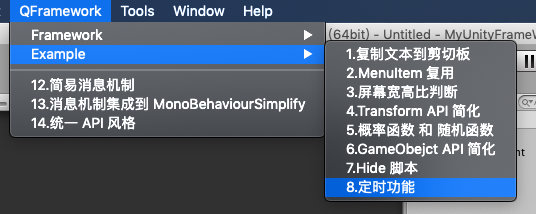
目录如下:
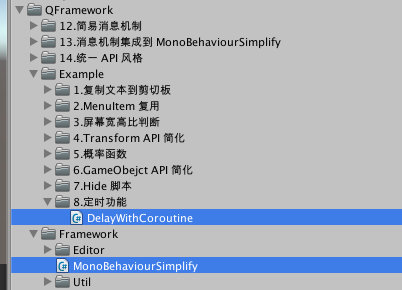
第十二个示例
代码如下:
     using

     System
     ;


     using

     System
     .
     Collections
     .
     Generic
     ;


     using

     UnityEngine
     ;


     namespace

     QFramework


     {


     public

     class

     MsgDispatcher


     {


     private

     static

     Dictionary
     <
     string
     ,
      Action
     <
     object
     >
     >
      RegisteredMsgs
     =

     new

     Dictionary
     <
     string
     ,
      Action
     <
     object
     >
     >
     (
     )
     ;


     public

     static

     void

     Register
     (
     string
      msgName
     ,

     Action
     <
     object
     >
      onMsgReceived
     )


     {


     if

     (
     !
     RegisteredMsgs
     .
     ContainsKey
     (
     msgName
     )
     )


     {

                RegisteredMsgs
     .
     Add
     (
     msgName
     ,
      _
     =>

     {

     }
     )
     ;


     }


            RegisteredMsgs
     [
     msgName
     ]

     +=
      onMsgReceived
     ;


     }


     public

     static

     void

     UnRegisterAll
     (
     string
      msgName
     )


     {

            RegisteredMsgs
     .
     Remove
     (
     msgName
     )
     ;


     }


     public

     static

     void

     UnRegister
     (
     string
      msgName
     ,
     Action
     <
     object
     >
      onMsgReceived
     )


     {


     if

     (
     RegisteredMsgs
     .
     ContainsKey
     (
     msgName
     )
     )


     {

                RegisteredMsgs
     [
     msgName
     ]

     -=
      onMsgReceived
     ;


     }


     }


     public

     static

     void

     Send
     (
     string
      msgName
     ,

     object
      data
     )


     {


     if

     (
     RegisteredMsgs
     .
     ContainsKey
     (
     msgName
     )
     )


     {

                RegisteredMsgs
     [
     msgName
     ]
     (
     data
     )
     ;


     }


     }


     #
     if
      UNITY_EDITOR


     [
     UnityEditor
     .
     MenuItem
     (
     "QFramework/12.简易消息机制"
     ,

     false
     ,

     13
     )
     ]


     #
     endif


     private

     static

     void

     MenuClicked
     (
     )


     {


     // 全部清空,确保测试有效


     UnRegisterAll
     (
     "消息1"
     )
     ;


     Register
     (
     "消息1"
     ,
      OnMsgReceived
     )
     ;


     Register
     (
     "消息1"
     ,
      OnMsgReceived
     )
     ;


     Send
     (
     "消息1"
     ,

     "hello world"
     )
     ;


     UnRegister
     (
     "消息1"
     ,
     OnMsgReceived
     )
     ;


     Send
     (
     "消息1"
     ,

     "hello"
     )
     ;


     }


     private

     static

     void

     OnMsgReceived
     (
     object
      data
     )


     {

            Debug
     .
     LogFormat
     (
     "消息1:{0}"
     ,
      data
     )
     ;


     }


     }


     }
MsgDispatcher 是能独立使用的类,所以要放到 Utils 里,其示例就放到 Example 里。
整理后如下: Assets/QFramework/Example/9.简易消息机制/MsgDispatcherExample.cs
     using

     UnityEngine
     ;


     namespace

     QFramework


     {


     public

     class

     MsgDispatcherExample

     :

     MonoBehaviour


     {


     #
     if
      UNITY_EDITOR


     [
     UnityEditor
     .
     MenuItem
     (
     "QFramework/Example/9.简易消息机制"
     ,

     false
     ,

     10
     )
     ]


     #
     endif


     private

     static

     void

     MenuClicked
     (
     )


     {


     // 全部清空,确保测试有效

            MsgDispatcher
     .
     UnRegisterAll
     (
     "消息1"
     )
     ;


            MsgDispatcher
     .
     Register
     (
     "消息1"
     ,
      OnMsgReceived
     )
     ;

            MsgDispatcher
     .
     Register
     (
     "消息1"
     ,
      OnMsgReceived
     )
     ;


            MsgDispatcher
     .
     Send
     (
     "消息1"
     ,

     "hello world"
     )
     ;


            MsgDispatcher
     .
     UnRegister
     (
     "消息1"
     ,
      OnMsgReceived
     )
     ;


            MsgDispatcher
     .
     Send
     (
     "消息1"
     ,

     "hello"
     )
     ;


     }


     private

     static

     void

     OnMsgReceived
     (
     object
      data
     )


     {

            Debug
     .
     LogFormat
     (
     "消息1:{0}"
     ,
      data
     )
     ;


     }


     }


     }
Assets/QFramework/Framework/Util/MsgDispatcher.cs
     using

     System
     ;


     using

     System
     .
     Collections
     .
     Generic
     ;


     namespace

     QFramework


     {


     public

     class

     MsgDispatcher


     {


     private

     static

     Dictionary
     <
     string
     ,
      Action
     <
     object
     >
     >
      RegisteredMsgs
     =

     new

     Dictionary
     <
     string
     ,
      Action
     <
     object
     >
     >
     (
     )
     ;


     public

     static

     void

     Register
     (
     string
      msgName
     ,

     Action
     <
     object
     >
      onMsgReceived
     )


     {


     if

     (
     !
     RegisteredMsgs
     .
     ContainsKey
     (
     msgName
     )
     )


     {

                RegisteredMsgs
     .
     Add
     (
     msgName
     ,
      _
     =>

     {

     }
     )
     ;


     }


            RegisteredMsgs
     [
     msgName
     ]

     +=
      onMsgReceived
     ;


     }


     public

     static

     void

     UnRegisterAll
     (
     string
      msgName
     )


     {

            RegisteredMsgs
     .
     Remove
     (
     msgName
     )
     ;


     }


     public

     static

     void

     UnRegister
     (
     string
      msgName
     ,
     Action
     <
     object
     >
      onMsgReceived
     )


     {


     if

     (
     RegisteredMsgs
     .
     ContainsKey
     (
     msgName
     )
     )


     {

                RegisteredMsgs
     [
     msgName
     ]

     -=
      onMsgReceived
     ;


     }


     }


     public

     static

     void

     Send
     (
     string
      msgName
     ,

     object
      data
     )


     {


     if

     (
     RegisteredMsgs
     .
     ContainsKey
     (
     msgName
     )
     )


     {

                RegisteredMsgs
     [
     msgName
     ]
     (
     data
     )
     ;


     }


     }


     }


     }
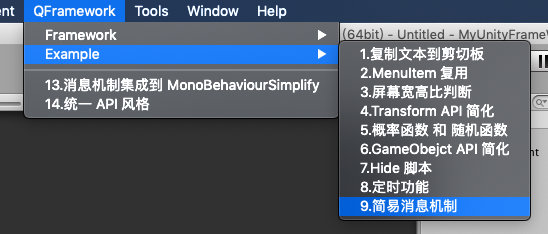
目录如下

菜单如下:
今天的内容就这些,我们下一篇再见,拜拜~
转载请注明地址:凉鞋的笔记:
liangxiegame.com
订阅全套专栏:
liangxiegame.com





 扫一扫
扫一扫


 被折叠的 条评论
为什么被折叠?
被折叠的 条评论
为什么被折叠?
 到【灌水乐园】发言





