


 本文详细介绍了Android中的服务组件,包括服务的概念、生命周期,并通过音乐播放器的示例展示了startService和bindService的不同使用方式及混合使用的方法。
一、概念
Service,中文名称为服务。服务是android的四大组件之一,service组件主要用于执行需要长期运行而不需要与用户进行交互的操作或者为其他组件或程序提供功能性服务。开启服务的方式有两种,Context.startService()以及 Context.bindService()。需要注意的是服务既不是一个单独的进程也不运行在一个单独的线程,service是运行在主线程的,所以不能直接执行联网等耗时操作或者cpu密集型操作。
二、service的生命周期
通过Context.startService()来开启一个服务,程序会依次调用其onCreate、onStartCommand方法,然后长期在后台运行,直到调用了Context.stopService或者在服务中调用stopSelf方法。通过调用stopSelf来结束服务可以保证在业务逻辑执行完之前不会关闭服务。
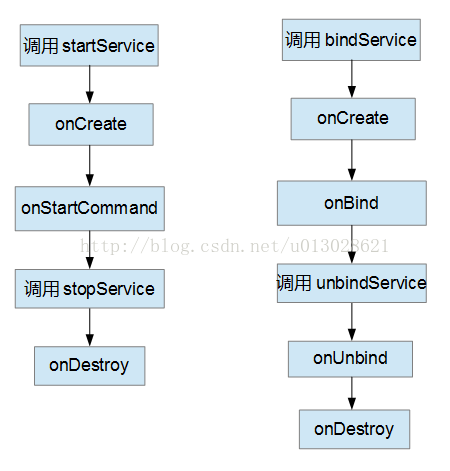
通过此方式开启服务有以下特点:
①onCreate方法只在服务首次创建时调用,此后无论startService调用多少次都不会再执行onCreate方法
②startService可以被多次调用,第二次调用之后会直接执行onStartCommand
③与onCreate方法一样,在一个生命周期中onDestroy方法只会执行一次,所以无论startService被调用了多少次,stopService方法只需要调用一次即可停止服务。
④服务不会随着activity的销毁而销毁
此外,还可以通过Context.bindService方法来开启(绑定)一个服务。通过此方式开启服务具有以下特点:
①onCreate和onBind方法都只在第一次执行bindService方法是执行,此后无论执行bindService多少次这两个方法都不会在执行
②绑定服务的activity被销毁的时候,绑定的服务也会被销毁,所以在销毁activity前需要解绑服务,否则报错
③unbindService方法只能执行一次,否则报错
三、startService方式启动服务
service的一个典型的应用场景就是音乐的播放。下面通过一个简单的播放器播放音乐的实例来实际操作一下service。
布局文件:
<?xml version="1.0" encoding="utf-8"?>
<LinearLayout xmlns:android="http://schemas.android.com/apk/res/android"
    xmlns:tools="http://schemas.android.com/tools"
    android:layout_width="match_parent"
    android:layout_height="match_parent"
    android:orientation="vertical"
    tools:context=".activity.MainActivity">

<Button
    android:id="@+id/start"
    android:layout_width="match_parent"
    android:layout_height="wrap_content"
    android:text="开启服务"
    />
<Button
    android:id="@+id/stop"
    android:layout_width="match_parent"
    android:layout_height="wrap_content"
    android:text="停止服务"
    />
</LinearLayout>
界面预览:
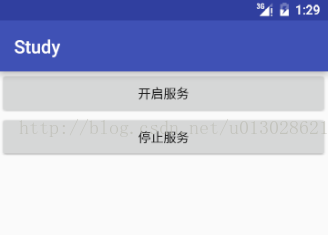
界面非常的简单,然后编写一个服务,注意在manifest中配置
package com.kwell.study.service;

import android.app.Service;
import android.content.Intent;
import android.media.MediaPlayer;
import android.os.Environment;
import android.os.IBinder;
import android.util.Log;

import java.io.IOException;

public class MusicService extends Service {
    private static final String TAG = "MusicService";
    private MediaPlayer player;

    @Override
    public IBinder onBind(Intent intent) {
        Log.e(TAG,"onBind");
        return null;
    }

    @Override
    public void onCreate() {
        super.onCreate();
        Log.e(TAG,"onCreate");
    }

    @Override
    public int onStartCommand(Intent intent, int flags, int startId) {
        //创建以及调用player
        player = new MediaPlayer();
        try {
            player.setDataSource(Environment.getExternalStorageDirectory()+"/最长的电影.mp3");
            player.prepare();
            player.start();
        } catch (IOException e) {
            e.printStackTrace();
        }
        Log.e(TAG,"onStartCommand:开始播放音乐");
        return super.onStartCommand(intent, flags, startId);
    }

    @Override
    public void onDestroy() {
        //停止并释放player
        player.stop();
        player.reset();
        player.release();
        Log.e(TAG,"onDestroy:停止播放音乐");
        super.onDestroy();
    }

}
编写activity
package com.kwell.study.activity;

import android.content.Intent;
import android.os.Bundle;
import android.support.v7.app.AppCompatActivity;
import android.view.View;

import com.kwell.study.R;
import com.kwell.study.service.MusicService;

public class MainActivity extends AppCompatActivity implements View.OnClickListener {
    private static final String TAG = "MainActivity";

    @Override
    protected void onCreate(Bundle savedInstanceState) {
        super.onCreate(savedInstanceState);
        setContentView(R.layout.activity_main);
        /** 设置按钮的点击事件 */
        findViewById(R.id.start).setOnClickListener(this);
        findViewById(R.id.stop).setOnClickListener(this);
    }

    @Override
    public void onClick(View v) {
        switch (v.getId()) {
            case R.id.start:
                //开启服务
                startService(new Intent(this, MusicService.class));
                break;
            case R.id.stop:
                //关闭服务
                stopService(new Intent(this, MusicService.class));
                break;
        }
    }

}
部署并运行,点击开始就可以欣赏周董的音乐了,点击结束服务即可停止播放

点击开启服务,然后退出activity,周董的歌声依然飘荡在空中~

说明service依然在后台运行。这样播放音乐有个问题,怎么切换下一首、上一首?怎么暂停和继续播放?
四、bindService方式开启服务
依然是播放音乐,这里使用bindService方式开启服务。布局文件:
<?xml version="1.0" encoding="utf-8"?>
<LinearLayout xmlns:android="http://schemas.android.com/apk/res/android"
    xmlns:tools="http://schemas.android.com/tools"
    android:layout_width="match_parent"
    android:layout_height="match_parent"
    android:orientation="vertical"
    tools:context="com.kwell.bindservice.MainActivity">

    <Button
        android:id="@+id/bind"
        android:layout_width="match_parent"
        android:layout_height="wrap_content"
        android:text="bindService"/>
    <Button
        android:id="@+id/unbind"
        android:layout_width="match_parent"
        android:layout_height="wrap_content"
        android:text="unbindService"/>
</LinearLayout>
界面预览:
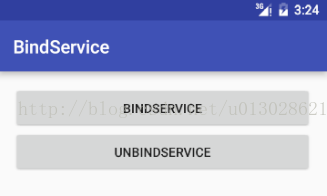
编写服务
package com.kwell.bindservice;

import android.app.Service;
import android.content.Intent;
import android.media.MediaPlayer;
import android.os.Binder;
import android.os.Environment;
import android.os.IBinder;
import android.util.Log;

import java.io.IOException;

public class MusicService extends Service {

    private static final String TAG = "MusicService";
    private MediaPlayer player;

    @Override
    public IBinder onBind(Intent intent) {
        //创建以及调用player
        player = new MediaPlayer();
        try {
            player.setDataSource(Environment.getExternalStorageDirectory()+"/最长的电影.mp3");
            player.prepare();
            player.start();
        } catch (IOException e) {
            e.printStackTrace();
        }
        Log.e(TAG,"onBind:开始播放音乐");
        return null;
    }

    @Override
    public boolean onUnbind(Intent intent) {
        //停止并释放player
        player.stop();
        player.reset();
        player.release();
        Log.e(TAG,"onUnbind:停止播放音乐");
        return super.onUnbind(intent);
    }

}
编写activity
package com.kwell.bindservice;

import android.content.ComponentName;
import android.content.Intent;
import android.content.ServiceConnection;
import android.os.IBinder;
import android.support.v7.app.AppCompatActivity;
import android.os.Bundle;
import android.util.Log;
import android.view.View;
import android.widget.Toast;

public class MainActivity extends AppCompatActivity implements View.OnClickListener, ServiceConnection {

    private static final String TAG = "MainActivity";

    @Override
    protected void onCreate(Bundle savedInstanceState) {
        super.onCreate(savedInstanceState);
        setContentView(R.layout.activity_main);
        findViewById(R.id.bind).setOnClickListener(this);
        findViewById(R.id.unbind).setOnClickListener(this);
    }

    @Override
    public void onClick(View v) {
        switch (v.getId()) {
            case R.id.bind:
                bindService(new Intent(this,MusicService.class),this,BIND_AUTO_CREATE);
                break;
            case R.id.unbind:
                unbindService(this);
                break;
        }
    }

    @Override
    public void onServiceConnected(ComponentName name, IBinder service) {
        Log.e(TAG,"onServiceConnected");
    }

    @Override
    public void onServiceDisconnected(ComponentName name) {
        Log.e(TAG,"onServiceDisconnected");
    }
}
点击bindService播放音乐,点击unbindService音乐停止

这里注意到当onBind方法返回null的时候,bindService方法中设置的回调onServiceConnected和onServiceDisconnected并没有被执行。
如果bindService这么使用,那并没有什么卵用,还不如直接使用startService。这里注意到onBind方法返回一个IBinder对象,而onServiceConnected接收到一个IBinder对象,两者之间有什么联系呢?
没错,onServiceConnected接收的正是onBind返回的IBinder,通过此对象可以实现服务与Activity之间的通信,使得Activity可以调用Service里的方法。
注意:Service不能像普通类那样直接new然后执行里面的方法,因为不通过在清单文件注册而直接new出来的类即使继承了Service也不是以服务的形式存在。
这样,我们就可以在MusicService中定义暂停、上一首、下一首等操作,然后在activity中通过返回的IBinder对象来调用这些操作,突破startService方式开启服务的局限。
布局文件
<?xml version="1.0" encoding="utf-8"?>
<LinearLayout xmlns:android="http://schemas.android.com/apk/res/android"
    xmlns:tools="http://schemas.android.com/tools"
    android:layout_width="match_parent"
    android:layout_height="match_parent"
    android:orientation="vertical"
    tools:context="com.kwell.bindservice.MainActivity">

    <Button
        android:id="@+id/bind"
        android:layout_width="match_parent"
        android:layout_height="wrap_content"
        android:text="bindService" />

    <Button
        android:id="@+id/unbind"
        android:layout_width="match_parent"
        android:layout_height="wrap_content"
        android:text="unbindService" />
    <Button
        android:id="@+id/start"
        android:layout_width="match_parent"
        android:layout_height="wrap_content"
        android:text="开始播放" />
    <Button
        android:id="@+id/stop"
        android:layout_width="match_parent"
        android:layout_height="wrap_content"
        android:text="停止播放" />
    <Button
        android:id="@+id/pause"
        android:layout_width="match_parent"
        android:layout_height="wrap_content"
        android:text="暂停" />
    <Button
        android:id="@+id/continueplay"
        android:layout_width="match_parent"
        android:layout_height="wrap_content"
        android:text="继续"
        />
    <Button
        android:id="@+id/next"
        android:layout_width="match_parent"
        android:layout_height="wrap_content"
        android:text="上一首" />
    <Button
        android:id="@+id/previous"
        android:layout_width="match_parent"
        android:layout_height="wrap_content"
        android:text="上一首"/>
</LinearLayout>
界面预览
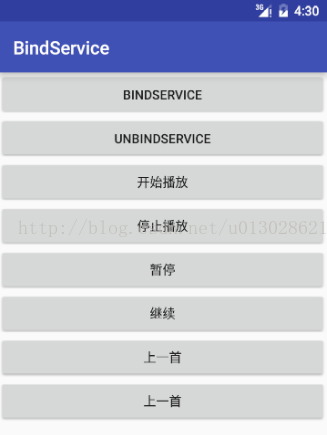
MusicService
package com.kwell.bindservice;

import android.app.Service;
import android.content.Intent;
import android.media.MediaPlayer;
import android.os.Binder;
import android.os.Environment;
import android.os.IBinder;
import android.util.Log;

import java.io.IOException;
import java.util.ArrayList;

public class MusicService extends Service {

private static final String TAG = "MusicService";
    private MediaPlayer player;
    /** 存放音乐的列表(路径) */
    private ArrayList<String> musics;
    /** 用来记录当前播放的是第几首歌 */
    private int index;
    @Override
    public void onCreate() {
        super.onCreate();
        musics = new ArrayList<>();
        //添加两首音乐
        musics.add(Environment.getExternalStorageDirectory()+"/最长的电影.mp3");
        musics.add(Environment.getExternalStorageDirectory()+"/失恋阵线联盟.mp3");
        //默认播放第一首歌
        index = 0;
        Log.e(TAG,"onCreate");
    }

    @Override
    public IBinder onBind(Intent intent) {

        Log.e(TAG,"onBind");
        return new MyBinder();
    }

    @Override
    public boolean onUnbind(Intent intent) {
        Log.e(TAG,"onUnbind");
        return super.onUnbind(intent);
    }

    /**
     * 开始播放音乐
     */
    private void start(){
        //创建以及调用player
        player = new MediaPlayer();
        try {
            player.setDataSource(musics.get(index));
            player.prepare();
            player.start();
        } catch (IOException e) {
            e.printStackTrace();
        }
        Log.e(TAG,"start:开始播放");
    }

    /**
     * 停止播放音乐
     */
    private void stop(){
        //停止并释放player
        player.stop();
        player.reset();
        player.release();
        Log.e(TAG,"stop:停止播放音乐");
    }

    /**
     * 暂停播放
     */
    private void pause(){
        player.pause();
        Log.e(TAG,"pause:暂停");
    }

    private void continuePlay(){
        player.start();
        Log.e(TAG,"continuePlay:继续");
    }

    /**
     * 下一首
     */
    private void next(){
        player.stop();
        player.reset();
        try {
            player.setDataSource(musics.get(++index%musics.size()));
            player.prepare();
            player.start();
        } catch (IOException e) {
            e.printStackTrace();
        }
        Log.e(TAG,"next:下一首");
    }

    /**
     * 上一首
     */
    private void previous(){
        player.stop();
        player.reset();
        try {
            player.setDataSource(musics.get(--index%musics.size()));
            player.prepare();
            player.start();
        } catch (IOException e) {
            e.printStackTrace();
        }
        Log.e(TAG,"previous:上一首");
    }

    /**
     * 创建一个类继承Binder,而Binder实现了IBinder接口<br/>
     * 在该类中实现调用Service操作的方法,从而返回给activity的时候,通它的实例调用service的方法
     */
    public class MyBinder extends Binder{
        //调用start
        public void callStart(){
            start();
        }

        public void callStop(){
            stop();
        }

        public void callPause(){
            pause();
        }

        public void callContinuePlay(){
            continuePlay();
        }

        public void callNext(){
            next();
        }

        public void callPrevious(){
            previous();
        }
    }
}
activity
package com.kwell.bindservice;

import android.content.ComponentName;
import android.content.Intent;
import android.content.ServiceConnection;
import android.os.IBinder;
import android.support.v7.app.AppCompatActivity;
import android.os.Bundle;
import android.util.Log;
import android.view.View;

public class MainActivity extends AppCompatActivity implements View.OnClickListener, ServiceConnection {

    private static final String TAG = "MainActivity";
    private MusicService.MyBinder musicService;

    @Override
    protected void onCreate(Bundle savedInstanceState) {
        super.onCreate(savedInstanceState);
        setContentView(R.layout.activity_main);
        findViewById(R.id.bind).setOnClickListener(this);
        findViewById(R.id.unbind).setOnClickListener(this);
        findViewById(R.id.start).setOnClickListener(this);
        findViewById(R.id.stop).setOnClickListener(this);
        findViewById(R.id.pause).setOnClickListener(this);
        findViewById(R.id.continueplay).setOnClickListener(this);
        findViewById(R.id.next).setOnClickListener(this);
        findViewById(R.id.previous).setOnClickListener(this);
    }

    @Override
    public void onClick(View v) {
        switch (v.getId()) {
            //绑定服务
            case R.id.bind:
                bindService(new Intent(this, MusicService.class), this, BIND_AUTO_CREATE);
                break;
            //接触绑定
            case R.id.unbind:
                unbindService(this);
                break;
            //开始播放
            case R.id.start:
                musicService.callStart();
                break;
            //停止播放
            case R.id.stop:
                musicService.callStop();
                break;
            //暂停播放
            case R.id.pause:
                musicService.callPause();
                break;
            case R.id.continueplay:
                musicService.callContinuePlay();
                break;
            //下一首
            case R.id.next:
                musicService.callNext();
                break;
            //上一首
            case R.id.previous:
                musicService.callPrevious();
                break;

        }
    }

    @Override
    public void onServiceConnected(ComponentName name, IBinder service) {
        Log.e(TAG, "onServiceConnected");
        musicService = (MusicService.MyBinder) service;
    }

    @Override
    public void onServiceDisconnected(ComponentName name) {
        Log.e(TAG, "onServiceDisconnected");
    }
}
运行结果:
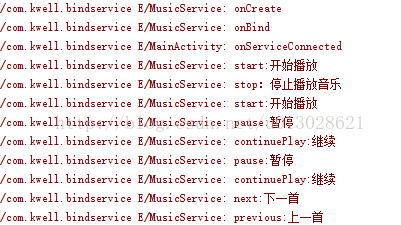
那么问题来了,暂停继续、上一首下一首这些操作都可以实现了,问题是通过bindService方式开启的服务在activity退出的时候就销毁了,而我们通常看到的播放器都会在界面退出是继续播放,这又该怎么实现呢?
五、混合的方式开启服务
混合方式也就是前两种方式的结合。混合方式开启的服务生命周期如下:
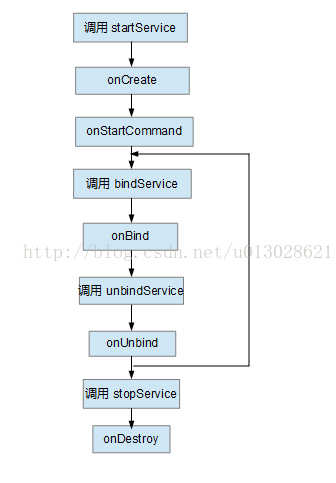
通过此方式开启服务,在unbindService方法被调用的时候,服务将不会被销毁。有时候不按照此生命周期顺序来执行看似程序也没有报错,,但最好不要这么做。这时候我们可以对上面的音乐播放器进行改造,让它既可以执行换歌等操作,也可以在关闭界面的时候在后台继续运行
布局文件
<?xml version="1.0" encoding="utf-8"?>
<LinearLayout xmlns:android="http://schemas.android.com/apk/res/android"
    xmlns:tools="http://schemas.android.com/tools"
    android:layout_width="match_parent"
    android:layout_height="match_parent"
    android:orientation="vertical"
    tools:context=".activity.MainActivity">

    <Button
        android:id="@+id/startservice"
        android:layout_width="match_parent"
        android:layout_height="wrap_content"
        android:text="开启服务"
    />
    <Button
        android:id="@+id/stopservice"
        android:layout_width="match_parent"
        android:layout_height="wrap_content"
        android:text="停止服务"
    />

    <Button
        android:id="@+id/bind"
        android:layout_width="match_parent"
        android:layout_height="wrap_content"
        android:text="bindService"
    />

    <Button
        android:id="@+id/unbind"
        android:layout_width="match_parent"
        android:layout_height="wrap_content"
        android:text="unbindService"
    />
    <Button
        android:id="@+id/start"
        android:layout_width="match_parent"
        android:layout_height="wrap_content"
        android:text="开始播放"
    />
    <Button
        android:id="@+id/stop"
        android:layout_width="match_parent"
        android:layout_height="wrap_content"
        android:text="停止播放"
    />
    <Button
        android:id="@+id/pause"
        android:layout_width="match_parent"
        android:layout_height="wrap_content"
        android:text="暂停"
    />
    <Button
        android:id="@+id/continueplay"
        android:layout_width="match_parent"
        android:layout_height="wrap_content"
        android:text="继续"
    />
    <Button
        android:id="@+id/next"
        android:layout_width="match_parent"
        android:layout_height="wrap_content"
        android:text="下一首"
    />
    <Button
        android:id="@+id/previous"
        android:layout_width="match_parent"
        android:layout_height="wrap_content"
        android:text="上一首"
    />

</LinearLayout>
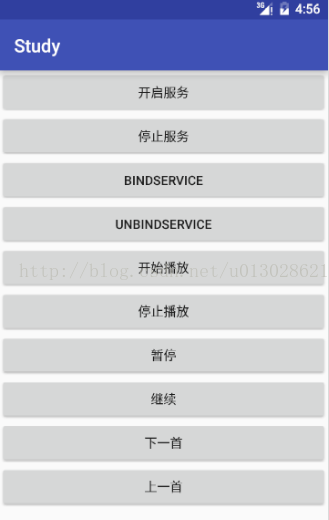
界面预览
MusicService
package com.kwell.study.service;

import android.app.Service;
import android.content.Intent;
import android.media.MediaPlayer;
import android.os.Binder;
import android.os.Environment;
import android.os.IBinder;
import android.util.Log;

import java.io.IOException;
import java.util.ArrayList;

public class MusicService extends Service {
    private static final String TAG = "MusicService";
    private MediaPlayer player;
    /** 存放音乐的列表(路径) */
    private ArrayList<String> musics;
    /** 用来记录当前播放的是第几首歌 */
    private int index;
    @Override
    public void onCreate() {
        super.onCreate();
        musics = new ArrayList<>();
        //添加两首音乐
        musics.add(Environment.getExternalStorageDirectory()+"/最长的电影.mp3");
        musics.add(Environment.getExternalStorageDirectory()+"/失恋阵线联盟.mp3");
        //默认播放第一首歌
        index = 0;
        Log.e(TAG,"onCreate");
    }

    @Override
    public IBinder onBind(Intent intent) {

        Log.e(TAG,"onBind");
        return new MyBinder();
    }

    @Override
    public int onStartCommand(Intent intent, int flags, int startId) {
        Log.e(TAG,"onStartCommand");
        return super.onStartCommand(intent, flags, startId);
    }

    @Override
    public boolean onUnbind(Intent intent) {
        Log.e(TAG,"onUnbind");
        return super.onUnbind(intent);
    }

    /**
     * 开始播放音乐
     */
    private void start(){
        //创建以及调用player
        player = new MediaPlayer();
        try {
            player.setDataSource(musics.get(index));
            player.prepare();
            player.start();
        } catch (IOException e) {
            e.printStackTrace();
        }
        Log.e(TAG,"start:开始播放");
    }

    /**
     * 停止播放音乐
     */
    private void stop(){
        //停止并释放player
        player.stop();
        player.reset();
        player.release();
        Log.e(TAG,"stop:停止播放音乐");
    }

    /**
     * 暂停播放
     */
    private void pause(){
        player.pause();
        Log.e(TAG,"pause:暂停");
    }

    private void continuePlay(){
        player.start();
        Log.e(TAG,"continuePlay:继续");
    }

    /**
     * 下一首
     */
    private void next(){
        player.stop();
        player.reset();
        try {
            player.setDataSource(musics.get(++index%musics.size()));
            player.prepare();
            player.start();
        } catch (IOException e) {
            e.printStackTrace();
        }
        Log.e(TAG,"next:下一首");
    }

    /**
     * 上一首
     */
    private void previous(){
        player.stop();
        player.reset();
        try {
            player.setDataSource(musics.get(--index%musics.size()));
            player.prepare();
            player.start();
        } catch (IOException e) {
            e.printStackTrace();
        }
        Log.e(TAG,"previous:上一首");
    }

    /**
     * 创建一个类继承Binder,而Binder实现了IBinder接口<br/>
     * 在该类中实现调用Service操作的方法,从而返回给activity的时候,通它的实例调用service的方法
     */
    public class MyBinder extends Binder {
        //调用start
        public void callStart(){
            start();
        }

        public void callStop(){
            stop();
        }

        public void callPause(){
            pause();
        }

        public void callContinuePlay(){
            continuePlay();
        }

        public void callNext(){
            next();
        }

        public void callPrevious(){
            previous();
        }
    }

}
activity
package com.kwell.study.activity;

import android.content.ComponentName;
import android.content.Intent;
import android.content.ServiceConnection;
import android.os.Bundle;
import android.os.IBinder;
import android.support.v7.app.AppCompatActivity;
import android.view.View;

import com.kwell.study.R;
import com.kwell.study.service.MusicService;

public class MainActivity extends AppCompatActivity implements View.OnClickListener, ServiceConnection {
    private static final String TAG = "MainActivity";
    private MusicService.MyBinder musicService;

    @Override
    protected void onCreate(Bundle savedInstanceState) {
        super.onCreate(savedInstanceState);
        setContentView(R.layout.activity_main);
/** 设置按钮的点击事件 */
        findViewById(R.id.startservice).setOnClickListener(this);
        findViewById(R.id.stopservice).setOnClickListener(this);
        findViewById(R.id.bind).setOnClickListener(this);
        findViewById(R.id.unbind).setOnClickListener(this);
        findViewById(R.id.start).setOnClickListener(this);
        findViewById(R.id.stop).setOnClickListener(this);
        findViewById(R.id.pause).setOnClickListener(this);
        findViewById(R.id.continueplay).setOnClickListener(this);
        findViewById(R.id.next).setOnClickListener(this);
        findViewById(R.id.previous).setOnClickListener(this);
    }

    @Override
    public void onClick(View v) {
        switch (v.getId()) {
            case R.id.startservice:
                //开启服务
                startService(new Intent(this, MusicService.class));
                break;
            case R.id.stopservice:
                //关闭服务
                stopService(new Intent(this, MusicService.class));
                break;

            //绑定服务
            case R.id.bind:
                bindService(new Intent(this,MusicService.class),this,BIND_AUTO_CREATE);
                break;
            //接触绑定
            case R.id.unbind:
                unbindService(this);
                break;
            //开始播放
            case R.id.start:
                musicService.callStart();
                break;
            //停止播放
            case R.id.stop:
                musicService.callStop();
                break;
                //暂停播放
            case R.id.pause:
                musicService.callPause();
                break;
            case R.id.continueplay:
                musicService.callContinuePlay();
                break;
            //下一首
            case R.id.next:
                musicService.callNext();
                break;
            //上一首
            case R.id.previous:
                musicService.callPrevious();
                break;
        }
    }

    @Override
    public void onServiceConnected(ComponentName name, IBinder service) {
        musicService = (MusicService.MyBinder) service;
    }

    @Override
    public void onServiceDisconnected(ComponentName name) {

    }
}
这样,一个简单的播放器就完成啦。此播放器的逻辑上处理的非常粗糙,真正使用时必须加以更加严密的处理。
如果有不对的地方,欢迎指正和交流~





 扫一扫
扫一扫


 5884
5884

 被折叠的 条评论
为什么被折叠?
被折叠的 条评论
为什么被折叠?
 到【灌水乐园】发言





