
185. Department Top Three Salaries - 部门工资前三高的所有员工 <Hard>

本文介绍如何使用SQL查询来找出每个部门中薪资排名前三的员工。通过具体实例展示了两种不同的查询方法,并对每种方法进行了详细解析。

Employee 表包含所有员工信息,每个员工有其对应的工号 Id,姓名 Name,工资 Salary 和部门编号 DepartmentId 。

+----+-------+--------+--------------+
| Id | Name  | Salary | DepartmentId |
+----+-------+--------+--------------+
| 1  | Joe   | 85000  | 1            |
| 2  | Henry | 80000  | 2            |
| 3  | Sam   | 60000  | 2            |
| 4  | Max   | 90000  | 1            |
| 5  | Janet | 69000  | 1            |
| 6  | Randy | 85000  | 1            |
| 7  | Will  | 70000  | 1            |
+----+-------+--------+--------------+
Department 表包含公司所有部门的信息。

+----+----------+
| Id | Name     |
+----+----------+
| 1  | IT       |
| 2  | Sales    |
+----+----------+
编写一个 SQL 查询,找出每个部门获得前三高工资的所有员工。例如,根据上述给定的表,查询结果应返回:

+------------+----------+--------+
| Department | Employee | Salary |
+------------+----------+--------+
| IT         | Max      | 90000  |
| IT         | Randy    | 85000  |
| IT         | Joe      | 85000  |
| IT         | Will     | 70000  |
| Sales      | Henry    | 80000  |
| Sales      | Sam      | 60000  |
+------------+----------+--------+
解释:

IT 部门中,Max 获得了最高的工资,Randy 和 Joe 都拿到了第二高的工资,Will 的工资排第三。销售部门(Sales)只有两名员工,Henry 的工资最高,Sam 的工资排第二。

The Employee table holds all employees. Every employee has an Id, and there is also a column for the department Id.
The Department table holds all departments of the company.
Write a SQL query to find employees who earn the top three salaries in each of the department. For the above tables, your SQL query should return the following rows (order of rows does not matter).
Explanation:In IT department, Max earns the highest salary, both Randy and Joe earn the second highest salary, and Will earns the third highest salary. There are only two employees in the Sales department, Henry earns the highest salary while Sam earns the second highest salary.

分析:公司里前 3 高的薪水意味着有不超过 3 个工资比这些值大。

AC代码:根据https://blog.youkuaiyun.com/tfstone/article/details/109180115以前的思路:
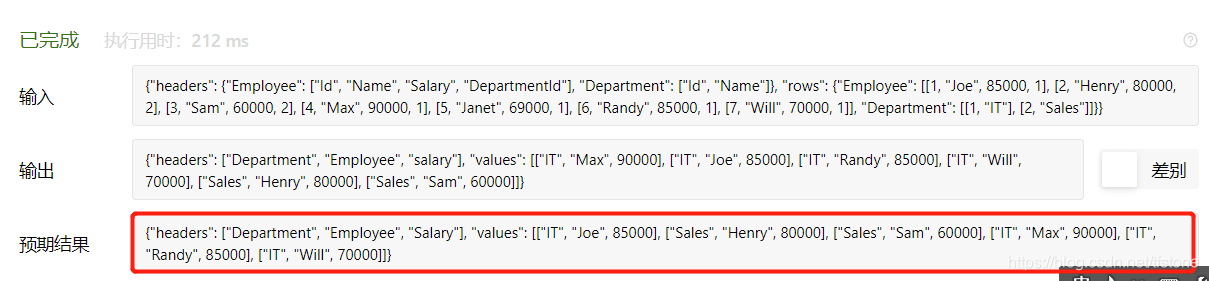
貌似leetcode没按题目给定的输出顺序检测测~,测试用例输出的结果是错的,但是能AC..我们还是按照标准给排下序把~

SELECT d.name AS `Department`, e.name AS `Employee`, e.salary
FROM employee e 
JOIN department d ON e.departmentid = d.id 
WHERE e.salary IN ( 
    SELECT salary FROM( 
        SELECT DISTINCT salary FROM employee 
        WHERE departmentid = d.id 
        ORDER BY salary DESC LIMIT 3 
    ) AS a 
)
order by e.departmentid,e.salary desc


#注意使用left join - 当左表不为空,右表为空,左关联会出现有返回值的情况;

select b.Name as `Department`,a.Name as `Employee`,a.Salary
from Employee a
join Department b on b.Id = a.DepartmentId
where 3 > (
    select count(distinct b.Salary) from Employee b 
    where a.DepartmentId = b.DepartmentId and b.Salary > a.Salary 
)
order by a.DepartmentId,a.Salary desc

or

select b.Name as `Department`,a.Name as `Employee`,a.Salary
from Employee a, Department b
where b.Id = a.DepartmentId and 3 > (
    select count(distinct b.Salary) from Employee b 
    where a.DepartmentId = b.DepartmentId and b.Salary > a.Salary 
)
order by a.DepartmentId,a.Salary desc


<think>我们不再使用CDN链接外部资源,而是假设项目已经通过npm安装了Vue、Vuex、ElementPlus等依赖。我们将使用单文件组件(SFC)的方式来构建应用,并且所有样式将自定义。以下是一个纯手工构建的工资管理系统端部分,包含自定义样式和本地化的组件实现。</think> 以下是一个完全自定义实现的工资管理系统端项目,采用纯Vue代码实现,不依赖任何外部CDN资源: ### 自定义工资管理系统实现 (Vue 3 Composition API) ```html <!DOCTYPE html> <html lang="zh-CN"> <head> <meta charset="UTF-8"> <meta name="viewport" content="width=device-width, initial-scale=1.0"> <title>工资管理系统</title> <style> /* 自定义全局样式 */ * { box-sizing: border-box; margin: 0; padding: 0; font-family: 'Segoe UI', 'Microsoft YaHei', sans-serif; } body { background-color: #f5f7fa; color: #333; line-height: 1.6; } .app-container { max-width: 1200px; margin: 0 auto; padding: 20px; } .header { background: linear-gradient(135deg, #3498db, #2c3e50); color: white; padding: 20px 0; text-align: center; border-radius: 8px 8px 0 0; margin-bottom: 25px; box-shadow: 0 4px 6px rgba(0, 0, 0, 0.1); } .main-layout { display: grid; grid-template-columns: 300px 1fr; gap: 25px; } .sidebar { background-color: white; border-radius: 8px; padding: 20px; box-shadow: 0 4px 6px rgba(0, 0, 0, 0.05); height: fit-content; } .content { background-color: white; border-radius: 8px; padding: 25px; box-shadow: 0 4px 6px rgba(0, 0, 0, 0.05); } /* 自定义按钮样式 */ .btn { display: inline-block; padding: 10px 20px; border: none; border-radius: 4px; background-color: #3498db; color: white; cursor: pointer; font-size: 16px; transition: background-color 0.3s; margin-right: 10px; margin-bottom: 10px; } .btn:hover { background-color: #2980b9; } .btn-primary { background-color: #27ae60; } .btn-primary:hover { background-color: #219653; } .btn-danger { background-color: #e74c3c; } .btn-danger:hover { background-color: #c0392b; } /* 自定义表单控件 */ .form-group { margin-bottom: 20px; } .form-label { display: block; margin-bottom: 8px; font-weight: 600; color: #2c3e50; } .form-input { width: 100%; padding: 12px; border: 1px solid #ddd; border-radius: 4px; font-size: 16px; transition: border-color 0.3s; } .form-input:focus { border-color: #3498db; outline: none; box-shadow: 0 0 0 3px rgba(52, 152, 219, 0.2); } .form-select { width: 100%; padding: 12px; border: 1px solid #ddd; border-radius: 4px; background-color: white; font-size: 16px; } /* 自定义表格样式 */ .data-table { width: 100%; border-collapse: collapse; margin-top: 20px; } .data-table th, .data-table td { padding: 14px; text-align: left; border-bottom: 1px solid #eee; } .data-table th { background-color: #f8f9fa; font-weight: 600; color: #2c3e50; } .data-table tr:nth-child(even) { background-color: #f9f9f9; } .data-table tr:hover { background-color: #f1f7fd; } /* 自定义卡片 */ .card { background: white; border-radius: 8px; padding: 20px; margin-bottom: 25px; box-shadow: 0 2px 4px rgba(0, 0, 0, 0.05); } .card-header { font-size: 18px; font-weight: 600; color: #2c3e50; padding-bottom: 15px; margin-bottom: 15px; border-bottom: 1px solid #eee; } /* 自定义标签 */ .tag { display: inline-block; padding: 4px 10px; border-radius: 12px; font-size: 14px; } .tag-dept-tech { background-color: #d6eaf8; color: #2874a6; } .tag-dept-finance { background-color: #d5f5e3; color: #27ae60; } .tag-dept-hr { background-color: #fadbd8; color: #c0392b; } /* 响应式布局 */ @media (max-width: 768px) { .main-layout { grid-template-columns: 1fr; } .sidebar { margin-bottom: 20px; } } </style> </head> <body> <div id="app" class="app-container"> <!-- 顶部导航 --> <header class="header"> <h1>工资管理系统</h1> <div v-if="currentEmployee" class="employee-info"> 当用户: {{ currentEmployee.name }} ({{ getDeptTag(currentEmployee.department) }}) </div> <button class="btn" @click="logout">退出</button> </header> <!-- 主内容区域 --> <div class="main-layout"> <!-- 侧边栏 --> <div class="sidebar"> <div class="card"> <div class="card-header">系统导航</div> <button class="btn btn-primary" @click="currentView = 'dashboard'">控制面板</button> <button class="btn" @click="currentView = 'employee'">员工管理</button> <button class="btn" @click="currentView = 'salary'">工资计算</button> <button class="btn" @click="currentView = 'report'">工资报表</button> </div> <div class="card"> <div class="card-header">统计概览</div> <div class="stats"> <p>员工总数: {{ employees.length }}</p> <p>本月计算工资: {{ salaries.length }}</p> <p>当部门: {{ getDeptTag(currentDepartment) }}</p> </div> </div> </div> <!-- 主内容 --> <div class="content"> <!-- 仪表盘视图 --> <div v-if="currentView === 'dashboard'"> <h2>控制面板</h2> <div class="card"> <div class="card-header">快速操作</div> <button class="btn" @click="openAddEmployeeModal">添加员工</button> <button class="btn" @click="openSalaryModal">计算工资</button> <button class="btn" @click="generateReport">生成报表</button> </div> <div class="card"> <div class="card-header">最近操作</div> <table class="data-table"> <thead> <tr> <th>时间</th> <th>操作</th> <th>详情</th> </tr> </thead> <tbody> <tr v-for="(log, index) in activityLogs.slice(0, 5)" :key="index"> <td>{{ log.timestamp }}</td> <td>{{ log.action }}</td> <td>{{ log.details }}</td> </tr> </tbody> </table> </div> </div> <!-- 员工管理视图 --> <div v-if="currentView === 'employee'"> <h2>员工管理</h2> <div class="form-group"> <label class="form-label">筛选部门</label> <select class="form-select" v-model="currentDepartment"> <option value="all">所有部门</option> <option value="技术部">技术部</option> <option value="财务部">财务部</option> <option value="人事部">人事部</option> <option value="市场部">市场部</option> </select> </div> <button class="btn btn-primary" @click="openAddEmployeeModal">添加新员工</button> <table class="data-table"> <thead> <tr> <th>ID</th> <th>姓名</th> <th>部门</th> <th>基本工资</th> <th>操作</th> </tr> </thead> <tbody> <tr v-for="emp in filteredEmployees" :key="emp.id"> <td>{{ emp.id }}</td> <td>{{ emp.name }}</td> <td><span :class="'tag ' + getDeptTagClass(emp.department)">{{ emp.department }}</span></td> <td>¥{{ emp.baseSalary.toFixed(2) }}</td> <td> <button class="btn" @click="editEmployee(emp)">编辑</button> <button class="btn btn-danger" @click="deleteEmployee(emp.id)">删除</button> </td> </tr> </tbody> </table> </div> <!-- 工资计算视图 --> <div v-if="currentView === 'salary'"> <h2>工资计算</h2> <div class="card"> <div class="form-group"> <label class="form-label">选择员工</label> <select class="form-select" v-model="selectedEmployeeId"> <option v-for="emp in employees" :key="emp.id" :value="emp.id">{{ emp.name }} ({{ emp.department }})</option> </select> </div> <div v-if="selectedEmployee" class="salary-form"> <div class="form-group"> <label class="form-label">员工基本信息</label> <div> <strong>{{ selectedEmployee.name }}</strong> | 部门: {{ selectedEmployee.department }} | 基本工资: ¥{{ selectedEmployee.baseSalary.toFixed(2) }} </div> </div> <div class="form-group"> <label class="form-label">奖金 (¥)</label> <input type="number" class="form-input" v-model.number="bonus" min="0" step="100"> </div> <div class="form-group"> <label class="form-label">扣款 (¥)</label> <input type="number" class="form-input" v-model.number="deduction" min="0" step="100"> </div> <div class="form-group"> <label class="form-label">实发工资</label> <div class="result-display">¥{{ calculateTotalSalary().toFixed(2) }}</div> </div> <button class="btn btn-primary" @click="calculateSalary">计算并保存</button> </div> </div> </div> <!-- 报表视图 --> <div v-if="currentView === 'report'"> <h2>工资报表</h2> <div class="form-group"> <label class="form-label">选择月份</label> <input type="month" class="form-input" v-model="reportMonth"> </div> <button class="btn" @click="exportToCSV">导出CSV</button> <button class="btn" @click="printReport">打印报表</button> <table class="data-table"> <thead> <tr> <th>员工ID</th> <th>姓名</th> <th>部门</th> <th>基本工资</th> <th>奖金</th> <th>扣款</th> <th>实发工资</th> </tr> </thead> <tbody> <tr v-for="salary in filteredSalaries" :key="salary.id"> <td>{{ salary.employeeId }}</td> <td>{{ getEmployeeName(salary.employeeId) }}</td> <td>{{ getEmployeeDept(salary.employeeId) }}</td> <td>¥{{ salary.baseSalary.toFixed(2) }}</td> <td>¥{{ salary.bonus.toFixed(2) }}</td> <td>¥{{ salary.deduction.toFixed(2) }}</td> <td>¥{{ salary.totalSalary.toFixed(2) }}</td> </tr> </tbody> </table> <div class="summary"> <h3>汇总统计</h3> <p>总人数: {{ filteredSalaries.length }}</p> <p>工资总额: ¥{{ getTotalSalaryAmount().toFixed(2) }}</p> </div> </div> </div> </div> <!-- 添加员工模态框 --> <div v-if="showAddEmployeeModal" class="modal"> <div class="modal-content"> <h3>{{ editingEmployee ? '编辑员工' : '添加新员工' }}</h3> <div class="form-group"> <label class="form-label">姓名</label> <input type="text" class="form-input" v-model="newEmployee.name"> </div> <div class="form-group"> <label class="form-label">部门</label> <select class="form-select" v-model="newEmployee.department"> <option value="技术部">技术部</option> <option value="财务部">财务部</option> <option value="人事部">人事部</option> <option value="市场部">市场部</option> </select> </div> <div class="form-group"> <label class="form-label">基本工资</label> <input type="number" class="form-input" v-model.number="newEmployee.baseSalary" min="0" step="100"> </div> <div class="modal-actions"> <button class="btn" @click="closeModal">取消</button> <button class="btn btn-primary" @click="saveEmployee"> {{ editingEmployee ? '更新' : '添加' }} </button> </div> </div> </div> </div> <script> const { createApp, ref, computed, onMounted } = Vue; const app = createApp({ setup() { // 当视图状态 const currentView = ref('dashboard'); // 部门筛选 const currentDepartment = ref('all'); // 员工数据 const employees = ref([ { id: 1, name: '张三', department: '技术部', baseSalary: 15000 }, { id: 2, name: '李四', department: '财务部', baseSalary: 12000 }, { id: 3, name: '王五', department: '人事部', baseSalary: 10000 }, { id: 4, name: '赵六', department: '技术部', baseSalary: 16000 } ]); // 工资数据 const salaries = ref([ { id: 1, employeeId: 1, month: '2023-08', baseSalary: 15000, bonus: 3000, deduction: 500, totalSalary: 17500 }, { id: 2, employeeId: 2, month: '2023-08', baseSalary: 12000, bonus: 2000, deduction: 300, totalSalary: 13700 } ]); // 当登录员工 const currentEmployee = ref(null); // 活动日志 const activityLogs = ref([ { timestamp: '2023-08-15 10:30', action: '添加员工', details: '添加新员工: 王五 (人事部)' }, { timestamp: '2023-08-14 15:20', action: '计算工资', details: '张三 工资计算完成: ¥17,500.00' }, { timestamp: '2023-08-10 09:45', action: '编辑员工', details: '李四 工资从¥11,000调整为¥12,000' } ]); // 员工模态框相关状态 const showAddEmployeeModal = ref(false); const editingEmployee = ref(null); const newEmployee = ref({ name: '', department: '技术部', baseSalary: 8000 }); // 工资计算相关状态 const selectedEmployeeId = ref(null); const bonus = ref(0); const deduction = ref(0); // 报表相关状态 const reportMonth = ref('2023-08'); // 计算属性 const filteredEmployees = computed(() => { if (currentDepartment.value === 'all') { return employees.value; } return employees.value.filter(emp => emp.department === currentDepartment.value); });
评论
成就一亿技术人!
拼手气红包6.0元
还能输入1000个字符
 
红包 添加红包
表情包 插入表情
 条评论被折叠 查看
添加红包

请填写红包祝福语或标题

红包个数最小为10个

红包金额最低5元

当前余额3.43前往充值 >
需支付:10.00
成就一亿技术人!
领取后你会自动成为博主和红包主的粉丝 规则
hope_wisdom
发出的红包
实付
使用余额支付
点击重新获取
扫码支付
钱包余额 0

抵扣说明:

1.余额是钱包充值的虚拟货币,按照1:1的比例进行支付金额的抵扣。
2.余额无法直接购买下载,可以购买VIP、付费专栏及课程。

余额充值


