


这里采用flask框架实现,项目文件如下:
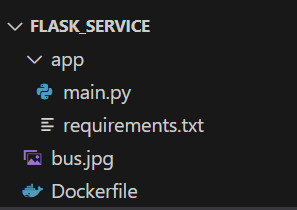
main.py
from typing import List
from flask import Flask, request, jsonify
from PIL import Image
import io
import torch
from torchvision import transforms, models
import requests  # For downloading ImageNet class labels

# -------------------- Initialization --------------------
app = Flask(__name__)

# Load pre-trained MobileNetV2 model (instead of ResNet18)
model = models.mobilenet_v2(pretrained=True)  # Changed to MobileNetV2
model.eval()  # Switch to evaluation mode

# Define image preprocessing pipeline (works for MobileNet as well)
preprocess = transforms.Compose([
    transforms.Resize(256),
    transforms.CenterCrop(224),
    transforms.ToTensor(),
    transforms.Normalize(
        mean=[0.485, 0.456, 0.406],  # ImageNet mean values
        std=[0.229, 0.224, 0.225]   # ImageNet standard deviation values
    )
])

# Load ImageNet class labels (1000 classes total)
try:
    LABELS_URL = "https://raw.githubusercontent.com/anishathalye/imagenet-simple-labels/master/imagenet-simple-labels.json"
    labels = requests.get(LABELS_URL).json()  # List where index corresponds to class ID
except Exception as e:
    print(f"Failed to load class labels: {e}")
    labels = [f"class{i}" for i in range(1000)]  # Default labels if loading fails


# -------------------- Existing Route: Numeric Processing --------------------
@app.route("/predict", methods=["POST"])
def predict():
    try:
        req_data = request.get_json()
        if "data" not in req_data:
            return jsonify({"error": "Request data is missing the 'data' field"}), 400

        x: List[float] = req_data["data"]
        y = list(map(lambda n: n + 1, x))
        return jsonify({"prediction": y})

    except Exception as e:
        return jsonify({"error": str(e)}), 500


# -------------------- Route: Image Classification (MobileNetV2) --------------------
@app.route("/classify", methods=["POST"])
def classify_image():
    try:
        # 1. Check file upload
        if 'file' not in request.files:
            return jsonify({"error": "Please upload an image using the 'file' field"}), 400

        file = request.files['file']
        if file.filename == '':
            return jsonify({"error": "No file selected"}), 400

        # 2. Read and preprocess image
        try:
            image = Image.open(io.BytesIO(file.read())).convert('RGB')
            input_tensor = preprocess(image)
            input_batch = input_tensor.unsqueeze(0)  # Add batch dimension
        except Exception as e:
            return jsonify({"error": f"Image processing failed: {str(e)}"}), 400

        # 3. Model inference
        try:
            with torch.no_grad():  # Disable gradient calculation
                output = model(input_batch)  # MobileNetV2 output shape: [1, 1000]

            # Parse results (same logic works for MobileNet)
            probabilities = torch.nn.functional.softmax(output[0], dim=0)
            top3_prob, top3_idx = torch.topk(probabilities, 3)

            results = []
            for idx, prob in zip(top3_idx, top3_prob):
                results.append({
                    "class": labels[idx.item()],
                    "probability": round(prob.item() * 100, 2)
                })

            return jsonify({
                "status": "success",
                "top3_predictions": results
            })

        except Exception as e:
            return jsonify({"error": f"Model inference failed: {str(e)}"}), 500

    except Exception as e:
        return jsonify({"error": str(e)}), 500


# -------------------- Entry Point --------------------
if __name__ == "__main__":
    app.run(host="0.0.0.0", port=9201, debug=False)
requirements.txt
flask
pillow
numpy==1.26
requests

--extra-index-url https://download.pytorch.org/whl/cpu
torch==1.8.0+cpu
torchvision==0.9.0+cpu
Dockerfile
FROM python:3.9-slim
WORKDIR /app
COPY ./app /app
RUN pip install -r requirements.txt -i https://pypi.mirrors.ustc.edu.cn/simple/
EXPOSE 9201
CMD ["python", "main.py"]
bus.jpg

构建docker镜像:
docker build -t flask_image .
运行容器:
docker run -d -p 9201:8001 --name flask_container flask_image
客户端发送:
curl -X POST "http://172.17.0.4:9201/predict" -H "Content-Type: application/json" -d '{"data": [1.0, 2.0, 3.0]}'
收到响应:
{"prediction":[2.0,3.0,4.0]}
客户端发送:
curl -X POST "http://172.17.0.4:9201/classify" -F "file=@bus.jpg"
收到响应:
{"status":"success","top3_predictions":[{"class":"class734","probability":48.18},{"class":"class654","probability":42.36},{"class":"class757","probability":4.04}]}






 扫一扫
扫一扫


 702
702

 被折叠的 条评论
为什么被折叠?
被折叠的 条评论
为什么被折叠?
 到【灌水乐园】发言





