


结果演示【当你在mc中实现了战刃prime会怎么样】 https://www.bilibili.com/video/BV1ne4BzZEC6/?share_source=copy_web&vd_source=c3618586d0ea2479570bcbe5d658acf5
学mc1.20.1的fabric模组时做的,很菜,仅交流,算是C/S网络模型的知识的分享吧
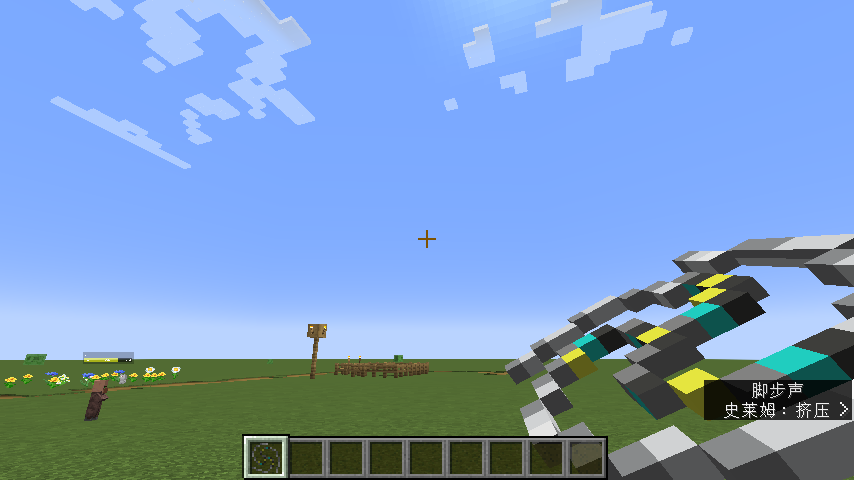
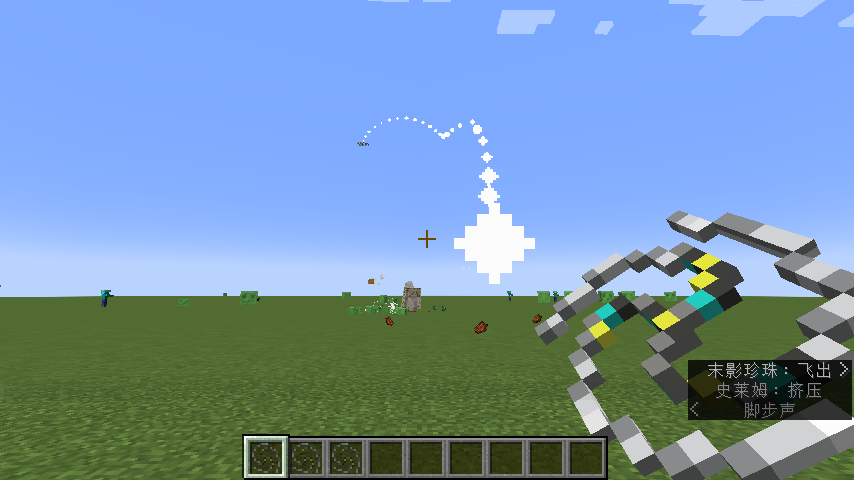
想要复现的话建议先看【【Besson】# 1 开发环境配置 | 1.20.1 Fabric 长线模组开发教程计划】 https://www.bilibili.com/video/BV1LccheqEjL/?share_source=copy_web&vd_source=c3618586d0ea2479570bcbe5d658acf5
战刃逻辑拆分
使用流程图
手上的战刃(Item)与投掷出的战刃(Entity)是两个东西,也需要拆分
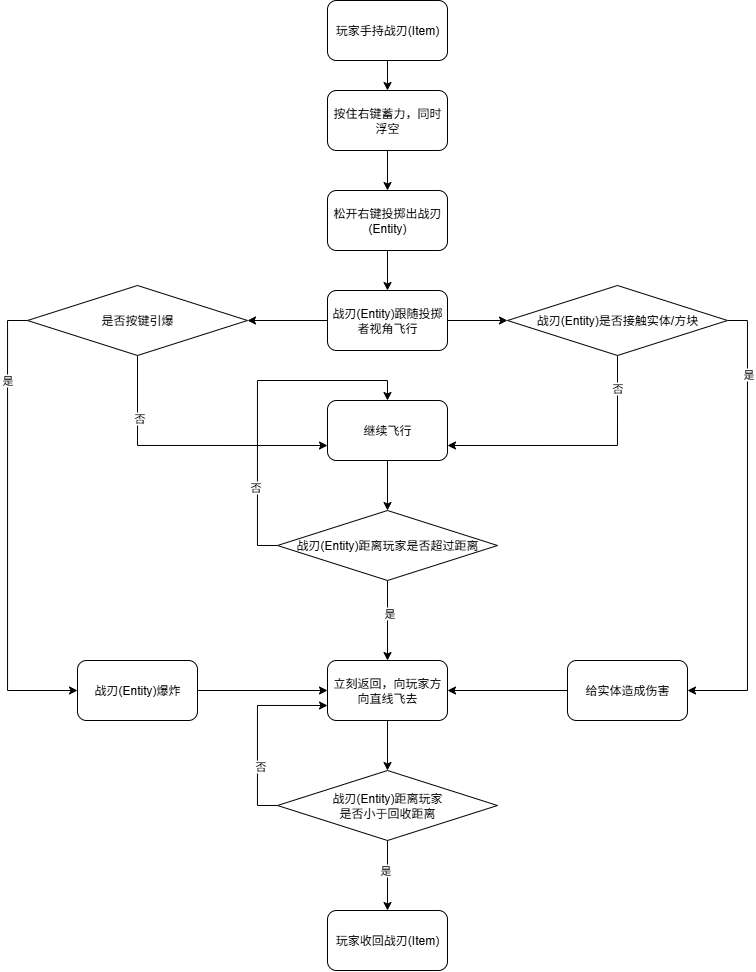
客户端服务端(C/S)业务拆分
Item类(UnbalanceBoomerangItem)
| Client客户端 | Server服务端 |
| 按下右键使用(use) | 按下右键使用(use) |
| 投掷蓄力动画 | 投掷出后生成战刃实体(Entity) |
|
投掷时滞空 | 通知客户端已经投掷出 |
| 滞空时粒子动画 | 在世界播放投掷音效 |
Entity类(UnbalanceBoomerangEntity)
| Client客户端 | Server服务端 |
| 追随玩家的视角 | 追随玩家的视角 |
| 返回玩家 | 返回玩家 |
| 判断是否超出距离 | 判断是否超出距离 |
| 战刃爆炸 | 战刃爆炸 |
| 轨迹的粒子 | 投掷者掉线后的处理 |
| 命中实体或方块判断 |
UML图

具体实现
Item类(UnbalanceBoomerangItem)
package com.clj.test.item;

import com.clj.test.entity.UnbalanceBoomerangEntity;
import com.clj.test.event.BoomerangClientEvents;
import net.minecraft.entity.LivingEntity;
import net.minecraft.entity.player.PlayerEntity;
import net.minecraft.item.Item;
import net.minecraft.item.ItemStack;
import net.minecraft.particle.ParticleTypes;
import net.minecraft.sound.SoundCategory;
import net.minecraft.sound.SoundEvents;
import net.minecraft.util.Hand;
import net.minecraft.util.TypedActionResult;
import net.minecraft.util.UseAction;
import net.minecraft.util.math.Vec3d;
import net.minecraft.world.World;

/**
 * 回旋镖物品
 * 按住右键 → 蓄力滞空
 * 松开右键 → 投掷实体
 */
public class UnbalanceBoomerangItem extends Item {
    public UnbalanceBoomerangItem(Settings settings) {
        super(settings);
    }

    // 最大蓄力时间(类似弓)
    @Override
    public int getMaxUseTime(ItemStack stack) {
        return 36000;
    }

    // 使用动画(BOW 会播放拉弓动画)
    @Override
    public UseAction getUseAction(ItemStack stack) {
        return UseAction.BOW;
    }


    // 右键使用
    @Override
    public TypedActionResult<ItemStack> use(World world, PlayerEntity user, Hand hand) {
        user.setCurrentHand(hand); // 开始使用物品(进入 usageTick)
        return TypedActionResult.consume(user.getStackInHand(hand));//表示玩家使用物品成功,并消耗一次该物品的使用次数。
    }

    // 每 tick 蓄力时调用
    @Override
    public void usageTick(World world, LivingEntity user, ItemStack stack, int remainingUseTicks) {
        if (world.isClient && user instanceof PlayerEntity player) {
            player.setVelocity(0, 0, 0); // 滞空
            if (world.random.nextFloat() < 0.3f) {
                world.addParticle(ParticleTypes.ENCHANT, player.getX(), player.getY() + 1.0, player.getZ(), 0, 0.05, 0);//滞空时的粒子,这里用了附魔台的粒子
            }
        }
    }

    // 松开右键时调用(蓄力完成)
    // 注意:部分 Yarn 映射中这个方法不会显示 @Override,但仍然会被调用
    @SuppressWarnings("unused")
    @Override
    public void onStoppedUsing(ItemStack stack, World world, LivingEntity user, int remainingUseTicks) {
        int useTime = getMaxUseTime(stack) - remainingUseTicks; // 实际蓄力时间
        float power = Math.min(3.5f, 0.8f + useTime / 20f); // 投掷力度

        if (!world.isClient && user instanceof PlayerEntity player) {
            Vec3d dir = player.getRotationVec(1.0f);//获取玩家的视角方向,战刃会跟着飞
            UnbalanceBoomerangEntity entity = new UnbalanceBoomerangEntity(world, player, dir, power);//创建战刃实体(在player的位置产生)
            world.spawnEntity(entity);//将战刃实体添加进游戏
            // 客户端设置投掷状态
            BoomerangClientEvents.setHasThrownBoomerang(true);//只有投掷出,才可以引爆战刃
            world.playSound(null, player.getBlockPos(),//这条是产生声音这里用末影珍珠飞出的声音
                    SoundEvents.ENTITY_ENDER_PEARL_THROW,
                    SoundCategory.PLAYERS, 0.8f, 1.2f);

            if (!player.getAbilities().creativeMode)//如果不是创造模式,物品数量减一
                stack.decrement(1);
        }
    }
}
Entity类(UnbalanceBoomerangEntity)
package com.clj.test.entity;

import com.clj.test.item.ModItems;
import net.minecraft.entity.Entity;
import net.minecraft.entity.EntityType;
import net.minecraft.entity.FlyingItemEntity;
import net.minecraft.entity.LivingEntity;
import net.minecraft.entity.player.PlayerEntity;
import net.minecraft.entity.projectile.thrown.ThrownItemEntity;
import net.minecraft.item.Item;
import net.minecraft.item.ItemStack;
import net.minecraft.particle.ParticleTypes;
import net.minecraft.sound.SoundCategory;
import net.minecraft.sound.SoundEvents;
import net.minecraft.util.hit.EntityHitResult;
import net.minecraft.util.hit.HitResult;
import net.minecraft.util.math.Vec3d;
import net.minecraft.world.World;

/**
 * 不回旋镖实体
 * 继承 ThrownItemEntity,让它具有「飞行」「碰撞」等行为
 * 实现 FlyingItemEntity 以便使用 ItemRenderer 渲染
 */
public class UnbalanceBoomerangEntity extends ThrownItemEntity implements FlyingItemEntity {

    private boolean returning = false; // 是否开始返回
    private boolean exploded = false;  // 是否已经爆炸
    private int lifeTicks = 0;         // 存活时间计数器
    private static final int MAX_LIFE = 25; // 最长存在时间(tick)

    // 构造函数 1:用于 EntityType 初始化
    public UnbalanceBoomerangEntity(EntityType<? extends UnbalanceBoomerangEntity> type, World world) {
        super(type, world);
    }

    // 构造函数 2:用于玩家投掷时创建
    public UnbalanceBoomerangEntity(World world, LivingEntity owner, Vec3d direction, float power) {
        super(ModEntities.UNBALANCE_BOOMERANG, owner, world); // 使用你注册的实体类型
        this.setVelocity(direction.multiply(power));          // 设置初始速度(方向*投掷力度)
    }

    // 返回用于渲染的物品(必需,因为实现了 FlyingItemEntity)
    @Override
    protected Item getDefaultItem() {
        return ModItems.UNBALANCE_BOOMERANG;
    }

    @Override
    public boolean shouldRender(double distance) {
        // distance 是实体与摄像机的距离平方
        // 例如 distance = 4096 表示 64 格远(因为 64² = 4096)
        double renderDistance = 128.0D; // 这里是最大可见距离(单位:方块)
        return distance < renderDistance * renderDistance;
    }
//每tick的逻辑
    @Override
    public void tick() {
        super.tick();
        lifeTicks++;//记录已经飞行的tick数,超出最长存在时间(MAX_LIFE),就返回

        // 客户端,只负责渲染特效
        if (getWorld().isClient) {
            getWorld().addParticle(ParticleTypes.END_ROD, getX(), getY(), getZ(), 0, 0, 0);//轨迹粒子
            return;
        }

        // 服务端
        Entity owner = getOwner();
        if (owner == null) {//如果投掷者不在了,直接销毁,这里可以自己改,也可以改成掉落物
            this.discard();
            return;
        }

        // 最大存在时间(且还没有处于返回状态)后自动返回
        if (lifeTicks > MAX_LIFE && !returning) {
            returning = true;
        }

        //阶段 1:跟随玩家视角的飞行 -----****会细讲****----
        if (!returning) {//没有处于返回状态
            // 玩家视线方向向量
            Vec3d lookDir = owner.getRotationVec(1.0f).normalize();

            // 当前速度
            Vec3d currentVel = getVelocity();

            // -------- 平滑插值修正方向 --------
            // 插值参数越小越平滑,越大越灵敏
            double turnSmoothness = 1.0; // 越小越慢,越平稳
            Vec3d targetVel = lookDir.multiply(1.3); // 目标速度大小
            Vec3d newVel = currentVel.lerp(targetVel, turnSmoothness); // 线性插值
            setVelocity(newVel);//将这个新速度给这个实体

            // 飞行中的姿态,与前面的方向速度不同
            this.prevYaw = this.getYaw();//获取旧的偏航角,就是水平旋转
            this.prevPitch = this.getPitch();//获取旧的俯仰角,垂直旋转
//设置新偏航角与俯仰角
            this.setYaw((float)(Math.toDegrees(Math.atan2(newVel.x, newVel.z))));
            this.setPitch((float)(Math.toDegrees(Math.asin(newVel.y / newVel.length()))));

        }

        //阶段 2:返回阶段
        else {
            handleReturning(owner);
        }
    }

    /**
     * 返回阶段,战刃朝向投掷者直线飞来
     */
    private void handleReturning(Entity owner) {
        //投掷者眼睛的位置 - 战刃当前的位置 = 返回的方向
        Vec3d toOwner = owner.getEyePos().subtract(getPos());
        double distance = toOwner.length();//投掷者与战刃的距离
        Vec3d dir = toOwner.normalize();//归一化,只保留方向信息

        // 随距离动态调整速度(越远越快)
        double speed = Math.min(2.0, 0.3 + distance * 0.1);

        // 平滑插值速度,避免瞬间掉头
        Vec3d newVel = getVelocity().lerp(dir.multiply(speed), 0.25);
        setVelocity(newVel);

        // 朝运动方向更新朝向
        this.prevYaw = this.getYaw();
        this.prevPitch = this.getPitch();
        this.setYaw((float) Math.toDegrees(Math.atan2(newVel.x, newVel.z)));
        this.setPitch((float) Math.toDegrees(Math.asin(newVel.y / newVel.length())));

        // 距离过近则回收
        if (distance < 1.5) {
            if (owner instanceof PlayerEntity player) {
                player.getInventory().insertStack(new ItemStack(ModItems.UNBALANCE_BOOMERANG));//玩家获得一个战刃(Item)
            }
            this.discard();//当前战刃(Entity)销毁
        }
    }


    // 当击中实体时触发
    @Override
    protected void onEntityHit(EntityHitResult entityHitResult) {
        super.onEntityHit(entityHitResult);
        if (getWorld().isClient) return;//服务端计算伤害,客户端不用管
        // 如果击中的是自己(投掷者),不造成伤害也不爆炸
        if (entityHitResult.getEntity() == getOwner()) {
            return;
        }

        // 造成伤害,并且伤害是由投掷者造成的
        entityHitResult.getEntity().damage(getDamageSources().thrown(this, getOwner()), 20.0F);

        // 爆炸,选修
//        explode();
        if(returning == false)
            returning = true; // 造成伤害后立即开始返回
    }

    // 当击中方块时触发
    @Override
    protected void onCollision(HitResult hitResult) {
        super.onCollision(hitResult);
        //服务端处理,集中方块后,切没有爆炸过(!exploded)就爆炸explode();
        if (!getWorld().isClient && hitResult.getType() == HitResult.Type.BLOCK && !exploded) {
           explode();
            if(returning == false)
                returning = true; // 击中方块后立即开始返回
        }
    }

    // 自定义爆炸逻辑,后面手动爆炸会调用
    public void triggerExplosion() {
        if (!exploded ) {//没炸过才炸
            explode();
            if(returning == false)
                returning = true; // 爆炸后立即开始返回
        }
    }
    //真正的爆炸逻辑
    private void explode() {
        exploded = true;//表示已经炸过了
        // 获取投掷者
        Entity owner = getOwner();
        // 临时设置投掷者免疫爆炸伤害
        if (owner != null) {
            owner.setInvulnerable(true);
        }

        getWorld().createExplosion(this, getX(), getY(), getZ(), 2.5f, World.ExplosionSourceType.NONE);//爆炸
        getWorld().playSound(null, getBlockPos(), SoundEvents.ENTITY_GENERIC_EXPLODE, SoundCategory.PLAYERS, 1.0f, 1.0f);//爆炸声音

        // 恢复投掷者的伤害接受状态,这个没必要
        if (owner != null) {
            owner.setInvulnerable(false);
        }


    }
}
主体逻辑已经完成
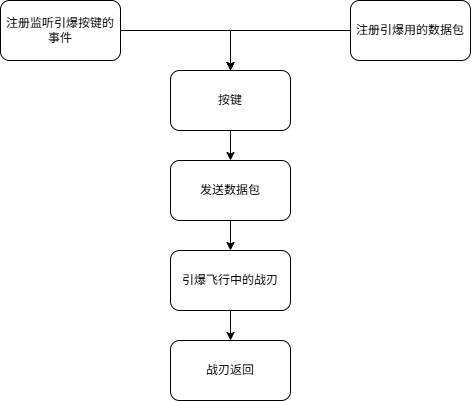
按键手动爆炸流程图
BoomerangClientEvents类(监听按键)
package com.clj.test.event;

import com.clj.test.item.UnbalanceBoomerangItem;
import com.clj.test.packet.ModPackets;
import io.netty.buffer.Unpooled;
import net.fabricmc.fabric.api.client.event.lifecycle.v1.ClientTickEvents;
import net.fabricmc.fabric.api.client.keybinding.v1.KeyBindingHelper;
import net.fabricmc.fabric.api.client.networking.v1.ClientPlayNetworking;
import net.minecraft.client.option.KeyBinding;
import net.minecraft.client.util.InputUtil;
import net.minecraft.network.PacketByteBuf;
import org.lwjgl.glfw.GLFW;

public class BoomerangClientEvents {
    // 创建专用引爆按键(也可以复用右键,根据需求调整)
    private static final KeyBinding DETONATE_KEY = KeyBindingHelper.registerKeyBinding(new KeyBinding(
            "key.student-mod.detonate_boomerang",//这个是游戏的按键设置中显示的名字
            InputUtil.Type.KEYSYM,
            GLFW.GLFW_KEY_R, // 使用R键作为引爆键
            "category.student-mod.combat"//这个是游戏的按键设置中显示的名字
    ));

    // 添加状态跟踪变量,产生战刃实体的时候,会将这个变量置为true,表示可以发数据包引爆了
    private static boolean hasThrownBoomerang = false;
    public static void register() {
        ClientTickEvents.END_CLIENT_TICK.register(client -> {
            if (client.player != null && DETONATE_KEY.wasPressed() && hasThrownBoomerang) {
                // 向服务器发送引爆请求,调用引爆函数是在数据包里,不在这里
                ClientPlayNetworking.send(ModPackets.TRIGGER_BOOMERANG_EXPLOSION, new PacketByteBuf(Unpooled.buffer()));
            }
        });
    }
    // 提供方法让其他类将这个变量置为true,表示可以发数据包引爆了
    public static void setHasThrownBoomerang(boolean thrown) {
        hasThrownBoomerang = thrown;
    }

}
ModPacket类(引爆的数据包)
package com.clj.test.packet;

import com.clj.test.StudentMod;
import com.clj.test.entity.UnbalanceBoomerangEntity;
import net.fabricmc.fabric.api.networking.v1.ServerPlayNetworking;
import net.minecraft.util.Identifier;

public class ModPackets {

    /*
    注册网络数据包
    */
    public static final Identifier TRIGGER_BOOMERANG_EXPLOSION = new Identifier(StudentMod.MOD_ID, "trigger_boomerang_explosion");

    /*
    在服务端线程中执行(server.execute)
    验证玩家对象不为空
    在玩家周围256格范围内搜索所有UnbalanceBoomerangEntity实体
    筛选出由该玩家投掷的战刃(entity.getOwner() == player)
    对每个匹配的战刃调用triggerExplosion()方法
    */
    public static void register() {
        ServerPlayNetworking.registerGlobalReceiver(TRIGGER_BOOMERANG_EXPLOSION, (server, player, handler, buf, responseSender) -> {
            server.execute(() -> {
                // 服务器端处理逻辑
                if (player != null) {
                    // 查找玩家投掷的回旋镖并引爆
                    player.getWorld().getEntitiesByClass(UnbalanceBoomerangEntity.class,
                            player.getBoundingBox().expand(256), // 搜索范围256格
                            entity -> entity.getOwner() == player)
                            .forEach(UnbalanceBoomerangEntity::triggerExplosion);
                }
            });
        });
    }
}
最后别忘了注册Item,Entity
在ModItems中
public static final Item UNBALANCE_BOOMERANG = registerItems(
            "unbalance_boomerang",
            new UnbalanceBoomerangItem(new Item.Settings().maxCount(1))
    );
在ModEntities中
    public static final EntityType<UnbalanceBoomerangEntity> UNBALANCE_BOOMERANG =
            Registry.register(
                    Registries.ENTITY_TYPE,
                    new Identifier(StudentMod.MOD_ID, "unbalance_boomerang_entity"),
                    FabricEntityTypeBuilder.<UnbalanceBoomerangEntity>create(SpawnGroup.MISC, UnbalanceBoomerangEntity::new)
                            .dimensions(EntityDimensions.fixed(0.8f, 0.8f)) // 实体大小
                            .trackRangeBlocks(256) // 追踪距离(块)
                            .trackedUpdateRate(1) // 更新频率,1tick一个更新,如果调大了,就一卡一卡的
                            .build()
            );
在onInitialize中
ModEntities.registerModEntities();
ModPackets.register();
BoomerangClientEvents.register();
实现重点
战刃跟随玩家视角的平滑插值(线性插值)GPT版
// 玩家视线方向向量
Vec3d lookDir = owner.getRotationVec(1.0f).normalize();

// 当前速度
Vec3d currentVel = getVelocity();

// -------- 平滑插值修正方向 --------
// 插值参数越小越平滑,越大越灵敏
double turnSmoothness = 1.0; // 越小越慢,越平稳
Vec3d targetVel = lookDir.multiply(1.3); // 目标速度大小
Vec3d newVel = currentVel.lerp(targetVel, turnSmoothness); // 线性插值
/*
新方向 = (投掷者视角方向 * 1.3)  + (本来的战刃方向向量 + (投掷者视角方向 * 1.3)) * turnSmoothness插值系数
*/
setVelocity(newVel);
一、什么是线性插值(lerp)——数学公式与直观含义
数学上,两个实数或向量之间的线性插值定义为:
lerp(a, b, t) = a + (b - a) * t
a:起点(当前值)
b:终点(目标值)
t:插值系数,通常在 [0,1] 之间
t = 0 → 结果 = a(不动)
t = 1 → 结果 = b(瞬间跳到目标)
0 < t < 1 → 在 a 与 b 之间按比例平滑过渡
对向量逐分量(x,y,z)应用同样公式,得到平滑的向量过渡。
这里新方向 = (投掷者视角方向 * 1.3) + (本来的战刃方向向量 + (投掷者视角方向 * 1.3)) * turnSmoothness插值系数
这样战刃就随玩家视角移动了
战刃跟随玩家视角的姿态控制(为什么要记录老的姿态)
// 面向运动方向
this.prevYaw = this.getYaw();
this.prevPitch = this.getPitch();
this.setYaw((float)(Math.toDegrees(Math.atan2(newVel.x, newVel.z))));
this.setPitch((float)(Math.toDegrees(Math.asin(newVel.y / newVel.length()))));
prevYaw、prevPitch是原来的姿态
后面两句又根据新的战刃方向改变了姿态
这是因为Minecraft客户端在渲染实体时使用插值来实现流畅动画,需要当前帧和前一帧的姿态数据,如果不保存旧姿态,直接更新角度值可能导致渲染时出现突然的角度跳跃
模型与贴图
通过网盘分享的文件:新建文件夹
链接: https://pan.baidu.com/s/1DRDoGF9oOrFWn6HAcIJxhA?pwd=sgy6 提取码: sgy6
--来自百度网盘超级会员v5的分享





 扫一扫
扫一扫


 1101
1101

 被折叠的 条评论
为什么被折叠?
被折叠的 条评论
为什么被折叠?
 到【灌水乐园】发言





