





两种方式实现左右滑动切换页签:①利用swiper组件 ②监听touch事件
滑动返回上一页:监听touch事件
先看效果
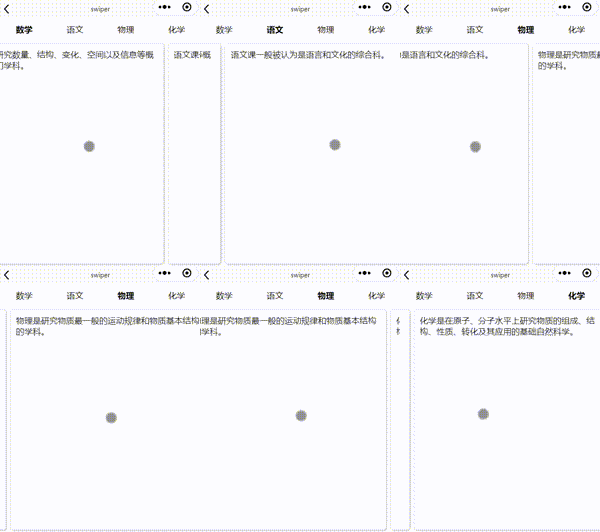
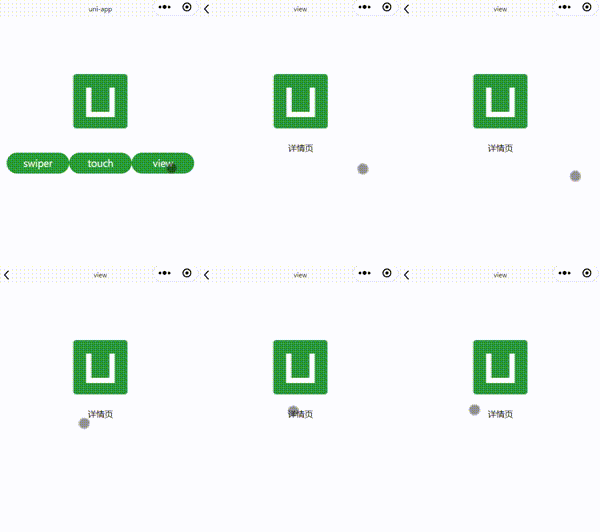
前端demo工程:https://ext.dcloud.net.cn/plugin?id=20674
方案1:利用swiper组件实现左右滑动切换页签
前端代码:swiper.vue
<view class="tabs"><view v-for="(tab,index) in tabs" :key="index" class="tab"><text @click="()=>clickItem(index)" :class="index === current?'active':''">{{tab}}</text></view></view><swiper class="swiper" :current="current" @change="changeItem"><swiper-item v-for="(item, index) in items" :key="index"><view class="item"><!-- 页签内容 --><text>{{item}}</text></view></swiper-item></swiper>
data() {return {tabs:['数学','语文','物理','化学'], //页签items:['数学是研究数量、结构、变化、空间以及信息等概念的一门学科。','语文课一般被认为是语言和文化的综合科。','物理是研究物质最一般的运动规律和物质基本结构的学科。','化学是在原子、分子水平上研究物质的组成、结构、性质、转化及其应用的基础自然科学。'],//页签内容current:0 //当前页签}}
//点击tab切换页签clickItem(idx){this.current = idx;},//左右滑动切换页签changeItem(e){this.current = e.detail.current;}
方案二:监听touch事件实现左右滑动切换页签
实现思路:
1)监听touchstart、touchmove、touchend事件,捕捉触碰位置
2)通过位移差,判断左右移动,切换当前页current
3)判断页签的和页签内容index是否与current一致,一致则展示
前端代码:touch.vue
<view class="tabs"><view v-for="(tab,index) in tabs" :key="index" class="tab"><text @click="()=>clickItem(index)" :class="index === current?'active':''">{{tab}}</text></view></view><view class="swiper" @touchstart="touchStart" @touchmove="touchMove" @touchend="touchEnd"><view v-for="(item, index) in items" :key="index"><view class="item" v-if="index === current"><!-- 页签内容 --><text>{{item}}</text></view></view></view>
data() {return {tabs:['数学','语文','物理','化学'], //页签items:['数学是研究数量、结构、变化、空间以及信息等概念的一门学科。','语文课一般被认为是语言和文化的综合科。','物理是研究物质最一般的运动规律和物质基本结构的学科。','化学是在原子、分子水平上研究物质的组成、结构、性质、转化及其应用的基础自然科学。'],//页签内容current:0, //当前页startX: 0, // 触摸开始的X坐标endX: 0, // 触摸结束的X坐标threshold: 50 ,// 滑动的阈值,当滑动超过这个值时触发返回isSwipe: false // 是否进行了滑动}}
//触摸开始touchStart(e) {this.startX = e.touches[0].clientX;},//触摸移动touchMove(e) {this.endX = e.touches[0].clientX;this.isSwipe = true; //有触发移动},//触摸结束touchEnd(e) {if(!this.isSwipe){return ;}//没有滑动。防止误碰触发this.isSwipe = false ;let distance = this.endX - this.startX;if (Math.abs(distance) > this.threshold) {// 判断滑动方向if (distance > 0 &&this.current>0) {this.current--;} else if(this.current<this.items.length-1){this.current++;}}},clickItem(idx){this.current = idx;}
说明:
1) 需在touchMove中增加isSwipe处理,防止误碰
2) 监听touch事件的view需要给足够的高度
监听touch事件,返回上一页
实现思路和方案二类似
前端代码:view.vue
<view class="content" @touchstart="touchStart" @touchmove="touchMove" @touchend="touchEnd"><image class="logo" src="/static/logo.png"></image><view class="text-area">{{title}}</view></view>
data() {return {title:'详情页',startX: 0, // 触摸开始的X坐标endX: 0, // 触摸结束的X坐标threshold: 50 ,// 滑动的阈值,当滑动超过这个值时触发返回isSwipe: false // 是否进行了滑动}}
//触摸开始touchStart(e) {this.startX = e.touches[0].clientX;},//触摸移动touchMove(e) {this.endX = e.touches[0].clientX;this.isSwipe = true;},//触摸结束touchEnd(e) {if(!this.isSwipe){return ;}this.isSwipe = false ;let distance = this.endX - this.startX;if (Math.abs(distance) > this.threshold) {// 判断滑动方向if (distance > 0) {// 向右滑动console.log('向右滑动');// 调用返回操作uni.navigateBack({delta: 1});}}}
说明:
1) 需在touchMove中增加isSwipe处理,防止误碰
2) 监听touch事件的view需要给足够的高度
最后介绍下我开发了两款微信小程序:趣味知识宝典、萌娃成长,大家可以免费使用,多多支持下!
趣味知识宝典:一款知识学习工具,在趣味中学习知识,包括成语(包含成语拼音、释义、出处、语法、例句、近义词、反义词、故事(寓言故事、历史典故)等,按照寓言、高考(近10年)、时间等多维度分类),科普知识(十万为什么),谜语(猜字谜、脑筋急转弯)等。
萌娃成长:育儿好帮手,奶瓶喂养、母乳亲喂、辅食喂养、补剂用药、换尿不湿、睡眠记录、身高体重、疫苗接种、发育评估(DQ)统统搞定,记录宝宝成长每个瞬间,与宝妈奶爸一起交流育儿经验,与萌娃一起健康快乐成长。





 扫一扫
扫一扫


 3102
3102

 被折叠的 条评论
为什么被折叠?
被折叠的 条评论
为什么被折叠?
 到【灌水乐园】发言





