





 本文介绍如何使用Spring Initializr创建一个简单的Web应用,通过GET请求返回定制化的问候信息,并利用Thymeleaf进行页面渲染。
what you will build?
得到一个应用,输入http://localhost:8080/greeting,返回“Hello, World!”
输入:http://localhost:8080/greeting?name=User,返回“Hello,XXXXX”。
Starting with Spring Initializr
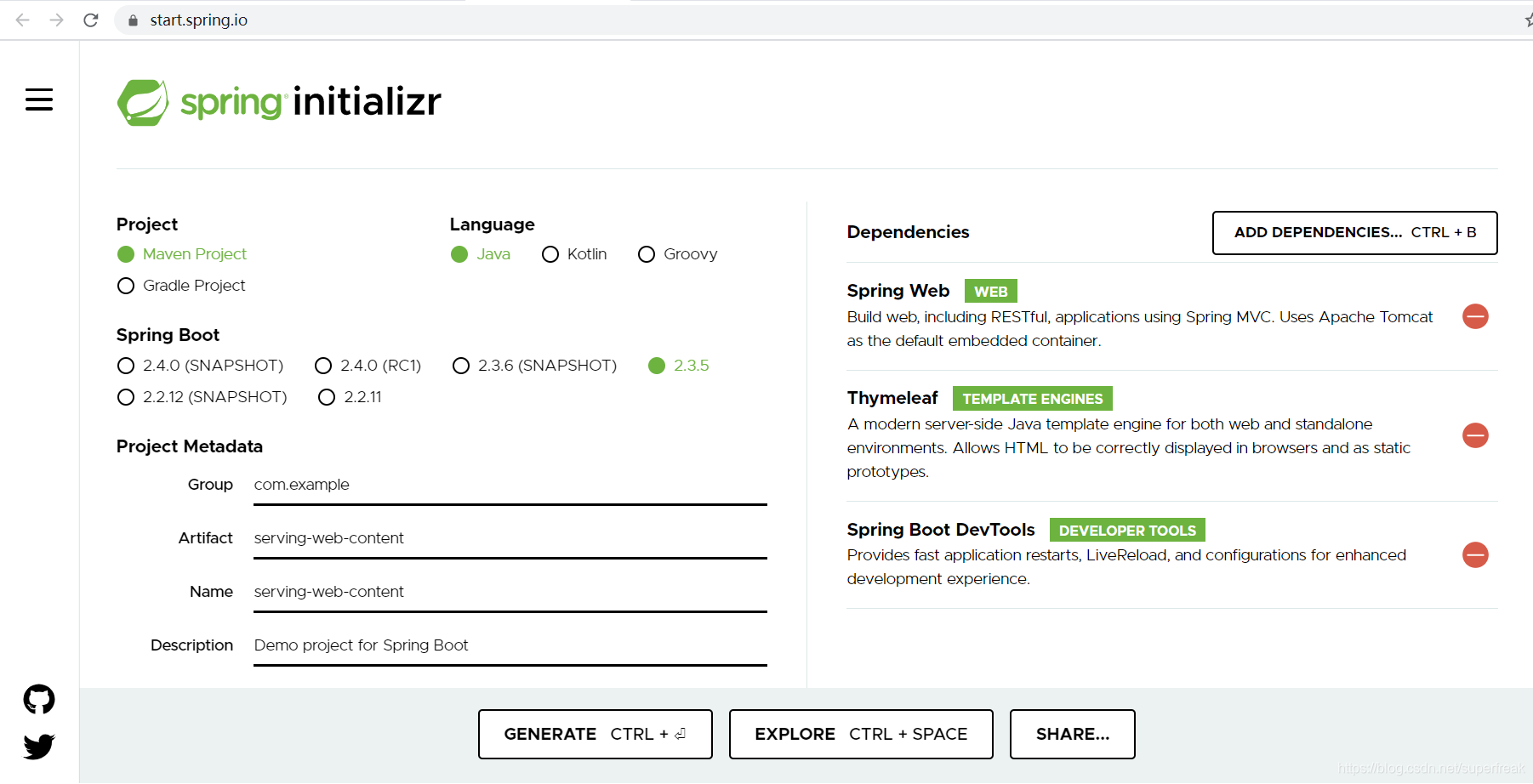
在这个地方完成项目的创建。
进入Spring Initializer,在artifact中输入:serving-web-content。artifact 这个地方需要看原文的pom。xml文件内容中的artifactid ,就可以知道我们这个地方该怎么填。
添加依赖的原文:This example needs the Spring Web, Thymeleaf, and Spring Boot DevTools dependencies.
就是在右侧加入依赖:Spring Web, Thymeleaf, and Spring Boot DevTools 如下图
如果你用gradle 也有gradle的构建文件,我用的是maven,所以关于gradle的都略去了。
Create a Web Controller
创建Web控制器。按照Spring的方式,HTTP requests are handled by a controller,HTTP请求都是要个一个控制器来处理的。对这个类要加上@Controller 注解。本例子中,GreetingController处理Get请求/greeting,返回view的名字(即greeting)。view 负责渲染HTML内容。下面具体的操作是添加GreetingController.java 文件,或者是加这个类,一个意思了。
类比较短,就列在这里。
package com.example.servingwebcontent;

import org.springframework.stereotype.Controller;
import org.springframework.ui.Model;
import org.springframework.web.bind.annotation.GetMapping;
import org.springframework.web.bind.annotation.RequestParam;

@Controller
public class GreetingController {

	@GetMapping("/greeting")
	public String greeting(@RequestParam(name="name", required=false, defaultValue="World") String name, Model model) {
		model.addAttribute("name", name);
		return "greeting";
	}

}
可以看到就是一个函数greeting,参数是name,给model 添加了属性 ,然后返回 greeting。
@GetMapping注解确保HTTP GET请求/greeting 最后映射到greeting()方法。
@RequestParam binds the value of the query string parameter name into the name parameter of the greeting() method. This query string parameter is not required. If it is absent in the request, the defaultValue of World is used. The value of the name parameter is added to a Model object, ultimately making it accessible to the view template.
@RequestParam 绑定查询字符串参数name 到greeting()方法的name参数,查询字符串不是必须的,如果缺失,默认值就是World。name参数的值添加到Model对象,最后使得它可以被view 模板访问。
The implementation of the method body relies on a view technology (in this case, Thymeleaf) to perform server-side rendering of the HTML. Thymeleaf parses the greeting.html template and evaluates the th:text expression to render the value of the ${name} parameter that was set in the controller.The following listing (from src/main/resources/templates/greeting.html) shows the greeting.html template:
方法体的实现依靠一个视图技术(本例为Thymeleaf),来执行服务器端的HTML渲染。Thymeleaf解析greeting.html 模板,然后计算th:text表达式的值来渲染¥{name}参数,它是在controller中设置的。下面是greeting.html 模板
<!DOCTYPE HTML>
<html xmlns:th="http://www.thymeleaf.org">
<head>
    <title>Getting Started: Serving Web Content</title>
    <meta http-equiv="Content-Type" content="text/html; charset=UTF-8" />
</head>
<body>
    <p th:text="'Hello, ' + ${name} + '!'" />
</body>
</html>
Spring Boot Devtools
开发Web应用一般就是编程了一些改变,重启应用,查看浏览器中改变,整个过程耗费时间。为了加速整个过程,Spirng Boot提供了方便的spring-boot-devtools.可以做:
热插拔
切换template引擎来禁用缓存
liveReload,自动刷新
基于开发的一些默认设置而不是生产环境。
Run the Application
Spring Initializer创建了应用类,默认的不用改就可以了。
package com.example.servingwebcontent;

import org.springframework.boot.SpringApplication;
import org.springframework.boot.autoconfigure.SpringBootApplication;

@SpringBootApplication
public class ServingWebContentApplication {

    public static void main(String[] args) {
        SpringApplication.run(ServingWebContentApplication.class, args);
    }

}
略去关于主类的一些说明。
main()方法调用SpringApplication.run()方法来启动一个应用。根本就没有web.xml,整个web是100%的纯的java的。
Build an executable JAR
为了达到看到效果就可以的目的,本人翻译的整个SpringGuide教程均略去了这个章节。
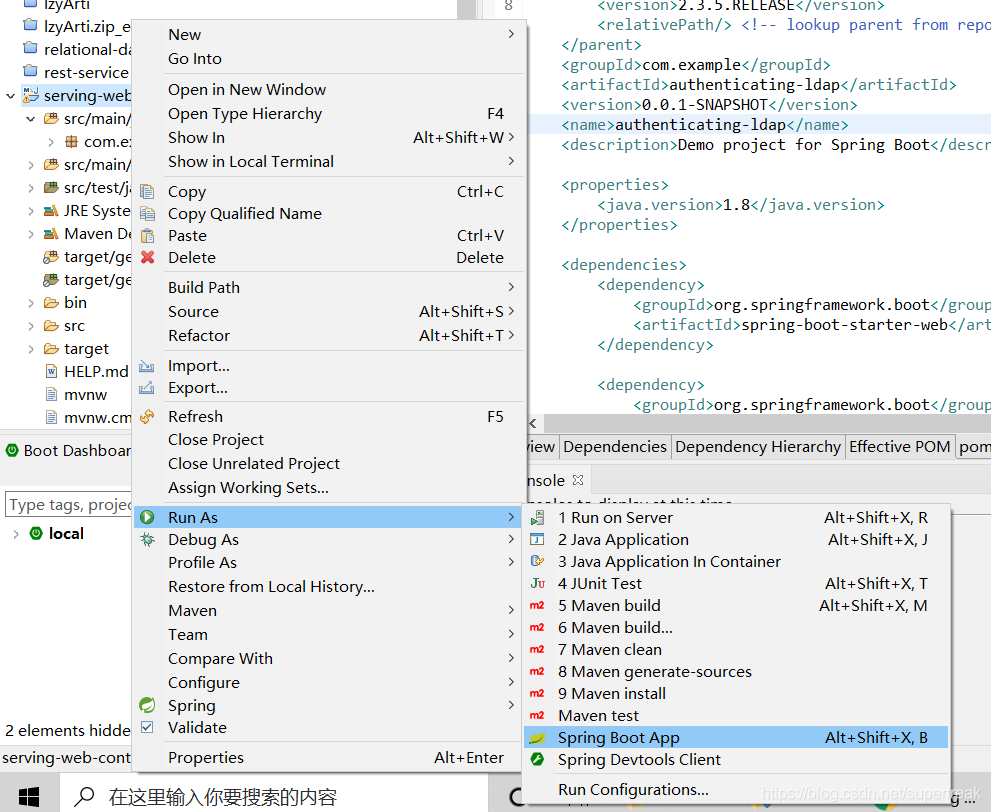
在做下面的测试之前,可以在SpringToolSuite4中,右键点击整个项目,选择Run as ---》SpringBootApp
具体如下图
之后就可以测试了。
Test the Application
浏览器中键入:http://localhost:8080/greeting
会看到 Hello,World!
浏览器中键入:http://localhost:8080/greeting?name=TeLangPu
会看到 Hello,TeLangPu!

Add a Home Page
静态资源包括HTML,JS文件 CSS文件 都放如static下。index.thml有点特殊,一般是作为欢迎页的。创建一个index.html
文件。
<!DOCTYPE HTML>
<html>
<head>
    <title>Getting Started: Serving Web Content</title>
    <meta http-equiv="Content-Type" content="text/html; charset=UTF-8" />
</head>
<body>
    <p>Get your greeting <a href="/greeting">here</a></p>
</body>
</html>重启后,可以访问http://localhost:8080/看到整个默认页。
Summray
结束了,你学会了一些东西。
See Also
还可以去看看其他的Guide。





 扫一扫
扫一扫


 448
448

 被折叠的 条评论
为什么被折叠?
被折叠的 条评论
为什么被折叠?
 到【灌水乐园】发言





