 微信公众号接入与消息处理


内网穿透工具
https://www.ngrok.cc/user.html 收费。。
1.微信公众号接入服务器
1.1申请微信公众号测试号
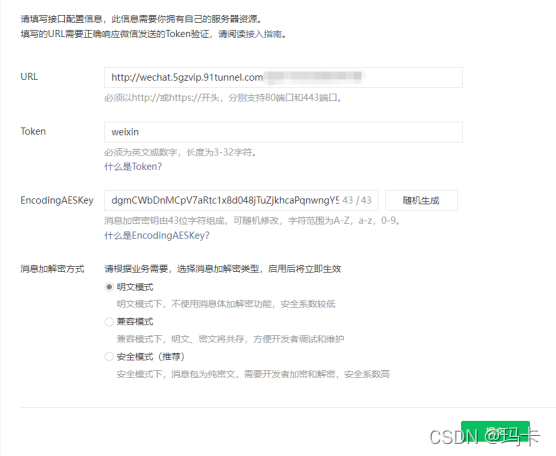
公众号首页—设置与开发—基本配置
@GetMapping("/wx")
	public void tokenVerify(HttpServletRequest request, HttpServletResponse response) throws IOException {
		String signature = request.getParameter("signature");
		String timestamp = request.getParameter("timestamp");
		String nonce = request.getParameter("nonce");
		String echostr = request.getParameter("echostr");

		boolean isVerify = SignUtil.checkSignature(signature, timestamp, nonce);

		if (!isVerify) {
			log.error("消息不是来自微信服务器!");
		} else {
			response.getOutputStream().println(echostr);
		}

	}
SignUtil接口
public class SignUtil {

	 private static String token = "weixin";

	    public static boolean checkSignature(String signature, String timestamp, String nonce) {
	        boolean result = false;

	        // 对token、timestamp和nonce按字典序排序
	        String[] array = new String[]{token, timestamp, nonce};
	        Arrays.sort(array);

	        // 将三个参数字符拼接成一个字符串
	        String str = array[0].concat(array[1]).concat(array[2]);

	        String sha1Str = null;
	        try {
	            // 对拼接后的字符串进行sha1加密
	            MessageDigest md = MessageDigest.getInstance("SHA-1");
	            byte[] digest = md.digest(str.getBytes());
	            sha1Str = byte2str(digest);
	        }
	        catch(Exception e) {
	        }

	        System.out.println(sha1Str);
	        if(sha1Str != null &&  sha1Str.equals(signature)) {
	            result = true;
	        }

	        return result;
	    }

	    /*
	     * 将字节数组转换成字符串
	     */
	    public static String byte2str(byte[] array) {
	        StringBuffer hexstr = new StringBuffer();
	        String shaHex="";
	        for(int i = 0; i < array.length; i++) {
	            shaHex = Integer.toHexString(array[i] & 0xFF);
	            if(shaHex.length() < 2) {
	                hexstr.append(0);
	            }
	            hexstr.append(shaHex);
	        }
	        return hexstr.toString();
	    }

}
Token必须跟代码里面一致,可加入配置文件
提交发送请求,请求成功
2.接收消息_返回消息
接受消息也需要封装,改为安全模式
/**
	 * 微信消息处理
	 *
	 * @throws IOException
	 */
	@PostMapping("/tokenVerify")
	public void getMsg(HttpServletRequest request, HttpServletResponse response) throws IOException {

		request.setCharacterEncoding("utf8");
		response.setCharacterEncoding("utf8");

		Map<String, String> map = XmlUtils.xmlAnalysis(request.getInputStream());

		String openId = map.get("FromUserName");
		String msgType = map.get("MsgType");

		String Conten = topicService.topicList();
		if ("event".equals(msgType)) {

			String Event = map.get("Event");
			if ("subscribe".equals(Event)) {

			} else if ("unsubscribe".equals(Event)) {

			}

		} else if ("text".equals(msgType)) {

			String Content = map.get("Content");

			if ("订阅".equals(Content)) {
				// Conten = topicService.topicList();
			} else if (CommonUtils.isNumeric(Content)) {

			}

		} else {

		}

		String xml = "<xml><ToUserName><![CDATA[" + map.get("FromUserName") + "]]></ToUserName><FromUserName><![CDATA["
				+ map.get("ToUserName") + "]]></FromUserName><CreateTime>" + System.currentTimeMillis() / 1000
				+ "</CreateTime><MsgType><![CDATA[text]]></MsgType><Content><![CDATA[" + Conten + "]]></Content><MsgId>"
				+ map.get("MsgId") + "</MsgId></xml>";

		PrintWriter out = response.getWriter();
		out.print(xml);
		out.flush();
		out.close();
	}
XmlUtils.xmlAnalysis方法
public static  Map<String,String> xmlAnalysis(InputStream is){

		//用户发过来的是什么消息
		SAXReader reader = new SAXReader();
        Document document = null;
        try {
            document = reader.read(is);
        } catch (DocumentException e) {
            e.printStackTrace();
        }
        Element root = document.getRootElement();
        List<Element> elements = root.elements();
        Map<String,String> map = new HashMap<>();
        for(Element e:elements){
            map.put(e.getName(), e.getStringValue());
        }

        return map;

	}
3.获取access_token
需要后期加入缓存
public static String REQURL = "https://api.weixin.qq.com/cgi-bin/token?grant_type=client_credential&appid=APPID&secret=SECRET";
	// 微信公众号
	private static final String APPID = "";
	private static final String APPSECRET = "";

	public static String getToken() throws IOException {

		String url = REQURL.replace("APPID", APPID);
		url = url.replace("SECRET", APPSECRET);

		String respJson = OkHttpUtils.runGet(url);

		JSONObject respJsonObj = JSONObject.parseObject(respJson);
		System.out.println(respJsonObj.getString("access_token"));
		return respJsonObj.getString("access_token");
	}





 扫一扫
扫一扫


 2913
2913

 被折叠的 条评论
为什么被折叠?
被折叠的 条评论
为什么被折叠?
 到【灌水乐园】发言





