


一、基础使用
import React from 'react';
import ReactDOM from 'react-dom/client';

// 1. 创建根节点
const root = ReactDOM.createRoot(document.getElementById('root'));

// 2. 渲染组件
root.render(<App />);

// 3. 卸载组件(可选)
root.unmount();
二、核心特性
- 并发渲染(Concurrent Rendering)
- 支持可中断渲染,优先处理高优先级更新
- 通过
useTransition、useDeferredValue等 API 控制渲染行为
- 自动批处理(Automatic Batching)
- 异步操作(如 setTimeout、Promise)中的状态更新也会被批处理
setTimeout(() => {


  setCount(1);
  setFlag(true);
   // 批量处理,仅触发一次渲染
}, 1000);
- 流式服务端渲染(Suspense SSR)
- 配合
Suspense实现渐进式内容加载
- 配合
三、源码分析
文件位置:packages/react-dom/src/client/ReactDOMRoot.js
export function createRoot(
  container: Element | Document | DocumentFragment,
  options?: CreateRootOptions,
): RootType {


  // 1. 验证容器有效性
  if (!isValidContainer(container)) {


    throw new Error('Target container is not a DOM element.');
  }

  // 2. 警告已有内容(开发环境)
  warnIfReactDOMContainerInDEV(container);

  // 配置信息设置 (可以不用特别关注)
  ...

  // 3. 创建内部根节点 FiberRoot (关键步骤)
  const root = createContainer(
    container,                          // DOM容器
    ConcurrentRoot,                     // 根节点类型
    null,                               // 水合回调
    isStrictMode,                       // 严格模式标志
    concurrentUpdatesByDefaultOverride, // 并发更新覆盖
    identifierPrefix,                   // ID前缀
    onUncaughtError,                    // 未捕获错误处理
    onCaughtError,                      // 已捕获错误处理
    onRecoverableError,                 // 可恢复错误处理
    transitionCallbacks,                // 过渡回调
  );
  // markContainerAsRoot 函数通过在给定的 DOM 容器上添加特定的属性或标记,来明确该容器是 React 应用的根节点
  // node[internalContainerInstanceKey] = hostRoot;
  // 4. 标记容器为已使用
  markContainerAsRoot(root.current, container);

  const rootContainerElement: Document | Element | DocumentFragment =
    container.nodeType === COMMENT_NODE
      ? (container.parentNode: any)
      : container;

  // 5. 初始化事件系统,容器根节点监听事件
  listenToAllSupportedEvents(rootContainerElement);

  // $FlowFixMe[invalid-constructor] Flow no longer supports calling new on functions
  // 6. 象返回 RootType 对象
  return new ReactDOMRoot(root);
}
函数调用栈
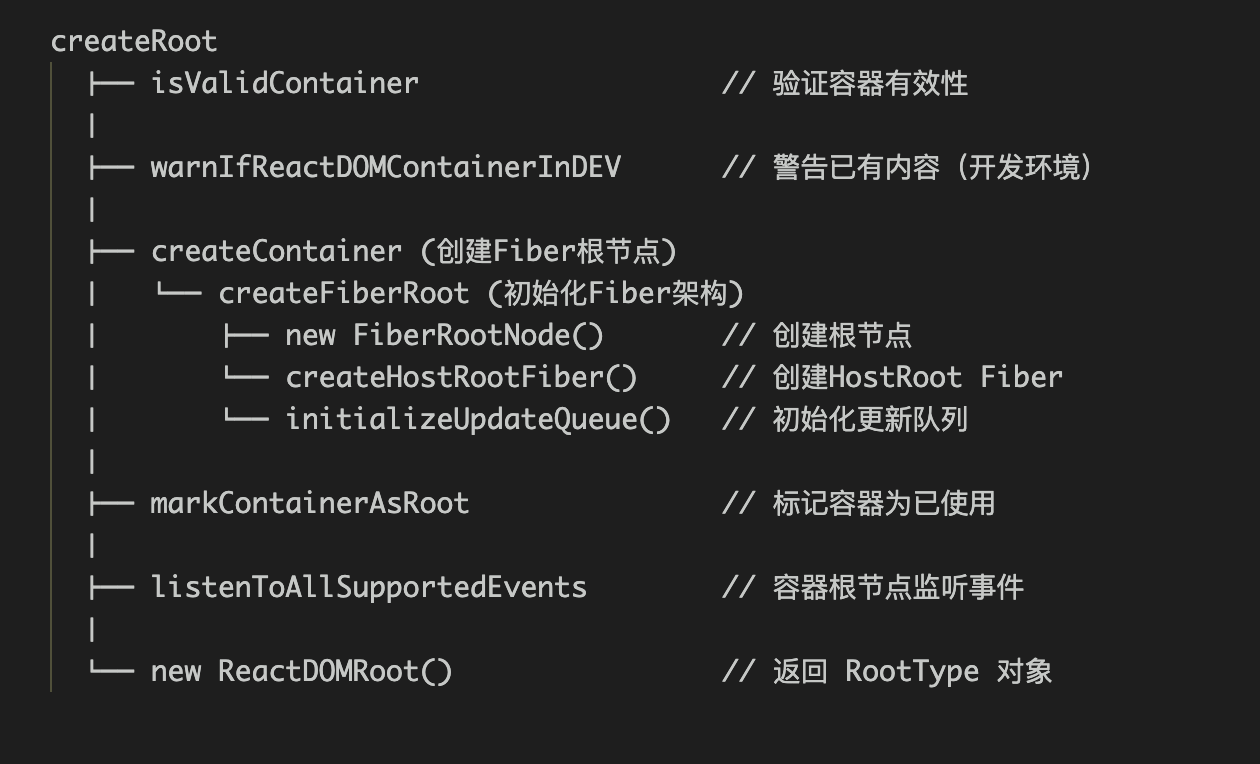
关键函数解析
createContiner
文件位置:packages/react-reconciler/src/ReactFiberReconciler.js
export function createContainer(
  containerInfo,
  tag,
  hydrationCallbacks,
  isStrictMode,
  concurrentUpdatesByDefaultOverride,
  identifierPrefix,
  onUncaughtError,
  onCaughtError,
  onRecoverableError,
  transitionCallbacks,
): OpaqueRoot {


  const hydrate = false;
  const initialChildren = null;
  return createFiberRoot(
    containerInfo,
    tag,
    hydrate,
    initialChildren,
    hydrationCallbacks,
    isStrictMode,
    identifierPrefix,
    onUncaughtError,
    onCaughtError,
    onRecoverableError,
    transitionCallbacks,
    null,
  );
}
参数详解
container: Container
- 类型:
HTMLElement:标准的 DOM 元素(通常是div#root)DocumentFragment:React 19 新增支持
- 作用:React 应用挂载的 DOM 容器
验证逻辑:
export function isValidContainer(node: any): boolean {


  return !!(
    node &&
    (node.nodeType === ELEMENT_NODE ||
     node.nodeType === DOCUMENT_NODE ||
     node.nodeType === DOCUMENT_FRAGMENT_NODE ||
     (!disableCommentsAsDOMContainers &&
      node.nodeType === COMMENT_NODE &&
      (node: any).nodeValue === ' react-mount-point-unstable '))
  );
}
- 注意事项:
- 必须是有效的 DOM 节点
- React 19 新增对 DocumentFragment 的支持
tag: RootTag
- 类型:数字常量
- 作用:指定渲染模式
可选值:
// <18 的渲染模式
// export const LegacyRoot = 0;       // ReactDOM.render 模式
// export const BlockingRoot = 1;      // 过渡模式(已弃用)
// export const ConcurrentRoot = 2;    // createRoot 模式

// 18+ 的渲染模式
 最低0.47元/天 解锁文章






 扫一扫
扫一扫


 1297
1297

 被折叠的 条评论
为什么被折叠?
被折叠的 条评论
为什么被折叠?
 到【灌水乐园】发言





