


安装
pip install latex2word
示例
from docx import Document
from latex2word import LatexToWordElement

"""
`pip install python-docx`
常规用法
General usage.
"""

# 公式(Latex string)
latex_input = r"x={-b \pm \sqrt{b^2-4ac}\over 2a}"
# 构建latex_to_word对象 (Build latex_to_word objects)
latex_to_word = LatexToWordElement(latex_input)

# 插入word公式(Create the docx file and insert the element)
doc = Document()
paragraph = doc.add_paragraph()
latex_to_word.add_latex_to_paragraph(paragraph)

doc.save('test.docx')
结果
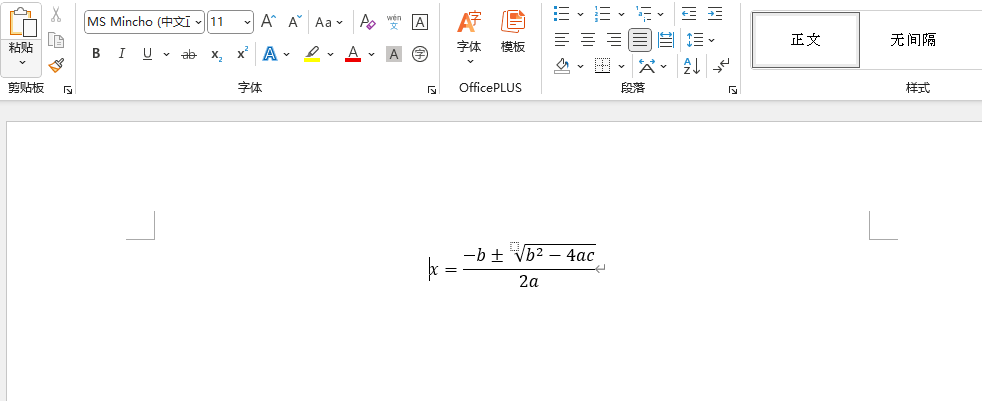
设置字体大小和颜色
from docx import Document
from docx.shared import Pt, RGBColor
from latex2word import LatexToWordElement

"""
`pip install python-docx`
设置字体大小和颜色
Set the font size and color.
"""

# Issue #1: ref: https://github.com/Gu-f/LatexToWord/issues/1

# 公式(Latex string)
latex_input = r"x={-b \pm \sqrt{b^2-4ac}\over 2a}"
# 构建latex_to_word对象 (Build latex_to_word objects)
latex_to_word = LatexToWordElement(latex_input)

# 插入word公式(Create the docx file and insert the element)
doc = Document()
paragraph = doc.add_paragraph()

paragraph.style.font.size = Pt(24)  # 设置字号大小(Set the font size)
paragraph.style.font.color.rgb = RGBColor(255, 0, 0)  # 设置颜色(Set the font color)

latex_to_word.add_latex_to_paragraph(paragraph)

doc.save('test.docx')
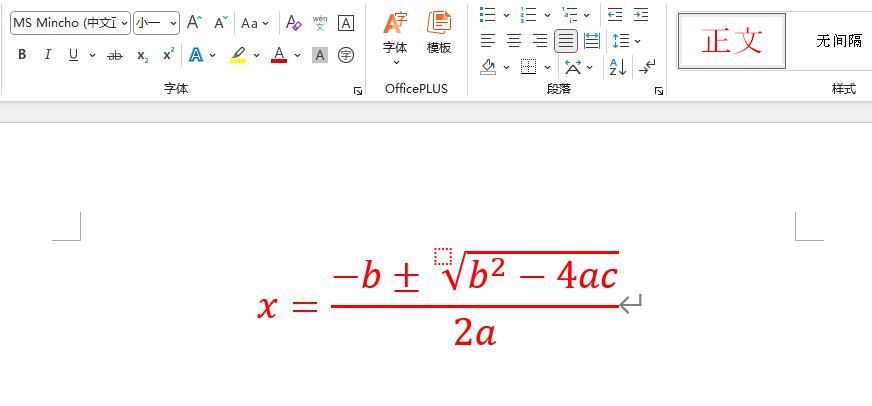





 扫一扫
扫一扫


 1795
1795

 被折叠的 条评论
为什么被折叠?
被折叠的 条评论
为什么被折叠?
 到【灌水乐园】发言





