


 本文介绍了一种在SSM框架下实现系统国际化的方案,详细阐述了如何通过数据库存储多语言资源,配合SSM框架进行国际化配置,以及前端页面如何响应不同语言环境。通过实例演示了从数据库表设计到具体实现的全过程。
背景
公司在越南投资办厂,要求国内系统全部实现多语言国际化版本,拿到该需求的第一想法就是翻译,并且是浏览器自动翻译,因为自己看国外网站的时候百试不爽。但这种方法经不住推敲,万一国外有的浏览器不支持翻译,那系统就无法翻译了。然后又想通过自己写程序去调用翻译接口实时翻译,考虑到系统中有大量的专业术语,加上实时翻译有延迟,所以方案并没有得到认可。(主要是想偷懒,不想多写代码),最后的方案就是自己配置国际化语言,经过几天的查阅资料与研究,采用数据库实现国际化。配置文件(properties)实现可参考:https://www.cnblogs.com/liukemng/p/3750117.html
数据库表设计
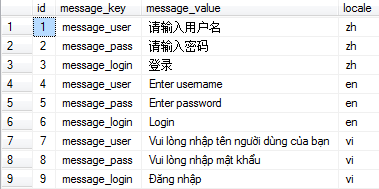
数据库表至少要有key、value、locale三个字段,根据需求添加相应语言,如下图所示:
注意: 为了防止越南文乱码,value的类型为nvarchar(200),插入数据时要加N.
例如:insert into t_scm_language(message_key, message_value, locale) into (‘message_login’, N’Đăng nhập’, ‘vi’);
具体实现
在MVC配置文件中 spring-mvc.xml 添加如下相关配置,因为是从数据库读取数据,所以不配置资源文件的路径.
	<!-- 国际化资源文件,设置“useCodeAsDefaultMessage”,默认为false,当Spring在ResourceBundle中找不到messageKey的话,
		 抛出NoSuchMessageException,把它设置为True,则找不到不会抛出异常,而是使用messageKey作为返回值。 -->
    <bean id="propertiesMessageSource"  class="org.springframework.context.support.ReloadableResourceBundleMessageSource">
        <property name="useCodeAsDefaultMessage" value="true" />
    </bean>
    <mvc:interceptors>
	    <!-- 国际化操作拦截器 如果采用基于(请求/Session/Cookie)则必需配置 -->
	    <bean class="org.springframework.web.servlet.i18n.LocaleChangeInterceptor" />
	</mvc:interceptors>
	<bean id="localeResolver" class="org.springframework.web.servlet.i18n.SessionLocaleResolver" />
	<!-- 数据库国际化资源 自定义的MessageResource -->
	<bean id="messageSource" class="com.demo.controller.MessageResource">
        <property name="parentMessageSource" ref="propertiesMessageSource"/>
	</bean>
根据数据库表结构创建实体类.
@Table(name = "t_scm_language")
public class Language implements Serializable{
	private static final long serialVersionUID = 1L;

	private Long id;
	private String messageKey;
	private String messageValue;
	private String locale;

	// get and set
}
DAO层接口设计.
public interface LanguageMapper extends Mapper<Language>{
	// 获取所有语言记录
	List<Language> getLanguageAll();

}
DAO层映射文件.
<!--
	namespace:必须与对应的接口全类名一致
	id:必须与对应接口的某个对应的方法名一致
 -->
<mapper namespace="com.demo.mapper.LanguageMapper">
	<resultMap type="com.demo.model.Language" id="languageMap">
		<id column="id" property="id"/>
		<result column="message_key" property="messageKey"/>
		<result column="message_value" property="messageValue"/>
		<result column="locale" property="locale"/>
	</resultMap>

	<select id="getLanguageAll" resultMap="languageMap">
		select * from t_scm_language
	</select>
</mapper>
Service层接口设计.
public interface LanguageService {
	List<Language> getLanguageAll();
}
Service具体实现类.
@Service
public class LanguageServiceImpl implements LanguageService {

	@Autowired
	LanguageMapper languageMapper;

	@Override
	public List<Language> getLanguageAll() {
		return languageMapper.getLanguageAll();
	}

}
在spring-common.xml配置 LanguageServiceImpl 依赖.
<bean id="languageServiceImpl" class="com.demo.service.impl.LanguageServiceImpl" />
自定义的MessageResource,本来想着直接通过@Autowired自动注入的,但一直注入失败,一直为Null,找了很久原因都没找到,后面查看ResourceLoaderAware源码,发现它实际运行的是ApplicationContext,所以可以通过配置文件的方式注入,至于为什么不能注解注入,暂时还不清楚,有知道的小伙伴可以告知一下,十分感谢!!
public class MessageResource extends AbstractMessageSource implements ResourceLoaderAware {

	@SuppressWarnings("unused")
	private ResourceLoader resourceLoader;

	private ApplicationContext applicationContext = new ClassPathXmlApplicationContext("config/spring-common.xml");

	/**
	 * Map切分字符
	 */
	protected final String MAP_SPLIT_CODE = "|";
	private final Map<String, String> properties = new HashMap<String, String>();

	public MessageResource() {
		reload();
	}

	public void reload() {
		properties.clear();
		properties.putAll(loadTexts());
	}

	/**
	 * 获取数据库数据
	 * @return
	 */
	private List<Language> getResource() {
		LanguageService languageService = (LanguageService) applicationContext.getBean("languageServiceImpl");
		List<Language> resources = languageService.getLanguageAll();
		System.out.println(resources.toString());
		return resources;
	}

	/**
	 * 加载数据
	 * @return
	 */
	protected Map<String, String> loadTexts() {
		Map<String, String> mapResource = new HashMap<String, String>();
		List<Language> resources = this.getResource();
		for (Language item : resources) {
			String code = item.getMessageKey() + MAP_SPLIT_CODE + item.getLocale();
			mapResource.put(code, item.getMessageValue());
		}
		return mapResource;
	}

	/**
	 * @param code
	 * @param locale
	 * 本地化语言
	 * @return
	 */
	private String getText(String code, Locale locale) {
		String localeCode = locale.getLanguage();
		String key = code + MAP_SPLIT_CODE + localeCode;
		String localeText = properties.get(key);
		String resourceText = code;

		if (localeText != null) {
			resourceText = localeText;
		} else {
			localeCode = Locale.ENGLISH.getLanguage();
			key = code + MAP_SPLIT_CODE + localeCode;
			localeText = properties.get(key);
			if (localeText != null) {
				resourceText = localeText;
			} else {
				try {
					if (getParentMessageSource() != null) {
						resourceText = getParentMessageSource().getMessage(code, null, locale);
					}
				} catch (Exception e) {
					e.printStackTrace();
				}
			}
		}
		return resourceText;
	}

	@Override
	public void setResourceLoader(ResourceLoader resourceLoader) {
		this.resourceLoader = (resourceLoader != null ? resourceLoader : new DefaultResourceLoader());
	}

	@Override
	protected MessageFormat resolveCode(String code, Locale locale) {
		String msg = getText(code, locale);
		MessageFormat result = createMessageFormat(msg, locale);
		return result;
	}

	@Override
	protected String resolveCodeWithoutArguments(String code, Locale locale) {
		String result = getText(code, locale);
		return result;
	}

}
Controller层。此处直接跳往login.jsp页面,spring-mvc.xml文件中有配置前缀与后缀.
@Controller
@RequestMapping(value = "/language")
public class LanguageController {

	@RequestMapping("/change")
	public String change(@RequestParam("locale") String locale, HttpSession session){
		if ("zh".equals(locale)) {
            Locale locale1 = new Locale("zh","CN");
            session.setAttribute(SessionLocaleResolver.LOCALE_SESSION_ATTRIBUTE_NAME, locale1);
        } else if ("en".equals(locale)) {
            Locale locale1 = new Locale("en","US");
            session.setAttribute(SessionLocaleResolver.LOCALE_SESSION_ATTRIBUTE_NAME, locale1);
        } else if ("vi".equals(locale)) {
        	Locale locale1 = new Locale("vi","VN");
            session.setAttribute(SessionLocaleResolver.LOCALE_SESSION_ATTRIBUTE_NAME, locale1);
        } else {
        	session.setAttribute(SessionLocaleResolver.LOCALE_SESSION_ATTRIBUTE_NAME,
        			LocaleContextHolder.getLocale());
        }
		return "login";
	}

}
这里使用BootStrap3.x实现前端页面.
<%@page contentType="text/html; charset=UTF-8" language="java" %>
<!--引入 spring 标签使用国际化-->
<%@ taglib prefix="spring" uri="http://www.springframework.org/tags" %>
<!DOCTYPE html>
<html>
<head>
    <meta charset="utf-8">
    <title>登录页面</title>
    <link rel="stylesheet" href="https://cdn.staticfile.org/twitter-bootstrap/3.3.7/css/bootstrap.min.css">
    <script src="https://cdn.staticfile.org/jquery/2.1.1/jquery.min.js"></script>
    <script src="https://cdn.staticfile.org/twitter-bootstrap/3.3.7/js/bootstrap.min.js"></script>
</head>
<body>

<form class="form-horizontal" role="form">
    <div class="form-group">
        <div class="col-sm-offset-1 col-sm-2">
            <input type="text" class="form-control" id="username"
                   placeholder="<spring:message code="message_user"/>">
        </div>
    </div>
    <div class="form-group">
        <div class="col-sm-offset-1 col-sm-2">
            <input type="text" class="form-control" id="password"
                   placeholder="<spring:message code="message_pass"/>">
        </div>
    </div>
    <div class="form-group">
        <div class="col-sm-offset-1 col-sm-2">
            <samp><a href="/language/change?locale=zh">中文</a>|</samp>
            <samp><a href="/language/change?locale=en">English</a>|</samp>
            <samp><a href="/language/change?locale=vi">Tiếng việt</a></samp>
        </div>
    </div>
    <div class="form-group">
        <div class="col-sm-offset-1 col-sm-2">
            <button type="submit" class="btn btn-default"><spring:message code="message_login"/></button>
        </div>
    </div>
</form>

</body>
</html>
运行结果
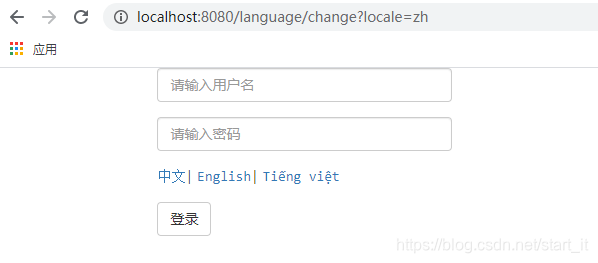
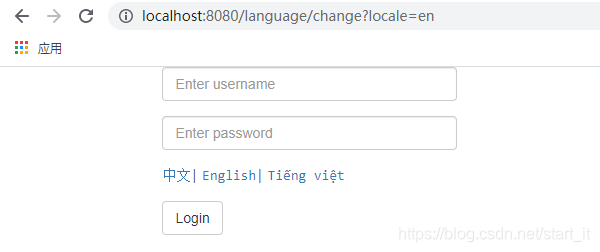
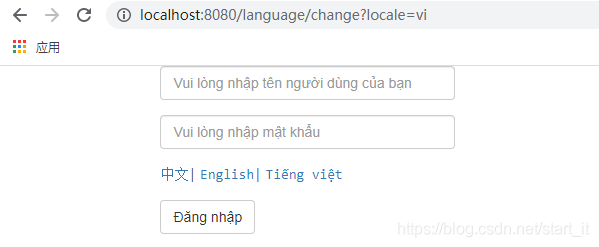
总结
实际项目应该将数据库的数据放置缓存,直接读取数据库影响效率,不推荐。
以上就是利用SSM实现国际化的一个小案例,仅供参考,如有不恰当之处,还望各位大佬斧正指导,小弟在此表示十分感谢!
让我们只争朝夕,不负韶华!





 扫一扫
扫一扫


 3222
3222

 被折叠的 条评论
为什么被折叠?
被折叠的 条评论
为什么被折叠?
 到【灌水乐园】发言





