


 本文详细介绍了Java中的continue,break和return语句,以及如何在循环结构中使用它们,包括内存分析示例和多个编程练习,如判断数的范围、计算水仙花数和求和问题。
【老韩视频p143-154】
1. continue
1.1 基本介绍
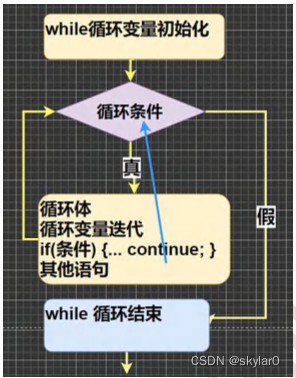
- continue 语句用于结束本次循环,继续执行下一循环。
- continue 语句用在多层嵌套的循环语句体时,可以用标签指明要跳过的是哪一层循环 , 这个和前面的标签的使用的规则一样。
1.2 语法+流程图
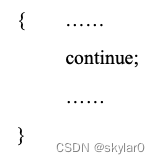
- continue本次循环下面的其他语句就不执行了。
1.3 入门练习
public class Test {
	public static void main(String[] args) {
		//入门代码理解
		int i = 1;
		while(i <= 4){
			i++;
			if(i == 2){
				continue;
			}
			System.out.println("i=" + i);
		}
	}
}
【内存分析法】
内存: i=1 2 3 4 5
显示:i=3,i=4,i=5
1.4 细节说明
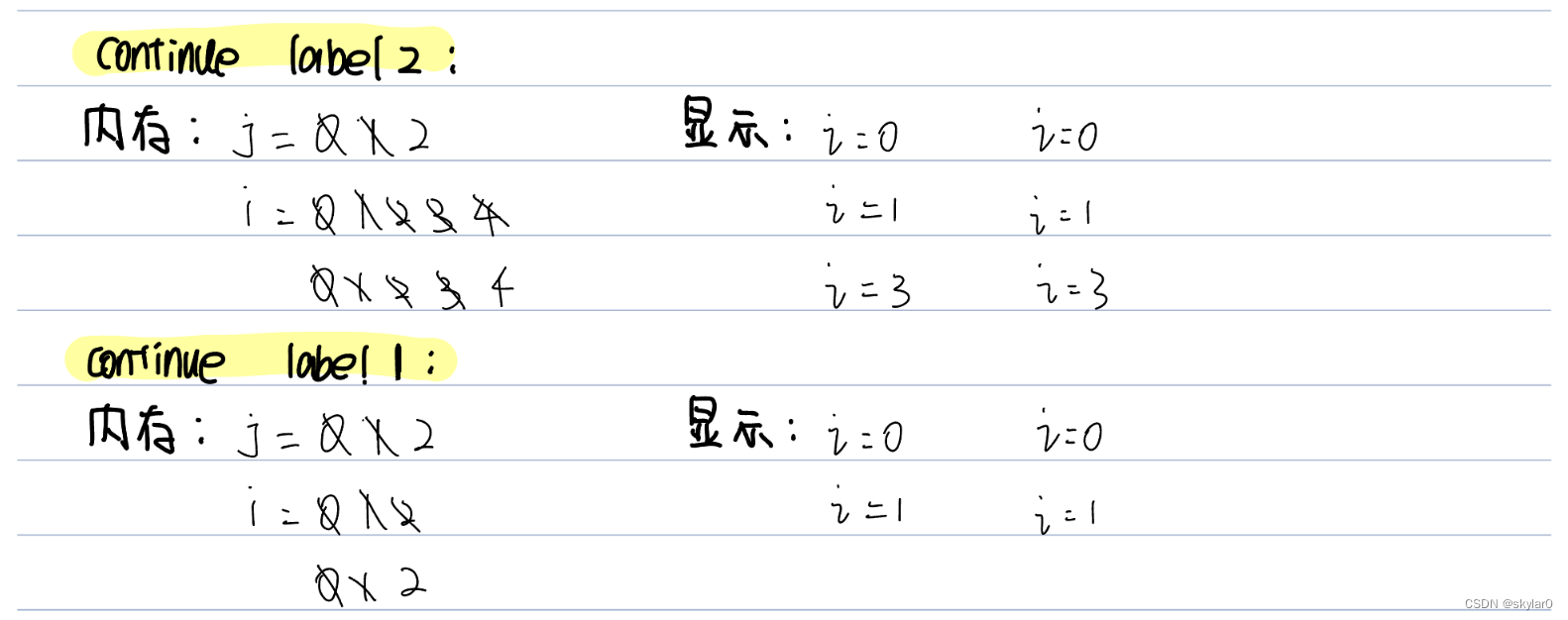
- 不写标签,默认continue是结束最近的一次循环。
public class Test {
	public static void main(String[] args) {
		//
		label1:
		for(int j = 0; j < 2; j++){
			label2:
			for(int i = 0; i < 4; i++){
				if(i == 2){
					//continue 2个标签的分析。
					//continue;//等价于continue label2;
					//continue label1;
				}
				System.out.printin("i = " + i);
			}
		}
	}
}
【内存分析法】
2. return
- return 使用在方法method上的,表示跳出所在的方法(在讲方法时,会详说。)
- 【注意:如果 return 写在 main 方法,表示退出程序。】
public class Test {
	public static void main(String[] args) {
		//看一下break、continue和return的区别

		for(int i = 1; i <= 5; i++){
			if(i==3) {
				System.out.println("老韩" + i);
				break;
				//continue
				//return退出所在方法。使用在main,退出程序
			}
			System.out.println("Hello!");
		}
		System.out println("go on..");
	}
}
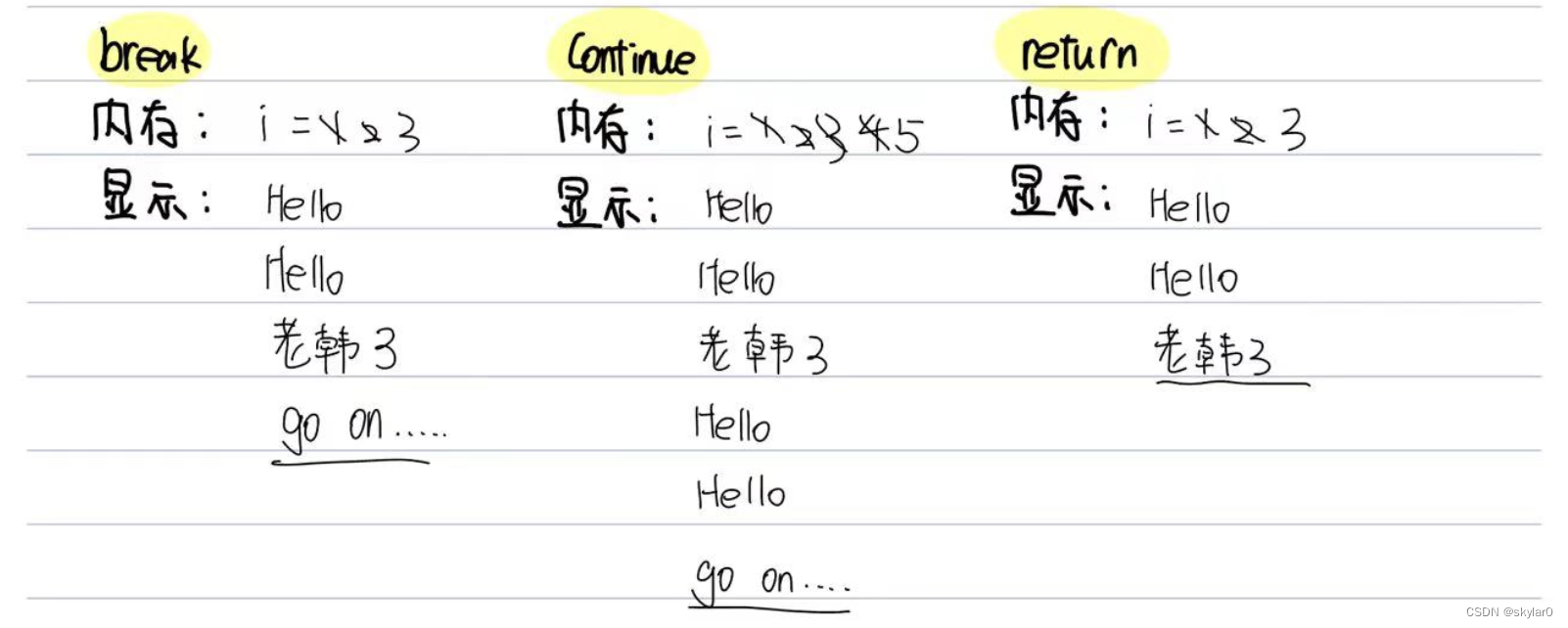
- 内存分析法看这组代码break/ continue/ return的区别。
3. 第六章作业
- 某人有100,000元,每经过一次路口,需要交费,规则如下:
1)当现金>50000时,每次交5%
2)当现金<=50000时,每次交1000
编程计算该人可以经过多少次路口,要求:使用 while + break方式完成。
【错误点:money要定义成double而不是int。让while无限循环,就把条件直接写成true。】
public class homework01 {
	public static void main(String[] args) {
		/*
		1. 某人有100,000元,每经过一次路口,需要交费,规则如下:
		1)当现金>50000时,每次交5%
		2)当现金<=50000时,每次交1000
		编程计算该人可以经过多少次路口,要求:使用 while + break方式完成。

		思路:
		1) 3种条件大于5w,1000-5w,小于1000【使用多分支】
		2) 定义double money保存100000
		3) while-break[money < 1000]
		4)  定义int count来累积次数
		*/

		double money = 100000;
		int count = 0; //累积路过的次数。
		while(true){
			if(money > 50000){
				money *= 0.95;//等价于money = money * 0.95;
			} else if(money >= 1000){
				money -= 1000;//等价于money = money - 1000;
			} else {
				break;
			}
			count++;
		}
		System.out.println(money + "元可以经过" + count + "次路口。");
	}
}
- 实现判断一个整数,展于哪个范围:大于0;小于0:等于0。
思路:定义intn =22;使用if-- else if – else 即可
public class homework02 {
	public static void main(String[] args) {
		//
		int n = 22;
		if(n > 0){
			System.out.println(n + "大于0");
		} else if(n < 0){
			System.out.println(n + "小于0");
		} else{
			System.out.println(n + "等于0");
		}
	}
}
- 判断一个年份是否为国年。
public class homework03 {
	public static void main(String[] args) {
		//判断一个年份是否为国年。
		int year = 2024;
		if((year % 4 == 0 && year % 100 != 0) || (year % 400 == 0)){
			System.out.println(year + "是闰年。");
		} else{
			System.out.println(year + "不是闰年。")
		}

	}
}
- 判断一个整数是否是水仙花数,所谓水仙花数是指一个3位数,其各个位上数宇立方和等于其本身。例如:153 = 111+333 + 555
public class homework04 {
	public static void main(String[] args) {
		/*
		判断一个整数是否是水仙花数,所谓水仙花数是指一个3位数,
		其各个位上数宇立方和等于其本身。
		例如:153 = 1*1*1+3*3*3 + 5*5*5

		思路:
		1. int n =153;
		2. 先得到n的个十百位各个数字,使用if判断条件。
		3. n的百位 = n / 100
		4. n的十位 = n % 100 / 10
		5. n的个位 = n % 10
		6. 判断
		*/
		int num = 153;
		int n1 = num / 100;
		int n2 = num % 100 / 10;
		int n3 = num % 10;
		if(n1 * n1 * n1 + n2 * n2 * n2 + n3 * n3 * n3 == num){
			System.out.println(num + "是一个水仙花数。");
		} else {
			System.out.println(num + "不是一个水仙花数。");
		}

	}
}
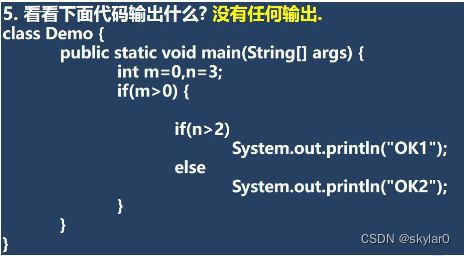
- 看看下面代码输出什么?
无任何输出。
- 输出1-100之间的不能被5整除的数,每5个一行
- 难点: 每5个一行。
思路:定义变量count来看输出的第几位,第5的倍数的输出后面换行一次。
public class homework06 {
	public static void main(String[] args) {
		//输出1-100之间的不能被5整除的数,每5个一行
		int start = 1;
		int end = 100;
		int num = 5;
		int count = 0;
		for(i = start, i <= end, i++){
			if(i % num != 0){
				System.out.print(i);
				count++;
				//每打印5个数后,就换行一次。5,10,15位后面都会换行。
				if(count % 5 == 0){
					System.out.println();
				}
			}
		}

	}
}
- 输出小写的a-z以及大写的Z-A
public class homework07 {
	public static void main(String[] args) {
		//输出小写的a-z以及大写的Z-A
		//考察我们对a-z编码和for循环的综合使用。
		//思路:
		//1. 'b' = 'a' + 1.  'c' = 'a' + 2.
		//使用for循环
		for(char c1 = 'a', c1 <= 'z', c1++){
			System.out.print(c1 + " ");
		}
		for(char c2 = 'Z', c2 >= 'A', c2--){
			System.out.print(c2 + " ");
		}

	}
}
- 求出1-1/2+1/3-1/4…1/100的和
- 易错点: 要把1/2 写成1.0 / 2才可以算出结果,不然全都是0了。
public class homework08 {
	public static void main(String[] args) {
		//求出1-1/2+1/3-1/4....1/100的和
		double sum = 0
		for(int i = 1, i <= 99, i++){
			if(i % 2 != 0){
				sum += 1.0 / i;
			}
		}
		for(int j = 2, j <= 100, j++){
			if(j % 2 == 0){
				sum -= 1.0 / j;
			}
		}
		System.out.println("和 = " + sum);


		//精简一下代码
				double sum = 0
		for(int i = 1, i <= 100, i++){
			if(i % 2 != 0){ //奇数
				sum += 1.0 / i;
			} else{//偶数
				sum -= 1.0 / i;
			}
		}
		System.out.println("和 = " + sum);
	}
}
- 求1+ (1+2) + (1+2+3) + (1+2+3+4) +…+(1+2+3+.+100)的结果
public class homework09 {
	public static void main(String[] args) {
		/*
		求1+ (1+2) + (1+2+3) + (1+2+3+4) +..+(1+2+3+.+100)的结果
		思路:
		1. 打印1-i的和
		2. 每一项都打印1-i,总共打印100项,i表示第几项。
		3.
		*/
		int sum = 0;
		for(int i = 1, i <= 100, i++){
			for(int j = 1, j <= i, j++){
				sum += j;
			}
		}
		System.out.println("结果等于" + sum);
	}
}





 扫一扫
扫一扫


 7031
7031

 被折叠的 条评论
为什么被折叠?
被折叠的 条评论
为什么被折叠?
 到【灌水乐园】发言





