



 本文介绍了如何使用Cesium库在WebGL视图中创建并定位不同类型的几何图形,如红色立方体、红色圆圈和边框线,通过`GeometryInstance`和`Primitive`进行展示。
Primitive
结构图解:
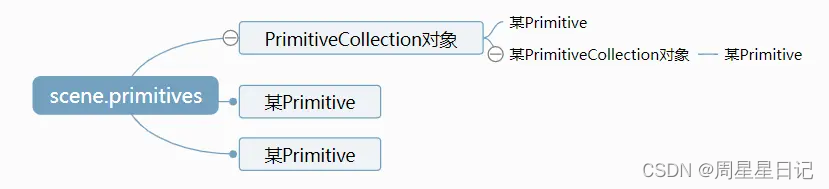
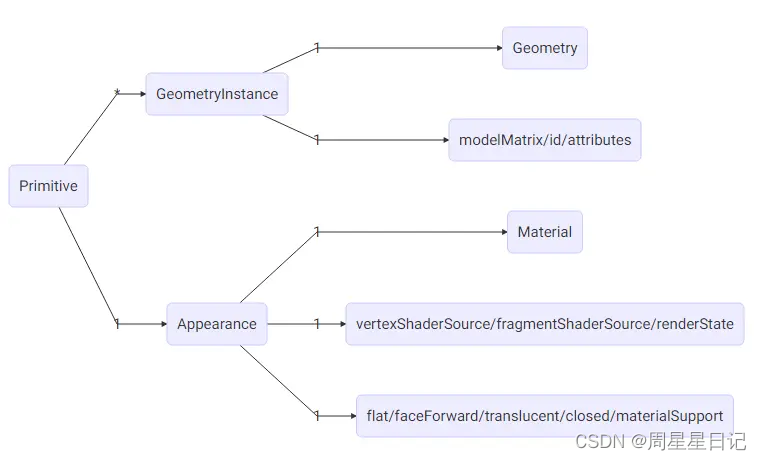
图元表示 Scene 中的几何图形。几何图形可以来自单个 GeometryInstance
例子1:
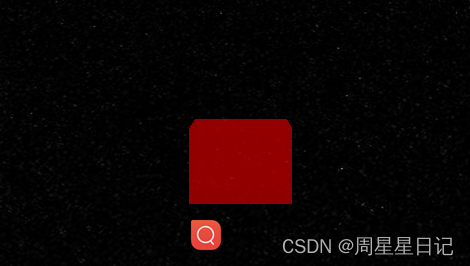
// Create the viewer.
const viewer = new Cesium.Viewer("cesiumContainer");
const scene = viewer.scene;

// Draw a red box and position it on the globe surface.

const dimensions = new Cesium.Cartesian3(400000.0, 300000.0, 500000.0);
// Box geometries are initially centered on the origin.
// We can use a model matrix to position the box on the
// globe surface.
const positionOnEllipsoid = Cesium.Cartesian3.fromDegrees(-105.0, 45.0);
const boxModelMatrix = Cesium.Matrix4.multiplyByTranslation(
  Cesium.Transforms.eastNorthUpToFixedFrame(positionOnEllipsoid),
  new Cesium.Cartesian3(0.0, 0.0, dimensions.z * 0.5),
  new Cesium.Matrix4()
);

// 1.创建一个几何体
const boxGeometry = Cesium.BoxGeometry.fromDimensions({
  vertexFormat: Cesium.PerInstanceColorAppearance.VERTEX_FORMAT,
  dimensions: dimensions,
});
// Create a geometry instance using the geometry
// and model matrix created above.
const boxGeometryInstance = new Cesium.GeometryInstance({
  geometry: boxGeometry,
  modelMatrix: boxModelMatrix,
  attributes: {
    color: Cesium.ColorGeometryInstanceAttribute.fromColor(
      new Cesium.Color(1.0, 0.0, 0.0, 0.5)
    ),
  },
});
// Add the geometry instance to primitives.
scene.primitives.add(
  new Cesium.Primitive({
    geometryInstances: boxGeometryInstance,
    //渲染样式
    appearance: new Cesium.PerInstanceColorAppearance({
      closed: true,
    }),
  })
);
例子2:创建一个圆形几何体
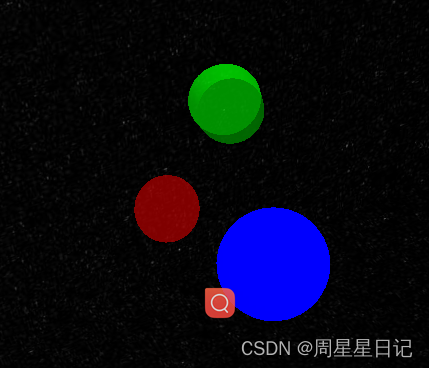
// Example 1: Draw a red circle on the globe surface.

// Create the circle geometry.
let circleGeometry = new Cesium.CircleGeometry({
  center: Cesium.Cartesian3.fromDegrees(-95.0, 43.0),
  radius: 250000.0,
  vertexFormat: Cesium.PerInstanceColorAppearance.VERTEX_FORMAT,
});
// Create a geometry instance using the circle geometry
// created above. We can also specify a color attribute,
// in this case, we're creating a translucent red color.
const redCircleInstance = new Cesium.GeometryInstance({
  geometry: circleGeometry,
  attributes: {
    color: Cesium.ColorGeometryInstanceAttribute.fromColor(
      new Cesium.Color(1.0, 0.0, 0.0, 0.5)
    ),
  },
});
// Add the geometry instance to primitives.
scene.primitives.add(
  new Cesium.Primitive({
    geometryInstances: redCircleInstance,
    appearance: new Cesium.PerInstanceColorAppearance({
      closed: true,
    }),
  })
);
例子3:创建一个边线几何体
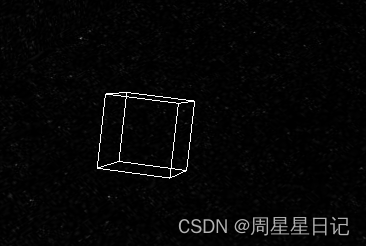
// Create the viewer.
const viewer = new Cesium.Viewer("cesiumContainer");
const scene = viewer.scene;

// Draw the outline of a box.

const dimensions = new Cesium.Cartesian3(400000.0, 400000.0, 400000.0);

// Box geometries are initially centered on the origin.
// We can use a model matrix to position the box on the
// globe surface.
const positionOnEllipsoid = Cesium.Cartesian3.fromDegrees(-106.0, 45.0);
const boxModelMatrix = Cesium.Matrix4.multiplyByTranslation(
  Cesium.Transforms.eastNorthUpToFixedFrame(positionOnEllipsoid),
  new Cesium.Cartesian3(0.0, 0.0, dimensions.z * 0.5),
  new Cesium.Matrix4()
);

// Create a box outline geometry.
const boxOutlineGeometry = Cesium.BoxOutlineGeometry.fromDimensions({
  dimensions: dimensions,
});

// Create a geometry instance using the geometry
// and model matrix created above.
const boxOutlineInstance = new Cesium.GeometryInstance({
  geometry: boxOutlineGeometry,
  modelMatrix: boxModelMatrix,
  attributes: {
    color: Cesium.ColorGeometryInstanceAttribute.fromColor(
      Cesium.Color.WHITE
    ),
  },
});

// Add the geometry instance to primitives.
scene.primitives.add(
  new Cesium.Primitive({
    geometryInstances: boxOutlineInstance,
    appearance: new Cesium.PerInstanceColorAppearance({
      flat: true,
      renderState: {
        lineWidth: Math.min(2.0, scene.maximumAliasedLineWidth),
      },
    }),
  })
);





 扫一扫
扫一扫


 2242
2242

 被折叠的 条评论
为什么被折叠?
被折叠的 条评论
为什么被折叠?
 到【灌水乐园】发言





