


 本文介绍了一种跨设备链路聚合技术e-Trunk的配置方法,包括三台交换机SW1、SW2和SW3的具体配置步骤及命令。通过e-Trunk实现负载均衡与冗余,确保网络稳定性和高可用性。
这里写自定义目录标题
e-trunk配置(跨设备链路聚合)
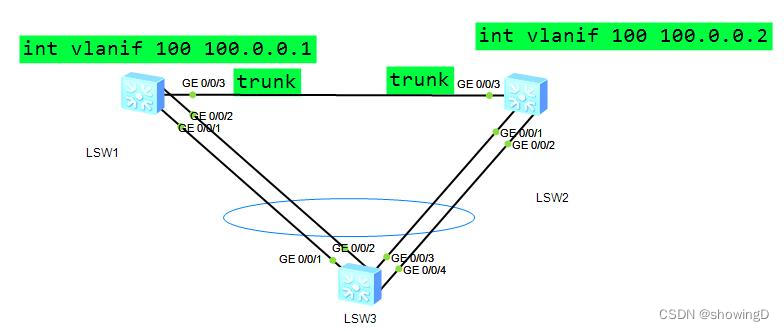
SW1配置代码
sys
sysname SW1
INT ETH-TRUNK 1
mode lacp
trunkport gi 0/0/1 to 0/0/2
quit
vlan 100
int vlanif 100
ip add 100.0.0.1 24
int g0/0/3
port link-type trunk
port trunk all vlan all
quit
e-trunk 12
priority 99
peer-add 100.0.0.2 source-address 100.0.0.1
quit
int eth-trunk 1
e-trunk 12 remote-eth-trunk 2
SW2的配置
sys
sysname SW2
INT ETH-TRUNK 2
mode lacp
trunkport gi 0/0/1 to 0/0/2
quit
vlan 100
int vlanif 100
ip add 100.0.0.2 24
int g0/0/3
port link-type trunk
port trunk all vlan all
quit
e-trunk 12
peer-add 100.0.0.1 sou 100.0.0.2
quit
int eth-trunk 2
e-trunk 12 remote-eth-trunk 1
SW3的配置代码
sys
sysname SW3
INT ETH-TRUNK 3
mode lacp
trunkport gi 0/0/1 to 0/0/4
quit
验证
在SW1上查看e-trunk 12的运行情况
 最低0.47元/天 解锁文章






 扫一扫
扫一扫


 3775
3775

 被折叠的 条评论
为什么被折叠?
被折叠的 条评论
为什么被折叠?
 到【灌水乐园】发言





