





 本文详细介绍了如何在AWS RHEL实例上使用VSFTPD配置FTP服务器,包括开启FTP端口、安装及配置VSFTPD、解决启动失败问题等步骤。
Have setup the FTP server at AWS RHEL by VSFTPD, procedure as below,
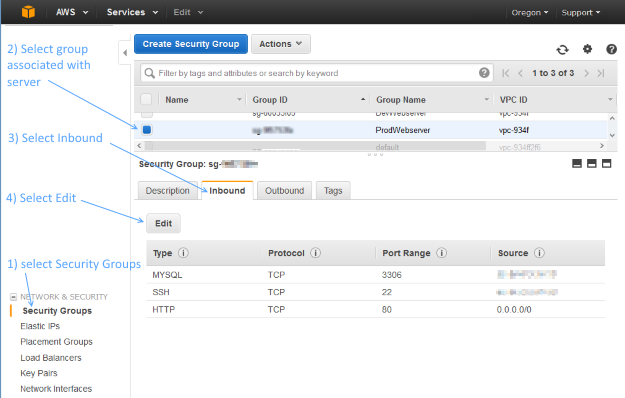
1, Open up the FTP ports at the AWS EC2 instance.
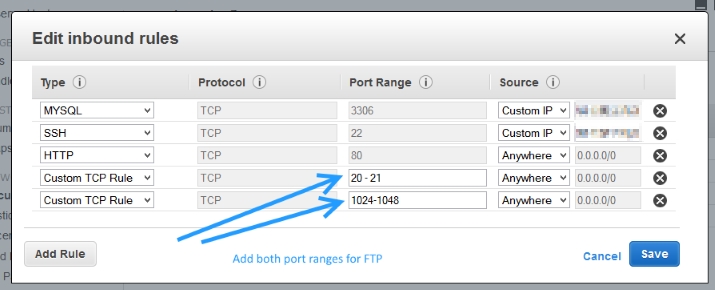
Add two Custom TCP Rules with port ranges 20-21 and 1024-1048
2, VSFTPD install and configuration
yum install vsftpd
vim /etc/vsftpd/vsftpd.conf
anonymous_enable=NO # from YES change to NO
#add following four lines at the end of vsftpd.conf
pasv_enable=YES
pasv_min_port=1024
pasv_max_port=1048
pasv_address=<Public IP of your instance>
#restrict user to the home directory
chroot_local_user=YES
#below need to be added and set as YES, otherwise FileZilla will return error, Fixing 500 OOPS: vsftpd: refusing to run with writable root inside chroot ()
allow_writeable_chroot=YES
#start the vsfptd service
service vsftpd start
#surviving reboot
chkconfig --level 345 vsftpd on
#add username and password
adduser username
passwd username
#working on the SELinux, certain items needs to be set as on, e.g. ftp_home_dir --> on
getsebool -a | grep ftp
setsebool -P the_name_of_the_item_you_need_to_set_on on
3, problem resolving on fail to start the vsftpd
found out proftpd was running and listening to the port 21, caused the vsftpd failed to start,
by using below command to check the port 21 usage, and kill process proftpd, problem resolved.
 netstat -anp | grep :21
 ps -ax





 扫一扫
扫一扫


 7009
7009

 被折叠的 条评论
为什么被折叠?
被折叠的 条评论
为什么被折叠?
 到【灌水乐园】发言





