



 介绍了一种利用现代显卡上可用的DXT5格式的高性能纹理压缩技术。该技术在压缩比和质量之间提供了很好的平衡,相较于DXT1压缩,在大多数图像上几乎不会造成质量损失。
Real-Time YCoCg-DXT Compression
J.M.P. van Waveren | Ignacio Castaño |
September 14th 2007
© 2007, id Software, Inc.
Abstract
| A high performance texture compression technique is introduced, which exploits the DXT5 format available on today's graphics cards. The compression technique provides a very good middle ground between DXT1 compression and no compression. Using the DXT5 format, textures consume twice the amount of memory of DXT1-compressed textures (a 4:1 compression ratio instead of 8:1). In return, however, the technique provides a significant gain in quality, and for most images, there is almost no noticeable loss in quality. In particular there is a consistent gain in RGB-PSNR of 6 dB or more for the Kodak Lossless True Color Image Suite. Furthermore, the technique allows for both real-time texture decompression during rasterization on current graphics cards, and high quality real-time compression on the CPU and GPU. |
1. Introduction
Textures are digitized images drawn onto geometric shapes to add visual detail. In today's computer graphics a tremendous amount of detail is mapped onto geometric shapes during rasterization. Not only are textures with colors used, but also textures specifying surface properties (such as specular reflection) or fine surface details (in the form of normal or bump maps). All these textures can consume large amounts of system and video memory. Fortunately, compression can be used to reduce the amount of memory required to store textures. Most of today's graphics cards allow textures to be stored in a variety of compressed formats that are decompressed in real-time during rasterization. One such format, which is supported by most graphics cards, is S3TC -- also known as DXT compression [1, 2].
Compressed textures not only require significantly less memory on the graphics card, but also generally render faster than uncompressed textures, due to reduced bandwidth requirements. Some quality may be lost due to the compression. However, the reduced memory footprint allows higher resolution textures to be used such that there can actually be a significant gain in quality.
2. DXT1
The DXT1 format [1, 2] is designed for real-time decompression in hardware on the graphics card during rendering. DXT1 is a lossy compression format with a fixed compression ratio of 8:1. DXT1 compression is a form of Block Truncation Coding (BTC) [3] where an image is divided into non-overlapping blocks, and the pixels in each block are quantized to a limited number of values. The color values of pixels in a 4x4 pixel block are approximated with equidistant points on a line through RGB color space. This line is defined by two end-points, and for each pixel in the 4x4 block a 2-bit index is stored to one of the equidistant points on the line. The end-points of the line through color space are quantized to 16-bit 5:6:5 RGB format and either one or two intermediate points are generated through interpolation. The DXT1 format allows a 1-bit alpha channel to be encoded, by switching to a different mode based on the order of the end points, where only one intermediate point is generated and one additonal color is specified, which is black and fully transparent.
The images below show a small section of image 14 of the Kodak Lossless True Color Image Suite [16]. The image on the left is the original. The image in the middle shows the same section of image 14, which was first downscaled to a quarter the size and then upscaled to the original size with bilinear filtering. The image on the right shows the same section compressed to DXT1 format.
 |  |  |
| Cut out section of image 14 of the Kodak Image Suite. 1.5 MB | Scaled down image to a quarter the size. 384 kB | Compressed to DXT1 with best possible quality. 192 kB |
The DXT1-compressed image has a lot more detail than an image first downscaled to a quarter the size and then upscaled to the original size with bilinear filtering. Furthermore, the DXT1-compressed image uses half the storage space of the image downscaled to a quarter the size. The DXT1-compressed image does, however, have a noticeable loss in quality compared to the original image.
3. Real-Time DXT1 on the CPU
The DXT1 format is designed for real-time decompression in hardware, not real-time compression. Whereas decompression is very simple, compression to DXT1 format typically requires a lot of work.
There are several good DXT compressors available. Most notably there are the ATI Compressonator [4] and the NVIDIA DDS Utilities [5]. Both compressors produce high quality DXT compressed images. However, these compressors are not open source and they are optimized for high quality off-line compression and are too slow for real-time use. NVIDIA also released an open source set of texture tools [6] which includes DXT compressors. These DXT compressors also aim for quality over speed. There is an open source DXT compressor available by Roland Scheidegger for the Mesa 3D Graphics Library [7]. Another good DXT compressor is Squish by Simon Brown [8]. This compressor is open source but it is also optimized for high quality off-line compression and is typically too slow for real-time use.
Until recently, real-time compression to DXT1 format was not considered to be a viable option. However, real-time compression to DXT1 is quite possible, as shown in [9], and the loss in quality compared to the best possible DXT1 compression is reasonable for most images. The RGB colors in a 4x4 block of pixels tend to map well to equidistant points on the line through the extents of the bounding box of the RGB color space, as that line spans the complete dynamic range, and tends to line up with the luminance distribution.
The images below once again show the small section of image 14 of the Kodak Lossless True Color Image Suite [16]. This particular section of image 14 shows some of the worst compression artifacts that may occur due to DXT compression. The image on the left is the original. The image in the middle shows the same section compressed to DXT1 with the best possible quality. The image on the right shows the result of the real-time DXT1 compressor.
| |  |
| Cut out section of image 14 of the Kodak Image Suite. 1.5 MB | Compressed to DXT1 with best possible quality. 192 kB | Compressed to DXT1 with real-time DXT1 compressor. 192 kB |
There are noticeable artifacts when using the real-time DXT1 compressor, but the best possible compression to DXT1 format also shows a noticeable loss in quality. For many images, however, the loss in quality due to real-time compression is either not noticeable or quite acceptable.
4. YCoCg-DXT5
The DXT5 format [2, 3] stores three color channels the same way DXT1 does, but without 1-bit alpha channel. Instead of the 1-bit alpha channel, the DXT5 format stores a separate alpha channel which is compressed similarly to the DXT1 color channels. The alpha values in a 4x4 block are approximated with equidistant points on a line through alpha space. The end-points of the line through alpha space are stored as 8-bit values, and based on the order of the end-points either 4 or 6 intermediate points are generated through interpolation. For the case with 4 intermediate points, two additional points are generated, one for fully opaque and one for fully transparent. For each pixel in a 4x4 block a 3-bit index is stored to one of the equidistant points on the line through alpha space, or one of the two additional points for fully opaque or fully transparent. The same number of bits are used to encode the alpha channel as the three DXT1 color channels. As such, the alpha channel is stored with higher precision than each of the color channels, because the alpha space is one-dimensional, as opposed to the three-dimensional color space. Furthermore, there are a total of 8 samples to represent the alpha values in a 4x4 block, as opposed to 4 samples to represent the color values. Because of the additional alpha channel, the DXT5 format consumes twice the amount of memory of the DXT1 format.
The DXT5 format can be used in many ways for different purposes. A well-known example is DXT5 compression of swizzled normal maps [12, 13]. The DXT5 format can also be used for high-quality compression of color images by using the YCoCg color space. The YCoCg color space was first introduced for H.264 compression [14, 15]. The RGB to YCoCg transform has been shown to be capable of achieving a decorrelation that is much better than that obtained by various RGB to YCbCr transforms and is very close to that of the KL transform when measured for a representative set of high-quality RGB test images [15]. Furthermore, the transformation from RGB to YCoCg is very simple and requires only integer additions and shifts.
High-quality compression of color images can be achieved by using the DXT5 format after converting the RGB_ data to CoCg_Y. In other words, the luma (Y) is stored in the alpha channel and the chroma (CoCg) is stored in the first two of the 5:6:5 color channels. For color images, this technique results in a 4:1 compression ratio with very good quality -- generally better than 4:2:0 JPEG at the highest quality setting.
| |  |
| Cut out section of image 14 of the Kodak Image Suite. 1.5 MB | Compressed to DXT1 with best possible quality. 192 kB | Compressed to YCoCg-DXT5 with best possible quality. 384 kB |
The CoCg_Y DXT5 compressed image shows no noticeable loss in quality and consumes one fourth the memory of the original image. The CoCg_Y DXT5 also looks much better than the image compressed to DXT1 format.
Obviously CoCg_Y color data is retrieved in a fragment program and some work is required to perform the conversion back to RGB. However, the conversion to RGB is rather simple:
Co = color.x - ( 0.5 * 256.0 / 255.0 )
Cg = color.y - ( 0.5 * 256.0 / 255.0 )
Y = color.w
R = Y + Co - Cg
G = Y + Cg
B = Y - Co - Cg
This conversion requires just three instructions in a fragment program. Furthermore, filtering and other calculations can typically be done in YCoCg space.
DP4 result.color.x, color, {  1.0, -1.0,  0.0 * 256.0 / 255.0, 1.0 };
DP4 result.color.y, color, {  0.0,  1.0, -0.5 * 256.0 / 255.0, 1.0 };
DP4 result.color.z, color, { -1.0, -1.0, 1.0 * 256.0 / 255.0, 1.0 };
The chroma orange (Co) and chroma green (Cg) are stored in the first two channels, where the Co end-points are stored with 5 bits and the Cg end-points are stored with 6 bits. Even though the end-points are stored with different quantization, this results in the best quality. The end-points for the Cg channel are stored with higher precision (6 bits) than the end-points for the Co channel (5 bits) because the Cg values affect all three RGB channels, whereas the Co values only affect the red and blue channel.
The 5:6 quantization of the CoCg color space can cause a slight color shift and possible loss of color. Ideally, there would not be any quantization and the end-points of the line through the CoCg color space would be stored in 8:8 format. Fortunately, the third channel of the DXT5 format can be used to gain up to 2 bits of precision for many of the 4x4 blocks of pixels. The quantization of the color space is most noticeable when the dynamic range of the colors in a 4x4 block is very low. The quantization either causes the colors to map to a single point, or the colors map to points outside the dynamic range. To overcome this problem the colors can be scaled up when the dynamic range of the colors is low. The colors are scaled up during compression and scaled down to their original values in the fragment program.
The color grey is represented as the point (128, 128) when the CoCg space is mapped to the range [0,255] x [0,255]. For most images the colors tend to get closer to grey as the dynamic range of the CoCg space decreases. As such, the color space for a 4x4 block of pixels is first centered on grey by subtracting (128, 128) from all colors. Then, the dynamic range of the color space of the 4x4 block is measured around the origin: max(abs(min),abs(max)). If the dynamic range of both channels is less than 64, all the CoCg values are scaled up by a factor of 2. If the dynamic range is less than 32, then all the CoCg values are scaled up by a factor of 4. The dynamic range has to be less than 64 and 32 respectively, to make sure the color values will not overflow. In effect, scaling the colors up by 2, the last bit of all CoCg values is always set to zero and is thus not affected by the quantization. In the same way, if the colors are scaled up by 4 the last two bits are always zero and are also not affected by quantization.
The scale factor 1, 2 or 4 is stored as a constant value over a whole 4x4 block of pixels, in the third channel of the DXT5 format. Stored as a constant value over a whole block, the presence of the scale factor does not affect the compression of the CoCg channels. The scale factor is stored as ( scale - 1 ) * 8, such that the scale factor only uses the two least-significant bits of the 5-bit channel. As such, the scale factor is not affected by the quantization to 5 bits and the dequantization and expansion in the DXT5 decoder, where the higher 3 bits are replicated to the lower three bits. The following figure shows the expansion of the scale factor from 5 bits to 8 bits in the DXT5 decoder.
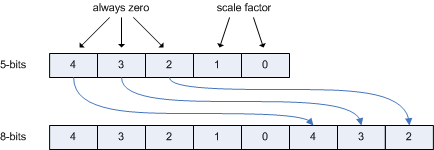
When an image is encoded to YCoCg-DXT5 like this, a little bit more work is required in the fragment program to convert back to RGB. The following pseudo-code shows the conversion.
scale = ( color.z * ( 255.0 / 8.0 ) ) + 1.0
Co = ( color.x - ( 0.5 * 256.0 / 255.0 ) ) / scale
Cg = ( color.y - ( 0.5 * 256.0 / 255.0 ) ) / scale
Y = color.w
R = Y + Co - Cg
G = Y + Cg
B = Y - Co - Cg
In a fragment program this translates to the following:
MAD color.z, color.z, 255.0 / 8.0, 1.0;
RCP color.z, color.z;
MUL color.xy, color.xyxy, color.z;
DP4 result.color.x, color, {  1.0, -1.0,  0.0 * 256.0 / 255.0, 1.0 };
DP4 result.color.y, color, {  0.0,  1.0, -0.5 * 256.0 / 255.0, 1.0 };
DP4 result.color.z, color, { -1.0, -1.0,  1.0 * 256.0 / 255.0, 1.0 };
In other words, only three more instructions are necessary in the fragment program to scale the CoCg values back down.
The image on the right below shows the result of YCoCg compression with scaling of the CoCg values, next to the original image on the left.
|  |
| Cut out section of image 14 of the Kodak Image Suite. 1.5 MB | Compressed to Scaled YCoCg-DXT5 with best possible quality. 384 kB |
For almost all images the quality is significantly higher when scaling up the CoCg values. However, it is worth noting that linear texture filtering (such as bilinear filtering) of the scaled CoCg values can result in non-linear filtering of the color values. The color values and the scale factors are filtered separately, before the color values are scaled down. In other words, a filtered scale factor is applied to filtered CoCg values -- which is not the same as filtering color values that are first scaled down. Interestingly, when measuring the quality of a bilinearly-filtered YCoCg-DXT5 compressed texture relative to a bilinearly-filtered original texture, the quality is still significantly higher when the CoCg values are scaled up, even though texture filtering can cause the colors to be scaled down incorrectly.
The incorrect scaling only affects the samples on the borders between 4x4 blocks of texels with different scale factors, and most of the time the scale factors are the same for adjacent blocks. The interpolated colors between blocks with different scale factors have a tendency to converge faster to the color values from the 4x4 blocks with the highest scale factors. However, there is typically no noticeable difference in perceived quality, because it is hard to tell the difference between a bilinear filter pattern and a non-linear filter pattern. There are also no unnatural color transitions, because the Co and Cg values undergo the same non-linear filtering and will not drift apart. In other words, a color transition still follows a straight line in CoCg space -- just not at a constant speed.
With the filtering being non-linear at the borders of 4x4 blocks with different scale factors, it is important that the filtered color values stay in-between the original color values from the 4x4 blocks. In other words, the color values should never go out of range -- which would cause artifacts. The figure below shows how bilinear filtering works between the texel values P0, P1, P2 and P3, with scale factors S0, S1, S2 and S3, and with the parameters 'q' and 'r'.
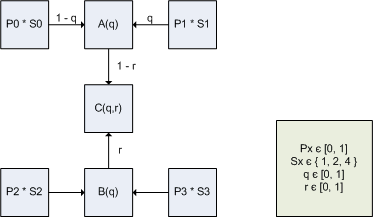
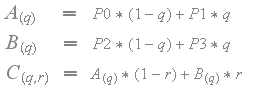
For regular bilinear filtering the scale factors S0, S1, S2 and S3 are all set to 1, and the texel values are interpolated as follows.
When the CoCg values are scaled up with different scale factors from adjacent blocks, then the filtering becomes non-linear as follows.
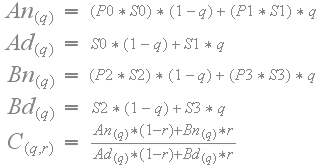
The filtered color values should never go out of range, so for the filtered sample C(q,r) the following must hold: min( P0, P1, P2, P3 ) <= C(q,r) <= max( P0, P1, P2, P3 ). First of all, it is trivial to see that the filtered sample C(q,r) is equal to one of the original texel values at the corners.
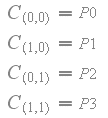
Since the sample C(q,r) is equal to one of the original texel values at the corners, the function C(q,r) must be monotonically increasing or monotonically decreasing for any constant 'r' so that the sample cannot go out of range. In other words, the partial derivative of C(q,r) with respect to 'q' must not change sign. The partial derivative of C(q,r) with respect to 'q' is the following:
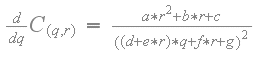
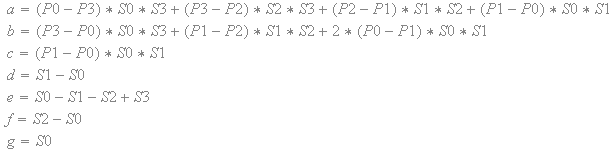
The expressions for 'a', 'b', 'c', 'd', 'e', 'f' and 'g' are either positive or negative constants based on the texel values and the scale factors. The numerator is a constant that is either positive or negative. The variable 'q' only appears once in the denominator. Furthermore, the denominator is squared and thus always positive. In other words, the partial derivative never changes sign.
In the same way, the function C(q,r) must be monotonically increasing or monotonically decreasing for any constant 'q', which means the partial derivative of C(q,r) with respect to 'r' must also never change sign. The partial derivative of C(q,r) with respect to 'r' is the following:
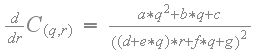
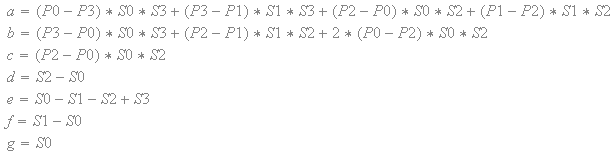
As with the partial derivative with respect to 'q', the partial derivative with respect to 'r' also never changes sign. Since the function C(q,r) goes through the original texel values at the corners, and the function is monotonically increasing or monotonically decreasing at a constant 'r', and also monotonically increasing or monotonically decreasing at a constant 'q', the sample C(q,r) can never go out of range and the following holds: min( P0, P1, P2, P3 ) <= C(q,r) <= max( P0, P1, P2, P3 ).
Trilinear filtering and anisotropic filtering also become non-linear if the scale factors are different. However, as with bilinear filtering, the filtered samples are also nicely bounded between the original texel values.
5. Real-Time YCoCg-DXT5 on the CPU
Using a regular real-time DXT5 compressor to compress to YCoCg-DXT5 does result in better quality than using DXT1 compression, and there is typically very little loss of detail [9]. However, there are noticeable color artifacts. In particular there are color blocking and color bleeding artifacts. The real-time DXT5 compressor from [9] approximates the colors in each 4x4 block with equidistant points on a line through CoCg space, where the line is created through the extents of the bounding box of the CoCg space. The problem is that, quite often the wrong diagonal of the bounding box of CoCg space is chosen. This is especially noticeable at transitions between elementary colors where this causes color bleeding artifacts.
To get much better quality the best of the two diagonals of the two-dimensional bounding box of CoCg space should be used. The real-time DXT5 compressor described in [9] can be extended to choose one of the two diagonals. The best way to decide which diagonal to use, is to test the sign of the covariance of the color values relative to the center of the bounding box of CoCg space. The following routine swaps two of the coordinates of the end-points of the line through CoCg space, based on which diagonal best fits the colors in a 4x4 block of pixels.
void SelectYCoCgDiagonal( const byte *colorBlock, byte *minColor, byte *maxColor ) {

    byte mid0 = ( (int) minColor[0] + maxColor[0] + 1 ) >> 1;
    byte mid1 = ( (int) minColor[1] + maxColor[1] + 1 ) >> 1;

    int covariance = 0;
    for ( int i = 0; i < 16; i++ ) {
        int b0 = colorBlock[i*4+0] - mid0;
        int b1 = colorBlock[i*4+1] - mid1;
        covariance += ( b0 * b1 );
    }

    if ( covariance < 0 ) {
        byte t = minColor[1];
        minColor[1] = maxColor[1];
        maxColor[1] = t;
    }
}
Calculating the covariance requires multiplication of the color values, which increases the dynamic range, and limits the amount of parallelism that can be exploited through a SIMD instruction set. Instead of calculating the covariance of the color values, it is also an option to calculate the covariance of only the sign bits of the colors relative to the center of the bounding box of color space. Interestingly, the loss in quality when only using the sign bits is really small and generally negligible. The following routine swaps two of the coordinates of the end-points of the line through CoCg space, based only on the covariance of the sign bits.
void SelectYCoCgDiagonal( const byte *colorBlock, byte *minColor, byte *maxColor ) {

    byte mid0 = ( (int) minColor[0] + maxColor[0] + 1 ) >> 1;
    byte mid1 = ( (int) minColor[1] + maxColor[1] + 1 ) >> 1;

    byte side = 0;
    for ( int i = 0; i < 16; i++ ) {
        byte b0 = colorBlock[i*4+0] >= mid0;
        byte b1 = colorBlock[i*4+1] >= mid1;
        side += ( b0 ^ b1 );
    }

    byte mask = -( side > 8 );

    byte c0 = minColor[1];
    byte c1 = maxColor[1];

    c0 ^= c1 ^= mask &= c0 ^= c1;

    minColor[1] = c0;
    maxColor[1] = c1;
}
There is no increase in dynamic range and the loop in the above routine can be implemented using operations on bytes only, which allows maximum parallelism to be exploited through a SIMD instruction set. In effect, this routine divides the bounding box of CoCg space into four uniform quadrants as follows:
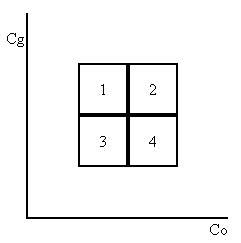
The routine then counts the number of colors that fall into each quadrant. If most colors are in quadrant 2 and 3, then the regular diagonal through the bounding box extents is used. However, if most colors are in quadrant 1 and 4, then the opposite diagonal is used.
The routine first calculates the midpoints of the Co and Cg ranges. The color values are then compared to these midpoints. The following table shows the relationship between the 4 quadrants and the CoCg values greater than or equal to the midpoints. Using a bitwise logical XOR operation on the results of the comparisons results in a '1' only for colors that are in either quadrant 1 or 4. The results of the XOR operations for the colors can be accumulated, to count the number of colors that are in quadrant 1 and 4. If more than half the colors are in quadrant 1 or 4, then the diagonal needs to be flipped.
| quadrant | >= Co midpoint | >= Cg midpoint | XOR |
|---|---|---|---|
| 1 | 0 | 1 | 1 |
| 2 | 1 | 1 | 0 |
| 3 | 0 | 0 | 0 |
| 4 | 1 | 0 | 1 |
Implementations using the MMX and SSE2 instruction sets can be found in appendix C and D respectively. The MMX/SSE2 instruction 'pavgb' is used to calculate the midpoints of the Co and Cg ranges. Unfortunately there are no instructions in the MMX or SSE2 instruction sets for comparing unsigned bytes. Only the 'pcmpeqb' instruction will work on both signed and unsigned bytes. However, the 'pmaxub' instruction does work with unsigned bytes. To evaluate a greater-than-or-equal relationship the 'pmaxub' instruction is used followed by the 'pcmpeqb' instruction, because the expression ( x >= y ) is equivalent to the expression ( max( x, y ) == x ).
The MMX/SSE2 instruction 'psadbw' is normally used to calculate the sum of absolute differences. However, this instruction can also be used to perform a horizontal add by setting one of the operands to all zeros. The MMX/SSE2 implementations in appendix C and D use the 'psadbw' instruction to add the results of the bitwise logical XOR operations.
To flip the diagonal, the routine uses a masked-XOR-swap, which requires just 4 instructions. The mask is used to select the bits of two registers that need to be swapped. Assume the bits to be swapped are stored in the registers 'xmm0' and 'xmm1', and the mask is stored in the register 'xmm2'. The following SSE2 code swaps each pair of bits from 'xmm0' and 'xmm1' for which the equivalent bit in 'xmm2' is set to one.
pxor    xmm0, xmm1
pand    xmm2, xmm0
pxor    xmm1, xmm2
pxor    xmm0, xmm1
Using the masked-XOR-swap the 'minColor' and 'maxColor' byte arrays can be read directly into two registers. The second bytes can then be swapped by using an appropriate mask without having to extract the bytes from the registers.
The following images show the differences between the original image, the image compressed to YCoCg-DXT5 with the real-time DXT5 compressor from [9], and the image compressed to YCoCg-DXT5 with the new real-time YCoCg-DXT5 compressor that uses the best diagonal. The images show that there is no noticeable color bleeding when using this small extension to the real-time DXT5 compressor.
|  | 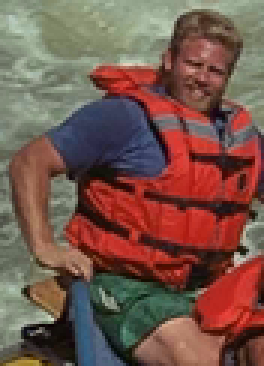 |
| Cut out section of image 14 of the Kodak Image Suite. 1.5 MB | Compressed to YCoCg-DXT5 with real-time DXT5 compressor. 384 kB | Compressed to YCoCg-DXT5 with real-time YCoCg-DXT5 compressor. 384 kB |
The DXT5 compressor from [9] insets the bounding box of color space and alpha space to improve the Mean Square Error (MSE). The bounding box of color space is inset by a total of half the distance between two points on the line through color space. There are 4 points on the line through color space and as such the bounding box is inset on either end by 1/16th of the range. In the same way the bounds of alpha space are inset by a total of half the distance between two points on the line through alpha space. In other words the bounds of alpha space are inset on either end by 1/32th of the range.
A side effect of insetting the bounding box is that for blocks of 4x4 pixels with a low dynamic range (small bounding box) the points on the line through color space or alpha space may snap to points very close to each other. In that case it is much better to have the end-points of a line a bit apart such that a larger dynamic range is covered where the interpolated points will typically be closer to the original values. The following code first insets the bounding box of color space and then rounds the end-points of the line outwards, so that the line covers a larger dynamic range. In the same way the bounds of alpha space are first inset and then rounded outwards.
#define INSET_COLOR_SHIFT       4       // inset color bounding box
#define INSET_ALPHA_SHIFT       5       // inset alpha bounding box

#define C565_5_MASK             0xF8    // 0xFF minus last three bits
#define C565_6_MASK             0xFC    // 0xFF minus last two bits

void InsetYCoCgBBox( byte *minColor, byte *maxColor ) {

    int inset[4];
    int mini[4];
    int maxi[4];

    inset[0] = ( maxColor[0] - minColor[0] ) - ((1<<(INSET_COLOR_SHIFT-1))-1);
    inset[1] = ( maxColor[1] - minColor[1] ) - ((1<<(INSET_COLOR_SHIFT-1))-1);
    inset[3] = ( maxColor[3] - minColor[3] ) - ((1<<(INSET_ALPHA_SHIFT-1))-1);

    mini[0] = ( ( minColor[0] << INSET_COLOR_SHIFT ) + inset[0] ) >> INSET_COLOR_SHIFT;
    mini[1] = ( ( minColor[1] << INSET_COLOR_SHIFT ) + inset[1] ) >> INSET_COLOR_SHIFT;
    mini[3] = ( ( minColor[3] << INSET_ALPHA_SHIFT ) + inset[3] ) >> INSET_ALPHA_SHIFT;

    maxi[0] = ( ( maxColor[0] << INSET_COLOR_SHIFT ) - inset[0] ) >> INSET_COLOR_SHIFT;
    maxi[1] = ( ( maxColor[1] << INSET_COLOR_SHIFT ) - inset[1] ) >> INSET_COLOR_SHIFT;
    maxi[3] = ( ( maxColor[3] << INSET_ALPHA_SHIFT ) - inset[3] ) >> INSET_ALPHA_SHIFT;

    mini[0] = ( mini[0] >= 0 ) ? mini[0] : 0;
    mini[1] = ( mini[1] >= 0 ) ? mini[1] : 0;
    mini[3] = ( mini[3] >= 0 ) ? mini[3] : 0;

    maxi[0] = ( maxi[0] <= 255 ) ? maxi[0] : 255;
    maxi[1] = ( maxi[1] <= 255 ) ? maxi[1] : 255;
    maxi[3] = ( maxi[3] <= 255 ) ? maxi[3] : 255;

    minColor[0] = ( mini[0] & C565_5_MASK ) | ( mini[0] >> 5 );
    minColor[1] = ( mini[1] & C565_6_MASK ) | ( mini[1] >> 6 );
    minColor[3] = mini[3];

    maxColor[0] = ( maxi[0] & C565_5_MASK ) | ( maxi[0] >> 5 );
    maxColor[1] = ( maxi[1] & C565_6_MASK ) | ( maxi[1] >> 6 );
    maxColor[3] = maxi[3];
}
The 'pmullw' instruction is used to upshift the values. Unlike the MMX/SSE2 shift instructions, the 'pmullw' instruction allows individual words in a register to be multiplied with a different value. The multipliers are (1 << INSET_COLOR_SHIFT) for the CoCg values stored in the first two channels, and (1 << INSET_ALPHA_SHIFT) for the Y values stored in the alpha channel. In the same way the 'pmulhw' instruction is used to shift down by using the multipliers (1 << ( 16 - INSET_COLOR_SHIFT )) for the CoCg values and (1 << ( 16 - INSET_ALPHA_SHIFT )) for the Y values.
In addition to choosing the best diagonal and insetting the bounds with proper rounding, the CoCg values can also be scaled up in real-time to gain precision. The following code shows how this can be implemented as an extension to the existing real-time DXT5 encoder.
void ScaleYCoCg( byte *colorBlock, byte *minColor, byte *maxColor ) {
    int m0 = abs( minColor[0] - 128 );
    int m1 = abs( minColor[1] - 128 );
    int m2 = abs( maxColor[0] - 128 );
    int m3 = abs( maxColor[1] - 128 );

    if ( m1 > m0 ) m0 = m1;
    if ( m3 > m2 ) m2 = m3;
    if ( m2 > m0 ) m0 = m2;

    const int s0 = 128 / 2 - 1;
    const int s1 = 128 / 4 - 1;

    int mask0 = -( m0 <= s0 );
    int mask1 = -( m0 <= s1 );
    int scale = 1 + ( 1 & mask0 ) + ( 2 & mask1 );

    minColor[0] = ( minColor[0] - 128 ) * scale + 128;
    minColor[1] = ( minColor[1] - 128 ) * scale + 128;
    minColor[2] = ( scale - 1 ) << 3;

    maxColor[0] = ( maxColor[0] - 128 ) * scale + 128;
    maxColor[1] = ( maxColor[1] - 128 ) * scale + 128;
    maxColor[2] = ( scale - 1 ) << 3;

    for ( int i = 0; i < 16; i++ ) {
        colorBlock[i*4+0] = ( colorBlock[i*4+0] - 128 ) * scale + 128;
        colorBlock[i*4+1] = ( colorBlock[i*4+1] - 128 ) * scale + 128;
    }
}
To exploit maximum parallelism the CoCg values are best upscaled as bytes without requiring more bits. This seems straight forward except that there are no instructions in the MMX and SSE2 instruction sets to shift or multiply bytes. Furthermore, 128 needs to be subtracted from an unsigned byte, which may result in a negative value. It is also not possible to represent 128 as a signed byte. However, an unsigned byte can be silently cast to a signed byte and then the signed byte value -128 can be added. With wrapping properly handled this results in the exact same calculation as subtracting 128 from an unsigned byte, where the result is a signed byte, which may become negative if the original value is below 128.
The scale factor is a power of two which means the scale is equivalent to a shift. As such it is possible to scale two bytes at the same time using a word multiply and the result can be masked off to remove any carry bits from the first byte that got moved into the second byte. The following code show how this is implemented where bias = 128, and scale = 1, 2 or 4.
|
| ||||||||||
|
| ||||||||||
|
| ||||||||||
| paddb |
| += |
| ||||||||
| pmullw |
| *= |
| ||||||||
| pand |
| &= |
| ||||||||
| psubb |
| -= |
|
After scaling the bytes they are placed back in the [0,255] range by subtracting the signed byte value -128. The above code shows how all four bytes of a pixel are loaded into a register, but only the CoCg values are upscaled, while the Y value is multiplied by 1. This avoids a lot of unpack and swizzle code that would otherwise be required to extract the CoCg values from all pixels.
The image on the right below shows the result of the extensions to the real-time DXT5 compressor, next to the original image on the left.
|  |
| Cut out section of image 14 of the Kodak Image Suite. 1.5 MB | Compressed to YCoCg-DXT5 with real-time YCoCg-DXT5 compressor using all extensions. 384 kB |
The end result is that there are no color blocking artifacts and there is very little color shift due to 5:6 quantization.
6. DXT Compression on the GPU
Real-time DXT1 and YCoCg-DXT5 can also be implemented on the GPU. This is possible thanks to new features available on DX10-class graphics hardware. In particular integer textures [17] and integer instructions [18] are very useful for implementing texture compression on the GPU.
The image that needs to be compressed is assumed to be present in video memory as an uncompressed RGB texture. If the image were not available in video memory, it would have to be uploaded from the host. This is done using a DMA transfer, usually at a rate of almost 2 GB/s. To compress the texture, a fragment program is used for each block of 4x4 texels by rendering a quad over the entire destination surface. It is currently not possible to write the results to a DXT-compressed texture directly, but the results can be written to an integer texture, instead. Note that the size of a DXT1 block is 64 bits, which is equal to one LA texel with 32 bits per component. Similarly the size of a DXT5 block is 128 bits, which is equal to one RGBA texel with 32 bits per component.
Once the compressed DXT blocks are stored to the texels of an integer texture they need to be copied to the compressed texture. This copy cannot be performed directly. However, an intermediate pixel buffer object (PBO) can be used by copying the contents of the integer texture into the PBO, and then copynig from the PBO to the compressed texture. These two copies are implemented in the video driver as very fast video memory copies and the costs are insignificant compared to the compression costs.
The fragment and vertex programs presented here are optimized for NVIDIA GeForce 8 Series GPUs. From an optimization standpoint there are several important differences between a CPU and a GeForce 8 Series GPU. On the CPU there is an advantage in using integer operations to exploit maximum parallelism. However, on a GeForce 8 Series GPU most floating point operations are as fast as or faster than integer operations. As such floating point values are used whenever it is more natural or saves computation. Because of the use of floating point operations, the results obtained by the GPU implementation are not bit-equivalent to the results from the CPU implementation. However, the results are still very similar to the results from the CPU implementation.
Another important difference between the CPU and a GeForce 8 Series GPU, is that a GeForce 8 Series GPU is a scalar processor. For this reason there is no need to write vectorized code. In addition, fragment and vertex programs are usually short and compilers can perform optimizations that would be prohibitively expensive for large C++ programs. As such, using a high-level shading language, it is possible to achieve almost the same performance that would be obtained by writing low-level assembly code for the GPU. The fragment and vertex programs presented here are implemented using OpenGL and the Cg 2.0 shading language [19].
7. Real-Time DXT1 on the GPU
Both, off-line and real-time DXT1 compressors have already been implemented on the GPU. The NVIDIA Texture Tools [10] provide a high-quality DXT1 compressor implemented in CUDA that has very good performance compared to equivalent CPU implementations. This compressor, however, is designed for high quality compression -- not real-time compression.
The NVIDIA SDK10 [11] provides a sample for real-time DXT1 compression. The GPU implementation of the real-time DXT1 compressor provided here is based on that sample, but adds some of the quality improvements described in previous sections. As described in section 5, the bounding box of the color space is inset by half the distance between two equidistant points on the line through the corners of the bounding box. The end-points are then rounded outwards to avoid having them snap to a single point. This small improvement comes at no noticeable performance penalty.
As mentioned in section 3, the RGB colors in a 4x4 block of pixels tend to map well to equidistant points on the line through the extents of the bounding box of the RGB color space, as that line spans the complete dynamic range, and tends to line up with the luminance distribution. The DXT1 compressors from [9] and [11] always use the line through the bounding box extents.
At a relatively small performance cost, the compression quality can be improved by selecting the best diagonal of the bounding box of RGB space, similar to how the real-time YCoCg-DXT5 compressor selects the best diagonal of the bounding box of CoCg space. However, selecting the best diagonal through RGB space only affects 2 percent of all 4x4 pixel blocks from the Kodak Lossless True Color Image Suite [16]. This is quite different from the YCoCg-DXT5 compression, where selecting the best diagonal through CoCg space affects close to 50 percent of all 4x4 pixel blocks.
For the Kodak images the improvement in Peak Signal to Noise Ratio (PSNR), from selecting the best diagonal though RGB space, is generally small. For image 2 and 23 there is about a 0.7 dB improvement in PSNR, for image 3 and 14 it is an improvement of 0.2 to 0.3 dB, and for all other images the improvement is below 0.2 dB, with an average improvement over all Kodak images of 0.1 dB. Nevertheless, the improvement in perceived quality can be significant in certain areas of an image. In particular the quality may improve noticeably in areas with transitions between elementary colors. If the wrong diagonal is chosen for a block with such a transition, the colors may change completely, which can be quite noticeable to the human eye. On the other hand, the DXT1 compression format usually does not perform very well in such areas any way, and thus there may still be some form of color bleeding or blocking -- even when the best diagonal is chosen.
In the end, it is a tradeoff between quality and performance. The selection of the best diagonal can improve the quality for some images at a relatively small (10% to 20%) performance cost. The GPU implementation of the DXT1 compressor can be found in appendix E. This implementation includes the code for selecting the best diagonal of the bounding box of RGB space, but it is not enabled by default. The implementation in appendix E is faster than the one from [11]. The performance improvement is the result of carefully tuning the code for performance; eliminating redundant and unneeded computations, and reorganizing the code to minimize register allocations.
8. Real-Time YCoCg-DXT5 on the GPU
The implementation of the YCoCg-DXT5 compression fragment program is relatively straightforward. As such only the relevant details are described and the differences compared to the CPU implementation are highlighted. The full implementation of the fragment program can be found in appendix E.
The first step in the fragment program is to read the block of 4x4 texels that needs to be compressed. This is typically done using regular texture sampling. However, it is more efficient to use texture fetching; a new feature that allows loading a single texel using a texture address and a constant offset, without doing any filtering or sampling. This is exposed in Cg 2.0 [19] and fetching the block of 4x4 texels is implemented as follows.
void ExtractColorBlock( out float3 block[16], sampler2D image, float2 tc, float2 imageSize ) {
    int4 base = int4( tc * imageSize - 1.5, 0, 0 );
    block[0] = toYCoCg( tex2Dfetch( image, base, int2(0, 0) ).rgb );
    block[1] = toYCoCg( tex2Dfetch( image, base, int2(1, 0) ).rgb );
    block[2] = toYCoCg( tex2Dfetch( image, base, int2(2, 0) ).rgb );
    block[3] = toYCoCg( tex2Dfetch( image, base, int2(3, 0) ).rgb );
    block[4] = toYCoCg( tex2Dfetch( image, base, int2(0, 1) ).rgb );
    block[5] = toYCoCg( tex2Dfetch( image, base, int2(1, 1) ).rgb );
    block[6] = toYCoCg( tex2Dfetch( image, base, int2(2, 1) ).rgb );
    block[7] = toYCoCg( tex2Dfetch( image, base, int2(3, 1) ).rgb );
    block[8] = toYCoCg( tex2Dfetch( image, base, int2(0, 2) ).rgb );
    block[9] = toYCoCg( tex2Dfetch( image, base, int2(1, 2) ).rgb );
    block[10] = toYCoCg( tex2Dfetch( image, base, int2(2, 2) ).rgb );
    block[11] = toYCoCg( tex2Dfetch( image, base, int2(3, 2) ).rgb );
    block[12] = toYCoCg( tex2Dfetch( image, base, int2(0, 3) ).rgb );
    block[13] = toYCoCg( tex2Dfetch( image, base, int2(1, 3) ).rgb );
    block[14] = toYCoCg( tex2Dfetch( image, base, int2(2, 3) ).rgb );
    block[15] = toYCoCg( tex2Dfetch( image, base, int2(3, 3) ).rgb );
}
Instead of converting the fetched colors to integers, they are kept in floating point format. The algorithm then continues the same way the CPU algorithm does, except that floating point values are used. First, the bounding box of the CoCg values is computed and then one of the two diagonals of the bound box is selected. The best way to select one of the diagonals is to test the sign of the covariance of the CoCg values. This can be implemented very efficiently on the GPU, so it is not necessary to approximate the diagonal selection using the covariance of the sign bits.
void SelectYCoCgDiagonal( const float3 block[16], in out float2 minColor, in out float2 maxColor ) {
    float2 mid = ( maxColor + minColor ) * 0.5;

    float covariance = 0.0;
    for ( int i = 0; i < 16; i++ ) {
        float2 t = block[i].yz - mid;
        covariance += t.x * t.y;
    }

    if ( covariance < 0.0 ) {
        swap( maxColor.y, minColor.y );
    }
}
Just as with the CPU implementation, a scale factor is used to gain up to two bits of precision for the end-points of the line through CoCg space. However, it is not necessary to upscale all of the CoCg values, as in the CPU implementation. The end-points of the line through CoCg space are represented in floating point format, so it is possible to simply downscale the end-points after the inset has been applied, and the colors have been rounded and converted to 5:6 format. As such, the original CoCg values for each texel can be compared to the unscaled points on the line through CoCg space to find the best matching point for each texel. The scale factor itself is calculated in the same manner as the CPU implementation.
int GetYCoCgScale( float2 minColor, float2 maxColor ) {
    float2 m0 = abs( minColor - offset );
    float2 m1 = abs( maxColor - offset );

    float m = max( max( m0.x, m0.y ), max( m1.x, m1.y ) );

    const float s0 = 64.0 / 255.0;
    const float s1 = 32.0 / 255.0;

    int scale = 1;
    if ( m < s0 ) scale = 2;
    if ( m < s1 ) scale = 4;

    return scale;
}
After calculating the scale factor, the end-points of the line through CoCg space are inset, quantized and bit-expanded as in the CPU implementation.
On the CPU, the Manhattan distance is calculated to find the best matching point on the line through CoCg space for each texel. This can be implemented very efficiently using an instruction to calculate the packed sum of absolute differences. On the GPU, however, it is more efficient to use the squared Euclidean distance, which can be calculated with a single dot product.
float colorDistance( float2 c0, float2 c1 ) {
    return dot( c0 - c1, c0 - c1 );
}
The output of the shader is a 4-component unsigned integer vector. In the fragment program each section of the DXT block is written to one of the vector components and the final value is returned.
    // Output CoCg in DXT1 block.
    uint4 output;
    output.z = EmitEndPointsYCoCgDXT5( mincol.yz, maxcol.yz, scale );
    output.w = EmitIndicesYCoCgDXT5( block, mincol.yz, maxcol.yz );

    // Output Y in DXT5 alpha block.
    output.x = EmitAlphaEndPointsYCoCgDXT5( mincol.x, maxcol.x );
    uint2 indices = EmitAlphaIndicesYCoCgDXT5( block, mincol.x, maxcol.x );
    output.x |= indices.x;
    output.y = indices.y;

    return output;
9. Compression on the CPU vs. GPU
As shown in the previous sections high performance DXT compression can be implemented on both the CPU and the GPU. Whether the compression is best implemented on the CPU or the GPU is application dependent.
Real-time DXT compression on the CPU is useful for textures that are dynamically created on the CPU. Compression on the CPU is also particularly useful for transcoding texture data that is streamed from disk in a format that cannot be used for rendering. For example, a texture may be stored in JPEG format on disk and, as such, cannot be used directly for rendering. Only some parts of the JPEG decompression algorithm can currently be implemented efficiently on the GPU. Memory can be saved on the graphics card, and rendering performance can be improved, by decompressing the original data and re-compressing it to DXT format. The advantage of re-compressing the texture data on the CPU is that the amount of data uploaded to the graphics card is minimal. Furthermore, when the compression is performed on the CPU, the full GPU can be used for rendering work as it does not need to perform any compression. With a definite trend to a growing number of cores on today's CPUs, there are typically free cores laying around that can easily be used for texture compression.
Real-time compression on the GPU may be less useful for transcoding, because of increased bandwidth requirements for uploading uncompressed texture data and because the GPU may already be tasked with expensive rendering work. However, real-time compression on the GPU is very useful for compressed render targets. The compression on the GPU can be used to save memory when rendering to a texture. Furthermore, such compressed render targets can improve the performance if the data from the render target is used for further rendering. The render target is compressed once, while the resulting data may be accessed many times during rendering. The compressed data results in reduced bandwidth requirements during rasterization and can, as such, significantly improve performance.
10. Results
The DXT1 format and YCoCg-DXT5 format have been tested with the Kodak Lossless True Color Image Suite [16]. The Peak Signal to Noise Ratio (PSNR) has been calculated over the unweighted RGB channels. In all cases a custom compressor was used for the off-line compression to get the best possible quality. Furthermore, the real-time DXT1 compressor from [9] and the CPU implementations of the real-time YCoCg-DXT5 compressors described here were used for real-time compression of the images.
The following table shows the PSNR values for the Kodak images compressed to the two formats. (Higher PSNR is better.)
| PSNR | ||||||||
| image | Off-line DXT1 | Real-Time DXT1 | Off-line YCoCg DXT5 | Real-Time YCoCg DXT5 | ||||
|---|---|---|---|---|---|---|---|---|
| kodim01 | 34.54 | 32.95 | 41.32 | 39.58 | ||||
| kodim02 | 37.70 | 34.36 | 44.33 | 41.19 | ||||
| kodim03 | 39.35 | 36.68 | 46.05 | 43.79 | ||||
| kodim04 | 37.95 | 35.62 | 45.02 | 42.91 | ||||
| kodim05 | 33.21 | 31.30 | 39.95 | 38.31 | ||||
| kodim06 | 35.82 | 34.20 | 42.82 | 41.14 | ||||
| kodim07 | 37.70 | 35.56 | 44.38 | 42.59 | ||||
| kodim08 | 32.69 | 31.12 | 39.51 | 37.61 | ||||
| kodim09 | 38.46 | 36.43 | 45.08 | 43.11 | ||||
| kodim10 | 38.53 | 36.71 | 45.36 | 43.29 | ||||
| kodim11 | 36.37 | 34.58 | 43.51 | 41.70 | ||||
| kodim12 | 39.38 | 37.26 | 46.21 | 43.97 | ||||
| kodim13 | 32.18 | 30.63 | 39.21 | 37.54 | ||||
| kodim14 | 34.49 | 32.20 | 41.47 | 39.81 | ||||
| kodim15 | 37.82 | 35.42 | 44.74 | 42.66 | ||||
| kodim16 | 38.86 | 37.15 | 45.85 | 44.07 | ||||
| kodim17 | 38.09 | 36.13 | 44.83 | 43.01 | ||||
| kodim18 | 34.86 | 33.10 | 41.42 | 39.66 | ||||
| kodim19 | 36.56 | 34.85 | 42.93 | 41.22 | ||||
| kodim20 | 38.17 | 36.19 | 44.84 | 42.94 | ||||
| kodim21 | 35.84 | 34.17 | 42.68 | 41.01 | ||||
| kodim22 | 36.75 | 34.91 | 43.39 | 41.53 | ||||
| kodim23 | 39.13 | 36.16 | 45.26 | 43.19 | ||||
| kodim24 | 34.38 | 32.46 | 41.61 | 39.80 | ||||
The following graph shows the PSNR for the Kodak images compressed to the two formats. (Higher PSNR is better.)
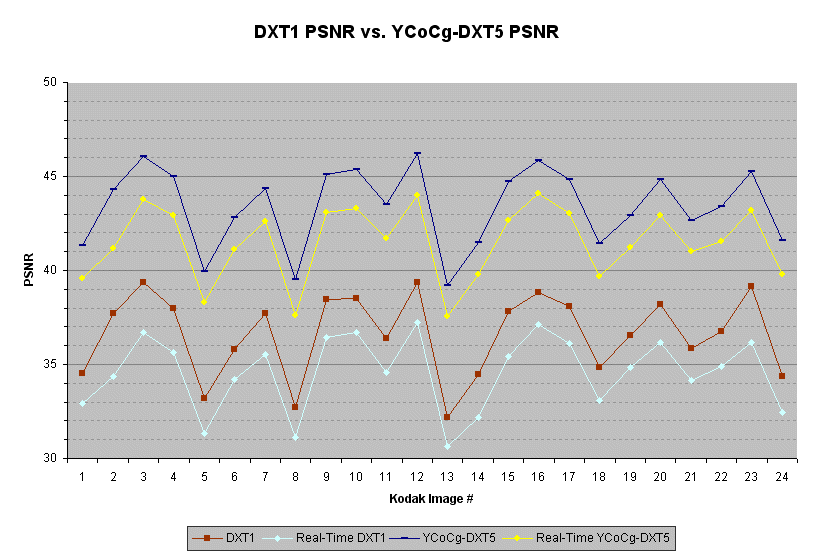
The YCoCg-DXT5 format provides a consistent improvement in PSNR of 6 dB or more over DXT1. All images that spike down in PSNR value have areas with high frequency luminance changes. From a PSNR point of view neither format does particularly well encoding these areas. However, it is typically very hard to distinguish the compressed pattern from the original pattern in an area with high frequency luminance changes.
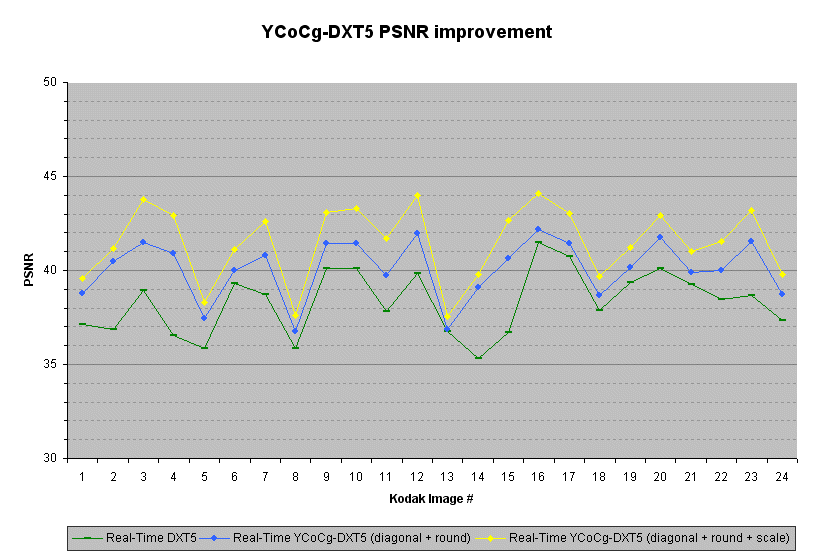
The graph below shows the PSNR improvement for the Kodak images compressed with the following compressors: the real-time DXT5 encoder from [9]; the real-time YCoCg-DXT5 encoder, which selects the best diagonal and uses proper rounding when insetting the bounds; and the real-time YCoCg-DXT5 encoder, which also upscales the CoCg values to gain precision. (Higher PSNR is better.)
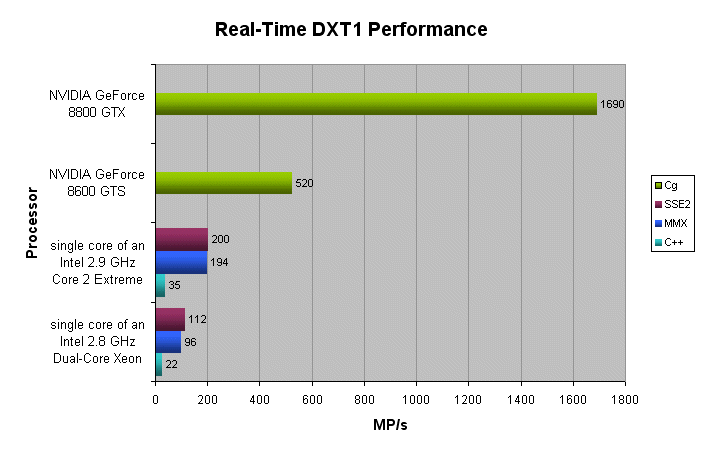
The performance of the SIMD optimized real-time DXT compressors has been tested on an Intel® 2.8 GHz dual-core Xeon® ("Paxville" 90nm NetBurst microarchitecture) and an Intel® 2.9 GHz Core™2 Extreme ("Conroe" 65nm Core 2 microarchitecture). Only a single core of these processors was used for the compression. Since the texture compression is block based, the compression algorithms can easily use multiple threads to utilize all cores of these processors. When using multiple cores there is an expected linear speed up with the number of available cores. The performance has also been tested on a NVIDIA GeForce 8600 GTS and a NVIDIA GeForce 8800 GTX. The 512x512 Lena image has been used for all the performance tests.
The following figure shows the number of Mega Pixels that can be compressed to the DXT1 format per second (higher MP/s = better).
The following figure shows the number of Mega Pixels that can be compressed to the YCoCg-DXT5 format per second (higher MP/s = better).
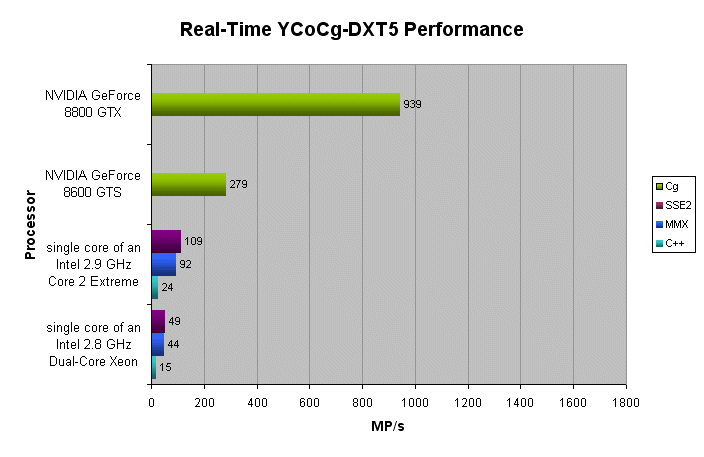
The figures show that real-time compression to YCoCg-DXT5 is a high performance alternative to real-time compression to DXT1. Furthermore, on a high-end NVIDIA GeForce 8 Series GPU, the real-time DXT1 and YCoCg-DXT5 compression algorithms run more than 8 times faster than on a single core of a high end Intel® Core™2 CPU. In other words more than 8 Intel® Core™2 cores would be needed to achieve similar performance.
11. Conclusion
The YCoCg-DXT5 format consumes double the memory of the DXT1 format. However, the quality is significantly better, and for most images, there is almost no noticeable loss in quality. Furthermore, high-quality compression to YCoCg-DXT5 can be done in real-time on both the CPU and GPU. As such, the YCoCg-DXT5 format provides a very good middle ground between no compression and real-time DXT1 compression.
12. References
| 1. | S3 Texture Compression Pat Brown NVIDIA Corporation, November 2001 Available Online: http://www.opengl.org/registry/specs/EXT/texture_compression_s3tc.txt |
| 2. | Compressed Texture Resources Microsoft Developer Network DirectX SDK, April 2006 Available Online: http://msdn2.microsoft.com/en-us/library/aa915230.aspx |
| 3. | Image Coding using Block Truncation Coding E.J. Delp, O.R. Mitchell IEEE Transactions on Communications, vol. 27(9), pp. 1335-1342, September 1979 |
| 4. | ATI Compressonator Library Seth Sowerby, Daniel Killebrew ATI Technologies Inc, The Compressonator version 1.27.1066, March 2006 Available Online: http://www.ati.com/developer/compressonator.html |
| 5. | NVIDIA DDS Utilities NVIDIA NVIDIA DDS Utilities, April 2006 Available Online: http://developer.nvidia.com/object/nv_texture_tools.html |
| 6. | NVIDIA Texture Tools NVIDIA NVIDIA Texture Tools, September 2007 Available Online: http://developer.nvidia.com/object/texture_tools.html |
| 7. | Mesa S3TC Compression Library Roland Scheidegger libtxc_dxtn version 0.1, May 2006 Available Online: http://homepage.hispeed.ch/rscheidegger/dri_experimental/s3tc_index.html |
| 8. | Squish DXT Compression Library Simon Brown Squish version 1.8, September 2006 Available Online: http://sjbrown.co.uk/?code=squish |
| 9. | Real-Time DXT Compression J.M.P. van Waveren Intel Software Network, October 2006 Available Online: http://www.intel.com/cd/ids/developer/asmo-na/eng/324337.htm |
| 10. | High Quality DXT Compression using CUDA Ignacio Castaño NVIDIA, February 2007 Available Online: http://developer.download.nvidia.com/compute/cuda/sdk/website/projects/dxtc/doc/cuda_dxtc.pdf |
| 11. | Compress DXT Simon Green NVIDIA, March 2007 Available Online: http://developer.download.nvidia.com/SDK/10/opengl/samples.html#compress_DXT |
| 12. | Bump Map Compression Simon Green NVIDIA Technical Report, October 2001 Available Online: http://developer.nvidia.com/object/bump_map_compression.html |
| 13. | Normal Map Compression ATI Technologies Inc ATI, August 2003 Available Online: http://www.ati.com/developer/NormalMapCompression.pdf |
| 14. | Transform, Scaling & Color Space Impact of Professional Extensions H. S. Malvar, G. J. Sullivan ISO/IEC JTC1/SC29/WG11 and ITU-T SG16 Q.6 Document JVT-H031, Geneva, May 2003 Available Online: http://ftp3.itu.int/av-arch/jvt-site/2003_05_Geneva/JVT-H031.doc |
| 15. | YCoCg-R: A Color Space with RGB Reversibility and Low Dynamic Range H. S. Malvar, G. J. Sullivan Joint Video Team (JVT) of ISO/IEC MPEG & ITU-T VCEG, Document No. JVT-I014r3, July 2003 Available Online: http://research.microsoft.com/~malvar/papers/JVT-I014r3.pdf |
| 16. | Kodak Lossless True Color Image Suite Kodak Available Online: http://r0k.us/graphics/kodak/ |
| 17. | GL_EXT_texture_integer OpenGL.org, July 2007 Available Online: http://www.opengl.org/registry/specs/EXT/texture_integer.txt |
| 18. | NV_gpu_program4 OpenGL.org, February 2007 Available Online: http://www.opengl.org/registry/specs/NV/gpu_program4.txt |
| 19. | Cg 2.0 NVIDIA, July 2007 Available Online: http://developer.nvidia.com/page/cg_main.html |
Appendix A
/*
    RGB_ to CoCg_Y conversion and back.
    Copyright (C) 2007 Id Software, Inc.
    Written by J.M.P. van Waveren

    This code is free software; you can redistribute it and/or
    modify it under the terms of the GNU Lesser General Public
    License as published by the Free Software Foundation; either
    version 2.1 of the License, or (at your option) any later version.

    This code is distributed in the hope that it will be useful,
    but WITHOUT ANY WARRANTY; without even the implied warranty of
    MERCHANTABILITY or FITNESS FOR A PARTICULAR PURPOSE.  See the GNU
    Lesser General Public License for more details.
*/

typedef unsigned char   byte;

/*
    RGB <-> YCoCg

    Y  = [ 1/4  1/2  1/4] [R]
    Co = [ 1/2    0 -1/2] [G]
    CG = [-1/4  1/2 -1/4] [B]

    R  = [   1    1   -1] [Y]
    G  = [   1    0    1] [Co]
    B  = [   1   -1   -1] [Cg]

*/

byte CLAMP_BYTE( int x ) { return ( (x) < 0 ? (0) : ( (x) > 255 ? 255 : (x) ) ); }

#define RGB_TO_YCOCG_Y( r, g, b )   ( ( (    r +   (g<<1) +  b     ) + 2 ) >> 2 )
#define RGB_TO_YCOCG_CO( r, g, b )  ( ( (   (r<<1)        - (b<<1) ) + 2 ) >> 2 )
#define RGB_TO_YCOCG_CG( r, g, b )  ( ( ( -  r +   (g<<1) -  b     ) + 2 ) >> 2 )

#define COCG_TO_R( co, cg )         ( co - cg )
#define COCG_TO_G( co, cg )         ( cg )
#define COCG_TO_B( co, cg )         ( - co - cg )

void ConvertRGBToCoCg_Y( byte *image, int width, int height ) {
    for ( int i = 0; i < width * height; i++ ) {
        int r = image[i*4+0];
        int g = image[i*4+1];
        int b = image[i*4+2];
        int a = image[i*4+3];
        image[i*4+0] = CLAMP_BYTE( RGB_TO_YCOCG_CO( r, g, b ) + 128 );
        image[i*4+1] = CLAMP_BYTE( RGB_TO_YCOCG_CG( r, g, b ) + 128 );
        image[i*4+2] = a;
        image[i*4+3] = CLAMP_BYTE( RGB_TO_YCOCG_Y( r, g, b ) );
    }
}

void ConvertCoCg_YToRGB( byte *image, int width, int height ) {
    for ( int i = 0; i < width * height; i++ ) {
        int y  = image[i*4+3];
        int co = image[i*4+0] - 128;
        int cg = image[i*4+1] - 128;
        int a  = image[i*4+2];
        image[i*4+0] = CLAMP_BYTE( y + COCG_TO_R( co, cg ) );
        image[i*4+1] = CLAMP_BYTE( y + COCG_TO_G( co, cg ) );
        image[i*4+2] = CLAMP_BYTE( y + COCG_TO_B( co, cg ) );
        image[i*4+3] = a;
    }
}
Appendix B
/*
    Real-Time YCoCg DXT Compression
    Copyright (C) 2007 Id Software, Inc.
    Written by J.M.P. van Waveren

    This code is free software; you can redistribute it and/or
    modify it under the terms of the GNU Lesser General Public
    License as published by the Free Software Foundation; either
    version 2.1 of the License, or (at your option) any later version.

    This code is distributed in the hope that it will be useful,
    but WITHOUT ANY WARRANTY; without even the implied warranty of
    MERCHANTABILITY or FITNESS FOR A PARTICULAR PURPOSE.  See the GNU
    Lesser General Public License for more details.
*/

typedef unsigned char   byte;
typedef unsigned short  word;
typedef unsigned int    dword;

#define INSET_COLOR_SHIFT       4       // inset color bounding box
#define INSET_ALPHA_SHIFT       5       // inset alpha bounding box

#define C565_5_MASK             0xF8    // 0xFF minus last three bits
#define C565_6_MASK             0xFC    // 0xFF minus last two bits

#define NVIDIA_G7X_HARDWARE_BUG_FIX     // keep the colors sorted as: max, min

byte *globalOutData;

word ColorTo565( const byte *color ) {
    return ( ( color[ 0 ] >> 3 ) << 11 ) | ( ( color[ 1 ] >> 2 ) << 5 ) | ( color[ 2 ] >> 3 );
}

void EmitByte( byte b ) {
    globalOutData[0] = b;
    globalOutData += 1;
}

void EmitWord( word s ) {
    globalOutData[0] = ( s >>  0 ) & 255;
    globalOutData[1] = ( s >>  8 ) & 255;
    globalOutData += 2;
}

void EmitDoubleWord( dword i ) {
    globalOutData[0] = ( i >>  0 ) & 255;
    globalOutData[1] = ( i >>  8 ) & 255;
    globalOutData[2] = ( i >> 16 ) & 255;
    globalOutData[3] = ( i >> 24 ) & 255;
    globalOutData += 4;
}

void ExtractBlock( const byte *inPtr, const int width, byte *colorBlock ) {
    for ( int j = 0; j < 4; j++ ) {
        memcpy( &colorBlock[j*4*4], inPtr, 4*4 );
        inPtr += width * 4;
    }
}

void GetMinMaxYCoCg( byte *colorBlock, byte *minColor, byte *maxColor ) {
    minColor[0] = minColor[1] = minColor[2] = minColor[3] = 255;
    maxColor[0] = maxColor[1] = maxColor[2] = maxColor[3] = 0;

    for ( int i = 0; i < 16; i++ ) {
        if ( colorBlock[i*4+0] < minColor[0] ) {
            minColor[0] = colorBlock[i*4+0];
        }
        if ( colorBlock[i*4+1] < minColor[1] ) {
            minColor[1] = colorBlock[i*4+1];
        }
        if ( colorBlock[i*4+2] < minColor[2] ) {
            minColor[2] = colorBlock[i*4+2];
        }
        if ( colorBlock[i*4+3] < minColor[3] ) {
            minColor[3] = colorBlock[i*4+3];
        }
        if ( colorBlock[i*4+0] > maxColor[0] ) {
            maxColor[0] = colorBlock[i*4+0];
        }
        if ( colorBlock[i*4+1] > maxColor[1] ) {
            maxColor[1] = colorBlock[i*4+1];
        }
        if ( colorBlock[i*4+2] > maxColor[2] ) {
            maxColor[2] = colorBlock[i*4+2];
        }
        if ( colorBlock[i*4+3] > maxColor[3] ) {
            maxColor[3] = colorBlock[i*4+3];
        }
    }
}

void ScaleYCoCg( byte *colorBlock, byte *minColor, byte *maxColor ) {
    int m0 = abs( minColor[0] - 128 );
    int m1 = abs( minColor[1] - 128 );
    int m2 = abs( maxColor[0] - 128 );
    int m3 = abs( maxColor[1] - 128 );

    if ( m1 > m0 ) m0 = m1;
    if ( m3 > m2 ) m2 = m3;
    if ( m2 > m0 ) m0 = m2;

    const int s0 = 128 / 2 - 1;
    const int s1 = 128 / 4 - 1;

    int mask0 = -( m0 <= s0 );
    int mask1 = -( m0 <= s1 );
    int scale = 1 + ( 1 & mask0 ) + ( 2 & mask1 );

    minColor[0] = ( minColor[0] - 128 ) * scale + 128;
    minColor[1] = ( minColor[1] - 128 ) * scale + 128;
    minColor[2] = ( scale - 1 ) << 3;

    maxColor[0] = ( maxColor[0] - 128 ) * scale + 128;
    maxColor[1] = ( maxColor[1] - 128 ) * scale + 128;
    maxColor[2] = ( scale - 1 ) << 3;

    for ( int i = 0; i < 16; i++ ) {
        colorBlock[i*4+0] = ( colorBlock[i*4+0] - 128 ) * scale + 128;
        colorBlock[i*4+1] = ( colorBlock[i*4+1] - 128 ) * scale + 128;
    }
}

void InsetYCoCgBBox( byte *minColor, byte *maxColor ) {
    int inset[4];
    int mini[4];
    int maxi[4];

    inset[0] = ( maxColor[0] - minColor[0] ) - ((1<<(INSET_COLOR_SHIFT-1))-1);
    inset[1] = ( maxColor[1] - minColor[1] ) - ((1<<(INSET_COLOR_SHIFT-1))-1);
    inset[3] = ( maxColor[3] - minColor[3] ) - ((1<<(INSET_ALPHA_SHIFT-1))-1);

    mini[0] = ( ( minColor[0] << INSET_COLOR_SHIFT ) + inset[0] ) >> INSET_COLOR_SHIFT;
    mini[1] = ( ( minColor[1] << INSET_COLOR_SHIFT ) + inset[1] ) >> INSET_COLOR_SHIFT;
    mini[3] = ( ( minColor[3] << INSET_ALPHA_SHIFT ) + inset[3] ) >> INSET_ALPHA_SHIFT;

    maxi[0] = ( ( maxColor[0] << INSET_COLOR_SHIFT ) - inset[0] ) >> INSET_COLOR_SHIFT;
    maxi[1] = ( ( maxColor[1] << INSET_COLOR_SHIFT ) - inset[1] ) >> INSET_COLOR_SHIFT;
    maxi[3] = ( ( maxColor[3] << INSET_ALPHA_SHIFT ) - inset[3] ) >> INSET_ALPHA_SHIFT;

    mini[0] = ( mini[0] >= 0 ) ? mini[0] : 0;
    mini[1] = ( mini[1] >= 0 ) ? mini[1] : 0;
    mini[3] = ( mini[3] >= 0 ) ? mini[3] : 0;

    maxi[0] = ( maxi[0] <= 255 ) ? maxi[0] : 255;
    maxi[1] = ( maxi[1] <= 255 ) ? maxi[1] : 255;
    maxi[3] = ( maxi[3] <= 255 ) ? maxi[3] : 255;

    minColor[0] = ( mini[0] & C565_5_MASK ) | ( mini[0] >> 5 );
    minColor[1] = ( mini[1] & C565_6_MASK ) | ( mini[1] >> 6 );
    minColor[3] = mini[3];

    maxColor[0] = ( maxi[0] & C565_5_MASK ) | ( maxi[0] >> 5 );
    maxColor[1] = ( maxi[1] & C565_6_MASK ) | ( maxi[1] >> 6 );
    maxColor[3] = maxi[3];
}

void SelectYCoCgDiagonal( const byte *colorBlock, byte *minColor, byte *maxColor ) const {
    byte mid0 = ( (int) minColor[0] + maxColor[0] + 1 ) >> 1;
    byte mid1 = ( (int) minColor[1] + maxColor[1] + 1 ) >> 1;

    byte side = 0;
    for ( int i = 0; i < 16; i++ ) {
        byte b0 = colorBlock[i*4+0] >= mid0;
        byte b1 = colorBlock[i*4+1] >= mid1;
        side += ( b0 ^ b1 );
    }

    byte mask = -( side > 8 );

#ifdef NVIDIA_7X_HARDWARE_BUG_FIX
    mask &= -( minColor[0] != maxColor[0] );
#endif

    byte c0 = minColor[1];
    byte c1 = maxColor[1];

    c0 ^= c1 ^= mask &= c0 ^= c1;

    minColor[1] = c0;
    maxColor[1] = c1;
}

void EmitAlphaIndices( const byte *colorBlock, const byte minAlpha, const byte maxAlpha ) {

    assert( maxAlpha >= minAlpha );

    const int ALPHA_RANGE = 7;

    byte mid, ab1, ab2, ab3, ab4, ab5, ab6, ab7;
    byte indexes[16];

    mid = ( maxAlpha - minAlpha ) / ( 2 * ALPHA_RANGE );

    ab1 = minAlpha + mid;
    ab2 = ( 6 * maxAlpha + 1 * minAlpha ) / ALPHA_RANGE + mid;
    ab3 = ( 5 * maxAlpha + 2 * minAlpha ) / ALPHA_RANGE + mid;
    ab4 = ( 4 * maxAlpha + 3 * minAlpha ) / ALPHA_RANGE + mid;
    ab5 = ( 3 * maxAlpha + 4 * minAlpha ) / ALPHA_RANGE + mid;
    ab6 = ( 2 * maxAlpha + 5 * minAlpha ) / ALPHA_RANGE + mid;
    ab7 = ( 1 * maxAlpha + 6 * minAlpha ) / ALPHA_RANGE + mid;

    for ( int i = 0; i < 16; i++ ) {
        byte a = colorBlock[i*4+3];
        int b1 = ( a <= ab1 );
        int b2 = ( a <= ab2 );
        int b3 = ( a <= ab3 );
        int b4 = ( a <= ab4 );
        int b5 = ( a <= ab5 );
        int b6 = ( a <= ab6 );
        int b7 = ( a <= ab7 );
        int index = ( b1 + b2 + b3 + b4 + b5 + b6 + b7 + 1 ) & 7;
        indexes[i] = index ^ ( 2 > index );
    }

    EmitByte( (indexes[ 0] >> 0) | (indexes[ 1] << 3) | (indexes[ 2] << 6) );
    EmitByte( (indexes[ 2] >> 2) | (indexes[ 3] << 1) | (indexes[ 4] << 4) | (indexes[ 5] << 7) );
    EmitByte( (indexes[ 5] >> 1) | (indexes[ 6] << 2) | (indexes[ 7] << 5) );

    EmitByte( (indexes[ 8] >> 0) | (indexes[ 9] << 3) | (indexes[10] << 6) );
    EmitByte( (indexes[10] >> 2) | (indexes[11] << 1) | (indexes[12] << 4) | (indexes[13] << 7) );
    EmitByte( (indexes[13] >> 1) | (indexes[14] << 2) | (indexes[15] << 5) );
}

void EmitColorIndices( const byte *colorBlock, const byte *minColor, const byte *maxColor ) {
    word colors[4][4];
    unsigned int result = 0;

    colors[0][0] = ( maxColor[0] & C565_5_MASK ) | ( maxColor[0] >> 5 );
    colors[0][1] = ( maxColor[1] & C565_6_MASK ) | ( maxColor[1] >> 6 );
    colors[0][2] = ( maxColor[2] & C565_5_MASK ) | ( maxColor[2] >> 5 );
    colors[0][3] = 0;
    colors[1][0] = ( minColor[0] & C565_5_MASK ) | ( minColor[0] >> 5 );
    colors[1][1] = ( minColor[1] & C565_6_MASK ) | ( minColor[1] >> 6 );
    colors[1][2] = ( minColor[2] & C565_5_MASK ) | ( minColor[2] >> 5 );
    colors[1][3] = 0;
    colors[2][0] = ( 2 * colors[0][0] + 1 * colors[1][0] ) / 3;
    colors[2][1] = ( 2 * colors[0][1] + 1 * colors[1][1] ) / 3;
    colors[2][2] = ( 2 * colors[0][2] + 1 * colors[1][2] ) / 3;
    colors[2][3] = 0;
    colors[3][0] = ( 1 * colors[0][0] + 2 * colors[1][0] ) / 3;
    colors[3][1] = ( 1 * colors[0][1] + 2 * colors[1][1] ) / 3;
    colors[3][2] = ( 1 * colors[0][2] + 2 * colors[1][2] ) / 3;
    colors[3][3] = 0;

    for ( int i = 15; i >= 0; i-- ) {
        int c0, c1, d0, d1, d2, d3;

        c0 = colorBlock[i*4+0];
        c1 = colorBlock[i*4+1];

        int d0 = abs( colors[0][0] - c0 ) + abs( colors[0][1] - c1 );
        int d1 = abs( colors[1][0] - c0 ) + abs( colors[1][1] - c1 );
        int d2 = abs( colors[2][0] - c0 ) + abs( colors[2][1] - c1 );
        int d3 = abs( colors[3][0] - c0 ) + abs( colors[3][1] - c1 );

        bool b0 = d0 > d3;
        bool b1 = d1 > d2;
        bool b2 = d0 > d2;
        bool b3 = d1 > d3;
        bool b4 = d2 > d3;

        int x0 = b1 & b2;
        int x1 = b0 & b3;
        int x2 = b0 & b4;

        result |= ( x2 | ( ( x0 | x1 ) << 1 ) ) << ( i << 1 );
    }

    EmitUInt( result );
}

bool CompressYCoCgDXT5( const byte *inBuf, byte *outBuf, int width, int height, int &outputBytes ) {
    byte block[64];
    byte minColor[4];
    byte maxColor[4];

    globalOutData = outBuf;

    for ( int j = 0; j < height; j += 4, inBuf += width * 4*4 ) {
        for ( int i = 0; i < width; i += 4 ) {

            ExtractBlock( inBuf + i * 4, width, block );

            GetMinMaxYCoCg( block, minColor, maxColor );
            ScaleYCoCg( block, minColor, maxColor );
            InsetYCoCgBBox( minColor, maxColor );
            SelectYCoCgDiagonal( block, minColor, maxColor );

            EmitByte( maxColor[3] );
            EmitByte( minColor[3] );

            EmitAlphaIndices( block, minColor[3], maxColor[3] );

            EmitUShort( ColorTo565( maxColor ) );
            EmitUShort( ColorTo565( minColor ) );

            EmitColorIndices( block, minColor, maxColor );
        }
    }

    outputBytes = globalOutData - outBuf;

    return true;
}
Appendix C
/*
Real-Time YCoCg DXT Compression (MMX)
Copyright (C) 2007 Id Software, Inc.
Written by J.M.P. van Waveren
This code is free software; you can redistribute it and/or
modify it under the terms of the GNU Lesser General Public
License as published by the Free Software Foundation; either
version 2.1 of the License, or (at your option) any later version.
This code is distributed in the hope that it will be useful,
but WITHOUT ANY WARRANTY; without even the implied warranty of
MERCHANTABILITY or FITNESS FOR A PARTICULAR PURPOSE. See the GNU
Lesser General Public License for more details.
*/
#define ALIGN16( x ) __declspec(align(16)) x
#define R_SHUFFLE_D( x, y, z, w ) (( (w) & 3 ) << 6 | ( (z) & 3 ) << 4 | ( (y) & 3 ) << 2 | ( (x) & 3 ))
ALIGN16( static dword SIMD_MMX_dword_word_mask[2] ) = { 0x0000FFFF, 0x0000FFFF };
ALIGN16( static dword SIMD_MMX_dword_alpha_bit_mask0[2] ) = { 7<<0, 0 };
ALIGN16( static dword SIMD_MMX_dword_alpha_bit_mask1[2] ) = { 7<<3, 0 };
ALIGN16( static dword SIMD_MMX_dword_alpha_bit_mask2[2] ) = { 7<<6, 0 };
ALIGN16( static dword SIMD_MMX_dword_alpha_bit_mask3[2] ) = { 7<<9, 0 };
ALIGN16( static dword SIMD_MMX_dword_alpha_bit_mask4[2] ) = { 7<<12, 0 };
ALIGN16( static dword SIMD_MMX_dword_alpha_bit_mask5[2] ) = { 7<<15, 0 };
ALIGN16( static dword SIMD_MMX_dword_alpha_bit_mask6[2] ) = { 7<<18, 0 };
ALIGN16( static dword SIMD_MMX_dword_alpha_bit_mask7[2] ) = { 7<<21, 0 };
ALIGN16( static word SIMD_MMX_word_0[4] ) = { 0x0000, 0x0000, 0x0000, 0x0000 };
ALIGN16( static word SIMD_MMX_word_1[4] ) = { 0x0001, 0x0001, 0x0001, 0x0001 };
ALIGN16( static word SIMD_MMX_word_2[4] ) = { 0x0002, 0x0002, 0x0002, 0x0002 };
ALIGN16( static word SIMD_MMX_word_31[4] ) = { 31, 31, 31, 31 };
ALIGN16( static word SIMD_MMX_word_63[4] ) = { 63, 63, 63, 63 };
ALIGN16( static word SIMD_MMX_word_center_128[4] ) = { 128, 128, 0, 0 };
ALIGN16( static word SIMD_MMX_word_div_by_3[4] ) = { (1<<16)/3+1, (1<<16)/3+1, (1<<16)/3+1, (1<<16)/3+1 };
ALIGN16( static word SIMD_MMX_word_div_by_7[4] ) = { (1<<16)/7+1, (1<<16)/7+1, (1<<16)/7+1, (1<<16)/7+1 };
ALIGN16( static word SIMD_MMX_word_div_by_14[4] ) = { (1<<16)/14+1, (1<<16)/14+1, (1<<16)/14+1, (1<<16)/14+1 };
ALIGN16( static word SIMD_MMX_word_scale654[4] ) = { 6, 5, 4, 0 };
ALIGN16( static word SIMD_MMX_word_scale123[4] ) = { 1, 2, 3, 0 };
ALIGN16( static word SIMD_MMX_word_insetShift[4] ) = { 1 << ( 16 - INSET_COLOR_SHIFT ), 1 << ( 16 - INSET_COLOR_SHIFT ), 1 << ( 16 - INSET_COLOR_SHIFT ), 1 << ( 16 - INSET_ALPHA_SHIFT ) };
ALIGN16( static word SIMD_MMX_word_insetShiftUp[4] ) = { 1 << INSET_COLOR_SHIFT, 1 << INSET_COLOR_SHIFT, 1 << INSET_COLOR_SHIFT, 1 << INSET_ALPHA_SHIFT };
ALIGN16( static word SIMD_MMX_word_insetShiftDown[4] ) = { 1 << ( 16 - INSET_COLOR_SHIFT ), 1 << ( 16 - INSET_COLOR_SHIFT ), 1 << ( 16 - INSET_COLOR_SHIFT ), 1 << ( 16 - INSET_ALPHA_SHIFT ) };
ALIGN16( static word SIMD_MMX_word_insetYCoCgRound[4] ) = { ((1<<(INSET_COLOR_SHIFT-1))-1), ((1<<(INSET_COLOR_SHIFT-1))-1), ((1<<(INSET_COLOR_SHIFT-1))-1), ((1<<(INSET_ALPHA_SHIFT-1))-1) };
ALIGN16( static word SIMD_MMX_word_insetYCoCgMask[4] ) = { 0xFFFF, 0xFFFF, 0x0000, 0xFFFF };
ALIGN16( static word SIMD_MMX_word_inset565Mask[4] ) = { C565_5_MASK, C565_6_MASK, C565_5_MASK, 0xFF };
ALIGN16( static word SIMD_MMX_word_inset565Rep[4] ) = { 1 << ( 16 - 5 ), 1 << ( 16 - 6 ), 1 << ( 16 - 5 ), 0 };
ALIGN16( static byte SIMD_MMX_byte_0[8] ) = { 0x00, 0x00, 0x00, 0x00, 0x00, 0x00, 0x00, 0x00 };
ALIGN16( static byte SIMD_MMX_byte_1[8] ) = { 0x01, 0x01, 0x01, 0x01, 0x01, 0x01, 0x01, 0x01 };
ALIGN16( static byte SIMD_MMX_byte_2[8] ) = { 0x02, 0x02, 0x02, 0x02, 0x02, 0x02, 0x02, 0x02 };
ALIGN16( static byte SIMD_MMX_byte_7[8] ) = { 0x07, 0x07, 0x07, 0x07, 0x07, 0x07, 0x07, 0x07 };
ALIGN16( static byte SIMD_MMX_byte_8[8] ) = { 0x08, 0x08, 0x08, 0x08, 0x08, 0x08, 0x08, 0x08 };
ALIGN16( static byte SIMD_MMX_byte_not[8] ) = { 0xFF, 0xFF, 0xFF, 0xFF, 0xFF, 0xFF, 0xFF, 0xFF };
ALIGN16( static byte SIMD_MMX_byte_colorMask[8] ) = { 0xFF, 0xFF, 0xFF, 0x00, 0x00, 0x00, 0x00, 0x00 };
ALIGN16( static byte SIMD_MMX_byte_diagonalMask[8] ) = { 0x00, 0xFF, 0x00, 0x00, 0x00, 0x00, 0x00, 0x00 };
ALIGN16( static byte SIMD_MMX_byte_scale_mask0[8] ) = { 0x00, 0x00, 0xFF, 0xFF, 0x00, 0x00, 0xFF, 0xFF };
ALIGN16( static byte SIMD_MMX_byte_scale_mask1[8] ) = { 0xFF, 0x00, 0x00, 0x00, 0xFF, 0x00, 0x00, 0x00 };
ALIGN16( static byte SIMD_MMX_byte_scale_mask2[8] ) = { 0x00, 0x00, 0x01, 0x00, 0x00, 0x00, 0x01, 0x00 };
ALIGN16( static byte SIMD_MMX_byte_scale_mask3[8] ) = { 0xFF, 0xFF, 0x00, 0xFF, 0x00, 0x00, 0x00, 0x00 };
ALIGN16( static byte SIMD_MMX_byte_scale_mask4[8] ) = { 0x00, 0x00, 0xFF, 0x00, 0x00, 0x00, 0x00, 0x00 };
ALIGN16( static byte SIMD_MMX_byte_minus_128_0[8] ) = { -128, -128, 0, 0, -128, -128, 0, 0 };
void ExtractBlock_MMX( const byte *inPtr, int width, byte *colorBlock ) {
__asm {
mov esi, inPtr
mov edi, colorBlock
mov eax, width
shl eax, 2
movq mm0, qword ptr [esi+0]
movq qword ptr [edi+ 0], mm0
movq mm1, qword ptr [esi+8]
movq qword ptr [edi+ 8], mm1
movq mm2, qword ptr [esi+eax+0]
movq qword ptr [edi+16], mm2
movq mm3, qword ptr [esi+eax+8]
movq qword ptr [edi+24], mm3
movq mm4, qword ptr [esi+eax*2+0]
movq qword ptr [edi+32], mm4
movq mm5, qword ptr [esi+eax*2+8]
add esi, eax
movq qword ptr [edi+40], mm5
movq mm6, qword ptr [esi+eax*2+0]
movq qword ptr [edi+48], mm6
movq mm7, qword ptr [esi+eax*2+8]
movq qword ptr [edi+56], mm7
emms
}
}
void GetMinMaxYCoCg_MMX( const byte *colorBlock, byte *minColor, byte *maxColor ) {
__asm {
mov eax, colorBlock
mov esi, minColor
mov edi, maxColor
pshufw mm0, qword ptr [eax+ 0], R_SHUFFLE_D( 0, 1, 2, 3 )
pshufw mm1, qword ptr [eax+ 0], R_SHUFFLE_D( 0, 1, 2, 3 )
pminub mm0, qword ptr [eax+ 8]
pmaxub mm1, qword ptr [eax+ 8]
pminub mm0, qword ptr [eax+16]
pmaxub mm1, qword ptr [eax+16]
pminub mm0, qword ptr [eax+24]
pmaxub mm1, qword ptr [eax+24]
pminub mm0, qword ptr [eax+32]
pmaxub mm1, qword ptr [eax+32]
pminub mm0, qword ptr [eax+40]
pmaxub mm1, qword ptr [eax+40]
pminub mm0, qword ptr [eax+48]
pmaxub mm1, qword ptr [eax+48]
pminub mm0, qword ptr [eax+56]
pmaxub mm1, qword ptr [eax+56]
pshufw mm6, mm0, R_SHUFFLE_D( 2, 3, 2, 3 )
pshufw mm7, mm1, R_SHUFFLE_D( 2, 3, 2, 3 )
pminub mm0, mm6
pmaxub mm1, mm7
movd dword ptr [esi], mm0
movd dword ptr [edi], mm1
emms
}
}
void ScaleYCoCg_MMX( byte *colorBlock, byte *minColor, byte *maxColor ) {
__asm {
mov esi, colorBlock
mov edx, minColor
mov ecx, maxColor
movd mm0, dword ptr [edx]
movd mm1, dword ptr [ecx]
punpcklbw mm0, SIMD_MMX_byte_0
punpcklbw mm1, SIMD_MMX_byte_0
movq mm6, SIMD_MMX_word_center_128
movq mm7, SIMD_MMX_word_center_128
psubw mm6, mm0
psubw mm7, mm1
psubw mm0, SIMD_MMX_word_center_128
psubw mm1, SIMD_MMX_word_center_128
pmaxsw mm6, mm0
pmaxsw mm7, mm1
pmaxsw mm6, mm7
pshufw mm7, mm6, R_SHUFFLE_D( 1, 0, 1, 0 )
pmaxsw mm6, mm7
pshufw mm6, mm6, R_SHUFFLE_D( 0, 1, 0, 1 )
movq mm7, mm6
pcmpgtw mm6, SIMD_MMX_word_63
pcmpgtw mm7, SIMD_MMX_word_32
pandn mm7, SIMD_MMX_byte_2
por mm7, SIMD_MMX_byte_1
pandn mm6, mm7
movq mm3, mm6
movq mm7, mm6
pxor mm7, SIMD_MMX_byte_not
por mm7, SIMD_MMX_byte_scale_mask0
paddw mm6, SIMD_MMX_byte_1
pand mm6, SIMD_MMX_byte_scale_mask1
por mm6, SIMD_MMX_byte_scale_mask2
movd mm4, dword ptr [edx]
movd mm5, dword ptr [ecx]
pand mm4, SIMD_MMX_byte_scale_mask3
pand mm5, SIMD_MMX_byte_scale_mask3
pslld mm3, 3
pand mm3, SIMD_MMX_byte_scale_mask4
por mm4, mm3
por mm5, mm3
paddb mm4, SIMD_MMX_byte_minus_128_0
paddb mm5, SIMD_MMX_byte_minus_128_0
pmullw mm4, mm6
pmullw mm5, mm6
pand mm4, mm7
pand mm5, mm7
psubb mm4, SIMD_MMX_byte_minus_128_0
psubb mm5, SIMD_MMX_byte_minus_128_0
movd dword ptr [edx], mm4
movd dword ptr [ecx], mm5
movq mm0, qword ptr [esi+ 0*4]
movq mm1, qword ptr [esi+ 2*4]
movq mm2, qword ptr [esi+ 4*4]
movq mm3, qword ptr [esi+ 6*4]
paddb mm0, SIMD_MMX_byte_minus_128_0
paddb mm1, SIMD_MMX_byte_minus_128_0
paddb mm2, SIMD_MMX_byte_minus_128_0
paddb mm3, SIMD_MMX_byte_minus_128_0
pmullw mm0, mm6
pmullw mm1, mm6
pmullw mm2, mm6
pmullw mm3, mm6
pand mm0, mm7
pand mm1, mm7
pand mm2, mm7
pand mm3, mm7
psubb mm0, SIMD_MMX_byte_minus_128_0
psubb mm1, SIMD_MMX_byte_minus_128_0
psubb mm2, SIMD_MMX_byte_minus_128_0
psubb mm3, SIMD_MMX_byte_minus_128_0
movq qword ptr [esi+ 0*4], mm0
movq qword ptr [esi+ 2*4], mm1
movq qword ptr [esi+ 4*4], mm2
movq qword ptr [esi+ 6*4], mm3
movq mm0, qword ptr [esi+ 8*4]
movq mm1, qword ptr [esi+10*4]
movq mm2, qword ptr [esi+12*4]
movq mm3, qword ptr [esi+14*4]
paddb mm0, SIMD_MMX_byte_minus_128_0
paddb mm1, SIMD_MMX_byte_minus_128_0
paddb mm2, SIMD_MMX_byte_minus_128_0
paddb mm3, SIMD_MMX_byte_minus_128_0
pmullw mm0, mm6
pmullw mm1, mm6
pmullw mm2, mm6
pmullw mm3, mm6
pand mm0, mm7
pand mm1, mm7
pand mm2, mm7
pand mm3, mm7
psubb mm0, SIMD_MMX_byte_minus_128_0
psubb mm1, SIMD_MMX_byte_minus_128_0
psubb mm2, SIMD_MMX_byte_minus_128_0
psubb mm3, SIMD_MMX_byte_minus_128_0
movq qword ptr [esi+ 8*4], mm0
movq qword ptr [esi+10*4], mm1
movq qword ptr [esi+12*4], mm2
movq qword ptr [esi+14*4], mm3
emms
}
}
void InsetYCoCgBBox_MMX( byte *minColor, byte *maxColor ) {
__asm {
mov esi, minColor
mov edi, maxColor
movd mm0, dword ptr [esi]
movd mm1, dword ptr [edi]
punpcklbw mm0, SIMD_MMX_byte_0
punpcklbw mm1, SIMD_MMX_byte_0
movq mm2, mm1
psubw mm2, mm0
psubw mm2, SIMD_MMX_word_insetYCoCgRound
pand mm2, SIMD_MMX_word_insetYCoCgMask
pmullw mm0, SIMD_MMX_word_insetShiftUp
pmullw mm1, SIMD_MMX_word_insetShiftUp
paddw mm0, mm2
psubw mm1, mm2
pmulhw mm0, SIMD_MMX_word_insetShiftDown
pmulhw mm1, SIMD_MMX_word_insetShiftDown
pmaxsw mm0, SIMD_MMX_word_0
pmaxsw mm1, SIMD_MMX_word_0
pand mm0, SIMD_MMX_word_inset565Mask
pand mm1, SIMD_MMX_word_inset565Mask
movq mm2, mm0
movq mm3, mm1
pmulhw mm2, SIMD_MMX_word_inset565Rep
pmulhw mm3, SIMD_MMX_word_inset565Rep
por mm0, mm2
por mm1, mm3
packuswb mm0, mm0
packuswb mm1, mm1
movd dword ptr [esi], mm0
movd dword ptr [edi], mm1
emms
}
}
void SelectYCoCgDiagonal_MMX( const byte *colorBlock, byte *minColor, byte *maxColor ) {
__asm {
mov esi, colorBlock
mov edx, minColor
mov ecx, maxColor
movq mm0, qword ptr [esi+ 0]
movq mm2, qword ptr [esi+ 8]
movq mm1, qword ptr [esi+16]
movq mm3, qword ptr [esi+24]
pand mm0, SIMD_MMX_dword_word_mask
pand mm2, SIMD_MMX_dword_word_mask
pand mm1, SIMD_MMX_dword_word_mask
pand mm3, SIMD_MMX_dword_word_mask
psllq mm0, 16
psllq mm3, 16
por mm0, mm2
por mm1, mm3
movq mm2, qword ptr [esi+32]
movq mm4, qword ptr [esi+40]
movq mm3, qword ptr [esi+48]
movq mm5, qword ptr [esi+56]
pand mm2, SIMD_MMX_dword_word_mask
pand mm4, SIMD_MMX_dword_word_mask
pand mm3, SIMD_MMX_dword_word_mask
pand mm5, SIMD_MMX_dword_word_mask
psllq mm2, 16
psllq mm5, 16
por mm2, mm4
por mm3, mm5
movd mm4, dword ptr [edx]
movd mm5, dword ptr [ecx]
pavgb mm4, mm5
pshufw mm4, mm4, R_SHUFFLE_D( 0, 0, 0, 0 )
movq mm5, mm4
movq mm6, mm4
movq mm7, mm4
pmaxub mm4, mm0
pmaxub mm5, mm1
pmaxub mm6, mm2
pmaxub mm7, mm3
pcmpeqb mm4, mm0
pcmpeqb mm5, mm1
pcmpeqb mm6, mm2
pcmpeqb mm7, mm3
movq mm0, mm4
movq mm1, mm5
movq mm2, mm6
movq mm3, mm7
psrlq mm0, 8
psrlq mm1, 8
psrlq mm2, 8
psrlq mm3, 8
pxor mm0, mm4
pxor mm1, mm5
pxor mm2, mm6
pxor mm3, mm7
pand mm0, SIMD_MMX_word_1
pand mm1, SIMD_MMX_word_1
pand mm2, SIMD_MMX_word_1
pand mm3, SIMD_MMX_word_1
paddw mm0, mm3
paddw mm1, mm2
movd mm6, dword ptr [edx]
movd mm7, dword ptr [ecx]
#ifdef NVIDIA_7X_HARDWARE_BUG_FIX
paddw mm1, mm0
psadbw mm1, SIMD_MMX_byte_0
pcmpgtw mm1, SIMD_MMX_word_8
pand mm1, SIMD_MMX_byte_diagonalMask
movq mm0, mm6
pcmpeqb mm0, mm7
psllq mm0, 8
pandn mm0, mm1
#else
paddw mm0, mm1
psadbw mm0, SIMD_MMX_byte_0
pcmpgtw mm0, SIMD_MMX_word_8
pand mm0, SIMD_MMX_byte_diagonalMask
#endif
pxor mm6, mm7
pand mm0, mm6
pxor mm7, mm0
pxor mm6, mm7
movd dword ptr [edx], mm6
movd dword ptr [ecx], mm7
emms
}
}
void EmitAlphaIndices_MMX( const byte *colorBlock, const byte minAlpha, const byte maxAlpha ) {
ALIGN16( byte alphaBlock[16] );
ALIGN16( byte ab1[8] );
ALIGN16( byte ab2[8] );
ALIGN16( byte ab3[8] );
ALIGN16( byte ab4[8] );
ALIGN16( byte ab5[8] );
ALIGN16( byte ab6[8] );
ALIGN16( byte ab7[8] );
__asm {
mov esi, colorBlock
movq mm0, qword ptr [esi+ 0]
movq mm5, qword ptr [esi+ 8]
psrld mm0, 24
psrld mm5, 24
packuswb mm0, mm5
movq mm6, qword ptr [esi+16]
movq mm4, qword ptr [esi+24]
psrld mm6, 24
psrld mm4, 24
packuswb mm6, mm4
packuswb mm0, mm6
movq alphaBlock+0, mm0
movq mm0, qword ptr [esi+32]
movq mm5, qword ptr [esi+40]
psrld mm0, 24
psrld mm5, 24
packuswb mm0, mm5
movq mm6, qword ptr [esi+48]
movq mm4, qword ptr [esi+56]
psrld mm6, 24
psrld mm4, 24
packuswb mm6, mm4
packuswb mm0, mm6
movq alphaBlock+8, mm0
movzx ecx, maxAlpha
movd mm0, ecx
pshufw mm0, mm0, R_SHUFFLE_D( 0, 0, 0, 0 )
movq mm1, mm0
movzx edx, minAlpha
movd mm2, edx
pshufw mm2, mm2, R_SHUFFLE_D( 0, 0, 0, 0 )
movq mm3, mm2
movq mm4, mm0
psubw mm4, mm2
pmulhw mm4, SIMD_MMX_word_div_by_14
movq mm5, mm2
paddw mm5, mm4
packuswb mm5, mm5
movq ab1, mm5
pmullw mm0, SIMD_MMX_word_scale654
pmullw mm1, SIMD_MMX_word_scale123
pmullw mm2, SIMD_MMX_word_scale123
pmullw mm3, SIMD_MMX_word_scale654
paddw mm0, mm2
paddw mm1, mm3
pmulhw mm0, SIMD_MMX_word_div_by_7
pmulhw mm1, SIMD_MMX_word_div_by_7
paddw mm0, mm4
paddw mm1, mm4
pshufw mm2, mm0, R_SHUFFLE_D( 0, 0, 0, 0 )
pshufw mm3, mm0, R_SHUFFLE_D( 1, 1, 1, 1 )
pshufw mm4, mm0, R_SHUFFLE_D( 2, 2, 2, 2 )
packuswb mm2, mm2
packuswb mm3, mm3
packuswb mm4, mm4
movq ab2, mm2
movq ab3, mm3
movq ab4, mm4
pshufw mm2, mm1, R_SHUFFLE_D( 2, 2, 2, 2 )
pshufw mm3, mm1, R_SHUFFLE_D( 1, 1, 1, 1 )
pshufw mm4, mm1, R_SHUFFLE_D( 0, 0, 0, 0 )
packuswb mm2, mm2
packuswb mm3, mm3
packuswb mm4, mm4
movq ab5, mm2
movq ab6, mm3
movq ab7, mm4
pshufw mm0, alphaBlock+0, R_SHUFFLE_D( 0, 1, 2, 3 )
pshufw mm1, mm0, R_SHUFFLE_D( 0, 1, 2, 3 )
pshufw mm2, mm0, R_SHUFFLE_D( 0, 1, 2, 3 )
pshufw mm3, mm0, R_SHUFFLE_D( 0, 1, 2, 3 )
pshufw mm4, mm0, R_SHUFFLE_D( 0, 1, 2, 3 )
pshufw mm5, mm0, R_SHUFFLE_D( 0, 1, 2, 3 )
pshufw mm6, mm0, R_SHUFFLE_D( 0, 1, 2, 3 )
pshufw mm7, mm0, R_SHUFFLE_D( 0, 1, 2, 3 )
pminub mm1, ab1
pminub mm2, ab2
pminub mm3, ab3
pminub mm4, ab4
pminub mm5, ab5
pminub mm6, ab6
pminub mm7, ab7
pcmpeqb mm1, mm0
pcmpeqb mm2, mm0
pcmpeqb mm3, mm0
pcmpeqb mm4, mm0
pcmpeqb mm5, mm0
pcmpeqb mm6, mm0
pcmpeqb mm7, mm0
pand mm1, SIMD_MMX_byte_1
pand mm2, SIMD_MMX_byte_1
pand mm3, SIMD_MMX_byte_1
pand mm4, SIMD_MMX_byte_1
pand mm5, SIMD_MMX_byte_1
pand mm6, SIMD_MMX_byte_1
pand mm7, SIMD_MMX_byte_1
pshufw mm0, SIMD_MMX_byte_1, R_SHUFFLE_D( 0, 1, 2, 3 )
paddusb mm0, mm1
paddusb mm0, mm2
paddusb mm0, mm3
paddusb mm0, mm4
paddusb mm0, mm5
paddusb mm0, mm6
paddusb mm0, mm7
pand mm0, SIMD_MMX_byte_7
pshufw mm1, SIMD_MMX_byte_2, R_SHUFFLE_D( 0, 1, 2, 3 )
pcmpgtb mm1, mm0
pand mm1, SIMD_MMX_byte_1
pxor mm0, mm1
pshufw mm1, mm0, R_SHUFFLE_D( 0, 1, 2, 3 )
pshufw mm2, mm0, R_SHUFFLE_D( 0, 1, 2, 3 )
pshufw mm3, mm0, R_SHUFFLE_D( 0, 1, 2, 3 )
psrlq mm1, 8- 3
psrlq mm2, 16- 6
psrlq mm3, 24- 9
pshufw mm4, mm0, R_SHUFFLE_D( 0, 1, 2, 3 )
pshufw mm5, mm0, R_SHUFFLE_D( 0, 1, 2, 3 )
pshufw mm6, mm0, R_SHUFFLE_D( 0, 1, 2, 3 )
pshufw mm7, mm0, R_SHUFFLE_D( 0, 1, 2, 3 )
psrlq mm4, 32-12
psrlq mm5, 40-15
psrlq mm6, 48-18
psrlq mm7, 56-21
pand mm0, SIMD_MMX_dword_alpha_bit_mask0
pand mm1, SIMD_MMX_dword_alpha_bit_mask1
pand mm2, SIMD_MMX_dword_alpha_bit_mask2
pand mm3, SIMD_MMX_dword_alpha_bit_mask3
pand mm4, SIMD_MMX_dword_alpha_bit_mask4
pand mm5, SIMD_MMX_dword_alpha_bit_mask5
pand mm6, SIMD_MMX_dword_alpha_bit_mask6
pand mm7, SIMD_MMX_dword_alpha_bit_mask7
por mm0, mm1
por mm2, mm3
por mm4, mm5
por mm6, mm7
por mm0, mm2
por mm4, mm6
por mm0, mm4
mov esi, globalOutData
movd dword ptr [esi+0], mm0
pshufw mm0, alphaBlock+8, R_SHUFFLE_D( 0, 1, 2, 3 )
pshufw mm1, mm0, R_SHUFFLE_D( 0, 1, 2, 3 )
pshufw mm2, mm0, R_SHUFFLE_D( 0, 1, 2, 3 )
pshufw mm3, mm0, R_SHUFFLE_D( 0, 1, 2, 3 )
pshufw mm4, mm0, R_SHUFFLE_D( 0, 1, 2, 3 )
pshufw mm5, mm0, R_SHUFFLE_D( 0, 1, 2, 3 )
pshufw mm6, mm0, R_SHUFFLE_D( 0, 1, 2, 3 )
pshufw mm7, mm0, R_SHUFFLE_D( 0, 1, 2, 3 )
pminub mm1, ab1
pminub mm2, ab2
pminub mm3, ab3
pminub mm4, ab4
pminub mm5, ab5
pminub mm6, ab6
pminub mm7, ab7
pcmpeqb mm1, mm0
pcmpeqb mm2, mm0
pcmpeqb mm3, mm0
pcmpeqb mm4, mm0
pcmpeqb mm5, mm0
pcmpeqb mm6, mm0
pcmpeqb mm7, mm0
pand mm1, SIMD_MMX_byte_1
pand mm2, SIMD_MMX_byte_1
pand mm3, SIMD_MMX_byte_1
pand mm4, SIMD_MMX_byte_1
pand mm5, SIMD_MMX_byte_1
pand mm6, SIMD_MMX_byte_1
pand mm7, SIMD_MMX_byte_1
pshufw mm0, SIMD_MMX_byte_1, R_SHUFFLE_D( 0, 1, 2, 3 )
paddusb mm0, mm1
paddusb mm0, mm2
paddusb mm0, mm3
paddusb mm0, mm4
paddusb mm0, mm5
paddusb mm0, mm6
paddusb mm0, mm7
pand mm0, SIMD_MMX_byte_7
pshufw mm1, SIMD_MMX_byte_2, R_SHUFFLE_D( 0, 1, 2, 3 )
pcmpgtb mm1, mm0
pand mm1, SIMD_MMX_byte_1
pxor mm0, mm1
pshufw mm1, mm0, R_SHUFFLE_D( 0, 1, 2, 3 )
pshufw mm2, mm0, R_SHUFFLE_D( 0, 1, 2, 3 )
pshufw mm3, mm0, R_SHUFFLE_D( 0, 1, 2, 3 )
psrlq mm1, 8- 3
psrlq mm2, 16- 6
psrlq mm3, 24- 9
pshufw mm4, mm0, R_SHUFFLE_D( 0, 1, 2, 3 )
pshufw mm5, mm0, R_SHUFFLE_D( 0, 1, 2, 3 )
pshufw mm6, mm0, R_SHUFFLE_D( 0, 1, 2, 3 )
pshufw mm7, mm0, R_SHUFFLE_D( 0, 1, 2, 3 )
psrlq mm4, 32-12
psrlq mm5, 40-15
psrlq mm6, 48-18
psrlq mm7, 56-21
pand mm0, SIMD_MMX_dword_alpha_bit_mask0
pand mm1, SIMD_MMX_dword_alpha_bit_mask1
pand mm2, SIMD_MMX_dword_alpha_bit_mask2
pand mm3, SIMD_MMX_dword_alpha_bit_mask3
pand mm4, SIMD_MMX_dword_alpha_bit_mask4
pand mm5, SIMD_MMX_dword_alpha_bit_mask5
pand mm6, SIMD_MMX_dword_alpha_bit_mask6
pand mm7, SIMD_MMX_dword_alpha_bit_mask7
por mm0, mm1
por mm2, mm3
por mm4, mm5
por mm6, mm7
por mm0, mm2
por mm4, mm6
por mm0, mm4
movd dword ptr [esi+3], mm0
emms
}
globalOutData += 6;
}
void EmitColorIndices_MMX( const byte *colorBlock, const byte *minColor, const byte *maxColor ) {
ALIGN16( byte color0[8] );
ALIGN16( byte color1[8] );
ALIGN16( byte color2[8] );
ALIGN16( byte color3[8] );
ALIGN16( byte result[8] );
__asm {
mov esi, maxColor
mov edi, minColor
pxor mm7, mm7
movq result, mm7
movd mm0, dword ptr [esi]
pand mm0, SIMD_MMX_byte_colorMask
movq color0, mm0
movd mm1, dword ptr [edi]
pand mm1, SIMD_MMX_byte_colorMask
movq color1, mm1
punpcklbw mm0, mm7
punpcklbw mm1, mm7
movq mm6, mm1
paddw mm1, mm0
paddw mm0, mm1
pmulhw mm0, SIMD_MMX_word_div_by_3
packuswb mm0, mm7
movq color2, mm0
paddw mm1, mm6
pmulhw mm1, SIMD_MMX_word_div_by_3
packuswb mm1, mm7
movq color3, mm1
mov eax, 48
mov esi, colorBlock
loop1: // iterates 4 times
movd mm3, dword ptr [esi+eax+0]
movd mm5, dword ptr [esi+eax+4]
movq mm0, mm3
movq mm6, mm5
psadbw mm0, color0
psadbw mm6, color0
packssdw mm0, mm6
movq mm1, mm3
movq mm6, mm5
psadbw mm1, color1
psadbw mm6, color1
packssdw mm1, mm6
movq mm2, mm3
movq mm6, mm5
psadbw mm2, color2
psadbw mm6, color2
packssdw mm2, mm6
psadbw mm3, color3
psadbw mm5, color3
packssdw mm3, mm5
movd mm4, dword ptr [esi+eax+8]
movd mm5, dword ptr [esi+eax+12]
movq mm6, mm4
movq mm7, mm5
psadbw mm6, color0
psadbw mm7, color0
packssdw mm6, mm7
packssdw mm0, mm6
movq mm6, mm4
movq mm7, mm5
psadbw mm6, color1
psadbw mm7, color1
packssdw mm6, mm7
packssdw mm1, mm6
movq mm6, mm4
movq mm7, mm5
psadbw mm6, color2
psadbw mm7, color2
packssdw mm6, mm7
packssdw mm2, mm6
psadbw mm4, color3
psadbw mm5, color3
packssdw mm4, mm5
packssdw mm3, mm4
movq mm7, result
pslld mm7, 8
movq mm4, mm0
movq mm5, mm1
pcmpgtw mm0, mm3
pcmpgtw mm1, mm2
pcmpgtw mm4, mm2
pcmpgtw mm5, mm3
pcmpgtw mm2, mm3
pand mm4, mm1
pand mm5, mm0
pand mm2, mm0
por mm4, mm5
pand mm2, SIMD_MMX_word_1
pand mm4, SIMD_MMX_word_2
por mm2, mm4
pshufw mm5, mm2, R_SHUFFLE_D( 2, 3, 0, 1 )
punpcklwd mm2, SIMD_MMX_word_0
punpcklwd mm5, SIMD_MMX_word_0
pslld mm5, 4
por mm7, mm5
por mm7, mm2
movq result, mm7
sub eax, 16
jge loop1
mov esi, globalOutData
movq mm6, mm7
psrlq mm6, 32-2
por mm7, mm6
movd dword ptr [esi], mm7
emms
}
globalOutData += 4;
}
bool CompressYCoCgDXT5_MMX( const byte *inBuf, byte *outBuf, int width, int height, int &outputBytes ) {
ALIGN16( byte block[64] );
ALIGN16( byte minColor[4] );
ALIGN16( byte maxColor[4] );
globalOutData = outBuf;
for ( int j = 0; j < height; j += 4, inBuf += width * 4*4 ) {
for ( int i = 0; i < width; i += 4 ) {
ExtractBlock_MMX( inBuf + i * 4, width, block );
GetMinMaxYCoCg_MMX( block, minColor, maxColor );
ScaleYCoCg_MMX( block, minColor, maxColor );
InsetYCoCgBBox_MMX( minColor, maxColor );
SelectYCoCgDiagonal_MMX( block, minColor, maxColor );
EmitByte( maxColor[3] );
EmitByte( minColor[3] );
EmitAlphaIndices_MMX( block, minColor[3], maxColor[3] );
EmitUShort( ColorTo565( maxColor ) );
EmitUShort( ColorTo565( minColor ) );
EmitColorIndices_MMX( block, minColor, maxColor );
}
}
outputBytes = globalOutData - outBuf;
return true;
}
Appendix D
/*
Real-Time YCoCg DXT Compression (SSE2)
Copyright (C) 2007 Id Software, Inc.
Written by J.M.P. van Waveren
This code is free software; you can redistribute it and/or
modify it under the terms of the GNU Lesser General Public
License as published by the Free Software Foundation; either
version 2.1 of the License, or (at your option) any later version.
This code is distributed in the hope that it will be useful,
but WITHOUT ANY WARRANTY; without even the implied warranty of
MERCHANTABILITY or FITNESS FOR A PARTICULAR PURPOSE. See the GNU
Lesser General Public License for more details.
*/
#define ALIGN16( x ) __declspec(align(16)) x
#define R_SHUFFLE_D( x, y, z, w ) (( (w) & 3 ) << 6 | ( (z) & 3 ) << 4 | ( (y) & 3 ) << 2 | ( (x) & 3 ))
ALIGN16( static dword SIMD_SSE2_dword_alpha_bit_mask0[4] ) = { 7<<0, 0, 7<<0, 0 };
ALIGN16( static dword SIMD_SSE2_dword_alpha_bit_mask1[4] ) = { 7<<3, 0, 7<<3, 0 };
ALIGN16( static dword SIMD_SSE2_dword_alpha_bit_mask2[4] ) = { 7<<6, 0, 7<<6, 0 };
ALIGN16( static dword SIMD_SSE2_dword_alpha_bit_mask3[4] ) = { 7<<9, 0, 7<<9, 0 };
ALIGN16( static dword SIMD_SSE2_dword_alpha_bit_mask4[4] ) = { 7<<12, 0, 7<<12, 0 };
ALIGN16( static dword SIMD_SSE2_dword_alpha_bit_mask5[4] ) = { 7<<15, 0, 7<<15, 0 };
ALIGN16( static dword SIMD_SSE2_dword_alpha_bit_mask6[4] ) = { 7<<18, 0, 7<<18, 0 };
ALIGN16( static dword SIMD_SSE2_dword_alpha_bit_mask7[4] ) = { 7<<21, 0, 7<<21, 0 };
ALIGN16( static word SIMD_SSE2_word_0[8] ) = { 0x0000, 0x0000, 0x0000, 0x0000, 0x0000, 0x0000, 0x0000, 0x0000 };
ALIGN16( static word SIMD_SSE2_word_1[8] ) = { 0x0001, 0x0001, 0x0001, 0x0001, 0x0001, 0x0001, 0x0001, 0x0001 };
ALIGN16( static word SIMD_SSE2_word_2[8] ) = { 0x0002, 0x0002, 0x0002, 0x0002, 0x0002, 0x0002, 0x0002, 0x0002 };
ALIGN16( static word SIMD_SSE2_word_31[8] ) = { 31, 31, 31, 31, 31, 31, 31, 31 };
ALIGN16( static word SIMD_SSE2_word_63[8] ) = { 63, 63, 63, 63, 63, 63, 63, 63 };
ALIGN16( static word SIMD_SSE2_word_center_128[8] ) = { 128, 128, 0, 0, 0, 0, 0, 0 };
ALIGN16( static word SIMD_SSE2_word_div_by_3[8] ) = { (1<<16)/3+1, (1<<16)/3+1, (1<<16)/3+1, (1<<16)/3+1, (1<<16)/3+1, (1<<16)/3+1, (1<<16)/3+1, (1<<16)/3+1 };
ALIGN16( static word SIMD_SSE2_word_div_by_7[8] ) = { (1<<16)/7+1, (1<<16)/7+1, (1<<16)/7+1, (1<<16)/7+1, (1<<16)/7+1, (1<<16)/7+1, (1<<16)/7+1, (1<<16)/7+1 };
ALIGN16( static word SIMD_SSE2_word_div_by_14[8] ) = { (1<<16)/14+1, (1<<16)/14+1, (1<<16)/14+1, (1<<16)/14+1, (1<<16)/14+1, (1<<16)/14+1, (1<<16)/14+1, (1<<16)/14+1 };
ALIGN16( static word SIMD_SSE2_word_scale66554400[8] ) = { 6, 6, 5, 5, 4, 4, 0, 0 };
ALIGN16( static word SIMD_SSE2_word_scale11223300[8] ) = { 1, 1, 2, 2, 3, 3, 0, 0 };
ALIGN16( static word SIMD_SSE2_word_insetShiftUp[8] ) = { 1 << INSET_COLOR_SHIFT, 1 << INSET_COLOR_SHIFT, 1 << INSET_COLOR_SHIFT, 1 << INSET_ALPHA_SHIFT, 0, 0, 0, 0 };
ALIGN16( static word SIMD_SSE2_word_insetShiftDown[8] ) = { 1 << ( 16 - INSET_COLOR_SHIFT ), 1 << ( 16 - INSET_COLOR_SHIFT ), 1 << ( 16 - INSET_COLOR_SHIFT ), 1 << ( 16 - INSET_ALPHA_SHIFT ), 0, 0, 0, 0 };
ALIGN16( static word SIMD_SSE2_word_insetYCoCgRound[8] ) = { ((1<<(INSET_COLOR_SHIFT-1))-1), ((1<<(INSET_COLOR_SHIFT-1))-1), ((1<<(INSET_COLOR_SHIFT-1))-1), ((1<<(INSET_ALPHA_SHIFT-1))-1), 0, 0, 0, 0 };
ALIGN16( static word SIMD_SSE2_word_insetYCoCgMask[8] ) = { 0xFFFF, 0xFFFF, 0x0000, 0xFFFF, 0xFFFF, 0xFFFF, 0x0000, 0xFFFF };
ALIGN16( static word SIMD_SSE2_word_inset565Mask[8] ) = { C565_5_MASK, C565_6_MASK, C565_5_MASK, 0xFF, C565_5_MASK, C565_6_MASK, C565_5_MASK, 0xFF };
ALIGN16( static word SIMD_SSE2_word_inset565Rep[8] ) = { 1 << ( 16 - 5 ), 1 << ( 16 - 6 ), 1 << ( 16 - 5 ), 0, 1 << ( 16 - 5 ), 1 << ( 16 - 6 ), 1 << ( 16 - 5 ), 0 };
ALIGN16( static byte SIMD_SSE2_byte_0[16] ) = { 0x00, 0x00, 0x00, 0x00, 0x00, 0x00, 0x00, 0x00, 0x00, 0x00, 0x00, 0x00, 0x00, 0x00, 0x00, 0x00 };
ALIGN16( static byte SIMD_SSE2_byte_1[16] ) = { 0x01, 0x01, 0x01, 0x01, 0x01, 0x01, 0x01, 0x01, 0x01, 0x01, 0x01, 0x01, 0x01, 0x01, 0x01, 0x01 };
ALIGN16( static byte SIMD_SSE2_byte_2[16] ) = { 0x02, 0x02, 0x02, 0x02, 0x02, 0x02, 0x02, 0x02, 0x02, 0x02, 0x02, 0x02, 0x02, 0x02, 0x02, 0x02 };
ALIGN16( static byte SIMD_SSE2_byte_7[16] ) = { 0x07, 0x07, 0x07, 0x07, 0x07, 0x07, 0x07, 0x07, 0x07, 0x07, 0x07, 0x07, 0x07, 0x07, 0x07, 0x07 };
ALIGN16( static byte SIMD_SSE2_byte_8[16] ) = { 0x08, 0x08, 0x08, 0x08, 0x08, 0x08, 0x08, 0x08, 0x08, 0x08, 0x08, 0x08, 0x08, 0x08, 0x08, 0x08 };
ALIGN16( static byte SIMD_SSE2_byte_colorMask[16] ) = { 0xFF, 0xFF, 0xFF, 0x00, 0x00, 0x00, 0x00, 0x00, 0xFF, 0xFF, 0xFF, 0x00, 0x00, 0x00, 0x00, 0x00 };
ALIGN16( static byte SIMD_SSE2_byte_diagonalMask[16] ) = { 0x00, 0xFF, 0x00, 0x00, 0x00, 0x00, 0x00, 0x00, 0x00, 0x00, 0x00, 0x00, 0x00, 0x00, 0x00, 0x00 };
ALIGN16( static byte SIMD_SSE2_byte_scale_mask0[16] ) = { 0x00, 0x00, 0xFF, 0xFF, 0x00, 0x00, 0xFF, 0xFF, 0x00, 0x00, 0xFF, 0xFF, 0x00, 0x00, 0xFF, 0xFF };
ALIGN16( static byte SIMD_SSE2_byte_scale_mask1[16] ) = { 0xFF, 0x00, 0x00, 0x00, 0xFF, 0x00, 0x00, 0x00, 0xFF, 0x00, 0x00, 0x00, 0xFF, 0x00, 0x00, 0x00 };
ALIGN16( static byte SIMD_SSE2_byte_scale_mask2[16] ) = { 0x00, 0x00, 0x01, 0x00, 0x00, 0x00, 0x01, 0x00, 0x00, 0x00, 0x01, 0x00, 0x00, 0x00, 0x01, 0x00 };
ALIGN16( static byte SIMD_SSE2_byte_scale_mask3[16] ) = { 0xFF, 0xFF, 0x00, 0xFF, 0x00, 0x00, 0x00, 0x00, 0xFF, 0xFF, 0x00, 0xFF, 0x00, 0x00, 0x00, 0x00 };
ALIGN16( static byte SIMD_SSE2_byte_scale_mask4[16] ) = { 0x00, 0x00, 0xFF, 0x00, 0x00, 0x00, 0x00, 0x00, 0x00, 0x00, 0xFF, 0x00, 0x00, 0x00, 0x00, 0x00 };
ALIGN16( static byte SIMD_SSE2_byte_minus_128_0[16] ) = { -128, -128, 0, 0, -128, -128, 0, 0, -128, -128, 0, 0, -128, -128, 0, 0 };
void ExtractBlock_SSE2( const byte *inPtr, int width, byte *colorBlock ) {
__asm {
mov esi, inPtr
mov edi, colorBlock
mov eax, width
shl eax, 2
movdqa xmm0, [esi]
movdqa xmmword ptr [edi+ 0], xmm0
movdqa xmm1, xmmword ptr [esi+eax]
movdqa xmmword ptr [edi+16], xmm1
movdqa xmm2, xmmword ptr [esi+eax*2]
add esi, eax
movdqa xmmword ptr [edi+32], xmm2
movdqa xmm3, xmmword ptr [esi+eax*2]
movdqa xmmword ptr [edi+48], xmm3
}
}
void GetMinMaxYCoCg_SSE2( const byte *colorBlock, byte *minColor, byte *maxColor ) {
__asm {
mov eax, colorBlock
mov esi, minColor
mov edi, maxColor
movdqa xmm0, xmmword ptr [eax+ 0]
movdqa xmm1, xmmword ptr [eax+ 0]
pminub xmm0, xmmword ptr [eax+16]
pmaxub xmm1, xmmword ptr [eax+16]
pminub xmm0, xmmword ptr [eax+32]
pmaxub xmm1, xmmword ptr [eax+32]
pminub xmm0, xmmword ptr [eax+48]
pmaxub xmm1, xmmword ptr [eax+48]
pshufd xmm3, xmm0, R_SHUFFLE_D( 2, 3, 2, 3 )
pshufd xmm4, xmm1, R_SHUFFLE_D( 2, 3, 2, 3 )
pminub xmm0, xmm3
pmaxub xmm1, xmm4
pshuflw xmm6, xmm0, R_SHUFFLE_D( 2, 3, 2, 3 )
pshuflw xmm7, xmm1, R_SHUFFLE_D( 2, 3, 2, 3 )
pminub xmm0, xmm6
pmaxub xmm1, xmm7
movd dword ptr [esi], xmm0
movd dword ptr [edi], xmm1
}
}
void ScaleYCoCg_SSE2( byte *colorBlock, byte *minColor, byte *maxColor ) {
__asm {
mov esi, colorBlock
mov edx, minColor
mov ecx, maxColor
movd xmm0, dword ptr [edx]
movd xmm1, dword ptr [ecx]
punpcklbw xmm0, SIMD_SSE2_byte_0
punpcklbw xmm1, SIMD_SSE2_byte_0
movdqa xmm6, SIMD_SSE2_word_center_128
movdqa xmm7, SIMD_SSE2_word_center_128
psubw xmm6, xmm0
psubw xmm7, xmm1
psubw xmm0, SIMD_SSE2_word_center_128
psubw xmm1, SIMD_SSE2_word_center_128
pmaxsw xmm6, xmm0
pmaxsw xmm7, xmm1
pmaxsw xmm6, xmm7
pshuflw xmm7, xmm6, R_SHUFFLE_D( 1, 0, 1, 0 )
pmaxsw xmm6, xmm7
pshufd xmm6, xmm6, R_SHUFFLE_D( 0, 0, 0, 0 )
movdqa xmm7, xmm6
pcmpgtw xmm6, SIMD_SSE2_word_63
pcmpgtw xmm7, SIMD_SSE2_word_31
pandn xmm7, SIMD_SSE2_byte_2
por xmm7, SIMD_SSE2_byte_1
pandn xmm6, xmm7
movdqa xmm3, xmm6
movdqa xmm7, xmm6
pxor xmm7, SIMD_SSE2_byte_not
por xmm7, SIMD_SSE2_byte_scale_mask0
paddw xmm6, SIMD_SSE2_byte_1
pand xmm6, SIMD_SSE2_byte_scale_mask1
por xmm6, SIMD_SSE2_byte_scale_mask2
movd xmm4, dword ptr [edx]
movd xmm5, dword ptr [ecx]
pand xmm4, SIMD_SSE2_byte_scale_mask3
pand xmm5, SIMD_SSE2_byte_scale_mask3
pslld xmm3, 3
pand xmm3, SIMD_SSE2_byte_scale_mask4
por xmm4, xmm3
por xmm5, xmm3
paddb xmm4, SIMD_SSE2_byte_minus_128_0
paddb xmm5, SIMD_SSE2_byte_minus_128_0
pmullw xmm4, xmm6
pmullw xmm5, xmm6
pand xmm4, xmm7
pand xmm5, xmm7
psubb xmm4, SIMD_SSE2_byte_minus_128_0
psubb xmm5, SIMD_SSE2_byte_minus_128_0
movd dword ptr [edx], xmm4
movd dword ptr [ecx], xmm5
movdqa xmm0, xmmword ptr [esi+ 0*4]
movdqa xmm1, xmmword ptr [esi+ 4*4]
movdqa xmm2, xmmword ptr [esi+ 8*4]
movdqa xmm3, xmmword ptr [esi+12*4]
paddb xmm0, SIMD_SSE2_byte_minus_128_0
paddb xmm1, SIMD_SSE2_byte_minus_128_0
paddb xmm2, SIMD_SSE2_byte_minus_128_0
paddb xmm3, SIMD_SSE2_byte_minus_128_0
pmullw xmm0, xmm6
pmullw xmm1, xmm6
pmullw xmm2, xmm6
pmullw xmm3, xmm6
pand xmm0, xmm7
pand xmm1, xmm7
pand xmm2, xmm7
pand xmm3, xmm7
psubb xmm0, SIMD_SSE2_byte_minus_128_0
psubb xmm1, SIMD_SSE2_byte_minus_128_0
psubb xmm2, SIMD_SSE2_byte_minus_128_0
psubb xmm3, SIMD_SSE2_byte_minus_128_0
movdqa xmmword ptr [esi+ 0*4], xmm0
movdqa xmmword ptr [esi+ 4*4], xmm1
movdqa xmmword ptr [esi+ 8*4], xmm2
movdqa xmmword ptr [esi+12*4], xmm3
}
}
void InsetYCoCgBBox_SSE2( byte *minColor, byte *maxColor ) {
__asm {
mov esi, minColor
mov edi, maxColor
movd xmm0, dword ptr [esi]
movd xmm1, dword ptr [edi]
punpcklbw xmm0, SIMD_SSE2_byte_0
punpcklbw xmm1, SIMD_SSE2_byte_0
movdqa xmm2, xmm1
psubw xmm2, xmm0
psubw xmm2, SIMD_SSE2_word_insetYCoCgRound
pand xmm2, SIMD_SSE2_word_insetYCoCgMask
pmullw xmm0, SIMD_SSE2_word_insetShiftUp
pmullw xmm1, SIMD_SSE2_word_insetShiftUp
paddw xmm0, xmm2
psubw xmm1, xmm2
pmulhw xmm0, SIMD_SSE2_word_insetShiftDown
pmulhw xmm1, SIMD_SSE2_word_insetShiftDown
pmaxsw xmm0, SIMD_SSE2_word_0
pmaxsw xmm1, SIMD_SSE2_word_0
pand xmm0, SIMD_SSE2_word_inset565Mask
pand xmm1, SIMD_SSE2_word_inset565Mask
movdqa xmm2, xmm0
movdqa xmm3, xmm1
pmulhw xmm2, SIMD_SSE2_word_inset565Rep
pmulhw xmm3, SIMD_SSE2_word_inset565Rep
por xmm0, xmm2
por xmm1, xmm3
packuswb xmm0, xmm0
packuswb xmm1, xmm1
movd dword ptr [esi], xmm0
movd dword ptr [edi], xmm1
}
}
void SelectYCoCgDiagonal_SSE2( const byte *colorBlock, byte *minColor, byte *maxColor ) {
__asm {
mov esi, colorBlock
mov edx, minColor
mov ecx, maxColor
movdqa xmm0, xmmword ptr [esi+ 0]
movdqa xmm1, xmmword ptr [esi+16]
movdqa xmm2, xmmword ptr [esi+32]
movdqa xmm3, xmmword ptr [esi+48]
pand xmm0, SIMD_SSE2_dword_word_mask
pand xmm1, SIMD_SSE2_dword_word_mask
pand xmm2, SIMD_SSE2_dword_word_mask
pand xmm3, SIMD_SSE2_dword_word_mask
pslldq xmm1, 2
pslldq xmm3, 2
por xmm0, xmm1
por xmm2, xmm3
movd xmm1, dword ptr [edx]
movd xmm3, dword ptr [ecx]
movdqa xmm6, xmm1
movdqa xmm7, xmm3
pavgb xmm1, xmm3
pshuflw xmm1, xmm1, R_SHUFFLE_D( 0, 0, 0, 0 )
pshufd xmm1, xmm1, R_SHUFFLE_D( 0, 0, 0, 0 )
movdqa xmm3, xmm1
pmaxub xmm1, xmm0
pmaxub xmm3, xmm2
pcmpeqb xmm1, xmm0
pcmpeqb xmm3, xmm2
movdqa xmm0, xmm1
movdqa xmm2, xmm3
psrldq xmm0, 1
psrldq xmm2, 1
pxor xmm0, xmm1
pxor xmm2, xmm3
pand xmm0, SIMD_SSE2_word_1
pand xmm2, SIMD_SSE2_word_1
paddw xmm0, xmm2
psadbw xmm0, SIMD_SSE2_byte_0
pshufd xmm1, xmm0, R_SHUFFLE_D( 2, 3, 0, 1 )
#ifdef NVIDIA_7X_HARDWARE_BUG_FIX
paddw xmm1, xmm0
pcmpgtw xmm1, SIMD_SSE2_word_8
pand xmm1, SIMD_SSE2_byte_diagonalMask
movdqa xmm0, xmm6
pcmpeqb xmm0, xmm7
pslldq xmm0, 1
pandn xmm0, xmm1
#else
paddw xmm0, xmm1
pcmpgtw xmm0, SIMD_SSE2_word_8
pand xmm0, SIMD_SSE2_byte_diagonalMask
#endif
pxor xmm6, xmm7
pand xmm0, xmm6
pxor xmm7, xmm0
pxor xmm6, xmm7
movd dword ptr [edx], xmm6
movd dword ptr [ecx], xmm7
}
}
void EmitAlphaIndices_SSE2( const byte *colorBlock, const byte minAlpha, const byte maxAlpha ) {
__asm {
mov esi, colorBlock
movdqa xmm0, xmmword ptr [esi+ 0]
movdqa xmm5, xmmword ptr [esi+16]
psrld xmm0, 24
psrld xmm5, 24
packuswb xmm0, xmm5
movdqa xmm6, xmmword ptr [esi+32]
movdqa xmm4, xmmword ptr [esi+48]
psrld xmm6, 24
psrld xmm4, 24
packuswb xmm6, xmm4
movzx ecx, maxAlpha
movd xmm5, ecx
pshuflw xmm5, xmm5, R_SHUFFLE_D( 0, 0, 0, 0 )
pshufd xmm5, xmm5, R_SHUFFLE_D( 0, 0, 0, 0 )
movdqa xmm7, xmm5
movzx edx, minAlpha
movd xmm2, edx
pshuflw xmm2, xmm2, R_SHUFFLE_D( 0, 0, 0, 0 )
pshufd xmm2, xmm2, R_SHUFFLE_D( 0, 0, 0, 0 )
movdqa xmm3, xmm2
movdqa xmm4, xmm5
psubw xmm4, xmm2
pmulhw xmm4, SIMD_SSE2_word_div_by_14
movdqa xmm1, xmm2
paddw xmm1, xmm4
packuswb xmm1, xmm1
pmullw xmm5, SIMD_SSE2_word_scale66554400
pmullw xmm7, SIMD_SSE2_word_scale11223300
pmullw xmm2, SIMD_SSE2_word_scale11223300
pmullw xmm3, SIMD_SSE2_word_scale66554400
paddw xmm5, xmm2
paddw xmm7, xmm3
pmulhw xmm5, SIMD_SSE2_word_div_by_7
pmulhw xmm7, SIMD_SSE2_word_div_by_7
paddw xmm5, xmm4
paddw xmm7, xmm4
pshufd xmm2, xmm5, R_SHUFFLE_D( 0, 0, 0, 0 )
pshufd xmm3, xmm5, R_SHUFFLE_D( 1, 1, 1, 1 )
pshufd xmm4, xmm5, R_SHUFFLE_D( 2, 2, 2, 2 )
packuswb xmm2, xmm2
packuswb xmm3, xmm3
packuswb xmm4, xmm4
packuswb xmm0, xmm6
pshufd xmm5, xmm7, R_SHUFFLE_D( 2, 2, 2, 2 )
pshufd xmm6, xmm7, R_SHUFFLE_D( 1, 1, 1, 1 )
pshufd xmm7, xmm7, R_SHUFFLE_D( 0, 0, 0, 0 )
packuswb xmm5, xmm5
packuswb xmm6, xmm6
packuswb xmm7, xmm7
pminub xmm1, xmm0
pminub xmm2, xmm0
pminub xmm3, xmm0
pcmpeqb xmm1, xmm0
pcmpeqb xmm2, xmm0
pcmpeqb xmm3, xmm0
pminub xmm4, xmm0
pminub xmm5, xmm0
pminub xmm6, xmm0
pminub xmm7, xmm0
pcmpeqb xmm4, xmm0
pcmpeqb xmm5, xmm0
pcmpeqb xmm6, xmm0
pcmpeqb xmm7, xmm0
pand xmm1, SIMD_SSE2_byte_1
pand xmm2, SIMD_SSE2_byte_1
pand xmm3, SIMD_SSE2_byte_1
pand xmm4, SIMD_SSE2_byte_1
pand xmm5, SIMD_SSE2_byte_1
pand xmm6, SIMD_SSE2_byte_1
pand xmm7, SIMD_SSE2_byte_1
movdqa xmm0, SIMD_SSE2_byte_1
paddusb xmm0, xmm1
paddusb xmm2, xmm3
paddusb xmm4, xmm5
paddusb xmm6, xmm7
paddusb xmm0, xmm2
paddusb xmm4, xmm6
paddusb xmm0, xmm4
pand xmm0, SIMD_SSE2_byte_7
movdqa xmm1, SIMD_SSE2_byte_2
pcmpgtb xmm1, xmm0
pand xmm1, SIMD_SSE2_byte_1
pxor xmm0, xmm1
movdqa xmm1, xmm0
movdqa xmm2, xmm0
movdqa xmm3, xmm0
movdqa xmm4, xmm0
movdqa xmm5, xmm0
movdqa xmm6, xmm0
movdqa xmm7, xmm0
psrlq xmm1, 8- 3
psrlq xmm2, 16- 6
psrlq xmm3, 24- 9
psrlq xmm4, 32-12
psrlq xmm5, 40-15
psrlq xmm6, 48-18
psrlq xmm7, 56-21
pand xmm0, SIMD_SSE2_dword_alpha_bit_mask0
pand xmm1, SIMD_SSE2_dword_alpha_bit_mask1
pand xmm2, SIMD_SSE2_dword_alpha_bit_mask2
pand xmm3, SIMD_SSE2_dword_alpha_bit_mask3
pand xmm4, SIMD_SSE2_dword_alpha_bit_mask4
pand xmm5, SIMD_SSE2_dword_alpha_bit_mask5
pand xmm6, SIMD_SSE2_dword_alpha_bit_mask6
pand xmm7, SIMD_SSE2_dword_alpha_bit_mask7
por xmm0, xmm1
por xmm2, xmm3
por xmm4, xmm5
por xmm6, xmm7
por xmm0, xmm2
por xmm4, xmm6
por xmm0, xmm4
mov esi, globalOutData
movd dword ptr [esi+0], xmm0
pshufd xmm1, xmm0, R_SHUFFLE_D( 2, 3, 0, 1 )
movd dword ptr [esi+3], xmm1
}
globalOutData += 6;
}
void EmitColorIndices_SSE2( const byte *colorBlock, const byte *minColor, const byte *maxColor ) {
ALIGN16( byte color0[16] );
ALIGN16( byte color1[16] );
ALIGN16( byte color2[16] );
ALIGN16( byte color3[16] );
ALIGN16( byte result[16] );
__asm {
mov esi, maxColor
mov edi, minColor
pxor xmm7, xmm7
movdqa result, xmm7
movd xmm0, [esi]
pand xmm0, SIMD_SSE2_byte_colorMask
pshufd xmm0, xmm0, R_SHUFFLE_D( 0, 1, 0, 1 )
movdqa color0, xmm0
movd xmm1, [edi]
pand xmm1, SIMD_SSE2_byte_colorMask
pshufd xmm1, xmm1, R_SHUFFLE_D( 0, 1, 0, 1 )
movdqa color1, xmm1
punpcklbw xmm0, xmm7
punpcklbw xmm1, xmm7
movdqa xmm6, xmm1
paddw xmm1, xmm0
paddw xmm0, xmm1
pmulhw xmm0, SIMD_SSE2_word_div_by_3
packuswb xmm0, xmm7
pshufd xmm0, xmm0, R_SHUFFLE_D( 0, 1, 0, 1 )
movdqa color2, xmm0
paddw xmm1, xmm6
pmulhw xmm1, SIMD_SSE2_word_div_by_3
packuswb xmm1, xmm7
pshufd xmm1, xmm1, R_SHUFFLE_D( 0, 1, 0, 1 )
movdqa color3, xmm1
mov eax, 32
mov esi, colorBlock
loop1: // iterates 2 times
movq xmm3, qword ptr [esi+eax+0]
pshufd xmm3, xmm3, R_SHUFFLE_D( 0, 2, 1, 3 )
movq xmm5, qword ptr [esi+eax+8]
pshufd xmm5, xmm5, R_SHUFFLE_D( 0, 2, 1, 3 )
movdqa xmm0, xmm3
movdqa xmm6, xmm5
psadbw xmm0, color0
psadbw xmm6, color0
packssdw xmm0, xmm6
movdqa xmm1, xmm3
movdqa xmm6, xmm5
psadbw xmm1, color1
psadbw xmm6, color1
packssdw xmm1, xmm6
movdqa xmm2, xmm3
movdqa xmm6, xmm5
psadbw xmm2, color2
psadbw xmm6, color2
packssdw xmm2, xmm6
psadbw xmm3, color3
psadbw xmm5, color3
packssdw xmm3, xmm5
movq xmm4, qword ptr [esi+eax+16]
pshufd xmm4, xmm4, R_SHUFFLE_D( 0, 2, 1, 3 )
movq xmm5, qword ptr [esi+eax+24]
pshufd xmm5, xmm5, R_SHUFFLE_D( 0, 2, 1, 3 )
movdqa xmm6, xmm4
movdqa xmm7, xmm5
psadbw xmm6, color0
psadbw xmm7, color0
packssdw xmm6, xmm7
packssdw xmm0, xmm6
movdqa xmm6, xmm4
movdqa xmm7, xmm5
psadbw xmm6, color1
psadbw xmm7, color1
packssdw xmm6, xmm7
packssdw xmm1, xmm6
movdqa xmm6, xmm4
movdqa xmm7, xmm5
psadbw xmm6, color2
psadbw xmm7, color2
packssdw xmm6, xmm7
packssdw xmm2, xmm6
psadbw xmm4, color3
psadbw xmm5, color3
packssdw xmm4, xmm5
packssdw xmm3, xmm4
movdqa xmm7, result
pslld xmm7, 16
movdqa xmm4, xmm0
movdqa xmm5, xmm1
pcmpgtw xmm0, xmm3
pcmpgtw xmm1, xmm2
pcmpgtw xmm4, xmm2
pcmpgtw xmm5, xmm3
pcmpgtw xmm2, xmm3
pand xmm4, xmm1
pand xmm5, xmm0
pand xmm2, xmm0
por xmm4, xmm5
pand xmm2, SIMD_SSE2_word_1
pand xmm4, SIMD_SSE2_word_2
por xmm2, xmm4
pshufd xmm5, xmm2, R_SHUFFLE_D( 2, 3, 0, 1 )
punpcklwd xmm2, SIMD_SSE2_word_0
punpcklwd xmm5, SIMD_SSE2_word_0
pslld xmm5, 8
por xmm7, xmm5
por xmm7, xmm2
movdqa result, xmm7
sub eax, 32
jge loop1
mov esi, globalOutData
pshufd xmm4, xmm7, R_SHUFFLE_D( 1, 2, 3, 0 )
pshufd xmm5, xmm7, R_SHUFFLE_D( 2, 3, 0, 1 )
pshufd xmm6, xmm7, R_SHUFFLE_D( 3, 0, 1, 2 )
pslld xmm4, 2
pslld xmm5, 4
pslld xmm6, 6
por xmm7, xmm4
por xmm7, xmm5
por xmm7, xmm6
movd dword ptr [esi], xmm7
}
globalOutData += 4;
}
bool CompressYCoCgDXT5_SSE2( const byte *inBuf, byte *outBuf, int width, int height, int &outputBytes ) {
ALIGN16( byte block[64] );
ALIGN16( byte minColor[4] );
ALIGN16( byte maxColor[4] );
globalOutData = outBuf;
for ( int j = 0; j < height; j += 4, inBuf += width * 4*4 ) {
for ( int i = 0; i < width; i += 4 ) {
ExtractBlock_SSE2( inBuf + i * 4, width, block );
GetMinMaxYCoCg_SSE2( block, minColor, maxColor );
ScaleYCoCg_SSE2( block, minColor, maxColor );
InsetYCoCgBBox_SSE2( minColor, maxColor );
SelectYCoCgDiagonal_SSE2( block, minColor, maxColor );
EmitByte( maxColor[3] );
EmitByte( minColor[3] );
EmitAlphaIndices_SSE2( block, minColor[3], maxColor[3] );
EmitUShort( ColorTo565( maxColor ) );
EmitUShort( ColorTo565( minColor ) );
EmitColorIndices_SSE2( block, minColor, maxColor );
}
}
outputBytes = globalOutData - outBuf;
return true;
}
Appendix E
/*
    Real-time DXT1 & YCoCg-DXT5 compression (Cg 2.0)
    Copyright (c) NVIDIA Corporation.
    Written by: Ignacio Castano

    Thanks to JMP van Waveren, Simon Green, Eric Werness, Simon Brown

    Permission is hereby granted, free of charge, to any person
    obtaining a copy of this software and associated documentation
    files (the "Software"), to deal in the Software without
    restriction, including without limitation the rights to use,
    copy, modify, merge, publish, distribute, sublicense, and/or sell
    copies of the Software, and to permit persons to whom the
    Software is furnished to do so, subject to the following
    conditions:

    The above copyright notice and this permission notice shall be
    included in all copies or substantial portions of the Software.

    THE SOFTWARE IS PROVIDED "AS IS", WITHOUT WARRANTY OF ANY KIND,
    EXPRESS OR IMPLIED, INCLUDING BUT NOT LIMITED TO THE WARRANTIES
    OF MERCHANTABILITY, FITNESS FOR A PARTICULAR PURPOSE AND
    NONINFRINGEMENT. IN NO EVENT SHALL THE AUTHORS OR COPYRIGHT
    HOLDERS BE LIABLE FOR ANY CLAIM, DAMAGES OR OTHER LIABILITY,
    WHETHER IN AN ACTION OF CONTRACT, TORT OR OTHERWISE, ARISING
    FROM, OUT OF OR IN CONNECTION WITH THE SOFTWARE OR THE USE OR
    OTHER DEALINGS IN THE SOFTWARE.
*/

// vertex program
void compress_vp(float4 pos : POSITION,
                 float2 texcoord : TEXCOORD0,
                 out float4 hpos : POSITION,
                 out float2 o_texcoord : TEXCOORD0
                 )
{
    o_texcoord = texcoord;
    hpos = pos;
}

typedef unsigned int uint;
typedef unsigned int2 uint2;
typedef unsigned int3 uint3;
typedef unsigned int4 uint4;

const float offset = 128.0 / 255.0;

// Use dot product to minimize RMS instead absolute distance like in the CPU compressor.
float colorDistance(float3 c0, float3 c1)
{
    return dot(c0-c1, c0-c1);
}

float colorDistance(float2 c0, float2 c1)
{
    return dot(c0-c1, c0-c1);
}

void ExtractColorBlockRGB(out float3 col[16], sampler2D image, float2 texcoord, float2 imageSize)
{
#if 0
    float2 texelSize = (1.0f / imageSize);
    texcoord -= texelSize * 2;
    for (int i = 0; i < 4; i++) {
        for (int j = 0; j < 4; j++) {
            col[i*4+j] = tex2D(image, texcoord + float2(j, i) * texelSize).rgb;
        }
    }
#else
    // use TXF instruction (integer coordinates with offset)
    // note offsets must be constant
    //int4 base = int4(wpos*4-2, 0, 0);
    int4 base = int4(texcoord * imageSize - 1.5, 0, 0);
    col[0] = tex2Dfetch(image, base, int2(0, 0)).rgb;
    col[1] = tex2Dfetch(image, base, int2(1, 0)).rgb;
    col[2] = tex2Dfetch(image, base, int2(2, 0)).rgb;
    col[3] = tex2Dfetch(image, base, int2(3, 0)).rgb;
    col[4] = tex2Dfetch(image, base, int2(0, 1)).rgb;
    col[5] = tex2Dfetch(image, base, int2(1, 1)).rgb;
    col[6] = tex2Dfetch(image, base, int2(2, 1)).rgb;
    col[7] = tex2Dfetch(image, base, int2(3, 1)).rgb;
    col[8] = tex2Dfetch(image, base, int2(0, 2)).rgb;
    col[9] = tex2Dfetch(image, base, int2(1, 2)).rgb;
    col[10] = tex2Dfetch(image, base, int2(2, 2)).rgb;
    col[11] = tex2Dfetch(image, base, int2(3, 2)).rgb;
    col[12] = tex2Dfetch(image, base, int2(0, 3)).rgb;
    col[13] = tex2Dfetch(image, base, int2(1, 3)).rgb;
    col[14] = tex2Dfetch(image, base, int2(2, 3)).rgb;
    col[15] = tex2Dfetch(image, base, int2(3, 3)).rgb;
#endif
}

float3 toYCoCg(float3 c)
{
    float Y = (c.r + 2 * c.g + c.b) * 0.25;
    float Co = ( ( 2 * c.r - 2 * c.b      ) * 0.25 + offset );
    float Cg = ( (    -c.r + 2 * c.g - c.b) * 0.25 + offset );

    return float3(Y, Co, Cg);
}

void ExtractColorBlockYCoCg(out float3 col[16], sampler2D image, float2 texcoord, float2 imageSize)
{
#if 0
    float2 texelSize = (1.0f / imageSize);
    texcoord -= texelSize * 2;
    for (int i = 0; i < 4; i++) {
        for (int j = 0; j < 4; j++) {
            col[i*4+j] = toYCoCg(tex2D(image, texcoord + float2(j, i) * texelSize).rgb);
        }
    }
#else
    // use TXF instruction (integer coordinates with offset)
    // note offsets must be constant
    //int4 base = int4(wpos*4-2, 0, 0);
    int4 base = int4(texcoord * imageSize - 1.5, 0, 0);
    col[0] = toYCoCg(tex2Dfetch(image, base, int2(0, 0)).rgb);
    col[1] = toYCoCg(tex2Dfetch(image, base, int2(1, 0)).rgb);
    col[2] = toYCoCg(tex2Dfetch(image, base, int2(2, 0)).rgb);
    col[3] = toYCoCg(tex2Dfetch(image, base, int2(3, 0)).rgb);
    col[4] = toYCoCg(tex2Dfetch(image, base, int2(0, 1)).rgb);
    col[5] = toYCoCg(tex2Dfetch(image, base, int2(1, 1)).rgb);
    col[6] = toYCoCg(tex2Dfetch(image, base, int2(2, 1)).rgb);
    col[7] = toYCoCg(tex2Dfetch(image, base, int2(3, 1)).rgb);
    col[8] = toYCoCg(tex2Dfetch(image, base, int2(0, 2)).rgb);
    col[9] = toYCoCg(tex2Dfetch(image, base, int2(1, 2)).rgb);
    col[10] = toYCoCg(tex2Dfetch(image, base, int2(2, 2)).rgb);
    col[11] = toYCoCg(tex2Dfetch(image, base, int2(3, 2)).rgb);
    col[12] = toYCoCg(tex2Dfetch(image, base, int2(0, 3)).rgb);
    col[13] = toYCoCg(tex2Dfetch(image, base, int2(1, 3)).rgb);
    col[14] = toYCoCg(tex2Dfetch(image, base, int2(2, 3)).rgb);
    col[15] = toYCoCg(tex2Dfetch(image, base, int2(3, 3)).rgb);
#endif
}

// find minimum and maximum colors based on bounding box in color space
void FindMinMaxColorsBox(float3 block[16], out float3 mincol, out float3 maxcol)
{
    mincol = float3(1, 1, 1);
    maxcol = float3(0, 0, 0);

    for (int i = 0; i < 16; i++) {
        mincol = min(mincol, block[i]);
        maxcol = max(maxcol, block[i]);
    }
}

void InsetBBox(in out float3 mincol, in out float3 maxcol)
{
    float3 inset = (maxcol - mincol) / 16.0 - (8.0 / 255.0) / 16;
    mincol = saturate(mincol + inset);
    maxcol = saturate(maxcol - inset);
}
void InsetYBBox(in out float mincol, in out float maxcol)
{
    float inset = (maxcol - mincol) / 32.0 - (16.0 / 255.0) / 32.0;
    mincol = saturate(mincol + inset);
    maxcol = saturate(maxcol - inset);
}
void InsetCoCgBBox(in out float2 mincol, in out float2 maxcol)
{
    float inset = (maxcol - mincol) / 16.0 - (8.0 / 255.0) / 16;
    mincol = saturate(mincol + inset);
    maxcol = saturate(maxcol - inset);
}

void SelectDiagonal(float3 block[16], in out float3 mincol, in out float3 maxcol)
{
    float3 center = (mincol + maxcol) * 0.5;

    float2 cov = 0;
    for (int i = 0; i < 16; i++)
    {
        float3 t = block[i] - center;
        cov.x += t.x * t.z;
        cov.y += t.y * t.z;
    }

    if (cov.x < 0) {
        float temp = maxcol.x;
        maxcol.x = mincol.x;
        mincol.x = temp;
    }
    if (cov.y < 0) {
        float temp = maxcol.y;
        maxcol.y = mincol.y;
        mincol.y = temp;
    }
}

float3 RoundAndExpand(float3 v, out uint w)
{
    int3 c = round(v * float3(31, 63, 31));
    w = (c.r << 11) | (c.g << 5) | c.b;

    c.rb = (c.rb << 3) | (c.rb >> 2);
    c.g = (c.g << 2) | (c.g >> 4);

    return (float3)c * (1.0 / 255.0);
}

uint EmitEndPointsDXT1(in out float3 mincol, in out float3 maxcol)
{
    uint2 output;
    maxcol = RoundAndExpand(maxcol, output.x);
    mincol = RoundAndExpand(mincol, output.y);

    // We have to do this in case we select an alternate diagonal.
    if (output.x < output.y)
    {
        float3 tmp = mincol;
        mincol = maxcol;
        maxcol = tmp;
        return output.y | (output.x << 16);
    }

    return output.x | (output.y << 16);
}

uint EmitIndicesDXT1(float3 col[16], float3 mincol, float3 maxcol)
{
    // Compute palette
    float3 c[4];
    c[0] = maxcol;
    c[1] = mincol;
    c[2] = lerp(c[0], c[1], 1.0/3.0);
    c[3] = lerp(c[0], c[1], 2.0/3.0);

    // Compute indices
    uint indices = 0;
    for (int i = 0; i < 16; i++) {

        // find index of closest color
        float4 dist;
        dist.x = colorDistance(col[i], c[0]);
        dist.y = colorDistance(col[i], c[1]);
        dist.z = colorDistance(col[i], c[2]);
        dist.w = colorDistance(col[i], c[3]);

        uint4 b = dist.xyxy > dist.wzzw;
        uint b4 = dist.z > dist.w;

        uint index = (b.x & b4) | (((b.y & b.z) | (b.x & b.w)) << 1);
        indices |= index << (i*2);
    }

    // Output indices
    return indices;
}

int GetYCoCgScale(float2 minColor, float2 maxColor)
{
    float2 m0 = abs(minColor - offset);
    float2 m1 = abs(maxColor - offset);

    float m = max(max(m0.x, m0.y), max(m1.x, m1.y));

    const float s0 = 64.0 / 255.0;
    const float s1 = 32.0 / 255.0;

    int scale = 1;
    if (m < s0) scale = 2;
    if (m < s1) scale = 4;

    return scale;
}

void SelectYCoCgDiagonal(const float3 block[16], in out float2 minColor, in out float2 maxColor)
{
    float2 mid = (maxColor + minColor) * 0.5;

    float cov = 0;
    for (int i = 0; i < 16; i++)
    {
        float2 t = block[i].yz - mid;
        cov += t.x * t.y;
    }
    if (cov < 0) {
        float tmp = maxColor.y;
        maxColor.y = minColor.y;
        minColor.y = tmp;
    }
}

uint EmitEndPointsYCoCgDXT5(in out float2 mincol, in out float2 maxcol, int scale)
{
    maxcol = (maxcol - offset) * scale + offset;
    mincol = (mincol - offset) * scale + offset;

    InsetCoCgBBox(mincol, maxcol);

    maxcol = round(maxcol * float2(31, 63));
    mincol = round(mincol * float2(31, 63));

    int2 imaxcol = maxcol;
    int2 imincol = mincol;

    uint2 output;
    output.x = (imaxcol.r << 11) | (imaxcol.g << 5) | (scale - 1);
    output.y = (imincol.r << 11) | (imincol.g << 5) | (scale - 1);

    imaxcol.r = (imaxcol.r << 3) | (imaxcol.r >> 2);
    imaxcol.g = (imaxcol.g << 2) | (imaxcol.g >> 4);
    imincol.r = (imincol.r << 3) | (imincol.r >> 2);
    imincol.g = (imincol.g << 2) | (imincol.g >> 4);

    maxcol = (float2)imaxcol * (1.0 / 255.0);
    mincol = (float2)imincol * (1.0 / 255.0);

    // Undo rescale.
    maxcol = (maxcol - offset) / scale + offset;
    mincol = (mincol - offset) / scale + offset;

    return output.x | (output.y << 16);
}

uint EmitIndicesYCoCgDXT5(float3 block[16], float2 mincol, float2 maxcol)
{
    // Compute palette
    float2 c[4];
    c[0] = maxcol;
    c[1] = mincol;
    c[2] = lerp(c[0], c[1], 1.0/3.0);
    c[3] = lerp(c[0], c[1], 2.0/3.0);

    // Compute indices
    uint indices = 0;
    for (int i = 0; i < 16; i++)
    {
        // find index of closest color
        float4 dist;
        dist.x = colorDistance(block[i].yz, c[0]);
        dist.y = colorDistance(block[i].yz, c[1]);
        dist.z = colorDistance(block[i].yz, c[2]);
        dist.w = colorDistance(block[i].yz, c[3]);

        uint4 b = dist.xyxy > dist.wzzw;
        uint b4 = dist.z > dist.w;

        uint index = (b.x & b4) | (((b.y & b.z) | (b.x & b.w)) << 1);
        indices |= index << (i*2);
    }

    // Output indices
    return indices;
}

uint EmitAlphaEndPointsYCoCgDXT5(in out float mincol, int out float maxcol)
{
    InsetYBBox(mincol, maxcol);

    uint c0 = round(mincol * 255);
    uint c1 = round(maxcol * 255);

    return (c0 << 8) | c1;
}

uint2 EmitAlphaIndicesYCoCgDXT5(float3 block[16], float minAlpha, float maxAlpha)
{
    const int ALPHA_RANGE = 7;

    float mid = (maxAlpha - minAlpha) / (2.0 * ALPHA_RANGE);

    float ab1 = minAlpha + mid;
    float ab2 = (6 * maxAlpha + 1 * minAlpha) * (1.0 / ALPHA_RANGE) + mid;
    float ab3 = (5 * maxAlpha + 2 * minAlpha) * (1.0 / ALPHA_RANGE) + mid;
    float ab4 = (4 * maxAlpha + 3 * minAlpha) * (1.0 / ALPHA_RANGE) + mid;
    float ab5 = (3 * maxAlpha + 4 * minAlpha) * (1.0 / ALPHA_RANGE) + mid;
    float ab6 = (2 * maxAlpha + 5 * minAlpha) * (1.0 / ALPHA_RANGE) + mid;
    float ab7 = (1 * maxAlpha + 6 * minAlpha) * (1.0 / ALPHA_RANGE) + mid;

    uint2 indices = 0;

    uint index;
    for (int i = 0; i < 6; i++)
    {
        float a = block[i].x;
        index = 1;
        index += (a <= ab1);
        index += (a <= ab2);
        index += (a <= ab3);
        index += (a <= ab4);
        index += (a <= ab5);
        index += (a <= ab6);
        index += (a <= ab7);
        index &= 7;
        index ^= (2 > index);
        indices.x |= index << (3 * i + 16);
    }

    indices.y = index >> 1;

    for (int i = 6; i < 16; i++)
    {
        float a = block[i].x;
        index = 1;
        index += (a <= ab1);
        index += (a <= ab2);
        index += (a <= ab3);
        index += (a <= ab4);
        index += (a <= ab5);
        index += (a <= ab6);
        index += (a <= ab7);
        index &= 7;
        index ^= (2 > index);
        indices.y |= index << (3 * i - 16);
    }

    return indices;
}

// compress a 4x4 block to DXT1 format
// integer version, renders to 2 x int32 buffer
uint4 compress_DXT1_fp(float2 texcoord : TEXCOORD0,
                       uniform sampler2D image,
                       uniform float2 imageSize = { 512.0, 512.0 }
                       ) : COLOR
{
    // read block
    float3 block[16];
    ExtractColorBlockRGB(block, image, texcoord, imageSize);

    // find min and max colors
    float3 mincol, maxcol;
    FindMinMaxColorsBox(block, mincol, maxcol);

 // enable the diagonal selection for better quality at a small performance penalty
//    SelectDiagonal(block, mincol, maxcol);

    InsetBBox(mincol, maxcol);

    uint4 output;
    output.x = EmitEndPointsDXT1(mincol, maxcol);
    output.w = EmitIndicesDXT1(block, mincol, maxcol);

    return output;
}


// compress a 4x4 block to YCoCg-DXT5 format
// integer version, renders to 4 x int32 buffer
uint4 compress_YCoCgDXT5_fp(float2 texcoord : TEXCOORD0,
                            uniform sampler2D image,
                            uniform float2 imageSize = { 512.0, 512.0 }
                            ) : COLOR
{
    //imageSize = tex2Dsize(image, texcoord);

    // read block
    float3 block[16];
    ExtractColorBlockYCoCg(block, image, texcoord, imageSize);

    // find min and max colors
    float3 mincol, maxcol;
    FindMinMaxColorsBox(block, mincol, maxcol);

    SelectYCoCgDiagonal(block, mincol.yz, maxcol.yz);

    int scale = GetYCoCgScale(mincol.yz, maxcol.yz);

    // Output CoCg in DXT1 block.
    uint4 output;
    output.z = EmitEndPointsYCoCgDXT5(mincol.yz, maxcol.yz, scale);
    output.w = EmitIndicesYCoCgDXT5(block, mincol.yz, maxcol.yz);

    // Output Y in DXT5 alpha block.
    output.x = EmitAlphaEndPointsYCoCgDXT5(mincol.x, maxcol.x);
    uint2 indices = EmitAlphaIndicesYCoCgDXT5(block, mincol.x, maxcol.x);
    output.x |= indices.x;
    output.y = indices.y;

    return output;
}


float4 display_fp(float2 texcoord : TEXCOORD0, uniform sampler2D image : TEXUNIT0) : COLOR
{
    float4 rgba = tex2D(image, texcoord);

    float Y = rgba.a;
    float scale = 1.0 / ((255.0 / 8.0) * rgba.b + 1);
    float Co = (rgba.r - offset) * scale;
    float Cg = (rgba.g - offset) * scale;

    float R = Y + Co - Cg;
    float G = Y + Cg;
    float B = Y - Co - Cg;

    return float4(R, G, B, 1);
}





 扫一扫
扫一扫


 8645
8645

 被折叠的 条评论
为什么被折叠?
被折叠的 条评论
为什么被折叠?
 到【灌水乐园】发言





