






效果如图:
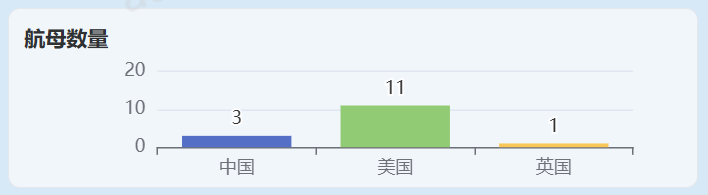
完整代码
<template>
  <div class="layout-padding" style="background-color: #d7e9f6;">
    <el-row :gutter="10">
      <el-col :span="9">
        <el-card class="top-card" style="background-color: #f1f6fb;border-radius: 8px;box-shadow: none;height: 120px;">
          <div style="font-weight: bold;margin-left: 10px;margin-top: 10px;">航母数量</div>
          <div style="height: 85px;margin-left: 35px;" ref="chart3"></div>
        </el-card>
      </el-col>
    </el-row>
  </div>
</template>

<script setup lang="ts">
import { ref, reactive, onMounted, onUnmounted } from 'vue';
import * as echarts from 'echarts';

// 用于存储所有 ECharts 实例,方便统一管理
const state_chart = reactive({
  myCharts: [] as echarts.EChartsType[],
});

// 获取图表容器的 DOM 引用
const chart3 = ref<HTMLElement>();

// 初始化图表
const chart3 = ref();
const init_chart3 = async () => {
  const myChart = echarts.init(chart3.value);
  const option = {
    tooltip: {
      trigger: 'axis',
      axisPointer: {
        type: 'shadow'
      }
    },
    grid: {
      top: '16%',
      bottom: '1%',
      containLabel: true
    },
    xAxis: [
      {
        type: 'category',
        data: ['中国', '美国', '英国']
      }
    ],
    yAxis: [
      {
        type: 'value',
        splitNumber: 1,
      }
    ],
    series: [
      {
        data: [3, 11, 1],
        type: 'bar',
        itemStyle: {
          color: function (params) {
            const colorList = ['#5470c6', '#91cc75', '#fac858'];
            return colorList[params.dataIndex];
          }
        },
        label: {
          show: true,
          position: 'top'
        }
      }
    ]
  };

  myChart.setOption(option);
  state_chart.myCharts.push(myChart);
};

// 组件挂载后初始化图表
onMounted(() => {
  init_chart3();
});

// 组件卸载前,销毁图表实例,释放内存
onUnmounted(() => {
  state_chart.myCharts.forEach(chart => {
    chart.dispose();
  });
});
</script>

<style scoped lang="scss">
.layout-padding {
  padding: 16px;
}

:deep(.top-card.el-card) {
  --el-card-padding: 0px;
}
</style>





 扫一扫
扫一扫


 1195
1195

 被折叠的 条评论
为什么被折叠?
被折叠的 条评论
为什么被折叠?
 到【灌水乐园】发言





