


大家好,我是小冬瓜。RAG(检索增强生成)技术是一种通过结合信息检索与大型语言模型(LLM)生成能力来提升回答准确性和相关性的方法。其核心思想是为 LLM 配备“外挂知识库”,使其在生成答案前能实时检索外部信息,避免依赖预训练数据的局限,很适合在知识问答和智能客服等场景使用。 本人在前几年做过一段时间大数据的开发工作,很大一部分时间工作都是在写sql ,给业务人员提取数据,当时大模型还没流行,那时就在想如果能够让系统自己生成sql并执行就好了。现如今有了LLM又有了RAG技术,是否能够轻松构建专有的知识库,让系统自动生成SQL并运行来解放自己的双手呢,答案是肯定的。本文使用spring-ai-rag框架开发一个小demo,构建自己专有的数据库文档知识库,让LLM自动生成可执行的SQL。
需求目标
构建数据库文档知识库,通过自然语言生成正确SQL查询语句。
演示效果


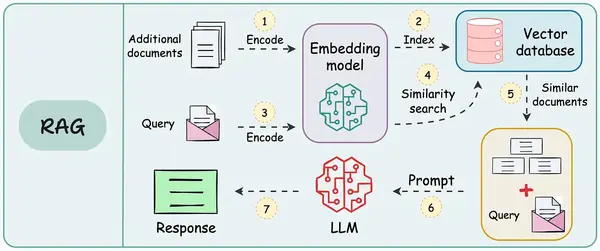
RAG流程
动图
名词解释
向量数据库: 将原始数据通过Embedding模型转化为高维向量存储。通过向量相似算法(如余弦相似度、欧氏距离)实现高效检索。直白一点说就是可以通过自然语言语义进行搜索(天很冷≈温度低≈不热),向量数据库有很多种,本文使用milvus
Embedding模型: 存储时将原始数据计算为高维向量,查询时将输入转化为向量值进行相似度搜索,本文使用百炼的text-embedding-v4
LLM: chatgpt,deepseek等,本文使用百炼的大模型qwen-plus
准备工作
安装向量数据库milvus
参考官方文档:
curl -sfL https://raw.githubusercontent.com/milvus-io/milvus/master/scripts/standalone_embed.sh -o standalone_embed.sh

bash standalone_embed.sh start
http://127.0.0.1:9091/webui/ 能打开这个网址证明安装成功
创建milvus collection结构
这块踩坑有点多,springai框架默认milvus数据存储结构,需要在milvus中先创建好才能使用,当然也可以自定义结构,本demo为了简化配置,使用spring-ai框架中默认的collection结构。
export CLUSTER_ENDPOINT="http://localhost:19530"
export TOKEN="root:Milvus"

export indexParams='[
        {
            "fieldName": "embedding",
            "metricType": "COSINE",
            "indexName": "my_vector",
            "indexType": "AUTOINDEX"
        }
    ]'

export schema='{
        "autoId": false,
        "enabledDynamicField": false,
        "fields": [
            {
                "fieldName": "doc_id",
                "dataType": "VarChar",
                "isPrimary": true,
                "elementTypeParams": {
                    "max_length": 64
                }
            },
            {
                "fieldName": "embedding",
                "dataType": "FloatVector",
                "elementTypeParams": {
                    "dim": "1024"
                }
            },
            {
                "fieldName": "content",
                "dataType": "VarChar",
                "elementTypeParams": {
                    "max_length": 65535
                }
            },
            {
                "fieldName": "metadata",
                "dataType": "JSON"
            }
        ]
    }'

curl --request POST \
--url "${CLUSTER_ENDPOINT}/v2/vectordb/collections/create" \
--header "Authorization: Bearer ${TOKEN}" \
--header "Content-Type: application/json" \
-d "{
    \"collectionName\": \"vector_store\",
    \"schema\": $schema,
    \"indexParams\": $indexParams
}"
代码实战
pom文件
 <dependencies>
  <dependency>
   <groupId>org.springframework.ai</groupId>
   <artifactId>spring-ai-starter-model-openai</artifactId>
  </dependency>
  <dependency>
   <groupId>org.springframework.boot</groupId>
   <artifactId>spring-boot-starter-webflux</artifactId>
  </dependency>
  <dependency>
   <groupId>org.springframework.ai</groupId>
   <artifactId>spring-ai-starter-vector-store-milvus</artifactId>
  </dependency>
  <dependency>
   <groupId>org.springframework.ai</groupId>
   <artifactId>spring-ai-advisors-vector-store</artifactId>
  </dependency>
  <dependency>
   <groupId>org.projectlombok</groupId>
   <artifactId>lombok</artifactId>
  </dependency>
 </dependencies>
配置文件
spring:
  application:
    name: rag
  ai:
    openai:
      api-key: ${DASHSCOPE_API_KEY}
      base-url: https://dashscope.aliyuncs.com/compatible-mode
      chat:
        options:
          model: qwen-plus
      embedding:
        options:
          model: text-embedding-v4
向量数据库的配置全使用的默认值,spring已经自动装配好无需配置。
代码
/**
 * @author 任海东
 * @since 2025年6月25日
 */
@SpringBootApplication
@AllArgsConstructor
@RestController
public class RagApplication {

 private final ChatClient.Builder builder;

 private final VectorStore vectorStore;

 /**
  * @param args
  */
 public static void main(final String[] args) {
  SpringApplication.run(RagApplication.class, args);
 }

// @PostConstruct // 仅执行一次
 public void init() {
  final List<Document> documents = List.of(new Document("表名:user,字段:id, name, age"),
    new Document("表名:role,字段:id, name"), new Document("表名:user_role,字段:id, user_id, role_id"),
    new Document("表名:perm,字段:id, name"), new Document("表名:role_perm,字段:id, role_id, perm_id"),
    new Document("表名:order,字段:id, user_id, create_time(datetime), trade_amount"));
  vectorStore.add(documents);
 }

 @GetMapping("/rag")
 public Flux<String> generate(@RequestParam(value = "msg") final String msg) {
  final String prompt = """
    你是一个专业的SQL工程师,请根据上下文表结构信息:
    <context>
    生成满足问题要求的查询SQL:
    1. 完全符合mysql语法规范
    2. 问题:%s
    3. 特别注意:a.如果未找到上下文请不要自由发挥仅回答: 提供的信息不足,无法生成SQL。 b.输出key为sql的json格式。
    """.formatted(msg);
  final var chatClient = builder.defaultAdvisors(new QuestionAnswerAdvisor(vectorStore)).build();
  return chatClient.prompt(prompt).stream().content();
 }

}
真正的代码很少,极其简单有木有,Spring AI 让Java 再次伟大!欢迎关注小冬瓜,一起学习交流!






 扫一扫
扫一扫


 1950
1950

 被折叠的 条评论
为什么被折叠?
被折叠的 条评论
为什么被折叠?
 到【灌水乐园】发言





